2015 AUDI TT ROADSTER radio
[x] Cancel search: radioPage 18 of 244

16 Instruments and warning/indicator lights
4 Safety belt warning light
Applies to vehicles: with safety belt warning light
The warning light is a reminder to fasten
safety belts .
The warning light . comes o n for a few sec
onds after the ignit io n is switched on as a re
minder to fasten your safety be lt .
Addit ional information on safety be lts
¢page 100.
D Battery
This warning/indicator light detects o mal
function in the generator or in the vehicle's
electrical system.
The . warning/in dicator lig ht ill uminates
when you switch on t he ignit ion and must go
out after the engi ne has started.
• Alternator fault: Battery is not being
charged
If the indicator light turns o n an d the me s
sage a ppears, t he re is a m alfu nct ion in the
generato r or vehicle e lectr ica l system.
Dr ive to yo ur auth o riz ed Aud i dea le r or quali
fi ed workshop immedi ately . B ecau se the vehi
cle ba tte ry is dischargi ng, tur n off a ll unnec
essary elect rical e quipment such as the radio .
See k professional ass ista nce if the batte ry
charge leve l is to o low.
(•) Low battery: battery will be charged
while driving
If th e indica to r l ight tu rns o n an d th e mes
s a ge appears, there ma y be lim ited st artin g
a bili ty.
If thi s message tu rns off after a li tt le w hile,
the bat tery cha rged eno ugh wh ile d riving.
I f th e message does not turn off, have you r
author iz e d Audi d ealer or qu alified workshop
cor rect t he malfunc tion .
~ Engine oil pressure
The red engine oil pressure warning symbol
requires immediate service or repair .
If the . symbo l appears in the disp lay and
flashes, the o il pressure is too low . In add ition
to the symbol, the followi ng message also ap
pears in the display :
Switch off engine! Oil pressure is too low
.. Pull off t he roa d and stop the ve hicle .
.. Shut the eng ine down.
.. Check the engine oil level¢
page 169 .
.. Contact your authori zed Audi dealer for as -
sistance if necessa ry.
Engine oil level too low
If the engine oil leve l is too low , top off oil to
the p roper level
¢ page 169 .
Engine oil level OK
If the . sym bo l starts flas hing ag ain even
t h o ug h t he eng ine oi l level checks OK on the
dips tic k,
do not start driving again and do
not let the engine run at idle.
Instead , con
tact yo ur auth o rized Aud i dea le r fo r ass is
tance.
(D Tips
- The engine oil pressure symbol. is
not an indicator for a low engine oil lev
el. Do not rely on it. Instead, check the oil level in your engine at regular inter
vals, preferably each time you refuel, and always before going on a long trip .
- The yellow oil level warn ing indication
Ill requires oil refill or workshop serv
ice without delay. Do not wait until the
red oil pressure warning symbol.
starts to flash before you respond to
the low oil level warning
II . By then,
your engine may already have suffered
serious damage.
Page 24 of 244

22 Driver in formation sy ste m
Driver information
system
Introduction
The Driver information display inside the in
strument cluster provides you, the driver ,
with important information.
Fig . 6 In strum en t cl ust er: center display
Fig. 7 Wiper le ver: con trols fo r the menu disp lay
Cent er d ispla y
With the igni tion on, the display in the Dr iver
I nformation System shows the fol low ing in
formation :
- CD* inserted or Radio* station set
- Outs ide temperature* : At temperatures be-
low 41 °F ( +S °C), a snowflake symbol ap
pears in front of the temperatu re d isplay
c::> .&_ .
- Warning when a door, the engine compa rt-
ment lid or the trunk lid is not closed .
Additional functions
You can open the following functions in the
Driver Information Sys tem disp lay by p ressing
the
! R ESE T I button c::> fig. 7 one or more times:
Digital speedometer *
T ire pressure monitoring
c::> page 198
Trip computer c::> page 23
Menu d isplay c::> page 24
Efficiency program c::> page 27
Service interval disp lay
c::> page 28
Lap timer* c::> page 28
Speed warn ing <=:> page 75
Auto Check Control
Some f unct ions and vehicle components are
scanned for their operati ng sta tus when yo u
switch the ign ition on and whi le you a re driv
ing. Malfunctions or req uired service proce
dures ar e signaled audib ly and indicated by
red and yellow i lluminated symbols and re
m inders in the display.
A WARNING -
- Never rely exclusively on the outside
temperature display to determine if a
road surface is icy or not . K eep in m ind
that road surfaces, espec ially br idges
and overp asses, co uld be ice covered and
slippe ry even at an outside tempe ra tu re
above 4 1 °F (+5 °C).
- Always remembe r, even if the "snow
f lake" symbo l (ice warning) does not ap
pear in the disp lay, black ice could be on
the road .
- A lways reduce your speed and d rive with
specia l care in cold weather cond itions
when the chance of encountering icy
road surfaces increases.
(D Tips
- If the vehicle is stationary, or if you are
dr iving at a very low speed, the tempera
t u re s hown in the d isp lay m ight be
slightly h igher than the actual o utside
temperature. Th is is caused by the heat
being radiated from the engine .
- On vehicles with Audi Nav igat ion sys
tem *, the displays may differ from their
normal appearance during navigation .
Page 35 of 244
Master key with remote control
The remote control allows you to lock or un
lock the vehicle electronically .
The transmitter and battery are located in the
head of the remote control. The receiver is lo
cated inside the vehicle. The maximum effec
tive range depends on several things . Remem
ber, if the battery is wea k, the effective range
decreases.
If you need to replace the remote control, or if
you need to have it repaired, you must see
your author ized Audi dealer. Only then can
you use the key again.
(D Tips
- If the ignition is sw itched on, the remote
control system is deactivated .
- The remote control system can be affect ed by other systems operating in the
same frequency range close to the vehi
cle, such as mobi le telephones, televi
sion broadcasting stations, etc.
- Fo r De clarat ion of Compliance to United
Sta tes FCC and Indus try Canada regula
tions ¢
page 228.
Master key battery replacement
Each master key contains a battery housed
under the cover .
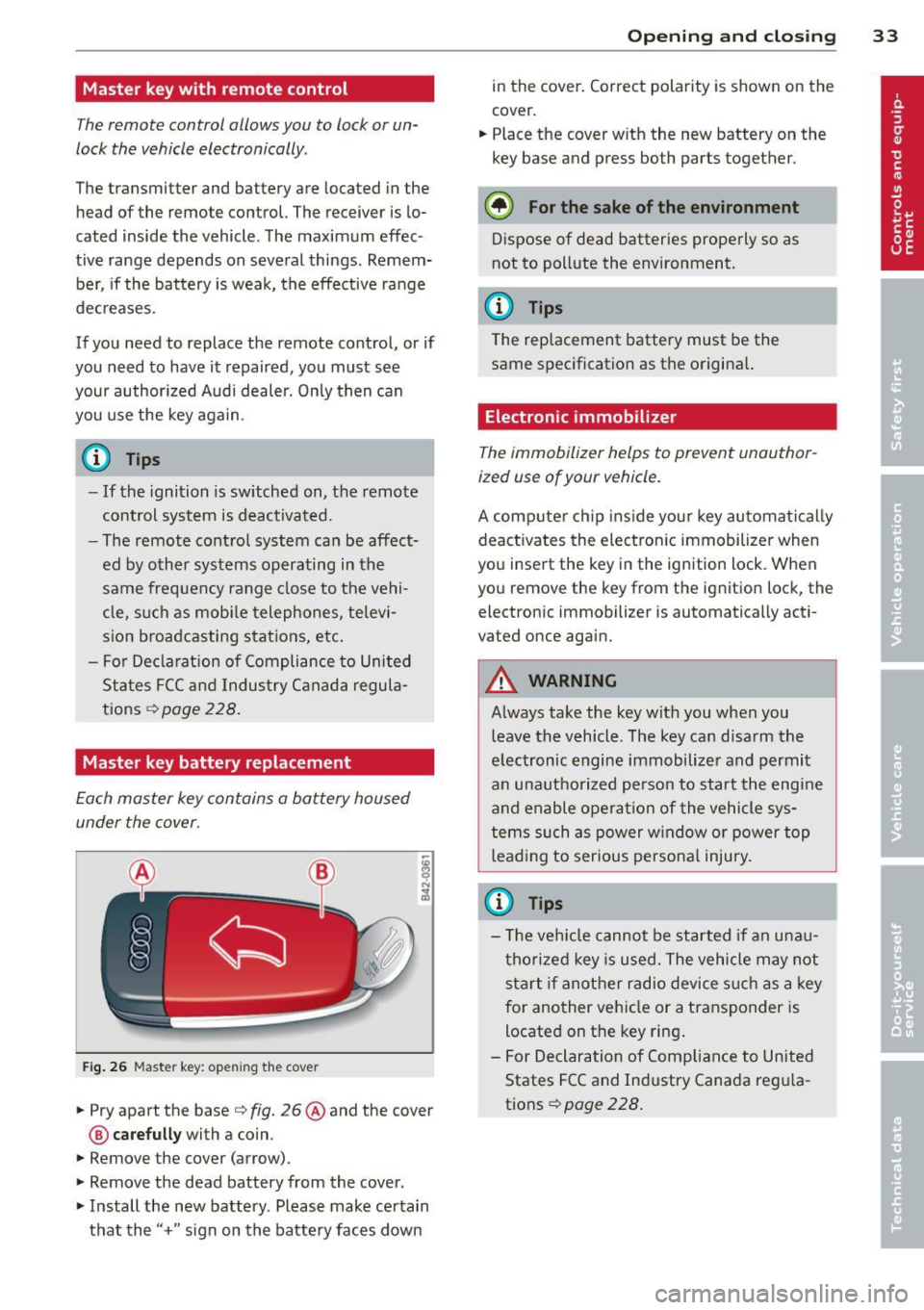
Fig . 26 Maste r key: open ing the cover
.. Pry apart the base¢ fig. 26@and the cover
@ care full y with a coin .
.,. Remove the cover (arrow) .
.,. Remove the dead battery from the cover .
.. Install the new battery . Please make certain
that the" +" sign on the batte ry faces down
Op enin g an d clos ing 33
in the cover . Correct polarity is shown on the
cover .
.. Place the cover with the new battery on the
key base and press both parts together .
@ For the sake of the env ironment
Dispose of dead batteries properly so as
not to pollute the environment.
(D Tips
The replacement battery must be the
same specification as the origina l.
Electronic immobilizer
The immobilizer helps to prevent unauthor
ized use of your vehicle.
A computer chip ins ide your key automatica lly
deactivates the electron ic immobilizer when
you insert the key in the ign ition lock. When
you remove the key from the ignition lock, the
electronic immobilizer is automatically acti
vated once again.
A WARNING
---
Always take the key with you when you leave the vehicle. The key can disarm the
electronic engine immobilizer and permit
an unauthorized person to start the engine
and enable operation of the vehicle sys
tems such as power w indow or power top
leading to serious persona l injury.
(D Tips
- T he ve hicle cannot be started if an unau
thorized key is used. The vehicle may not
start if another radio device s uch as a key
for another vehicle or a transponder is
located on the key ring .
- For Declaration of Compliance to United
States FCC and Industry Canada reg ula
tions¢
page 228 .
Page 38 of 244
36 Opening and closing
-The operation of the remote control key
can be temporarily disrupted by interfer
ence from transmitters in the vicinity of
the vehicle working in the same frequen
cy range (e.g. a cell phone, radio equip
ment) .
- In order to make sure the locking func
tion is working, you should always keep
your eye on the vehicle to make sure it is
properly locked .
- Do not use the remote control if you are
inside the car, otherwise you may unin
tentionally lock the vehicle, and then you
would set off the anti-theft alarm when
you try to start the engine or open a
door. In case this happens anyhow, push
the unlock button
CD .
- Use the panic function only if you are in
an emergency situation.
Resetting the remote control
The remote control must be reset if the vehi
cle does not unlock .
.,,. Press the unlock button CD on the remote
control.
.,,. Manually unlock the driver's door lock with
the mechanical key within 30 seconds.
.,,. Press either the lock-1'.D or the unlock
CD but
ton to complete th e reset sequence.
Operating locks with the key
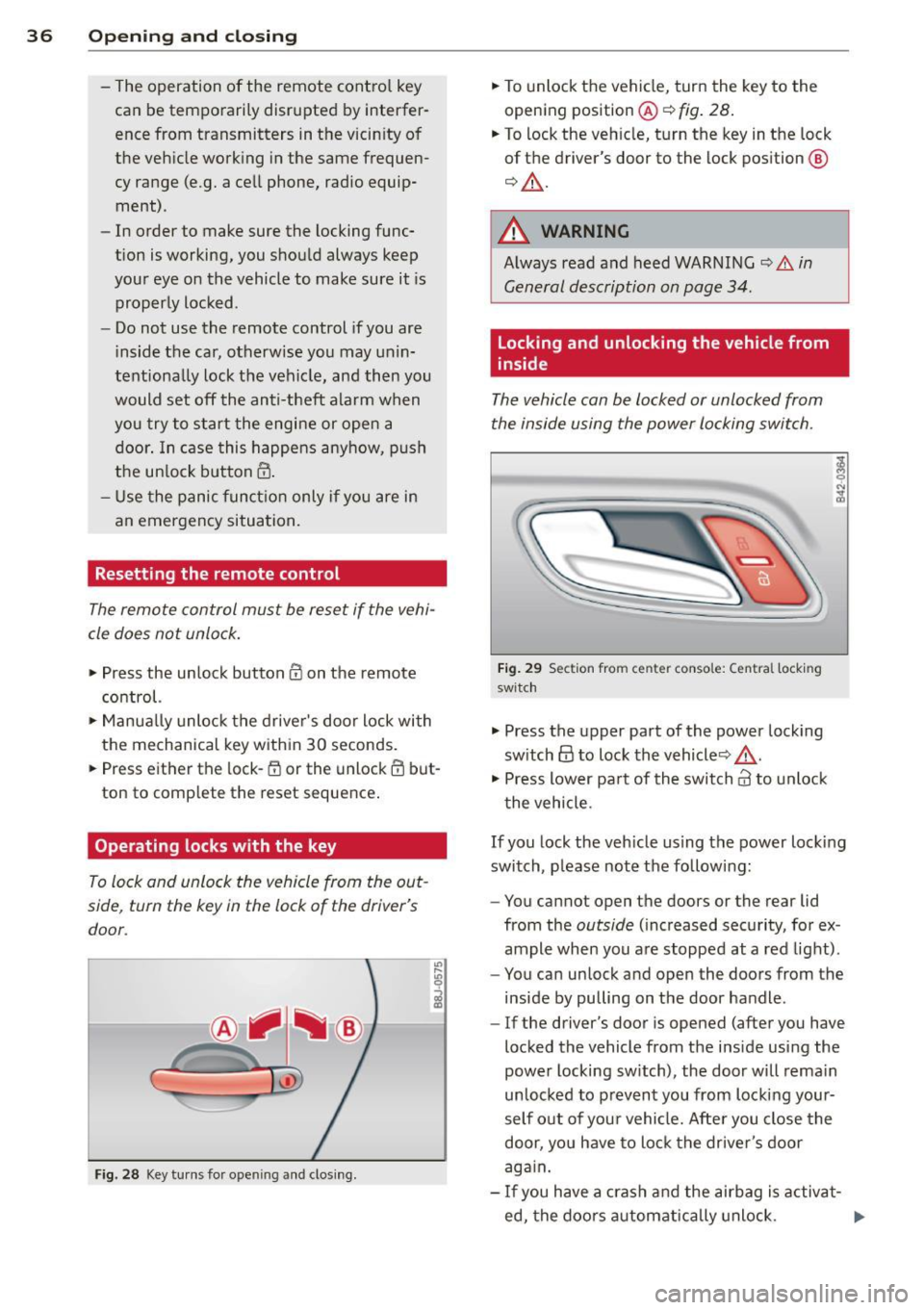
To lock and unlock the vehicle from the out
side , turn the key in the lock of the driver's
door .
Fig. 28 Key turns for ope ning and clo sing.
.,,. To unlock the vehicle, turn the key to the
opening position@¢
fig. 28.
.,,. To lock the vehicle, turn the key in the lock
of the driver's door to the lock position
@
¢ &_ .
A WARNING
Always read and heed WARNING¢.&. in
General description on page 34.
Locking and unlocking the vehicle from
inside
The vehicle can be locked or unlocked from
the inside using the power locking switch .
Fig. 29 Sec tion from center conso le: Ce ntra l locking
switch
.,,. Press the upper part of the power locking
switch
@ to lock the vehicle ¢&_ .
.,,. Press lower pa rt of the switch
crl to unlock
the vehicle .
If you lock the vehicle using the power locking
switch , please note the following:
- You cannot open the doors or the rear lid
from the
outside (increased security, for ex
ample when you are stopped at a red light).
- You can unlock and open the doors from the
inside by pulling on the door handle .
-If the driver's door is opened (after you have
locked the vehicle from the inside using the
power locking switch), the door will remain
unlocked to prevent you from locking your
self out of your vehicle. After you close the
door, you have to lock the driver 's door
again.
- If you have a crash and the airbag is activat-
ed, the doors automatically unlock. ..,.
Page 91 of 244
Phase 1:
p rogramming th e overh ead keypad
1. Make sure yo ur vehicle is wit hin ope rating
range of the remote contro lled garage
door opener .
2. Set the parking brake
q A in General in
formation on page 88 .
3. Tur n the ignition on . Do not sta rt the en
g ine!
4. P ress and hold the two o utside Home Link
b uttons
(D and @for app rox ima tely 20
seconds until indicator light @
q fig . 97
begins to flash. Then release both but
tons . Do not hold the buttons for longer
than 30 seconds.
.,. This procedure only needs to be performed
once . It erases the factory-set defau lt codes
and does not have to be repeated to pro
gram add it ional remote controls .
S. Pr ess and hold t he Home link button (D ,
® or@ unt il the indicato r ligh t@
starts flashing
slowly . Release the bu tton.
.,. The system will remain in programming
mode for 5 minutes . Co to the front of the
vehicle and proceed with phase 2 .
Phase 2:
programming the bumper mounted trans
mitter
6. Hold the original remote control at a dis
tance between 0 -6 in . (0 -15 cm) from the
bumper below the appropriate head light
for your vehicle
q fig . 98 (use th e sho rtest
d istance possible) .
7. A im t he remote con trol jus t be low the
driver side head ligh t.
8 . Pr ess and hold the activa tion button on
the remote cont ro l.
.,. May be different in Canada.
If so, press and
re -press (cycle) the act ivat ion button on your
remote control every two seconds.
9 . The emergency flashers will flash
three
time s
(after about 15 -60 seconds) when
the prog ramm ing is successful. Release
the butto n on the re m ote control.
.,. To program more devi ces, repeat steps 4 to
9.
Homelink 89
10. Press and ho ld the t rained Home link b ut
ton and observe t he indicator light @
qfig. 97.
.,. If the ind icator light is solid/contin uous,
programm ing is comp lete and your device
should activate w hen you press and release
t he t ra ined Homel ink button .
.,. If the ind icator light blinks rapidly fo r 2 sec
onds and is t hen a so lid/continuous light,
p roceed w it h phase 3 to progr am a roll ing
code device.
Phase 3: rolling code programming
.,. A second pe rson o n a ladde r who can safely
reach th e garage door opene r motor is rec
ommended .
11. Loc ate t he "lea rn" bu tton on t he g arage
doo r opener motor ( re fer to the operating
inst ruct ions for the opener, as t he loca
t ion of t his button may va ry by man ufac
turer) .
12 . Press and release the learn b utton on the
garage door opener motor .
.,. Note : once the b utton is p ressed, there are
30 seconds in w hich to initiate the next
step.
13 . On t he Home link keypad ins ide t he ve hi
cl e, firmly press and hold t he Home link
bu tton prev iously progr ammed in phases
1 and 2 fo r two seconds and release . R e
peat this seque nce
twice.
.,. Some vehicles may require the press/ho ld/
re lease sequence up to three t imes to com
plete t he trai ning process .
.,. Homelink should now activate your rolling
code equipped device .
If the S minute time limit is exceeded , the
emergency flashers will flash one time to in
dicate that the p rocess has been te rm ina ted .
In this case, repeat steps 4 t hrough 9.
If the emergency flashers do not flash
three
times (afte r about lS -60 seconds) , program
ming was not successful. In this case, repeat
steps 4 through 9 .
Remote contro l units for garage door openers
in Canada are set to stop transmitting radio
fr eque ncy signa ls afte r two seconds . This t ime
Ill-
Page 92 of 244
90 Homelink
may not be s ufficient for the Homelin k sys
tem to learn t he radio frequency signal. Per
form all other steps as described above.
Operating the Homelink transmitter
The Homelink transm itter works in the same
manner as the orig inal handheld remote con
trol that came with the system .
.. Press the appropriate prog rammed button
Q) ,@ or @ ¢ page 88, fig . 97 to activate
the des ired remote control functio n ¢ .&.
in
General information on page
88 .
Reprogramming a single button
A Homel ink button can be rep rogrammed in
d iv idually wi tho ut affec ting t he o ther bu tton
a llo cat io ns.
Programming the overhead keypad
.. Press the appropriate Homel ink button u n-
t il the indicato r light begins flashing slowly .
Programming the bumper mounted trans
mitter
1. Hold the original remote control at a dis
tance between
0 -5 in . (0 -13 cm) from the
bumper below the app ropriate head light
fo r you r vehicle (use the shortest distance
possib le).
2. A im the remote control just below the
driver side head light.
3. P ress and hold the activation button on
the remote contro l.
4 . The emergency flashers will flash
three
tim es
(after about 15 -60 seconds) when
the programm ing is successful. Now re
lease the bu tton on the remote control.
.. If the device ut ilizes a roll ing code, p lease
fo llow p hase 3 of¢
page 88, Programming
the HomeLink transmitter
f or roll ing code
programming .
This procedure will cau se the exi sting pro
gramming on the Homelink button to be
e ra sed! Erasing the programming of the
Homelink transmitter
When you e
rase the prog ramming, the p ro
gramming on all three of the transmitte r
c h anne ls with be lost!
.. Per form steps 1 to 4 as described on
¢ page 89, Phase 1: programming the over
head keypad .
When completed, the Home link system will
be in the prog ramming mode and is then
ready to learn the codes for remote controlled
devices .
(D Tips
- Programmed buttons cannot be erased
individually .
- F or se curity reasons you are advise d to
erase the programming of the Homelink
system before yo u sell yo ur vehicle .
Page 123 of 244
-If you must install a rearward facing
child safety seat on the front passenger
seat because of exceptional circumstan ces and the
PA SSE NGER AI R BAG OFF
light does not appear and stay on have
the a irbag system inspected by your Audi
dealer.
- A tight tether or other strap on a rear
ward-fac ing child restra int attached to
the front passenger seat can put too much pressure on the weight-sens ing
mat in the seat and register more weight
than is actually on the seat. The heavier
weight registered can make the system
work as though an adu lt were on the seat
and deploy the Advanced Airbag when it
must be suppressed caus ing serious or
even fatal injury to the child .
- If, in exceptional circ umstances, you
must install a forward-facing child re
st raint on the front passenger seat, a l
ways move the seat into its rearmost po
sit ion in the seat's fo re and aft adjust
ment range, as far away from the airb ag
as possib le . The backrest m ust be adjust
ed to an upright position. Make sure that
the
PASSENGER AIR BAG OFF light
comes on and stays on all the t ime when
ever the ignition is switched on.
A WARNING
- If the PASSENGER AIR BAG OFF light
does not go out when an adult is sitting
on the front passenger seat after taking
the steps described above, have the air
bag system inspected by your Aud i deal
er before transporting anyone on the
front passenger seat.
(Di Tips
If the weight-sensing mat in the front pas
senger seat detects an empty seat, the
front airbag on the pa ssenge r side will be
t urned off, and
PASSENGER AIR BAG OFF
w ill stay on .
Airbag system 12 1
Repair, care and disposal of the airbags
Parts of the airbag system are i nstalled at
many diffe rent p laces o n your Aud i. Insta llin g,
removing, servicing or repa iring a part in an
area of the vehicle can damage a part of an
airbag system and prevent that system from
working properly in a coll is ion.
T he re a re some important t hings you have to
know to make sure that the effectiveness o f
the system wi ll not be impaired and that dis
carded components do not cause injury or pol
lute the environment.
A WARNING
Improper care, serv ic ing and repair proce
dures can increase the risk of personal in
jury and death by preventing an a irbag
from deploying when needed or deploying
an a irbag unexpec tedly:
- Never cover, obst ruct, or change the
steer ing whee l horn pad or airbag cover
or the inst rument panel or mod ify them
in any w ay .
- Never attach any objects s uch as c up
holders or telephone mountings to the
surfaces covering the a irbag un its .
- For cleaning the horn pad or instr ument
panel, use only a soft, dry cloth or one
mo istened with pla in water. Solvents or
cleaners could damage the airbag cover
or change the st iffness or strength of the
material so that the airbag cannot de
ploy and protect properly.
- Never repair, adjust, or change any parts
of the a irbag system.
- All work on the steering wheel, instru
ment panel, front seats or e lectr ica l sys
tem (including the installation of audio
equ ipment, cellular telephones and CB
radios, etc.) must be performed by a
qualified technic ian who has the training
and specia l equipment necessary.
- For any work on the airbag system, we
strongly recommend that you see your
author ized Audi dealer or qualified work-
shop.
~
•
•
Page 149 of 244
Basically, energy management consists of
batter y di agno sis, idling cur rent man age
ment
and d yn ami c en ergy m anagement.
Battery diagnosis
Battery d iagnosis continuously dete rmines
the state of the battery. Senso rs determ ine
battery vo ltage, battery current and battery
temperature. This determines the current
state of charge and the power of the battery.
Idling curre nt management
Idling c urrent management red uces energy
consumption while the vehicle is standing.
With the ignition switched off, it contro ls the
energy supply to the various electrica l compo
nents . Data from battery diagnosis is consid
ered.
Depending on the battery's state of charge,
individua l consumers are grad ually turned off
to prevent excess ive d ischarge of the battery
and thus mainta in start ing capability.
Dynam ic energ y manag em ent
While the vehicle is being driven, dynamic en
ergy management distributes the energy gen
erated according to the needs of the individu
a l components. It regu lates consumption, so
that more electrical energy is not being used
than is being generated and ensures an opti
mal state of charge for the battery .
(D Tips
-But even energy management cannot
negate the limits of physics. Consider
that the power and life of a battery are l imited.
- If starting ab ility is threatened, you are
i nformed by a warn ing
c!;> page 148,
Driver notification in the instrument
cluster display.
Int ellig ent technolog y 147
What you should know
The highest priority is given to maintaining
starting capability.
The battery is severely taxed in short-distance
driv ing, in city traff ic and during the cold time
of year . Abundant electrical energy is re
quired, but only a l ittle is generated .
It is also
c ritical if the engi ne is not running and electri
ca l components are turned on . In this in
stance ene rgy is be ing consumed but none is
being generated.
It i s in precise ly these situations that you will
notice ene rgy management act ive ly regu lat
ing the d istribu tion of ene rgy.
V ehicle stands for an extended period
If you do not drive your vehicle over a period
of several days or weeks , e lectr ica l compo
nents a re g radually cut back or switched off.
T his reduces energy consumption and ma in
ta ins s tart ing capability over a longer pe riod .
Take into considerat ion that when you unlock
you r vehicle, some convenience functions,
s u ch as the remo te key o r power seat adjust
ment, may not be available. The convenience
f unct ions wi ll be available again when you
turn on the ignition and start the engine.
With the engine turned off
If you listen to the radio, for examp le, w ith
the engine tu rned o ff, the battery is being dis
charged .
If starting capabi lity is jeopardized due to en
ergy consumption , a message appears in the
driver in formation d isplay.
You have to start t he engine to charge the
battery.
With the engine running
Although electrical energy is generated when
the vehicle is being driven, the battery can be come discharged . This happens mostly when
little energy is being gene rated and a great
deal consumed and the battery's state of
c h arge is not opt imal.
•
•