2015 AUDI TT ROADSTER park assist
[x] Cancel search: park assistPage 16 of 244

14 Instruments and warning/indicator lights
Engine oil sensor malfunction
Qpage20
Battery
Qpage 16
Low fuel level
Qpage20
Windshield washer fluid level low
Q page20
Defective light bulb
Q page20
USA models: Defective brake light
Qpage20
Canada models: Defective brake
light
Q page 20
Dynamic headlight range control*
defective
Q page 20
Adaptive Light* defective
Q page20
Light/rain sensor defective (auto
matic headlights)* defective
Q page 21
Audi magnetic ride
Qpage 21
Rear spoiler./
Qpage 21
USA models: Speed warning 1
~page 75
Canada models: Speed warning 1
~page 75
USA models: Speed wa rning 2
~ page 75
Canada models: Speed warning 2
~page 75
Electro -mechanical power assist
~ page 17
Other indicator lights
•ii
T
urn s ignals
~ page 21
CRUISE USA models: Cruise control acti
vated
~ page 21
Canada models: Cruise control ac
tivated
~ page 21
High beam
Qpage50
BRAKE/ ((D) Brake system
This warning/indicator light illuminates when
the brake fluid level is too low or when there
is a malfunction in the ABS, or when the park
ing brake is set.
If the. (USA models) . (Canada models)
symbol flashes in the display with the parking
brake released , there is a malfunction in the
brake system. In addition to the symbol, one
of two messages appears in the display:
Stop vehicle and check brake fluid level
Stabilization program and ABS fault! See
Owner's manual
.,. Pull off the road and stop the veh icle.
.,. Obtain profess ional assistance.
USA models: if there is a ma lfunction in the
ABS system, the
II warning/indicator light il
luminates along with the. system malfunc
t ion warning/indicator light
Q &. .
Canada models: if there is a malfunction in
the ABS system, the
[IJ warning/indicator
light illuminates together with the. brake
system malfunction warning/indicator light
Q&. ,
The light . (USA)/ . (Canada) illuminates
when the ignition is turned on. It goes o ut af
ter the engine has been started and the park ing brake is fully released . This indicates that
the brake warn ing light is funct ion ing proper
ly.
If the brake warning light does not light up
when the engine is cranking or the parking
brake is applied, there may be a malfunction
in the electrical system. In this case, contact
your Audi dealer.
If the ABS fa ils, the ABS warn ing/ indicator
light
II (USA models)/ [IJ (Canada mode ls) ..,.
Page 17 of 244

Instrument s and warnin g/indic ator ligh ts 15
flashes together with the brake system warn
ing/indicator light¢.&,. .
(USA models):
If the warning light . and the
warn ing light
riJ ill umina te together, imme
diate ly contact your authorized Audi dea ler o r
qualified workshop to have all brake pads in
spected
¢ page 19.
When the light comes on, an audib le warn ing
signal is also given .
Parking brak e set
The parking brake warning light./. (Cana
da models) illuminates whe n the park ing
b rake is set. In addit ion, a warning tone will
sound after you have driven for longer than 3
seconds and faster than 3 mph (5 km/h).
Pa rking brak e set
The . warning/ind icator light illuminates
when the parking brake is set¢.&, .
_& WARNING
-Always observe the wa rni ngs in
¢ page 164, Working in the engine
compartment,
before opening the en
gine hood and check ing the brake fluid.
- Driving with low brake fluid is a safety
hazard! Stop the car an d get professiona l
assistance.
- USA models: If both, the. warning
light and the
Ill warning light come on
at the same time, the rear wheels could
lock up first under hard brak ing . Lock-up
of the rear whee l brakes can cause loss of
vehicle control and an accident. Have
yo ur vehicle repaired immed iately by
you r autho rized Aud i dealer o r a quali
fied workshop . D rive slowly and avo id
s u dden, hard brake application .
-Canada models: If both, the brake warn
ing light . and the ABS warning light
[iJ come on at the same t ime, the rear
wheels co uld lock up first unde r hard
braking . Lock -up of the rear wheel brakes
can cause loss o f vehicle control and an
acc ident. Have your vehicle repaired im
med iate ly by your authorized Aud i dealer or a qualified workshop
. Drive slowly and
avoid sudden, hard brake application .
- If the brake warning/indicator light does
not go out after a few seconds and the
parking brake is released, or lights up
while you are dr iving, the f lu id leve l in
the brake flu id reservo ir is too low . If you
be lieve that it is safe to do so, proceed
immed iate ly at low speed to the nearest
author ized Audi dealer or qualified work
shop and have the brake sys tem inspect
ed .
- Always keep in mind that after severa l
brake applications, you will need greater
pressu re on the brake pedal to stop you r
vehicle . Do not rely on strained brakes to
respond with maximum stopping power
in critical s ituations. You must allow for
increased braking distances. The extra
distance used up by fading brakes could lead to an accident.
tli1 ! .'!r Safety systems
The . (USA models) /. (Canada models)
indicato r light monitors the safety systems
e.g. (a irbags, pre tensioners) and ill uminates
f or a few se conds eac h time you swi tch the ig
nition on.
If the . (USA models)/ . (Canada models)
i ndicato r ligh t does no t go o ut, o r if it illum i
na tes while yo u are driving, or if it starts to
blink, then there is a mal function somewhe re
in the system. If the light does not i lluminate
when you switch on the ignition , th is also
means there is a malfunct ion.
_& WARNING
If yo u have a ma lfunction in the safety sys
tems, co ntact your authorized Aud i dea ler
immediately. Otherwise the safety sys
tems may not work properly in an acc i
dent.
Page 19 of 244

Instrument s and warnin g/indic ator ligh ts 17
-L Engine cooling system
A malfunction in the engine cooling system
must be repaired as soon as possible.
When the. symbol in the display flashes,
then either the eng ine coolant
temperature is
too high, or the coolant
level is too low . In ad
d ition to the symbol, the following message
a lso appears in the display:
S witc h off engin e and ch eck c ool ant l evel
~ Pull off the road and stop the vehicle.
~ Turnoff the engine.
~ Check coolant level ¢ page 172.
~ Add coolant if necessary¢ page 172.
~ Conti nue driving only after the eng ine cool
ant warn ing/ indicator l ight goes out .
~ Contact you r authorized Audi dea le r fo r as-
s istance if necessary.
If the engine coolant level is correct, then the radiator fan may be the cause of the malf unc
tion .
If the generator warning/ind icator light
should also illuminate¢
page 16, then the
fan belt may be damaged .
A WARNING
-If your veh icle should break down for
mechanical or other reasons, park at a
safe distance from moving traffic, turn
off the engine and turn on the hazard
warning lights
¢ page 51, Emergency
flasher.
-
- Never open the hood if you see or hear
steam or coolant escaping from the en gine compartment - you risk being scald
ed . Wait until you can no longer see or
hear steam or coo lant escaping.
- The engine compartment of any veh icle
is a dangerous area. Before you perform
any work in the engine compartment,
turn
off the engi ne and allow it to cool.
Follow the wa rning sticke rs.
(D Note
Do not continue driving if the. symbo l
illuminates . There is a malfunct ion in the engine cooling system
-you could damage
your engine.
~ Electro-mechanical power assist
If the indicator light i lluminates while you are
driv ing, there is a malfunction in the electro
mechan ica l steer ing. If the indicator light is
showing £~ ). there may be a reduction in pow
er steeri ng assist . If the indicator light is
showing ., there may be a total loss of pow
er steeri ng assist. The steer ing must be in
spected immed iately by a qualified wo rkshop
Q & . With the engine not running (e.g. when
the car is being towed), there is a lso no power
assist available .
A WARNING
-
If there is a malf u nction, the indicator
light for the electro-mechanical power as
sist illuminates. Seek professional assis
tance.
~ Convertible top
The warning/indicator light monitors the con
vertible top function.
The l!1 warning/indicator light illuminates
when you switch on the ignition for about 2
seconds as a check and then goes out. The
warning/indicator light has the following
funct ions:
- The light illuminates when the folding top opens or closes.
- It flashes if one of the conditions for auto
matically lowering or ra is ing the convertible
top is not met and the switch to actuate the
convert ible top is pressed.
- The light illuminates when the convert ible
top is opened or closed
incompletely.
!;.! ~ Electronic Stabilization Control
(ESC)
If the GJ ind icator lamp b lin ks wh ile d riving,
the ESC or ASR (Anti-Slip Reg ulation) is active-
ly reg ulating .
IJI,-
Page 26 of 244
24 Driver information system
the calculation of the current trip informa
t ion. If the trip is interrupted for
more than 2
hours
the memory is reset automatica lly.
Total -trip memory (Trip computer 2)
Unlike the sing le-trip memory, the total-trip
memory is not reset automatically. This per
mits you to evaluate your dr iving data for the
entire period between manual resets.
Efficiency program*
The effic ien cy program can help you to use
less fuel
~ page 2 7.
Operation
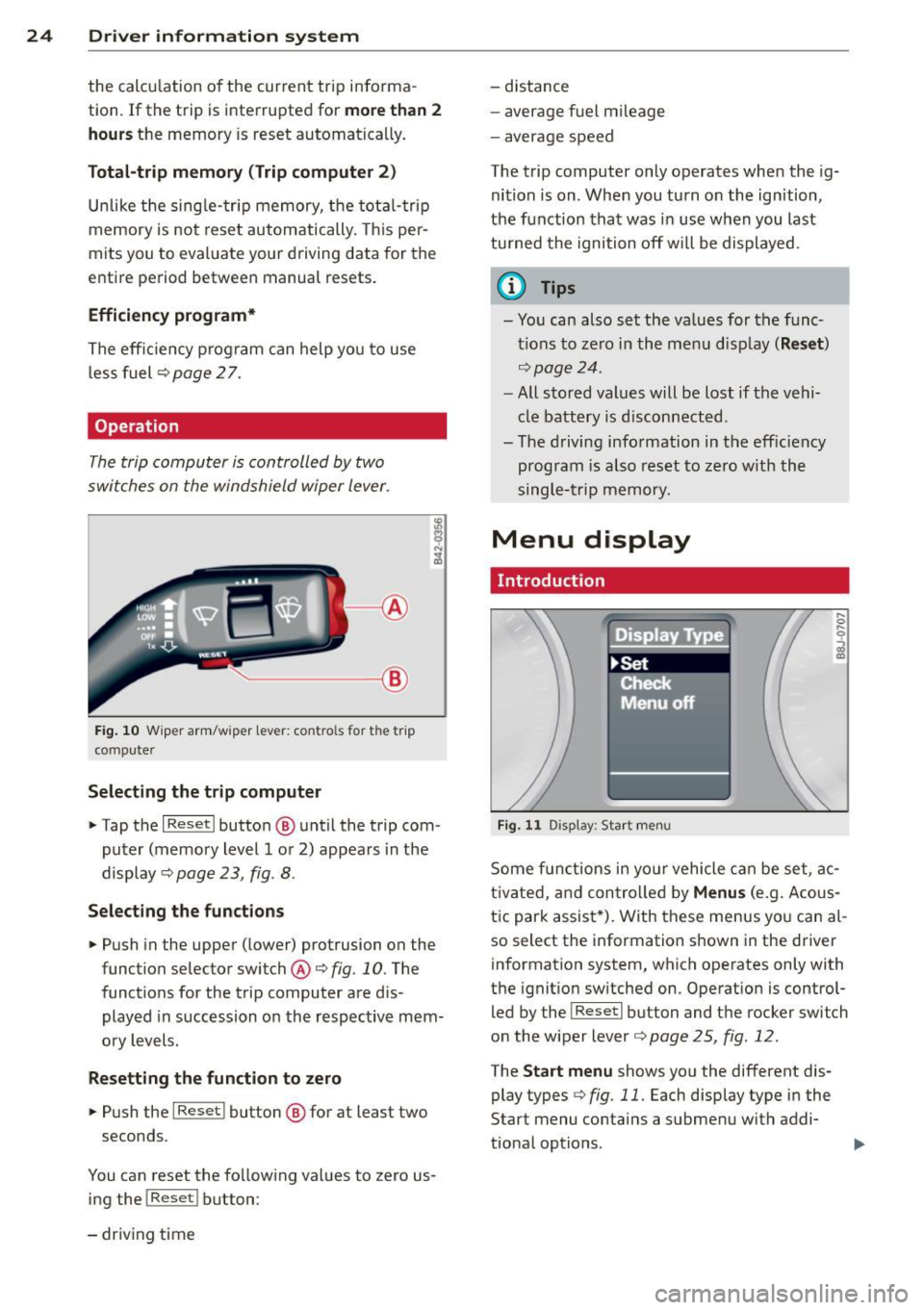
The trip computer is controlled by two
switches on the windshield wiper lever.
-----------< @
Fig. 10 W iper arm/w iper lever: con tro ls for t he trip
compute r
Selecting the trip computer
"Tap the I Reset I button @ until the trip com
puter (memory level 1 or 2) appears in the
display ¢
page 23, fig . 8.
Selecting the functions
" Push in the upper (lower) protrusion on the
function selector switch @
q fig. 10. The
functions for the trip computer are d is
played in succession on the respective mem
ory levels.
Resetting the function to zero
" Push the I Reset I button @ for at least two
seconds.
You can reset the fo llowing values to zero us
ing the
I Reset I button :
- driving time -
distance
- average f uel mileage
- average speed
The t rip computer only operates when the ig
nition is on. When you turn on the ignition,
the function that was in use when you last
turned the ignition off will be displayed .
(D Tips
-You can also set the values for the func
tions to zero in the menu display
(Reset )
qpage24 .
-All stored values will be lost if the vehi
cle battery is disconnected .
- The driving information in the efficiency
program is a lso reset to zero with the
single-trip memory.
Menu display
Introduction
Display Type
•set
iF'Cf t -,,., ==
Menu off
Fig. 11 D isplay: Sta rt men u
Some funct ions in yo ur vehicle can be set , ac
t ivated, and controlled by
Menus (e.g. Acous
tic park assist *). With these menus you can al
so select the information shown in the driver
information system, which operates only with
the ignition switched on. Operation is control
led by the
! Reset I button and the rocker switch
on the wiper lever
q page 25, fig . 12.
The Start menu shows you the different dis
play types
q fig . 11 . Each display type in the
Start menu contains a submenu with addi
tional options .
Page 77 of 244
(D Note
On ly after the vehi cle has come to com
plete stop, should you f irm ly set the park
ing brake and either move the selector lev
er into "P".
Parking
P ar kin g
"' Stop the vehicle using the brake pedal.
"' Set the parking brake firmly .
"' Switch
off the eng ine .
"' Move the se lector lever into the P pos ition
i=> & .
"'When on incl ines or declines, turn the steer
ing wheel so that the vehicle w ill roll into
the curb if it begins to move .
A WARNING
This is how you can reduce the risk of in
jury when leaving your veh icle.
- Never park the vehicle where it can come
in contact with dry grass, spilled f uel or
any other flammable mater ials.
- Never allow anyone -especially small
children -to remain in the vehicle when
it is locked . Locked doors make it more
difficult for rescuers to access the pas
senger compartment in the event of an
eme rgency. Danger to life!
- Never leave ch ild ren unsupervised in the
vehicle . Children co uld re lease the park
ing brake. The vehicle co uld start to roll
away and cause an accident.
- No matter what the season is, the tem
perature in a par ked vehicle can reach
dange ro us levels.
Starting on hills
App lies to vehicles : wit h hill hold assist
Hill hold ass ist makes it easier to start on
hill s.
-
The system is act ivated when the brake pedal
i s depressed for a few second s.
On the ro ad 75
After releasing the brake pedal, the b rake
power is held for a
brief moment to p revent
the ve hicle from rolling back when starting . At
th is time, you can easi ly beg in to move your
vehicle.
A WARNING
- If you did not begin moving immed iate ly
after releasing the brake pedal, under
certain ci rc u mstances, the vehicle would
beg in to rol l backwa rd. Dep ress the
bra ke peda l immedi ate ly o r engage the
hand brake .
- Should the e ngine sta ll, dep ress the
brake peda l immedi ate ly or engage the
hand brake .
- I n order to prevent the vehicle from roll
i n g back unintentionally when s tarting in
stop -and -go traffic, keep the brake pedal
depressed for a few seconds before driv
ing off.
(D Tips
You can find o ut if yo ur vehicle is eq uipped
with "Hill hold assist" at an authorized
A udi dealership.
Speed warning system
Overv iew
The speed warning system helps you to keep
your driving speed below a set speed limit.
The speed warning system warns the driver if
he exceeds a previous ly stored max imum
speed . A warning tone will sound as soon as
the ve hicle speed exceeds the set speed by
about 3 mph (3 km/h). At the same time, a
warning symbo l appea rs in the disp lay.
The speed warning system has two warning
thre sholds that function independently of
each other and that have somewhat different
purposes:
Speed warning 1
You can use speed warning 1 to set the maxi mum speed while you are driving . This setting
will remai n in effect until yo u tur n
off the .,..
Page 81 of 244

Audi magnetic ride
Applies to vehicles: with magnetic ride
Damping can be adjusted to the driver's pref
erence and it adapts automatically to the cur
rent driving situation.
Fig. 87 Ce nter console : Switc h for Au di magnet ic ride
• Press the sw itch Q fig . 87 to tu rn sport set-
t ing on or off.
Aud i magnetic ride is an electronically con
trolled damping system. This chassis system
assists the dr iver by adapting to the particular
situation through imperceptible control proc
esses. The
da mping provides individua l modu
lation of damping forces. For example, with
damping characteristics set to provide greater
comfort, damping is set somewhat harder for
a brief period only
as required, when rounding
a curve and when braking.
St andard setti ng
Select the standard sett ing if you prefer a sus
pension setting emphasizing comfort .
Sport setting
Select the sport setting if you prefer a sporty
suspens ion setting . The LED in the switch
R
comes on to indicate sport setting.
@ T ips
The warning/indicator light R in the in
strument cluster comes on in the event of
a ma lfunction. Drive to the closest author
ized Audi dealer as soon as possible and
have the malfunction repaired.
On th e road 7 9
Sport mode
Applies to vehicles: wit h Sport button
Fig . 88 Butto n in the center console
.,. To switch sport mode on, press the button
in the center console . The indicator light
turns on.
• To switch sport mode off, press the button
in the center console again. The indicator
light turns on .
A more agile and sporty driving style is possi
ble when driving the vehicle in "sport mode".
T his mode affects throttle response and the
sound of the engine and the damping charac
teristics of the Audi magnetic ride for dynamic
suspension tuning .
(1} Tips
If there is a malfunction in the retractable
rear spoiler* or the Audi magnetic ride*, it
may not be poss ible to activate sport
mode.
Acoustic parking system
Rear acoustic park assist
Applies to vehicles: with 4-channe l acoustic park assist
Acoustic park assist gives a warning about
obstacles behind the vehicle.
D es cription
The rear acoustic park assist (4-channel
acoustic park assist) determines the distance
of the vehicle from an obstacle using ultra
sonic sensors. The sensors are in the rear
bumper. The volume and the pitch of the
Page 82 of 244

80 On the road
chimes can be adjusted through the menu dis
p lay
~ page 24 .
The range at which the sensors start to meas
ure is
a b ou t:
To the side 2 feet (0.60 m)
Center rea r 5 feet (1.60 m)
Activation
The parking assist
is activated when r ev erse
ge ar is engaged . A b rief tone confi rms that
the system is activated .
Backing up
Distance warning when back ing up starts
when an obstacle is detected in the range of
the park assist system . As the d istance de
creases, the time i nterva l between the audible
tones becomes shorter.
When the d istance is less than 1 foot (0.30
m), the tone becomes cont inuous . At this
poi nt you should stop backing up.
Please note that low objects already signalled
by a warning can disappear from the system 's
detection range and w ill not continue to be
signalled.
Potenti al malfunction s
If a warning buz zer sounds for a few seconds
when the ignition is sw itched on, there is a
system malfunction w ith the acoustic park as
sist . If the malfunction persists unti l the igni
tion is switched off , there will be no acoustic
warn ing at the next attempt to activate the
system . Have the problem corrected.
There is no confirmation tone when reverse
gear is engaged if there is a system ma lfunc
tion .
For the park ing ass ist to operate, the sensors
must be kept clean and free of ice.
_& WARNING
- Sensors have blind spots in which objects
cannot be detected . Pay special attention
to sma ll children and animals. They can- not a
lways be detected by the sensors -
danger of an accident!
- The parking assist cannot rep lace the
driver's attention. The driver alone is re
sponsible for parking and similar driving maneuvers. Always watch where you are
driving.
(D Note
Low obstacles already signa lled by a warn
i ng can d isappear from the system's detec
tion range as they are approached and w ill
not continue to be signalled. Objects such
as barrier chains, trailer draw bars, th in
painted vertical poles, o r fences may not
be detected by the system - risk of dam
age .
@ Tips
For the parking assist to operate, the sen
sors must be kept clean and free of snow
and ice.
Page 88 of 244
86 Transmis sion
& WARNING ,-
- Always adapt your driving to the traffic
flow.
- Only use Launch Control when road and
traffic conditions allow it and other driv
ers will not be endangered or annoyed by
your driving and the acceleration of the
vehicle .
- Make sure that ESC remains enabled.
With the ESC disabled, the vehicle could
brake away, particularly on a slick and
slippery road - risk of skidding!
- Once acce lerat ion is finished, switch ASR
on again by briefly pushing the ESC but
ton.
(j) Tips
- The transmission temperature may in
crease significantly after using the Launch Control Program. If that hap
pens, the program may not be available
for a few minutes.
It will be available
again after a cool-down period.
- When accelerating using the Launch
Control program, all vehicle parts are
subject to heavy loads . This can result in
increased wear.
Back-up program
In the event of a system malfunction, there is
a back-up program.
In the event of system malfunction, the auto
matic transmission switches to the fail-safe
mode. Al l of the selector lever position dis
plays for the automatic transmission are high
lighted with a light background in the instru
ment cluster display . In some cases you can
not use reverse gear any more.
If the transmission switches to fail-safe mode, you should take the vehicle to an au
thorized Audi dealership as soon as possible
to have the condition corrected .
Clutch is overheating
• Clutch is overheating! Please stop vehi
cle!
If the symbols are illum inated, the clutch is
overheating and could be damaged if you con
t inu e to drive. Stop the vehicle and allow the
transmission to cool with the se lector lever in
the P position while the engine runs at idle. If
the warning does not turn off, do not continue driving. See your authorized Audi dealer or
qualified repair facility for assistance. Other
wise serious transmission damage could re
sult . Once the indicator light has turned off,
drive to your authorized Audi dealer or quali
fied repa ir facility immed iately to have the
malfunction corrected .
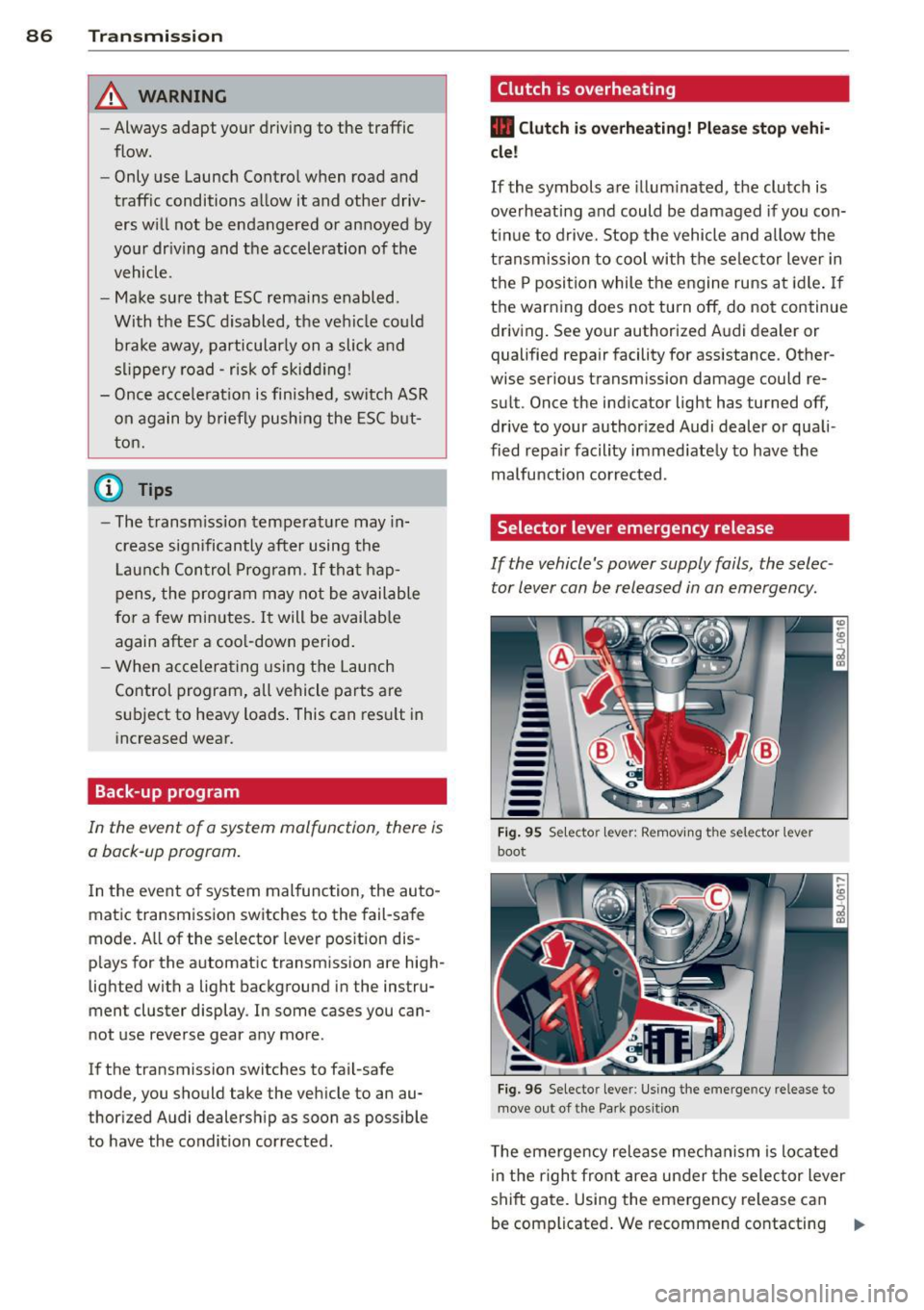
Selector lever emergency release
If the vehicle's power supply fails, the selec
tor lever can be released in an emergency.
--
-
-
-
-
---Fig. 95 Selecto r lev er: Remov ing the selector le ver
boot
Fig. 96 Selecto r lever : Using the emerge ncy release to
move out of the Park positio n
The emergency release mechanism is located
i n the right front area under the selector lever
shift gate. Using the emergency release can
be complicated. We recommend contacting ..,_