2015 AUDI TT ROADSTER light
[x] Cancel search: lightPage 44 of 244
42 Convertible top
Opening the Convertible Top Manually
Applies to vehicles: with manua l convertible top
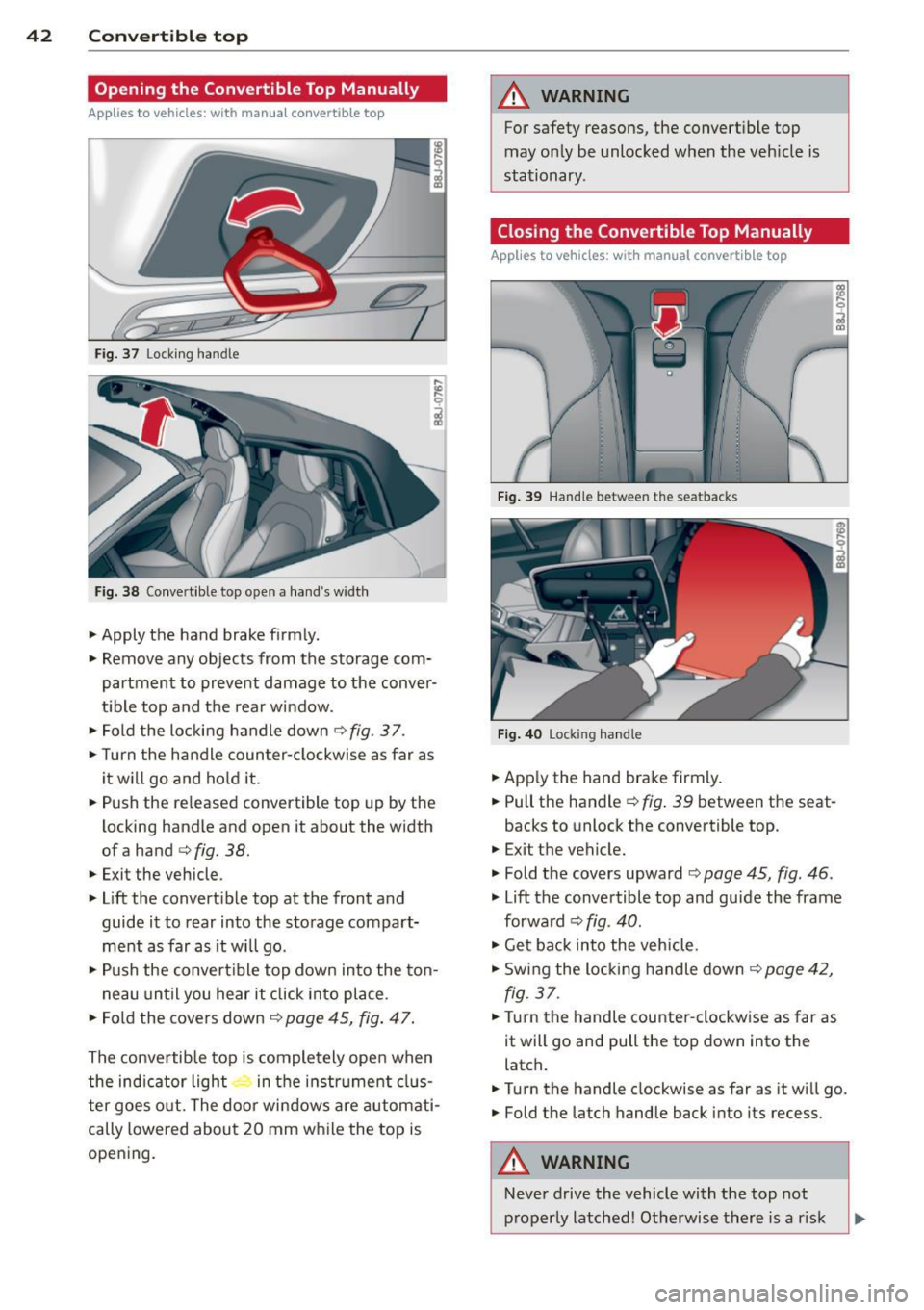
Fig. 37 Lock ing handle
Fig. 38 Convert ible top open a hand 's widt h
• Apply the hand brake f irmly.
• Remove any objects from the storage com
partment to prevent damage to the conver
t ib le top and the rear window.
• Fold the locking handle down
¢ fig . 3 7.
• Turn the handle coun ter-clockwise as far as
it w ill go and hold it.
• Push the released convertible top up by the
locking handle and open it about the width
ofa hand
¢ fig. 38.
• Exit the vehicle .
• Lift the convert ible top at the front and
guide it to rear into the storage compart
ment as far as it will go .
• Push the convert ible top down into the ton -
n eau until you hear it click into place .
• Fo ld the covers down ¢
page 45, fig. 47.
The conve rtib le top is comple tely ope n when
the ind icator light in t he i nstr ument clus
ter goes o ut. The door windows a re automati
cally lowered about 20 mm w hile the top is
opening .
A WARNING
-~
For safety reasons, the convert ible top
may on ly be unlocked when the veh icle is
stationary .
Closing the Convertible Top Manually
Applies to vehicles: with manual convertib le top
F ig . 39 Hand le betwee n the sea tbacks
Fig. 4 0 Locking hand le
• App ly the hand brake firmly.
• Pull the handle¢
fig. 39 between the seat-
backs to unlock the convertible top.
• Exit the vehicle.
• Fold the covers upward ¢
page 45, fig. 46 .
• Lift the convertible top and guide the frame
forwa rd ¢
fig. 40.
• Get bac k into the vehicle.
• Swing the locking handle down <=?
page 42,
fig. 37.
• Turn the handle counter -clockw ise as far as
it will go and pull the top down into the
latch .
• Turn the handle clockwise as far as it wi ll go.
• Fold the la tch handle back into its recess.
A WARNING
-
-
Neve r drive the vehicle with the top not
p roperly latched! Otherwise there is a r isk
Page 45 of 244
that the top will be opened by the wind.
Th is can result in injuries and damage to
the vehicle.
@ Tips
The indicator light for the convertible top goes out as soon as it is correctly latched .
Opening and Closing the Convertible
Top Automatically
App lies to vehicles: with power convertible top
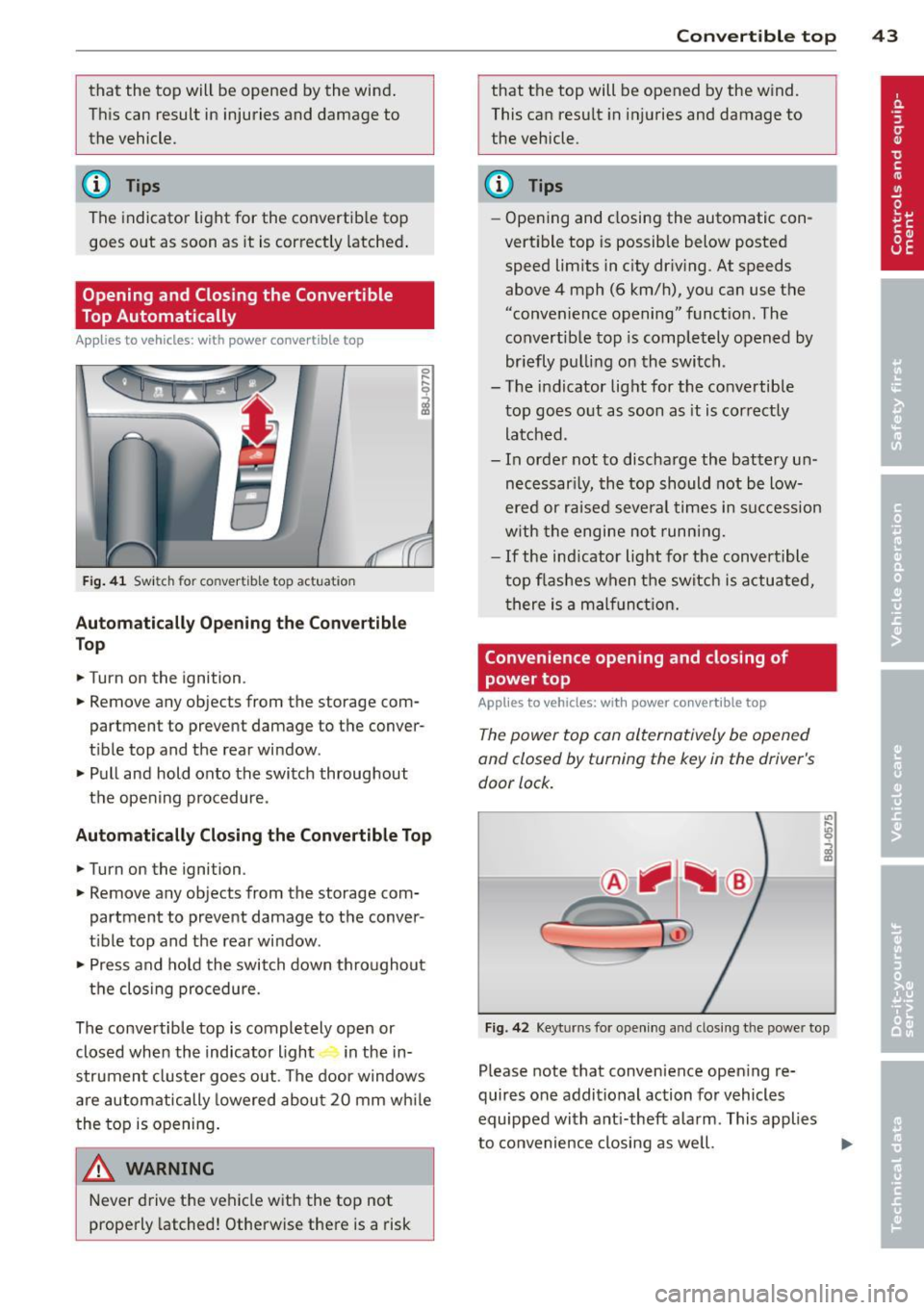
Fig . 41 Switch for convertible top actuation
Au tomaticall y Op ening th e Convertible
Top
.. Turn on the ignition .
.. Remove any objects from the storage com
partment to prevent damage to the
conver
tible top and the rear window.
.. Pull and hold onto the switch throughout
the opening procedure.
Automatic ally C losing th e Con vertible T op
.. Turn on the ignition .
.. Remove any objects from the storage com
partment to prevent damage to the
conver
t ible top and the rear window .
.. Press and hold the switch down throughout
the closing procedure.
The convertible top is completely open or
closed when the indicator light in the in-
strument cluster goes out . The door windows
are automatically lowered about 20 mm wh ile
the top is opening .
& WARNING
Never drive the vehicle with the top not
properly latched! Otherwise there is a risk
-
Con vert ible top 4 3
that the top will be opened by the wind.
This can result in in juries and damage to
the vehicle.
(D Tips
- Opening and closing the automatic con
vertible top is possible below posted speed lim its in city driv ing. At speeds
above 4 mph (6 km/h), you can use the
"convenience opening" funct ion. The
convertible top is completely opened by
br iefly pulling on the switch .
- The indicator light for the co nvertible
top goes o ut as soon as it is correctly
latched.
- In order not to discharge the battery un
necessar ily, the top should not be low
ered or raised several times in succession
w ith the engine not running.
- If the ind icator light for the convertible
t op flashes when the switch is actuated,
there is a malf unct ion.
Convenience opening and closing of
power top
Applies to vehicles: with power co nvertible top
The power top can alternatively be opened
and closed by turning the key in the driver's
door lock.
c
F ig. 42 Keyt urns for ope ning and closing th e power top
Please note that convenience open ing re
quires one additional action for vehicles
equipped with ant i-theft alarm . This applies
to convenience closing as we ll.
Page 49 of 244
opening for the eme rgency locking crank is
l ocated behind the protective cap.
Removing the square shaft
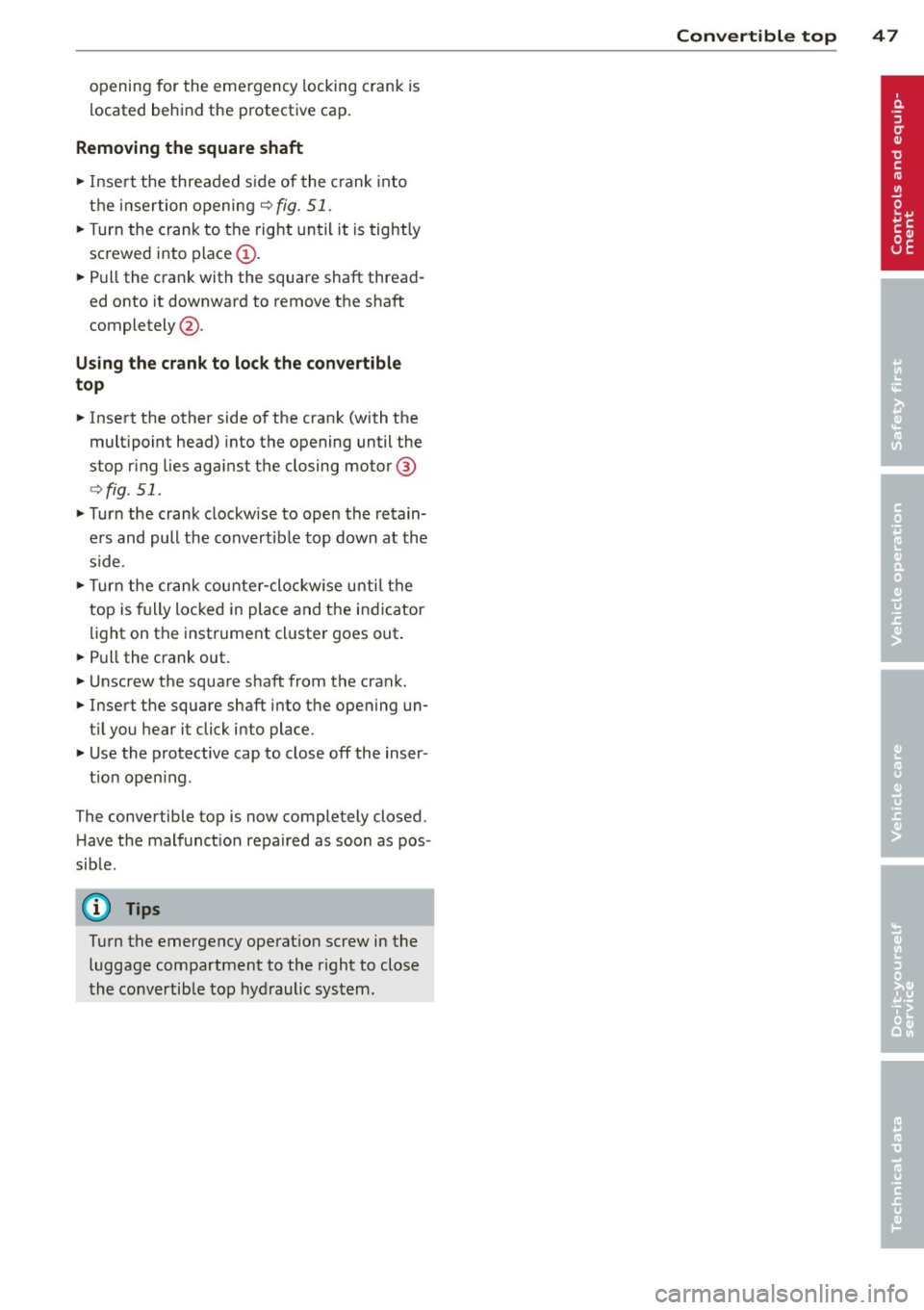
.,. Insert the threaded side of the crank into
the insertion opening
q fig. 51 .
.,. Turn the crank to the right until it is tightly
screwed into place@ .
.,. Pull the crank with the square shaft thread
ed onto it downward to remove the shaft
completely @.
Using the crank to lock the convertible
top
.,. Insert the other side of the crank (with the
mult ipoint head) into the opening until the
stop ring lies against the closing mo tor @
qfig . 51 .
.,. Turn the crank clockwise to open the retain
ers and pull the convertible top down at the
s ide .
.,. Turn the crank counter-clockwise until the
top is fully locked in place and the indicator
light on the instrument cluster goes out .
.,. Pull the crank out.
.,. Unscrew the square shaft from the crank .
.,. Insert the square shaft into the opening un
t il you hear it click into place .
.,. Use the protective cap to close off the inser -
t ion open ing .
The convertible top is now completely closed .
H ave the malfunct ion repaired as soon as pos
sible.
(Dl Tips
Turn the emergency operat ion screw in the
luggage compartment to the r ight to close
the convertible top hydraulic system.
Convertible top 47
Page 50 of 244

48 Clear vision
Clear vision Lights
Switching the headlights on and off
Fig . 52 Instr ument pane l: lig ht sw itc h
Fig. 53 Instrum ent pane l: ligh t swi tch with daytime
runnin g lights (DRL)
The light switch must not be overturned past
the stops in
either direct ion.
Switching on automatic headlight
control*
.,. Turn the light switch to AUTO* ¢ fig. 52.
Switching on the side marker lights
... Turn the light switch to :;oo: .
Switching on the headlights and high
beam
... Turn the light switch to iD.
... Push the high beam lever forward towards
the instrument panel¢
page SO.
Switching off the lights
... Turn the light switch to 0.
The head lights only work when the ignition is
switched on. While start ing the engine or
when switching off the ignition, the head- lights
will go off and only the side ma rker
lights will be on.
Daytime running lights (DRL) (USA
models)
T he daytime running lights can be turned on
or off using this function. If the function is ac
tive, the daytime running lights are turned on
automatically when the ignit ion is switched
on.
The daytime running lights are activated
only
when the light switch is at the AUTO* or DRL *
position.
Daytime running lights (Canada models
only)
The daytime running lights are activated only
when the light switch ¢ fig. 52 is either at the
0 or the :;oo: position.
T he daytime r unning lights funct ion cannot be
turned off.
Automatic headlight control*
In the switch position AUTO the automatic
headlight control
is turned on. The low
beams are turned on automatically through a
light sensor as soon as ambient brightness
(e .g. when driving into a tunnel) falls below a
value preset at the factory. When ambient
brightness increases aga in, the low beams are
turned off again automatically ¢.&. .
In the
AUTO position the low beams are
switched off automatically when the ignition
is turned off .
Light Sensor Malfunction*
In the event of a light sensor malfunction, the
driver is notified in the instrument cluster dis
play:
tal Automatic headlights/automatic wipers
defective
For safety reasons the low beams are turned
on permanently with the switch in
AUTO* .
However, you can continue to turn the lights
on and off using the light switch . Have the
Ill>-
Page 51 of 244

light sensor checked as soon as possible at a
dealership.
Adaptive light *
The benefit of adaptive l ight is that the curve
and the edge of the road are better i llum inat
ed . The adaptive light is contro lled automati
cally, depending on vehicle speed and steering
wheel angle.
When driving a round bends, the head lights
are contro lled according to steering wheel an
g le . So that there is no black area ahead of the
ve hic le, the two main beams pivot at different
angles. The system works above a speed of
about 6 mph (10 km/h).
Com ing home /le avi ng home function *
The function is swit ched on when the switch is
in the AUTO* position and the function is
shown as active in the driver information sys
tem.
The
coming hom e function illuminates the
area around the vehicle when the ign ition is
switched off and the driver's door is ope ned.
The length of time the lights remain on can be
set in the menu display
( Illumination > Exte
rior lights > coming home ).
The leavi ng home function i lluminates the
area around the vehicle when unlocking it.
A WARNING
- Never use dayt ime running l ights to see
where you are going. They are not bright
enough and w ill not let you see far
enough ahead for safety, especially at
dusk or when it is dar k. Always switch on
the low beams at dusk or when i t is dar k.
- Automatic headlights a re only intended
to assist the dr iver. They do not re lieve
t he driver of his responsibi lity to check
t he headlights and to turn them on man
ually according to the current light and
visibility conditions. For example, fog
and rain cannot be detected by the light
sensors. So a lways switch on the head
lights under these weather cond itions
and when driving in the dark
jO .
Clear vis ion 49
- Crashes can happen when you cannot see
the road ahead and when you cannot be
seen by other motorists.
- Always turn on the headlights so that
youcanseeahe adandsothatothe ~
can see your car from the back .
- Please observe legal regulat ions w hen
using the ligh ting systems des cribed.
(D Tips
- T he light sensor for head light control is
located in the rear view mirror mount.
Do not apply any stickers to t he wind
shield in th is area to preven t malfunc
tions or fa ilures.
- Some exter io r l ighting funct ions can be
adjusted in t he driver i nformat ion sys
t em
~page 24.
- I f you remove the igni tion from t he igni
t ion lock while the headligh ts are s till
on, a buzzer wi ll sound as long as the
driver's door is o pen to remind yo u to
t u rn off the lights.
- Always observe the specific local regula
tions for your area as to when to use your
lights.
- With automatic headlights, the high
beam f unction is also available, but w ith
one restrict ion: If you have not sw itched
the high beams back to low beams dur
ing automatic headlight operation (for
example, after d riving throug h a tunnel),
only the low beams come on the next
t ime au tomati c headlights a re swi tched
on. To use the high beams , you firs t have
t o pull the hig h beam lever back and
then push the lever fo rward again .
- In coo l or damp weather, the inside of
the headlights, turn signals an d tail
lights can fog over due to the tempera
t u re difference between the inside and
outside. They w ill clear shortly after
switching them on. This does not affect
the se rv ice life of the lighting.
Page 52 of 244

50 Clear vis ion
Front fog lights
F ig. 5 4 Fog light act ivation: light switch pos itio n on
veh icles WITHOUT sensor light
Switching on the front fog lights iO
.,. Do not turn the light switch ·'t/-· ¢ fig. 54 to-
ward the fog light symbol
}D.
.,. Turn the light switch to :o o: or to io .
.,. Pull the ligh t switch to the first stop @.
When the front fog lights are on, the symbol
}D next to the light switch will i llum ina te.
@ Tips
With the switch in AUTO front fog lights
cannot be turned on in addit ion.
Turn signals and high beam lever
The lever on the left side of the steering col
umn is used to operate the turn signals and
the high beam as well as the headlight flash
er .
Fig . 55 Tu rn signa l and high beam lever
The turn signal and high beam lever has the
following functions:
Turn signals ¢ Q ©@
.,. Push the lever up as fa r as it ca n go to t urn
on the right turn s ignal or down to tu rn on
the left turn signal ¢
fig. 55 .
.,. Move the lever briefly unti l you meet res ist
ance and release it to flash three times .
.,. Move the lever (up or down) until you meet
resistance and hold it there to determine
the flashing time for the turn signals .
High be am gD @
.,. Push the lever forward to switch on the high
beam.
.,. Pull the lever back towards you to switch off
the high beam.
Headlight fla sh er gD @
.,. Pull the lever toward the steering whee l to
use the headlight flasher.
Not es on thes e features
- The turn signals on ly work wi th the ignition
sw itched on. The indicator lights
B or iPJ
in the instrument cluster~ page 12 a lso
blink.
- After you have tu rned a corner, the turn sig
na l switches off automatically .
- The
high beam wo rks on ly when the head
lights are on . The indicator light
Iii in the
instrument cluster illuminates when the
high beams are on.
- The
headlight flasher works only as lo ng as
you ho ld the lever -even if there a re no
lights turned on. The indicator light
Iii in
the instrument cluster illuminates when you
use t he headlight flasher.
A WARNING
Do not use the h igh beam or head light
flasher if yo u know that these could b lind
oncom ing traffic.
-
Page 53 of 244
Emergency flasher
The emergency flasher makes other motorists
a w are that you or your vehicle are in an emer
gency situation.
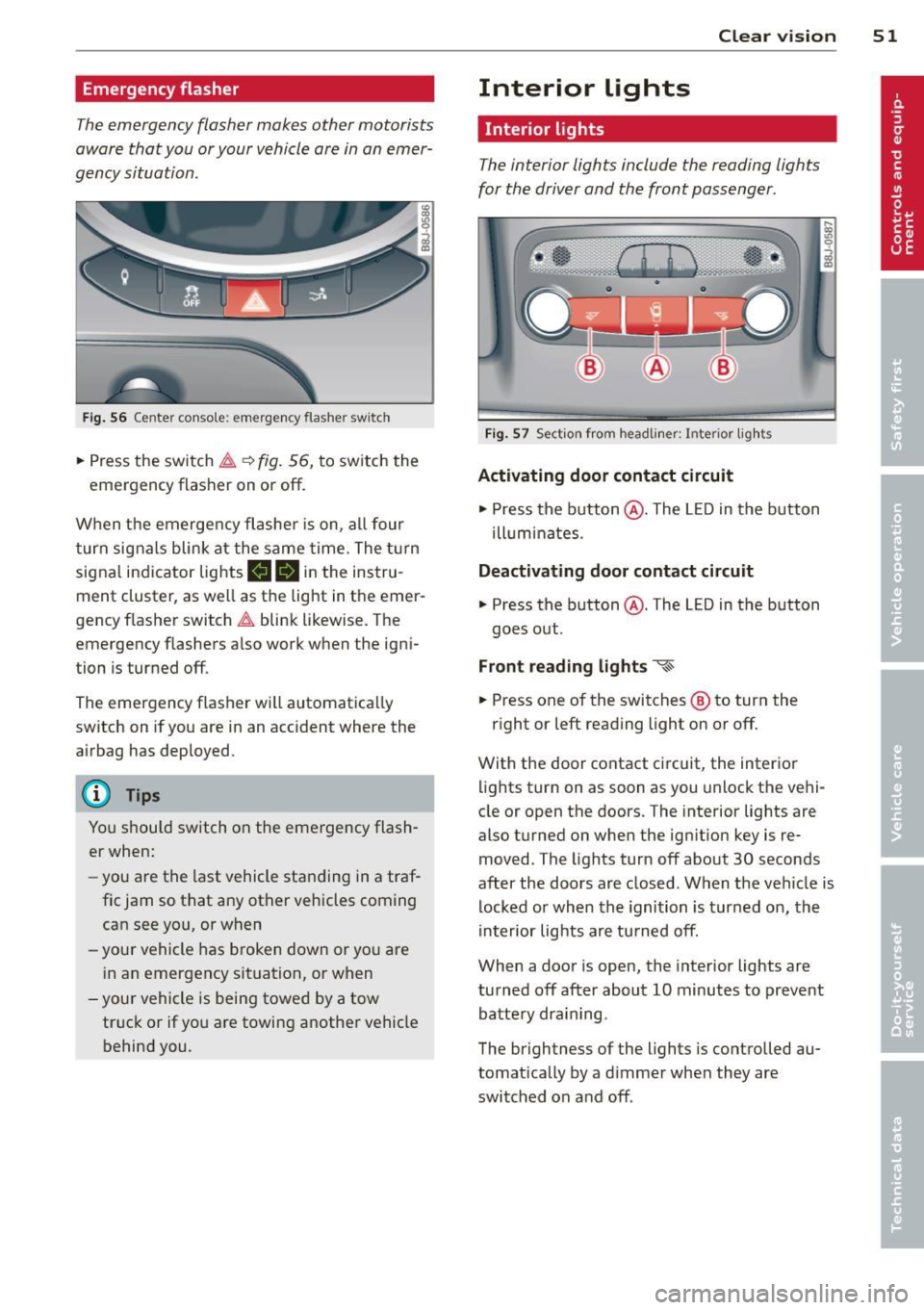
Fi g. 56 Center console: em ergency flasher sw itch
.. Press the switch ~~ fig. 56, to switch the
emergency flasher on or off.
When the emerge ncy flashe r is on, al l four
turn signals blink at the same time. The t urn
signal indicator lights
mlll in the instru
ment cluster, as well as the light in the emer
gency f lasher switch ~ blink likewise. The
emergency flashers a lso work when the igni
tion is turned off.
The emergency flasher will automatica lly
switch on if you are in an acc ident where the
airbag has deployed.
@ Tips
You should switch on the emergency flash
er when:
- you are the last vehicle sta nding in a traf
fic jam so that any other vehicles coming can see you, or when
- your vehicle has broken down or yo u are
i n an emergency situation, or when
-you r vehicle is being towed by a tow
truck or if you are towing a nothe r vehicle
behind you. Clear vi
sion 51
Interior lights
Interior lights
The interior lights include the reading lights
for the driver and the front passenger .
Fig. 57 Section fro m headli ner: Interior light s
Activating door contact circuit
.. Press the button @. The L ED in the button
ill um inates.
Deactivating door contact circuit
.. Press the button @. The LED in the button
goes out .
Front read ing lights ~
.. Press one of the switches ® to turn the
r ight or left reading light on or off.
With the door contact ci rcuit, the inter ior
lights turn on as soon as you unlock the vehi
cle or open the doors. The interior lights are
also turned on when the ignition key is re
moved. The lights turn off about 30 seconds
after the doors are closed . When the veh icle is
locked or when the ignition is turned on, the
in terior lig hts are tu rned off.
When a door is open, the inte rior lights are
tu rned off after about 10 minutes to preve nt
batte ry dra in ing.
The brightness of the lights is controlled au
tomat ica lly by a d immer when they are
switched on and off .
Page 54 of 244
52 Clear vis ion
Instrument panel illumination
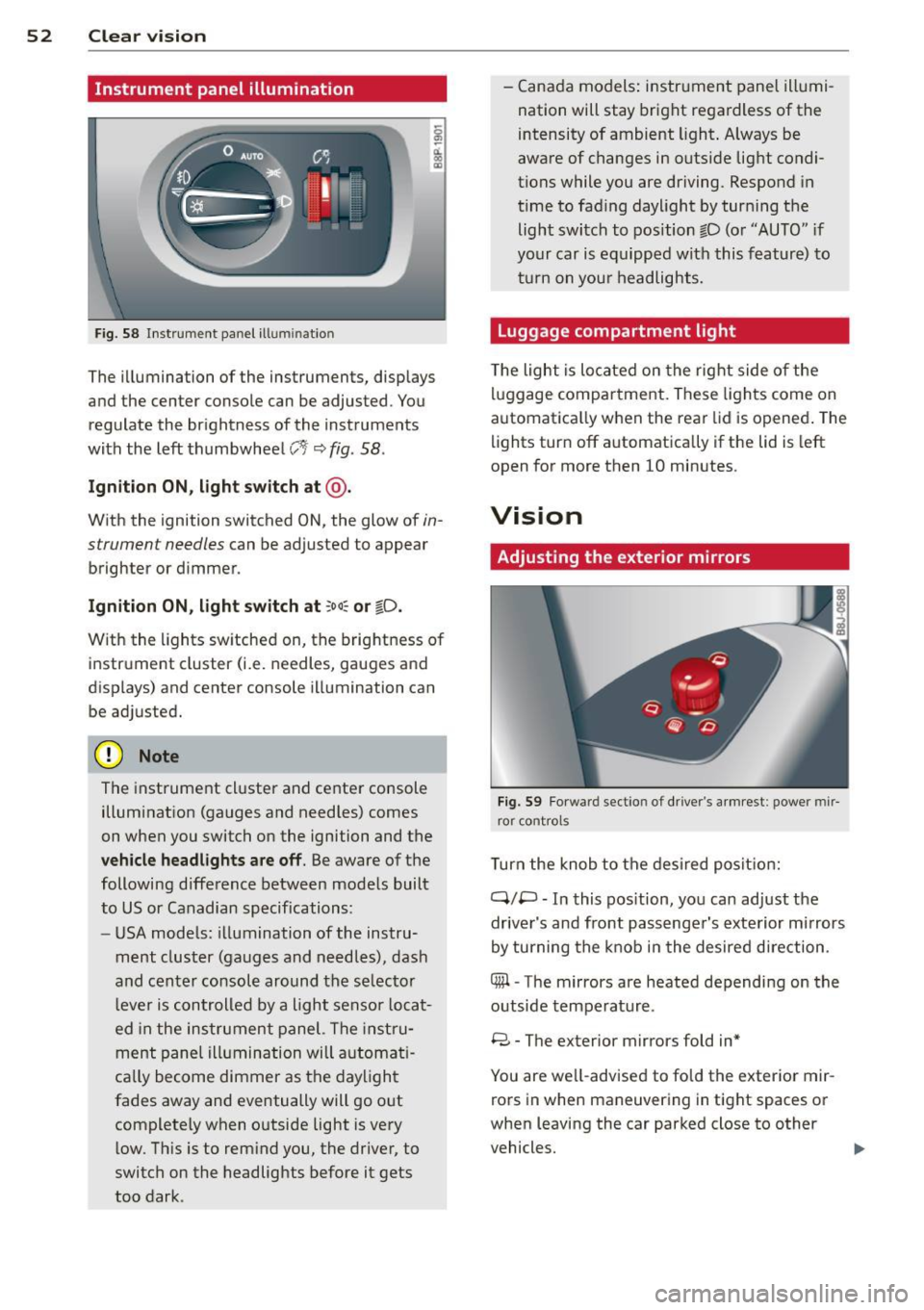
F ig. 58 Instrument panel ill umination
The illumination of the instruments, displays
and the center console can be adjusted. You
regulate the brightness of the instruments
with the left thumbwheel
CJ:J ~ fig. 58.
Ignition ON, light switch at @ .
With the ignition switched ON, the glow of in
strument needles can be adjusted to appear
brighter or dimmer.
Ignition ON , light switch at ;oo~ or io .
With the l ights sw itched on, the brightness of
instrument cluster (i.e. needles, gauges and
displays) and center console illumination can
be adjusted.
@ Note
The instrument cl uster and cente r console
illumination (gauges and needles) comes
on when you switch on the ignition and the
vehicle headligh ts ar e off . Be aware of the
following difference between mode ls built
to US or Canadian specifications:
- USA mode ls: illumination of the instru
ment cluster (gauges and needles), dash
and center consol e around the se lector
l ever is controlled by a light senso r locat
ed in the instrument panel. The instru
ment pane l illumination will a utomat i
cally become dimmer as the daylight
fades away and eventually will go out
complete ly when outside light is very
l ow . Th is is to rem ind you, the driver, to
switch on the headlights before it gets
too dark . -
Canada models: instrument panel illumi
nation will stay bright regardless of the
intensity of ambient light . Always be
aware of changes in outside light condi
tions while you are driving. Respond in
time to fading daylight by tur ning the
light switch to position fD (o r "AUTO" if
your car is equipped with this feature) to
t ur n on you r headlights.
Luggage compartment light
The light is located on the right side of the
lu ggage compartme nt. These lights come on
automat ica lly when the rear lid is opened . The
lights turn off automatica lly if the lid is left
open for more then 10 minutes.
Vision
Adjusting the exterior mirrors
Fig. 59 Fo rwa rd section of driver's a rmrest: power mir
ror controls
Turn the knob to the desired posit ion:
Q/ P -In this pos ition, you can adjust the
driver's and front passenger's exte rior m irrors
by turning the knob in the desired d irection.
4iil -The mirrors are heated depending on the
outside temperature .
8 -The exterior mirrors fold in*
You are we ll-advised to fold the exterior mir
rors in when maneuvering in tight spaces or
when leaving the car parked close to other
vehicles. ..,,.