2015 AUDI TT ROADSTER alarm
[x] Cancel search: alarmPage 36 of 244
34 Opening and closing
Power locking system
General description
The power locking system locks or unlocks all
doors simultaneously.
The power lock ing system in your ve hicle in
corporates the fo llow ing funct ions:
- Central locking function
- Remote con tro l feature q page 33 .
- Anti -Theft Alarm Sys tem q page 38.
A ll the doors and the rear lid are locked by the
centra l locking system when you lock the vehi
cle.
The unlocking a nd lock ing mode * can be
changed in t he d river i nfo rmation system
qpage24.
Unlocking the vehicle
You can un lock the vehicle from outs ide e ither
by using the remote control
or by insert ing
a nd turning the key in t he driver's door lock.
When you
unlock your veh icle:
- The anti-theft alarm system is deactivated br iefly.
- The veh icle inter ior lights ill uminate for ap
proximate ly 30 seconds.
- All turn signa l lights will f lash twice w hen
the car is unlocked.
- After unlock ing the vehicle, yo u have 30 sec
onds to open a door or the rear lid. After 30
seconds, the vehicle automatically locks and
the ant i-theft a larm system activates again.
The rear lid can be locked or un locked either
by using the remote control
or by insert ing
a nd turning the key in the driver's door lock.
Unlock ing the ve hicle w ith the remote co ntrol
c::::5 will only unlock the rear lid, to open it, the
lid handle needs to be p ressed .
Locking the vehicle
You can lock the vehicle from o utside e ither by
using the remote control
or by insert ing and
turning the key in the drivers's door lock.
When you
lo ck the vehicle:
- All doors and the rear lid are locked. -
All turn signal lights wi ll flash once when
the car is loc ked .
- The ant i-theft a larm system is ac tiva ted.
The ho rn of the anti -theft alarm system wi ll
sound and t he anti-theft a la rm system read
iness light, located in the center of the in
strument panel be low the w indshield on the
r ight side of the air vent, will start to blink.
- The vehicle interior lights turn off.
Automat ic lock ing*
T he au tom atic locking fea ture locks a ll the ve
hicle doors an d the rear lid when you drive
faster than 9 m ph (15 km/h).
You can unlock t he vehi cle from the i nside by:
- remov ing the key from the igni tion swi tc h
(the vehi cle w ill automatically u nlock itself)
or
- pressi ng the un loc k pa rt of the power lock
sw itch
ll:D or
pull ing the door ha ndle (to open the doo r).
If you wish, yo u can have an a utho rized Aud i
dealer convert your power doo r lock system to
automat ic locking.
Unintentionally locking yourself out
T he veh icle does not lock with t he centra l
l ocking switch
¢ page 3 6 if the driver's door
is open .
D o no t lock your ve hicle w ith the
remote mas
ter key
un til a ll doo rs and t he rea r lid are
cl osed. In this way yo u avoid locking yourse lf
o ut accidentally .
_& WARNING
- When you loc k yo ur vehicle from o utside,
nobody- espec ia lly children -shou ld re
main inside the vehicle. Remember,
when yo u lock the vehicle from the out
side th e wi ndows cannot be o pened from
the inside.
- Wh en you leav e th e ve hicle, always re
move the ign ition key and take it w ith
you. This will preven t passe ngers (chil
d ren, f or example) from acci denta lly be
i n g loc ke d in the vehicle s hould they
Page 38 of 244
36 Opening and closing
-The operation of the remote control key
can be temporarily disrupted by interfer
ence from transmitters in the vicinity of
the vehicle working in the same frequen
cy range (e.g. a cell phone, radio equip
ment) .
- In order to make sure the locking func
tion is working, you should always keep
your eye on the vehicle to make sure it is
properly locked .
- Do not use the remote control if you are
inside the car, otherwise you may unin
tentionally lock the vehicle, and then you
would set off the anti-theft alarm when
you try to start the engine or open a
door. In case this happens anyhow, push
the unlock button
CD .
- Use the panic function only if you are in
an emergency situation.
Resetting the remote control
The remote control must be reset if the vehi
cle does not unlock .
.,,. Press the unlock button CD on the remote
control.
.,,. Manually unlock the driver's door lock with
the mechanical key within 30 seconds.
.,,. Press either the lock-1'.D or the unlock
CD but
ton to complete th e reset sequence.
Operating locks with the key
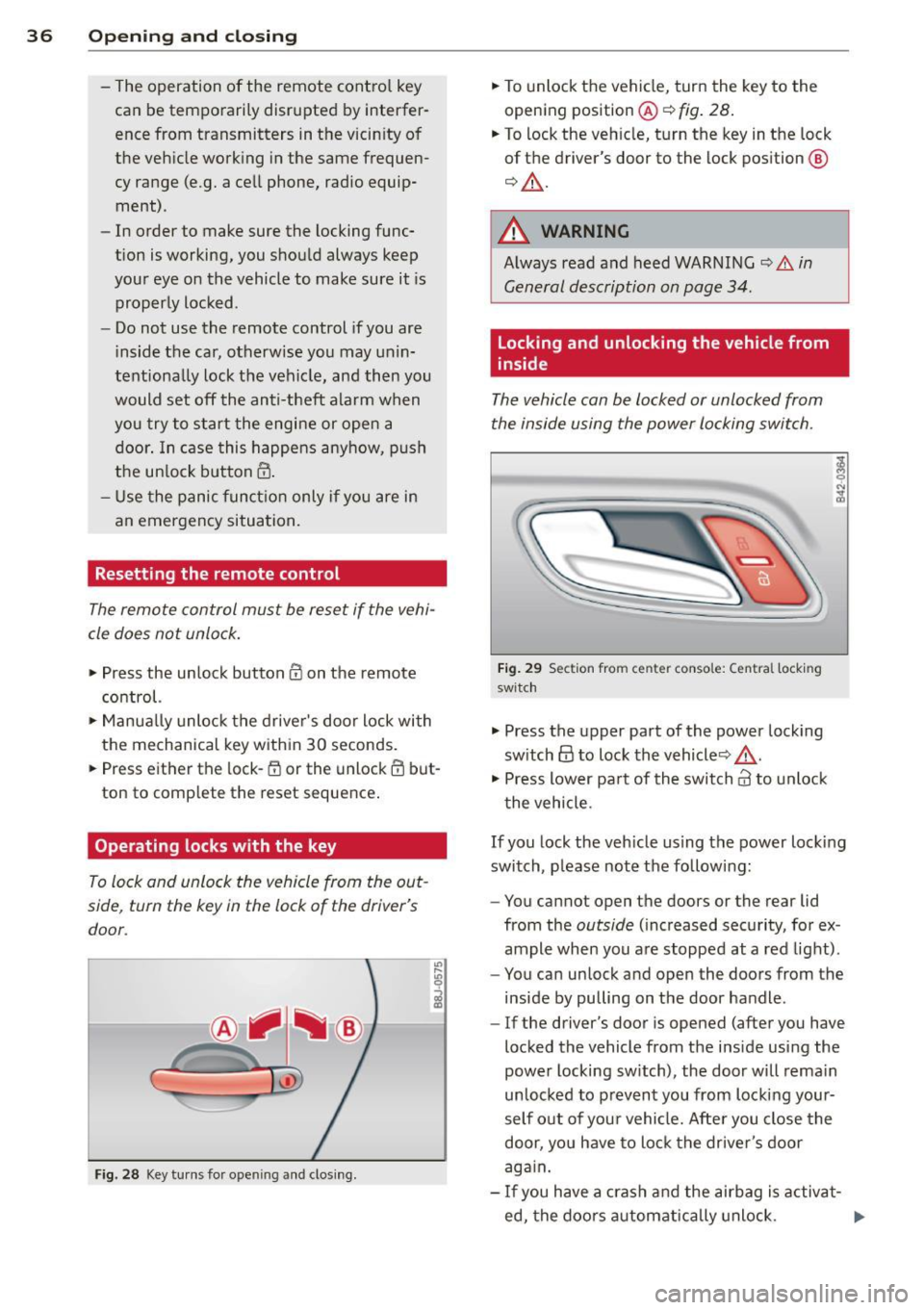
To lock and unlock the vehicle from the out
side , turn the key in the lock of the driver's
door .
Fig. 28 Key turns for ope ning and clo sing.
.,,. To unlock the vehicle, turn the key to the
opening position@¢
fig. 28.
.,,. To lock the vehicle, turn the key in the lock
of the driver's door to the lock position
@
¢ &_ .
A WARNING
Always read and heed WARNING¢.&. in
General description on page 34.
Locking and unlocking the vehicle from
inside
The vehicle can be locked or unlocked from
the inside using the power locking switch .
Fig. 29 Sec tion from center conso le: Ce ntra l locking
switch
.,,. Press the upper part of the power locking
switch
@ to lock the vehicle ¢&_ .
.,,. Press lower pa rt of the switch
crl to unlock
the vehicle .
If you lock the vehicle using the power locking
switch , please note the following:
- You cannot open the doors or the rear lid
from the
outside (increased security, for ex
ample when you are stopped at a red light).
- You can unlock and open the doors from the
inside by pulling on the door handle .
-If the driver's door is opened (after you have
locked the vehicle from the inside using the
power locking switch), the door will remain
unlocked to prevent you from locking your
self out of your vehicle. After you close the
door, you have to lock the driver 's door
again.
- If you have a crash and the airbag is activat-
ed, the doors automatically unlock. ..,.
Page 40 of 244
38 Opening and closing
well as the vehicle doors closed when not
in use.
@ Tips
- If the rear lid is ope n or not properly
locked when the ignition is turned on,
the door and rear lid warning appears in
the instrument cluster disp lay.
- If the rear lid on a locked vehicle is un
l ocked with the middle button
c;j on the
remote key, the rear lid is automatically
l ocked again immediately after clos ing.
This is indicated by the turn signals
blinking .
Rear Lid Emergency Release
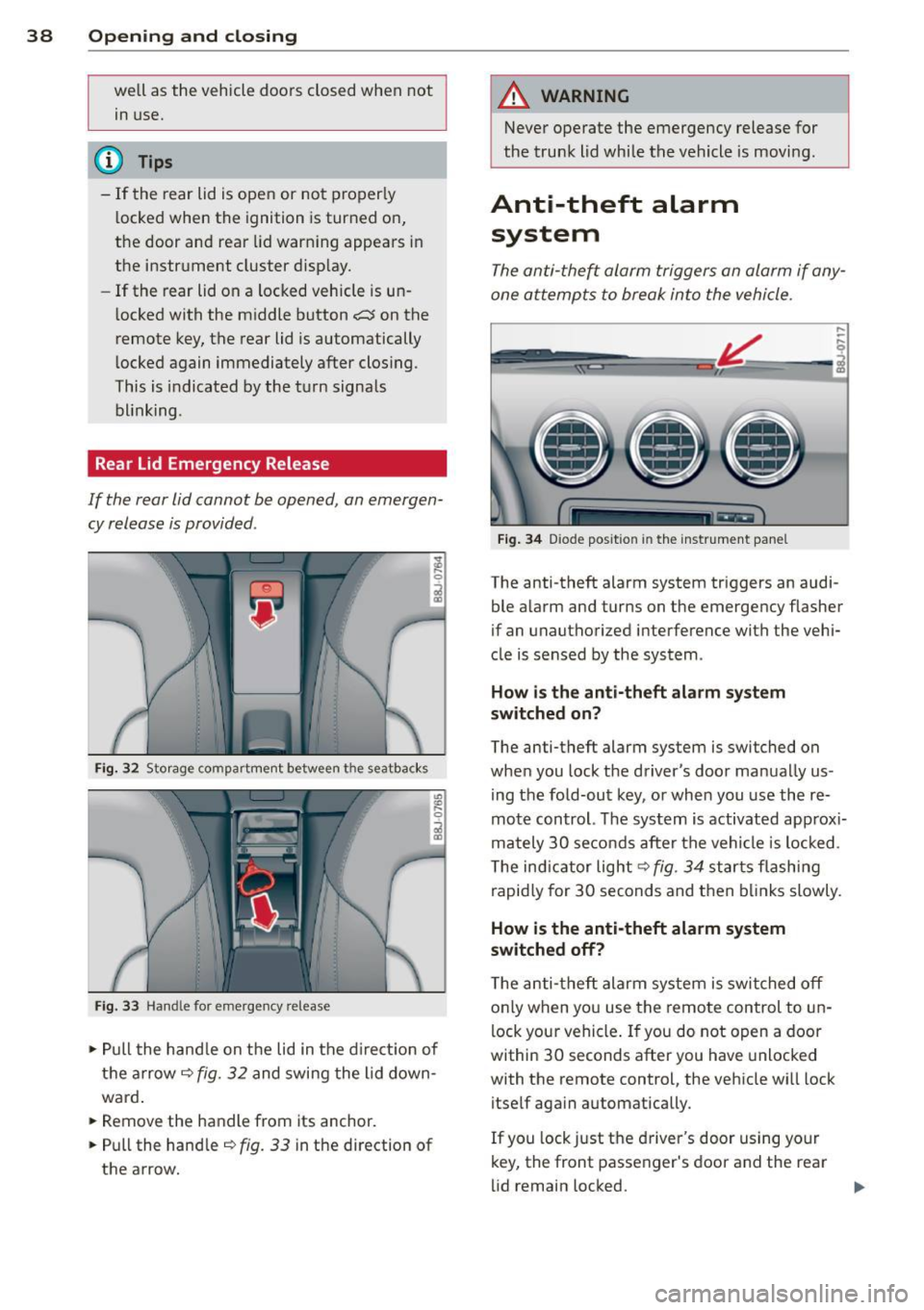
If the rear lid cannot be opened , an emergen
cy release is provided .
Fig. 32 Storage compartment between t he seatbacks
Fig. 33 Hand le for emergency re lease
., Pull the handle on the lid in the direction of
the arrow
i=;,fig. 32 and swing the lid down
ward .
.. Remove the handle from its anchor.
.. Pull the handle
r::;,fig. 33 in the direction of
the arrow.
A WARNING
-Never operate the emergency release for
the trunk lid while the vehicle is moving .
Anti-theft alarm
system
The anti-the~ alarm triggers an alarm if any
one attempts to break into the vehicle.
Fig. 34 Diode positio n in th e instrument panel
,..
-q
i
The anti-theft alarm system triggers an audi
ble a larm and turns on the emergency flasher
if an unauthorized interference with the vehi
cle is sensed by the system .
How is the anti-theft alarm system
switched on?
The anti-theft alarm system is switched on
when you lock the driver's door manually us
ing the fold-out key, or when you use the re
mote control. The system is activated approx i
mately 30 seconds after the vehicle is locked.
T he ind icator light
r::;, fig. 34 starts flashing
rapidly for 30 seconds and then blinks slowly.
How is the anti-theft alarm system
switched off?
The anti-theft alarm system is switched off
o nl y when you use the remote control to un
lock your vehicle . If you do not open a door
within 30 seconds after you have unlocked
with the remote control, the vehicle wi ll lock
itself aga in automatically .
If you lock just the driver's door using your
key, the front passenger's door and the rear
lid remain locked. ..,.
Page 41 of 244

When will the anti theft ala rm system be
triggered?
When the vehicle is locked , the alarm system
monitors and protects the following parts of
the vehicle:
- engine compartment
- luggage compartment
- doo rs
- ignition
When the system is activated, the alarm will
be triggered if one of the doors, the engine
hood or the rear lid are opened, or if the ign i
tion is turned on.
The anti-theft alarm system will also go off
when the battery is disconnected.
You can a lso trigger the alarm by pressing the
PANIC button on your remote-control key.
This will alert other people in case of emer
gency. Press the
PANIC button again to turn
off the alarm .
How is the anti-theft alarm switched off
when triggered?
The alarm system is switched off when you
unlock the vehicle using the remote-control key or when the ignition is sw itched on . The
a larm will also switch itse lf off when it comes
to the end of its cycle.
Emergency flasher
The emergency flasher will blink briefly when
the doors, engine hood and rear lid are prop
erly closed.
If the emergency flashers do not blink, check
the doors, engine hood and rear lid to make
sure they are properly closed. If you close a
door, the hood or the rear lid with the ant i
theft alarm switched on, the emergency flash
ers will blink only after you have closed the
door or lid.
(1) Tips
For the anti-theft alarm system to func
tion properly, make sure all vehicle doors
and windows are closed before leaving the
vehicle.
Opening and closing 39
Power windows
Controls
The driver can operate all windows .
Fig. 35 Driver's door: power w indow switches
If the respective switch is pushed or pulled
the window w il l open or clos e. The power win
dow switches have a two-position function :
Opening the windows
.,. Press the switch and hold it down until the
w indow has reached the desired position .
.,. Press the switch
briefly to open the window
automatically. By briefly pressing the switch
again, the downward travel of the window
can be stopped in any position<=-> .&_.
Closing the windows
.,. Pull the sw itch and hold it unti l the window
has reached the desired position .
.,. Pull the switch
briefly to close the window
automatically. By briefly press ing the switch
aga in, the upward travel of the window can
be stopped in any position
~ .&_ .
Switch @<=->fig .
35 operates the window in
the driver's door.
Switch @ operates the window in the front
passenger 's door.
&_ WARNING
- Do not leave children unattended in the
vehicle, especially with access to vehicle
keys . Unsupervised use of the keys can
result in start ing of the engine and use
of vehicle systems such as power win
dows, etc. wh ich could result in serious
injury.
Page 45 of 244
that the top will be opened by the wind.
Th is can result in injuries and damage to
the vehicle.
@ Tips
The indicator light for the convertible top goes out as soon as it is correctly latched .
Opening and Closing the Convertible
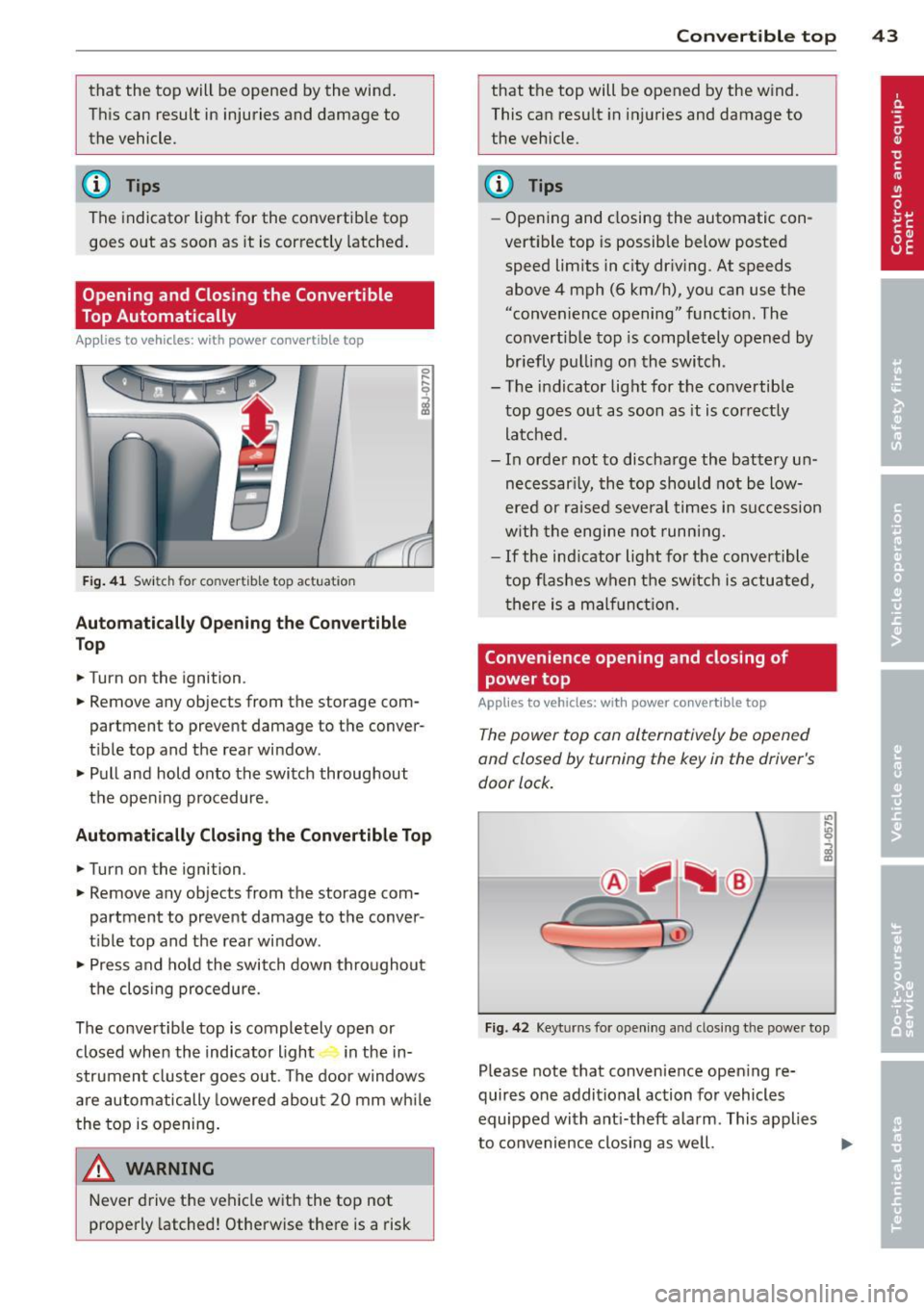
Top Automatically
App lies to vehicles: with power convertible top
Fig . 41 Switch for convertible top actuation
Au tomaticall y Op ening th e Convertible
Top
.. Turn on the ignition .
.. Remove any objects from the storage com
partment to prevent damage to the
conver
tible top and the rear window.
.. Pull and hold onto the switch throughout
the opening procedure.
Automatic ally C losing th e Con vertible T op
.. Turn on the ignition .
.. Remove any objects from the storage com
partment to prevent damage to the
conver
t ible top and the rear window .
.. Press and hold the switch down throughout
the closing procedure.
The convertible top is completely open or
closed when the indicator light in the in-
strument cluster goes out . The door windows
are automatically lowered about 20 mm wh ile
the top is opening .
& WARNING
Never drive the vehicle with the top not
properly latched! Otherwise there is a risk
-
Con vert ible top 4 3
that the top will be opened by the wind.
This can result in in juries and damage to
the vehicle.
(D Tips
- Opening and closing the automatic con
vertible top is possible below posted speed lim its in city driv ing. At speeds
above 4 mph (6 km/h), you can use the
"convenience opening" funct ion. The
convertible top is completely opened by
br iefly pulling on the switch .
- The indicator light for the co nvertible
top goes o ut as soon as it is correctly
latched.
- In order not to discharge the battery un
necessar ily, the top should not be low
ered or raised several times in succession
w ith the engine not running.
- If the ind icator light for the convertible
t op flashes when the switch is actuated,
there is a malf unct ion.
Convenience opening and closing of
power top
Applies to vehicles: with power co nvertible top
The power top can alternatively be opened
and closed by turning the key in the driver's
door lock.
c
F ig. 42 Keyt urns for ope ning and closing th e power top
Please note that convenience open ing re
quires one additional action for vehicles
equipped with ant i-theft alarm . This applies
to convenience closing as we ll.
Page 176 of 244

17 4 Che cking and filling
Brake fluid
Checking brake fluid level
Fig . 133 Engine compa rtment: cove r on the brake fluid
reservo ir
Before you check anything in the engine com
partment,
a lw ays read and h eed all WA RN
ING S ¢&. in Working in the engine compart
ment on page 164.
,.. Read the brake fluid level from the brake
fluid reservoir¢
page 166, fig . 128. T he
brake flu id leve l must be between the "MIN"
and "MAX" markings.
The brake flu id rese rvo ir is located behind the
rear part ition of the eng ine compartment o n
the left side ¢
page 166.
The fluid level may drop slightly after some
time due to the automatic adjustment of the b rake pads . This is not cause for alarm.
If the brake fluid level falls
considerably be
low the "MIN" mark, the brake warning/indi
cator light (U.S. models: . , Canadian mod
e ls: . ) w ill come on
¢page 14. Do not con
tinue to operate the vehicle. The comp lete
brake system shou ld be thoroughly checked
by an authorized A udi dealer or other quali
fied facility and the cause corrected.
If the
brake fluid level is too low, the brake warn ing/
indicator light w ill illuminate. Contact an au
thor ized Audi dealer
imm ediatel y.
Changing brake fluid
Have the brake fluid changed by an experi
enced technician .
Brake fluid absorbs moisture from the air. If
the water content in the brake fluid is too high, corrosion in the brake system may result
after a period of time . The boiling point of the
brake flu id will also decrease conside rably and
decrease braking pe rformance.
Therefore, the brake fluid must be changed
eve ry two y ears. Always use new brake flu id
which conforms to Federal Motor Veh icle
Standard "F MVSS 116 DOT 4".
The brake fluid reservoir can be diff icult to
reach, therefore, we recommend that you
have the brake fluid changed by your author
ized
Audi dealer . Your dealer has the correct
tools, the right brake fl uid and the know -how
to do this for you.
A WARNING
- Brake fluid is poisonous . It must be stor
ed only in the closed original container
out of the reach of children!
- Brake failure can resu lt from o ld or inap
propriate brake flu id. Observe these pre
cautions:
- Use only brake f luid that meets SA E
specifica tion
J 1 7 03 and conforms to
Federa l Moto r Ve hicl e Standard 1 16.
Always check with yo ur authorized Aud i
dealer to make sure yo u are using the
correct brake fluid. The correct type of brake f lu id is also ind icated on the
brake flu id reservoir.
- The brake fluid must be new. Heavy use
of the brakes can cause a vapor lock if
the brake fluid is left in the system too
l ong. This can seriously affect the effi
c iency of the brakes as well as your
safety. This cou ld resu lt in an accident.
(D Note
Brake fluid will damage the paint of your
vehicle .
Page 179 of 244

-Do not interchange the positive and neg
ative cables .
- When working on the battery , be sure
not to short-circuit the terminals with
tools or other metal objects. This would cause the battery to heat up very quickly,
which could lead to damage or explosion and personal injury.
- When a battery is charged, it produces
hydrogen gas which is explosive and
could cause personal injury .
- Always keep the battery well out of the reach of children .
- Before work is done on the electrical sys
tem, disconnect the negative ground ca
ble .
- Before performing any work on the elec
trical system , switch off the engine and
ignition as well as any electrical equip
ment. The negative cable on the battery
must be disconnected. If you are just go
ing to replace a light bulb, then it is
enough to switch off the lights.
- Before disconnecting the battery , switch
off the anti-theft alarm system! Other
wise you will set off the alarm.
- When disconnecting the battery, first
disconnect the negative cable and then
the positive cable.
- Before reconnecting the battery, make
sure all electrical consumers are switch
ed off. Reconnect the positive cable first
and then the negative cable. Never inter
change the cables - this could start a fire!
- Never charge a fro zen or a thawed-out
battery. It could explode! If a battery has
frozen, then it must be replaced. A dis
charged battery can freeze over at 32 °F
(0 °C) .
-Make sure the vent hose is always attach
ed to the opening on the side of the bat
tery.
- Never use batteries which are damaged.
Danger of explosion! Always replace a
damaged battery.
Checking and filling 177
A WARNING
California Proposition 65 Warning:
- Battery posts, terminals and related ac cessories contain lead and lead com
pounds, chemicals known to the State of
California to cause cancer and reproduc
tive problems . Wash hands after han
dling.
Q) Note
- Do not disconnect the vehicle battery
when the ignition is switched on or when
the engine is running, otherwise , you will
damage electronic components in the
electrical system.
- If your vehicle is going to stand for a
long period of time without being driven,
protect the battery from "freezing", oth
erwise it will be damaged and will then
have to be replaced.
Checking the battery acid level on magic
eye batteries*
The battery acid level in the battery can be
checked through the clear inspection window .
Fig. 134 Lugg age compar tme nt: Battery w ith mag ic
e ye .
On top of the battery, there is a round "win
dow". This window (magic eye) changes color
as the battery charge and acid level change.
.,. Read and heed all WARNINGS
~.&_ in
Working on the battery on page 176
.. Read the acid level from the window on the
battery ~
fig. 134. Ill>-
Page 231 of 244

A
A/C operation . . . . . . . . . . . . . . . . . . . . . . . 70
Accessories .. ... .. .. ... ... .. .. .. .. . 227
Acoustic park assist . . . . . . . . . . . . . . . . . . 79
Adapt ive light . . . . . . . . . . . . . . . . . . . 20, 49
Adding Eng ine coolant .................. .. 172
Eng ine oi l ...................... .. 169
W indshield washer flu id . . . . . . . . . . . . 179
Addit ional accessories ............... 227
Additives Engine oil . ... .... .... ... .. .. .. .. .
Ad justab le steer ing column ........... .
Ad justing front seats ................ . 169
72
59
Ad justing s teering co lumn ... .. .. .. .. .. 72
Adjust ing the seats ................... 60
Advanced Airbag System Ch ildren
130
Components ............. .... .. ... 114
Front airbags . . . . . . . . . . . . . . . . . . . . . 112
H ow the components work together .. 116
Mon itoring . . . . . . . . . . . . . . . . . . . . . . . 118
Weight -sens ing mat ............... 130
Airbag system . . . . . . . . . . . . . . . . . 108, 126
Care ... .. .. ................. .. ... 121
Ch ild restra ints .................. .. 131
Components (front airbags) . . . . . . . . . 114
Danger of fitting a child safety seat on
the front passenger seat . .. .. .. .. .. . 109
Di sposal . .. ............. .... .. .. .
Fr ont airbags .. .. ..... ... .. .. .. .. .
How do the front airbags work? ... .. .
How many airbags does my vehicle
have? . ... . .... ............. .. .. .
Important safety instructions on the
knee airbag system ........ ... .. .. .
Important th ings to know .......... .
Indicator light ... .. ... ... .. .. .. .. . 12
1
112
1 17
114
124
108
118
Knee ai rbags ............. .... .. .. . 123
M oni tor ing . ............. .. .. .. .. . 118
P ASSENG ER AIR BAG O FF ligh t .. .. .. . 119
Repai rs .. .. ... .. ..... ... .. .. .. .. . 121
Side airbags . . . . . . . . . . . . . . . . . . . . . . 125
Warning/ indicato r lights ... .. ...... .. 15
When must the system be inspected? . 118
A lcantara
C leaning ... .. ... ..... ... .. .. .. .. . 157
Inde x 229
All-wheel drive . ..... . .. .. ..... ... .. 146
Winter tires ... .... . ... ...... ... .. 195
Alternato r .. .. .. .. ................. . 16
Anti-free ze
refer to Engine cool ing system ....... 171
Anti -lock brake system . .. ..... ... .. .. 141
Warning/indicator lights ..... ... .. .. . 18
Anti-s lip reg ulation ............. .... 141
Anti-theft systems
Anti -theft alarm system ............. 38
E lectronic immob il izer .. .. ..... ... .. . 33
Ashtray . ... .. .. .. .. .. ... ..... ... .. . 63
Aste ris k
Wha t does i t mean when something is
marked w ith an aster isk? . . . . . . . . . . . . . . 6
Audi magnet ic r ide . . . . . . . . . . . . . . . 21, 79
Desc ription .. .. .. .... ........... .. . 79
Ind icator light . .. .. .. ........... .. . 21
Audi Service Repair Manuals a nd Litera-
ture .......... ... .. .............. . 225
Automatic be lt retractor .. .... ... .. .. 103
Automat ic convert ible top
cl osing
... .. .. .. .... ........... .. . 43
opening . ... .. .. .. . .. ... .... ... .. . 43
Automat ic transm iss ion ......... .... .. 81
Driving Notes . . . . . . . . . . . . . . . . . . . . . . 83
E mergency p rog ram ........... .. .. . 86
E mergency re le a se .................. 86
Ign it ion key safety loc k ......... .... . 73
K ick -down ... .... .. . .. .. ..... ... .. . 85
La unc h Control Program
..... ... .. .. . 85
Se lector lever lock
82
Se lector lever positions ......... .. .. . 81
Tiptronic .. .. .. .. ................. . 84
Tiptronic controls on the steering wheel 85
Auto Safety Hot line . .. .. ..... ... .. .. . 98
Ave rage fuel mileage . . . . . . . . . . . . . . . . . 23
Average speed . . . . . . . . . . . . . . . . . . . . . . . 23
Avoid damaging the vehicle .... ... .. .. 150
B
Bat tery . . . . . . . . . . . . . . . . . . . . . . 175, 17 7
Charg ing .. .. .. .. ................. 178
Checking ba ttery acid level ... ... .. .. 177
Connect ing . ... .... . ... ...... ... .. 175
Disconnecting 175
•
•