2015 AUDI S3 SEDAN steering
[x] Cancel search: steeringPage 76 of 282

Driving
& WARNING
-Never allow the engine to run in confined
spaces, because this increases the risk of as
phyxiation.
- Never
remove the ignition key from the igni
tion look while the vehicle is moving . Other
wise the steering lock will engage and you
will not be able to steer the vehicle.
- Please note that the brake booster and pow
er steering only work when the engine is
running . When the engine off, you must use
more force to steer or brake the vehicle. Be
cause the usual steering and braking capa
bility is not available, the risk of accidents or
injuries increases.
- Always take the vehicle key with you when
leaving the vehicle,
even for a short period
of time. This applies particularly when chil
dren remain in the vehicle. Otherwise the
children could start the engine or operate
electrical equipment such as power win
dows .
CT'.) Note
- Avoid high engine speed, full throttle, and
heavy engine load as long as the engine has
not reached operating temperature yet . You
could damage the engine .
- The engine cannot be started by pushing or
towing .
@ For the sake of the environment
Do not let the engine run while parked to
warm up. Begin driving immediately. This re
duces unnecessary emissions.
(D Tips
- If it is difficult to turn the key to position
(D, turn the steering wheel back and forth
slightly to release the steering wheel lock.
- After starting a cold engine, there may be a
brief period of increased noise because the
oil pressure must first build up in the hy
draulic
valve adjusters . This is normal and
not a cause for concern.
- If the battery is disconnected and recon
nected, you have to hold the ignition key in
74
position (D for five seconds for the engine
to start.
- After switching the ignition off, you can only
remove the key when the selector lever is in
the "P" (Park) position. After that, the selec
tor lever is locked.
Stopping the engine with the key
App lies to vehicles : with mechanical ignition loc k
Stopping the engine
.. Bring the vehicle to a full stop .
.. Turn the key to posi tion @.
Releasing the steering lock
Requirement: The selector lever must be in the P
position.
.,. Remove the ignition key in position@
q page 75, fig. 69 q ,&..
.. Turn the steering wheel until you hear the
steering wheel lock.
The locked steering helps prevent vehicle theft.
A WARNING
-
-Never turn off the engine before the vehicle
has come to a complete stop. The full func
tion of the brake booster and the power
steering is not guaranteed. You must use
more force to turn or brake if. Because you
cannot steer and brake as you usually
would, this could lead to accidents and seri
ous injuries.
- Never
remove the ignition key from the igni
tion look while the vehicle is moving . Other
wise, the steering lock could suddenly en
gage and you would not be able to steer the
vehicle.
- Please note that the brake booster and pow
er steering only work when the engine is
running. When the engine off, you must use
more force to steer or brake the vehicle. Be
cause the usual steering and braking capa bility is not available, the risk of accidents or
injuries increases.
- Always take the vehicle key with you when
leaving the vehicle,
even for a short period
of time . This applies particularly when
Page 77 of 282

....,
N
0 > co
children remain in the vehicle. Otherwise
the children could start the engine or operate electrical equipment such as power win
dows .
- For safety reasons, always park the vehicle
with the selector lever in the P position.
Otherwise, there is the risk that the vehicle
could roll.
- After the engine has been switched off, the
radiator fan can continue to run for up to 10
minutes -even with the ignition switched
off.
It can also switch on again after some
time if the coolant temperature rises as a
result of heat build up or if the engine com
partment is heated by sunlight and the en
gine is hot.
(D Note
- If the engine has been under heavy load for
an extended period of time, heat builds up
in the engine compartment after the engine
is switched off -there is a risk of damaging
the engine . For this reason, let the engine
run for at idle for approximately two mi
nutes before shutting it off.
Starting and stopping
the engine (vehicles with
a convenience key)
Engine with the
button Starting
Applies to vehicles : wit h convenience key
The I S TART ENGINE STOP I button switches the
ignition on and starts the engine.
Fig. 69 Ce nter conso le : STAR T ENGINE STOP button (wit h
:0 conve nience key)
"'
"'
"'
......
Driving
You can start your car without using your conven
ience key. You must simply be carrying the key
with you .
Switching the ignition on/off or prewarming
If thP ,Y,n indicator light blinks and the message
Plea se move steering wheel appears when
switching the ignition on, the steer ing is locked
by the steering lock. In this case, turn the steer
ing wheel slightly to the left/right .
.,. To switch the ign ition on/off , press the
!S TART ENGINE ST OP I button. Do not press the
bra ke pedal whi le doing this.
Diesel vehicles are preheated while the ignition is
switched on
m .
Starting the engine
Your vehicle is equipped with launch control. The
engine starts automatically when you press the
I STAR T ENGINE ST OP I button brief ly.
.,. Press the brake pedal and move the selector
lever to the P or N position .
.,. Press the
I STAR T ENGINE ST OP ! button briefly .
The engine w ill start .
Major electrical equipment switches off tempora
rily when start ing the engine.
It is possible that there will be a slight delay
when starting the engine in diesel vehicles in
colder temperatures . Therefore, you must hold
the brake pedal down until the engine starts . The
indicator light turns on while the engine is pre
heating
m .
The prewarming time depends on the coolant
temperature and outside temperature . The glow
plug indicator light
El will only turn on for ap
proximate ly 1 second when the eng ine is warm or
the outside temperature is higher than 8
°C. That
means you can start the engine
immediately .
If the engine does not start immediately, stop
the start ing procedure by pushing the
I STAR T ENGINE ST OP I button again and repeat
after 30 seconds. .,.
75
Page 78 of 282

Driving
Autom ati c s tar t m alfun cti on
If the lll3 (gasoline engine) or II (diese l eng ine)
indicator light turns on when you start the en
gine, there is an automatic start ma lfunction.
To start the engine, press and ho ld the
I START ENGINE STOP! button un til the engine
runs .
Drive to an autho rized Audi dea ler or authorized
Aud i Service Fac ility immediately to have the
mal funct ion corrected.
_& WARNING
- Never allow the engine to run in confined
spaces -danger of asphyxiation.
- Always take the vehicle key with you when
leaving the vehicle, even for a short period
of time . This applies partic ularly when chil
dren remain in the vehicle. Otherw ise the
children could start the engine or operate
electrical equ ipment such as power win
dows.
- Please note that the brake booster and pow
er steering only work when the engine is
running . When the eng ine off, you must use
more force to steer or brake the ve hicle. Be
cause the usual stee ring and bra king capa
bility is not availab le, the risk of accidents o r
injur ies inc reases.
(D Note
- Avoid high eng ine speed, full thrott le, and
heavy engine load as long as the eng ine has
not reached operating temperature yet. You
could damage the engine.
- The engi ne cannot be sta rted by pushing or
tow ing.
@ For the sake of the environment
Do not let the engine run while par ked to
warm up. Beg in d riving immed iately. This re
duces unnecessary emissions.
l ) Th is fun ctio n is not availabl e in all cou ntri es .
76
-
(D Tips
-After starting a cold engine, there may be a
br ief per iod of increased noise because the
oil pressure must first build up in the hy
draulic valve adjusters. This is normal and
not a cause for concern .
- If the . indicator light blinks in the instru
ment cluster before switching the ignition
off, the ignition will not switch on again.
¢page 126
-If you leave your vehicle w ith the ignition
switched on, the ign ition w ill switch off af
ter a certain amou nt of time . Make sure that
elect rical equipment such as the exterio r
lights a re switched off.
Turning the engine off using the
button
Applies to vehicles: with convenience key
... Bring the vehicle to a full stop.
... Move the se lector lever into the P position.
... Press the
I STAR T ENGINE STOP ! button
¢page 75, fig. 69.
Ste ering lo ck1l
The steering locks when yo u turn the engine off
using the
I STAR T ENGINE ST OP !* button, move
the selector lever into the P position and open
the driver's door.
The locked steering he lps prevent ve hicle theft.
Eme rgency off
If it is absolutely necessa ry, the engine can also
be turned off while driving at speeds lower than
6 mph (10 km/h). To switch the engine off, press
the
I START ENGINE STOP! button twice in a row
briefly or press and hold for longer than two sec
onds.
_& WARNING
- Never turn off the engine before the vehicle
has come to a complete stop. The full func
tion of the brake booster and the powe r
steer ing is not guaranteed. You must use
Page 79 of 282

....,
N
0 > co
rl I.O
"'
"'
"'
rl
more force to turn or brake if necessary. Be
cause you cannot steer and brake as you
usually would, this could lead to crashes
and serious injuries.
- Please note that the brake booster and pow
er steering only work when the engine is
running. When the engine off, you must use
more force to steer or brake the veh icle. Be
cause the usual steering and braking capa
bility is not avai lable, the risk of accidents or
injuries inc reases.
- Always take t he vehi cle key with you when
leaving the vehicle, even for a short period
of time. This applies partic ularly when chil
dren remain in the vehicle . Otherwise the
children could start the engine or operate
electrical equipment such as power win
dows.
- For safety reasons, always park the vehicle
with the selector lever in the P position.
Otherw ise, there is the risk that the veh icle
could roll.
- After the engine has been switched off, the radiator fan can continue to run for up to 10
minutes -even with the ignition switched
off.
It can also switch on again after some
t ime if the coolant temperature rises as the
result of heat bu ildup or if the eng ine com
partment is heated by the s un's rays and the
engine is hot .
(D Note
If the eng ine has been under heavy load for
an extended per iod of t ime, heat bu ilds up in
the eng ine comp artment after the engine is
sw itched off -there is a r isk of damaging the
engine. For this reason, let the engine run for
at idle for approximate ly two minutes before
shutting it off.
Dr iving
Starting the engine if there is a
malfunction
Applies to vehicles: with convenience key
It may not be possible to start the engine under
certain circumstances, for example if the battery
in the vehicle key is drained, if interference is af
fected the key or if there is a system malfunc
tion.
F ig. 70 Steer ing colum n/remote co ntrol key: start ing the
engine if there is a ma lfunction
As long as the message y >l) K ey not r ecognized .
Se e owne rs manual
appears, you can start your
vehicle using the emergency start function .
"' Press the brake pedal
c:::> .&. in Engine with the
button
START ENGINE STOP Starting on
page
76.
"' Press the ~ I s=T~A~R~T~E~N~G~IN~E~s=T~O~P~ I button.
"' Ho ld the master key in the location indicated as
shown in the illustration
y >>) c:::> fig. 70. The en
gine will start .
"' If the engine does not automat ically start,
press the
I START ENGINE STOP I button again.
Drive to an authorized Audi dealer or authorized
Audi Serv ice Facility immediately to have the
malfunction corrected.
@ Tips
You can display the message that appears
during an emergency by pressing the
I S TART ENGINE STOP!* button.
Driver messages
Turn off ignition befor e leavi ng car. Batt ery is
di schar ging
77
Page 81 of 282

M N
0 > co ,...., \!) 1.1'1
1.1'1
1.1'1
,....,
brake provides various convenience and safety
functions.
When starting from rest
- The integral hill start assist helps you when
driving by automatically releasing the parking
brake ¢
page 80 , Starting from a stop.
- When starting on inclines, the hill start assist
prevents the vehicle from unintentionally roll
ing back. The braking force of the parking brake
is not r eleased until sufficient driving forc e has
b ee n built up at the wh eels.
Emergency brake function
An emergency braking functions ensures that the
vehicle can be slowed down even if the
normal
brakes fail¢ page 80, Emergency braking func
tion.
A WARNING
- Do not press the accelerator pedal inadver
tently if the vehicle is stationary but the en gine is running and a gear is selected . Other
wise the vehicle will start to move immedi
ately and could result in a crash.
-If the power supply fails, the released park
ing brake can no longer engage. In this case,
park the vehicle on level ground and secure
it by placing the selector lever in the P posi
tion. See an authorized Audi dealer or au
thorized Audi Service Facility for assistance.
(D Note
If the . or 1111 (USA models)/ . (Canada
models) indicator light in the instrument clus
ter blinks , there is a malfunction in the brake
system. Refer to the detailed description of
the indicator lights¢
page 17.
-If the - (USA models)/ . (Cana-
da models) or
Ill indicator light turns on,
there is a malfunction in the parking brake
¢ page 18.
(D Tips
-If the parking brake is set while the ignition
is switched
off, thP l<@) indicator light in the
button and in the instrument cluster dis
play - (USA models) /. (Canada mod-
Driving
els) will turn off after a certain amount of
time.
- If driver's door is opened while the ignition
is switched on, the parking brake sets auto
matically. This prevents unintended rolling
of the vehicle.
- Occasional noises when the parking brake is
applied and released are normal and are not
a cause for concern.
- When the vehicle is parked, the parking
brake goes through a self-test cycle at regu
lar intervals. Any noises associated with this
are normal.
- If there is a power failure, the parking brake will not set if it is released, and it will not
release if it is set¢&. See an authorized
Audi dealer or authorized Audi Service Fa
cility for assistance .
Parking
.. Press the brake pedal to stop the vehicle.
.. Pull the switch@¢
page 78, fig . 71 to set the
parking brake.
.. Place the selector lever in the P position.
.. Turn th e engine off¢,& .
.. Turn the steering wheel when pa rking on in
clines so that the wheels will roll into the curb
if the vehicle starts moving .
A WARNING
--Always take the vehicle key with you when
leaving the vehicle, even for a short period
of time. This applies particularly when chil
dren remain in the vehicle. Otherwise the
children could start the engine , release the
parking brake or operate electrical equip
ment (e.g. power windows). There is the risk
of an accident.
- When the vehicle is locked, no one -particu
larly not children should remain in the vehi
cle. Locked doors make it more difficult for
emergency workers to get into the vehicle,
which puts lives at risk.
79
Page 89 of 282
....,
N
0 > co
rl I.O
"'
"'
"'
rl
Shifting manually (tiptronic mode)
Applies to vehicles: with 5 tronic transmiss ion/ shi ft padd les
The tiptronic allow the driver to shift the gears
manually.
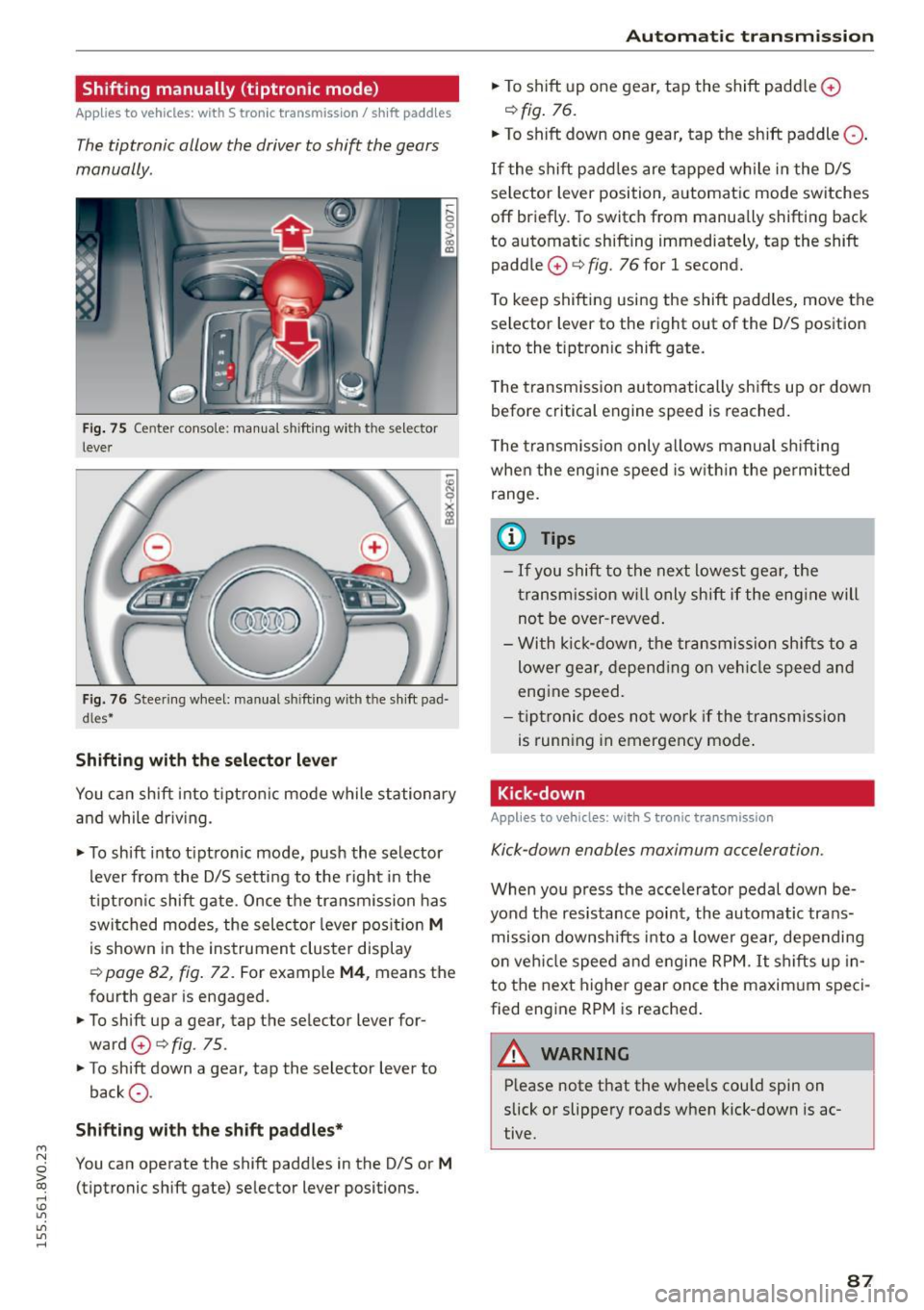
Fig. 75 Center c_onso le: manual shi fting wi th the selec tor
lever
Fig. 76 Steering wheel: manual shi fting with t he shift pad
d les*
Shifting with the selector lever
You can shift into tiptronic mode while stationary
and while driv ing.
• To shift into tip tron ic mode, push the selector
lever from the D/S setting to the right in the
tiptron ic shift gate. Once the transmission has
switched modes, the selecto r lever position
M
is shown in the instrument cluster display
r:::> page 82, fig. 72 . For example M4, means the
fourth gear is engaged.
• To shift up a gear, tap the selector lever for
ward
0 r:::> fig . 75.
• To shift down a gear, tap the selector lever to
back
0 -
Shifting with the shift paddles*
You can operate the shift paddles in the D/S or M
(tiptronic shift gate) selector lever positions.
Automatic transmission
• To shift up one gear, tap the shift padd le 0
r:::> fig. 76.
• To shift down one gear, tap the shift paddle 0 -
If the shift paddles are tapped while in the D/S
selector lever position, automatic mode switches
off briefly. To switch from manually shifting back
to automatic shifting immediately, tap the shift paddle
0 ¢ fig. 76 for 1 second.
To keep shifting using the shift paddles, move the
selector lever to the right out of the D/S position
into the t iptron ic shift gate.
T he transmission automatically shifts up or down
before critical engine speed is reached.
The transmission only allows manual shifting
whe n the engine speed is within the permitted
range.
(0 Tips
- If you shift to the next lowest gear, the
transmission will only shift if the engine will
not be over-revved.
- With kick-down, the transmission shifts to a
lower gear, depending on vehicle speed and
engine speed.
- tiptronic does not work if the transmission
is running in emergency mode .
Kick-down
Applies to vehicles: wit h S tronic transm issio n
Kick-down enables maximum acceleration.
When you press the accelerator pedal down be
yond the resistance point , the automatic trans
mission downsh ifts into a lower gear, depending
on veh icle speed and engine RPM.
It shifts up in
to the next higher gear once the maxim um speci
fied eng ine RPM is reached.
A WARNING ~
Please note that the whee ls cou ld spin on
slick or slippery roads when kick-down is ac
tive .
-
87
Page 90 of 282
Automatic transmission
Launch Control-Program
Applie s to v ehi cles: w ith launch control
The Launch Control Program enables maximum
acceleration .
Requirement: The engine must be at operating
temperature and t he steering wheel must not be
turned.
.,. With the engine running, press the
!~OFFI but
ton briefly one time
l) .
.,. Pull the selector lever back out of the O/S posi
tion briefly to select the S position, or press it
toward the right into the tiptronic position or
select the
Dynamic driving mode in drive se
lect*
~page 112.
.,. Press the brake pedal firmly with your left foot
and hold it all the way down for at least 1 sec
ond.
.,. At the same time, press the gas pedal all the
way down with your right foot until the engine
reaches and stays at a high RPM level.
.,. Remove your left foot from the brake.
_.&. WARNING
- Always adapt your driving to the traffic flow.
- Only use Launch Control when road and traf-
fic conditions allow it and other drivers will
not be endangered or impacted by your driv
ing and the vehicle's acceleration.
- Please note that the drive wheels can spin
and the vehicle can break away when sport
mode is switched on, especially when the
road is slippery.
- Once the vehicle has started moving, press
the
l .1'3 OFF ! button briefly to turn the sport
mode off.
(D Tips
- The transmission temperature may increase
significantly after using the launch control program. If that happens, the program may
1l In vehicles w ith a d rive r infor matio n syste m, a n ESC light
in t he instrument clus ter s tays o n co ntinuo usly and t he
message
Stabilization control (ESC): sport. Warning! Re·
stricted stability
appears temporarily.
88
not be available for a few minutes. It will be
available again after a cool-down period.
- When accelerating using the launch control
program, all vehicle parts are subject to
heavy loads. This can lead to increased wear.
Emergency mode
App lies to vehicles : wi th S t ro ni c t ra nsmi ssio n
In the event of a system malfunction, there is an
emergency program .
If all of the selector lever positions are highlight
ed with a light background in the instrument
cluster display, there is a system malfunction and
the S tronic transmission is running in the emer
gency program. The vehicle can still be driven in
emergency mode, but only with reduced speed
and not in all gears. In some cases, the vehicle
cannot drive in reverse .
(D Note
If the transmission runs in emergency mode,
drive to an authorized Audi dealer or author
ized Audi Service Facility immediately to have
the malfunction corrected.
Transmission malfunction
• Transmission malfunction! Please stop the
vehicle and select P
There is a malfunction in the transmission. Park
the vehicle securely and do not continue driving.
See an authorized Audi dealer or authorized Audi
Service Facility for assistance.
• Transmission overheating! Please stop the
vehicle!
The transmission is too hot and can become dam
aged. Stop and let the transmission cool with the
engine running (at idle) in the P selector lever po
sition. Then the indicator light and the message
turn off, drive to an authorized Audi dealer or au
thorized Audi Service Facility immediately to have.,.
Page 94 of 282

Trailer mode
load" on the label located on the driver's side B
pillar (visible when the door is open). Inflate
trailer tires to trailer and tire manufacturers'
specifications.
Lights
Check to make sure both vehicle and trailer lights
are working properly.
Safety chains
Be sure tra iler safety cha ins are properly connect
ed from the trailer to the hitch on the vehicle.
L eave enough slack in the chains to permit turn
ing corners. When you install safety chains, make
sure they will not drag on the road when you are
driving .
The chains should cross under the trai ler tongue
to prevent it from dropping in case of separation
from the hitch .
Driving instructions
Driving with a trailer always requires extra care
and consideration .
To obta in the best poss ible handling of vehicle
and trailer, please note the following:
.,. Do not tow a loaded tra iler when your car itself
is not loaded.
.. Be especia lly careful when passing other
vehicles.
.. Observe speed limits .
.. Do not drive at the maximum permissible
speed.
.. Always apply brakes early.
.. Monitor the temperature gauge.
Weight distribution
Towing a loaded trai ler with an empty car results
in a high ly unstable distribution of weight. If this
cannot be avoided, drive at very low speeds only
to avoid the risk of losing steering control.
A "balanced" rig is easie r to operate and control.
This means that the tow vehicle should be loaded
to the extent possible and permissible, while
keeping the trailer as light as poss ible under the
circumstances. Whenever possible, transfer
some cargo to the luggage compartment of the
92
tow vehicle while observing tongue load require
ments and vehicle loading considerations.
Speed
The higher the speed, the more diff icult it be
comes for the driver to control the rig. Do not
drive at the maximum permissible speed. Reduce
your speed even more if load, weather or wind
conditions are unfavorab le -particularly when
going downh ill.
Reduce veh icle speed
immediately if the trailer
shows the slightest sign of swaying .
Do not try
to stop the swaying by accelerating.
Observe speed limits. In some areas, speeds for
vehicles towing tra ile rs are lower than fo r regular
vehicles .
Always apply brakes early. When driving down
hill, shift int o a lo wer gear to use the eng ine
braking effect to slow the vehicle . Use of the
brakes alone can cause them to overheat and fail.
Coolant temperature
The coolant temperature gauge¢ page 12 must
be obse rved carefully. The coolant temperature
can increase if you dr ive on long inclines in a low
gear at high engine speeds . Reduce your speed
immediately if the LEDs in the top part of the dis
play turn on .
For more information abo ut ind icator lights, re
fer to. ¢
page 19 .
A WARNING
-
Anyone not properly restrained in a moving
vehicle is at a much greater risk in an acci
dent. Never let anyone ride in your car who is
not proper ly wearing the restraints provided
by Aud i.
Trailer mode notes
Important to know
Your vehicle handles differently when towing a
trai ler because of the additiona l weight and dif
ferent weight distribution . Safety, performance
and economy will greatly depend on how careful-
ly you load your trailer and operate your r ig. ..,.