2015 AUDI S3 SEDAN steering
[x] Cancel search: steeringPage 95 of 282
M N
0 > co ,...., \!) 1.1'1
1.1'1
1.1'1
,....,
Before you actually tow your trailer, practice
turning, stopping and backing up in an area away
from traffic. Keep practicing until you have be
come completely fami liar with the way your ve hi
cle-trailer combination behaves and responds.
Backing up is d iff icu lt and requires practice . Back
i ng up w ith a trailer generally req uires steering
action oppos ite to that when backing up yo ur ve
hi cle without a trailer.
M aintain a g reater distance betwee n your vehicle
and the one in front of yo u. You w ill need more
room to stop. To compensate for the tra iler, you
will need a larger than norma l turning radius.
When passing, remember that yo u cannot acce l
erate as fast as yo u normally would because of
the added load. Make sure you have enough room
to pass. After passing, allow plenty of room for
your trailer before changing lanes again.
Avoid jerky sta rts, sharp turns or rapid lane
changes.
@ Tips
- Do not tow a tra ile r during the break-in peri
od of yo ur vehicle.
- If yo u tow a t railer, you r A udi may require
more frequent ma intenance due to the ex
tra load
~ page 262.
Parking on a slope
Do not park on a slope with a trailer . If it cannot
be avoided, do so only after doing the following:
When parking:
.. Apply the foo t brake .
.. Have someone pla ce chocks under bo th t he ve
hicle and the trailer wheels .
.. With c hocks i n place, s lowly re lease the brakes
u nti l the whee l chocks absorb the load .
.. Turn the wheels towards the c urb .
.. Apply the parking brake .
.. Se lect the P selector lever pos ition.
When restarting after parking :
.. Apply the foot brake .
.. Start the eng ine.
.. Se lect the D/S selector lever posit ion.
Trailer mode
.. Release the pa rking brake and s lowly pull out
an d away from the wheel chocks .
.. Stop and have someone retr ieve the wheel
chocks.
(D Tips
If you move the selector leve r of the automat
i c transm iss ion to P before app ly ing the park
i ng brake and before blocking the wheels, you
may have to use mo re force later to move the
l ever out of the P posit ion.
93
Page 101 of 282

M N
0 > co ,...., \!) 1.1'1
1.1'1
1.1'1
,....,
Switching adaptive cruise control on
"'Pull the lever toward yo u into posit ion (!)
¢fig. 84. ACC: sta ndb y appears in the instru
ment cluster disp lay .
Saving the speed and activating regulation
"'T o save the current speed, press the !SETI
¢ fig. 84 button . T he stored speed is s hown in
the tachomete r LED line @and appears briefly
in the information line @¢
fig. 85.
"' To activate the reg ulation while stationary, you
must press the brake pedal.
Sw itching adaptiv e cruise c ontrol off
"' Push the lever away from you into position @
u nt il it clicks into place. The message
ACC : off
appears .
The stored speed in the L ED line is erased.
@ Indicato r light s
II-adaptive cruise contro l is switched o n. Ob
jects ahead are not detected. The stored speed is
maintained.
• -An object ahead was detected . The adaptive
cruise control system regu lates the speed and
d istance to the object ahead and brakes/acceler
ates automatica lly.
f:i -adaptive cru ise contro l is switched o n. An
object ahead was detected. Yo ur vehicle remains
stopped and w ill not start dr iving automatica lly.
• -The automatic brak ing is no t eno ugh to
maintain a sufficient distance to an object ahead .
You must intervene ¢
page 102, Request for
driver intervention.
© Instrument clu ster display
If adaptive cruise control is not shown in the in
strument cluster display, yo u can call i t up using
the mu ltifunc tion steering wheel buttons
¢page 28.
Based on the g raphics in the display, you can de
termine if the system is ma inta ining a distance to
a vehicle ahead and what that dis tance to this ve
h icle is:
No vehi cle -No object ahead was detected .
Ass is t
White vehicle -An object ahead was de tected .
Re d vehi cle -Request fo r the d river to take action
¢page 102.
Both arrows on the scale© indicate the d istance
to the object ahead. No arrow appears when the
vehicle is on an open road and the re is no object
ahead. If a n object is detected ahead, the a rrow
moves on the sca le.
T he green zone on the sca le indicates the store
distance. For i nformat ion on changing the dis
t a nce, refer to ¢
page 101. If the distance se
l ected is ex ceeded or not reached, the arrow
moves into the red zone on the scale .
_& WARNING
-Using adaptive cruise contro l incorrectly can
cause collisions, other accidents and serious in ju ries.
- If you press the
ISETI button when driving at
speeds be low 20 mph (30 km/h), the vehi
cle acce lerates automatically up to 20 mph
(30 km/h), which is the mi nimum speed
that can be set.
{!) Tips
- If you switch the ignit ion or the adaptive
cruise contro l system off, the set speed is
erased for safety reason.
- The Electronic Stabilization Control (ESC) and Anti-Slip Regulat ion (ASR) both sw itch
on when the adaptive cruise contro l is
switched on . ESC and ASR ca nnot be switch
e d off when adaptive c ruise cont ro l is
sw itched on.
- With the adaptive c ruise control activated
the ESC sport mode cannot be activated .
99
Page 105 of 282

M N
0 > co ,...., \!) ..,.,
..,.,
..,., ,....,
llJ ACC off: manu al cont rol!
This message appea rs if the veh icle rolls back
when sta rting on a slight incline, even tho ugh
ACC is active. Press the brake pedal to prevent
the vehicle from rolling or starting to move.
IIJ ACC : engin e speed
This message appears if the driver has not shifted
up or down in time when the adaptive cruise con
trol is braking or accelerating, causing the vehicle
to exceed or to not reach the permitted eng ine
speed. The adapt ive cr uise control turns off. A
chime sounds as a reminder.
•••
Three wh ite dots appear if a setting cannot be se
lected with the operat ing lever . For example, this
happens if adaptive cruise control cannot be act i
vated when stopped because the dr iver has not
fastened the safety belt.
Doo r op en
Adaptive cruise control cannot be switched on
when the vehicle is stationary and the dr iver's
door is open.
Audi pre sense
Introduction
Applies to vehicles: with Audi pre sense bas ic or Audi pre
sense front
W ith in the limits of the system, p re sense basic
and p re sense fro nt can initiate steps to protect
veh icle o ccupants i n certa in dangerous s itua
tions.
Critical driving situat ions can be recognized by
the pre sense front v ia a network of differe nt ve
h icle systems and can take steps to prepare the
veh icle occ upan ts for a po ten tial coll is ion.
The pre sense front wo rks with a radar sensor and
a video camera*. It also functions within t he lim
i ts of the system when adapt ive cr uise con trol* is
sw itched off.
A ss is t
General information
General information
Applies to vehicles: wit h Audi pre sense front or A udi ada ptive
cruise control
_&. WARNING
A lso follow the gene ral info rmation found on
~ page 9 7, General information.
Audi pre sense basic
Description
App lies to vehicles: wit h Aud i pre sense basic
The function of the pre sense basic is activated at
a speed of 20 mph (30 km/h) or higher .
The following functions can be triggered under certain conditions within the limits of the sys
tem:
- Tensioning of the safety belts (for example,
during heavy braking): the front safety belts
have reversible belt pretensioners. If a col lision
does not occur, the safety belts loosen slightly
and are ready to trigger again .
- Closing the windows and the sunroof* (for ex
ample, when over- or understeering): the w in
dows and the sunroof* close until there is only
a small gap open .
Audi drive select: the deployment time is adapt ed in dynam ic mode.
_&. WARNING ~
The pre sense basic cannot overcome natural
physical laws . It is a system des igned to assist
and it cannot p revent a coll ision. Do not let
the increased safety provided tempt you into
taking r is ks. Thi s co uld inc rease your risk of a
collis ion .
- The system can dep loy incorrectly due to
system-specific limits .
(D Tips
-Certa in p re sense bas ic functions switch off
when ESC is switched off (sport mode) o r
w hen driving in reverse. .,.
103
Page 108 of 282
Ass is t
- Switch the pre sense off when you are load
ing the vehicle onto a vehicle carrier, train,
sh ip or other type of transportation. Th is
can prevent undesired warnings from the pre sense system.
Driver messages
Applies to veh icles: w ith Audi p re se nse or Audi adaptive
cruise control
Audi pr e se nse cu rrently un ava ilable. No sens or
v is ion
This message appea rs if the sensor view is ob
s tructed, for example by leaves, snow, heavy
spray or dirt . Clean the sensor¢
page 97, fig. 81.
Audi pre sense : off
This message appears when the ESC is switched
to sport mode, for example¢
page 124.
Audi p re sen se: sys tem fault!
This message appears when the pre sense func
tion is affected. For example, this cou ld be
caused by a faulty sensor.
If the message stays on, d rive to an au thorized
Aud i dea ler or authorized Audi Service Faci lity to
have the malfunction corrected.
Audi active lane assist
Description
Applies to vehicles : with Audi active lane assist
Active lane ass ist detects lane marker lines with
in the limits of the system using a came ra in the
windshie ld. If you are app roach ing a detected
lane marker line and it appears like ly that you
will leave the lane, the system will warn you with
corrective steering . You can override this steering
at any time. If you pass over a line, the steering
wheel will v ibrate light ly. In order for this warn
ing vibrat ion to occur, it must first be switched
on in the MMI. Active lane assist is operable
when the lane marker line is detected on at least one side of the veh icle.
l) T hi s function is not ava ilable in all cou ntri es.
106
The system will not warn you befo re crossing a
l ane marker line if you have activated the turn
s ignal. In this case, it assumes that you are
changing lanes intentionally.
The system is des igned for driving on express
ways and highways and therefore on ly activates
at speeds above approx imately 40 mph (65 km/
h).
A WARNING
-
- The system warns the driver that the vehicle
is leaving the lane using corrective steering .
The driver is always responsible for keeping
the vehicle within the lane.
- The system can help you keep the vehicle in
the lane, but it does not drive by itself.
Al
ways keep you r hands on the steering
wheel.
- Corrective steer ing may not occur in certa in
situa tions, su ch as during heavy braking.
- There may be cases where the camera does
not recognize all lane ma rker lines. Correc
tive stee ring can only take p lace on the side
of the vehicle where lane marker line5 are
detec ted.
- Othe r road structures or obje cts cou ld possi
b ly be identified un intent ionally as lane
marker l ines . As a result, corrective steering
may be unexpected or may not occur .
- The camera view can be restricted, for ex
ample by vehicles driving ahead or by rain,
snow, heavy spray light shining into the
camera or by d irt on the window. This can
result in active lane ass ist not detecting the
lane marker lines or detecting them incor
rectly.
- In certain situat ions where visibility is low,
the vehicle may switch from "early" to "late"
corrective steering
l l.
- Under certain co nditions such as ruts in the
road, an inclined roadway or crosswinds, the
corrective steering a lone may not be enough
to keep the vehicle in the midd le of the lane.
~
Page 109 of 282
....,
N
0 > co
rl I.O
"'
"'
"'
rl
-For safety reasons, act ive lane assist must
not be used when there are poor road and/
or weather conditions such as slippery
roads, fog, gravel, heavy rain, snow and the
potent ial for hydroplaning. Us ing active lane
assist under these conditions may increase
the risk of a crash.
Switching on and off
A ppl ies to vehicles: with Audi ac tive lane assis t
•
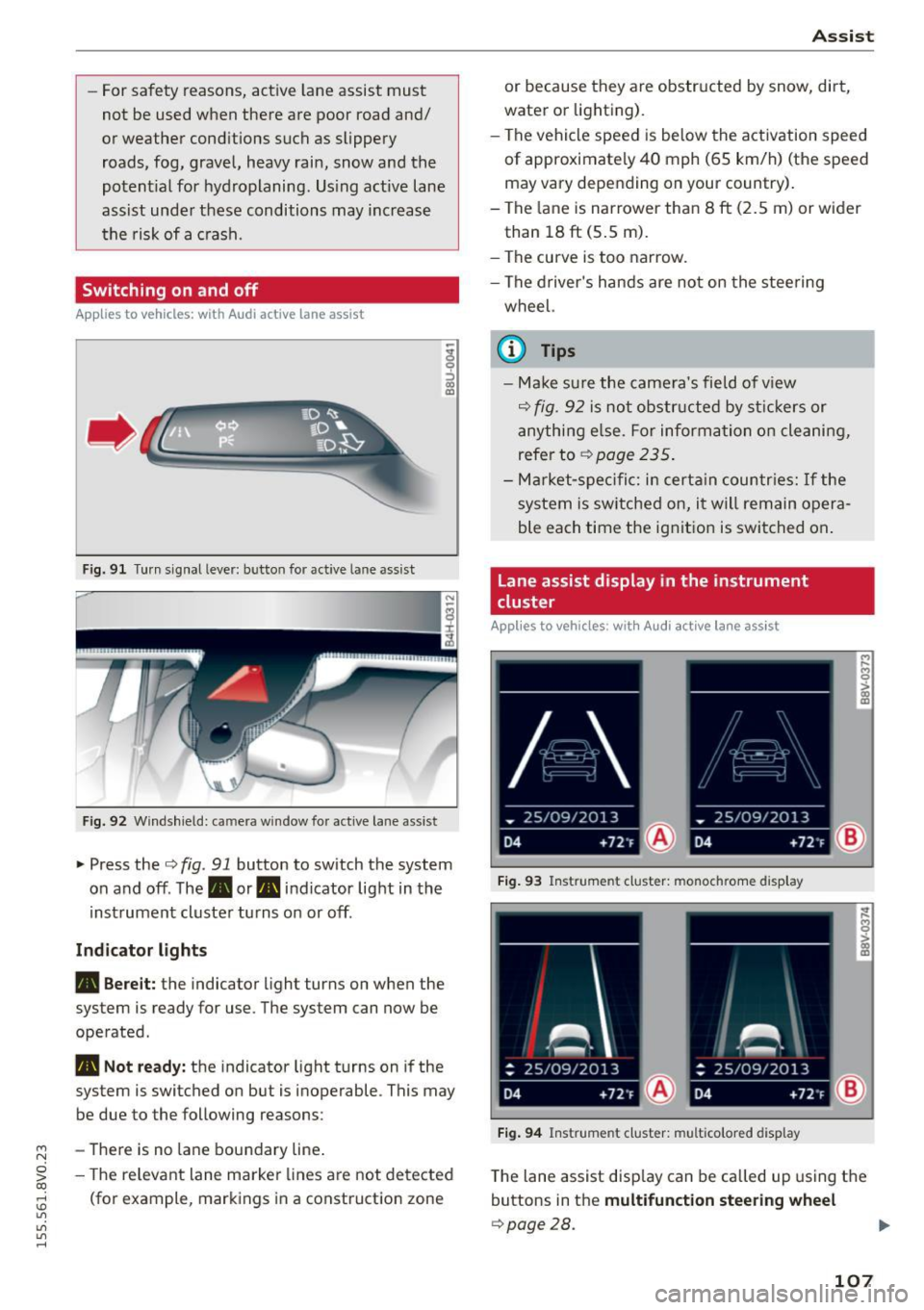
Fig. 91 Turn s ignal lever: but ton for active lane assist
Fig. 92 W indsh ield: camera w indow fo r active lane assist
~ Press the Q fig. 91 button to switch the system
on and off. The. or. indicator light in the
inst rument cluster turns on or off.
Ind icat or light s
• Bere it:
the indicator light turns on when the
system is ready for use. The system can now be
operated .
• Not read y: the indicator light turns on if the
system is switched on but is inoperable . This may
be due to the following reasons:
- There is no lane boundary line .
- The re levant lane marke r lines a re not detected
(for example, markings in a construction zone
A ssi st
or because they a re obstr ucted by snow, dirt,
water or lighting).
- The vehicle speed is be low the activation speed
of approximately 40 mph (65 km/h) (the speed
may vary depending on your country) .
- The la ne is nar rower than 8
ft (2.5 m) or wider
than 18
ft (5 .5 m).
- The curve is too narrow.
- The driver's hands are not on the stee ring
wheel.
a) Tips
- Make sure the came ra's field of v iew
Q fig. 92 is not obstr ucted by st ic kers or
anything e lse. For informa tion o n cleaning,
refer to
~ page 235.
-Ma rket -s pe ci fic: i n certa in countr ies: If the
system is sw itched on, i t will remain opera
ble each time the ignit ion is switched on .
Lane assist display in the instrument
cluster
App lies to vehicles: wit h Audi a ctive la ne ass ist
F ig . 93 Instrument cluster: monochrome display
Fi g. 94 Instrument cluster: multicolored display
M
~ > a,
a,
T he lane assist disp lay can be called up us ing the
buttons in the
multifunct ion steering wheel
Q page28.
107
Page 110 of 282
Assist Monochrome display
Refer to¢ fig. 93
® solid lines: active lane ass ist is switched
on and ready to provide warnings on the
side that is ind icated.
® blinking line (left or r ight): active lane as -
sist is warning you by a vibration in the
steering whee l that you are leaving the
lane.
® unfilled line(s): lane assist is activated,
but not ready to give warn ing
no lines: active lane assist is switched off .
Multicolored display
Refer to¢ fig. 94
® solid white lines: active lane assist is
switched on and ready to provide warn-
ings on the side that is indic ated.
® red line (left or rig ht): active lane assist is
warn ing you by a v ibration in the steer ing
wheel that you are leaving the lane .
® solid gray lines: lane assist is activated,
but not ready to give warning
no lines: active lane assist is switched off .
Messages in the instrument cluster display
If the active lane ass ist has a malfunction, the
ra, indicator light in the inst rument cluste r dis
play turns off and one of the following messages
appears:
Audi active lane assist: currently not available.
No camera view
This message appears if the camera is unab le to
detect the lines . Th is could happen if:
- The camera field of view ¢
page 107, fig. 92 is
dirty or cove red in ice . Clean this area on the
windshield.
- The came ra f ield of view is fogged over. Wait
u nt il the fog has cleared before switching the
active lane assist on again.
- The system has been unable to detect the lanes
for an extended period of time due to road con-
l) Thi s fun ctio n is not available in all cou ntri es.
108
ditions. Switch the active lane assist back on
when the lines are more visib le.
Audi active lane assist: Currently unavailable
There is a temporary active lane assist malfunc
tion . Try switching the active lane assist on again
l ate r.
Audi active lane assist: system fault!
Drive to an authorized A udi dealer or authorized
Audi Service Facility immed iate ly to have the
malfunction corrected.
ra, Audi active lane assist: Please continue
steering vehicle!
This message appears if you are not steering by
you rself. If this is the case, active lane assist does
not switch off, but it is "not ready" to provide a
warning. The system can he lp you keep the vehi
cle in the lane. However, you are responsible for
driving the veh icle and must steer it yourse lf.
Adjusting the steering time and vibration
warning
Applies to vehicles: with Audi active lane assist
You can adjust individual active lane assist set
tings in the MMI.
.,. Select: the I MENU I button> Car > Systems *
control button > Driver assistance > Audi active
lane assist .
Steering time
1>
Early: in this setting, the corrective steering hap
pens continuously to help keep the vehicle in the
center of the lane.
Late : in this setting, the system provides correc
tive steering just before a vehicle whee l touches a
detected lane marker line .
Vibration warning
You can switch the additional vibrating warning
i n the steer ing whee l on or off.
II>
Page 114 of 282

Assist Driver messages
Appl ies to vehicles: with Audi side assist
If the side assist switches off automatically, a
message appears in the instrument cluster dis
p la y.
@j Audi side assist: currently unavailable.
No sensor vision
The radar sensors' vision is affected. Do not cover
the area in front of the sensors with bike wheels,
stickers, dirt or other objects. Clean the area in
front of the sensors, if necessary
r:!> page 110,
fig. 98.
@j Audi side assist: currently unavailable
Side assist cannot be switched on temporarily be
cause there is a ma lfunction (for examp le, the
battery charge level may be too low).
@j Audi side assist: System fault!
The system cannot guarantee that it will detect
veh icles correctly and it is switched off. The sen
sors have been displaced or are faulty. Have the
system checked by an authorized Audi dealer or
authorized Audi Service Facility soon.
Audi drive select (drive
settings)
Introduction
Applies to vehicles: with Audi drive select
Audi drive select makes it possible to experience
different types of vehicle settings in one vehicle.
The driver can select from three
Comfort, Auto
and Dynamic modes using the ~.7l.'i button in the
center console or the MMI to switch between a
sporty and a comfortable driving mode, for ex
ample . In the
individual* mode, the settings can
be adjusted to your personal preferences . This
makes it possib le to combine settings such as a
sporty engine tun ing with light steering .
.,&. WARNING
Using Audi drive select incorrect ly can lead to
collisions, other accidents and serious inju
ries.
112
· Description
Applies to vehicles: with Audi drive se lect
The vehicle setup in each mode depends on the
vehicle's features. However , the eng ine and steer
ing are always affected.
Engine and automatic transmission
Depending on the mode, the engine and auto
matic transmission* respond more qu ickly or in a
more balanced manner to accelerator peda l
movements .
Adaptive dampers (Audi magnetic ride)*
The adaptive dampers use sensors to record in
format ion regarding steer ing movements, brak
ing and acce lerat ion operations by the driver,
road surface, dr iv ing speed, and load. With Audi
drive select you can adjust the adaptive dampers
sporty (dynamic), comfortable (comfort) or bal
anced (auto).
Steering
T he steer ing adapts in terms of steer ing ass is
tance. There a re diffe rent modes
Q page 113.
Indirect steering that moves easily as in comfort
mode is especia lly suited to long drives on a high
way. The dynamic mode provides sporty, direct
steering .
For vehicles with progressive steering* the steer
ing performance is more agi le .
Cornering light*
The cornering light adjusts when driv ing on
curves at speeds between 6 mph (10 km/h) and
68 mph (110 km/h). The pivoting action and the
lig hting are also adapted to the mode.
Adaptive cruise control*
The behavior when accelerating can be adjusted
from comfortable to sporty, depending on the
Audi drive select mode. Adaptive cruise control
also responds to the driving behavior of the vehi
cle ahead in a more conservative or sporty man
ner.
Page 115 of 282
....,
N
0 > co
rl I.O
"'
"'
"'
rl
@ Tips
In some models, the maximum vehicle speed
can only be reached in the auto and dynamic
modes.
Selecting the driving mode
A ppl ies to vehicles: with Audi drive select
You con choose between comfort, auto, dynamic
and individual* .
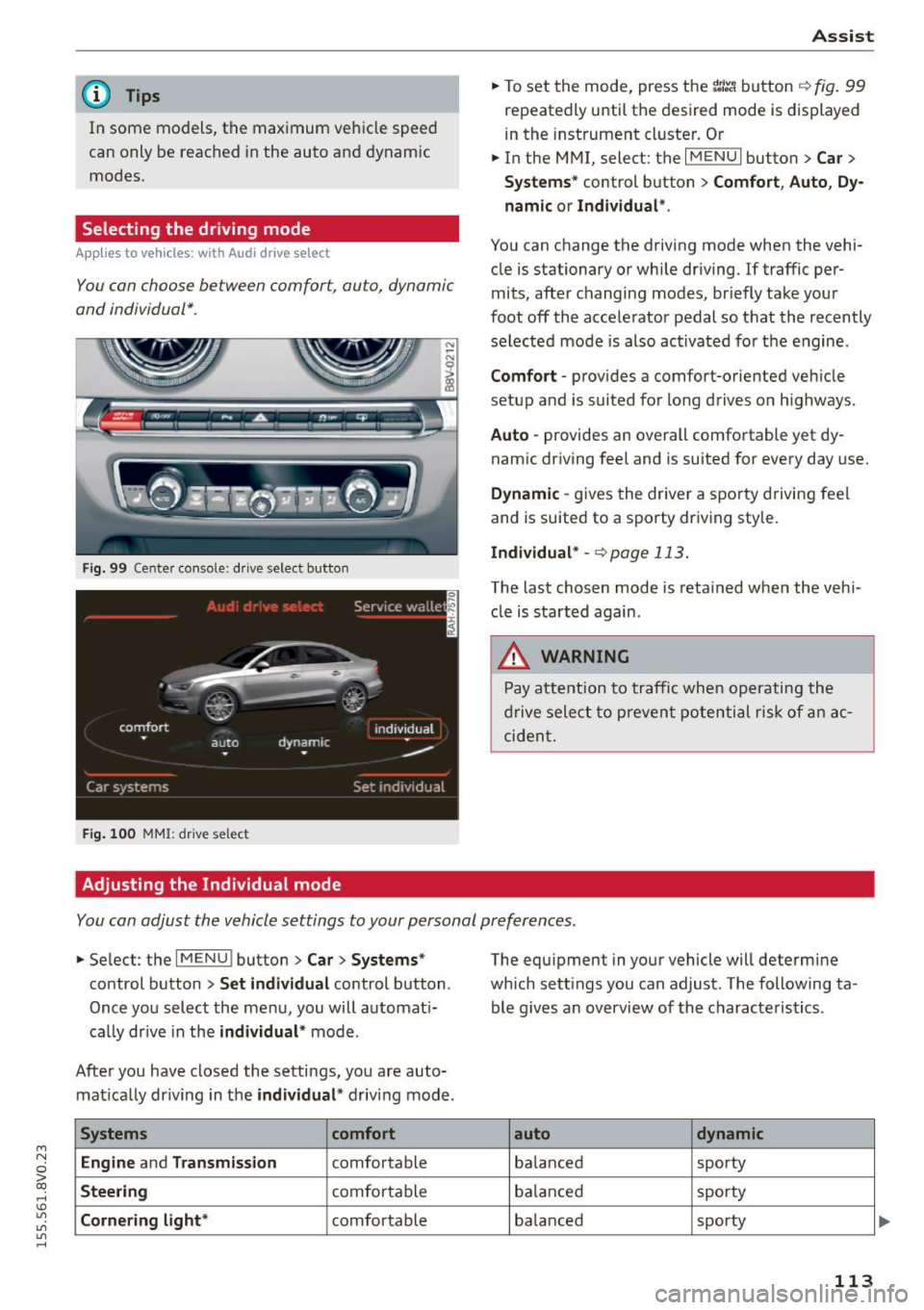
Fig. 99 Center console: dr ive selec t button
Fig . 100 MMI : drive select
Adjusting the Individual mode Assist
.,.
To set the mode, press the r:1:.~ button ~ fig. 99
repeatedly until the desired mode is displayed
in the instrument cluster. Or
.,. In the MMI, select: the
I MENU I button >C ar>
Systems"
control button > Comfort, Auto, Dy
namic or Individual ".
You can change the driving mode when the vehi
cle is stationary or while driving.
If traffic per
mits, after changing modes, briefly take your
foot off the accelerator pedal so that the recently
selected mode is also activated for the engine .
Comfort -provides a comfort-oriented vehicle
setup and is suited for long drives o n highways.
Auto -provides an overall comfortable yet dy
namic driving feel and is suited for every day use.
Dynamic -gives the driver a sporty driving feel
and is suited to a sporty driving sty le.
Individual* -<=>page 113.
The last chosen mode is retained when the veh i
cle is started again .
.&, WARNING
-Pay attention to traffic when operating the
drive select to prevent potential risk of an ac
cident.
You con adjust the vehicle settings to your personal preferences .
.,. Select : the IMENU ! button> Car> Systems*
control button > Set individual control button .
Once you select the menu, you will automat i
ca lly dr ive in the
individual* mode .
After you have closed the settings, you are auto mat ically dr iving in the
individual * driving mode .
Systems comfort
Engine
and Transmission comfortable
Steering comfortable
Cornering light* comfortable The equipment
in your vehicle will determine
which sett ings you can adjust. The following ta
ble g ives an overview of the characteristics .
auto dynamic
balanced sporty
balanced sporty
ba lanced sporty
113