2015 AUDI S3 SEDAN steering
[x] Cancel search: steeringPage 121 of 282
....,
N
0 > co
rl I.O
"'
"'
"'
rl
Switching on/off
Applies to vehicles: with parking system plus w it h rearv iew
camera
Switching on
• Shift into reverse, or
• Press the
P~A button in the center console
¢page 117, fig. 102. A short confirmation
tone sounds and the LED in the button turns
on.
Switching between the rearview camera and
optical display
• Press the Graphic control button ®
r::!.>page 119, fig . 108 to see the optica l display.
• Press the
Rear view contro l button to see the
rearview camera image.
Switching off
• Drive faster than 6 mph (10 km/h), or
• Press the
P,qA button, or
• switch the ign ition off.
@ Tips
The v isual display in the left pa rt of the dis
play should he lp you detect the critical veh icle
areas.
Cross parking
Appl ies to vehicles : with parking system plus with rearview
camera
This view may be used when parking in a garage
or in a parking space.
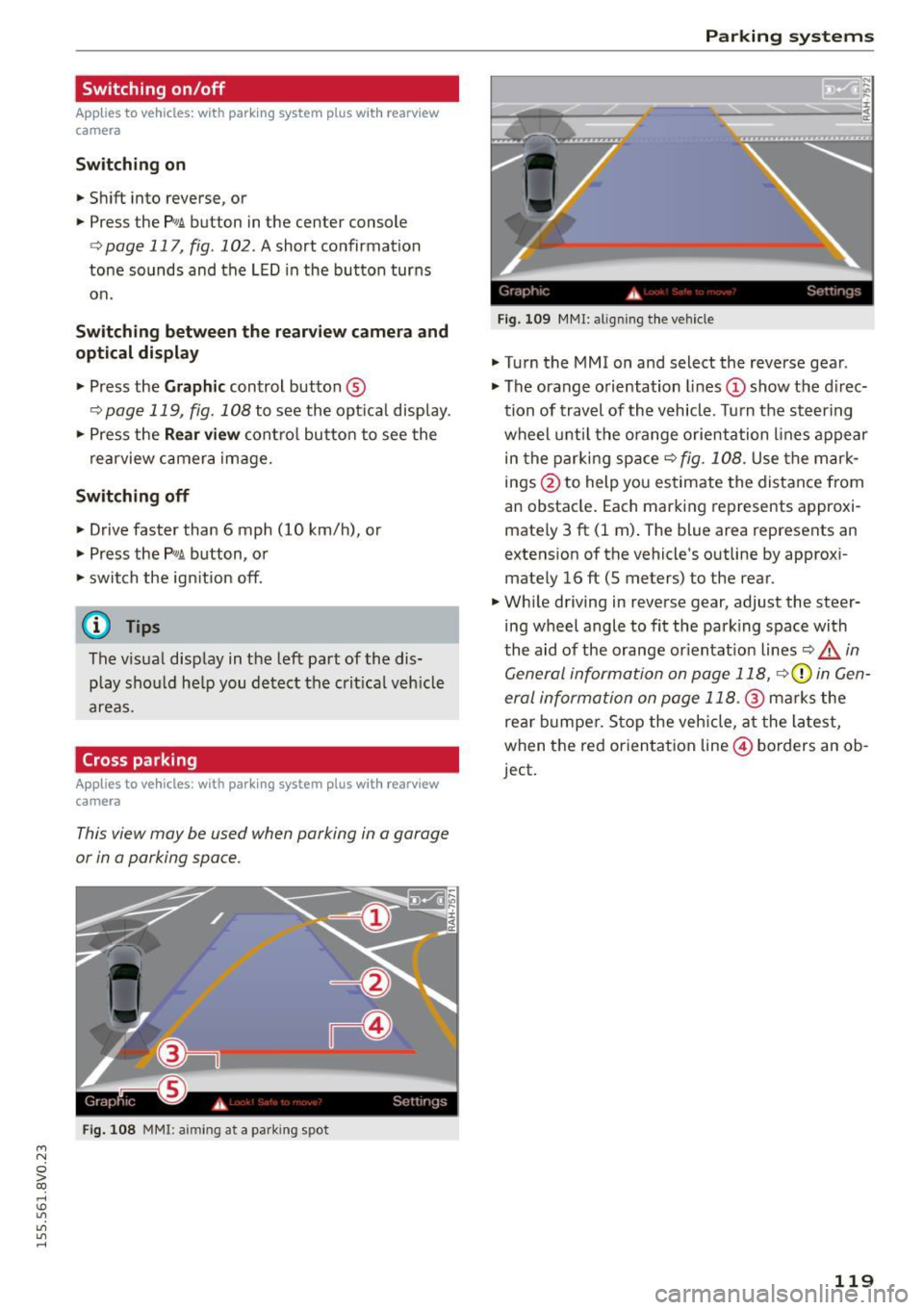
Fi g. 108 MMI: aiming at a park ing spot
Parking systems
Gr,11;t I( i._ S,·T .. 1',lJ',
Fig. 109 MMI : aligning t he veh icle
• Turn the MM I on and select the reverse gear .
• The orange orientation lines
(D show the direc
tion of travel of the vehicle . Turn the steering
wheel unt il the orange orientation lines appear
in the parking space¢
fig. 108. Use the mark
in gs @ to help you estimate the distance from
an obstacle . Each marking represents approxi
mately 3 ft (1 m) . The blue area represents an
extens ion of the vehicle 's outline by approxi
mate ly 16 ft (5 meters) to the rear.
• Wh ile driving in reverse gear, adjust the steer
ing wheel angle to fit the park ing space with
the aid of the orange or ientat ion lines
Q A in
General information on page 118,
r::!.>0 in Gen
eral information on page 118.@
marks the
rea r bumper . S top the vehicle, at the latest,
when the red orienta tion line © borders an ob
ject.
119
Page 122 of 282

Parking systems
Parallel parking
Applies to veh icles: w ith pa rk in g system p lus w it h rearv iew
camera
This view may be used when parallel parking
along the side of a street .
Fig. 110 MMI: blue surface aligned wit h parking spot
Fig. 111 MMI: contact of the blue curved line with the curb
Park ing on the right is described here. It is iden
tical when parking on the left .
If there is an obstacle next to the park ing space
(such as a wall), refer to "Information for parking
next to obstacles" ¢
page 120 .
.,. Turn on the right turn signal.
.,. Position your vehicle next to a parked vehicle in
front of the desired parking space. The distance
to this veh icle should be approximately 3 ft (1
m) .
.,. Turn the MMI on and select the reverse gear .
The park ing system is turned on and the
cross
parking indicator is displayed.
.,. Press the control button on the MMI-controls
to select
(D ¢ fig. 110. The parallel parking in
dicator is displayed .
.,. Back up and al ign your vehicle so the blue area
@ borders on the rear end of the vehicle behind
you or on the parking space line¢.&.
in Gener-
120
al information on page 118, ¢(Din General in
formation on page 118 .
The blue area repre
sents an extension of the vehicle's outline by
approximately 16
ft (5 meters) to the rear. The
long side of the blue area should be on the
curb . The entire b lue area must fit into the
parking space .
.,. With the vehicle stopped, turn the steering
wheel to the right as far as it will go .
.,. Back into the parking space until the blue curve
¢
fig. 111 touches the curb¢.&. in General in
formation on page 118, ¢(Din General infor
mation on page 118.
Stop the vehicle .
.,. With the vehicle stopped, turn the steering
wheel to the left as far as it will go .
.,. Continue to back into the parking space until
the vehicle is parked parallel to the curb¢.&.
in General information on page 118, ¢CI) in
General information on page 118 .@
marks
the rear bumper. Stop the vehicle, at the latest,
when the red orientat ion line @ borders an ob
ject. Keep an eye on the front of your vehicle
while doing this.
Parking next to obstacles
If there is an obstacle (such as a wall) next to the
parking space, position the veh icle so there is
more space on that side. Position the long side of
the blue surface so that there is suff icient space
from the obstacle. The surface must not be
touching . You will also need to start turning the
steering wheel much earlier. The blue curve
¢ fig. 111 must not touch the obstacle and
should have sufficient room .
(D Note
Keep enough distance from the curb to avo id
damage to the rims.
¢j) Tips
The left or right orientation lines and surfaces
will be disp layed, depending on the turn sig
nal being used.
Page 125 of 282
M N
0 > co ,...., \!) 1.1"1
1.1"1
1.1"1
,....,
shared, please see your contract with the
wireless telecommunications provider and the
"About Aud i connect" tab in your vehicle's
MMI: ! MENUI button> Audi connect > About
Audi connect .
Electronic stabilization
control (ESC)
Description
The E lectronic Stabilization Contro l (ESC) reinfor
ces driver safety. It reduces the risk of slipping
and improves driving stability. ESC detects criti
cal s ituations such as the vehicle oversteering
and understeering or the wheels a re spinning.
The vehicle is stabilized by applying the brakes or
reducing engine torque. Once the ESC is activat
ed, the indicator light
DJ blinks in the instru
ment cluster.
The fol low ing systems a re integrated in the ESC:
Anti-lock braking system (ABS)
ABS prevents the wheels from locking when brak
i ng. The vehicle can still be steered even during
hard braking . Apply steady pressure to the brake
pedal. Do not pump the pedal. A pulsing in the
brake pedal ind icates that the system is acting to
stabilize the vehicle .
Brake assist system
The brake assist system can decrease braking d is
tance . It increases braking power when the driver
presses the brake pedal quickly in emergency s it
uations. You must press and hold the brake pedal
unti l the dangerous sit uation is ove r. In vehicles
with adaptive cruise control *, the brake assist
system is more sensit ive if the distance detected
to the vehicle ahead is too small.
Anti-slip regulation (ASR)
ASR reduces engine power when the drive whee ls
begin spinning and adapts the force to the road
conditions. This makes it easier to start, acceler
ate and drive up inclines.
Intelligent Technology
Electronic differential lock (EDL)
The EDL brakes whee ls that are spinning and
trans fers the drive power to the other drive wheel
or whee ls if the vehicle is equipped with all wheel
drive*). This function is not available at higher
speeds.
In extreme cases, EDL automatically switches off
to keep the brake on the braked wheel from over
heating. The vehicle is still working correct ly. EDL
will switch on again automatically when condi
tions have returned to normal.
Steering recommendation
The ESC helps to stabilize the vehicle by changing
the steering torque .
Selective wheel torque control
Selective wheel torque control is used when dr iv
i ng on curves. The front wheel on the inside of
the curve o r both wheels on the inside of the
curve are braked selectively as needed . This al
lows more precise driving in curves .
Automatic post-collision braking system
The "Automat ic post -collision braking system"
can help to reduce the ris k of sliding and of other
collisions after an accident. If the airbag control
module detects a collision above a certain vehicle
speed, the vehicle is braked by the ESC.
T he vehicle does not brake automatically if:
- the driver presses the accelerator pedal, or
- the braking force generated by the pressed
brake pedal is greater than the brak ing force
that would be initiated by the system, or
- the ESC, the brake system or the vehicle electr i
cal system are not funct ion ing .
A WARNING
-The ESC and its integrated systems cannot
overcome the limits posed by natural phys i
cal laws. This is especially important on slip
pery or wet roads .
If the systems begin act
ing to stabilize your vehicle, you should im-
mediately a lter your speed to match the ..,.
123
Page 128 of 282

Intelligent Technology
& WARNING
-New brake pads do not achieve their full
braking effect during the first 250 mi
(400 km). They must be "broken in" first .
However, you can compensate for the slight·
ly reduced braking force by pressing firmly
on the brake pedal. Avoid heavy braking dur·
ing the break-in period.
- Alway apply the brakes for the purpose of
cleaning the brake system when road and
traffic conditions permit. You must not en·
danger other road users. This increases the
risk of an accident.
- On steep slopes , reduce the speed and se
lect a lower gear or lower selector lever po·
sition. Drive as little as possible while press· ing the brake pedal and avoid putting your
left foot on the brake pedal while driving.
This could cause the brakes to overheat and impair the efficiency of the brakes .
- Do not let the brakes "grind" by always
keeping your foot on the brake pedal. This
can cause the brakes to overheat, increase
wear and increase braking distance unneces·
sarily.
- Certain weather and operating conditions
such as driving through water, driving in
heavy rain or driving after washing your
ve·
hide can impair the effectiveness of the
brakes. In the winter, ice may build up on
the brake pads, rotors and drums. Check
these components by braking carefully. Ap·
plying the brakes carefully several times
dries the brakes and removes ice build-up .
- The efficiency of the brakes can also be im·
paired by driving for long stretches on roads
covered with salt without using the brakes.
You can
remove salt deposits from the brake
rotors and pads by carefully applying the
brakes several times.
- If the front spoiler is damaged or you install
another spoiler, make sure the front wheel
brakes are ventilated properly . Otherwise,
the brake system could overheat, which re·
duces their effectiveness.
- Failure of a brake circuit impairs braking
performance, which increases braking dis·
126
tance. Avoid driving the vehicle and have it
towed it to the nearest authorized Audi
dealer or authorized Audi Service Facility .
- Never let the vehicle roll while the engine is
stopped because this increases the risk of an
accident .
-If the brake booster is not working, you will
have to press much harder on the brake ped·
al to compensate for the lack of the booster .
(D Note
-Never let the brakes "rub" by pressing the
pedal lightly when braking is not really nee·
essary. This causes the brakes to overheat
and increases braking distance and causes
wear .
- Before driving on a long stretch with steep
slopes, reduce your speed and shift to the
next lower gear This makes use of the en·
gine braking effect and relieves the brakes .
If you need to brake additionally, brake in
intervals and not continuously.
(D Tips
-If the brake booster is not working, you
must press the brake pedal with much more
force then normal.
- If you retrofit your vehicle with a front spoil·
er, wheel covers or similar items, make sure
that the air flow to the front wheels is not
interrupted. Otherwise the brake system
can become too hot.
Electromechanical
steering
The electromechanical steering supports the
driver's steering movements .
Power steering adapts electronically based on
the vehicle speed.
T he vehicle still has full steering functionality if
the power steering fails or when the engine is
stopped (towing). To steer, you must apply much
more force than usual.
Indicator lights and messages
• Do not drive vehicle: steering defective
Page 129 of 282
M N
0 > co ,...., \!) 1.1'1
1.1'1
1.1'1
,....,
If th is indicator light turns on and stays on and
this message appears, the power steering may have failed .
Do
not continue driving. See an authorized Aud i
dea ler or autho rized Audi Service Facility for as
sistance.
• Do not drive vehicle: steering defective
There is a malfunction in the electron ic steering
l ock. You cannot turn the ignition on .
Do
not tow your vehicle because it cannot be
steered. See an authorized Aud i dealer or author
ized Audi Service Fac ility for assistance .
'-:r,ij Steering malfunction: you can continue driv
ing
If the indicator light turns on, the steering whee l
may be more difficult to move or more sensitive
than usual. The steering wheel may also be at an
angle when dr iving straight.
Drive slow ly to an authorized Audi dealer or au
thor ized Audi Se rvice Facility to have the ma l
function corrected.
!II Steering lock: system fault! Please contact
Service
There is a malfunct ion in the electron ic steering
l oc k.
Drive to an authorized Aud i dealer or authorized
Aud i Service Facility immediately to have the
malfunction corrected.
_& WARNING
-
Have the system malfunction corrected as
soon as possible by an authorized Audi dealer
or authorized Audi Service Faci lity, as th is in
creases the risk of an accident .
(D Tips
If
the . or ,-:r-n indicator light only stays on
for a short time, you may continue driving.
Intelligent Technology
All wheel drive (quattro)
Applies to vehicles: with all w heel drive
In all wheel drive, all four wheels are powered.
General information
In all wheel dr ive, the dr iv in g power is divided be
tween all four whee ls . T his happens automatical
ly depending on your driving behavior as well as
the current road conditions . Refer to¢
page 123,
Electronic stabilization control (ESC).
The all wheel drive concept is designed for high
engine power. Your vehicle is exceptionally pow
erfu l and has excellent driving characteristics
both under normal driving conditions and on
snow and ice. Always read and follow safety pre cautions
q ,& .
Winter tires
By using all wheel drive, your vehicle has good
forward motion with standard tires in winter con
ditions. However, in winter we recommend using
winter or all season tires on
all four wheels, be
cause this will improve the
braking effect .
Snow chains
If
there are snow chain laws, snow chains must
also be used on vehicles with all wheel drive
q page 230, Snow chains.
Replacing tires
For vehicles with all wheel d rive, only wheels wi th
the same rolling circumference should be used.
Avoid wheels with different tread depths
qpage 221.
Offroad vehicle?
Your Audi is not an offroad vehicle -there is not
enough ground clearance. For this reason, avoid
difficult terra in. Refer to¢
page 259.
_& WARNING ~
-Also, in vehicles with a ll wheel drive, adapt
your driving style to the current road and
traffic cond itions . Do not let the increased
safety provided tempt you into taking risks.
- The braking ability of your veh icle is limited
to the tract ion of the wheels. In th is way, it
127
Page 132 of 282
Driving safety
Driving safety
Basics
Safe driving habits
Please remember -safe ty first!
This chapter contains important information,
tips, instructions and warnings that you need to
read and observe for your own safety, the safety
of your passengers and others. We have summar ized here what you need to know about safety
belts, airbags, child restraints as well as child
safety. Your safety is for us
priority number 1. Al
ways observe the information and warnings in
this section - for your own safety as well as that
of your passengers .
The information in this section applies to all
model versions of your vehicle . Some of the fea
tures described in this sections may be standard
equipment on some models, or may be optional
equipment on others. If you are not sure, ask
your authorized Audi dealer.
A WARNING
- Always make sure that you follow the in
structions and heed the WARNINGS in this
Manual.
It is in your interest and in the in
terest of your passengers.
- Always keep the complete Owner's Litera
ture in your Audi when you lend or sell your
vehicle so that this important information
will always be available to the driver and
passengers.
-
- Always keep the Owner's literature handy so
that you can find it easily if you have ques
tions .
- Always adjust your speed to the weather
traffic and conditions. Follow the speed lim
its .
- Always drive in such a way that you can stop
your vehicle safely.
- Always adjust your speed to the general
flow of traffic. Follow the speed limits.
130 ·
Safety equipment
The safety features are part of the occupant re
straint system and work together to help reduce the risk of injury in a wide variety of accident sit
uations.
Your safety and the safety of your passengers
should not be left to chance. Advances in tech
nology have made a variety of features available
to help reduce the risk of injury in an accident.
The following is a list of just a few of the safety
features in your Audi:
- sophisticated safety belts for driver and all pas-
senger seating positions,
- safety belt pretensioners,
- safety belt force limiters for the front seats,
- safety belt height adjustment systems for the
front seats,
- front airbags,
- knee airbags for the front seats*
- side airbags in the front seats and outer rear
seats*,
- side curtain airbags with ejection mitigation
features,
- special LATCH anchorages for child restraints,
- head restraints for each seating position,
- adjustable steering column .
- pre sense basic* (preventative passenger pro- tection)
These individual safety features, can work to gether as a system to help protect you and your
passengers in a wide range of accidents . These
features cannot work as a system if they are not
always correctly adjusted and correctly used .
Safety is everybody's responsibility!
Important things to do before driving
Safety is everybody's job! Vehicle and occupant
safety always depends on the informed and care
ful driver .
For your safety and the safety of your passen
gers,
before driving always:
.. Make sure that all lights and signals are operat
ing correctly .
.. Make sure that the tire pressure is correct. ..,.
Page 133 of 282
....,
N
0 > co
rl I.O
"'
"'
"'
rl
.. Make sure that a ll windows are clean and afford
good visibility to the outside .
.. Secure all luggage and other items carefully
r=> page 59, r=> page 59.
.. Make sure that nothing can interfere with the
pedals.
.. Adjust front seat, head restraint and mirrors
correct ly for your he ight.
.,. Instruct passengers to adjust the head re
stra ints according to their he ight .
.. Make sure to use the right child restraint cor
rect ly to protect children
r=> page 172, Child
safety .
.. Sit properly in your seat and make sure that
your passengers do the same
r=> page 54, Front
seats .
.. Fasten your safety belt and wear it proper ly. Al
so instruct your passengers to fasten their safe
ty belts p roperly
r=> page 140.
What impairs driving safety?
Safe driving is directly related to the condition of
the vehicle, the driver as well as the driver 's abili
ty to concentrate on the road without being dis
tracted.
The driver is respons ible for the safety of the ve
h icle and all of its occupants.
If your ability to
d rive is impaired, safety r isks for everybody in the
veh icle increase and you also become a hazard to
eve ryone else on the road
r=> &, . Therefo re:
.. Do not let you rself be distracted by passengers
or by using a cellular telephone .
.. NEV ER dr ive when your dr iv ing abili ty is im
paired (by medicat ions, alcohol, drugs, etc.).
.. Observe all traffic laws, rules of the road and
speed limits and plain common sense.
.. ALWAYS adjust your speed to road, traffic and
weather conditions.
.. Take frequent breaks on long trips. Do not dr ive
for more than two hours at a stretch .
.,. Do NOT drive when you are t ired, under pres
su re or when you a re stressed.
Dri vin g s afe ty
A WARNING
-Impaired dr iving safety increases the risk of
serious personal injury and death wheneve r a
vehicle is being used .
Correct passenger
seating positions
Proper seating position for the driver
The proper driver seating position is important
for safe, relaxed driving.
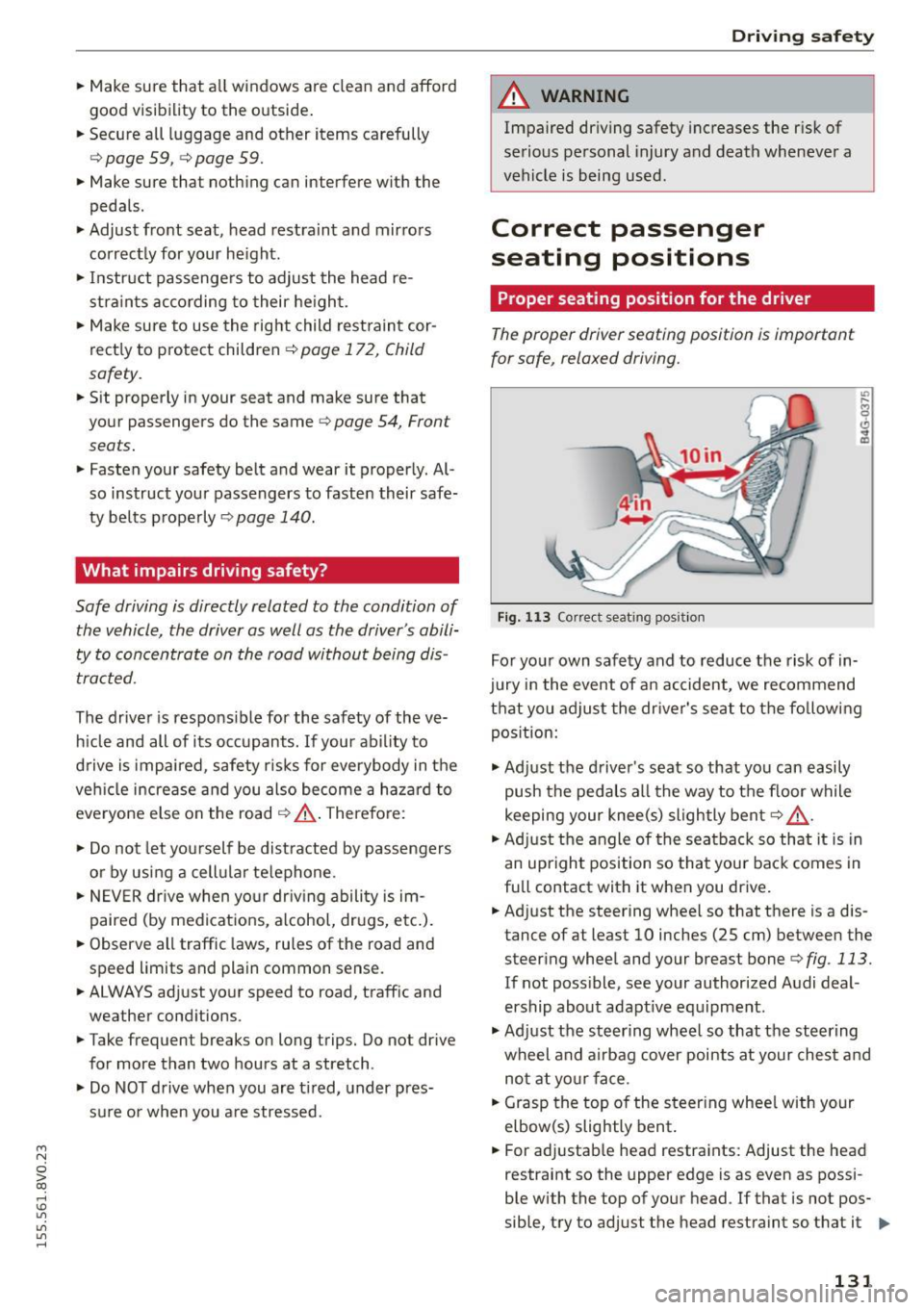
F ig , 1 13 Correct seating pos it ion
For yo ur own safety and to reduce the risk of in
jury in the event of a n accident, we recommend
that you adjust the dr iver's seat to the fo llowing
pos ition:
.,. Ad just the driver's seat so that you can easily
push the pedals all the way to the floor while
keeping your knee(s) slightly bent
r=> &, .
.. Ad just t he angle of the seatbac k so that it is in
an upright position so that your back comes in
full contact with it when you drive .
.. Adjust the steering whee l so that there is a dis
tance of at least 10 inches (25 cm) between the steering wheel and your breast bone
r=> fig. 113.
If not poss ible, see your authorized Audi deal
ership about adapt ive eq uipment.
.,. Ad just the steering wheel so that the steering
wheel and airbag cover points at your che st a nd
no t at yo ur face .
.. Grasp the top of the steer ing whee l with your
elbow(s) slightly bent .
.. For adjustab le head restraints: Adjust the head
restraint so the upper edge is as even as possi-
ble with the top of your head . If that is not pos
sible, try to adj ust the head restraint so that it .,.
131
Page 134 of 282
Driving safety
is as close to this position as possible. Move the
head restraint so that it is as close to the back
of the head as possible.
.. Fa sten and wear safety belt s correctly
<=> page 143.
.. Always keep both feet in the footwell so that
you are in control of the veh icle at all times.
For detailed information on how to adjust the
driver's seat, see
<=> page 55 .
A WARNING
Drivers who are unbelted, out of position or
too close to the airbag can be seriously in
jured by an airbag as it unfolds. To help re
duce the risk of serious personal injury:
- Always adjust the dr iver's seat and the
steering wheel so that there are at least
10 inches (25 cm) between your breastbone
and the steering wheel.
- Always adjust the driver's seat and the
steering wheel so that there are at least
4 inches (10 cm) between the knees and the
lower part of the instrument panel.
- Always hold the steering wheel on the out
side of the steering wheel rim with your
hands at the 9 o'clock and 3 o'clock posi
tions to help reduce the risk of personal in
jury if the driver's airbag inflates .
- Never hold the steering wheel at the
12 o'clock position or with your hands at
other positions inside the steering wheel
rim or on the steering wheel hub . Holding
the steering wheel the wrong way can cause
serious injuries to the hands, arms and head
if the driver's airbag inflates.
- Pointing the steering wheel toward your
face decreases the ability of the supplemen
tal driver's airbag to protect you in a colli
sion.
- Always sit in an upright position and never
lean against or place any part of your body
too close to the area where the airbags are
located.
- Before driving, always adjust the front seats
properly and make sure that all passengers
are properly restrained.
132
- For adjustable head restraints: before driv
ing, always also adjust the head restraints
properly .
- Never adjust the seats while the vehicle is
moving. Your seat may move unexpectedly
and you could lose control of the vehicle.
- Never drive with the backrest reclined or tilted far back! The farther the backrests are
tilted back, the greater the risk of injury due
to incorrect positioning of the safety belt
and improper seating position .
- Children must always ride in child seats
<=> page 172 . Special precautions apply
when installing a child seat on the front pas senger seat<=>
page 148.
· Proper seating position for the front
passenger
The proper front passenger seating position is
important for safe , relaxed driving.
For your own safety and to reduce the risk of in
jury in the event of an accident, we recommend
that you adjust the seat for the front passenger
to the following position :
.. Adjust the angle of the seatback so that it is in
an upright position and your back comes in full
contact with it whenever the vehicle is moving .
.. For adjustab le head restraints: adjust the head
restraint so the upper edge is as even as possi
ble with the top of your head. If that is not pos
sible, try to adjust the head restraint so that it
is as close to this position as possible
<=> page 134 . Move the head restraint so that it
is as close to the back of the head as possible.
.. Keep both feet flat on the floor in front of the
front passenger seat .
.. Fasten and wear safety belts correctly
<=> page 143.
For detailed information on how to adjust the
front passenger's seat, see
c> page 54.
A WARNING
Front seat passengers who are unbelted, out
of position or too close to the airbag can be