2015 AUDI Q5 tow
[x] Cancel search: towPage 119 of 302

M N
co ~ co
rl I.O
"' N
"' rl
General information
Applies to vehicles: with Audi side assist
®
®
Fig. 1 29 Drivi ng sit ua tions
F ig. 13 0 Rea r of th e ve hicle: Pos it io n of the sensors
Side assist fu nctions a t spee ds above app rox i
mate ly 19 mph (30 km/h).
@ Vehicles that ar e approaching
In certain cases, a vehicle will be classified as
cr itical for a lane chang e even if it is still some
what far away . The faster a vehicle approa ches,
the sooner the d isplay i n the exter io r mir ro r will
turn on.
@ Vehicles traveling with you
Vehicles traveling w ith you a re indicated in the
exte rior m irror if they ar e classified as cr itical fo r
a lane change. All vehi cles detected by side assist
Aud i side assist
are indica ted by the time they en ter your "blind
spot ", at the latest.
@ Vehicles left behind
If you s low ly pas s a vehi cle that s ide ass ist has
de tec ted ( the di fference in speed between the ve
hicle an d you r vehi cle is less than 9 m ph o r
15 km/ h), the display in the exterio r mirror tu rns
o n as soo n as the vehicle enters your blind spot.
T he disp lay will not t urn on if you quickly pass a
vehicle th at side ass ist has de te cte d (t he differ
ence in speed between the vehicle and you r vehi
cle is greater than 9 mph or 15 km/h).
Functional limitations
The radar senso rs are designed to detec t the left
and right adj ac ent lanes whe n the road lanes are
the norma l width . In cer tain s ituations, the dis
play in the exterior mirror may turn on even
though there is no vehicle located in the area that
is cr itica l for a lane change . For example:
- if the lanes are narrow or if your are dr iving on
the edge of yo ur lane. If t his is the case, the
system may have detected the vehicle in anoth
er lane that is
not adjacent to your current lane .
- if you a re dr ivi ng throug h a c urve . Side assist
may react to a vehicle that is one lane over from
the adjacent lane.
- if side assist reacts to othe r objects (such as
high or disp laced guard rails).
- In poor weather conditions . The side assist
fu nctions are limited.
D o no t cover the rad ar senso rs¢
fig. 130 with
stickers, depos its, bicycle w heels or other ob
jects, because this will affect the function . Do not
u se side assist when towing a t railer . Fo r infor
mation o n cleaning, refer to¢
page 208 .
A WARNING
-Always pay attent ion to traffic and to t he
area a round your ve hicle . Side assist cannot
replace a dr iver's atten tion . T he d river alone
is always responsible for lane c hanges and
sim ilar dr iv in g mane uvers.
117
Page 121 of 302

M N
co
a:
co
,...., \!) 1.1'1
N 1.1'1 ,....,
@ Tips
-Side assist is not active wh ile you are mak
i ng the ad justment .
- Your settings are automatically stored and
ass igned to the remote control key being
u sed.
Driver messages
App lies to vehicles: with Audi side assist
If s ide ass ist switches off by itse lf, the LED in the
button turns off and a message wi ll appea r in the
in str ument cluster d is pl ay:
Audi side assist unavailable: Sensors blocked
The radar sensors' vision is affected. Do not cover
the area in front of the senso rs with bike wheels,
sticke rs, dirt or other objects. Clean the area in
fro nt of t he sensors, if necessary
c:> page 117,
fig . 130 .
Audi side assist: Currently unavailable
Side assist cannot be switched o n tempo rari ly be
cause there i s a ma lf u nctio n (for examp le, the
battery c harge level may be too l ow) .
Audi side assist: System fault!
The system cannot guara ntee that it wi ll dete ct
ve hicles co rrectly an d it is switc hed off. The sen
sors have been disp laced or are fau lty. Have t he
system checked by an auth orized A udi dealer or
author ized Audi Serv ice Facility so on .
Audi side ass ist: Unavailable when towing
Side assist sw itches off automatically when a fac
tory- insta lled trailer hitch is connected to the
e lectrica l connector on the tra ile r. The re is n o
g ua rantee the system w ill switch off w hen using
a retr ofitted tra ile r hitch. Do not use s ide assist
wh en towing a tra ile r.
Aud i side assist
119
Page 130 of 302

Automatic transmission
The transmission temperature has increased sig
nificant ly due to the sporty driving man ner. Drive
in a less sporty manner unti l the temperature re
turns to the normal range and the indicato r light
sw itches of.
[§J Transmi ssion malfunction: You can continue
driving
There is a sys tem ma lf u nction in the tr ansmis
sion . You may continue driving. Drive to your au
thorized A udi dealer or qualified repair facility
soon to have the malf unct io n corrected.
[§J Transmi ssion malfunction: Limited driving
functionality
T here is a sys tem ma lf u nction in the transmis
si on . The tr ansmis sion is sw itch ing t o emergen cy
mode. This mode only shi fts in to cert ain gears o r
will no longer shift a t all. The engine may s tall.
Drive to yo ur aut ho rized Audi dea le r o r qu alified
repair facility immediately to have the ma lf u nc
tion corrected.
[§J Transmission malfunction: Stop vehicle and
shift to park .
Do not contin ue dr ivi ng. Sele ct the P se lec tor lev
e r p osition and see yo ur auth o rize d Aud i de aler
or qualified repair fac ility for assistance .
(D Note
If the tra n sm ission switc hes to e mergency
mo de, you sho uld take the vehicle to an au
t horized A udi d ealershi p as soo n as poss ible
to have the co ndition corrected .
128
Selector lever emergency release
If the vehicle's power supply fails, the selector
lever can be released in an emergency .
Fig. 139 Fro nt ce nte r co nsole: R emov ing t he ashtray insert
Fig. 140 Selector lev er em erg en cy re le ase
.. To access the emergency re lease mechanism,
remove the ashtray insert @ using the re lease
switch @<:::?
fig. 139 .
.. Loosen and remove the cap in the ashtray
mount
c::? fig. 140.
.. You now have access to a p in . Using a sc rewdriv
er or sim ilar o bject, press the p in down and
hold it in that position .
.. Now press t he re lease but to n and move these-
le cto r leve r to t he N posit ion.
The selector leve r ca n only be mov ed from the P
pos it ion if the key is in the lock and the igni tion is
swi tched on. If th e power supp ly fails (fo r ex am
ple, the bat tery is dis ch arge d) and the veh icle
mus t be pushed or towe d, move the selector lev
er to the N position f irst using the emergency re
l ease .
Page 132 of 302

Parkin g sys tem
Rearview camera cover age area
The MM I disp lay shows the area cove red by the
rearview camera
c::> fig . 143 (D. Objects that are
not in the area covered @are not shown on the
MMI disp lay.
We recommend that yo u practice par king with
the rearview camera in a traffic-free location o r
parking lot to become familiar with the system,
the orientation lines, and their f unction . When
doing this, there should be good light and weath
er cond itions.
I n the MMI disp lay, objects or vehicles appear
closer o r further away if:
- yo u are driving in reverse gear from a level su r
face onto an incl ine, or a downward slope,
- you are driving in reverse gear toward protrud
ing obje cts,
- the ve hicl e i s ca rrying too much load in the
rear.
The accuracy of the or ientat ion lines and blue
surfac es dimin ishes if:
- the rearv iew camera does not provide a reliab le
image, for examp le, in poor visibility cond itions
or if the lens is d irty,
- the image on the screen is not visible due to
su n g la re and reflect ion .
Caring for the rearview camera lens
The rearview camera is located above the rear li
cense plate bracket. For the parking system to
operate, the lens
c::> fig. 144 must be kept clean:
- Dampen the lens with a house ho ld alcoho l-
based glass cleaner, and then wipe the lens
clean with a dry cloth
c::> Q) .
-Remove snow with a hand brush and ice pref
erably with a de- ic ing spray
c::> Q).
A WARNING
-The parking system ca nnot rep lace the driv
er's attenti on . T he d rive r alone is responsi
ble fo r parki ng a nd s imilar dr iv ing ma neu
vers.
- Senso rs have b lind spots in which objects
cannot be detected . Pay special atte ntion to
130
sma ll children and an imals beca use the sen
sors cannot always detect them.
- Always keep your eyes on the vehicle 's s ur
round ings, using the rearview mirror as
wel l.
- Do not allow yourself to be distracted from
traffic by the rearview camera pict ures.
- If the position and t he installation angle of
the camera has changed, for e xamp le, after
a rear end collision, do not continue to use
the system for safety reaso ns. Have it
checked by a qualified dealersh ip.
(D Note
- Low obstacles a lready s ignaled by a warn ing
can disappear from the system's detection
range as they are approached and w ill n ot
cont in ue to be signaled. Objects such as
bar rier cha ins, trailer draw ba rs, thi n pa int
ed vert ica l poles or fences may not be de
t e cted by the system, posi ng ris k of dam
a ge.
- N ever use wa rm o r hot wate r to remove
s now or ice from the rea rv iew came ra lens ·
t h is could cause the lens to crac k!
- Whe n cleani ng the len s, neve r use produ cts
th at ar e abra s ive.
Page 133 of 302

M N
co ~ co
rl I.O
"' N
"' rl
Switching on and off
Applies to vehicles: with Audi parking system p lus w ith rear
view came ra
The reorview camera switches on automatically
together with the acoustic and visual park assist
when you put the vehicle in reverse.
Fig. 145 Center console: Parking system switch
Fig. 1 46 MMI display: visual dista nce display
Switching on
.. Switch the MMI on and select reverse gea r.
.. To use the front parking system, press the
switch
P' "A in the center console c::> fig . 145. A
sho rt confirmat ion tone sou nds a nd the indica
tor light in the switc h lights up.
Switching betwe en th e re arview camera and
v is ual display
.. Press the Gr aphic control button c::> page 132,
fig. 147
® to see the visual d isplay .
.. Press the
Rear view cont ro l button to see the
rearview camera image
c::> fig . 146 .
Switching off
.. Drive faster than 6 mph ( 10 km/h), or
.. press the sw itch P
11JA or
.. swi tch off the ignit ion.
Par king system
Segm ents in th e vi sual display
T he red segmen ts in front of and behind the vehi
cle
c::> fig. 146 help you to determine the distance
between you and an obstacle. As your vehicle
comes closer to the obstacle, the segments move
closer to the vehicle. The collision area has been
reached when the next to last segment is dis
played. Do not continue dr iv ing farther ¢.&.
in
General Information on page 130!
A WARNING
--The MM I display cannot show, or cannot ad-
equate ly show, certa in objects (such as
smal l posts or grating), reces ses in the
ground a nd protr uding p arts on ano ther car.
- Only use t he rearview came ra to ass ist you if
it shows a good, clear picture. For examp le,
the image may be affected by the su n shin
ing into the lens, dirt on the lens or if there
is a defect.
- Use the rearv iew camera only with the rear
lid completely closed. Make sure any objects
you may have mounted on the rear lid do
not block the rearview camera.
(D Tips
-The sensors m ust be kept clean and free o f
snow and ice for t he park assist to operate.
- The visua l display is shown in the ill ustra
tion of the rearview camera. This disp lay
shows whe re the sensors have detected an
obstacle.
- Yo u can change the volume and pitch of the
signa ls as well as the display ¢
page 134.
-Please fo llow the instruc tions for tow ing a
trailer ¢
page 134.
-What appears in the disp lay is time -delayed .
131
Page 136 of 302

Parkin g system
mirror or a corner of yo ur vehicle does not col
lide with any obstacles. This can damage to
your vehicle.
(D Tips
The left or right orientation lines and sur faces
wi ll be displayed, depending on the turn sig
nal being used .
Adjusting the display
and warning tones
A pp lies to veh icles: w ith Audi park ing system p lus w ith rear
view ca mera
The display and warning tones can be adjusted in
the MMI.
~ Select: I CARI function button > Pa rking system .
Or
~ Select: ICARI funct ion button > Car s ystem s*
control button> Driver ass ist > Par king aid .
D is pl ay
- Off -when the parking system is switched on,
only audib le signals are given .
-On -when the parking system is switched on,
either the visual disp lay or the picture from the
rearview camera is disp layed.
Warning tones
- Front volum e -
front sensor volume
- Front frequency -front sensor frequency
-Rea r volume -rear sensor volume
-Rear fre quenc y -rear sensor frequency
- In -ca r entertainment fader /M usic volume
w hile pa rking -
when the parking system is
switched on, the volume of the active audio
source is lowered.
The newly adjusted value is briefly heard from
the signal generator.
(D Tips
- The warning tones can also be adjusted d i
rectly by the visual display or the picture
from the rearview camera. Simply press the
S ett ing s control button.
- Changed settings are activated when park
i ng system is switched on again .
134
-The settings are automatica lly stored and
assigned to the remote contro l key .
Trailer hitch
App lies to vehicles : wi th Audi parking sys te m plus wi th rea r
v iew camera a nd t railer hitch
For vehicles with a factory installed trailer hitch,
o r a trai ler h itch installed accord ing to factory
spec ifications, the parking sys tem rear sensors
do not come on whenever you shift into reverse
gear or when you press the
P" 1A switch. Remem
ber, there is no warning for distances to the rear.
The front sensors remain activated . The visua l
display switches to the trailer towing mode. The
picture from the rearv iew camera w ill not show
the or ientat ion lines nor the blue surfaces.
If you insta ll a hitch yourse lf, this function may
not work.
Error messages
App lies to vehicles: wi th Audi parking sys te m plus with rea r·
v iew camera
There is an error in the system if the LED on the
PwA switch is b linking and you hear a continuous
a larm for a few seconds after switching on the
parking system or when the parking system is al
ready act ivated. Have your authori zed Audi dealer
correct the error.
(D Tips
If the error is not corrected before you switch
off the ignition, when you switch on the park i ng system again, the LED in the
Pw.o. sw itch
will blink.
Page 139 of 302

M N
co
a:
co
,...., \!) ..,.,
N ..,., ,....,
For detai led information on how to adjust the
driver's seat, see ¢
page 64.
A WARNING
Drivers who are unbelted, out of position or
too close to the airbag can be ser ious ly in
jured by an airbag as it unfolds. To help re
duce the risk of serious personal injury:
- Always adjust the driver's seat and the
steering wheel so that there are at least
10 inches (25 cm) between your breastbone
and the steering wheel.
- Always hold the steering wheel on the out
side of the steering wheel rim with your
hands at the 9 o'clock and 3 o'clock posi
tions to he lp reduce the risk of personal in
jury if the dr iver's a irbag inflates.
- Never hold the steer ing whee l at the
12 o'cloc k posit ion or with your hands at
other pos it ions inside the steering wheel
rim or on the steering wheel hub. Holding
the steering wheel the wrong way can cause
serious injuries to the hands, arms and head
if the driver's airbag deploys.
- Pointing the steering whee l toward your
face decreases the ability of the supp lemen
tal driver's a irbag to protect you in a colli
sion.
- Always s it in an upright position and never
lean against or place any part of your body
too close to the area where the airbags are located .
- Before driv ing, a lways adjust the front seats
and head restraints properly and make sure
that all passengers are properly restrained.
- Never adjust the seats while the vehicle is
moving . Your seat may move unexpectedly
and you could lose control of the vehicle.
- Never drive with the backrest recl ined or
t ilted far back! The farther the back rests are
t il ted back, the greater the ris k of injury due
to incorrect pos ition ing of the sa fety belt
and improper seating posit ion.
- Children must always ride in child safety
seats¢
page 172 . Special precautions ap
ply when installing a ch ild safe ty seat on the
front passenger seat ¢
page 152.
Drivin g s afet y
Proper seating position for the front
passenger
The proper front passenger seating position is
important for safe, relaxed driving.
Fo r yo ur own safety and to reduce the risk of in
jury in the event of an accident, we recommend
t h at you adjust the sea t for the front passenger
to the fo llow ing pos ition:
"' Adj ust the angle of the seatback so that it is in
an upright position and your back comes in full
contact w ith it wheneve r th e vehi cle is moving.
"' Ad just the head rest ra in t so the upper edge is
as even as possib le w ith the top of your head. If
that is not possib le, try to adj ust the head re
straint so that it is as close to this position as
possible
¢ page 138.
"' Keep both feet flat on the floor in front of the
front passenger seat.
"' Fasten and wear safety belts correct ly
¢ page 147.
For detailed information on how to adjust the
front passenger's seat, see ¢
page 63.
A WARNING
--
Front seat passengers who are unbelted, out
of position or too close to the airbag can be
se riously in ju red o r killed by the a irbag as i t
unfo lds. To help reduce the risk of serious per
sona l injury :
- Passenge rs must always si t in an upright po
sition and never le an aga inst or place any
pa rt of their body too close to the area
where the airbags are located .
- Passengers who are unbelted, ou t of posi
tion or too close to the airbag can be seri
ously injured by an airbag as it unfo lds with
great force in the blink of an eye.
- Always make sure that there are at least
10 inches (25 cm) between the front pas
senger's breastbone and the instrument panel.
- Each passenger must always sit on a seat of
their own and proper ly fasten and wear the
safety belt be long ing to that seat .
- Before driving, always adjust the front pas
senger seat and head restraint properly.
1 37
Page 142 of 302
Driving safety
-Never place any objects in the driver's foot
well. An object could get into the pedal area
and interfere with pedal function . In case of
sudden braking or an accident, you would not be able to brake or accelerate!
- Always make sure that nothing can fall or
move into the driver 's footwell.
Floor mats on the driver side
Always use floor mots that con be securely at
t ached to the floor mo t fas teners and do no t in
terfere with the free movement of the pedals .
• Make su re that the floor mats are properly se
cured and cannot move and interfere with the pedals
c> _&. .
Use only floor mats that leave the pedal area un
obstructed and that are firmly secured so that
they cannot slip out of position. You can obtain
suitable floor mats from your authorized Audi
dealer .
Floor mat fasteners are installed in your Audi.
Floor mats used in your vehicle must be attached
to these fasteners. Properly securing the floor mats will prevent them from sliding into posi
tions that could interfere with the pedals or im
pair safe operation of your vehicle in other ways.
A WARNING
Pedals that cannot move freely can result in a
loss of vehicle control and increase the risk of
serious personal injury.
- Always make sure that floor mats are prop
erly secured .
- Never place or install floor mats or other
floor coverings in the vehicle that cannot be
properly secured in place to prevent them
from slipping and inte rfering w ith the ped
als or the ability to control the vehicle .
- Never place or install floor mats or other
floor coverings on top of already installed
floor mats. Additional floor mats and other
coverings will reduce the size of the pedal
area and interfere with the pedals .
- Always properly reinstall and secure floor
mats that have been taken out for cleaning.
140
-Always make sure that objects cannot fall
into the driver footwell while the vehicle is
moving. Objects can become trapped under
the brake pedal and accelerator pedal caus
ing a loss of vehicle control.
Storing cargo correctly
Loading the luggage compartment
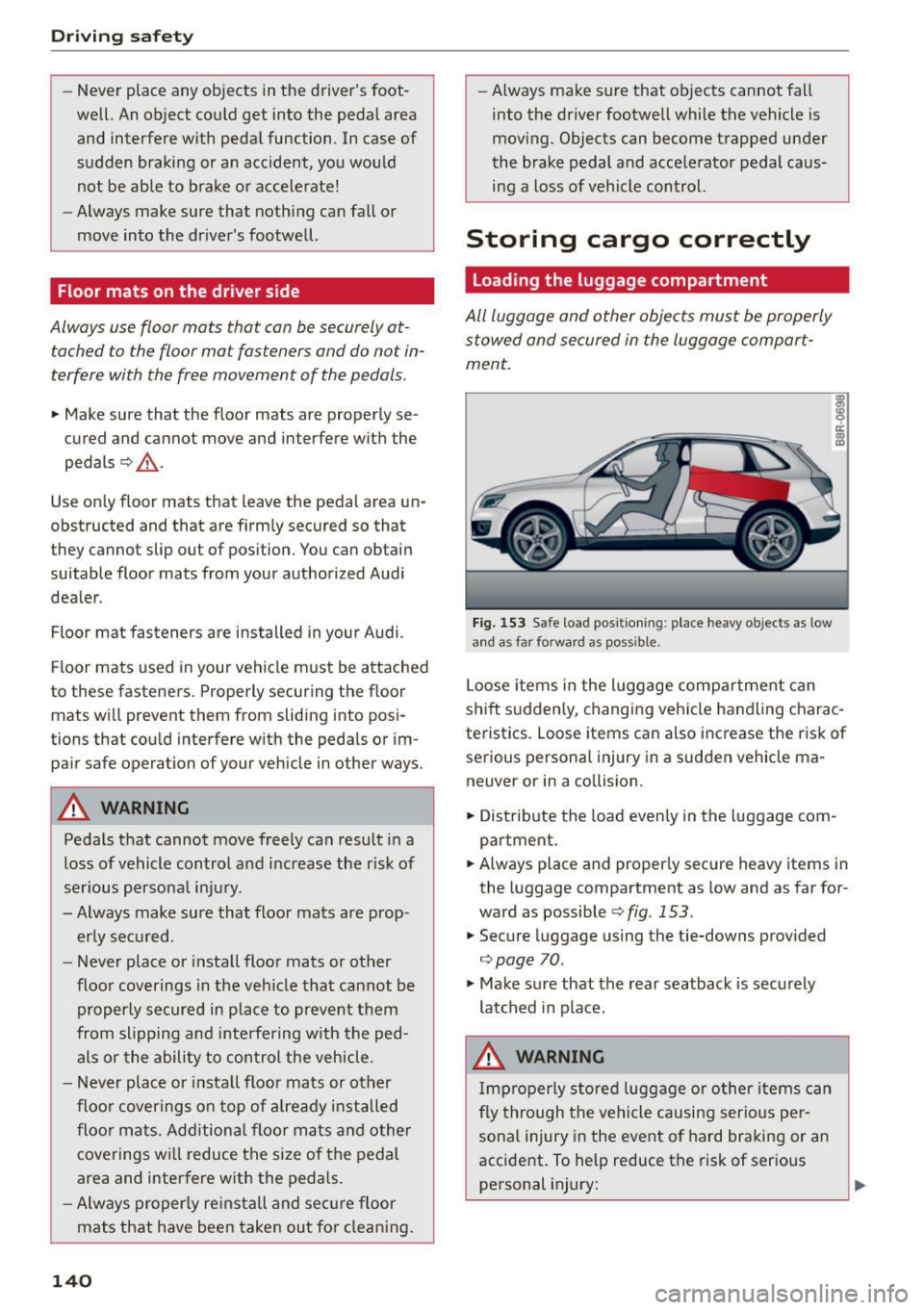
All luggage and other objects must be properly stowed and secured in the luggage comport
ment.
Fig. 153 Safe loa d positioning : place heavy o bjects as low
and as far fo rwa rd as poss ib le.
Loose items in the luggage compartment can
shift suddenly, changing vehicle handling charac
teristics . Loose items can also increase the risk of
serious personal injury in a sudden vehicle ma neuver or in a collision .
• Distribute the load evenly in the luggage com
partment.
• Always place and properly secure heavy items in
the luggage compartment as low and as far for
ward as possible
c> fig . 153.
• Secure luggage using the tie-downs provided
c>poge 70.
• Make sure that the rear seatback is securely
latched in place.
A WARNING
Improperly stored luggage or other items can
fly through the vehicle causing serious per
sonal injury in the event of hard braking or an
accident. To help reduce the risk of serious personal injury: ..,.