2015 AUDI Q5 warning
[x] Cancel search: warningPage 128 of 302

Automatic transmission
-Never leave your vehicle with the engine
running while in gear. If you must leave your
vehicle when the engine is running, activate
the parking brake and move the selector lev er to P.
- Power is still transmitted to the wheels
when the engine is running at idle. To pre
vent the vehicle from "creeping", you must keep your foot on the brake when the engine
is running and the selector lever is in D/S or
R or "tiptronic" mode is selected.
- Do not press the accelerator pedal when
changing the selector lever position while
the vehicle is stationary and the engine is
running.
- Never shift into R or P while driving.
- Before driving down a steep slope, reduce
your speed and shift into a lower gear with
"tiptronic".
- Do not ride the brakes or press the brake
pedal too often or too long when driving
down a hill. Constant braking causes the
brakes to overheat and substantially re
duces braking performance, increases brak
ing distance or causes complete failure of
the brake system.
- To prevent the vehicle from rolling back
when stopping on inclines, always hold it in
place with the brake pedal or parking brake.
- Never hold the vehicle on an incline with a
slipping clutch. The clutch opens automati
cally when it becomes too hot from the
overload. An indicator lamp[!] illuminates
and a driver message appears
<=> page 127
when the clutch is overloaded .
-If the engine must remain running, never
have any driving position engaged when
checking under the hood. Make sure these
lector lever has securely engaged and is
locked in P with the parking brake set
<=>page 221. Otherwise, any increase in en
gine speed may set the vehicle in motion,
even with the parking brake applied.
0 Note
- When stopping on an incline, do not try to
hold the vehicle in place by pressing the ac
celerator pedal while a driving gear is se-
126
lected. This can cause the transmission to
overheat and can damage it. Activate the
parking brake or press the brake pedal to
prevent the vehicle from rolling.
- Allowing the vehicle to roll when the engine
is stopped and the selector lever is in N will
damage the transmission because it is not
lubricated under those circumstances.
{!) Tips
For safety reasons, the parking brake is re
leased automatically only when the driver's
safety belt is engaged in the buckle.
Hill descent control
The hill descent control system assists the driver
when driving down declines.
Hill descent control is activated when the selec
tor lever is in D/S and you press the brake pedal.
The transmission automatically selects a gear
that is suitable for the incline. Hill descent con
trol tries to maintain the speed achieved at the
time of braking, within physical and technical limitations.
It may still be necessary to adjust the
speed with the brakes.
Hill descent control switches off once the decline
levels out or you press the accelerator pedal.
When the speed is set in the cruise control sys
tem <=>
page 95, hill descent control is also acti
vated .
A WARNING
Hill descent control cannot overcome physical
limitations, so it may not be able to maintain
a constant speed under all conditions. Always
be ready to apply the brakes.
Page 129 of 302

M N
co ~ co
rl I.O
"' N
"' rl
Manual shift program
Using the manual shift program you can man
ually select gears.
Fig. 137 Center console: shift ing t he g ears manually
Fig. 138 Stee ring whee l: Shi ft paddles•
Gear selection with selector lever
The tiptronic mode can be selected either with
the vehicle stationary or on the move.
• Push the selector lever to the right from D/S.
"' N N N :,:,
18
An M appears in the instrument cluster display
as soon as the transm ission has shifted.
• To upshift, push the selector lever forward to
the plus position
0 ~fig. 137.
• To downshift, push the lever to the minus posi-
tion
0 .
Gear selection with shift paddles*
The shift paddles are activated when the selector
lever is in D/S or the tiptronic manual shift pro
gram.
• To upshift , touch the button on the right
0
~fig. 138.
• To downshift, touch the button on the left 0-
• If you do not press a shift paddle within a short
t ime whi le in the D/S position, the transmission
will return to automatic mode. To keep shifting
Automatic transmission
using the shift padd les, move the selector lever
to the right out of the D/S position.
T he transmission automatically shifts up or dow n
before critical engine speed is reached.
T he transmission only allows manual shifting
when the engine speed is withi n the permitted
range.
@ Tips
- When you shift into the next lower gear, the
transmission will downshift only when there
is no possibility of over-revving the engine.
- When the kick-down comes on, the trans
mission will shift down to a lower gear, de
pending on vehicle and engine speeds.
- Tiptronic is ino perative when the transmis
sion is in the fail-safe mode .
- Hybrid drive*: electric d riving is not possible
in tiptronic mode.
Kick-down
Kick-down enables maximum acceleration .
When you depress the accelerator pedal beyond
the resistance point, the automatic transmission
downsh ifts into a lower gear, depending on vehi
cle speed and engine speed . The upshift into the
next higher gear takes pla ce once the maximum
specified eng ine speed is reached .
A WARNING
-Please note that the drive wheels can spin if
kick-down is used on a smooth slippery road -
there is a risk of skidding.
Transmission malfunction
rm Transmission: Press brake pedal and select
gear again.
Press the brake pedal and select the desired se
lector lever position again. You can then cont inue
driving .
rm Transmission overheating: Please drive con-
servatively. ..,.
127
Page 132 of 302

Parkin g sys tem
Rearview camera cover age area
The MM I disp lay shows the area cove red by the
rearview camera
c::> fig . 143 (D. Objects that are
not in the area covered @are not shown on the
MMI disp lay.
We recommend that yo u practice par king with
the rearview camera in a traffic-free location o r
parking lot to become familiar with the system,
the orientation lines, and their f unction . When
doing this, there should be good light and weath
er cond itions.
I n the MMI disp lay, objects or vehicles appear
closer o r further away if:
- yo u are driving in reverse gear from a level su r
face onto an incl ine, or a downward slope,
- you are driving in reverse gear toward protrud
ing obje cts,
- the ve hicl e i s ca rrying too much load in the
rear.
The accuracy of the or ientat ion lines and blue
surfac es dimin ishes if:
- the rearv iew camera does not provide a reliab le
image, for examp le, in poor visibility cond itions
or if the lens is d irty,
- the image on the screen is not visible due to
su n g la re and reflect ion .
Caring for the rearview camera lens
The rearview camera is located above the rear li
cense plate bracket. For the parking system to
operate, the lens
c::> fig. 144 must be kept clean:
- Dampen the lens with a house ho ld alcoho l-
based glass cleaner, and then wipe the lens
clean with a dry cloth
c::> Q) .
-Remove snow with a hand brush and ice pref
erably with a de- ic ing spray
c::> Q).
A WARNING
-The parking system ca nnot rep lace the driv
er's attenti on . T he d rive r alone is responsi
ble fo r parki ng a nd s imilar dr iv ing ma neu
vers.
- Senso rs have b lind spots in which objects
cannot be detected . Pay special atte ntion to
130
sma ll children and an imals beca use the sen
sors cannot always detect them.
- Always keep your eyes on the vehicle 's s ur
round ings, using the rearview mirror as
wel l.
- Do not allow yourself to be distracted from
traffic by the rearview camera pict ures.
- If the position and t he installation angle of
the camera has changed, for e xamp le, after
a rear end collision, do not continue to use
the system for safety reaso ns. Have it
checked by a qualified dealersh ip.
(D Note
- Low obstacles a lready s ignaled by a warn ing
can disappear from the system's detection
range as they are approached and w ill n ot
cont in ue to be signaled. Objects such as
bar rier cha ins, trailer draw ba rs, thi n pa int
ed vert ica l poles or fences may not be de
t e cted by the system, posi ng ris k of dam
a ge.
- N ever use wa rm o r hot wate r to remove
s now or ice from the rea rv iew came ra lens ·
t h is could cause the lens to crac k!
- Whe n cleani ng the len s, neve r use produ cts
th at ar e abra s ive.
Page 133 of 302

M N
co ~ co
rl I.O
"' N
"' rl
Switching on and off
Applies to vehicles: with Audi parking system p lus w ith rear
view came ra
The reorview camera switches on automatically
together with the acoustic and visual park assist
when you put the vehicle in reverse.
Fig. 145 Center console: Parking system switch
Fig. 1 46 MMI display: visual dista nce display
Switching on
.. Switch the MMI on and select reverse gea r.
.. To use the front parking system, press the
switch
P' "A in the center console c::> fig . 145. A
sho rt confirmat ion tone sou nds a nd the indica
tor light in the switc h lights up.
Switching betwe en th e re arview camera and
v is ual display
.. Press the Gr aphic control button c::> page 132,
fig. 147
® to see the visual d isplay .
.. Press the
Rear view cont ro l button to see the
rearview camera image
c::> fig . 146 .
Switching off
.. Drive faster than 6 mph ( 10 km/h), or
.. press the sw itch P
11JA or
.. swi tch off the ignit ion.
Par king system
Segm ents in th e vi sual display
T he red segmen ts in front of and behind the vehi
cle
c::> fig. 146 help you to determine the distance
between you and an obstacle. As your vehicle
comes closer to the obstacle, the segments move
closer to the vehicle. The collision area has been
reached when the next to last segment is dis
played. Do not continue dr iv ing farther ¢.&.
in
General Information on page 130!
A WARNING
--The MM I display cannot show, or cannot ad-
equate ly show, certa in objects (such as
smal l posts or grating), reces ses in the
ground a nd protr uding p arts on ano ther car.
- Only use t he rearview came ra to ass ist you if
it shows a good, clear picture. For examp le,
the image may be affected by the su n shin
ing into the lens, dirt on the lens or if there
is a defect.
- Use the rearv iew camera only with the rear
lid completely closed. Make sure any objects
you may have mounted on the rear lid do
not block the rearview camera.
(D Tips
-The sensors m ust be kept clean and free o f
snow and ice for t he park assist to operate.
- The visua l display is shown in the ill ustra
tion of the rearview camera. This disp lay
shows whe re the sensors have detected an
obstacle.
- Yo u can change the volume and pitch of the
signa ls as well as the display ¢
page 134.
-Please fo llow the instruc tions for tow ing a
trailer ¢
page 134.
-What appears in the disp lay is time -delayed .
131
Page 134 of 302

Parking syste m
Reverse Parking
App lies to veh icles: w ith Audi park ing system p lus w ith rear
view ca mera
Parking mode 1 can be used when parking in a
garage or into a parking space.
Fig. 147 MMI display: aiming at a parking spot
Fig. 148 MMI d isplay: align ing the vehicle
.,. Switch the MMI on and select reverse gear .
.,. Turn the steering wheel until the orange orien
tation lines
(D appear in the parking spot
c::> fig. 147. Use the markings @to help you es
t imate the d istance from an obsta cle. Each
mar king represents 3
ft (1 meter). The bl ue
area represents an extension o f the ve hicle's
outline by approximately 16
ft (5 meters) to
the rear .
.,. While driving in reverse gear, adjust the steer
ing wheel angle to fit the parking space with
the aid of the orange orientation lines
c::>@. @
marks the rear bumper. Stop the vehicle when
the red or ientat ion line @ borders an object
c::>,&. .
.&_ WARNING
- T he re arview camera does not show the en
t i re area behind the vehicle
c::> page 129,
132
fig. 143 . Watch out especially for small chil
dren and anima ls. The rearview camera can
not always detect them, posing risk of an
accident!
- Please note that objects not touching the
ground can appear to be further away than
they really are (for example, the bumper of
a parked veh icle, a trai ler hitch, or the rear
of a truck). In this case, you should not use
the help lines to help with parking, which
poses dange r of an accident!
(D Note
In the MMI display, the direction of travel of
the veh icle rear is represented depend ing on
the steer ing whee l ang le. The vehicle front
swings o ut more than the vehicle rear. Main
tain plenty o f distance so that yo ur outside
mirror or a corner of your vehicle does not co l
li de with any obstacles. This can damage to
your vehicle.
Page 135 of 302
M N
co ~ co
rl I.O
"'
Parallel Parking
Applies to vehicles: with Audi parking system p lus w ith rear
view came ra
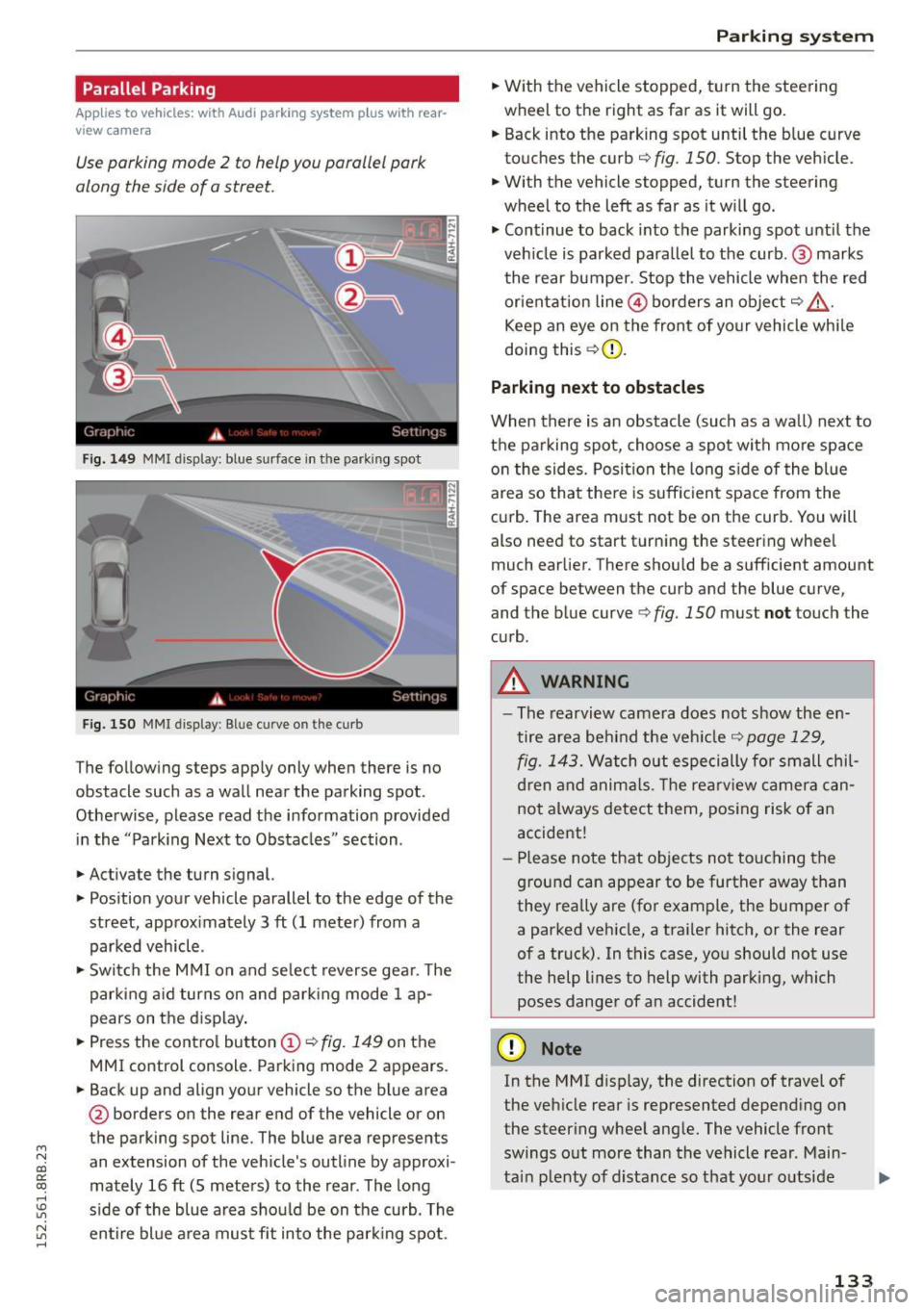
Use parking mode 2 to help you parallel pork
along the side of o street.
Fig. 149 MMI disp lay: blue surface in th e parking spot
Fig. 150 MMI display: Blue curve on th e curb
The follow ing steps app ly only when there is no
obstacle such as a wall near the parking spot.
Othe rwise, please read the informat ion provided
in the "Parking Next to Obstacles" section .
.,. Activate the turn s ignal.
.,. Position your vehicle parallel to the edge of the
street, approx imately 3 ft (1 meter) from a
parked vehicle .
.,. Swi tch the M MI on and se lect reverse gea r. T he
park ing a id turns on and park ing mode 1 ap
pears on the d isplay .
.,. Press the contro l button (!)¢
fig. 149 on the
MMI control console. Parking mode 2 appears.
.,. Back up and align your vehicle so the b lue area
@ borders on the rear end of the vehicle or on
the parking spot line. The blue area represents
an extension of the vehicle's outline by approxi
mately 16 ft (S meters) to the rear . The long
s ide of the blue area should be on the curb. The
~ entire bl ue a rea mus t fit into the par king spot .
Parking system
.,. With the vehicle stopped, t urn the steering
wheel to the right as far as it will go.
... Back into the parking spot until the b lue curve
to uches the curb
q fig. 150. Stop the vehicle.
.,. With the vehicle stopped, turn the steering
wheel to th e left as far as it w ill go .
.,. Cont inue to back into the parking spot until the
veh icle is parked para llel to the curb .@ marks
the rear bumper. Stop the vehicle when the red
or ientation line@ borders an obje ct
q .&, .
Keep an eye on the front of yo ur vehicle whi le
doing this ¢(D.
Parking next to obstacles
When there is an obstacle (such as a wall) next to
t h e pa rking spot, choose a spot with mo re space
o n the sides. Posi tion the long s ide of the blue
area so tha t the re is suff icient space from the
cu rb . T he area m ust not be on the curb. You will
also need to start t urn ing the steering wheel
much earlier. There should be a sufficient amount
of space between the curb and the blue curve
'
and the blue curve 9 fig. 150 must not touch the
c u rb .
A WARNING
-The rearvi ew camera does no t show the en
tire area be hind the veh icle
q page 129,
fig. 1 43.
Watch out especi ally for small chil
d ren and anima ls. The rearv iew camer a ca n
not always detect t hem, posing risk of a n
accident!
- Pl ease no te that objects no t to uch ing the
g round can appear to be further away than
they really are (for example, the bumper of
a parked vehicle, a traile r hitc h, or the rear
of a truck). In this case, you should not use
the help lines to help with parking, which
poses danger of an accident!
(D Note
In the MMI d isplay, the direction of travel of
the veh icle rear is represented depend ing on
the steer ing whee l ang le. The vehicle front
swings o ut more than the vehicle rear . Main
ta in plenty of d istance so that your o utside
133
Page 136 of 302

Parkin g system
mirror or a corner of yo ur vehicle does not col
lide with any obstacles. This can damage to
your vehicle.
(D Tips
The left or right orientation lines and sur faces
wi ll be displayed, depending on the turn sig
nal being used .
Adjusting the display
and warning tones
A pp lies to veh icles: w ith Audi park ing system p lus w ith rear
view ca mera
The display and warning tones can be adjusted in
the MMI.
~ Select: I CARI function button > Pa rking system .
Or
~ Select: ICARI funct ion button > Car s ystem s*
control button> Driver ass ist > Par king aid .
D is pl ay
- Off -when the parking system is switched on,
only audib le signals are given .
-On -when the parking system is switched on,
either the visual disp lay or the picture from the
rearview camera is disp layed.
Warning tones
- Front volum e -
front sensor volume
- Front frequency -front sensor frequency
-Rea r volume -rear sensor volume
-Rear fre quenc y -rear sensor frequency
- In -ca r entertainment fader /M usic volume
w hile pa rking -
when the parking system is
switched on, the volume of the active audio
source is lowered.
The newly adjusted value is briefly heard from
the signal generator.
(D Tips
- The warning tones can also be adjusted d i
rectly by the visual display or the picture
from the rearview camera. Simply press the
S ett ing s control button.
- Changed settings are activated when park
i ng system is switched on again .
134
-The settings are automatica lly stored and
assigned to the remote contro l key .
Trailer hitch
App lies to vehicles : wi th Audi parking sys te m plus wi th rea r
v iew camera a nd t railer hitch
For vehicles with a factory installed trailer hitch,
o r a trai ler h itch installed accord ing to factory
spec ifications, the parking sys tem rear sensors
do not come on whenever you shift into reverse
gear or when you press the
P" 1A switch. Remem
ber, there is no warning for distances to the rear.
The front sensors remain activated . The visua l
display switches to the trailer towing mode. The
picture from the rearv iew camera w ill not show
the or ientat ion lines nor the blue surfaces.
If you insta ll a hitch yourse lf, this function may
not work.
Error messages
App lies to vehicles: wi th Audi parking sys te m plus with rea r·
v iew camera
There is an error in the system if the LED on the
PwA switch is b linking and you hear a continuous
a larm for a few seconds after switching on the
parking system or when the parking system is al
ready act ivated. Have your authori zed Audi dealer
correct the error.
(D Tips
If the error is not corrected before you switch
off the ignition, when you switch on the park i ng system again, the LED in the
Pw.o. sw itch
will blink.
Page 137 of 302

M N
co
a:
co
Driving safety
Basics
Safe driving habits
Please remember -safety first!
This chapter contains important information,
tips, instructions and warnings that you need to
read and observe for your own safety, the safety
of your passengers and others . We have summar
ized here what you need to know about safety
belts, airbags , chi ld restraints as well as child
safety. Your safety is for us
priority number 1. Al
ways observe the informat ion and warn ings in
this section - for your own safety as well as that
of your passengers .
The information in this section app lies to all
model ve rsions of your vehicle . Some of the fea
tures described in this sections may be standard
equipment on some models, or may be optional
eq uipment on others .
If you are not sure, ask
your authorized Audi dealer.
A WARNING
- Always make sure that you follow the in
struct ions and heed the WARNINGS in this
Manual. It is in your interest and in the in
terest of your passengers.
- Always keep the complete Owne r's Litera
ture in your Aud i when you lend or sell your
vehicle so that this important info rmation
will always be ava ilable to the driver and
passenge rs.
-
- Always keep the Owner's literature handy so
that you can find it easily if you have ques
tions.
Safety equipment
The safety features are part of the occupant re
straint system and work together to help reduce the risk of injury in a wide variety of accident sit
uations.
Your safety and the safety of your passenge rs
should not be left to chance. Advances in tec h-
; nology have made a var iety of fea tures available
~ to help reduce the r isk o f injury in an accident. ,....,
Dr ivin g sa fet y
The following is a list of just a few of the sa fety
features in your A udi:
- sophisticated s afety be lts fo r drive r and a ll pas-
senger seat ing pos itions,
- be lt fo rce limi ters for the front seats,
- belt pretensioners for the seats,
- be lt he ight adjustment for the front seats,
- head restra ints for each seating posit ion,
- front airbags,
- side airbags in the front seats and outer rear
seats *,
- side curtain airbags,
- specia l LATCH anchorages for child rest raints,
- adjustab le steering colum n.
These ind iv idual safety features, can work to
gether as a system to help protect you and your
passengers in a w ide range of accidents . T hese
features cannot work as a system if they are not always cor rect ly adjusted and co rrectly used.
S afet y is ev erybod y's re sponsibil it y !
Important things to do before driving
Safety is everybody 's job! Vehicle and occupant
safety always depends on the informed and care
ful driver .
For your safety and the safety of your passen
gers,
before driv ing alway s:
.,. Make s ure that all lights and signals are operat
ing correctly .
.,. Make sure that the tire pressure is correct .
.,. Make sure that all windows are clean and afford
good vis ibility to the outs ide .
.,. Secure all luggage and other items carefully
Q page 77 .
.,. Ma ke s ure that nothing can inte rfere wi th the
peda ls .
.,. Adjust front seat, head restraint and mirrors
correctly for your height.
.,. Instruct passengers to adjust the head re
straints according to the ir height.
.,. Make sure to use the r ight child restraint cor
rectly to protect ch ildren
Q page 172, Child
safety.
1 3 5