2014 SUBARU TRIBECA ignition
[x] Cancel search: ignitionPage 176 of 426
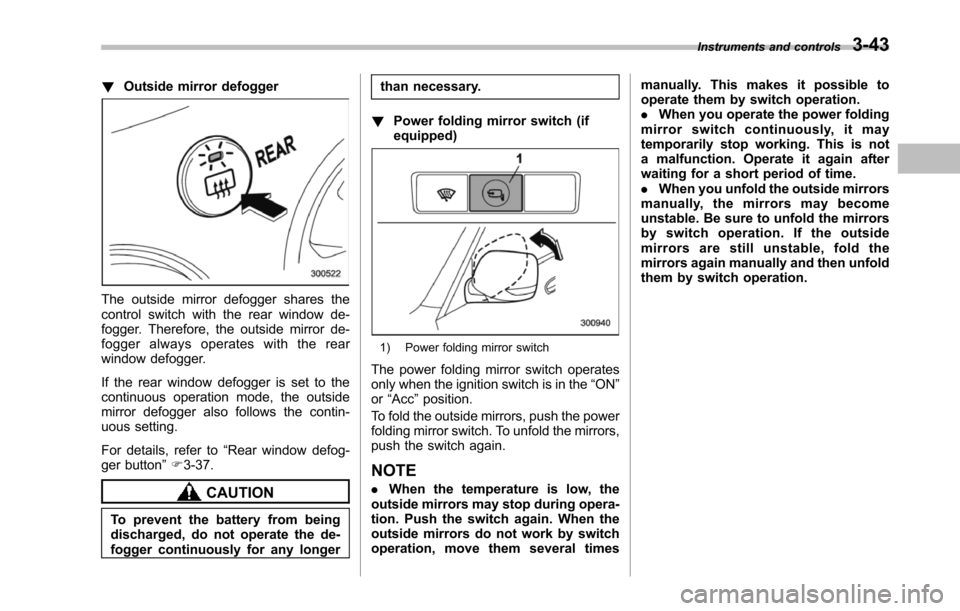
!Outside mirror defogger
The outside mirror defogger shares thecontrol switch with the rear window de-fogger. Therefore, the outside mirror de-fogger always operates with the rearwindow defogger.
If the rear window defogger is set to thecontinuous operation mode, the outsidemirror defogger also follows the contin-uous setting.
For details, refer to“Rear window defog-ger button”F3-37.
CAUTION
To prevent the battery from beingdischarged, do not operate the de-fogger continuously for any longer
than necessary.
!Power folding mirror switch (ifequipped)
1) Power folding mirror switch
The power folding mirror switch operatesonly when the ignition switch is in the“ON”or“Acc”position.
To fold the outside mirrors, push the powerfolding mirror switch. To unfold the mirrors,push the switch again.
NOTE
.When the temperature is low, theoutside mirrorsmay stop during opera-tion. Push the switch again. When theoutside mirrors do not work by switchoperation, move them several times
manually. This makes it possible tooperate them by switch operation..When you operate the power foldingmirror switch continuously, it maytemporarily stop working. This is nota malfunction. Operate it again afterwaiting for a short period of time..When you unfold the outside mirrorsmanually, the mirrors may becomeunstable. Be sure to unfold the mirrorsby switch operation. If the outsidemirrors are still unstable, fold themirrors again manually and then unfoldthem by switch operation.
Instruments and controls3-43
Page 195 of 426
5-4Audio
Type A audio set (if equipped)
The audio set will operate only when the ignition switch is in the“Acc”or“ON”position.
&Radio operation
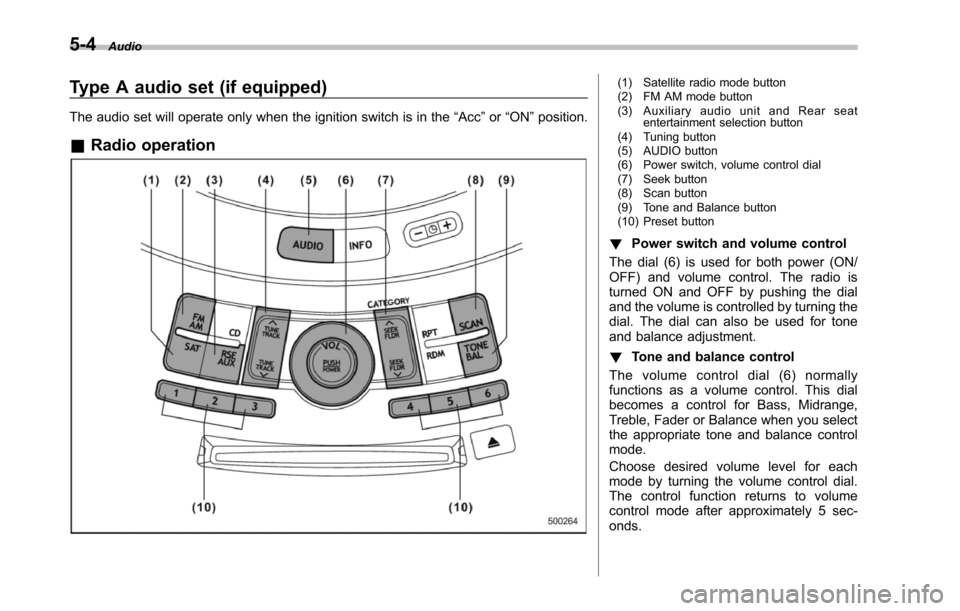
(1) Satellite radio mode button(2) FM AM mode button(3) Auxiliary audio unit and Rear seatentertainment selection button(4) Tuning button(5) AUDIO button(6) Power switch, volume control dial(7) Seek button(8) Scan button(9) Tone and Balance button(10) Preset button
!Power switch and volume control
The dial (6) is used for both power (ON/OFF) and volume control. The radio isturned ON and OFF by pushing the dialand the volume is controlled by turning thedial. The dial can also be used for toneand balance adjustment.
!Tone and balance control
The volume control dial (6) normallyfunctions as a volume control. This dialbecomes a control for Bass, Midrange,Treble, Fader or Balance when you selectthe appropriate tone and balance controlmode.
Choose desired volume level for eachmode by turning the volume control dial.The control function returns to volumecontrol mode after approximately 5 sec-onds.
Page 203 of 426
5-12Audio
!Repeating
!To repeat the currently playingtrack
To repeat a track, briefly press the“RPT”button (6) while the track is playing. Thedisplay will show“RPT”, and the track willbe repeated.
To cancel the track repeat-play mode:
Press the“RPT”button once (non-MP3disc)
Press the“RPT”button twice (MP3 disc)The“RPT”indication will turn off, and thenormal playback mode will be resumed.
NOTE
.With an MP3 disc inserted, eachtime you briefly press the button, themode willchange to the next one in thefollowing sequence.
If you accidentally press the button andcancel the track repeat-play mode,press it again to reselect the repeat-play mode..The repeat-play mode will be can-celed if you perform any of the follow-ing steps.–Press the“RDM”button.–Press the“SCAN”button.
–Press the“”button.–Select the radio mode.–Press the“RSE AUX”button.–Press the“”or“”side of the“SEEK FLDR”button (MP3 disc).–Turn off the power of the audioequipment.–Turn the ignition switch to the“LOCK”position.
!To repeat the currently playingfolder (MP3 disc)
To repeat the currently playing folder,press the“RPT”button (6) twice while atrack is playing. The display will show“F-RPT”,andthefolderwillbeplayedrepeatedly.
To cancel the folder repeat-play mode,press the“RPT”button once more. The“F-RPT”indication will turn off, and thenormal playback mode will be resumed.
NOTE
.Each time you briefly press thebutton, the mode will change to thenext one in the following sequence.
If you accidentally press the button andcancel the folder repeat-play mode,press it again to reselect the folder
repeat-play mode..The folder repeat-play mode will becancelled if you perform any of thefollowing steps.–Press the“RDM”button.–Press the“SCAN”button.–Press the“”button.–Select the radio mode.–Press the“RSE AUX”button.–Press the“”or“”side of the“SEEK FLDR”button (MP3 disc).–Turn off the power of the audioequipment.–Turn the ignition switch to the“LOCK”position.
!Random playback
!Non-MP3 disc
Press the“RDM”button (5) briefly duringdiscplayback to play all of the tracks onthe disc in a random order. The display willshow“RDM”, and all of the tracks on thedisc will be played in a random order.
To cancel random mode, press the buttonagain. The“RDM”indication will turn off,and the normal playback mode will beresumed.
NOTE
Random playback will be cancelled ifyou performany of the following steps.
Page 204 of 426

.Press the“RPT”button..Press the“SCAN”button..Press the“”button..Select the radio mode..Press the“RSE AUX”button..Press the“”or“”side of the“SEEK FLDR”button..Tu r n o f f t h e p o w e r o f t h e a u d i oequipment..Tu r n t h e i g n i t i o n s w i t c h t o t h e“LOCK”position.
!MP3 disc
Press the“RDM”button (5) during discplayback to play all of the tracks in thefolder currently being played in randomorder. Press the“RDM”button again toplay all of the tracks on the disc in randomorder. The display will show“RDM”duringthe random mode.
To cancel the random mode, press the“RDM”button during“in-disc”randomplayback. The“RDM”indication will turnoff, and the normal playback mode will beresumed.
NOTE
.Each time you briefly press thebutton, the mode will change to thenext one in the following sequence.
If you accidentally press the button andcancel the random mode, press it againto reselect the random mode..Random playback will be cancelledif you perform any of the followingsteps.–Press the“RPT”button.–Press the“SCAN”button.–Press the“”button.–Select the radiomode.–Press the“RSE AUX”button.–Press the“”or“”side of the“SEEK FLDR”button.–Turn off the power of the audioequipment.–Turn the ignition switch to the“LOCK”position.
!Scan
The scan mode lets you listen to the first10 seconds of each track on the disc/folder in succession. Press the“SCAN”button (7) to start scanning through alltracks upward beginning with the trackfollowing the currently selected one. Afterall tracks on the disc/folder has been
scanned, normal playback mode is re-stored.
To cancel a scan, press the button again.
NOTE
The scan mode will be cancelled if youperform any of the following opera-tions.
.Press the“RPT”button..Press the“RDM”button..Press the“”button..Press the“”or“”side of the“TUNE TRACK”button..Press the“”or“”side of the“SEEK FLDR”button (MP3 disc)..Select the radio mode..Press the“RSE AUX”button..Tu r n o f f t h e p o w e r o f t h e a u d i oequipment..Tu r n t h e i g n i t i o n s w i t c h t o t h e“LOCK”position.
!To eject a disc from the player
Whena disc is being played back or whena disc is in the player, press the“”button(8). The disc will be ejected.
NOTE
.Avoid driving the vehicle with a CDsticking out, because vibration mightmake it fall out..If the disc is left ejected for more
Audio5-13
–CONTINUED–
Page 205 of 426
5-14Audio
than approximately 15 seconds afterthe ignition switch is turned to the“LOCK”position, a disc protectionfunction will operate, automaticallyreloading the disc. In this case, thedisc is not played.
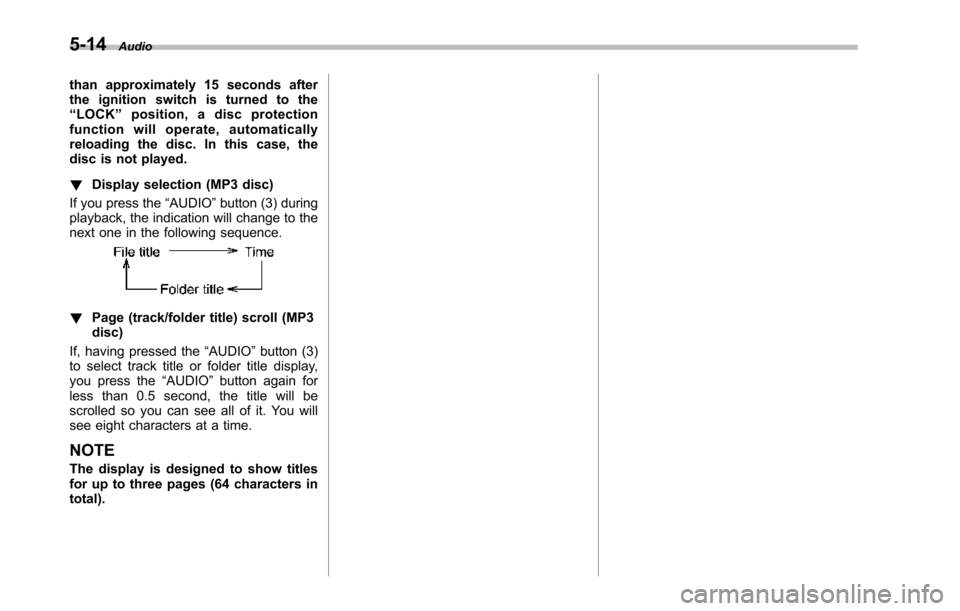
!Display selection (MP3 disc)
If you press the“AUDIO”button (3) duringplayback, the indication will change to thenext one in the following sequence.
!Page (track/folder title) scroll (MP3disc)
If, having pressed the“AUDIO”button (3)to select track title or folder title display,you press the“AUDIO”button again forless than 0.5 second, the title will bescrolled so you can see all of it. You willsee eight characters at a time.
NOTE
The display is designed to show titlesfor up to three pages (64 characters intotal).
Page 206 of 426
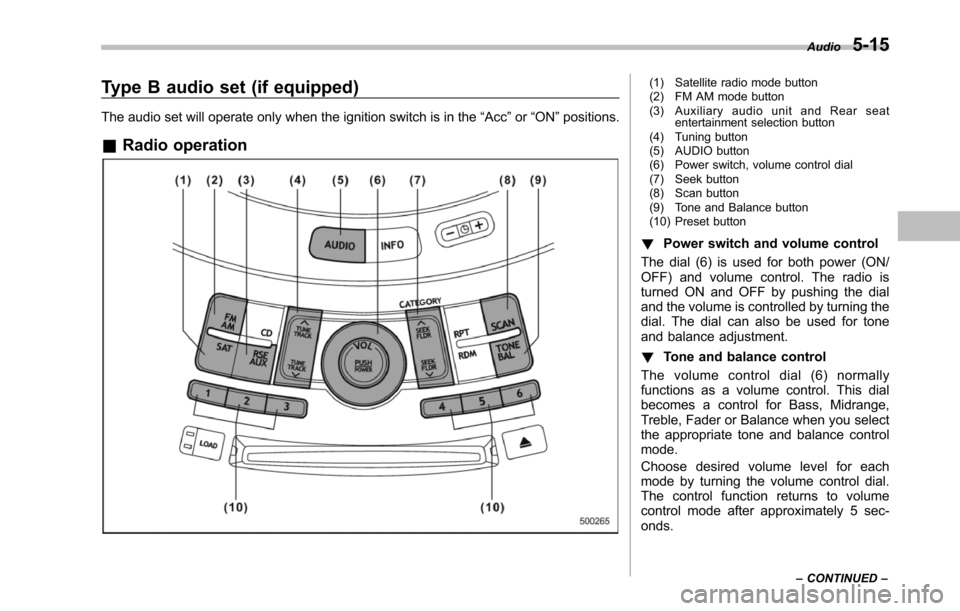
Type B audio set (if equipped)
The audio set will operate only when the ignition switch is in the“Acc”or“ON”positions.
&Radio operation
(1) Satellite radio mode button(2) FM AM mode button(3) Auxiliary audio unit and Rear seatentertainment selection button(4) Tuning button(5) AUDIO button(6) Power switch, volume control dial(7) Seek button(8) Scan button(9) Tone and Balance button(10) Preset button
!Power switch and volume control
The dial (6) is used for both power (ON/OFF) and volume control. The radio isturned ON and OFF by pushing the dialand the volume is controlled by turning thedial. The dial can also be used for toneand balance adjustment.
!Tone and balance control
The volume control dial (6) normallyfunctions as a volume control. This dialbecomes a control for Bass, Midrange,Treble, Fader or Balance when you selectthe appropriate tone and balance controlmode.
Choose desired volume level for eachmode by turning the volume control dial.The control function returns to volumecontrol mode after approximately 5 sec-onds.
Audio5-15
–CONTINUED–
Page 215 of 426
5-24Audio
–Press the“RSE AUX”button.–Press the“”or“”side of the“SEEK FLDR”button (MP3 disc).–Turn off the power of the audioequipment.–Turn the ignition switch to the“LOCK”position.
!To repeat the currently playingdisc/folder
To repeat the currently playing disc/folder,press the“RPT”button (6) twice while atrack is playing. The display will show“D-RPT”, and the disc/folder will be playedrepeatedly.
To c a n c e l t h e d i s c / f o l d e r r e p e a t - p l a ymode, press the“RPT”button once more.The“D-RPT”indication will turn off, andthe normal playback mode will be re-sumed.
NOTE
.Each time you briefly press thebutton, the mode will change to thenext one in the following sequence.
If you accidentally press the button andcancel the disc/folder repeat-playmode, press it again to reselect thedisc/folder repeat-play mode.
.The disc/folder repeat-play modewill be cancelled if you perform any ofthe following steps.–Press the“RDM”button.–Press the“SCAN”button.–Press the“”button.–Press the disc select button.–Select the radio mode.–Press the“RSE AUX”button.–Press the“”or“”side of the“SEEK FLDR”button (MP3 disc).–Turn off the power of the audioequipment.–Turn the ignition switch to the“LOCK”position.
!Random playback
!Non-MP3 disc
Press the“RDM”button (5) briefly duringdisc playback to play all of the tracks onthe disc in a random order. The display willshow“RDM”, and all of the tracks on thedisc will be played in a random order.
To cancel random mode, press the buttonagain. The“RDM”indication will turn off,and the normal playback mode will beresumed.
NOTE
Random playback will be cancelled ifyou perform any of the following steps.
.Press the“RPT”button..Press the“SCAN”button..Press the“”button..Select the radio mode..Press the“RSE AUX”button..Press the“”or“”side of the“SEEK FLDR”button..Tu r n o f f t h e p o w e r o f t h e a u d i oequipment..Tu r n t h e i g n i t i o n s w i t c h t o t h e“LOCK”position.
!MP3 disc
Press the“RDM”button (5) during discplayback to play all of the tracks in thefolder currently being played in randomorder. Press the“RDM”button again toplay all of the tracks on the disc in randomorder. The display will show“RDM”duringthe random mode.
To cancel the random mode, press the“RDM”button during“in-disc”randomplayback. The“RDM”indication will turnoff, and the normal playback mode will beresumed.
NOTE
.Each time you briefly press thebutton, the mode will change to thenext one in the following sequence.
Page 216 of 426
If you accidentally press the button andcancel the random mode, press it againto reselect the random mode..Random playback will be cancelledif you perform any of the followingsteps.–Press the“RPT”button.–Press the“SCAN”button.–Press the“”button.–Select the radio mode.–Press the“RSE AUX”button.–Press the“”or“”side of the“SEEK FLDR”button.–Turn off the power of the audioequipment.–Turn the ignition switch to the“LOCK”position.
!SCAN
The scan mode lets you listen to the first10 seconds of each track in succession.Press the“SCAN”button (7) to startscanning upward beginning with the trackfollowing the currently selected one. Whenall tracks in the disc/folder have beenscanned, normal playback will be re-sumed. To cancel the scan mode, press
the button again.
NOTE
The scan mode will be cancelled if youperform any of the following steps.
.Press the“RPT”button..Press the“RDM”button..Press the“”or“”side of the“TUNE TRACK”button..Press the“”or“”side of the“SEEK FLDR”button (MP3 disc)..Press the“”button..Press the discselect button..Select the radio mode..Press the“RSE AUX”button..Tu r n o f f t h e p o w e r o f t h e a u d i oequipment..Tu r n t h e i g n i t i o n s w i t c h t o t h e“LOCK”position.
!Display selection (MP3 disc)
If you press the“AUDIO”button (3) duringplayback, theindication will change to thenext one in the following sequence.
!Page (track/folder title) scroll (MP3disc)
If, having pressed the“AUDIO”button (3)to select track title or folder title display,you press the“AUDIO”button again forless than 0.5 second, the title will bescrolled so you can see all of it. You willsee eightcharacters at a time.
NOTE
The display is designed to show titlesfor up to three pages (64 characters intotal).
!Folder selection (MP3 disc)
Press the“”side of the“SEEK FLDR”button (4) briefly to select the next folder.Pressing the“”side of the same buttonthe first time makes the player go back tothe beginning of the currently selectedtrack; pressing it a second time makes itgo back to the previously selected track.
NOTE
Only MP3 folders are recognized whenan attempt to select the next or pre-vious folder is made. If no appropriatefolder existson the disc, pressing the“”or“”side of the“SEEK FLDR”button has no effect.
Audio5-25
–CONTINUED–