2014 SUBARU TRIBECA air condition
[x] Cancel search: air conditionPage 108 of 426
Immobilizer
CAUTION
FCC WARNING
Changes or modifications not ex-pressly approved by the party re-sponsible for compliance could voidthe user’s authority to operate theequipment.
The immobilizer system is designed toprevent an unauthorized person fromstarting the engine. Only keys registeredwith your vehicle’s immobilizer system canbe used to operate your vehicle. Even ifan unregistered key fits into the ignitionswitchand can be turned to the“START”position, the engine will automatically stopafter several seconds.
Each immobilizer key contains a trans-ponder in which the key’s ID code isstored. When a key is inserted into theignition switch and turned to the“ON”position, the transponder transmits thekey’s ID code to the immobilizer system’sreceiver. If the transmitted ID codematches the ID code registered in theimmobilizer system, the system allows theengine to be started. Since the ID code istransmitted and acted upon almost in-
stantly, the immobilizer system does notimpede normal starting of the engine.
If the engine does not start, pull out thekey once before trying again. Refer to“Ignition switch”F3-3.
This device complies with Part 15 ofthe FCC Rules and RSS-Gen of ICRules. Operation is subject to thefollowing two conditions: (1) this de-vice may not cause harmful interfer-ence, and (2) this device must acceptany interference received, includinginterference that may cause undesiredoperation.
CAUTION
.Do not place the key under directsunlight or anywhere it maybecomehot.
.Do not get the key wet. If the keygets wet, wipe it dry with a clothimmediately.
NOTE
To p r o t e c t y o u r v e h i c l e f r o m t h e f t ,please pay close attention to the fol-lowing security precautions.
.Never leaveyour vehicle unattendedwith its keys inside..Before leaving your vehicle, close all
windows and lock the doors and reargate..Do not leave spare keys or anyrecord of your key number in thevehicle.
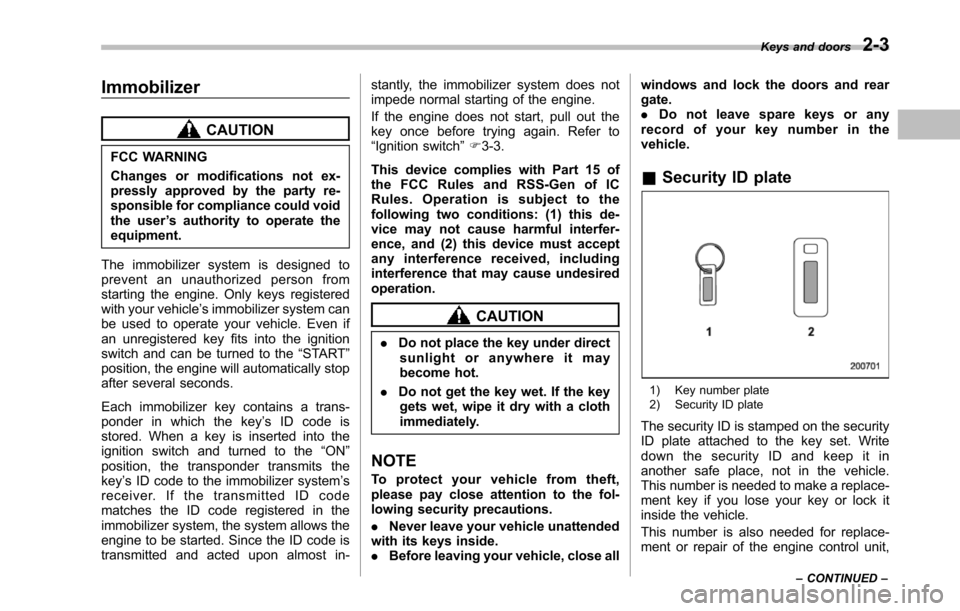
&Security ID plate
1) Key number plate2) Security ID plate
The security ID is stamped on the securityID plate attached to the key set. Writedown the security ID and keep it inanother safe place, not in the vehicle.This number is needed to make a replace-ment key if you lose your key or lock itinside the vehicle.
This number is also needed for replace-ment or repair of the engine control unit,
Keys and doors2-3
–CONTINUED–
Page 144 of 426
turned ON next time, however, thecomplete sequence of the warningoperation resumes. For further detailsabout canceling the warning operation,please contact your SUBARU dealer.
If there is no passenger on the frontpassenger’s seat, the seatbelt warningdevice for the front passenger’s seat willbe deactivated. The front passenger’soccupant detection system monitorswhetheror not there is a passenger onthe front passenger’s seat. Observe thefollowing precautions. Failure to do somay prevent the device from functioningcorrectly or cause the device to fail.
.Do not install any accessory such as atable or TV onto the seatback.
.Do not store a heavy load in theseatback pocket.
.Do not allow the second-row seatoccupant to place his/her hands or legson the front passenger’s seatback, orallow him/her to pull the seatback.
If the seatbelt warning device for the frontpassenger’s seat does not function cor-rectly (e.g., it is activated even when thefront passenger’s seat is empty or it isdeactivated even when the front passen-ger has not fastened his/her seatbelt),take the following actions.
.Ensure that no article is placed on the
seat other than a child restraint systemand its child occupant.
.Ensure that there is no article left in theseatback pocket.
If still the seatbelt warning device for frontpassenger’s seat does not function cor-rectly after taking relevant corrective ac-tions describedabove, immediately con-tact your SUBARU dealer for an inspec-tion.
&SRS airbag system
warning light
When the ignition switch is turned to the“ON”position, the SRS airbag systemwarning light will illuminate for approxi-mately 6 seconds and turn off. This showsthe SRS frontal airbag and SRS sideairbag and SRS curtain airbag and seat-belt pretensioners are in normal operation.
WARNING
If the warning light exhibits any ofthe following conditions, there maybe a malfunction in the seatbeltpretensioners and/or SRS airbagsystem. Immediately take your vehi-cle to your nearest SUBARU dealerto have the system checked. Unlesschecked and properly repaired, the
seatbelt pretensioners and/or SRSairbags will operate improperly (e.g.SRS airbags may inflate in a veryminor collision or not inflate in asevere collision), which may in-crease the risk of injury.
.Flashing or flickering of the warn-ing light
.No illumination of the warninglight when the ignition switch isfirst turned to the“ON”position
.Continuous illumination of thewarning light
.Illuminationof the warning lightwhile driving
Instruments and controls3-11
–CONTINUED–
Page 148 of 426

WARNING
If this light does not illuminatebriefly after the ignition switch isturned ON or the light illuminatessteadily after blinking for approxi-mately one minute, you should haveyour Tire Pressure Monitoring Sys-tem checked at a SUBARU dealer assoon as possible.
If this light illuminates while driving,never brake suddenly and keepdriving straight ahead while gradu-ally reducing speed. Then slowlypull off the road to a safe place.Otherwise an accident involvingserious vehicle damage and seriouspersonal injury could occur.
If this light still illuminates whiledriving after adjusting the tire pres-sure, a tire may have significantdamage and a fast leak that causesthe tire to lose air rapidly. If you havea flat tire, replace it with a spare tireas soon as possible.
When a spare tire is mounted or awheel rim is replaced without theoriginal pressure sensor/transmitterbeing transferred, the Low tire pres-sure warning light will illuminatesteadily after blinking for approxi-mately one minute. This indicates
that the TPMS is unable to monitorall four road wheels. Contact yourSUBARU dealer as soon as possiblefor tire and sensor replacement and/or system resetting. If the lightilluminates steadily after blinkingfor approximately one minute,promptly contact a SUBARU dealerto have the system inspected.
CAUTION
The tire pressure monitoring systemis NOT a substitute for manuallychecking tire pressure. The tirepressureshould be checked peri-odically (at least monthly) using atire gauge. After any change to tirepressure(s), the tire pressure mon-itoring system will not re-check tireinflationpressures until the vehicleis first driven more than 20 mph (32km/h). Therefore, after adjusting thetire pressures, increase the vehiclespeed to at least 20 mph (32 km/h) tostart the TPMS re-checking of thetire inflation pressures. If the tirepressures are now above the severelow pressure threshold, the low tirepressure warning light should turnoff a few minutes later. Therefore, besure to install the specified size for
the front and rear tires.
&ABS warning light
CAUTION
If the warning light behaves asfollows, the ABS system may notwork properly.
When the warning light illuminates,the ABS function shuts down; how-ever, the conventional brake systemcontinues to operate normally.
.The warning light does not illu-minate when the ignition switchis turned to the“ON”position.
.The warning light illuminateswhen the ignition switch isturned to the“ON”position, butit does not turn off even when thevehicle speed exceeds approxi-mately 8 mph (12 km/h).
.The warning light illuminates dur-ing driving.
If any of these conditions occur,have the ABS system repaired atthe first available opportunity byyour SUBARU dealer.
The ABS warning light illuminates to-
Instruments and controls3-15
–CONTINUED–
Page 151 of 426
3-18Instruments and controls
&All-Wheel Drive warn-
ing light
WARNING
Continued driving with the AWDwarning light flashing can lead topowertrain damage. If the AWDwarninglight flashes, promptly parkin a safe place then check whetherall four tires are the same diameterand whether any of the tires has apuncture or has lost air pressure forsome other reason.
NOTE
If the temporary spare tire is used, theAWD warning light may flash. Use ofthe temporary spare tire should there-fore be restricted to the minimum timenecessary. Replace the temporarysparetire with a conventional tire assoon as possible.
This light flashes if the vehicle is drivenwith tires of different diameters fitted on itswheelsor with the air pressure exces-sively low in any of its tires.
&Vehicle Dynamics
Control warning light
(U.S.-spec models and
Canada-spec. models)/
Vehicle Dynamics Con-
trol operation indicator
light (all models)
!Vehicle Dynamics Control warninglight (U.S.-spec models andCanada-spec. models)
CAUTION
The Vehicle Dynamics Control sys-tem provides its ABS controlthrough the electrical circuit of theABS system. Accordingly, if the ABSis inoperative, the Vehicle DynamicsControl system becomes unable toprovide ABS control. As a result, theVehicle Dynamics Control systemalso becomes inoperative, causingthe warning light to illuminate.Though both the Vehicle DynamicsControl and ABS systems are inop-erative in this case, the ordinaryfunctions of the brake system arestill available. You will be safe whiledriving with this condition, but drivecarefully and have your vehicle
checked at a SUBARU dealer assoon as possible.
NOTE
.If the electrical circuit of the VehicleDynamics Control system itself mal-functions, the warning light only illumi-nates. At this time, the ABS (Anti-lockBrake System) remains fully opera-tional..The warning light illuminates whenthe electronic control system of theABS/Vehicle Dynamics Control systemmalfunctions.
The Vehicle Dynamics Control system isprobably inoperative under any of thefollowing conditions. Have your vehiclecheckedat a SUBARU dealer immedi-ately.
.The warning light does not illuminatewhen the ignition switch is turned to the“ON”position.
.The warning light illuminates while thevehicle is running.
NOTE
If the warning light behavior is asdescribed in the following examples,the Vehicle Dynamics Control systemmay be considered normal.
.The warning light illuminates right
Page 162 of 426
&Daytime running light system
WARNING
The brightness of the illumination ofthe high beam headlights is reducedby the daytime running light system.The light switch must always beturned to the“”position when itis dark outside.
The high beam headlights will automati-cally illuminate at reduced brightnesswhen the engine has started, under thefollowing conditions.
.The select lever is in a position otherthan the“P”position.
.The parkingbrake is fully released.
.The light switch is in the“OFF”or“”position.
NOTE
When the light switch is in the“”position,the front side marker lights,parking lights and license plate lightsare also illuminated.
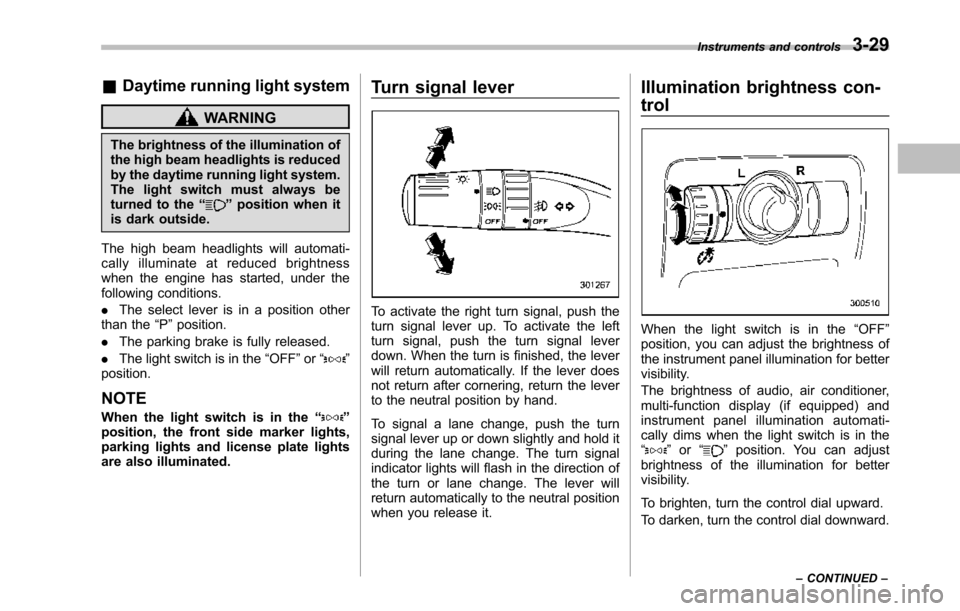
Turn signal lever
To activate the right turn signal, push theturn signal lever up. To activate the leftturn signal, push the turn signal leverdown. When the turn is finished, the leverwill return automatically. If the lever doesnot return after cornering, return the leverto the neutral position by hand.
To signal a lane change, push the turnsignal lever up or down slightly and hold itduring the lane change. The turn signalindicator lights will flash in the direction ofthe turn or lane change. The lever willreturn automatically to the neutral positionwhen you release it.
Illumination brightness con-
trol
When the light switch is in the“OFF”position, you can adjust the brightness ofthe instrument panel illumination for bettervisibility.
The brightnessof audio, air conditioner,multi-function display (if equipped) andinstrument panel illumination automati-cally dims when the light switch is in the“”or“”position. You can adjustbrightness of the illumination for bettervisibility.
To brighten, turn the control dial upward.
To darken, turn the control dial downward.
Instruments and controls3-29
–CONTINUED–
Page 173 of 426
3-40Instruments and controls
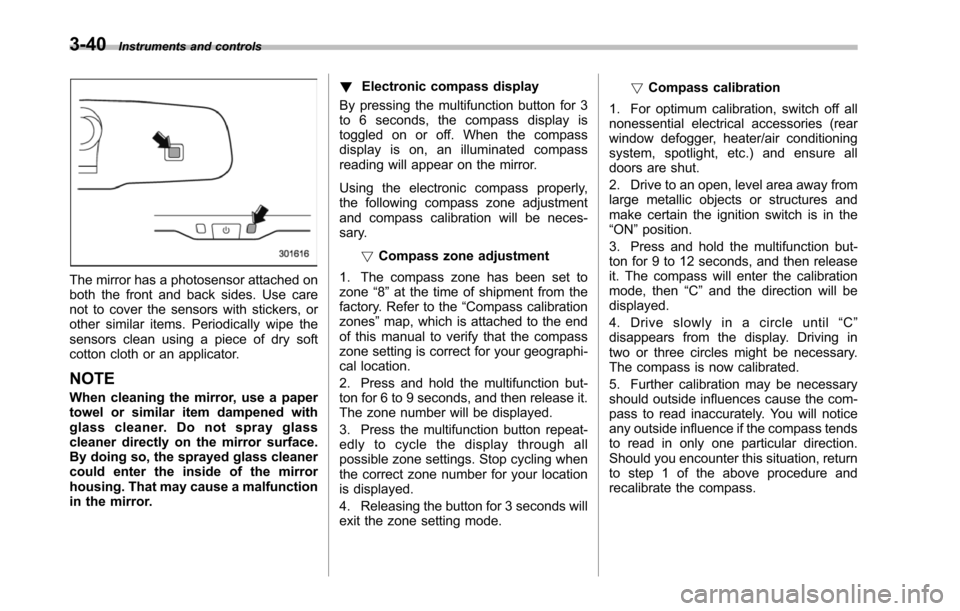
The mirror has a photosensor attached onboththe front and back sides. Use carenot to cover the sensors with stickers, orother similar items. Periodically wipe thesensors clean using a piece of dry softcotton cloth or an applicator.
NOTE
When cleaning the mirror, use a papertowel or similar item dampened withglass cleaner. Do not spray glasscleaner directly on the mirror surface.By doing so, the sprayed glass cleanercould enter the inside of the mirrorhousing. That may cause a malfunctionin the mirror.
!Electronic compass display
By pressing the multifunction button for 3to 6 seconds, the compass display istoggled on or off. When the compassdisplay is on, an illuminated compassreading will appear on the mirror.
Using the electronic compass properly,the following compass zone adjustmentand compass calibration will be neces-sary.
!Compasszone adjustment
1. The compass zone has been set tozone“8”at the time of shipment from thefactory. Refer to the“Compass calibrationzones”map, which is attached to the endof this manual to verify that the compasszone setting is correct for your geographi-cal location.
2. Press and hold the multifunction but-ton for 6 to 9 seconds, and then release it.The zone number will be displayed.
3. Press the multifunction button repeat-edly to cycle the display through allpossible zone settings. Stop cycling whenthe correct zone number for your locationis displayed.
4. Releasing the button for 3 seconds willexitthe zone setting mode.
!Compass calibration
1. For optimum calibration, switch off allnonessential electrical accessories (rearwindow defogger, heater/air conditioningsystem, spotlight, etc.) and ensure alldoors are shut.
2. Drive to an open, level area away fromlarge metallic objects or structures andmake certain the ignition switch is in the“ON”position.
3. Press and hold the multifunction but-ton for 9 to 12 seconds, and then releaseit. The compass will enter the calibrationmode,then“C”and the direction will bedisplayed.
4. Drive slowly in a circle until“C”disappears from the display. Driving intwo or three circles might be necessary.The compass is now calibrated.
5. Further calibration may be necessaryshould outside influences cause the com-pass to read inaccurately. You will noticeany outside influence if the compass tendsto read in only one particular direction.Shouldyou encounter this situation, returnto step 1 of the above procedure andrecalibrate the compass.
Page 174 of 426
&Type C inside mirror (if
equipped)
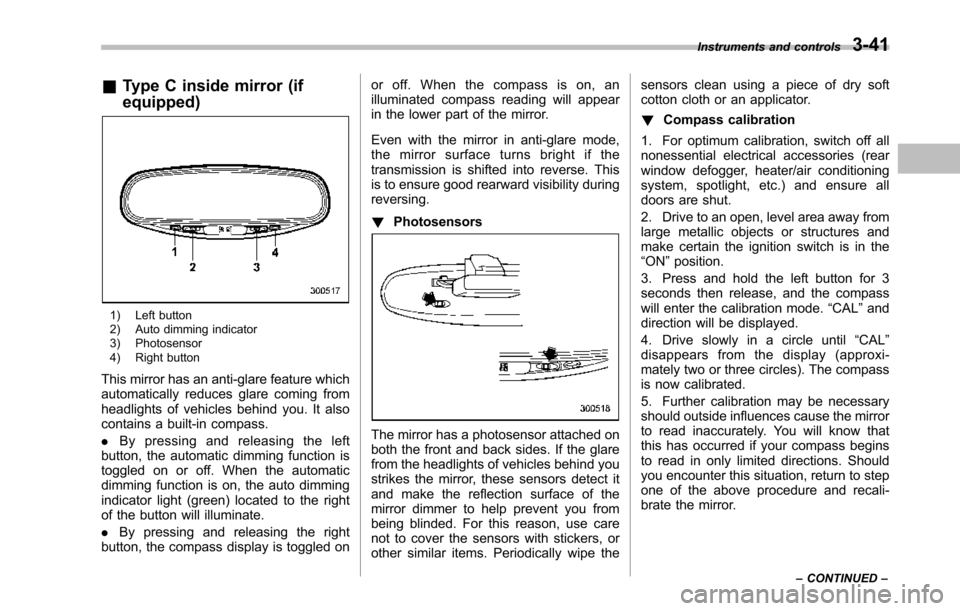
1) Left button2) Auto dimming indicator3) Photosensor4) Right button
This mirror has an anti-glare feature whichautomatically reduces glare coming fromheadlights of vehicles behind you. It alsocontains a built-in compass.
.By pressing and releasing the leftbutton, the automatic dimming function istoggled on or off. When the automaticdimming function is on, the auto dimmingindicator light (green) located to the rightof the button will illuminate.
.By pressing and releasing the rightbutton, the compass display is toggled on
or off. When the compass is on, anilluminated compass reading will appearin the lower part of the mirror.
Even with the mirror in anti-glare mode,the mirror surface turns bright if thetransmission is shifted into reverse. Thisis to ensure good rearward visibility duringreversing.
!Photosensors
The mirror has a photosensor attached onboth the front and back sides. If the glarefrom the headlights of vehicles behind youstrikes the mirror, these sensors detect itand make the reflection surface of themirror dimmer to help prevent you frombeing blinded. For this reason, use carenot to cover the sensors with stickers, orother similar items. Periodically wipe the
sensors clean using a piece of dry softcotton cloth or an applicator.
!Compass calibration
1. For optimum calibration, switch off allnonessential electrical accessories (rearwindow defogger, heater/air conditioningsystem, spotlight, etc.) and ensure alldoors are shut.
2. Drive to an open, level area away fromlarge metallic objects or structures andmake certain the ignition switch is in the“ON”position.
3. Press and hold the left button for 3seconds then release, and the compasswill enter the calibration mode.“CAL”anddirection will be displayed.
4. Drive slowly in a circle until“CAL”disappears from the display (approxi-mately two or three circles). The compassis now calibrated.
5. Further calibration may be necessaryshould outside influences cause the mirrorto read inaccurately. You will know thatthis has occurred if your compass beginsto read in only limited directions. Shouldyou encounter this situation, return to stepone of the above procedure and recali-brate the mirror.
Instruments and controls3-41
–CONTINUED–
Page 178 of 426
Ventilator.............................................................. 4-2Airflow................................................................ 4-2Ventilator............................................................ 4-4
Automatic climate control system..................... 4-5Control panel...................................................... 4-5Rear air conditioner............................................. 4-9Temperature sensors........................................... 4-9
Operating tips for heater and airconditioner....................................................... 4-10Cleaning ventilator grille..................................... 4-10Efficient cooling after parking in directsunlight........................................................... 4-10
Lubrication oil circulation in the refrigerantcircuit.............................................................. 4-10Checking air conditioning system before summerseason............................................................ 4-10Cooling and dehumidifying in high humidity andlow temperature weather conditions................. 4-10Air conditioner compressor shut-off when engineis heavily loaded.............................................. 4-11Refrigerant for your climate control system ........ 4-11
Air filtration system........................................... 4-11Replacing the air filter........................................ 4-11
Climate control
4