2014 SUBARU TRIBECA light
[x] Cancel search: lightPage 237 of 426
6-16Interior equipment
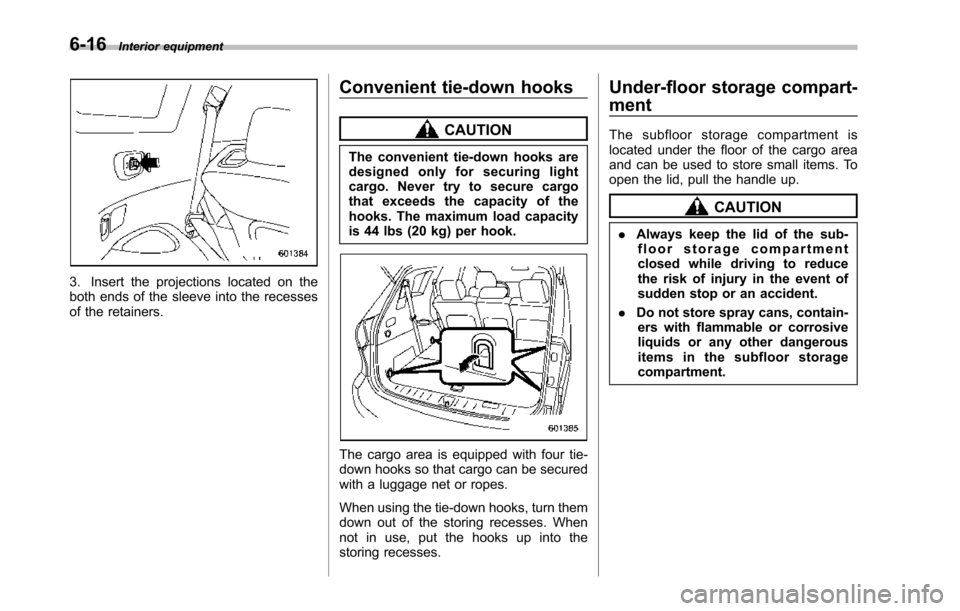
3. Insert the projections located on theboth ends of the sleeve into the recessesof the retainers.
Convenient tie-down hooks
CAUTION
The convenient tie-down hooks aredesigned only for securing lightcargo. Never try to secure cargothat exceeds the capacity of thehooks. The maximum load capacityis 44 lbs (20 kg) per hook.
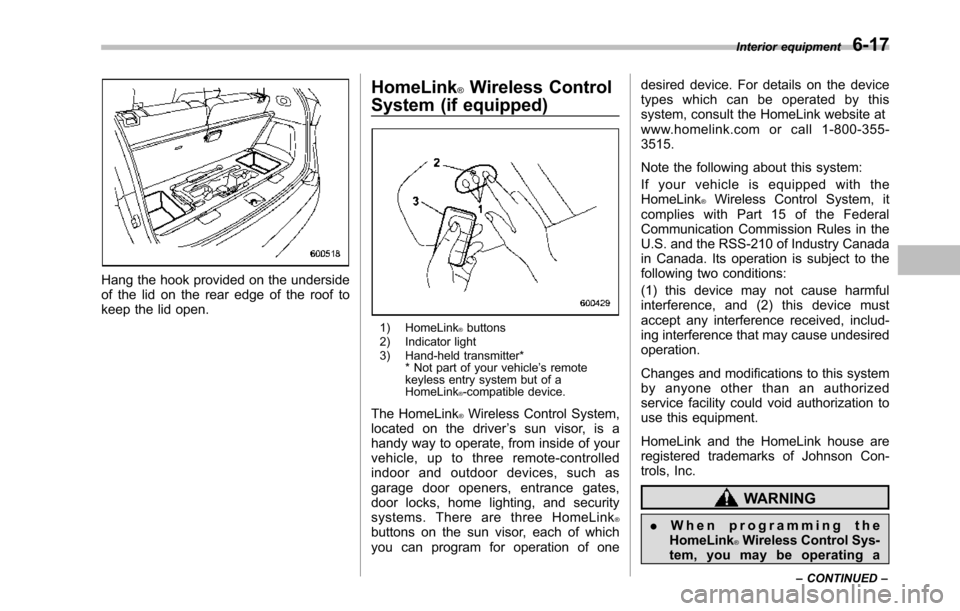
Thecargo area is equipped with four tie-down hooks so that cargo can be securedwith a luggage net or ropes.
When using the tie-down hooks, turn themdown out of the storing recesses. Whennot in use, put the hooks up into thestoring recesses.
Under-floor storage compart-
ment
The subfloor storage compartment islocated under the floor of the cargo areaand can be used to store small items. Toopen the lid, pull the handle up.
CAUTION
.Always keep the lid of the sub-floor storage compartmentclosed whiledriving to reducethe risk of injury in the event ofsudden stop or an accident.
.Do not store spray cans, contain-ers with flammable or corrosiveliquids or any other dangerousitems in the subfloor storagecompartment.
Page 238 of 426
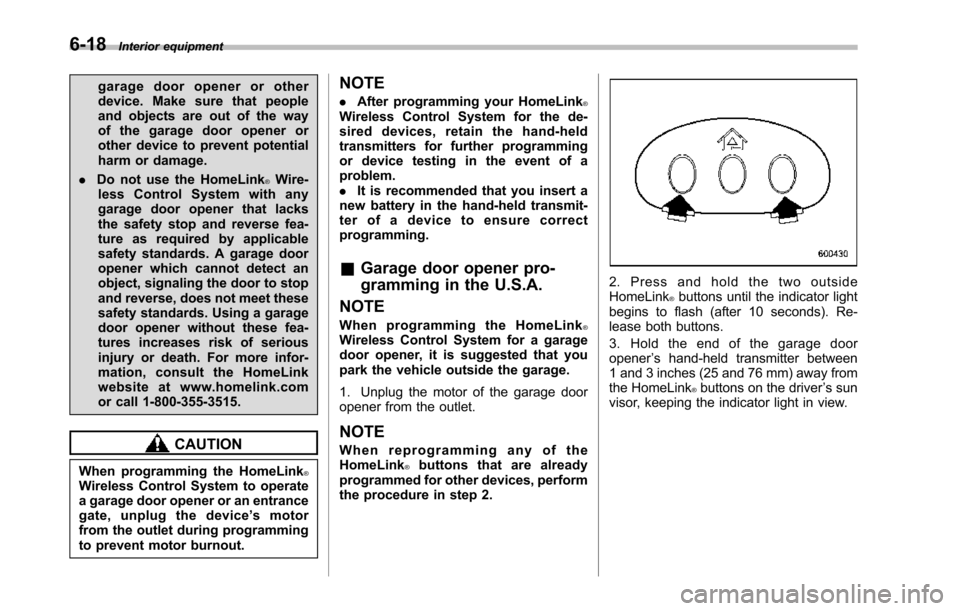
Hang the hook provided on the undersideof the lid on the rear edge of the roof tokeepthe lid open.
HomeLink®Wireless Control
System (if equipped)
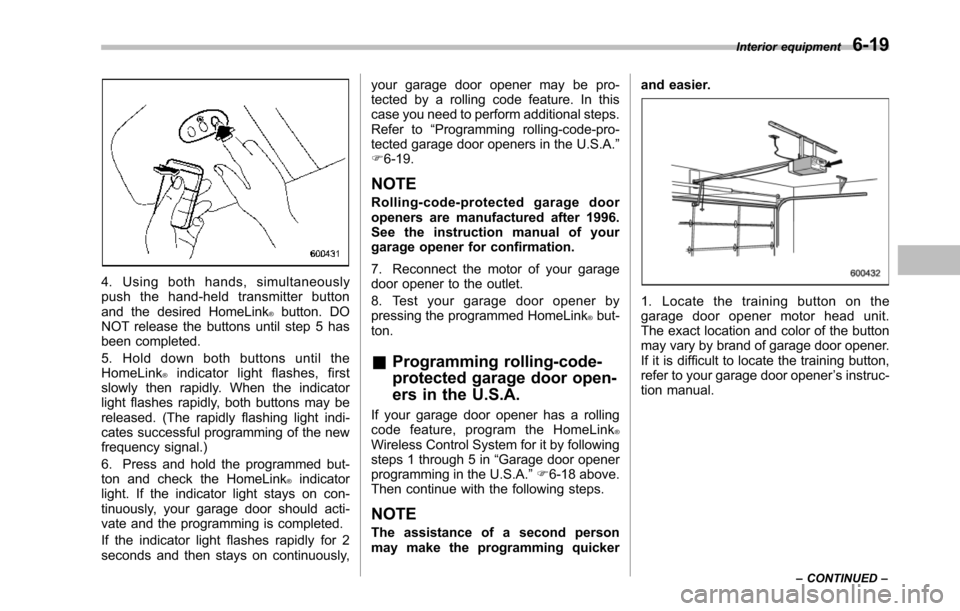
1) HomeLink®buttons2) Indicator light3) Hand-held transmitter** Not part of your vehicle’s remotekeyless entry system but of aHomeLink®-compatible device.
The HomeLink®Wireless Control System,located on the driver’s sun visor, is ahandy way to operate, from inside of yourvehicle, up to three remote-controlledindoor and outdoor devices, such asgarage door openers, entrance gates,door locks, home lighting, and securitysystems. There are three HomeLink®buttons on the sun visor, each of whichyou can program for operation of one
desired device. For details on the devicetypes which can be operated by thissystem, consult the HomeLink website atwww.homelink.com or call 1-800-355-3515.
Note the following about this system:
If your vehicle is equipped with theHomeLink®Wireless Control System, itcomplies with Part 15 of the FederalCommunication Commission Rules in theU.S. and the RSS-210 of Industry Canadain Canada. Its operation is subject to thefollowing two conditions:
(1) this device may not cause harmfulinterference, and (2) this device mustaccept any interference received, includ-ing interference that may cause undesiredoperation.
Changes and modifications to this systemby anyone other than an authorizedservice facility could void authorization touse this equipment.
HomeLink and the HomeLink house areregistered trademarks of Johnson Con-trols, Inc.
WARNING
.When programming theHomeLink®Wireless Control Sys-tem, you may be operating a
Interior equipment6-17
–CONTINUED–
Page 239 of 426
6-18Interior equipment
garage door opener or otherdevice. Make sure that peopleand objects are out of the wayof the garage door opener orother device to prevent potentialharm or damage.
.Do not use the HomeLink®Wire-less Control System with anygarage door opener that lacksthe safety stopand reverse fea-ture as required by applicablesafety standards. A garage dooropener which cannot detect anobject, signaling the door to stopand reverse, does not meet thesesafetystandards. Using a garagedoor opener without these fea-tures increases risk of seriousinjury or death. For more infor-mation, consult the HomeLinkwebsite at www.homelink.comor call 1-800-355-3515.
CAUTION
When programming the HomeLink®WirelessControl System to operatea garage door opener or an entrancegate, unplug the device’smotorfrom the outlet during programmingto prevent motor burnout.
NOTE
.After programming your HomeLink®Wireless Control System for the de-sired devices, retain the hand-heldtransmitters for further programmingor device testing in the event of aproblem..It is recommended that you insert anew battery in the hand-held transmit-ter of a device to ensure correctprogramming.
&Garage door opener pro-
gramming in the U.S.A.
NOTE
When programming the HomeLink®Wireless ControlSystem for a garagedoor opener, it is suggested that youpark the vehicle outside the garage.
1. Unplug the motor of the garage dooropener from the outlet.
NOTE
When reprogramming any of theHomeLink®buttons that are alreadyprogrammed for other devices, performthe procedure in step 2.
2. Press and hold the two outsideHomeLink®buttons until the indicator lightbegins to flash (after 10 seconds). Re-lease both buttons.
3. Hold the end of the garage dooropener’s hand-held transmitter between1 and 3 inches (25 and 76 mm) away fromthe HomeLink®buttons on the driver’s sunvisor, keeping the indicator light in view.
Page 240 of 426
4. Using both hands, simultaneouslypush the hand-held transmitter buttonand the desired HomeLink®button. DONOT release the buttons until step 5 hasbeen completed.
5. Hold down both buttons until theHomeLink®indicator light flashes, firstslowly then rapidly. When the indicatorlight flashes rapidly, both buttons may bereleased. (The rapidly flashing light indi-cates successful programming of the newfrequency signal.)
6. Press and hold the programmed but-ton and checkthe HomeLink®indicatorlight. If the indicator light stays on con-tinuously, your garage door should acti-vate and the programming is completed.
If the indicator light flashes rapidly for 2seconds and then stays on continuously,
your garage door opener may be pro-tected by a rolling code feature. In thiscase you need to perform additional steps.Refer to“Programming rolling-code-pro-tected garage door openers in the U.S.A.”F6-19.
NOTE
Rolling-code-protected garage dooropeners are manufactured after 1996.See the instruction manual of yourgarage opener for confirmation.
7. Reconnect the motor of your garagedoor opener to the outlet.
8. Test your garage door opener bypressing the programmed HomeLink®but-ton.
&Programming rolling-code-
protected garage door open-
ers in the U.S.A.
If your garage door opener has a rollingcode feature, program the HomeLink®Wireless Control System for it by followingsteps1 through 5 in“Garagedoor openerprogramming in the U.S.A.”F6-18 above.Then continue with the following steps.
NOTE
The assistance of a second personmay make the programming quicker
and easier.
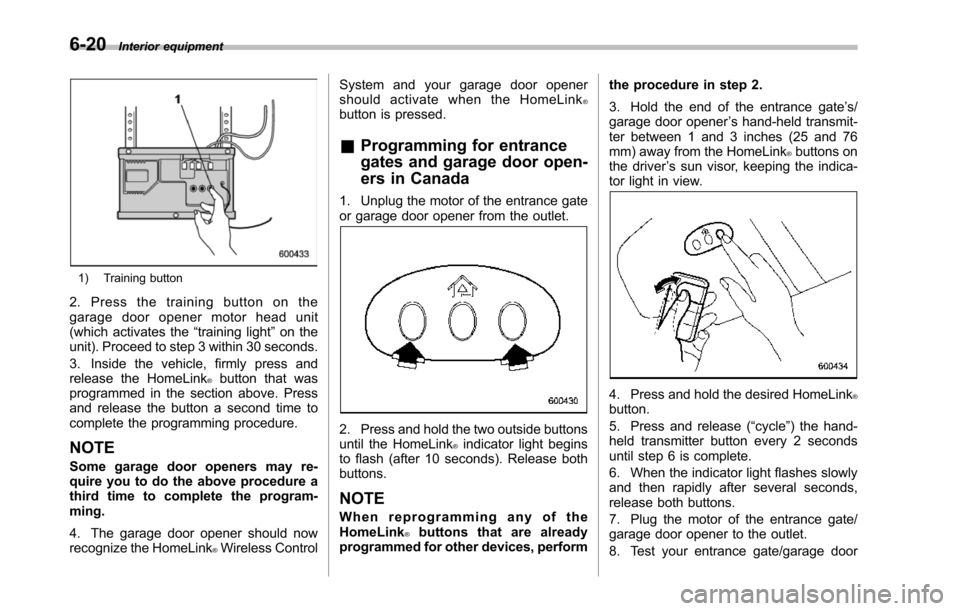
1. Locate the training button on thegarage door opener motor head unit.The exactlocation and color of the buttonmay vary by brand of garage door opener.If it is difficult to locate the training button,refer to your garage door opener’s instruc-tion manual.
Interior equipment6-19
–CONTINUED–
Page 241 of 426
6-20Interior equipment
1) Training button
2. Press the training button on thegarage door opener motor head unit(which activates the“training light”on theunit). Proceed to step 3 within 30 seconds.
3. Inside the vehicle, firmly press andrelease the HomeLink®button that wasprogrammed in the section above. Pressand release thebutton a second time tocomplete the programming procedure.
NOTE
Some garage door openers may re-quire you to do the above procedure athird time to complete the program-ming.
4. The garage door opener should nowrecognize the HomeLink®Wireless Control
System and your garage door openershould activate when the HomeLink®button is pressed.
&Programming for entrance
gates and garage door open-
ers in Canada
1. Unplug the motor of the entrance gateor garage door opener from the outlet.
2. Press and hold the two outside buttonsuntil the HomeLink®indicator light beginsto flash (after 10 seconds). Release bothbuttons.
NOTE
When reprogramming any of theHomeLink®buttons that are alreadyprogrammed for other devices, perform
the procedure in step 2.
3. Hold the end of the entrance gate’s/garage door opener’s hand-held transmit-ter between 1 and 3 inches (25 and 76mm) away from the HomeLink®buttons onthe driver’s sun visor, keeping the indica-tor light in view.
4. Press and hold the desired HomeLink®button.
5. Press and release (“cycle”) the hand-held transmitter button every 2 secondsuntil step 6 is complete.
6. When the indicator light flashes slowlyand then rapidly after several seconds,release both buttons.
7. Plug the motor of the entrance gate/garage door opener to the outlet.
8. Test your entrance gate/garage door
Page 242 of 426
opener by pressing the programmedHomeLink®button.
&Programming other devices
To program other devices such as doorlocks, home lighting and security systems,contact HomeLink at www.homelink.comor call 1-800-355-3515.
&Operating the HomeLink®
Wireless Control System
Once programmed, the HomeLink®Wire-less Control System can be used toremote-controlthe devices to which itsbuttons are programmed. To activate adevice, simply press the appropriate but-ton.The indicator light illuminates, indicat-ing that the signal is being transmitted.
&Erasing HomeLink®button
memory
NOTE
.Performing this procedure erasesthe memory of all the preprogrammedbuttons simultaneously. The memoryof individual buttons cannot be erased..It is recommended that upon thesale of the vehicle, the memory of allprogrammed HomeLink®buttons beerased for security purposes.
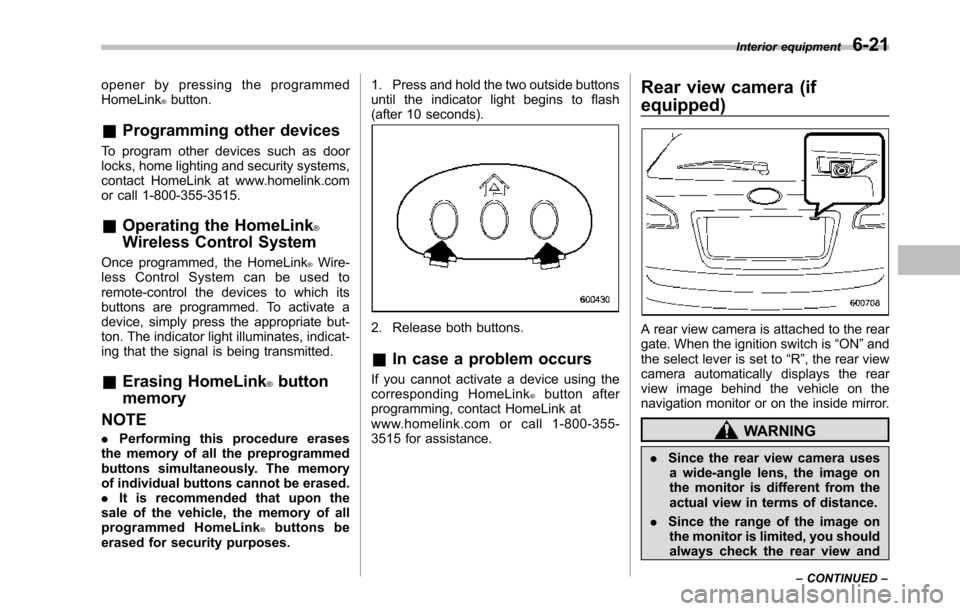
1. Press and hold the two outside buttonsuntil the indicator light begins to flash(after 10 seconds).
2. Release both buttons.
&In case a problem occurs
If you cannot activate a device using thecorresponding HomeLink®button afterprogramming, contact HomeLink atwww.homelink.com or call 1-800-355-3515 for assistance.
Rear view camera (if
equipped)
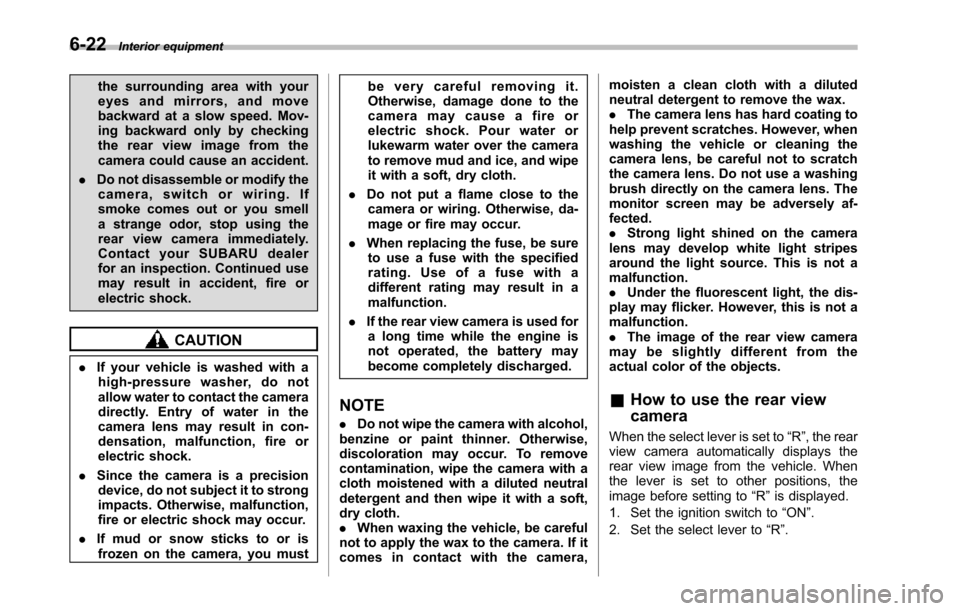
A rear view camera is attached to the reargate. When the ignition switch is“ON”andthe select lever is set to“R”, the rear viewcamera automatically displays the rearview image behind the vehicle on thenavigation monitor or on the inside mirror.
WARNING
.Since the rear view camera usesa wide-angle lens, the image onthe monitor is different from theactual view in terms of distance.
.Since the range of the image onthe monitor is limited, you shouldalways check the rear view and
Interior equipment6-21
–CONTINUED–
Page 243 of 426
6-22Interior equipment
the surrounding area with youreyes and mirrors, and movebackward at a slow speed. Mov-ing backward only by checkingthe rear view image from thecamera could cause an accident.
.Do not disassemble or modify thecamera, switch or wiring. Ifsmoke comes out or you smella strange odor, stop using therear view camera immediately.Contact your SUBARU dealerfor an inspection. Continued usemay result in accident, fire orelectric shock.
CAUTION
.If your vehicle is washed with ahigh-pressure washer, do notallow water to contact the cameradirectly. Entry of water in thecamera lens may result in con-densation, malfunction, fire orelectric shock.
.Since the camera is a precisiondevice, do not subject it to strongimpacts. Otherwise, malfunction,fire or electric shock may occur.
.If mud or snow sticks to or isfrozen on the camera, you must
be very careful removing it.Otherwise, damage done to thecamera may cause a fire orelectric shock. Pour water orlukewarm water over the camerato remove mud and ice, and wipeit with a soft, dry cloth.
.Do not put a flame close to thecamera or wiring. Otherwise, da-mage or fire may occur.
.When replacing the fuse, be sureto use a fuse with the specifiedrating. Use of a fuse with adifferent rating may result in amalfunction.
.If the rear view camera is used fora long time while the engine isnot operated, the battery maybecome completely discharged.
NOTE
.Do not wipe the camera with alcohol,benzine or paint thinner. Otherwise,discoloration may occur. To removecontamination, wipe the camera with acloth moistened with a diluted neutraldetergent and then wipe it with a soft,dry cloth..When waxing the vehicle, be carefulnot to apply the wax to the camera. If itcomes in contact with the camera,
moisten a clean cloth with a dilutedneutral detergent to remove the wax..The camera lens has hard coating tohelp prevent scratches. However, whenwashing the vehicle or cleaning thecamera lens, be careful not to scratchthe camera lens. Do not use a washingbrush directly on the camera lens. Themonitorscreen may be adversely af-fected..Strong light shined on the cameralens may develop white light stripesaround the light source. This is not amalfunction..Under the fluorescent light, the dis-play may flicker. However, this is not amalfunction..The image of the rear view cameramay be slightly different from theactual color of the objects.
&How to use the rear view
camera
When the select lever is set to“R”, the rearview camera automatically displays therear view image from the vehicle. Whenthe lever is set to other positions, theimage before setting to“R”is displayed.
1. Set the ignition switch to“ON”.
2. Set the select lever to“R”.
Page 244 of 426
NOTE
.The image of the rear view camerahas priority over other screen displays..The image of the rear view camera ishorizontally reversed as is the casewith the vehicle rearview mirror or theside view mirror..It may be difficult to see the image ofthe rearview camera in the followingcases. This is not a malfunction of thecamera.–The vehicle is in a dark place (atnight, in a tunnel, etc.).–The vehicle is in an extremely hotor cold place.–An object (such as raindrops,snow, dirt, etc.) that disturbs theview of the rear view camera sticksto the lens of the camera.–Strong light shined directly onthe camera lens (occasionally, thereare vertical lines on the screen).
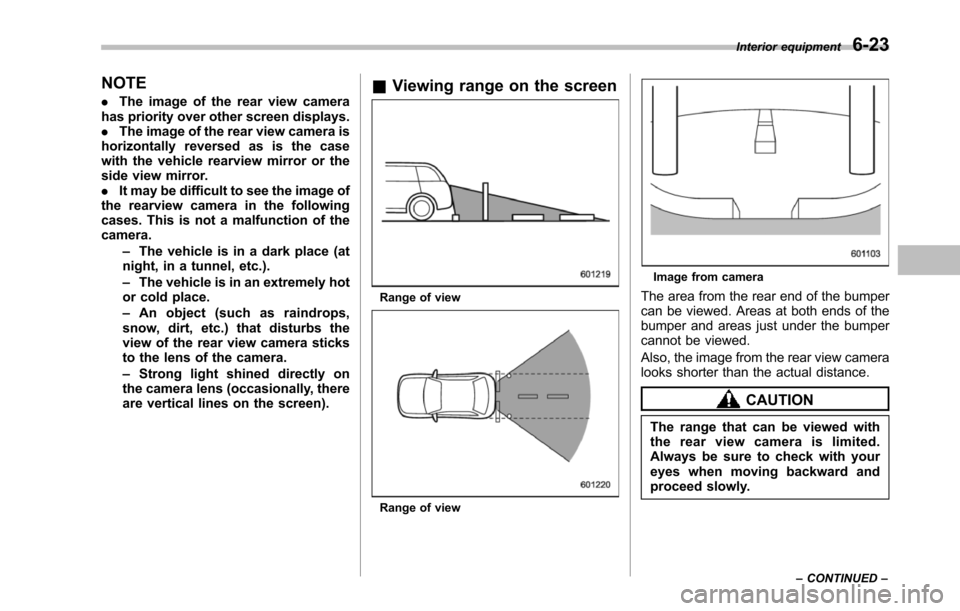
&Viewing range on the screen
Range of view
Range of view
Image from camera
Thearea from the rear end of the bumpercan be viewed. Areas at both ends of thebumper and areas just under the bumpercannot be viewed.
Also, the image from the rear view cameralooks shorter than the actual distance.
CAUTION
The rangethat can be viewed withthe rear view camera is limited.Always be sure to check with youreyes when moving backward andproceed slowly.
Interior equipment6-23
–CONTINUED–