2014 NISSAN TEANA REMOVAL
[x] Cancel search: REMOVALPage 134 of 4801

BR-38
< REMOVAL AND INSTALLATION >
REAR DISC BRAKE
REAR DISC BRAKE
BRAKE PAD
BRAKE PAD : Exploded ViewINFOID:0000000009463716
BRAKE PAD : Removal and InstallationINFOID:0000000009463717
WARNING:
Clean dust on brake calipers and brake pads with a vacuum dust collector to minimize the hazard of
airborne particles or other materials.
CAUTION:
• While removing brake caliper, do not de press brake pedal because piston will pop out.
• Do not damage piston boot.
• Keep disc brake rotors and brake pa ds free from brake fluid and grease.
• Burnish the brake pads and disc brake rotors mutually contacting surfaces after refinishing or
replacing disc brake rotors, after replacing brake pads, or if a soft pedal occurs at very low mileage.
Refer to BR-17, "Brake Burnishing"
.
REMOVAL
1. Partially drain brake fluid from the master cylinder. Refer to BR-14, "Drain and Refill".
2. Remove rear wheel and tire using power tool. Refer to WT-55, "Adjustment"
.
3. Remove the upper and lower sliding pin bolts. Refer to BR-39,
"BRAKE CALIPER ASSEMBLY : Exploded View".
NOTE:
Note the sliding pin orientation during removal. The upper sliding
pin contains a bushing.
4. Remove brake caliper from torque member. Leavi ng brake hose attached, reposition the brake caliper
aside with wire.
1. Inner cover shim 2. Inner shim 3. Inner pad
4. Outer pad 5. Outer shim 6. Outer shim cover
7. Pad retainer A. Molykote AS-880N grease B. Molykote 7439 grease
AWFIA0940ZZ
ALFIA0288ZZ
Revision: November 20132014 Altima NAM
Page 135 of 4801

REAR DISC BRAKEBR-39
< REMOVAL AND INSTALLATION >
C
D E
G H
I
J
K L
M A
B
BR
N
O P
CAUTION:
Do not twist or stretch the brake hose.
5. Remove the brake pads and shims from the torque member.
6. Remove the brake pad retainers from the torque member. CAUTION:
• When removing the brake pad retainers from the torque
member, lift in the directi on indicated by the arrow as
shown so that it does not deform.
• Replace brake pad retainers if damage exists.
INSTALLATION
Installation is in the reverse order of removal.
• Apply Molykote AS-880N grease or equivalent betw een the outer brake pad, outer shim cover and outer
shim and the inner shim and inner brake pad. Install out er shim, outer shim cover to outer brake pad, and
inner shim, inner shim cover to inner brake pad.
CAUTION:
Replace brake pad shims and covers if damage exists.
• Apply Molykote 7439 grease or equivalent between brake pad retainers and brake pad ends. Install brake pad retainers and brake pads on torque member.
CAUTION:
• Make sure the brake pad retainers are fastened properly to the torque member.
• Replace brake pad retainers if damage exists.
• Using a suitable tool, press the piston into the cylinder bore of the caliper.
• Check brake fluid level and refill as necessary. Refer to BR-8, "Inspection"
.
• Burnish contact surface between brake pads and disc brake rotors. Refer to BR-17, "Brake Burnishing"
.
BRAKE CALIPER ASSEMBLY
BRAKE CALIPER ASSEMBLY : Exploded ViewINFOID:0000000009463718
SBR556E
AWFIA0937ZZ
Revision: November 20132014 Altima NAM
Page 136 of 4801
BR-40
< REMOVAL AND INSTALLATION >
REAR DISC BRAKE
BRAKE CALIPER ASSEMBLY : Removal and Installation
INFOID:0000000009463719
WARNING:
Clean dust on brake calipers and brake pads with a vacuum dust collector to minimize the hazard of
airborne particles or other materials.
CAUTION:
• While removing brake caliper, do not depr ess brake pedal because the piston will pop out.
• Do not damage piston boot.
• Keep disc brake rotor free from brake fluid.
• Refill the brake reservoir with new brake fluid “DOT 3”.
• Do not reuse drained brake fluid.
NOTE:
When removing components such as hoses, tubes/lines, etc. , cap or plug openings to prevent fluid from spill-
ing.
REMOVAL
1. Remove rear wheel and tire using power tool. Refer to WT-55, "Adjustment".
2. Remove reservoir cap.
3. Partially drain brake fluid from the master cylinder. Refer to BR-14, "Drain and Refill"
.
4. Remove union bolt (A) and then remove brake hose from brake caliper. Discard the copper sealing wash- ers.
CAUTION:
Do not reuse copp er sealing washers.
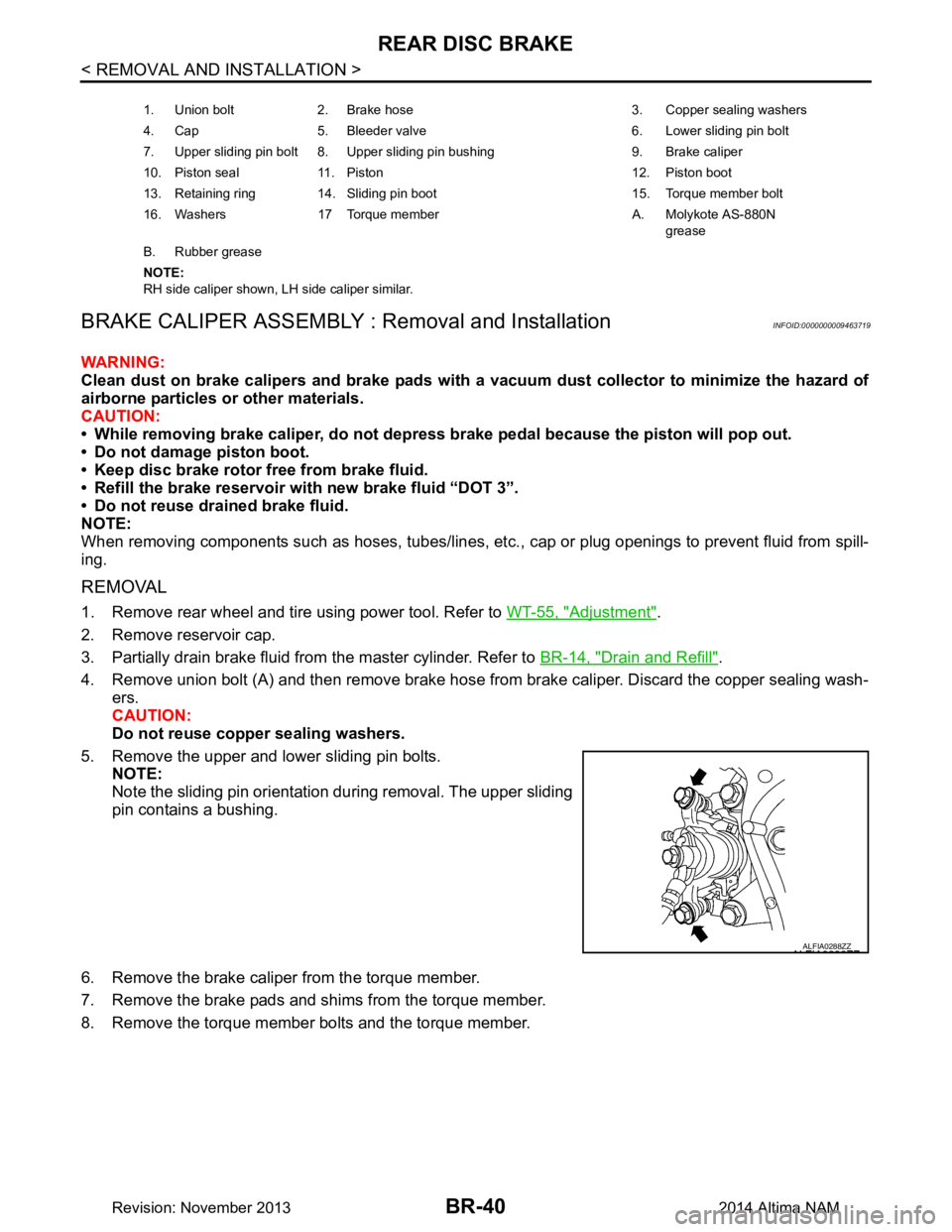
5. Remove the upper and lower sliding pin bolts. NOTE:
Note the sliding pin orientation during removal. The upper sliding
pin contains a bushing.
6. Remove the brake caliper from the torque member.
7. Remove the brake pads and shims from the torque member.
8. Remove the torque member bolts and the torque member.
1. Union bolt 2. Brake hose 3. Copper sealing washers
4. Cap 5. Bleeder valve 6. Lower sliding pin bolt
7. Upper sliding pin bolt 8. Upper sliding pin bushing 9. Brake caliper
10. Piston seal 11. Piston 12. Piston boot
13. Retaining ring 14. Sliding pin boot 15. Torque member bolt
16. Washers 17 Torque member A. Molykote AS-880N grease
B. Rubber grease
NOTE:
RH side caliper shown, LH side caliper similar.
ALFIA0288ZZ
Revision: November 20132014 Altima NAM
Page 137 of 4801
REAR DISC BRAKEBR-41
< REMOVAL AND INSTALLATION >
C
D E
G H
I
J
K L
M A
B
BR
N
O P
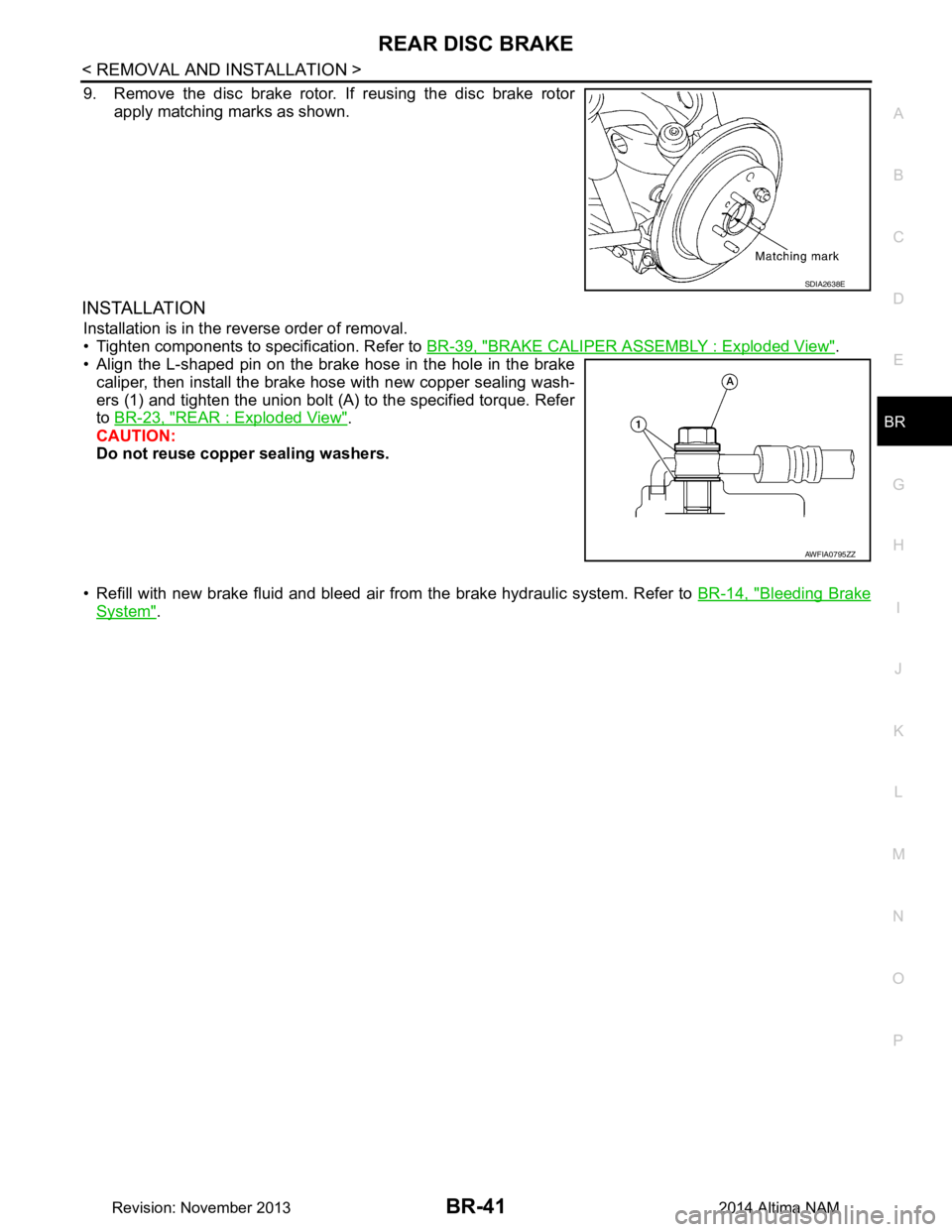
9. Remove the disc brake rotor. If reusing the disc brake rotor apply matching marks as shown.
INSTALLATION
Installation is in the reverse order of removal.
• Tighten components to specification. Refer to BR-39, "BRAKE CALIPER ASSEMBLY : Exploded View"
.
• Align the L-shaped pin on the brake hose in the hole in the brake
caliper, then install the brake hose with new copper sealing wash-
ers (1) and tighten the union bolt (A) to the specified torque. Refer
to BR-23, "REAR : Exploded View"
.
CAUTION:
Do not reuse copper sealing washers.
• Refill with new brake fluid and bleed air fr om the brake hydraulic system. Refer to BR-14, "Bleeding Brake
System".
SDIA2638E
AWFIA0795ZZ
Revision: November 20132014 Altima NAM
Page 149 of 4801

BRC-3
C
D E
G H
I
J
K L
M A
B
BRC
N
O P
ABS WARNING LA MP ................................... ..112
Component Function Check ................................ ..112
Diagnosis Procedure .............................................112
BRAKE WARNING LAMP ............................. ..113
Component Function Check ................................ ..113
Diagnosis Procedure .............................................113
VDC OFF INDICATOR LAMP ..........................114
Description .......................................................... ..114
Component Function Check ..................................114
Diagnosis Procedure .............................................114
SLIP INDICATOR LAMP ..................................115
Component Function Check ................................ ..115
Diagnosis Procedure .............................................115
SYMPTOM DIAGNOSIS ............................116
VDC/TCS/ABS ................................................ ..116
Symptom Table ................................................... ..116
EXCESSIVE ABS FUNCTION OPERATION
FREQUENCY ................................................. ..
117
Diagnosis Procedure ........................................... ..117
UNEXPECTED PEDAL REACTION ................118
Diagnosis Procedure ........................................... ..118
THE BRAKING DISTANCE IS LONG ..............119
Diagnosis Procedure ........................................... ..119
ABS FUNCTION DOES NOT OPERATE .........120
Diagnosis Procedure ........................................... ..120
PEDAL VIBRATION OR ABS OPERATION
SOUND OCCURS .......................................... ..
121
Diagnosis Procedure ........................................... ..121
VEHICLE JERKS DURING VDC/TCS/ABS
CONTROL .......................................................
122
Diagnosis Procedure ........................................... ..122
NORMAL OPERATING CONDITION .............123
Description .............................................................123
REMOVAL AND INSTALLATION .............124
WHEEL SENSOR ............................................124
Exploded View - Front Wheel Sensor .................. ..124
Removal and Installation - Front Wheel Sensor ....124
Exploded View - Rear Wheel Sensor ....................125
Removal and Installation - Rear Wheel Sensor .....125
SENSOR ROTOR ............................................127
Removal and Installation - Front Sensor Rotor .....127
Removal and Installation - Rear Sensor Rotor ......127
ABS ACTUATOR AND ELECTRIC UNIT
(CONTROL UNIT) ...........................................
128
Exploded View ..................................................... ..128
Removal and Installation .......................................128
VDC OFF SWITCH ..........................................130
Removal and Installation .......................................130
YAW RATE/SIDE/DECEL G SENSOR ...........131
Removal and Installation .......................................131
STEERING ANGLE SENSOR .........................132
Exploded View .......................................................132
Removal and Installation .......................................132
Revision: November 20132014 Altima NAMRevision: November 20132014 Altima NAM
Page 150 of 4801
![NISSAN TEANA 2014 Service Manual
BRC-4
< PRECAUTION >[VDC/TCS/ABS]
PRECAUTIONS
PRECAUTION
PRECAUTIONS
Precaution for Supplemental Restraint Syst
em (SRS) "AIR BAG" and "SEAT BELT
PRE-TENSIONER"
INFOID:0000000009951721
The Supplemen](/manual-img/5/57390/w960_57390-149.png "NISSAN TEANA 2014 Service Manual
BRC-4
< PRECAUTION >[VDC/TCS/ABS]
PRECAUTIONS
PRECAUTION
PRECAUTIONS
Precaution for Supplemental Restraint Syst
em (SRS) \"AIR BAG\" and \"SEAT BELT
PRE-TENSIONER\"
INFOID:0000000009951721
The Supplemen")
BRC-4
< PRECAUTION >[VDC/TCS/ABS]
PRECAUTIONS
PRECAUTION
PRECAUTIONS
Precaution for Supplemental Restraint Syst
em (SRS) "AIR BAG" and "SEAT BELT
PRE-TENSIONER"
INFOID:0000000009951721
The Supplemental Restraint System such as “A IR BAG” and “SEAT BELT PRE-TENSIONER”, used along
with a front seat belt, helps to reduce the risk or severi ty of injury to the driver and front passenger for certain
types of collision. Information necessary to service the system safely is included in the SR and SB section of
this Service Manual.
WARNING:
• To avoid rendering the SRS inopera tive, which could increase the risk of personal injury or death in
the event of a collision which would result in air bag inflation, all maintenance must be performed by
an authorized NISS AN/INFINITI dealer.
• Improper maintenance, including in correct removal and installation of the SRS, can lead to personal
injury caused by unintent ional activation of the system. For re moval of Spiral Cable and Air Bag
Module, see the SR section.
• Do not use electrical test equipmen t on any circuit related to the SRS unless instructed to in this
Service Manual. SRS wiring harn esses can be identified by yellow and/or orange harnesses or har-
ness connectors.
PRECAUTIONS WHEN USING POWER TOOLS (AIR OR ELECTRIC) AND HAMMERS
WARNING:
• When working near the Airbag Diagnosis Sensor Unit or other Airbag System sensors with the Igni-
tion ON or engine running, DO NOT use air or electri c power tools or strike near the sensor(s) with a
hammer. Heavy vibration could activate the sensor( s) and deploy the air bag(s), possibly causing
serious injury.
• When using air or electric power tools or hammers , always switch the Ignition OFF, disconnect the
battery and wait at least three minutes before performing any service.
Precaution for Brake SystemINFOID:0000000009463735
WARNING:
Clean any dust from the front brake and rear br ake using a vacuum dust collector. Do not blow by
compressed air.
• Brake fluid use refer to BR-8, "Inspection"
.
• Do not reuse drained brake fluid.
• Do not spill or splash brake fluid on painted surfaces. Brake fluid may seriously damage paint. Wipe it off immediately and wash with water if it gets on a painted surface.
• Always confirm the specified tightening torque when installing the brake pipes.
• After pressing the brake pedal more deeply or harder t han normal driving, such as air bleeding, check each
item of brake pedal. Adjust brake pedal if it is outside the standard value.
• Do not use mineral oils such as gasoline or light oil to clean. They may damage rubber parts and cause
improper operation.
• Always loosen the brake tube flar e nut with a flare nut wrench.
• Tighten the brake tube flare nut to the specified torque with a crow-
foot (A) and torque wrench (B).
• Always connect the battery terminal when moving the vehicle.
• Turn the ignition switch OFF and disconnect the ABS actuator and
electric unit (control unit) harness connector or the battery negative
terminal before performing the work.
• Check that no brake fluid leakage is present after replacing the parts.
JPFIA0001ZZ
Revision: November 20132014 Altima NAMRevision: November 20132014 Altima NAM
Page 206 of 4801
![NISSAN TEANA 2014 Service Manual
BRC-60
< BASIC INSPECTION >[VDC/TCS/ABS]
CONFIGURATION [ABS ACTUATOR AND ELECTRIC UNIT (CONTROL UNIT)]
CONFIGURATION [ABS ACTUATOR
AND ELECTRIC UNIT (CONTROL
UNIT)]
Work ProcedureINFOID:000000000946](/manual-img/5/57390/w960_57390-205.png "NISSAN TEANA 2014 Service Manual
BRC-60
< BASIC INSPECTION >[VDC/TCS/ABS]
CONFIGURATION [ABS ACTUATOR AND ELECTRIC UNIT (CONTROL UNIT)]
CONFIGURATION [ABS ACTUATOR
AND ELECTRIC UNIT (CONTROL
UNIT)]
Work ProcedureINFOID:000000000946")
BRC-60
< BASIC INSPECTION >[VDC/TCS/ABS]
CONFIGURATION [ABS ACTUATOR AND ELECTRIC UNIT (CONTROL UNIT)]
CONFIGURATION [ABS ACTUATOR
AND ELECTRIC UNIT (CONTROL
UNIT)]
Work ProcedureINFOID:0000000009463769
CAUTION:
• Use “Manual Configuration” only when “TYPE ID” of ABS actuator an d electric unit (control unit)
cannot be read.
• After configuration, turn the ignition switch from OFF to ON and check that the VDC warning lamp
turns OFF after staying illuminated for approximately two seconds.
• If an error occurs during configurat ion, start over from the beginning.
1.CHECKING TYPE ID (1)
Use FAST (service parts catalogue) to search ABS ac tuator and electric unit (control unit) of the applicable
vehicle and find “Type ID”.
Is
“Type ID” displayed?
YES >> Print out “Type ID” and GO TO 2.
NO >> “Configuration” is not required for ABS actuat or and electric unit (control unit). Replace in the
usual manner. Refer to BRC-128, "Removal and Installation"
.
2.CHECKING TYPE ID (2)
CONSULT Configuration
1. Select “Before Replace ECU” of “Read/Write Configuration”.
2. Check that “Type ID” is displayed on the CONSULT screen.
Is
“Type ID” displayed?
YES >> GO TO 3.
NO >> GO TO 7.
3.VERIFYING TYPE ID (1)
CONSULT Configuration
Compare a “Type ID” displayed on the CONSULT screen with the one searched by using FAST (service parts
catalogue) to check that these “Type ID” agree with each other.
NOTE:
For the “Type ID” searched by using FA ST (service parts catalog), use the last five digits of the “Type ID”.
>> GO TO 4.
4.SAVING TYPE ID
CONSULT Configuration
Save “Type ID” on CONSULT.
>> GO TO 5.
5.REPLACING ABS ACTUATOR AND ELECTRIC UNIT (CONTROL UNIT) (1)
Replace ABS actuator and electric unit (control unit). Refer to BRC-128, "Removal and Installation"
.
CAUTION:
Never perform the following work items:
• Air bleeding
>> GO TO 6.
6.WRITING (AUTOMATIC WRITING)
CONSULT Configuration
1. Select “After Replace ECU” of “R e/programming, Configuration” or that of “Read / Write Configuration”.
2. Select the “Type ID” agreeing with the one stored on CONSULT and the one searched by using FAST (service parts catalogue) to write the “Type ID” in to the ABS actuator and electric unit (control unit).
NOTE:
Revision: November 20132014 Altima NAMRevision: November 20132014 Altima NAM
Page 207 of 4801
![NISSAN TEANA 2014 Service Manual
CONFIGURATION [ABS ACTUATOR AND ELECTRIC UNIT (CONTROL UNIT)]
BRC-61
< BASIC INSPECTION > [VDC/TCS/ABS]
C
D E
G H
I
J
K L
M A
B
BRC
N
O P
For the “Type ID” searched by using FAST (service parts](/manual-img/5/57390/w960_57390-206.png "NISSAN TEANA 2014 Service Manual
CONFIGURATION [ABS ACTUATOR AND ELECTRIC UNIT (CONTROL UNIT)]
BRC-61
< BASIC INSPECTION > [VDC/TCS/ABS]
C
D E
G H
I
J
K L
M A
B
BRC
N
O P
For the “Type ID” searched by using FAST (service parts")
CONFIGURATION [ABS ACTUATOR AND ELECTRIC UNIT (CONTROL UNIT)]
BRC-61
< BASIC INSPECTION > [VDC/TCS/ABS]
C
D E
G H
I
J
K L
M A
B
BRC
N
O P
For the “Type ID” searched by using FAST (service parts catalog), use the last five digits of the “Type ID”.
>> GO TO 9.
7.REPLACING ABS ACTUATOR AND ELECTRIC UNIT (CONTROL UNIT) (2)
Replace ABS actuator and electric unit (control unit). Refer to BRC-128, "Removal and Installation"
.
CAUTION:
Never perform the following work items:
• Air bleeding
>> GO TO 8.
8.WRITING (MANUAL WRITING)
CONSULT Configuration
1. Select “Manual Configuration”.
2. Select the “Type ID” searched by using FAST (service parts catalogue) to write the “Type ID” into the ABS
actuator and electric unit (control unit).
NOTE:
For the “Type ID” searched by using FAST (service parts catalog), use the last five digits of the “Type ID”.
>> GO TO 9.
9.VERIFYING TYPE ID (2)
Compare “Type ID” written into the ABS actuator and el ectric unit (control unit) with the one searched by using
FAST (service parts catalogue) to check that these “Type ID” agree with each other.
NOTE:
For the “Type ID” searched by using FAST (service parts catalog), use the last five digits of the “Type ID”.
>> GO TO 10.
10.CHECKING VDC WARNING LAMP
1. Turn the ignition switch OFF.
2. Turn the ignition switch ON and check that the VDC warning lamp turns OFF after staying illuminated for
approximately two seconds.
CAUTION:
Never start the engine.
Is the inspection result normal?
YES >> GO TO 11.
NO >> Perform the self-diagnosis of “ABS”. Refer to BRC-33, "CONSULT Function (ABS)"
.
11 .PERFORMING SUPPLEMENTARY WORK
1. Perform the air bleeding. Refer to BR-14, "Bleeding Brake System"
.
2. Perform the self-diagnosis of all systems.
3. Erase self-diagnosis results.
>> End of work.
Revision: November 20132014 Altima NAMRevision: November 20132014 Altima NAM