2014 NISSAN TEANA display unit
[x] Cancel search: display unitPage 3892 of 4801
ADDITIONAL SERVICE WHEN REPLACING CONTROL UNITSEC-67
< BASIC INSPECTION >
C
D E
F
G H
I
J
L
M A
B
SEC
N
O P
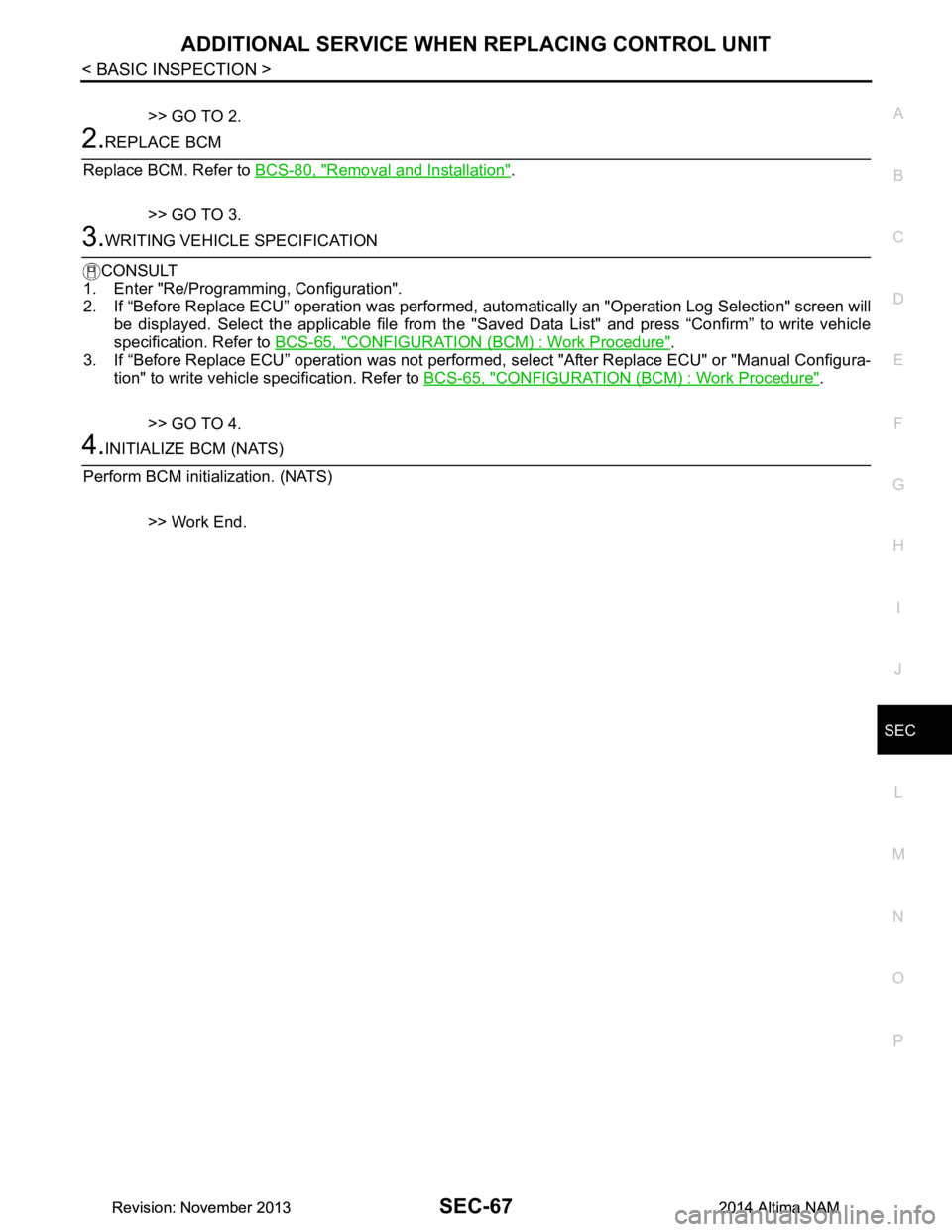
>> GO TO 2.
2.REPLACE BCM
Replace BCM. Refer to BCS-80, "Removal and Installation"
.
>> GO TO 3.
3.WRITING VEHICLE SPECIFICATION
CONSULT
1. Enter "Re/Programming, Configuration".
2. If “Before Replace ECU” operation was performed, automatically an "Operation Log Selection" screen will
be displayed. Select the applicable file from the "S aved Data List" and press “Confirm” to write vehicle
specification. Refer to BCS-65, "CONFIGURATION (BCM) : Work Procedure"
.
3. If “Before Replace ECU” operation was not performed, select "After Replace ECU" or "Manual Configura-
tion" to write vehicle specification. Refer to BCS-65, "CONFIGURATION (BCM) : Work Procedure"
.
>> GO TO 4.
4.INITIALIZE BCM (NATS)
Perform BCM initialization. (NATS)
>> Work End.
Revision: November 20132014 Altima NAMRevision: November 20132014 Altima NAM
Page 3915 of 4801
SEC-90
< DTC/CIRCUIT DIAGNOSIS >
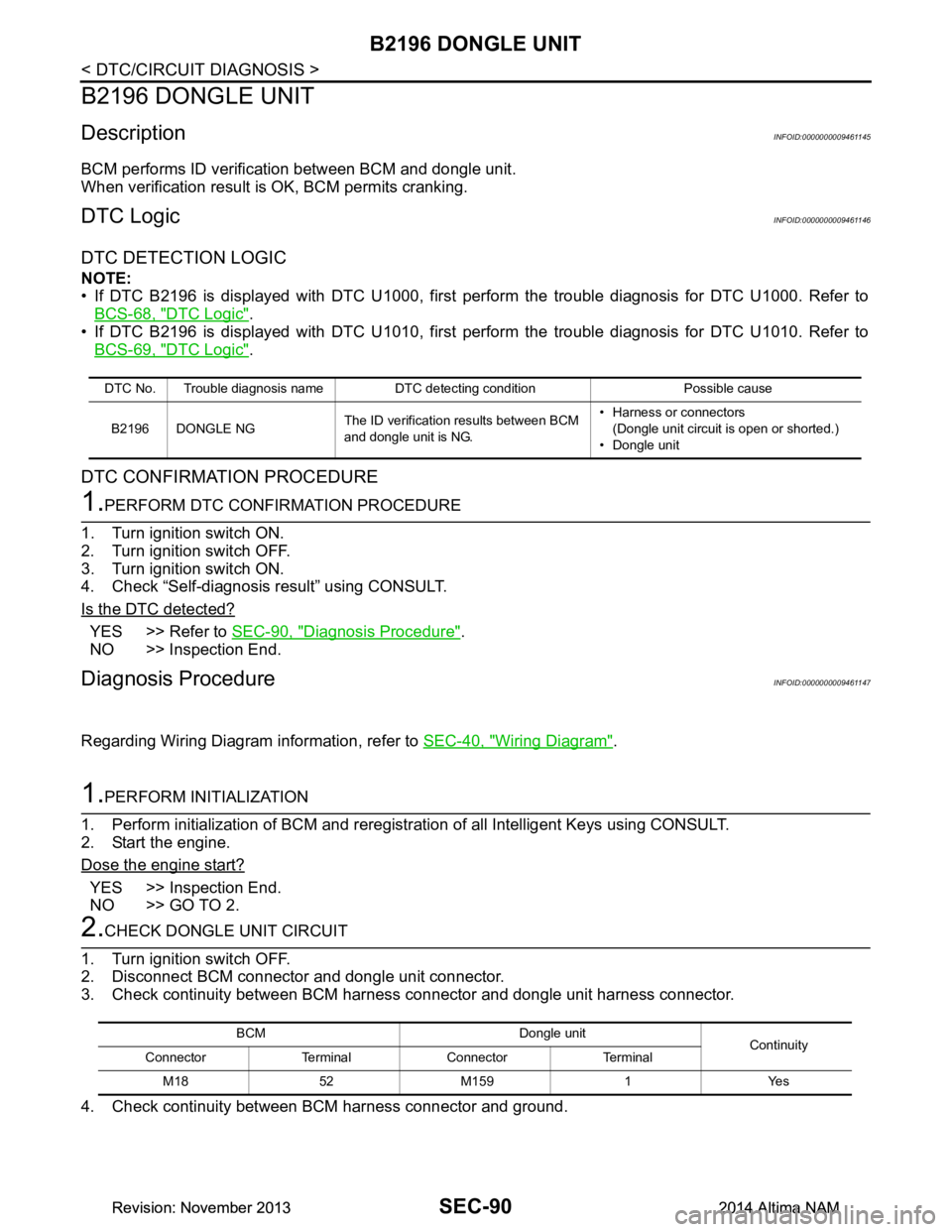
B2196 DONGLE UNIT
B2196 DONGLE UNIT
DescriptionINFOID:0000000009461145
BCM performs ID verification between BCM and dongle unit.
When verification result is OK, BCM permits cranking.
DTC LogicINFOID:0000000009461146
DTC DETECTION LOGIC
NOTE:
• If DTC B2196 is displayed with DTC U1000, first perform the trouble diagnosis for DTC U1000. Refer to
BCS-68, "DTC Logic"
.
• If DTC B2196 is displayed with DTC U1010, first perform the trouble diagnosis for DTC U1010. Refer to BCS-69, "DTC Logic"
.
DTC CONFIRMATION PROCEDURE
1.PERFORM DTC CONFIRMATION PROCEDURE
1. Turn ignition switch ON.
2. Turn ignition switch OFF.
3. Turn ignition switch ON.
4. Check “Self-diagnosis result” using CONSULT.
Is the DTC detected?
YES >> Refer to SEC-90, "Diagnosis Procedure".
NO >> Inspection End.
Diagnosis ProcedureINFOID:0000000009461147
Regarding Wiring Diagram information, refer to SEC-40, "Wiring Diagram".
1.PERFORM INITIALIZATION
1. Perform initialization of BCM and reregistration of all Intelligent Keys using CONSULT.
2. Start the engine.
Dose the engine start?
YES >> Inspection End.
NO >> GO TO 2.
2.CHECK DONGLE UNIT CIRCUIT
1. Turn ignition switch OFF.
2. Disconnect BCM connector and dongle unit connector.
3. Check continuity between BCM harness connector and dongle unit harness connector.
4. Check continuity between BCM harness connector and ground.
DTC No. Trouble diagnosis name DTC detecting condition Possible cause
B2196 DONGLE NG The ID verification results between BCM
and dongle unit is NG. • Harness or connectors
(Dongle unit circuit is open or shorted.)
• Dongle unit
BCM Dongle unit Continuity
Connector Terminal Connector Terminal
M1852M1591 Yes
Revision: November 20132014 Altima NAMRevision: November 20132014 Altima NAM
Page 3924 of 4801
B2557 VEHICLE SPEEDSEC-99
< DTC/CIRCUIT DIAGNOSIS >
C
D E
F
G H
I
J
L
M A
B
SEC
N
O P
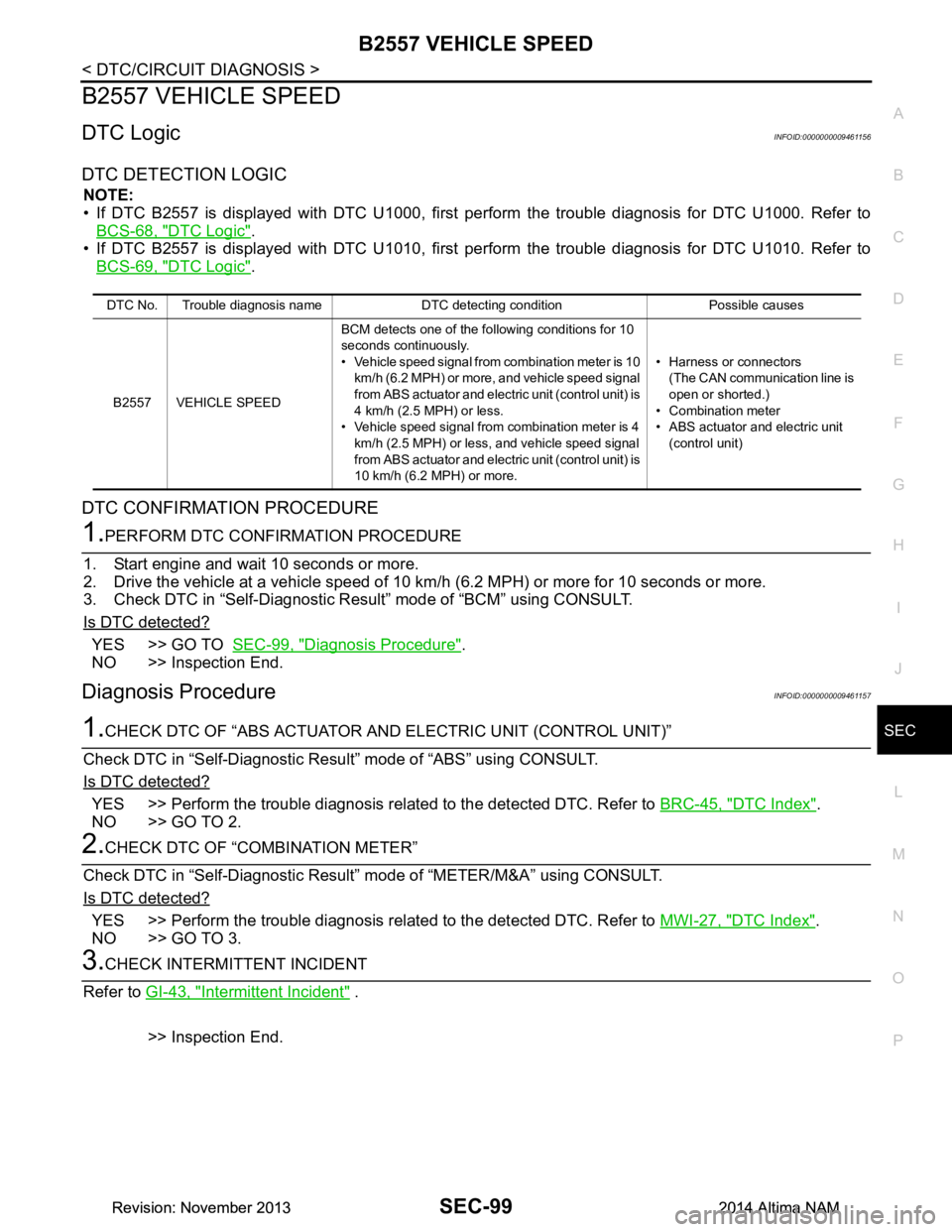
B2557 VEHICLE SPEED
DTC LogicINFOID:0000000009461156
DTC DETECTION LOGIC
NOTE:
• If DTC B2557 is displayed with DTC U1000, first per form the trouble diagnosis for DTC U1000. Refer to
BCS-68, "DTC Logic"
.
• If DTC B2557 is displayed with DTC U1010, first per form the trouble diagnosis for DTC U1010. Refer to
BCS-69, "DTC Logic"
.
DTC CONFIRMATION PROCEDURE
1.PERFORM DTC CONFIRMATION PROCEDURE
1. Start engine and wait 10 seconds or more.
2. Drive the vehicle at a vehicle speed of 10 km/h (6.2 MPH) or more for 10 seconds or more.
3. Check DTC in “Self-Diagnostic Result” mode of “BCM” using CONSULT.
Is DTC detected?
YES >> GO TO SEC-99, "Diagnosis Procedure".
NO >> Inspection End.
Diagnosis ProcedureINFOID:0000000009461157
1.CHECK DTC OF “ABS ACTUATOR A ND ELECTRIC UNIT (CONTROL UNIT)”
Check DTC in “Self-Diagnostic Resu lt” mode of “ABS” using CONSULT.
Is DTC detected?
YES >> Perform the trouble diagnosis rela ted to the detected DTC. Refer to BRC-45, "DTC Index".
NO >> GO TO 2.
2.CHECK DTC OF “COMBINATION METER”
Check DTC in “Self-Diagnostic Result” mode of “METER/M&A” using CONSULT.
Is DTC detected?
YES >> Perform the trouble diagnosis rela ted to the detected DTC. Refer to MWI-27, "DTC Index".
NO >> GO TO 3.
3.CHECK INTERMITTENT INCIDENT
Refer to GI-43, "Intermittent Incident"
.
>> Inspection End.
DTC No. Trouble diagnosis name DTC detecting condition Possible causes
B2557 VEHICLE SPEED BCM detects one of the following conditions for 10
seconds continuously.
• Vehicle speed signal from combination meter is 10
km/h (6.2 MPH) or more, and vehicle speed signal
from ABS actuator and electric unit (control unit) is
4 km/h (2.5 MPH) or less.
• Vehicle speed signal from combination meter is 4 km/h (2.5 MPH) or less, and vehicle speed signal
from ABS actuator and electric unit (control unit) is
10 km/h (6.2 MPH) or more. • Harness or connectors
(The CAN communication line is
open or shorted.)
• Combination meter
• ABS actuator and electric unit (control unit)
Revision: November 20132014 Altima NAMRevision: November 20132014 Altima NAM
Page 3999 of 4801
SRC-6
< SYSTEM DESCRIPTION >
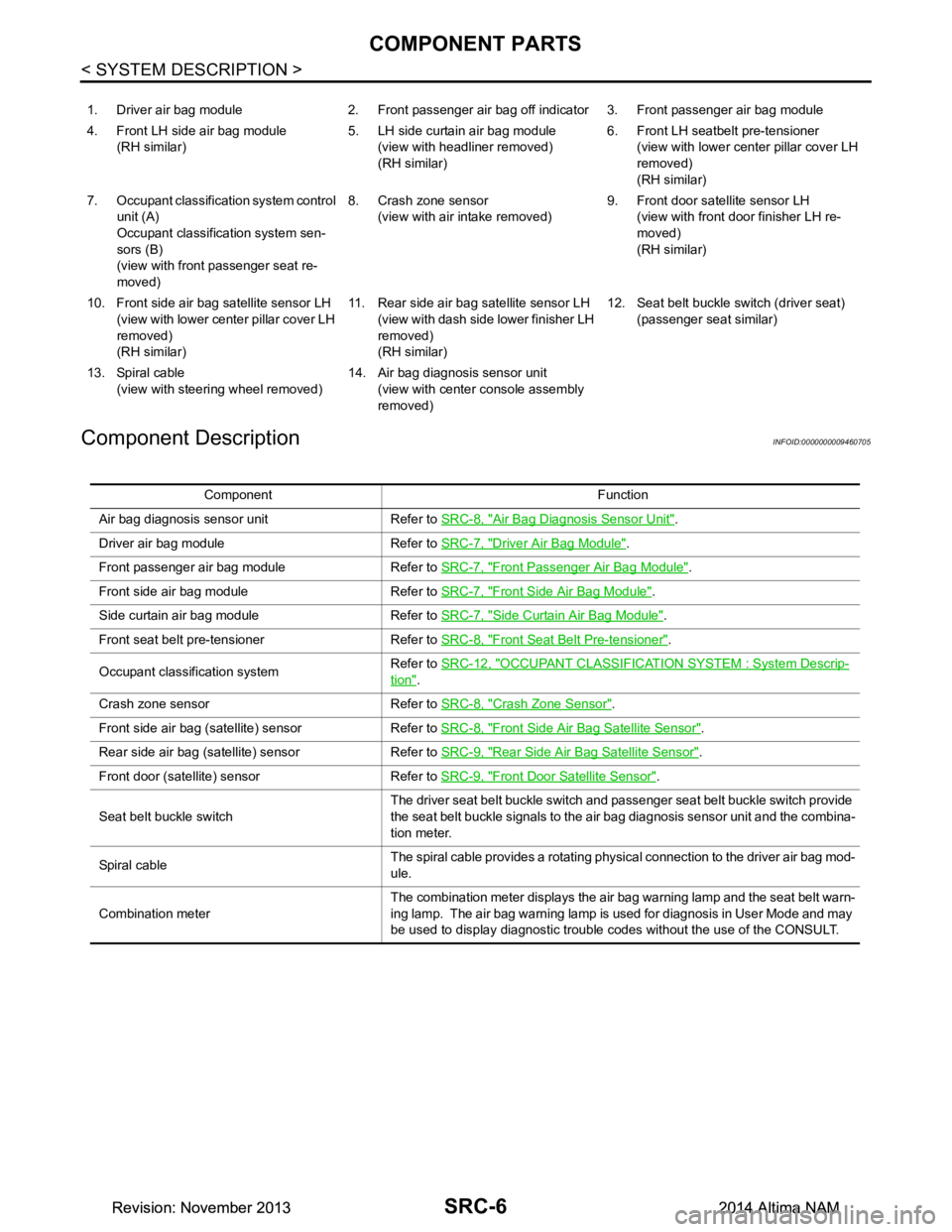
COMPONENT PARTS
Component Description
INFOID:0000000009460705
1. Driver air bag module 2. Front passenger air bag off indicator 3. Front passenger air bag module
4. Front LH side air bag module (RH similar) 5. LH side curtain air bag module
(view with headliner removed)
(RH similar) 6. Front LH seatbelt pre-tensioner
(view with lower cent er pillar cover LH
removed)
(RH similar)
7. Occupant classification system control unit (A)
Occupant classification system sen-
sors (B)
(view with front passenger seat re-
moved) 8. Crash zone sensor
(view with air intake removed) 9. Front door satellite sensor LH
(view with front door finisher LH re-
moved)
(RH similar)
10. Front side air bag satellite sensor LH (view with lower cent er pillar cover LH
removed)
(RH similar) 11. Rear side air bag satellite sensor LH
(view with dash side lower finisher LH
removed)
(RH similar) 12. Seat belt buckle switch (driver seat)
(passenger seat similar)
13. Spiral cable (view with steeri ng wheel removed) 14. Air bag diagnosis sensor unit
(view with center console assembly
removed)
Component Function
Air bag diagnosis sensor unit Refer to SRC-8, "Air Bag Diagnosis Sensor Unit"
.
Driver air bag module Refer to SRC-7, "Driver Air Bag Module"
.
Front passenger air bag module Refer to SRC-7, "Front Passenger Air Bag Module"
.
Front side air bag module Refer to SRC-7, "Front Side Air Bag Module"
.
Side curtain air bag module Refer to SRC-7, "Side Curtain Air Bag Module"
.
Front seat belt pre-tensioner Refer to SRC-8, "Front Seat Belt Pre-tensioner"
.
Occupant classification system Refer to
SRC-12, "OCCUPANT CLASSIFICATION SYSTEM : System Descrip-
tion".
Crash zone sensor Refer to SRC-8, "Crash Zone Sensor"
.
Front side air bag (satellite) sensor Refer to SRC-8, "Front Side Air Bag Satellite Sensor"
.
Rear side air bag (satellite) sensor Refer to SRC-9, "Rear Side Air Bag Satellite Sensor"
.
Front door (satellite) sensor Refer to SRC-9, "Front Door Satellite Sensor"
.
Seat belt buckle switch The driver seat belt buckle switch and passenger seat belt buckle switch provide
the seat belt buckle signals to the air bag diagnosis sensor unit and the combina-
tion meter.
Sp iral c ab le The spiral cable provides a rotating physical connection to the driver air bag mod-
ule.
Combination meter The combination meter displays the air bag warning lamp and the seat belt warn-
ing lamp. The air bag warning lamp is used for diagnosis in User Mode and may
be used to display diagnostic trouble codes without the use of the CONSULT.
Revision: November 20132014 Altima NAMRevision: November 20132014 Altima NAM
Page 4001 of 4801
SRC-8
< SYSTEM DESCRIPTION >
COMPONENT PARTS
Front Seat Belt Pre-tensioner
INFOID:0000000009460710
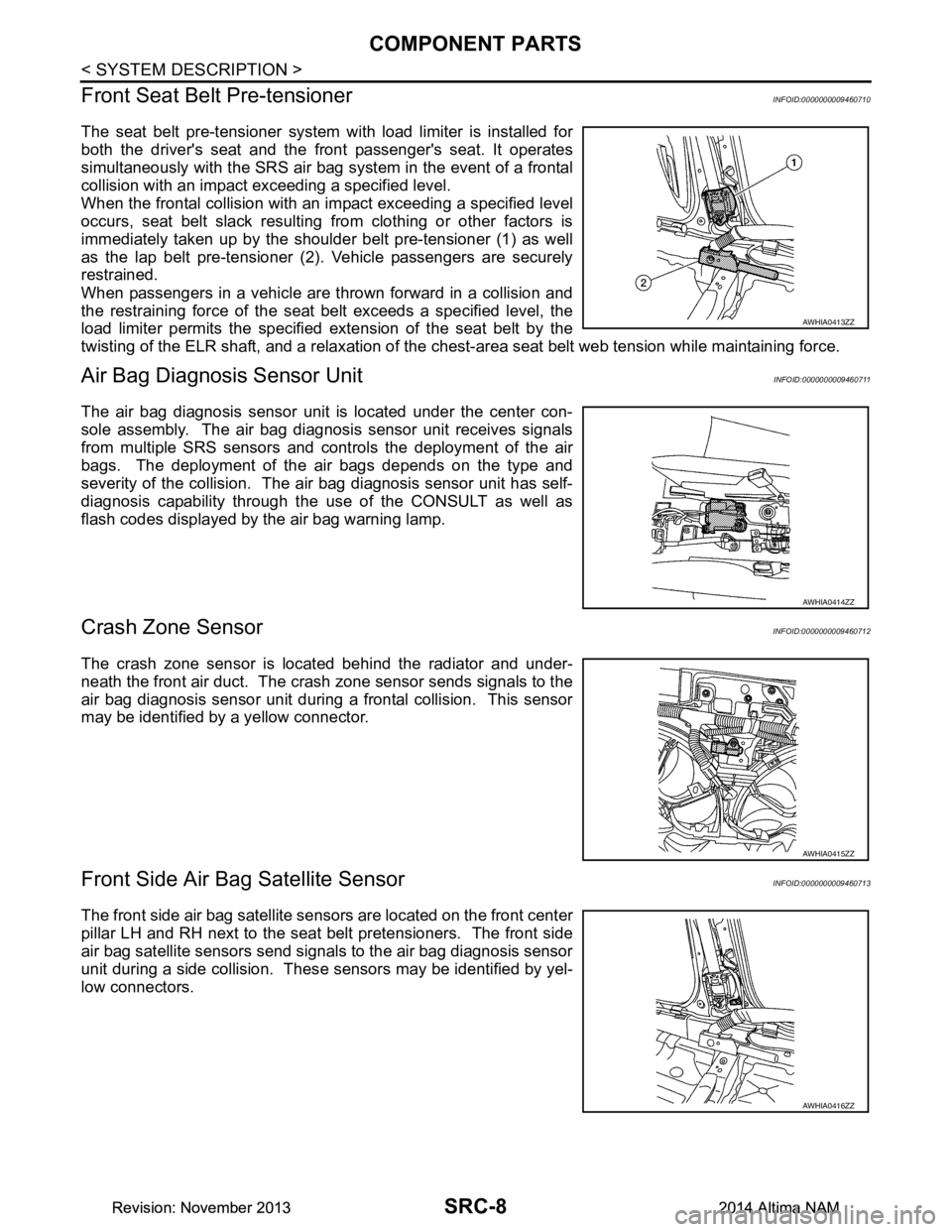
The seat belt pre-tensioner system wi th load limiter is installed for
both the driver's seat and the front passenger's seat. It operates
simultaneously with the SRS air bag system in the event of a frontal
collision with an impact exceeding a specified level.
When the frontal collision with an im pact exceeding a specified level
occurs, seat belt slack resulting from clothing or other factors is
immediately taken up by the shoulder belt pre-tensioner (1) as well
as the lap belt pre-tensioner (2). Vehicle passengers are securely
restrained.
When passengers in a vehicle are thrown forward in a collision and
the restraining force of the seat belt exceeds a specified level, the
load limiter permits the specified extension of the seat belt by the
twisting of the ELR shaft, and a relaxation of the ches t-area seat belt web tension while maintaining force.
Air Bag Diagnosis Sensor UnitINFOID:0000000009460711
The air bag diagnosis sensor unit is located under the center con-
sole assembly. The air bag diagnosis sensor unit receives signals
from multiple SRS sensors and cont rols the deployment of the air
bags. The deployment of the air bags depends on the type and
severity of the collision. The air bag diagnosis sensor unit has self-
diagnosis capability through the use of the CONSULT as well as
flash codes displayed by the air bag warning lamp.
Crash Zone SensorINFOID:0000000009460712
The crash zone sensor is located behind the radiator and under-
neath the front air duct. The crash zone sensor sends signals to the
air bag diagnosis sensor unit during a frontal collision. This sensor
may be identified by a yellow connector.
Front Side Air B ag Satellite SensorINFOID:0000000009460713
The front side air bag satellite sensors are located on the front center
pillar LH and RH next to the seat belt pretensioners. The front side
air bag satellite sensors send signals to the air bag diagnosis sensor
unit during a side collision. Thes e sensors may be identified by yel-
low connectors.
AWHIA0413ZZ
AWHIA0414ZZ
AWHIA0415ZZ
AWHIA0416ZZ
Revision: November 20132014 Altima NAMRevision: November 20132014 Altima NAM
Page 4005 of 4801
SRC-12
< SYSTEM DESCRIPTION >
SYSTEM
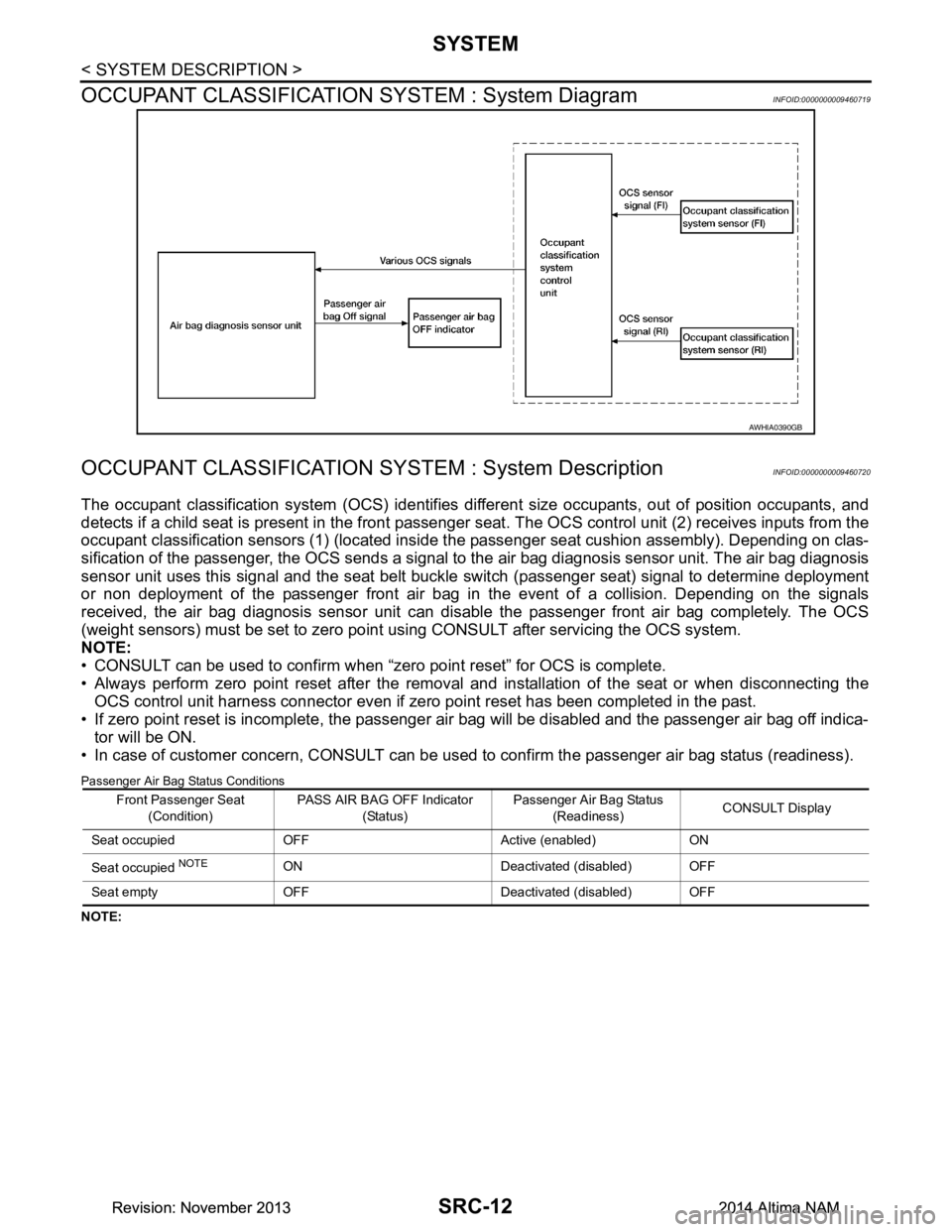
OCCUPANT CLASSIFICATION SYSTEM : System Diagram
INFOID:0000000009460719
OCCUPANT CLASSIFICATION SY STEM : System DescriptionINFOID:0000000009460720
The occupant classification system (OCS) identifies diff erent size occupants, out of position occupants, and
detects if a child seat is present in the front passenger seat. The OCS control unit (2) receives inputs from the
occupant classification sensors (1) (located inside t he passenger seat cushion assembly). Depending on clas-
sification of the passenger, the OCS sends a signal to the air bag diagnosis sensor unit. The air bag diagnosis
sensor unit uses this signal and the seat belt buckle switch (passenger seat) signal to determine deployment
or non deployment of the passenger front air bag in the event of a collision. Depending on the signals
received, the air bag diagnosis sensor unit can dis able the passenger front air bag completely. The OCS
(weight sensors) must be set to zero point using CONSULT after servicing the OCS system.
NOTE:
• CONSULT can be used to confirm when “zero point reset” for OCS is complete.
• Always perform zero point reset after the removal and installation of the seat or when disconnecting the
OCS control unit harness connector even if zero point reset has been completed in the past.
• If zero point reset is incomplete, the passenger air bag will be disabled and the passenger air bag off indica-
tor will be ON.
• In case of customer concern, CONSULT can be us ed to confirm the passenger air bag status (readiness).
Passenger Air Bag Status Conditions
NOTE:
AWHIA0390GB
Front Passenger Seat
(Condition) PASS AIR BAG OFF Indicator
(Status) Passenger Air Bag Status
(Readiness) CONSULT Display
Seat occupied OFF Active (enabled) ON
Seat occupied
NOTEON Deactivated (disabled) OFF
Seat empty OFF Deactivated (disabled) OFF
Revision: November 20132014 Altima NAMRevision: November 20132014 Altima NAM
Page 4009 of 4801
SRC-16
< SYSTEM DESCRIPTION >
DIAGNOSIS SYSTEM (AIR BAG)
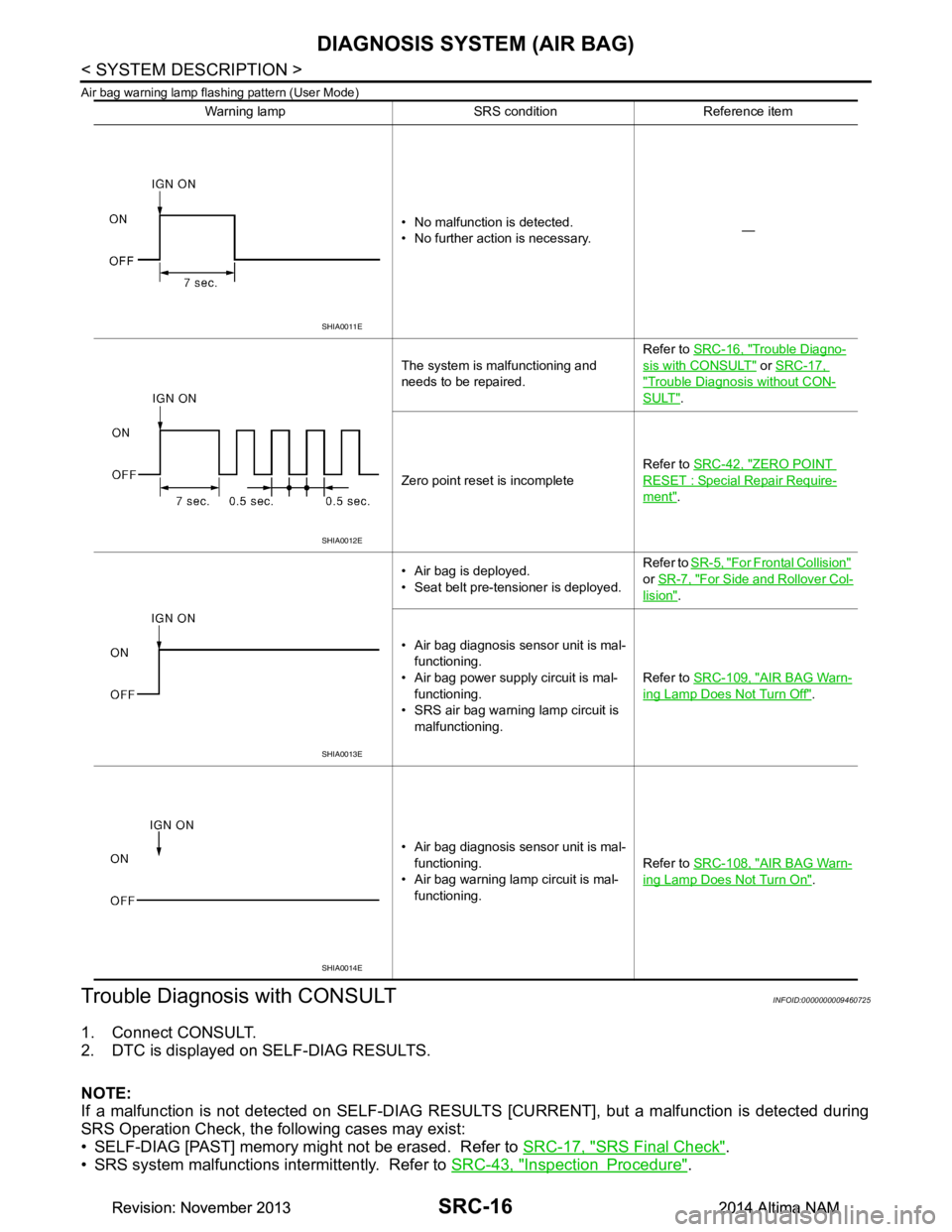
Air bag warning lamp flashing pattern (User Mode)
Trouble Diagnosis with CONSULTINFOID:0000000009460725
1. Connect CONSULT.
2. DTC is displayed on SELF-DIAG RESULTS.
NOTE:
If a malfunction is not detected on SELF-DIAG RESU LTS [CURRENT], but a malfunction is detected during
SRS Operation Check, the following cases may exist:
• SELF-DIAG [PAST] memory might not be erased. Refer to SRC-17, "SRS Final Check"
.
• SRS system malfunctions intermittently. Refer to SRC-43, "Inspection Procedure"
.
Warning lamp SRS condition Reference item
• No malfunction is detected.
• No further action is necessary. —
The system is malfunctioning and
needs to be repaired. Refer to
SRC-16, "Trouble Diagno-
sis with CONSULT" or SRC-17,
"Trouble Diagnosis without CON-
SULT".
Zero point reset is incomplete Refer to
SRC-42, "ZERO POINT
RESET : Special Repair Require-
ment".
• Air bag is deployed.
• Seat belt pre-tensioner is deployed. Refer to
SR-5, "For Frontal Collision"
or SR-7, "For Side and Rollover Col-
lision".
• Air bag diagnosis sensor unit is mal- functioning.
• Air bag power supply circuit is mal- functioning.
• SRS air bag warning lamp circuit is
malfunctioning. Refer to
SRC-109, "AIR BAG Warn-
ing Lamp Does Not Turn Off".
• Air bag diagnosis sensor unit is mal- functioning.
• Air bag warning lamp circuit is mal- functioning. Refer to
SRC-108, "AIR BAG Warn-
ing Lamp Does Not Turn On".
SHIA0011E
SHIA0012E
SHIA0013E
SHIA0014E
Revision: November 20132014 Altima NAMRevision: November 20132014 Altima NAM
Page 4010 of 4801
DIAGNOSIS SYSTEM (AIR BAG)SRC-17
< SYSTEM DESCRIPTION >
C
D E
F
G
I
J
K L
M A
B
SRC
N
O P
Trouble Diagnosis without CONSULTINFOID:0000000009460726
DIAGNOSIS MODE
NOTE:
Diagnosis Mode can not be entered if a malfunction is not detected in User Mode.
1. Turn ignition switch ON.
2. After AIR BAG warning lamp lights for 7 seconds, turn ignition switch OFF within 1 second.
3. Wait more than 3 seconds.
4. Repeat steps 1 to 3 two more times (3 times total).
5. Turn ignition switch ON.
SRS is now in Diagnosis Mode. Refer to SRC-23, "Flash Code Index"
.
SRS History CheckINFOID:0000000009460727
SRS HISTORY CHECK
1. Check repair history of the SRS. If no repairs have been made, perform SRC-15, "SRS Operation
Check". If repairs have been made, GO TO step 2.
2. Erase "SELF-DIAG [PAST]" after repair. Refer to SRC-17, "SRS Final Check"
.
SRS Final CheckINFOID:0000000009460728
DIAGNOSIS MODE
1. Connect CONSULT.
2. Confirm that zero point reset of OCS is complete.
3. If no DTCs are detected on “SELF- DIAG RESULTS [CURRENT]”, repair of SRS is completed. Go to step
4.
If any DTCs are detected on “SEL F-DIAG RESULTS [CURRENT]”, t he malfunction has not been repaired
completely or another malfunction is being detected. Perform SRS Operation Check again. Refer to
SRC-15, "SRS Operation Check"
.
4. Touch “ERASE”. NOTE:
Touching “ERASE” will clear the SRS memory of the malfunction (“SELF-DIAG [PAST]”). If “SELF-
DIAG [PAST]” is not erased, User Mode may s how the previous system malfunction even if the
malfunction has been repaired completely.
5. Check that no malfunction is detected in “SELF-DIAG [PAST]”.
6. Exit Diagnosis Mode and disconnect the CONSULT.
7. Perform SRS Operation Check. Refer to SRC-15, "SRS Operation Check"
.
CONSULT Function (AIR BAG)INFOID:0000000009460729
CAUTION:
After disconnecting the CONSULT vehicle interface (VI) from the data link connector, the ignition must
be cycled OFF → ON (for at least 5 seconds) → OFF. If this step is not performed, the BCM may not go
to ”sleep mode”, potentiall y causing a discharged battery and a no-start condition.
CONSULT can display each diagnostic item using the diagnostic test modes shown following.
Diagnostic Test Mode Diagnostic Item Description
Self Diagnostic Result SEL F-DIAG RESULT [CURRENT]A current Self-diagnosis result (also indicated by the number of
warning lamp flashes in the Diagnosis mode) is displayed on the
CONSULT screen in real time. This refers to a malfunctioning part
requiring repairs.
Data Monitor DATA MONITOR Displays air bag diagnosis sensor unit input/output data in real time.
Ecu Identification ECU DISCRIMINATED NO. Air bag diagnosis sensor unit ECU discriminated number (identifica-
tion number) or part number is displayed. Air bag diagnosis sensor
unit has individual ECU discriminated number (identification num-
ber) or part number based on model and equipment.
Trouble Diagnostic Record TROUBLE DIAG RECORD [PAST] With TROUBLE DIAG RECORD, diagnosis results previously
erased by a reset operation can be displayed on the CONSULT
screen.
Revision: November 20132014 Altima NAMRevision: November 20132014 Altima NAM