2014 MITSUBISHI OUTLANDER SPORT Track
[x] Cancel search: TrackPage 254 of 388
Audio Files (MP3/WMA/AAC)
For pleasant driving 8-17
8
zDiscs that have not been finalized cannotbe played back.zEven if recorded using the correct formaton a recorder or computer, applicationsoftware settings and environments; discpeculiarities, damage, or marking; or dirtor condensation on the lens inside theproduct may render the disc unplayable.zDepending on the disc, some functionsmay not be used, or the disc may not playback.zDo not use discs with cracks or warps.zIf the disc has stickers affixed, remainsfrom removed stickers, or affixed adhe-sive, then do not use the disc.zDiscs that have decorative labels or stick-ers may not be used.
This product will play back audio CDs, how-ever please be aware of the following pointsregarding CD standards.zEnsure that you use discs with on thelabel surface.zPlayback of other than standard CDs isnot guaranteed. Even if the audio can beplayed back, the audio quality cannot beguaranteed.zWhen playing back other than standardCDs, the following may occur.
•There may be noise during playback.•There may be jumping in the audio.•The disc may not be recognized.•The first track may not be played back.•It may take longer than usual until startof playback of tracks.•Playback may start from within thetrack.•Some parts may not be played back.•Tracks may freeze during playback.• Tracks may be displayed erroneously.
E00736100026
This product can play back MP3/WMA/AACformat audio files recorded on CD-ROM,CD-R/RW, and USB devices.There are limitations on the files and mediathat can be used, therefore read the followingprior to recording MP3/WMA/AAC formataudio files on discs or USB devices.Additionally, ensure you read the user manu-als for your CD-R/RW drive and the writingsoftware, and ensure these are used correctly.If the MP3/WMA/AAC format audio filesincludes title information or other data, thenthis can be displayed.
Nonstandard CDs
Audio Files (MP3/WMA/AAC)
CAUTIONzCD-ROM and CD-R/RW media can onlyplay back MP3 format audio files.zActions such as copyi
ng audio CDs or files
and either distributing th
ese to others for free
or for charge, or uploading files via the Inter-net or other means to servers is an infringe-ment of the law.zDo not append the file extensions “.mp3”,“.wma”, or “.m4a”, to other thanMP3/WMA/AAC format
files. Playing back
discs with these types
of files recorded upon
them may cause the files to be incorrectlyidentified for playback, which may lead toloud noise, resulting in
speaker damage or
accident.NOTE
zDepending on the condition of the discrecorder or recording software used, correctplayback may not be possible. In these cases,refer to the user manual for your product orsoftware.zDepending on your computer’s operatingsystem, version, softwa
re, or settings, files
may not have a file extension appended. Inthese cases, append the file extensions“.mp3”, “.wma”, or “.m4a” when copyingthe files.zFiles larger than 2GB in size cannot beplayed back.
BK0203201EN.book 17 ページ 2013年11月19日 火曜日 午前11時50分
Page 255 of 388
Audio Files (MP3/WMA/AAC)8-18 For pleasant driving
8
E00736200030
Data formats that can be played on discs(CD-ROM, CD-R/RW) and USB devices dif-fer.
E00736300031
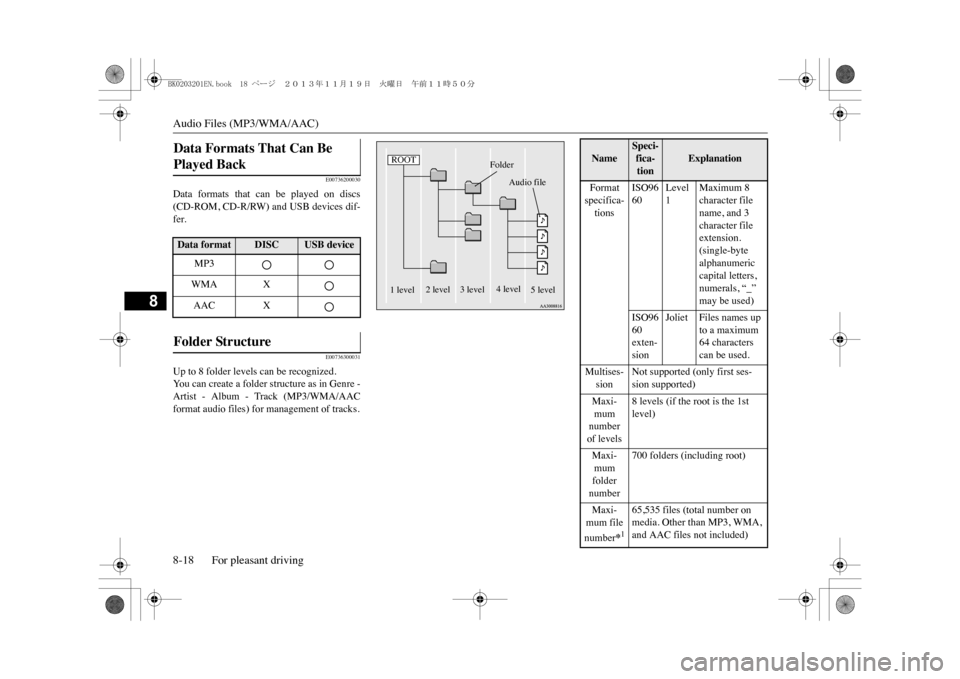
Up to 8 folder levels can be recognized.Yo u c a n c r e a t e a f o l d e r s t r u c t u r e a s i n G e n r e -Artist - Album - Track (MP3/WMA/AACformat audio files) for management of tracks.Data Formats That Can Be Played Back Data format
DISC
USB device
MP3WMA XAAC X
Folder Structure
ROOT
Folder
Audio file
1 level
2 level 3 level
4 level
5 level
Name
Speci-fica-tion
Explanation
Format specifica-tions
ISO9660
Level 1
Maximum 8 character file name, and 3 character file extension.(single-byte alphanumeric capital letters, numerals, “_” may be used)
ISO9660 exten-sion
Joliet Files names up
to a maximum 64 characters can be used.
Multises-sion
Not supported (only first ses-sion supported)
Maxi-mum number of levels
8 levels (if the root is the 1st level)
Maxi-mum folder number
700 folders (including root)
Maxi-mum file number
*165,535 files (total number on media. Other than MP3, WMA, and AAC files not included)
BK0203201EN.book 18 ページ 2013年11月19日 火曜日 午前11時50分
Page 256 of 388
Audio Files (MP3/WMA/AAC)
For pleasant driving 8-19
8
E00736400029
MP3 is an abbreviation of “MPEG-1 AudioLayer 3”. MPEG is an abbreviation of
“Motion Picture Experts Group”, and this is avideo compression standard used in videoCDs, etc.MP3 is one of the audio compression meth-ods contained in the MPEG audio standard,and reduces the quality of sounds that arebeyond the auditory resolution of the humanear and that are hidden by louder sounds, thuscreating high-quality data with a lower datasize.Because this can compress CD audio toapproximately 1/10 its original data size with-out perceptible loss, approximately 10 CDscan be written to a single CD-R/RW disc.Specifications for MP3 files that can beplayed are as below.
E00736601031
WMA is an abbreviation of Windows MediaAudio, and this is an audio compression for-mat from Microsoft. This is a compression
File name and folder name restric-tions
Maximum 64 bytes (for Uni-code, 32 characters), files/ fold-ers with file/ folder names longer than this will not be dis-played or played back.
USB sup-ported formats
The recommended file system is FAT 3 2 .1 partition only
*1:Do not include other thanMP3/WMA/AAC files. However, if stor-ing many tracks within the same folder,these may not be recognized even if lessthan the maximum number of tracks. Inthese cases, divide the tracks up into mul-tiple folders.
NOTE
zThe order in which folders and audio filesare displayed on this product may be differ-ent to how they are displayed on a computer.
What Is MP3? Name
Speci-fica-tion
Explanation
CAUTIONzMP3 files different to the standards at rightmay not play back correctly, or file/foldernames may not be displayed correctly.
Standards for MP3 Files T hat Can Be Played Back
Item
Details
Specification MPEG-1 AUDIO LAYER3
MPEG-2 AUDIO LAYER3
Sampling frequency [kHz]
MPEG-1: 32/44.1/48MPEG-2: 16/22.05/24
Bit rate [kbps]
MPEG-1: 32 to 320MPEG-2: 8 to 160
VBR (varia-ble bit rate)
Support
Channel mode
Stereo/ Joint stereo/ Dual channel/ Monaural
File exten-
sion
mp3
Supported tag informa-
tion
ID3 tag Ver. 1.0, Ver. 1.1, Ve r . 2 . 2 , Ve r. 2 . 3 , Ve r . 2 . 4 (ISO-8859-1, UTF-16 (Uni-code)), Titles, Artist name, Album name
Maximum number of characters that can be indicated on the display
64 characters
What Is WMA?
Item
Details
BK0203201EN.book 19 ページ 2013年11月19日 火曜日 午前11時50分
Page 261 of 388
Listen to Radio8-24 For pleasant driving
8
E00737601155
E00737700029
This explains how to listen to AM and FMradio broadcasts.Press the RADIO key to switch the band.Switch between AM and FM bands.The selected band is indicated on the display.
14-
6 keyReturn during audio track search, andstop Bluetooth Audio
*.
For radio, use as preset key 6.
15-
key/ key
For audio, select audio track/file; forradio, perform automatic station selec-tion.
16- MENU key
Switch to Menu mode.
17-
/SEL key
Adjust audio quality and select items.For radio, manually select stations.
*:Requires a separately-purchased Blue-tooth-capable audio device in equip-ment by type.
Ste er in g wheel audio remot e control switches 1- Vol + key, - key
Adjust audio functions and the mobilephone function volume.
2-
CH key, keySelect CD and other audio source tracksand radio stations.Hold down to skip up and down throughtracks.
3- MODE key
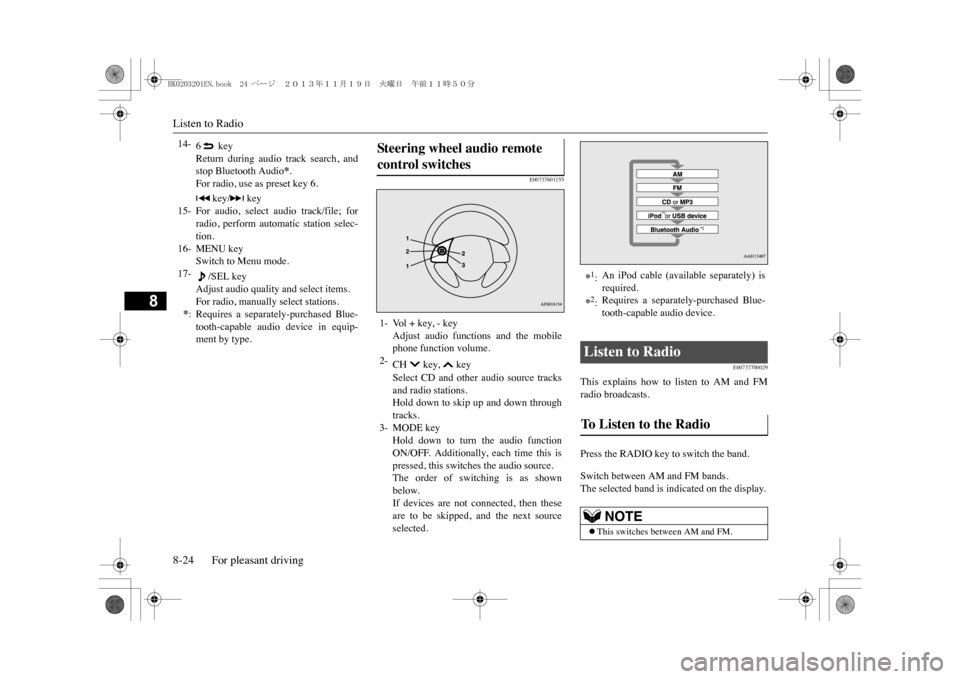
Hold down to turn the audio functionON/OFF. Additionally, each time this ispressed, this switches the audio source.The order of switching is as shownbelow.If devices are not connected, then theseare to be skipped, and the next sourceselected.
*1:An iPod cable (available separately) isrequired.
*2:Requires a separately-purchased Blue-tooth-capable audio device.
Listen to Radio To Listen to the Radio
NOTE
zThis switches between AM and FM.
BK0203201EN.book 24 ページ 2013年11月19日 火曜日 午前11時50分
Page 263 of 388
Listen to CDs8-26 For pleasant driving
8
E00737800033
This explains how to listen to audio CDs(CD-DA/CD-TEXT).Insert the disc.Insert a disc to automatically start playback.m “Insert/Eject Discs” (P.8-22)If a disc is already within the product, pressthe MEDIA key to switch to CD as thesource.Press the key or key to select thetrack.This enables selection of the next or previoustrack.Hold down the 3 key or the 4 key.Fast forward/rewind is possible.
Repeat playback, random playback, and scanplayback are possible.Press the 1RPT key.Repeat playback of the track currently beingplayed.Press the 2RDM key.Play the tracks on the disc in a random order.
Press the SCAN key.Play the first 10 seconds of each of the trackson the whole disc in order.
E00737900034
This explains how to listen to audio files on adisc.Insert the disc.Insert a disc to automatically start playback.m “Insert/Eject Discs” (P.8-22)
Listen to CDs Play CDs Select the Track Fast Forward or Rewind
Switch Playback Mode Repeat Playback (RPT)
NOTE
zPressing again will cancel.zSelecting a track, ejecting, fast forwarding,or rewinding will cancel.
Random Playback (RDM)
NOTE
zPressing again will cancel.zEjecting will cancel this.
Scan Playback (SCAN)
NOTE
zPress this button agai
n during playback if
you wish to hear that track, and that trackwill play normally.
Listen to MP3s
CAUTIONzCD-ROM and CD-R/RW media can onlyplay back MP3 format audio files.
To L i s t e n t o M P 3 s
BK0203201EN.book 26 ページ 2013年11月19日 火曜日 午前11時50分
Page 264 of 388
Listen to MP3s
For pleasant driving 8-27
8
If a disc is already within the product, pressthe MEDIA key to switch to CD as thesource.Press the key or key to select thetrack.This enables selection of the next or previoustrack.Hold down the 3 key or the 4 key.Fast forward/rewind is possible.Repeat playback, random playback, and scanplayback are possible.
Press the 1RPT key.Repeat playback of the track currently beingplayed.Hold down the 1RPT key.Repeat playback of the tracks within thefolder currently being played.Press the 2RDM key.
Play the tracks in the folder in a randomorder.Hold down the 2RDM key.Play all tracks in folders on the disc in a ran-dom order.Press the SCAN key.Play the first 10 seconds of each of the tracksin the folder currently being played in order.Search folders and files, and select a track.1. Turn the /SEL key to select the folder.
NOTE
zDepending on the file structure, it may takesome time to read the contents of the disc.
Select the Track (File) Fast Forward or Rewind Switch Playback Mode
Repeat Playback (RPT)
NOTE
zPressing again will cancel.zSelecting a file, ejecti
ng, fast forwarding, or
rewinding will cancel.
Folder Repeat Playback
NOTE
zPressing again will cancel.zEven if the file is selected, folder repeatplayback will not be cancelled.
Random Playback (RDM)
NOTE
zPressing again will cancel.
Folder Random Playback
NOTE
zPressing again will cancel.
Scan Playback (SCAN) Search Tracks
BK0203201EN.book 27 ページ 2013年11月19日 火曜日 午前11時50分
Page 265 of 388
Listen to an iPod8-28 For pleasant driving
8
2. Press the /SEL key.Files within the selected folder are dis-played.3. Turn the /SEL key to select the file.4. Press the /SEL key.This plays the selected file (track).
E00738001071
By connecting commercially-availableiPod/iPhone devices to this product, you canplay back tracks on these through the product.
NOTE
zWhile the folder is selected, press the 6key to cancel track search mode.zIf there is no operation for 10 seconds afterselecting the folder, th
en track search mode
will be cancelled.zSelect the folder, and hold down the
/SEL key to start playback from the first
track in that folder.zWhile the file is selected, press the 6 keyto return to the previous operation.zWhile the file is selected, hold down the6 key to cancel track search mode.zIf there is no operation for five seconds afterselecting the file, that file is played back.zDisc operations such as selecting a track willcancel track search mode.
Listen to an iPod
CAUTIONzDo not leave the iP
od/iPhone unattended in
the vehicle.zNever hold these devices in your hand tooperate while driving,
as this is dangerous.
zNo indemnification for data loss resultingwhen the iPod/iPhone is
connected to the
product will be possible.zDepending on how the devices are handled,audio files being damaged or lost, thereforeit is recommended that data be backed up.NOTE
zDepending on the generati
on, model, or soft-
ware version of th
e iPod/iPhone, playback
on this product may not be possible.(mP. 8 - 1 3 ) A d d i t i o n a l l y, p l a y b a c k a s
explained in this docum
ent may not be possi-
ble.zRegarding details such as types ofiPod/iPhone that can be connected to equip-ment by type, and types of files that can beplayed back, refer to “Types of connectabledevices and supported f
ile specifications” on
page 8-63.
zUsage of iPod/iPhone hardware with the lat-est software version is recommended.zRegarding how to connect the iPod/iPhone,refer to “How to connect an iPod” on page8-62.zWhen connecting the iPod/iPhone, use acommercially-available iPod connectioncable.zSet up the device in order that no unsafeactions, such as plugging in the connectioncable are taken while driving.zWhen inserting and removing theiPod/iPhone, for safety’s sake first stop thevehicle.zDepending on the status of the iPod/iPhone,it may take some time until the device is rec-ognized, or playback starts.zDepending on the iPod/iPhone, the buttonfunctions on the product may not operatewhile the iPod/iPhone is connected.ziPod/iPhone specifications and settings maymean that connection is not possible, orresult in differences in operation or display.zDepending on audio data in the iPod/iPhone,track information may not be displayed cor-rectly.zDepending on the status of the vehicle anddevice, the iPod/iPhone may not play backafter starting the Plug-in Hybrid EV system.zData containing copyri
ght information may
not play back.zIt is recommended
that the iPod/iPhone
equaliser settings be set to flat.NOTE
BK0203201EN.book 28 ページ 2013年11月19日 火曜日 午前11時50分
Page 266 of 388
Listen to an iPod
For pleasant driving 8-29
8
Press the MEDIA key to set the iPod as thesource.The selected source is indicated on the dis-play.Press the key or key to select thetrack.This enables selection of the next or previoustrack.
Hold down the 3 key or the 4 key.Fast forward/rewind is possible.Repeat playback and shuffle playback arepossible.Press the 1RPT key.Repeat playback of the track currently beingplayed.Press the 2RDM key.Play tracks in the category currently beingplayed in a random order.
Hold down the 2RDM key.Play back the album in a random order(tracks in any order on the album).Search categories or track names, and select atrack.1. Turn the /SEL key to select the cate-gory.2. Press the /SEL key. Categories ortracks within the selected category aredisplayed.3. Turn the /SEL key to select the cate-gory or track.
zOperate the iPod/iPhone
while connected to
this product.zIf the iPod/iPhone
is connected via Bluetooth
as a Bluetooth-capable audio device, then donot connect the iPod
/iPhone using an iPod
cable. Connection using both methods willresult in erroneous operation.zIf an iPod/iPhone does not operate correctly,then remove the iPod/iPhone from the prod-uct, reset, then reconnect.
Play iPod Select the Track (File)
NOTE
Fast Forward or Rewind Switch Playback Mode Repeat Playback (RPT)
NOTE
zPressing again will cancel.
Shuffle Playback (RDM)
NOTE
zPressing again will cancel.
Album Shuffle Playback
NOTE
zPressing again will cancel.
Search Tracks
BK0203201EN.book 29 ページ 2013年11月19日 火曜日 午前11時50分