2014 MITSUBISHI OUTLANDER SPORT phone
[x] Cancel search: phonePage 278 of 388
Bluetooth® 2.0 interface
For pleasant driving 8-41
8
See the following section for details on howto operate.Refer to “Bluetooth
® 2.0 interface” on page
8-41.Refer to “USB input terminal” on page 8-61.Bluetooth
® is a registered trademark of
BLUETOOTH SIG, INC.
E00764600013
Yo u h a v e a c q u i r e d a d e v i c e t h a t i n c l u d e s s o f t -ware licensed by MITSUBISHI MOTORSCORPORATION from JOHNSON CON-TROLS Inc (the automotive experience busi-ness unit), and their subsequent 3rd partysuppliers. For a complete list of these 3rdparty products and their end user licenseagreements, please go to the following web-site.http://www.jciblueconnect.com/faq/fulldis-closure.pdf
E00726001902
The Bluetooth
® 2.0 interface allows for mak-
ing/receiving hands-free calls in the vehicleusing a Bluetooth
® compatible cellular phone
based on the wireless communication tech-nology commonly known as Bluetooth
®. It
also allows the user to play music, saved in aBluetooth
® music player, from the vehicle’s
speakers.The system is equipped with a voice recogni-tion function, which allows you to makehands-free calls by simple switch operationsand voice command operations using adefined voice tree. The Bluetooth
® 2.0 interface can be used
when the operation mode is in ON or ACC.Before you can use the Bluetooth
® 2.0 inter-
face, you must pair the Bluetooth
® device
and Bluetooth
® 2.0 interface. Refer to “Con-
necting the Bluetooth
® 2.0 interface and
Bluetooth
® device” on page 8-47.
Bluetooth
® is a registered trademark of
BLUETOOTH SIG, INC.
Link System End User License Agreement Bluetooth
® 2.0 interface
WA R N I N GzAlthough the Bluetooth
® 2.0 interface
allows you to make hands-free calls, if youchoose to use the cellular phone whiledriving, you must not allow yourself to bedistracted from the safe operation of yourvehicle. Anything, including cellularphone usage, that distracts you from thesafe operation of your vehicle increasesyour risk of an accident.zRefer to and comply with all state andlocal laws in your area regarding cellularphone usage while driving.NOTE
zIf the operation mode is left in ACC, theaccessory power will automatically turn offafter a certain period of time and you will nolonger be able to use the Bluetooth
® 2.0
interface. The accessory power comes onagain if the power
switch is operated.
Refer to “ACC power auto-cutout function”on page 7-11.zThe Bluetooth
® 2.0 interface cannot be used
if the Bluetooth
® device has a flat battery or
the device power is turned off.zHands-free calls will
not be possible if your
phone does not have
service available.
zIf you place the Bluetooth
® device in the
luggage compartment, you may not be ableto use the Bluetooth
® 2.0 interface.
BK0203201EN.book 41 ページ 2013年11月19日 火曜日 午前11時50分
Page 279 of 388
Bluetooth® 2.0 interface8-42 For pleasant driving
8
Steering control switch and microphone m P.8-42Vo i c e r e c o g n i t i o n f u n c t i o n
m P.8-43
Useful voice commands
m P.8-44
Speaker enrollment function
m P.8-45
Connecting the Bluetooth
® 2.0 interface and
the Bluetooth
® device
m P.8-47
Operating a music player connected via Blue-tooth
® m P.8-51
How to make or receive hands-free calls m P.8-51Phonebook function
m P.8-54
E00727200308
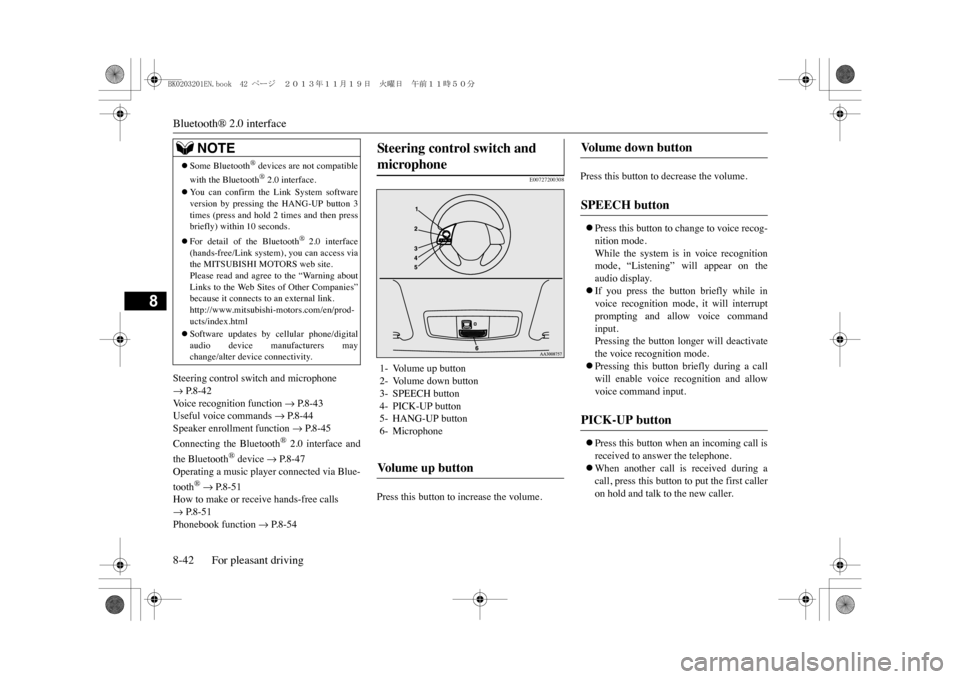
Press this button to increase the volume.
Press this button to decrease the volume.zPress this button to change to voice recog-nition mode.While the system is in voice recognitionmode, “Listening” will appear on theaudio display.zIf you press the button briefly while invoice recognition mode, it will interruptprompting and allow voice commandinput.Pressing the button longer will deactivatethe voice recognition mode. zPressing this button briefly during a callwill enable voice recognition and allowvoice command input.zPress this button when an incoming call isreceived to answer the telephone.zWhen another call is received during acall, press this button to put the first calleron hold and talk to the new caller.
zSome Bluetooth
® devices are not compatible
with the Bluetooth
® 2.0 interface.
zYo u c a n c o n f i r m t h e L i n k S y s t e m s o f t w a r eversion by pressing the HANG-UP button 3times (press and hold 2
times and then press
briefly) within 10 seconds.zFor detail of the Bluetooth
® 2.0 interface
(hands-free/Link system), you can access viathe MITSUBISHI MOTORS web site.Please read and agree to the “Warning aboutLinks to the Web Sites of Other Companies”because it connects to an external link.http://www.mitsubishi-motors.com/en/prod-ucts/index.htmlzSoftware updates by cellular phone/digitalaudio device manufacturers maychange/alter device connectivity.NOTE
Steering control switch and microphone 1- Volume up button2- Volume down button3- SPEECH button4- PICK-UP button5- HANG-UP button6- MicrophoneVo l u m e u p b u t t o n
Vo l u m e d o w n b u t t o n SPEECH button PICK-UP button
BK0203201EN.book 42 ページ 2013年11月19日 火曜日 午前11時50分
Page 280 of 388
Bluetooth® 2.0 interface
For pleasant driving 8-43
8
•In such circumstances, you can press thebutton briefly to switch between callers.Yo u w i l l s w i t c h t o t h e f i r s t c a l l e r a n d t h eother caller will be put on hold.•To establish a three-way call in such situ-ations, press the SPEECH button to entervoice recognition mode and then say“Join calls.”
zPress this button when an incoming call isreceived to refuse the call.zPress this button during a call to end thecurrent call.When another call is on hold, you willswitch to that call.zIf this button is pressed in the voice recog-nition mode, the voice recognition modewill be deactivated.
Yo u r v o i c e w i l l b e r e c o g n i z e d b y a m i c r o -phone in the overhead console, allowing youto make hands-free calls with voice com-mands.
E00727300514
The Bluetooth
® 2.0 interface is equipped
with a voice recognition function.Simply say voice commands and you can per-form various operations and make or receivehands-free calls.With the Bluetooth
® 2.0 interface, voice rec-
ognition is possible for English, French,
Spanish, Italian, German, Dutch, Portugueseand Russian. The factory setting is “English”or “Russian.”1. Press the SPEECH button.2. Say “Setup.”3. Say “Language.”4. The voice guide will say “Select a lan-guage: English, French, Spanish, Italian,German, Dutch, Portuguese or Russian”Say the desired language. (Example:“English”)
HANG-UP button
NOTE
zWhen you press the SPEECH button to entervoice recognition mode with a cellular phonepaired to the system, current information onthe cellular phone, such as “remaining bat-tery life,” “signal strength” or “roaming,”will be displayed on the audio display.
*
*: Some cellular phones will not send thisinformation to the Bluetooth
® 2.0 interface.
zCall waiting and three-way calls can be usedby the Bluetooth
® 2.0 interface, only if it is
possible to use those se
rvices with your cel-
lular phone.
Microphone
NOTE
zIf a cellular phone is brought close to themicrophone, it may create noise in the voiceon the phone. In such a case, take the cellularphone at a place as far as possible from themicrophone.
Vo i c e r e c o g n i t i o n f u n c t i o n
NOTE
NOTE
zIf the voice command that you say differsfrom the predefined command or cannot berecognised due to ambient noise or someother reason, the Bluetooth
® 2.0 interface
will ask you for the voice command again upto 3 times. zFor best performance
and further reduction
of ambient noise, the vehicle windowsshould be closed, lower the blower speed andrefrain from conversa
tion with your passen-
gers while engaging the voice recognitionfunction.zSome voice commands have alternativecommands.zDepending on the selected language, somefunctions may not be available.
Selecting the language
BK0203201EN.book 43 ページ 2013年11月19日 火曜日 午前11時50分
Page 281 of 388

Bluetooth® 2.0 interface8-44 For pleasant driving
8
5. The voice guide will say “English(French, Spanish, Italian, German, Dutch,Portuguese or Russian) selected. Is thiscorrect?” Say “Yes.”If you say “No,” the system will return toStep 4.6. When the voice guide says “English(French, Spanish, Italian, German, Dutch,Portuguese or Russian) selected,” the lan-guage change process will be completedand the system will return to the mainmenu.
E00760000019E00760100010
The Bluetooth
® 2.0 interface is equipped
with a help function. If you say “Help” when the system is waitingfor a voice command input, the system willtell you a list of the commands that can beused under the circumstances.
E00760200011
There are 2 cancel functions.If you are at the main menu, say “Cancel” toexit from the Bluetooth
® 2.0 interface.
If you are anywhere else within the system,say “Cancel” to return to the main menu.
E00760400013
The Bluetooth
® 2.0 interface is equipped
with a confirmation function.With the confirmation function activated, youare given more opportunities than normal toconfirm a command when making varioussettings to the Bluetooth
® 2.0 interface. This
allows you to decrease the possibility that asetting is accidentally changed. The confirmation function can be turned onor off by following the steps below. 1. Press the SPEECH button.2. Say “Setup.”3. Say “Confirmation prompts.”4. The voice guide will say “Confirmationprompts are
E00760501242
It is possible to use a password as a securityfunction by setting a password of your choicefor the Bluetooth
® 2.0 interface.
When the security function is turned on, it isnecessary to make a voice input of a 4-digitpassword in order to use all functions of theBluetooth
® 2.0 interface, except for recep-
tion. Use the following procedure to turn on thesecurity function by setting a password.
NOTE
zThe voice guide will repeat the same mes-sage twice. The first message is in the cur-rent language, and the second message is inthe selected language.zIf many entries are registered in the vehiclephonebook, changing the language will takea longer time.zChanging the language deletes the mobilephonebook imported to the Bluetooth
® 2.0
interface. If you wish to use it, you will haveto import it again.
Useful voice commands Help function Canceling Confirmation function setting
Security function Setting the password
BK0203201EN.book 44 ページ 2013年11月19日 火曜日 午前11時50分
Page 283 of 388

Bluetooth® 2.0 interface8-46 For pleasant driving
8
This makes it easier for the Bluetooth
® 2.0
interface to recognise voice commands saidby you. Yo u c a n t u r n a v o i c e m o d e l r e g i s t e r e d w i t hthe speaker enrollment function on and offwhenever you want.
E00727501294
It takes about 2 to 3 minutes to complete thespeaker enrollment process.To e n s u r e t h e b e s t r e s u l t s , r u n t h r o u g h t h eprocess while in the driver’s seat, in an envi-ronment that is as quiet as possible (whenthere is no rain or strong winds and the vehi-cle windows are closed). Please turn off yourphone while in speaker enrollment to preventinterruption of the process.Use the following procedure for speakerenrollment.1. Stop your vehicle in a safe area, firmlyapply the parking brake and push the elec-trical parking switch.2. Press the SPEECH button.
3. Say “Voice training.”4. The voice guide will say “This operationmust be performed in a quiet environmentwhile the vehicle is stopped. See theowner’s manual for the list of requiredtraining phrases. Press and release theSPEECH button when you are ready tobegin. Press the HANG-UP button to can-cel at any time.”Press the SPEECH button to start thespeaker enrollment process.
5. The voice guide will prompt for phrase 1.Repeat the corresponding phrase listed intable “Enrollment commands” on page8-61.The system will register your voice andthen move on to the registration of thenext command. Continue the process untilall phrases have been registered.6. When all enrollment commands havebeen read out, the voice guide will say“Speaker enrollment is complete.” Thesystem will then end the speaker enroll-ment process and return to the mainmenu.
Speaker enrollment
NOTE
zSpeaker enrollment is not possible unless thevehicle is parked. Ma
ke sure you park the
vehicle in a safe area before attemptingspeaker enrollment.
NOTE
zIf you do not start the speaker enrollmentprocess within 3 minut
es after pressing the
SPEECH button, the speaker enrollmentfunction will time out. The voice guide will say “Speaker enroll-ment has timed out.” The system will thenbeep and the voice recognition mode will bedeactivated.
NOTE
zTo r e p e a t t h e m o s t r e c e n t v o i c e t r a i n i n g c o m -mand, press and release the SPEECH button.zIf you press the HANG-UP button anytimeduring the process, the system will beep andstop the speaker enrollment process.NOTE
zCompleting the speaker enrollment processwill turn on the voice model automatically.zThe commands “Help” and “Cancel” will notwork in this mode.
BK0203201EN.book 46 ページ 2013年11月19日 火曜日 午前11時50分
Page 284 of 388
Bluetooth® 2.0 interface
For pleasant driving 8-47
8
E00727600096
Yo u c a n t u r n a v o i c e m o d e l r e g i s t e r e d w i t hthe speaker enrollment function on and offwhenever you want.Yo u c a n a l s o r e t r a i n t h e s y s t e m .Use the following procedure to perform theseactions.1. Press the SPEECH button.2. Say “Voice training.”3. If you have completed a speaker enroll-ment process once already, the voiceguide will say either “Enrollment is ena-bled. Would you like to disable orretrain?” or “Enrollment is disabled.Wo u l d y o u l i k e t o e n a b l e o r r e t r a i n ? ”4. When enrollment is “enabled,” the voicemodel is on; when enrollment is “disa-bled,” the voice model is off. Say thecommand that fits your needs. Say “Retrain” to start the speaker enroll-ment process and recreate a new voicemodel. (Refer to “Speaker enrollment” onpage 8-46.)
E00760601399
Before you can make or receive hands-freecalls or play music using the Bluetooth
® 2.0
interface function, you must pair the Blue-tooth
® device and Bluetooth
® 2.0 interface.
Up to 7 Bluetooth
® devices can be paired
with the Bluetooth
® 2.0 interface.
If multiple paired Bluetooth
® devices are
available in the vehicle, the cellular phone ormusic player most recently connected is auto-matically connected to the Bluetooth
® 2.0
interface.Yo u c a n a l s o c h a n g e a B l u e t o o t h
® device to
be connected.
To p a i r a B l u e t o o t h
® device with the Blue-
tooth
® 2.0 interface, follow the steps below.
1. Stop your vehicle in a safe area, firmlyapply the parking brake and push the elec-trical parking switch.2. Press the SPEECH button.3. Say “Setup.”4. Say “Pairing Options.”
Enabling and disabling the voice model and retraining
Connecting the Bluetooth
® 2.0
interface and Bluetooth
® d e v i c e
NOTE
zPairing is required only when the device isused for the first time. Once the device hasbeen paired with the Bluetooth
® 2.0 inter-
face, all you need is to bring the device intothe vehicle next time and the device willconnect to the Bluetooth
® 2.0 interface auto-
matically (if supported by the device). Thedevice must ha
ve Bluetooth
® turned ON to
connect.
To p a i r
NOTE
zYo u c a n n o t p a i r a n y B l u e t o o t h
® device with
the Bluetooth
® 2.0 interface unless the vehi-
cle is parked. Before pairing a Bluetooth
®
device with the Bluetooth
® 2.0 interface,
confirm that the vehicle is parked in a safelocation.
BK0203201EN.book 47 ページ 2013年11月19日 火曜日 午前11時50分
Page 286 of 388
Bluetooth® 2.0 interface
For pleasant driving 8-49
8
E00760700104
If multiple paired Bluetooth
® devices are
available in the vehicle, the cellular phone ormusic player most recently connected is auto-matically connected to the Bluetooth
® 2.0
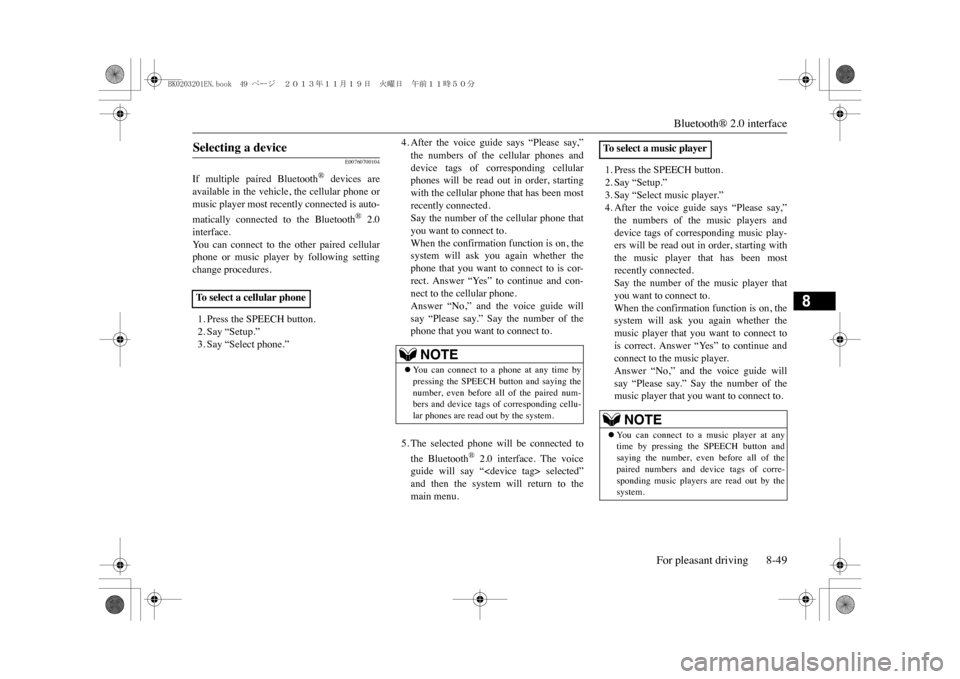
interface.Yo u c a n c o n n e c t t o t h e o t h e r p a i r e d c e l l u l a rphone or music player by following settingchange procedures.1. Press the SPEECH button.2. Say “Setup.”3. Say “Select phone.”
4. After the voice guide says “Please say,”the numbers of the cellular phones anddevice tags of corresponding cellularphones will be read out in order, startingwith the cellular phone that has been mostrecently connected.Say the number of the cellular phone thatyou want to connect to.When the confirmation function is on, thesystem will ask you again whether thephone that you want to connect to is cor-rect. Answer “Yes” to continue and con-nect to the cellular phone.Answer “No,” and the voice guide willsay “Please say.” Say the number of thephone that you want to connect to.5. The selected phone will be connected tothe Bluetooth
® 2.0 interface. The voice
guide will say “
1. Press the SPEECH button.2. Say “Setup.”3. Say “Select music player.”4. After the voice guide says “Please say,”the numbers of the music players anddevice tags of corresponding music play-ers will be read out in order, starting withthe music player that has been mostrecently connected.Say the number of the music player thatyou want to connect to.When the confirmation function is on, thesystem will ask you again whether themusic player that you want to connect tois correct. Answer “Yes” to continue andconnect to the music player.Answer “No,” and the voice guide willsay “Please say.” Say the number of themusic player that you want to connect to.
Selecting a device To s e l e c t a c e l l u l a r p h o n e
NOTE
zYo u c a n c o n n e c t t o a p h o n e a t a n y t i m e b ypressing the SPEECH button and saying thenumber, even before all of the paired num-bers and device tags
of corresponding cellu-
lar phones are read out by the system.
To s e l e c t a m u s i c p l a y e r
NOTE
zYo u c a n c o n n e c t t o a m u s i c p l a y e r a t a n ytime by pressing the SPEECH button andsaying the number, even before all of thepaired numbers and de
vice tags of corre-
sponding music players are read out by thesystem.
BK0203201EN.book 49 ページ 2013年11月19日 火曜日 午前11時50分
Page 287 of 388

Bluetooth® 2.0 interface8-50 For pleasant driving
8
5. The selected music player will be con-nected to the Bluetooth
® 2.0 interface.
The voice guide will say “
Use the following procedure to delete apaired Bluetooth
® device from the Blue-
tooth
® 2.0 interface.
1. Press the SPEECH button.2. Say “Setup.”3. Say “Pairing Options.”4. The voice guide will say “Select one ofthe following: pair, edit, delete, or list.”Say “Delete.”5. After the voice guide says “Please say,”the numbers of the devices and devicetags of corresponding devices will be readout in order, starting with the device thathas been most recently connected. After itcompletes reading all pairs, the voiceguide will say “or all.”Say the number of the device that youwant to delete from the system.If you want to delete all paired phonesfrom the system, say “All.”
6. For confirmation purposes, the voiceguide will say “Deleting
E00760800017
Yo u c a n c h e c k a p a i r e d B l u e t o o t h
® device by
following the steps below.1. Press the SPEECH button.2. Say “Setup.”3. Say “Pairing Options.”4. The voice guide will say “Select one ofthe following: pair, edit, delete, or list.”Say “List.”
5. The voice guide will read out device tagsof corresponding devices in order, startingwith the Bluetooth
® device that has been
most recently connected.6. After the device tags of all paired Blue-tooth
® devices have been read, the system
will say “End of list, would you like tostart from the beginning?”To h e a r t h e l i s t a g a i n f r o m t h e b e g i n n i n g ,answer “Yes.” When you are done, answer “No” toreturn to the main menu.
Deleting a device
NOTE
zIf the device deletion process fails for somereason, the voice guide will say “Deletefailed” and then the system will cancel delet-ing the device.
To c h e c k a p a i r e d B l u e t o o t h
®
device
NOTE
zIf you press and release the SPEECH buttonand say “Continue” or “Previous” while thelist is being read, the system will advance orrewind the list.Say “Continue” to proceed to the device withthe next highest number or “Previous” toreturn to the phone w
ith the previous num-
ber. zYo u c a n c h a n g e t h e d e v i c e t a g b y p r e s s i n gand releasing the SPEECH button and thensaying “Edit” while the list is being read.zYo u c a n c h a n g e t h e p h o n e t o b e c o n n e c t e dby pressing and releas
ing the SPEECH but-
ton and then saying “Select phone” while thelist is being read.zYo u c a n c h a n g e t h e m u s i c p l a y e r t o b e c o n -nected by pressing and releasing theSPEECH button and th
en saying “Select
music player” while the list is being read.
BK0203201EN.book 50 ページ 2013年11月19日 火曜日 午前11時50分