2014 MERCEDES-BENZ B-CLASS SPORTS service indicator
[x] Cancel search: service indicatorPage 6 of 360
1, 2,
3...
12 Vsocket
see Sockets A
ABS (Anti-lock Braking System) Display message ............................ 208
Function/notes ................................ 63
Important safety notes ....................63
Warning lamp ................................. 239
Activating/deactivating cooling
with air dehumidification .................126
Active Parking Assist Canceling ...................................... .179
Detecting parking spaces ..............176
Display message ............................ 228
Exiting aparking spac e.................. 178
Function/notes ............................. 175
Important safety notes ..................175
Parking .......................................... 177
ADAPTIVE BRAKE ................................. 69
Adaptive Brake Assist Display message ............................ 216
Function/notes ................................ 65
Adaptive brake lamps .........................67
Adaptive Highbeam Assist Display message ............................ 223
Function/notes ............................. 108
Switching on/off ........................... 109
Switching on/off (on-board
computer) ...................................... 203
Additional speedometer ...................202
Additives (engine oil) ........................350
Airb ags
Deployment ..................................... 41
Display message ............................ 219
Front airb ag (driver, front
passenger )....................................... 45
Important safety notes ....................43
Knee bag .......................................... 45
PASSENGER AIR BAG OFF
indicator lamp .................................. 47
Safety guidelines ............................. 42
Side impact airb ag.......................... 46
Windo wcurtain air bag .................... 47Air-conditionin
gsystem
see Climate control
Airv ents
Important safet ynotes .................. 133
Rea r............................................... 134
Setting ........................................... 133
Setting the center airv ents........... 133
Setting the sid eairvents ............... 133
Alarm system
see ATA (Anti-Theft Alarm system)
Ambient lighting
Setting the brightness (on-board
computer) ...................................... 204
Anti-loc kbraking system
se eA BS (Anti-lock Braking System)
Anti-thef talarm system
se eA TA (Anti-Theft Alarm system)
Ashtray ............................................... 263
Assistanc edisplay (on-board
computer) .......................................... 199
Assistanc emenu (on-board
computer) .......................................... 199
ASSYST PLUS Displaying aservice message ........285
Hiding aservice message ..............285
Notes ............................................. 284
Resetting the service interval
displa y........................................... 285
Service message ............................ 284
Specia lservice requirements ......... 285
ATA (Anti-Theft Alarm system)
Activating/deactivating ...................70
Function .......................................... .70
Switching off the alarm ....................70
ATTENTIO NASSIST
Activating/deactivating .................201
Display message ............................ 226
Function/notes ............................. 183
Audio menu (on-board computer) ....196
Audio system see separate operating instructions
Authorized Centers
see Qualified specialist workshop
Authorized Mercedes-Benz Center
see Qualified specialist workshop
Authorized workshops
see Qualified specialist workshop 4
Index
Page 268 of 360
The mbrac
esystem To adjus
tthe volume during acall, proceed
as follows:
X Press the 0008or0009 button on the
multifunction steering wheel.
or
X Use the volume controller of the audio
system/COMAND.
The system offers various services, e.g:
R Automatic and manual emergency call
R Roadside Assistancec all
R MB Info call
System self-test After you have switched on the ignition, the
system carries out aself-diagnosis.
Am alfunction in th esystem has been
detected if on eofthefollowin goccurs:
R The indicator lamp in th eSOS bu tton does
no tc om eond uringthe system self-test.
R The indicator lamp in the 0014Roadside
Assistanc ebutto ndoes not light up during
self-diagnosis of the system.
R The indicator lamp in the 001FMB Info call
button does not light up during self-
diagnosis of the system.
R The indicator lamp in one or more of the
following button scontinues to light up red
after the system self-diagnosis:
- SOS button
- 0014 Roadside Assistance call button
- 001F MB Info call button
R After the system self-diagnosis, the
Inoperative or
Service Not Activated message appears in the
multifunction display.
If am alfunction is indicated as outlined
above, the system may not operate as
expected. In the event of an emergency, help
will have to be summoned by other means. Have the system checked at the nearest
authorized Mercedes-Benz Center or call the
following telephone assistance service:
Customer Servic
eat1-888-923-8367
Emergency call Important safety notes
G
WARNING
It can be dangerous to remain in the vehicle,
even if you have pressed the SOS button in an
emergenc yif:
R you see smoke inside or outside of the
vehicle, e.g. if there is afire after an
accident
R the vehicle is on adangerous section of
road
R the vehicle is not visible or cannot easily be
seen by other road users, particularly when
dark or in poor visibility conditions
There is arisk of an accident and injury.
Leave the vehicle immediately in this or
similar situations as soon as it is safe to do
so. Move to asafe location along with other
vehicle occupants. In such situations, secure
the vehicle in accordanc ewith national
regulations, e. g. with awarning triangle.
You must have alicense agreement to
activate the mbrace service. Make sure that
your system is activated and operational. To
register, press the 001FMB Info call button.
If any of the steps mentioned are not carried
out, the system may not be activated.
If you have questions about the activation,
contact the following telephone assistance
service:
Customer Servic eat1-888-923-8367
General notes
An emergenc ycall is dialed automatically if
an air bag or Emergency Tensionin gDevice is
triggered.
i You cannot end an automatically
triggered emergenc ycall yourself. 266
FeaturesStowage and features
Page 270 of 360
X
Press Roadside Assistance button 001A.
This initiates acall to the Mercedes-Benz
Customer Assistance Center.
The indicator lamp in Roadside Assistance
button 001Aflashes while the call is active.
The multifunction display shows the
Connectin gCall message. The audio
output is muted.
If ac onnection can be made, the CallConnected message appears in the
multifunction display.
If am obile phone network and GPS reception
are available, the system transfers data to the
Mercedes-Benz Customer Assistance Center,
for example:
R Current location of the vehicle
R Vehicle identification number
i The audio system or COMAND display
indicates that acall is active. During the
call, you can change to the navigation menu
by pressing the NAVI button on COMAND,
for example.
Voice output is not available.
Av oice connection is established between
the Mercedes-Benz Customer Assistance
Center and the vehicle occupants.
From the vehicle remote malfunction
diagnosis, the Mercedes-Benz Customer
Assistance Center can ascertain the nature of
the problem (Y page 271).
The Mercedes-Benz Customer Assistance
Center either sends aqualified Mercedes-
Benz technician or makes arrangement sfor
your vehicle to be transported to the nearest
authorized Mercedes-Benz Center.
You may be charged for services such as
repair work and/or towing.
Further details are available in your mbrace
manual. i
The system has not been able to initiate
ar oadside assistance call, if:
R the indicator lamp for Roadside
Assistance call button 001Ais flashing
continuously.
R no voice connection to the Mercedes-
Benz Customer Assistance Center was
established.
This can occur if the relevant mobile phone
network is not available, for example.
The Call Failed message appears in the
multifunction display.
X To end acall: press the 0008button on the
multifunctio nsteering wheel.
or
X Press the corresponding button for ending
ap hone cal lonthe audi osystemoron
COMAND.
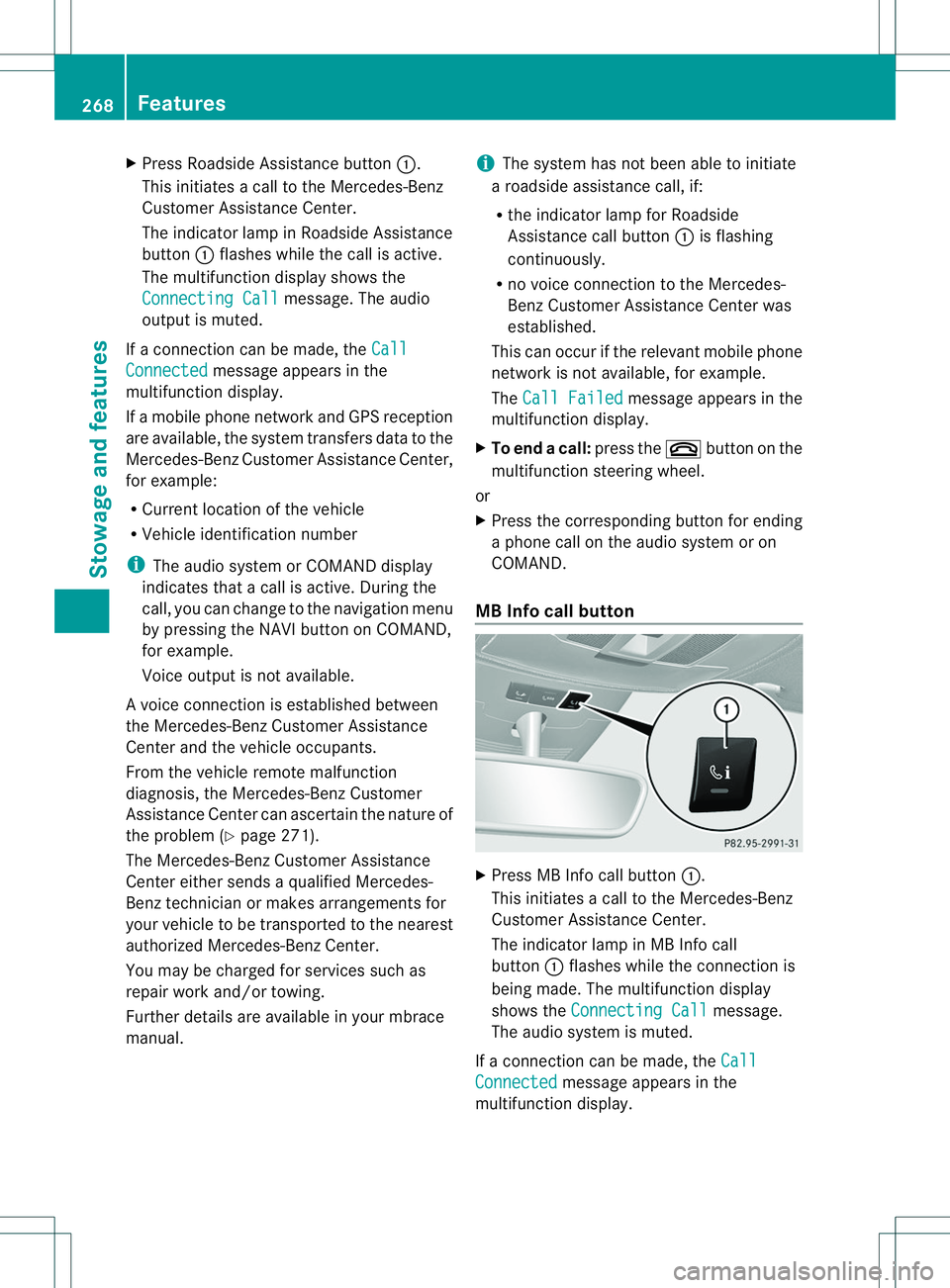
MB Info call button X
Press MB Info call button 001A.
This initiate sacall to th eMercedes-Benz
Custome rAssistance Center.
The indicator lamp in MB Info call
button 001Aflashes while the connection is
being made. The multifunction display
shows the Connecting Call message.
The audios ystem is muted.
If ac onnection can be made, the Call Connected message appears in the
multifunction display. 268
FeaturesStowage and features
Page 271 of 360
If
am obilep hone network and GPS reception
are available, the system transfers data to the
Mercedes-Benz Customer Assistance Center,
for example:
R Current location of the vehicle
R Vehicle identification number
i The audio system or COMAND display
indicates that acall is active. During the
call,y ou can change to the navigation menu
by pressing the NAVI button on COMAND,
for example.
Voice outputisn ot available.
Av oice connection is established between
the Mercedes-Benz Customer Assistance
Center and the vehicle occupants.
You receive information about operating your
vehicle, about the nearest authorized
Mercedes-Benz Center and about other
products and services from Mercedes-Benz.
i The system has not been able to initiate
an MB Info call, if:
R the indicator lamp in MB Info call
button 001Ais flashing continuously.
R no voice connection to the Mercedes-
Benz Customer Assistance Center was
established.
This can occur if the relevant mobile phone
network is not available, for example.
The Call Failed message appears in the
multifunction display.
X To end acall: press the 0008button on the
multifunctio nsteering wheel.
or
X Press the corresponding button for ending
ap hone cal lonthe audi osystemoron
COMAND.
Call priority When servic
ecallsa re active, e.g. Roadside
Assistanc eorMBInfoc alls, an emergency
call can still be initiated. In this case, an
emergenc ycall will tak epriorit yand override
all other active calls. The indicator lamp of th
erespective button
flashes until th ecall is ended.
An emergenc ycall can only be terminated by
th eM ercedes-Ben zCustome rAssistance
Center.
All other calls can be ended by pressing:
R the 0008 button on the multifunction
steering wheel
R the corresponding button on the audio
system or on COMAND for ending a
telephone call
i When acall is initiated, the audios ystem
is muted. The mobile phone is no longer
connected to COMAND. However, if you
want to use your mobile phone, do so only
when the vehicle is stationary and in asafe
location.
Downloading destinations in COMAND Downloading destinations
Destination Download gives you access to a
data bank with over 15 millionP oints of
Interest (POIs). These can be downloaded on
the navigation system in your vehicle. If you
know the destination ,the address can be
downloaded. Alternatively, you can obtain the
location of Points of Interest (POIs)/
important destination sinthe vicinity.
Furthermore, you can download routes with
up to 20 way points.
You are prompted to confirm route guidance
to the address entered.
The system calculates the route and
subsequently startst he route guidance with
the address entered.
i If you select No ,t
he address can be saved
in the address book.
i The destination download function is
available if the relevant mobile phone
network is available and data transfer is
possible. Features
269Stowage and features Z
Page 276 of 360
opener, contact an authorized Mercedes-
Benz Center.
Alternatively, you can call the following
telephone assistance services:
R
USA: Mercedes-Benz Customer
Assistance Center at
1-800-FOR-MERCedes
R Canada: Customer Servic eat
1-800-387-0100
R HomeLink ®
hotline 1-800-355-3515
(free of charge)
More information on HomeLink ®
and/or
compatible products is also available
online at http://www.homelink.com.
i Notes on the declaration of conformity
(Y page 24).
USA:F CC ID: CB2HMIHL4
Canada: IC: 279B-HMIHL4
Programming Programming buttons
Observe the "Important safety notes"
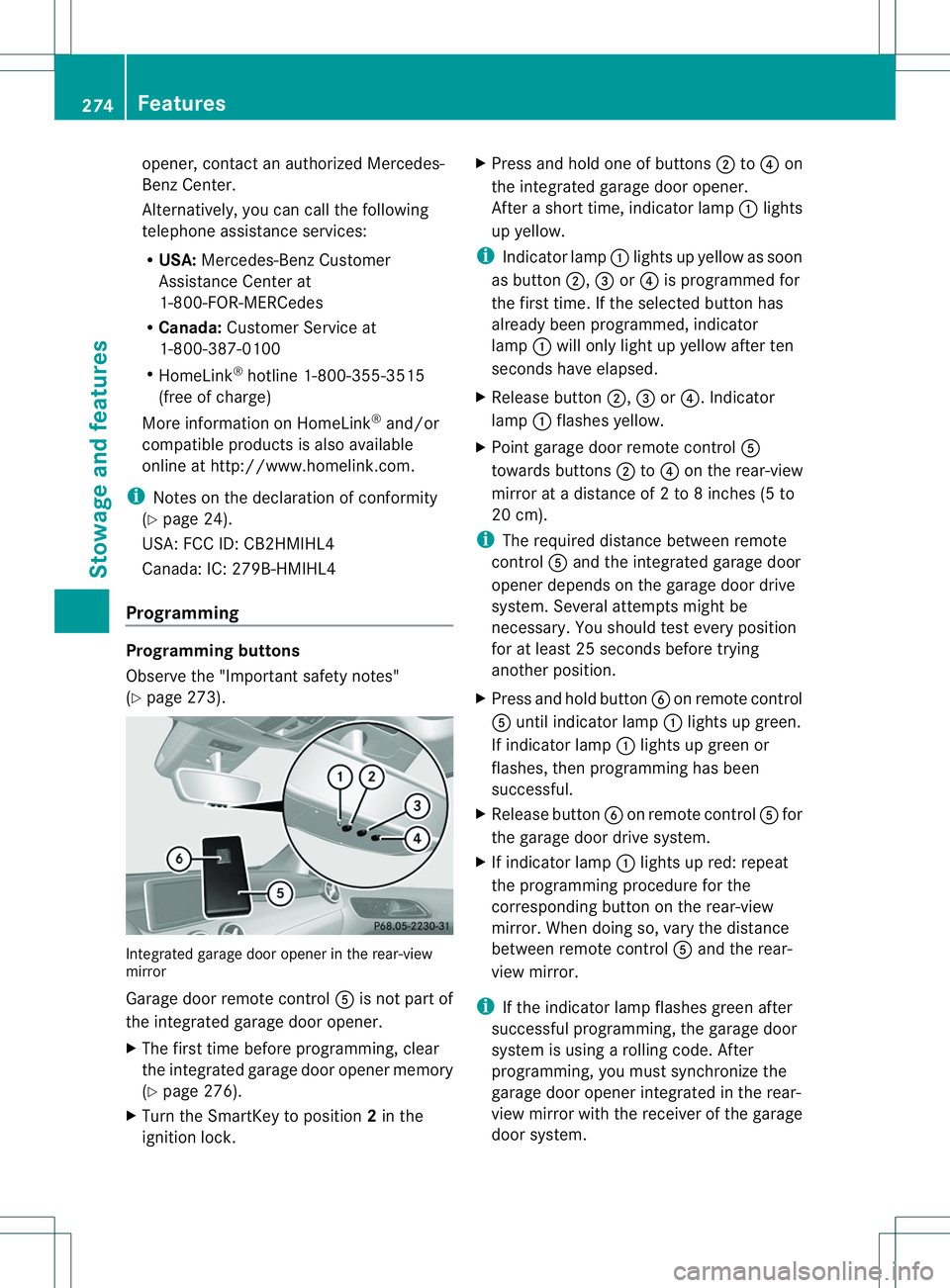
(Y page 273). Integrated garage door opener in the rear-view
mirror
Garage door remote control
001Eis not part of
the integrated garage door opener.
X The first time before programming, clear
the integrated garage door opener memory
(Y page 276).
X Turn the SmartKey to position 2in the
ignition lock. X
Press and hold one of buttons 0010to0021 on
the integrated garage door opener.
After ashort time, indicator lamp 001Alights
up yellow.
i Indicator lamp 001Alights up yellow as soon
as button 0010,0023or0021 is programmed for
the first time. If the selected button has
already been programmed, indicator
lamp 001Awill only light up yellow after ten
seconds have elapsed.
X Release button 0010,0023or0021.I ndicator
lamp 001Aflashes yellow.
X Point garage door remote control 001E
towards buttons 0010to0021 on the rear-view
mirror at adistance of 2to8inches (5 to
20 cm).
i The required distance between remote
control 001Eand the integrated garage door
opener depends on the garage door drive
system. Several attempt smight be
necessary. You should tes tevery position
for at least 25 seconds before trying
another position.
X Press and hold button 0024on remote control
001E until indicator lamp 001Alights up green.
If indicator lamp 001Alights up green or
flashes, then programming has been
successful.
X Release button 0024on remote control 001Efor
the garage door drive system.
X If indicator lamp 001Alights up red: repeat
the programming procedure for the
corresponding button on the rear-view
mirror. When doing so, vary the distance
between remote control 001Eand the rear-
view mirror.
i If the indicator lamp flashes green after
successfu lprogramming, the garage door
system is using arolling code. After
programming, you must synchronize the
garage door opener integrated in the rear-
view mirror with the receive rofthe garage
door system. 274
FeaturesStowage and features
Page 303 of 360
batteries to
aqualified
specialist workshop or a
special collection point for
used batteries.
! Have the battery checked regularly at a
qualified specialist workshop.
Observe the servic eintervals in the
Maintenance Booklet or contact aqualified
specialist workshop for more information.
! You should have all work involving the
battery carried out at aqualified specialist
workshop. In th eexcepti onal cas ethatitis
necessar yfor you to disconnect th ebattery
yourself, mak esure that:
R you switch off th eenginea nd remove the
SmartKey. Chec kthata ll th eindicator
lamps in th einstrumen tcluste rare off.
Otherwise, electronic components, such
as th ealternator, may be damaged.
R you first remove th enegative terminal
clam pand then th epositive terminal
clamp. Never swap th etermi nal clamps.
Otherwise, th evehicle's electronic
system may be damaged.
R on vehicles wit hautomatic transmission,
th et ransmission is locke dinposition P
after disconnecting th ebattery. The
vehicl eissecured against rollin gaway.
You can then no longer mov ethe vehicle.
The battery and th ecover of th epositive
terminal clam pmust be installed securely
durin goperation.
Comply wit hsafet yprecaution sand take
protective measures when handling
batteries. Risk of explosion.
Fire, open flames and smokin
gare
prohibited when handlin gthe
battery. Avoid creating sparks. Battery acid is caustic. Avoid
contact wit
hskin, eyes or clothing.
Wear suitable protective clothing,
especially gloves, apro nand
faceguard.
Rinse any aci dspillsimmediately
with clear water. Contact a
physician if necessary. Wear ey
eprotection. Kee
pchildren away. Observ
ethisO perator' sManual.
For safety reasons ,Mercedes–Benz
recommends tha tyou only use batteries that
have been tested and approved for your
vehicle by Mercedes-Benz. These batteries
have greater impact resistanc eand as aresult
there is no risk of acid burns to occupants
when abattery is damaged in an accident.
In order for the battery to achieve the
maximum possible service life, it must always
be sufficiently charged.
Like other batteries, the vehicle battery may
discharge over time if you do not use the
vehicle. In this case, have the battery
disconnected at aqualified specialist
workshop. You can also charge the battery
with acharger recommended by Mercedes-
Benz.C ontactaqualified specialist workshop
for further information.
Have the battery condition of charge checked
more frequently if you use the vehicle mainly
for short trips or if you leave it standin gidle
for alengthy period. Consult aqualified
specialist workshop if you wish to leave your
vehicle parked for along period of time.
Only replace abattery with abattery that has
been recommended by Mercedes-Benz. Battery (vehicle)
301Breakdown assistance Z
Page 304 of 360
i
Remove th eSmartKey if you park the
vehicl eand do no trequire any electrical
consumers. The vehicle will then use very
little energy, thus conservin gbattery
power.
i If the power supply has been interrupted,
e.g. if you reconnectt he battery, you will
have to:
R set the clock (audio system/COMAND,
see the separate operating instructions).
R reset the function for folding the exterior
mirrors in/out automatically ,byfolding
the mirrors out once (Y page 100).Charging the battery
G
WARNING
During charging and jump-starting, explosive
gases can escape from the battery. There is a
risk of an explosion.
Particularly avoid fire, open flames, creating
sparks and smoking. Ensure there is sufficient
ventilation while charging and jump-starting.
Do not lean over abattery. G
WARNING
Batterya cid is caustic. There is arisk of injury.
Avoid contact with the skin, eyes or clothing.
Do not inhale any battery gases. Do not lean
over the battery. Keep children away from
batteries. Wash battery acid immediately with
water and seek medical attention. G
WARNING
Ad ischarged battery can freeze at
temperatures below freezin gpoint .When
jump-starting the vehicle or charging the
battery, gases can escape from the battery.
There is arisk of an explosion.
Allow the frozen battery to thaw out before
charging it or jump-starting.
! Only use battery chargers with a
maximum charging voltage of 14.8 V. !
Only charge the battery using the jump-
startingc onnection point.
The jump-starting connection point is in the
engine compartment( Ypage 303).
X Open the hood.
X Connect the battery charger to the positive
terminal and ground point in the same
order as when connecting the donor
battery in the jump-starting procedure
(Y page 303).
If, at low temperatures, the indicator lamps/
warning lamps in the instrumentc luster do
not light up, it is highly likely that the
discharged battery has frozen.Int his case
you may neither jump-start the vehicle nor
charge the battery. The service life of a
thawed-out battery may be shorter. The
startingc haracteristics can be impaired,
particularly at low temperatures. Have the
thawed-out battery checked at aqualified
specialist workshop.
Only charge the installed battery with a
battery charger which has been tested and
approved by Mercedes-Benz. An accessory
battery charge unit specially adapted for
Mercedes-Ben zvehicles and tested and
approved by Mercedes-Benzisa vailable. It
permits the charging of the battery in its
installed position. Contact an authorized
Mercedes-Benz Center for further
information and availability. Read the battery
charger's operating instructions before
charging the battery. 302
Battery (vehicle)Breakdown assistance
Page 305 of 360
Jump-starting
For the jump-starting procedure, use only the jump-starting connection point, consisting of a
positive terminal and an earth point, in the engine compartment. G
WARNING
Battery acid is caustic. There is arisk of injury.
Avoid contact with the skin, eyes or clothing. Do not inhale any battery gases. Do not lean over
the battery. Keep children away from batteries. Wash battery acid immediately with water and
seek medical attention. G
WARNING
During charging and jump-starting, explosive gases can escape from the battery. There is arisk
of an explosion.
Particularly avoid fire, open flames, creating sparks and smoking. Ensure there is sufficient
ventilation while charging and jump-starting. Do not lean over abattery. G
WARNING
During the charging process, abattery produces hydrogen gas. If ashort circuit occurs or sparks
are created, the hydrogen gas can ignite. There is arisk of an explosion.
R Make sure that the positive terminal of aconnected battery does not come into contact with
vehicle parts.
R Never place metal objects or tools on abattery.
R It is important that you observe the described order of the battery terminals when connecting
and disconnecting abattery.
R When jump-starting, make sure that the battery poles with identical polarity are connected.
R It is particularly important to observe the described order when connecting and disconnecting
the jumper cables.
R Never connect or disconnectt he battery terminals while the engine is running.G
WARNING
Ad ischarged battery can freeze at temperatures below freezin gpoint .When jump-starting the
vehicle or charging the battery, gases can escape from the battery. There is arisk of an explosion.
Allow the frozen battery to thaw out before charging it or jump-starting.
! Avoid repeated and lengthy startinga ttempts. Otherwise, the catalytic converter could be
damaged by the non-combusted fuel.
If, at low temperatures, the indicator lamps/warning lamps in the instrumentc luster do not
light up, it is highly likely that the discharged battery has frozen .Inthis case you may neither
jump-start the vehicle nor charge the battery. The service life of athawed-out battery may be
shorter. The startingc haracteristics can be impaired, particularly at low temperatures. Have
the thawed-out battery checked at aqualified specialist workshop. Jump-starting
303Breakdown assistance Z