Page 94 of 403
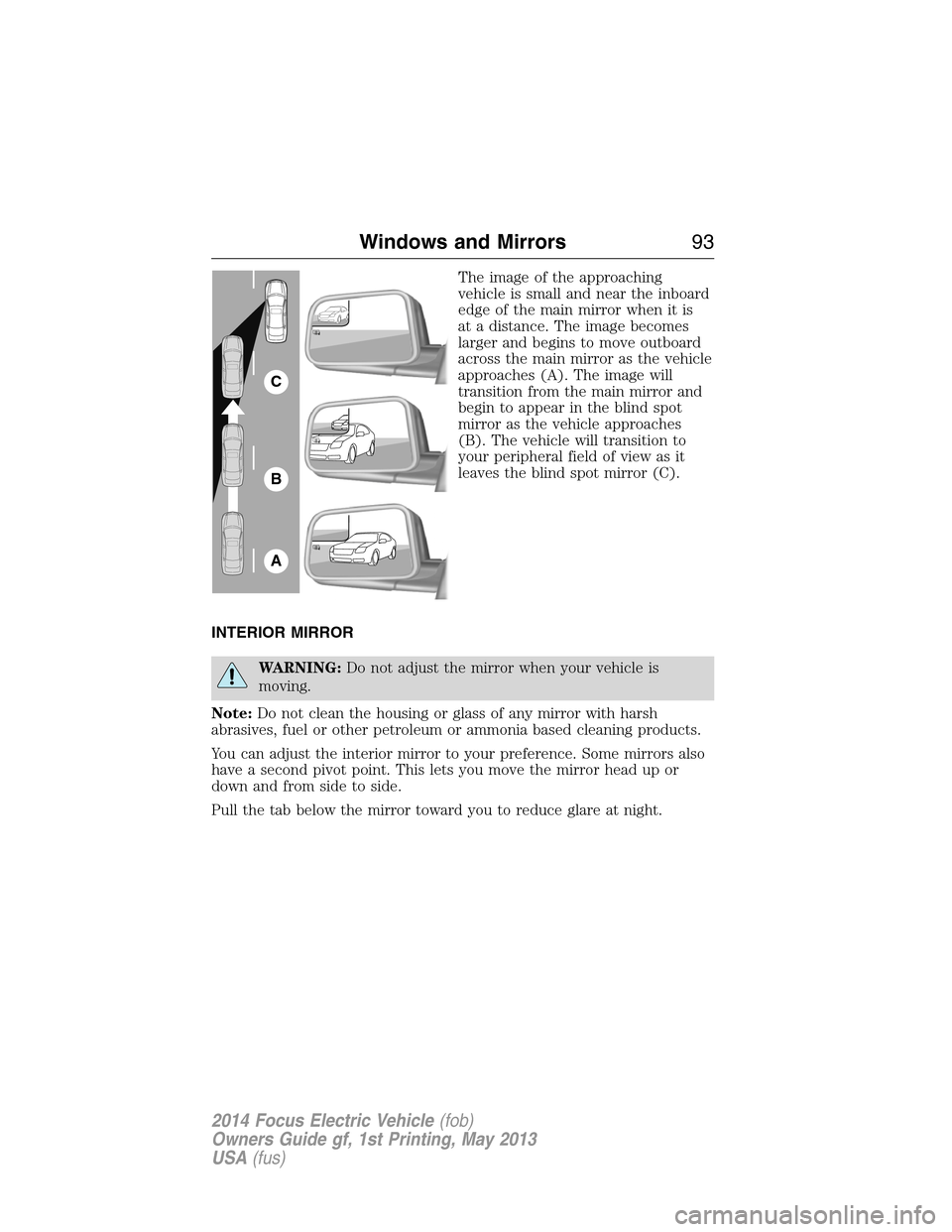
The image of the approaching
vehicle is small and near the inboard
edge of the main mirror when it is
at a distance. The image becomes
larger and begins to move outboard
across the main mirror as the vehicle
approaches (A). The image will
transition from the main mirror and
begin to appear in the blind spot
mirror as the vehicle approaches
(B). The vehicle will transition to
your peripheral field of view as it
leaves the blind spot mirror (C).
INTERIOR MIRROR
WARNING:Do not adjust the mirror when your vehicle is
moving.
Note:Do not clean the housing or glass of any mirror with harsh
abrasives, fuel or other petroleum or ammonia based cleaning products.
You can adjust the interior mirror to your preference. Some mirrors also
have a second pivot point. This lets you move the mirror head up or
down and from side to side.
Pull the tab below the mirror toward you to reduce glare at night.
A
B
C
Windows and Mirrors93
2014 Focus Electric Vehicle(fob)
Owners Guide gf, 1st Printing, May 2013
USA(fus)
Page 96 of 403
GAUGES
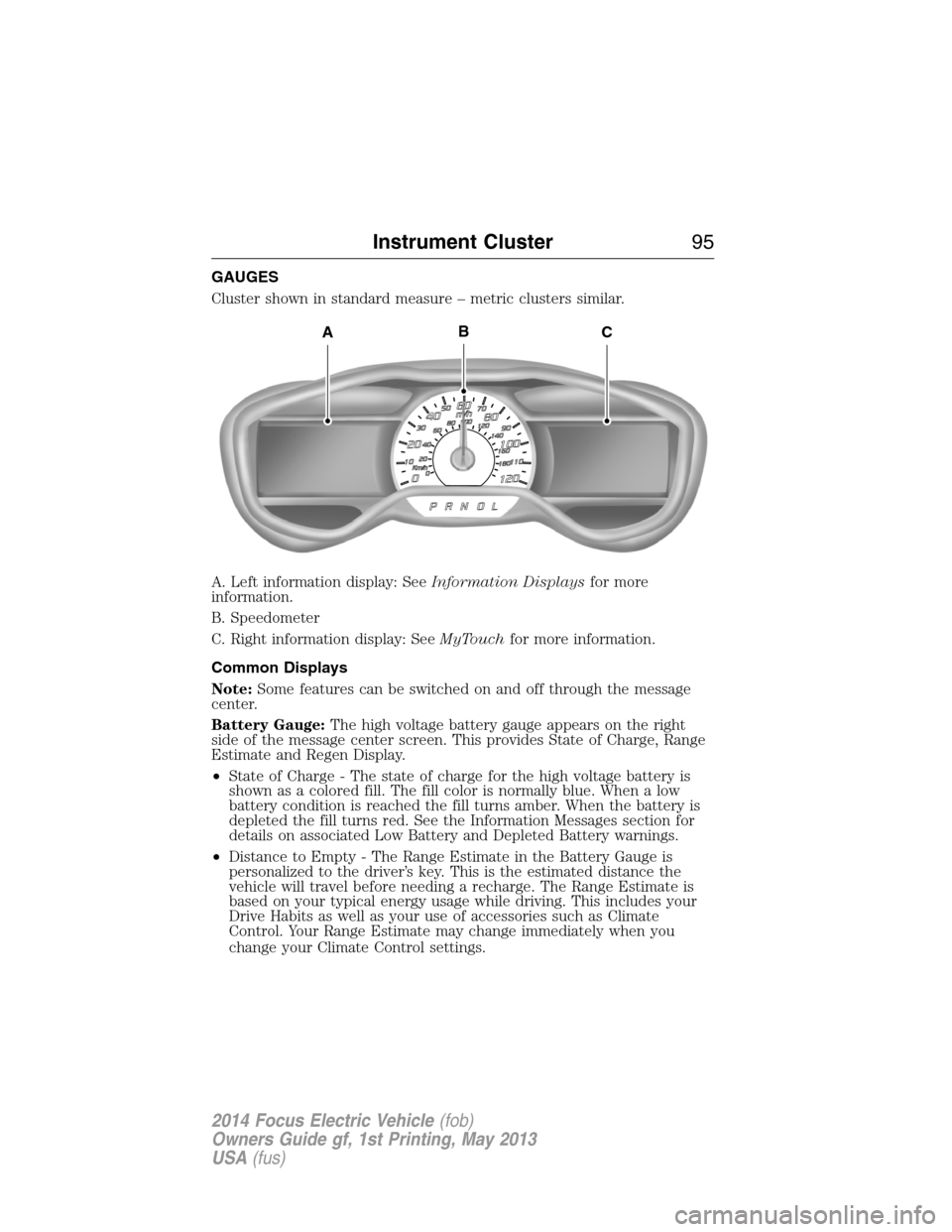
Cluster shown in standard measure – metric clusters similar.
A. Left information display: SeeInformation Displaysfor more
information.
B. Speedometer
C. Right information display: SeeMyTouchfor more information.
Common Displays
Note:Some features can be switched on and off through the message
center.
Battery Gauge:The high voltage battery gauge appears on the right
side of the message center screen. This provides State of Charge, Range
Estimate and Regen Display.
•State of Charge - The state of charge for the high voltage battery is
shown as a colored fill. The fill color is normally blue. When a low
battery condition is reached the fill turns amber. When the battery is
depleted the fill turns red. See the Information Messages section for
details on associated Low Battery and Depleted Battery warnings.
•Distance to Empty - The Range Estimate in the Battery Gauge is
personalized to the driver’s key. This is the estimated distance the
vehicle will travel before needing a recharge. The Range Estimate is
based on your typical energy usage while driving. This includes your
Drive Habits as well as your use of accessories such as Climate
Control. Your Range Estimate may change immediately when you
change your Climate Control settings.
ACB
Instrument Cluster95
2014 Focus Electric Vehicle(fob)
Owners Guide gf, 1st Printing, May 2013
USA(fus)
Page 98 of 403

WARNING LAMPS AND INDICATORS
These indicators can alert you to a vehicle condition that may become
serious enough to cause expensive repairs. Many lights will illuminate
when you start your vehicle to make sure they work. If any light remains
on after starting the vehicle, refer to the respective system warning light
for additional information.
Note:Some warning indicators are reconfigurable telltales (RTT). These
indicators appear in the information display and function the same as a
warning light, but do not display on startup.
Airbag readiness
If this light fails to illuminate when the ignition is turned on,
continues to flash or remains on, contact your authorized dealer
as soon as possible. A chime will sound when there is a
malfunction in the indicator light.
Anti-lock brake system
If the ABS light stays illuminated or continues to flash, a
malfunction has been detected. Contact your authorized dealer
as soon as possible. Normal braking is still functional unless the
brake warning light also is illuminated.
Brake system warning light
To confirm the brake system warning light is functional, it will
momentarily illuminate when the vehicle is switched on, to
accessory or Ready to Drive mode.
If it illuminates when you are driving, check that the parking brake is not
engaged. If the parking brake is not engaged, this indicates low brake
fluid level or a brake system malfunction. Have the system checked
immediately by your authorized dealer.
WARNING:Driving a vehicle with the brake system warning
light on is dangerous. A significant decrease in braking
performance may occur. It will take you longer to stop the vehicle.
Have the vehicle checked by your authorized dealer as soon as possible.
Driving extended distances with the parking brake engaged can cause
brake failure and the risk of personal injury.
Instrument Cluster97
2014 Focus Electric Vehicle(fob)
Owners Guide gf, 1st Printing, May 2013
USA(fus)
Page 100 of 403

Low tire pressure warning
Illuminates when your tire pressure is low. If the light remains
on at start up or while driving, the tire pressure should be
checked. When the vehicle is first turned on, the light will
illuminate for 3 seconds to ensure the bulb is working. If the light does
not turn on or begins to flash, contact your authorized dealer as soon as
possible.
Low washer fluid (RTT)
Illuminates when the windshield washer fluid is low.
Motor coolant overheat warning (RTT)
Illuminates when the motor cooling system is overheating. Stop
the vehicle in a safe place and contact your authorized dealer.
Overdrive cancel and grade assist (if equipped)
Illuminates when the overdrive function of the transmission has
been turned off and the grade assist function has been turned on.
Park lamps
Illuminates when the park lamps are on.
Powertrain malfunction/reduced power (RTT)
Illuminates when a powertrain or high-voltage charge system
fault has been detected. If the indicator stays on or continues
to come on, contact your authorized dealer as soon as possible.
Ready to drive
Illuminates once the vehicle has been switched on and is ready
to drive. A corresponding message may display stating ready to
drive or a message regarding budget if a charge point has not
been entered.
Safety belt
Reminds you to fasten your safety belt. A Belt-Minder® chime
will also sound to remind you to fasten your safety belt.
Instrument Cluster99
2014 Focus Electric Vehicle(fob)
Owners Guide gf, 1st Printing, May 2013
USA(fus)
Page 101 of 403

Speed control (if equipped) (RTT)
Illuminates when the speed control is activated. Turns off when
the speed control system is deactivated.
Stability Control System
Displays when the AdvanceTrac®/Traction control is active.
If the light remains on, have the system serviced immediately.
Stability Control System Off
Illuminates when AdvanceTrac®/Traction control has been
disabled by the driver.
Stop safely (RTT)
Indicates electrical component fault/failure that will cause the
vehicle to shutdown or enter into a limited operating mode.
A message may also display.
If the indicator stays on or continues to come on, contact your
authorized dealer as soon as possible
Turn signal
Illuminates when the left or right turn signal or the hazard
warning flasher is turned on. If the indicators stay on or flash
faster, check for a burned out bulb.
Vehicle plugged in (RTT)
Illuminates when the vehicle is plugged in. A corresponding
message may display after attempting to start the vehicle.
100Instrument Cluster
2014 Focus Electric Vehicle(fob)
Owners Guide gf, 1st Printing, May 2013
USA(fus)
Page 102 of 403
AUDIBLE WARNINGS AND INDICATORS
Key In Ignition Warning Chime
Sounds when the key is left in the ignition in the off or accessory
position and the driver’s door is opened.
Keyless Warning Alert (If Equipped)
Sounds when the keyless vehicle is in RUN and the driver’s door is
opened.
Headlamps On Warning Chime
Sounds when the headlamps or parking lamps are on, the ignition is off
(the key is not in the ignition) and the driver’s door is opened.
Parking Brake On Warning Chime
Sounds when you have left the parking brake on and drive your vehicle.
If the warning chime remains on after you have released the parking
brake, have the system checked by your authorized dealer immediately.
Instrument Cluster101
2014 Focus Electric Vehicle(fob)
Owners Guide gf, 1st Printing, May 2013
USA(fus)
Page 103 of 403
GENERAL INFORMATION
WARNING:Driving while distracted can result in loss of vehicle
control, crash and injury. We strongly recommend that you use
extreme caution when using any device that may take your focus off
the road. Your primary responsibility is the safe operation of your
vehicle. We recommend against the use of any handheld device while
driving and encourage the use of voice-operated systems when possible.
Make sure you are aware of all applicable local laws that may affect the
use of electronic devices while driving..
Various systems on your vehicle can be controlled using the information
display controls on the steering wheel. Corresponding information is
displayed in the information display.
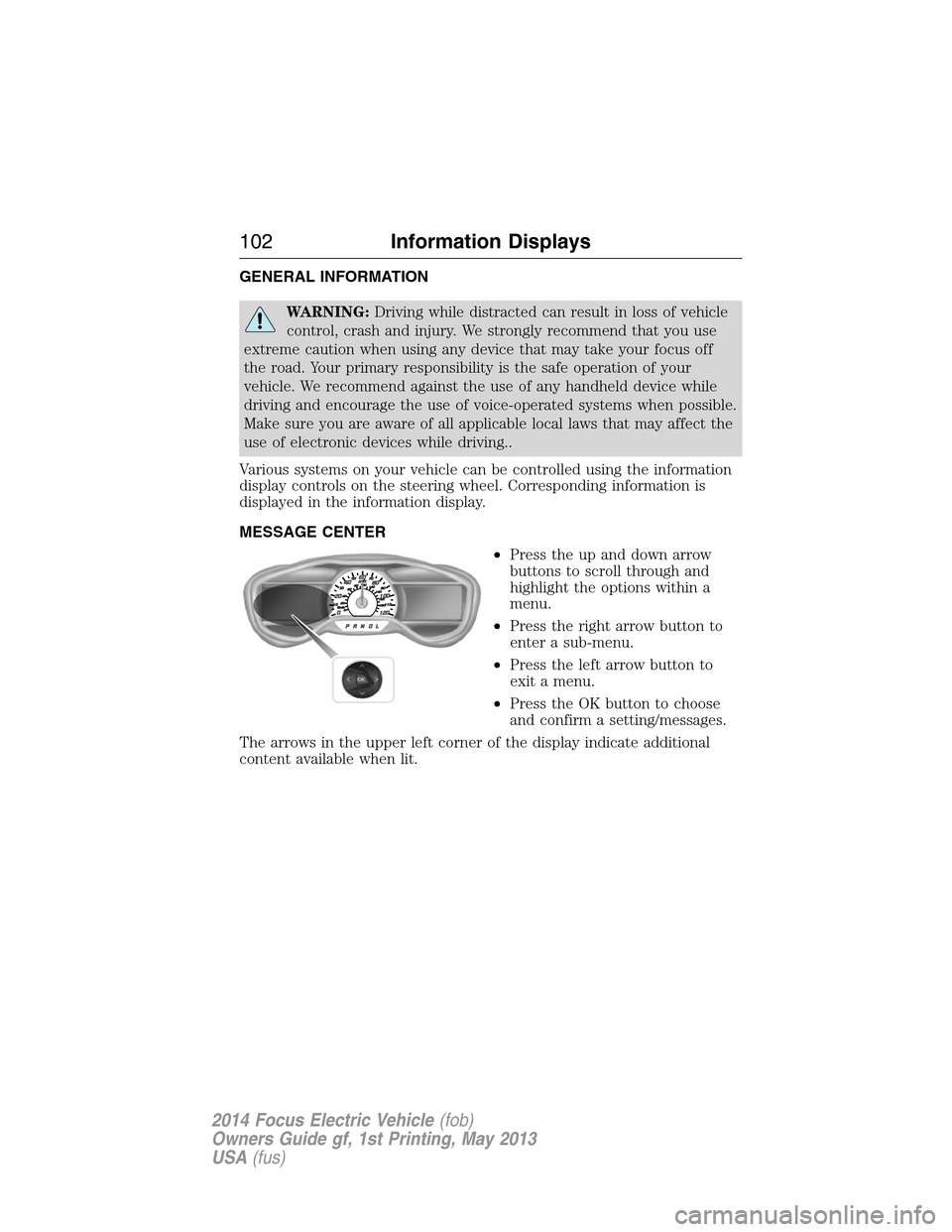
MESSAGE CENTER
•Press the up and down arrow
buttons to scroll through and
highlight the options within a
menu.
•Press the right arrow button to
enter a sub-menu.
•Press the left arrow button to
exit a menu.
•Press the OK button to choose
and confirm a setting/messages.
The arrows in the upper left corner of the display indicate additional
content available when lit.
102Information Displays
2014 Focus Electric Vehicle(fob)
Owners Guide gf, 1st Printing, May 2013
USA(fus)
Page 108 of 403
Energy
Use the arrow buttons to choose the desired energy display.
Energy
Energy History
OptionsTime intervals /
Help
Energy Coach Options Help
•Energy History: This view from left to right starts with the Budget
View gauge and adds historical Energy Use and Budget data. The data
is represented as an average for time intervals of either 1, 2 or
6 minutes, with the leftmost interval being the most recent. Total time
for the five intervals is shown at the bottom of the view. Interval time
can be selected in the Options menu. Intervals shown in grey color are
from the previous drive.
•
Energy Coach: This view provides a comparison of your recent
Acceleration, Braking and Cruising behavior to what is recommended for
most efficient use of energy under present conditions. The horizontal
bars fill from left to right with best efficiency (and Blue color) shown
as at least half full. When the bars are less than half full, the color is
Amber, suggesting that a change in behavior is needed to achieve better
energy efficiency.
Information
In this mode, you can view different vehicle system information
and perform a system check.
Warnings
XX Warnings Displays the number of warnings that need
immediate attention in red. You can only view the
warnings from the System Check menu. View them
immediately by pressing OK and then OK again to
enter system check. Use the up/down arrows to
scroll through the warnings.
Information Displays107
2014 Focus Electric Vehicle(fob)
Owners Guide gf, 1st Printing, May 2013
USA(fus)