Page 109 of 403
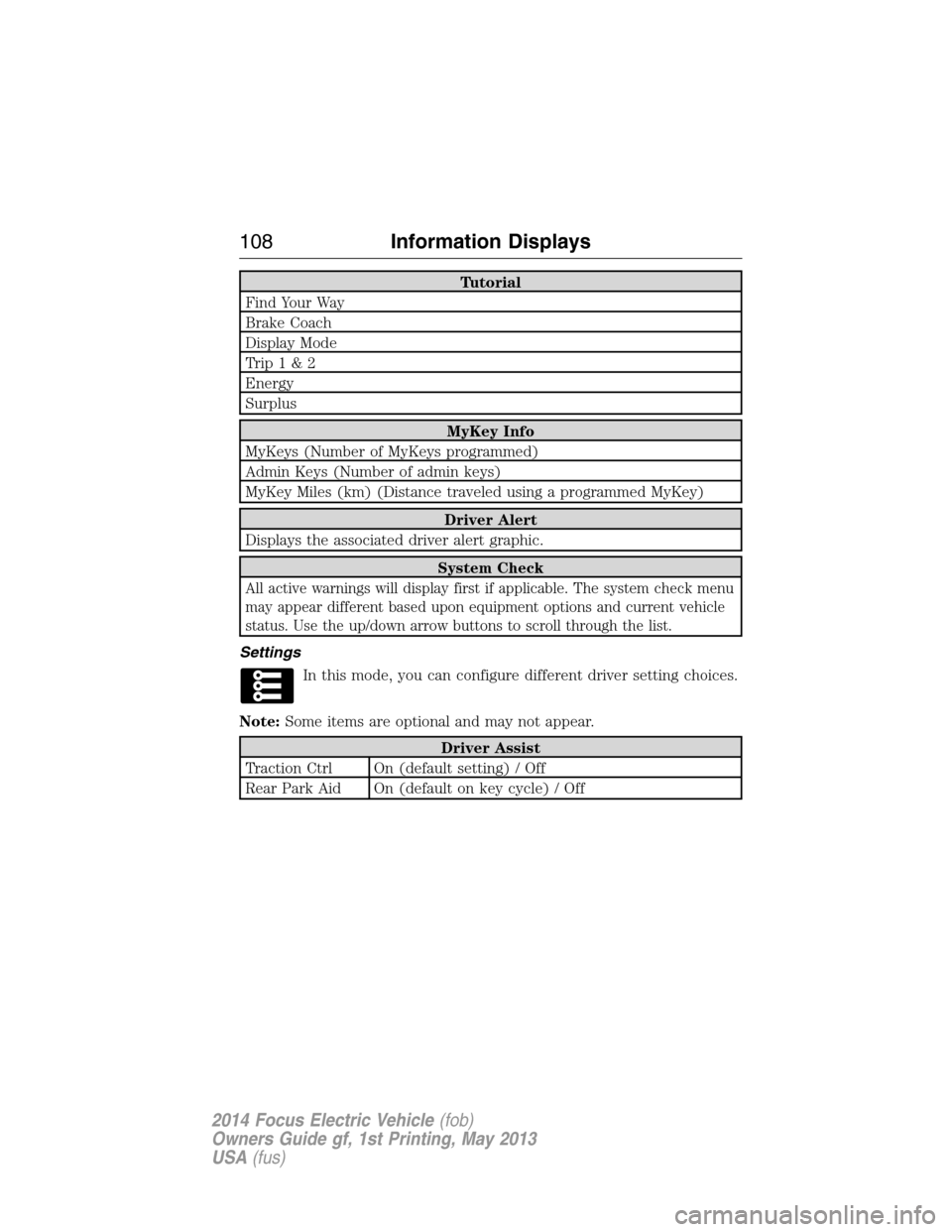
Tutorial
Find Your Way
Brake Coach
Display Mode
Trip1&2
Energy
Surplus
MyKey Info
MyKeys (Number of MyKeys programmed)
Admin Keys (Number of admin keys)
MyKey Miles (km) (Distance traveled using a programmed MyKey)
Driver Alert
Displays the associated driver alert graphic.
System Check
All active warnings will display first if applicable. The system check menu
may appear different based upon equipment options and current vehicle
status. Use the up/down arrow buttons to scroll through the list.
Settings
In this mode, you can configure different driver setting choices.
Note:Some items are optional and may not appear.
Driver Assist
Traction Ctrl On (default setting) / Off
Rear Park Aid On (default on key cycle) / Off
108Information Displays
2014 Focus Electric Vehicle(fob)
Owners Guide gf, 1st Printing, May 2013
USA(fus)
Page 111 of 403
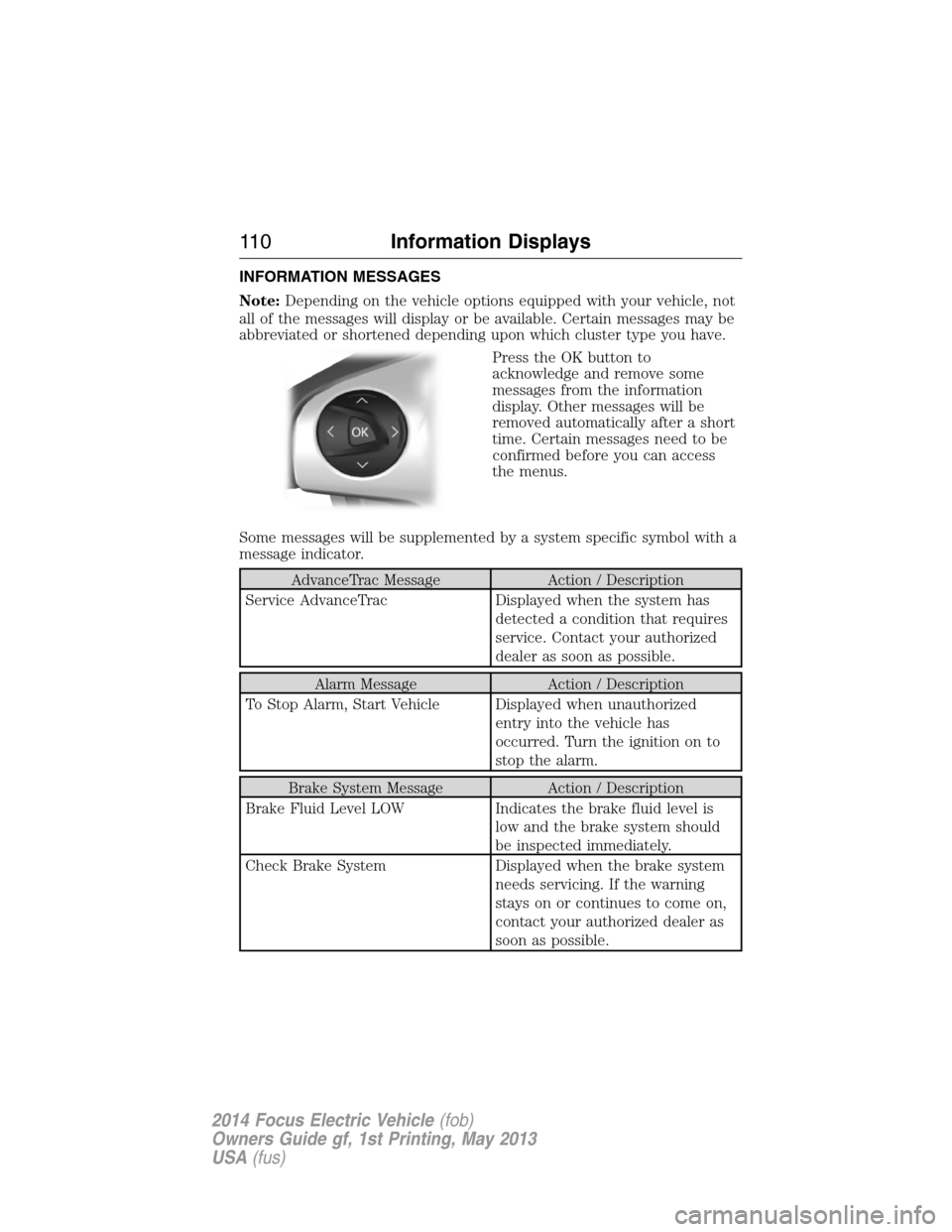
INFORMATION MESSAGES
Note:Depending on the vehicle options equipped with your vehicle, not
all of the messages will display or be available. Certain messages may be
abbreviated or shortened depending upon which cluster type you have.
Press the OK button to
acknowledge and remove some
messages from the information
display. Other messages will be
removed automatically after a short
time. Certain messages need to be
confirmed before you can access
the menus.
Some messages will be supplemented by a system specific symbol with a
message indicator.
AdvanceTrac Message Action / Description
Service AdvanceTrac Displayed when the system has
detected a condition that requires
service. Contact your authorized
dealer as soon as possible.
Alarm Message Action / Description
To Stop Alarm, Start Vehicle Displayed when unauthorized
entry into the vehicle has
occurred. Turn the ignition on to
stop the alarm.
Brake System Message Action / Description
Brake Fluid Level LOW Indicates the brake fluid level is
low and the brake system should
be inspected immediately.
Check Brake System Displayed when the brake system
needs servicing. If the warning
stays on or continues to come on,
contact your authorized dealer as
soon as possible.
11 0Information Displays
2014 Focus Electric Vehicle(fob)
Owners Guide gf, 1st Printing, May 2013
USA(fus)
Page 112 of 403
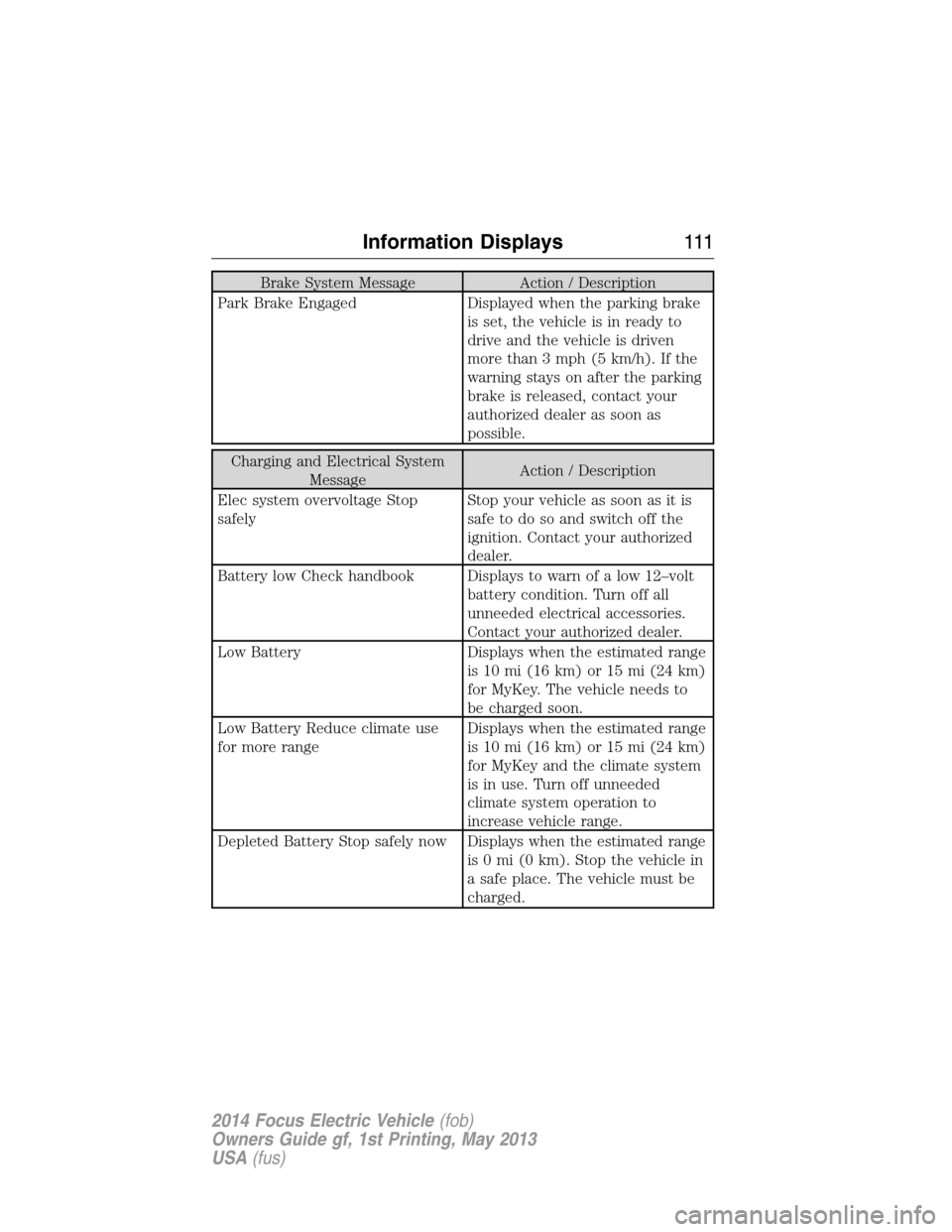
Brake System Message Action / Description
Park Brake Engaged Displayed when the parking brake
is set, the vehicle is in ready to
drive and the vehicle is driven
more than 3 mph (5 km/h). If the
warning stays on after the parking
brake is released, contact your
authorized dealer as soon as
possible.
Charging and Electrical System
MessageAction / Description
Elec system overvoltage Stop
safelyStop your vehicle as soon as it is
safetodosoandswitchoffthe
ignition. Contact your authorized
dealer.
Battery low Check handbook Displays to warn of a low 12–volt
battery condition. Turn off all
unneeded electrical accessories.
Contact your authorized dealer.
Low Battery Displays when the estimated range
is 10 mi (16 km) or 15 mi (24 km)
for MyKey. The vehicle needs to
be charged soon.
Low Battery Reduce climate use
for more rangeDisplays when the estimated range
is 10 mi (16 km) or 15 mi (24 km)
for MyKey and the climate system
is in use. Turn off unneeded
climate system operation to
increase vehicle range.
Depleted Battery Stop safely now Displays when the estimated range
is 0 mi (0 km). Stop the vehicle in
a safe place. The vehicle must be
charged.
Information Displays111
2014 Focus Electric Vehicle(fob)
Owners Guide gf, 1st Printing, May 2013
USA(fus)
Page 114 of 403
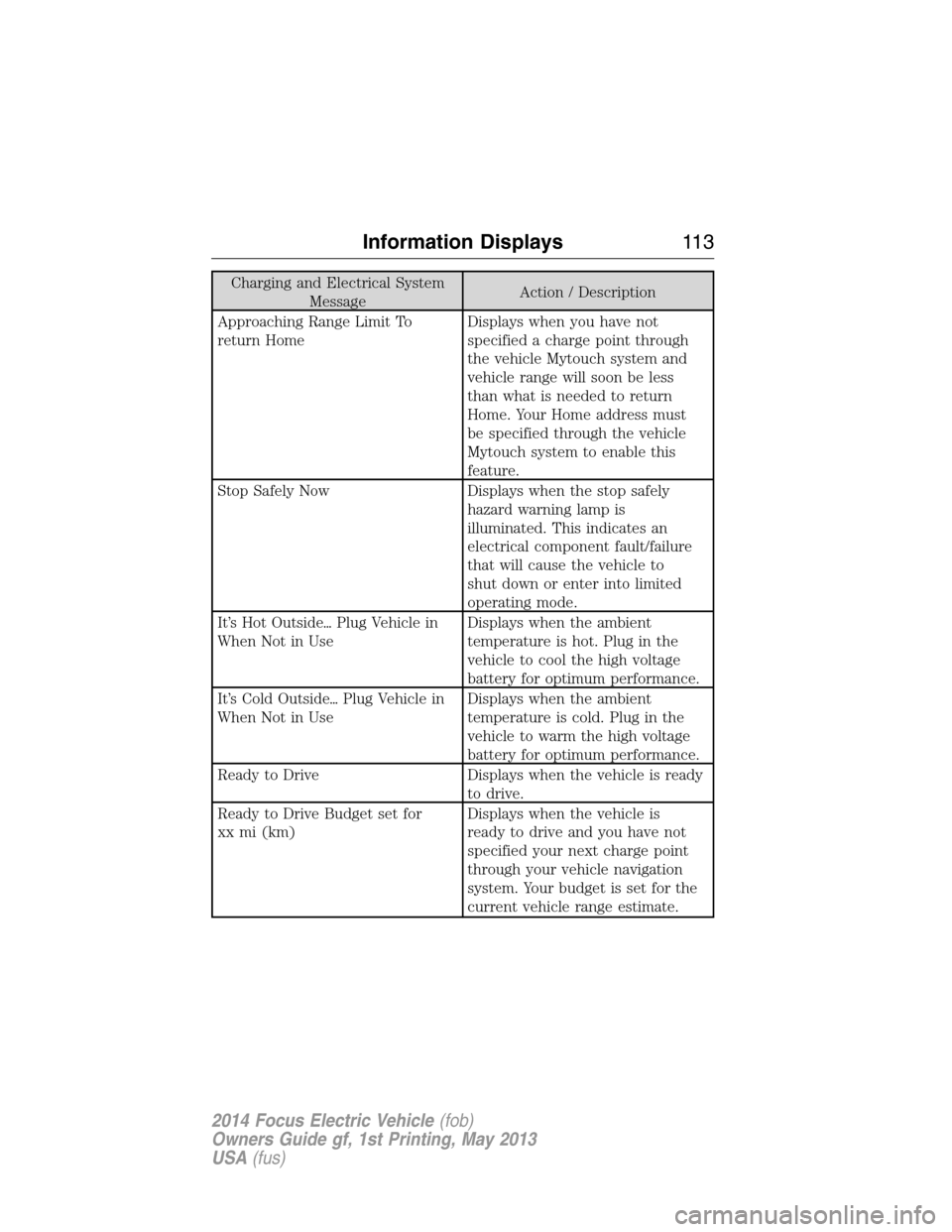
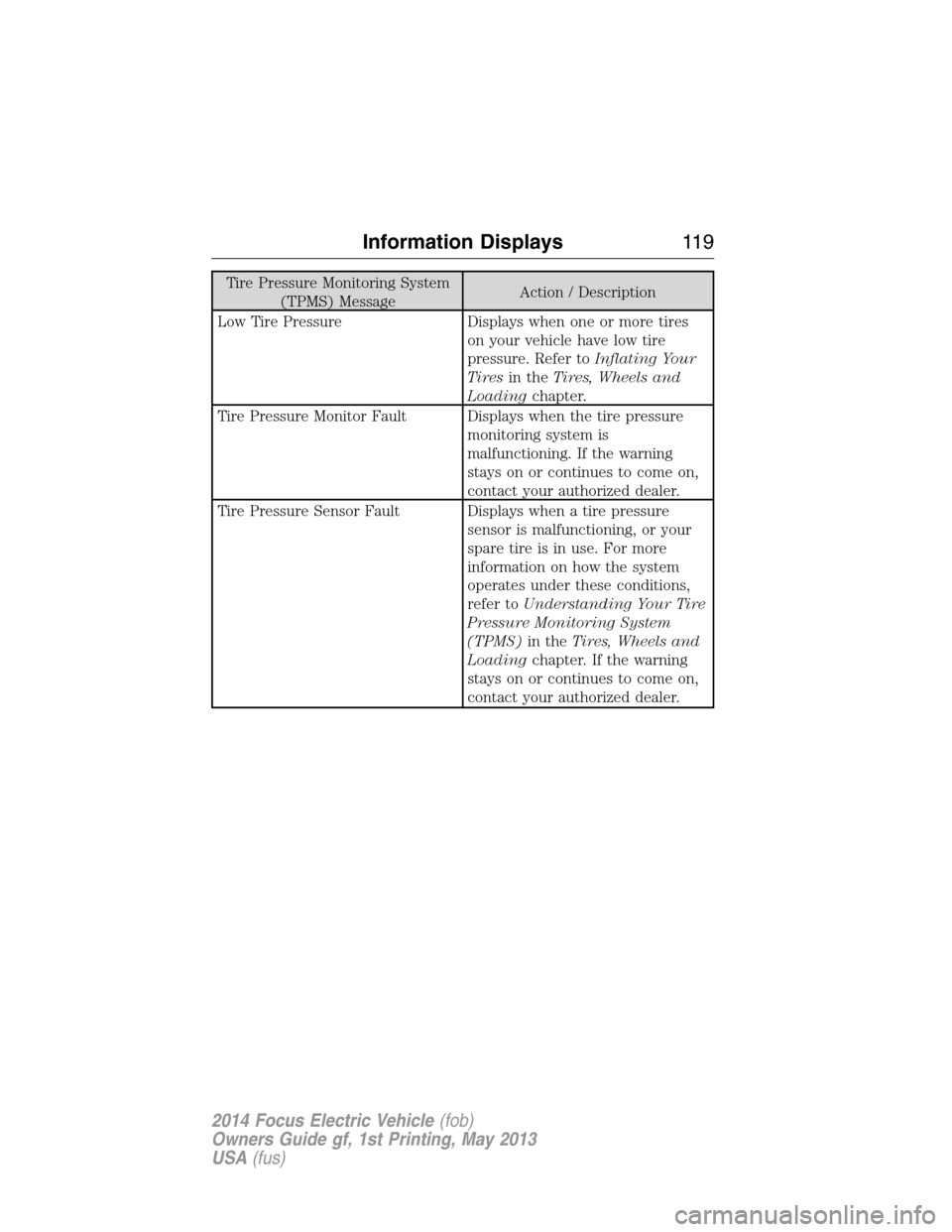
Charging and Electrical System
MessageAction / Description
Approaching Range Limit To
return HomeDisplays when you have not
specified a charge point through
the vehicle Mytouch system and
vehicle range will soon be less
than what is needed to return
Home. Your Home address must
be specified through the vehicle
Mytouch system to enable this
feature.
Stop Safely Now Displays when the stop safely
hazard warning lamp is
illuminated. This indicates an
electrical component fault/failure
that will cause the vehicle to
shut down or enter into limited
operating mode.
It’s Hot Outside�Plug Vehicle in
When Not in UseDisplays when the ambient
temperature is hot. Plug in the
vehicle to cool the high voltage
battery for optimum performance.
It’s Cold Outside�Plug Vehicle in
When Not in UseDisplays when the ambient
temperature is cold. Plug in the
vehicle to warm the high voltage
battery for optimum performance.
Ready to Drive Displays when the vehicle is ready
to drive.
Ready to Drive Budget set for
xx mi (km)Displays when the vehicle is
ready to drive and you have not
specified your next charge point
through your vehicle navigation
system. Your budget is set for the
current vehicle range estimate.
Information Displays11 3
2014 Focus Electric Vehicle(fob)
Owners Guide gf, 1st Printing, May 2013
USA(fus)
Page 117 of 403
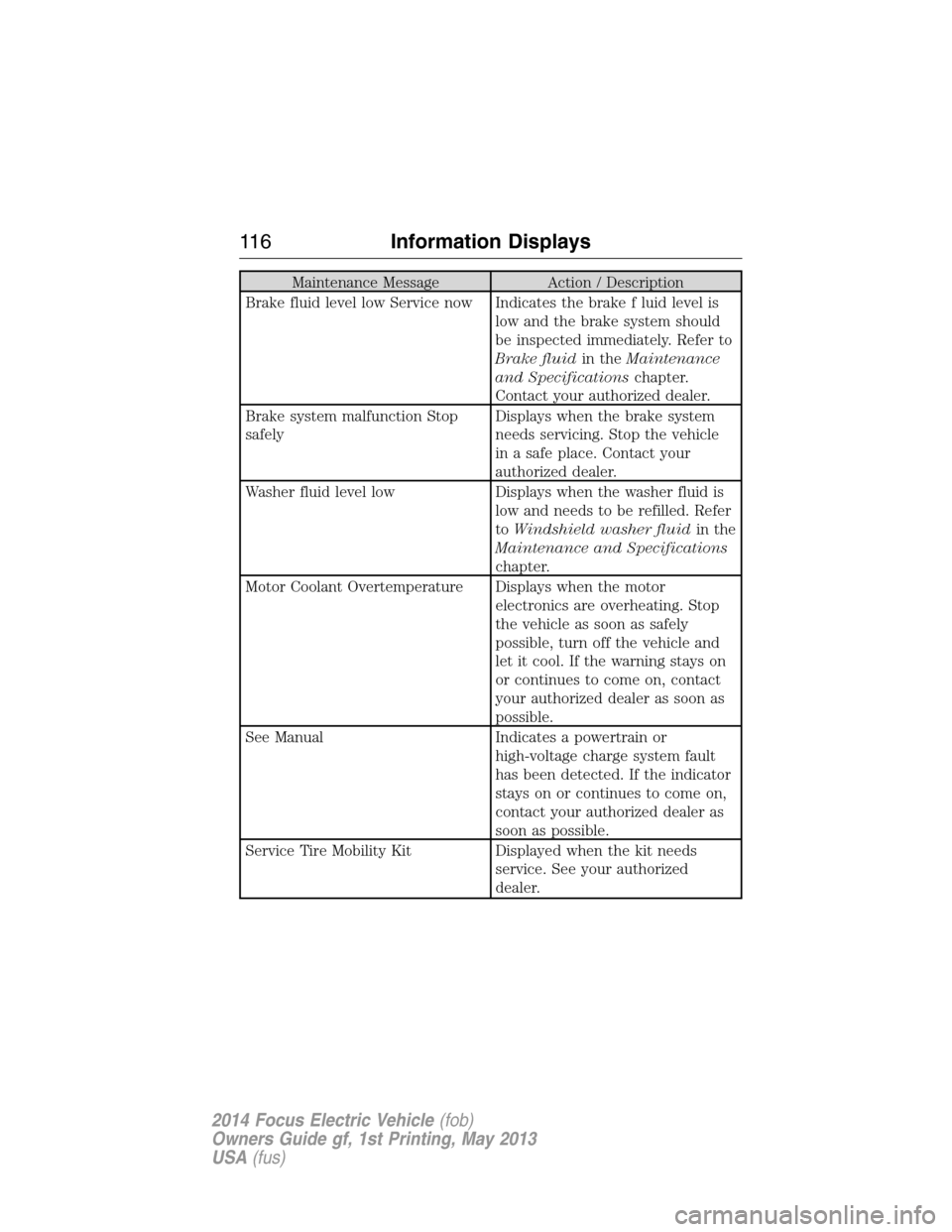
Maintenance Message Action / Description
Brake fluid level low Service now Indicates the brake f luid level is
low and the brake system should
be inspected immediately. Refer to
Brake fluidin theMaintenance
and Specificationschapter.
Contact your authorized dealer.
Brake system malfunction Stop
safelyDisplays when the brake system
needs servicing. Stop the vehicle
in a safe place. Contact your
authorized dealer.
Washer fluid level low Displays when the washer fluid is
low and needs to be refilled. Refer
toWindshield washer fluidin the
Maintenance and Specifications
chapter.
Motor Coolant Overtemperature Displays when the motor
electronics are overheating. Stop
the vehicle as soon as safely
possible, turn off the vehicle and
let it cool. If the warning stays on
or continues to come on, contact
your authorized dealer as soon as
possible.
See Manual Indicates a powertrain or
high-voltage charge system fault
has been detected. If the indicator
stays on or continues to come on,
contact your authorized dealer as
soon as possible.
Service Tire Mobility Kit Displayed when the kit needs
service. See your authorized
dealer.
11 6Information Displays
2014 Focus Electric Vehicle(fob)
Owners Guide gf, 1st Printing, May 2013
USA(fus)
Page 120 of 403
Tire Pressure Monitoring System
(TPMS) MessageAction / Description
Low Tire Pressure Displays when one or more tires
on your vehicle have low tire
pressure. Refer toInflating Your
Tiresin theTires, Wheels and
Loadingchapter.
Tire Pressure Monitor Fault Displays when the tire pressure
monitoring system is
malfunctioning. If the warning
stays on or continues to come on,
contact your authorized dealer.
Tire Pressure Sensor Fault Displays when a tire pressure
sensor is malfunctioning, or your
spare tire is in use. For more
information on how the system
operates under these conditions,
refer toUnderstanding Your Tire
Pressure Monitoring System
(TPMS)in theTires, Wheels and
Loadingchapter. If the warning
stays on or continues to come on,
contact your authorized dealer.
Information Displays11 9
2014 Focus Electric Vehicle(fob)
Owners Guide gf, 1st Printing, May 2013
USA(fus)
Page 128 of 403
SITTING IN THE CORRECT POSITION
WARNING:Sitting improperly out of position or with the seat
back reclined too far can take off weight from the seat cushion
and affect the decision of the passenger sensing system, resulting in
serious injury or death in a crash. Always sit upright against your seat
back, with your feet on the floor.
WARNING:Do not recline the seat back as this can cause the
occupant to slide under the seat’s safety belt, resulting in severe
personal injury in the event of a crash.
WARNING:Do not place objects higher than the seat backs to
reduce the risk of injury in a crash or during heavy braking or
when stopping suddenly.
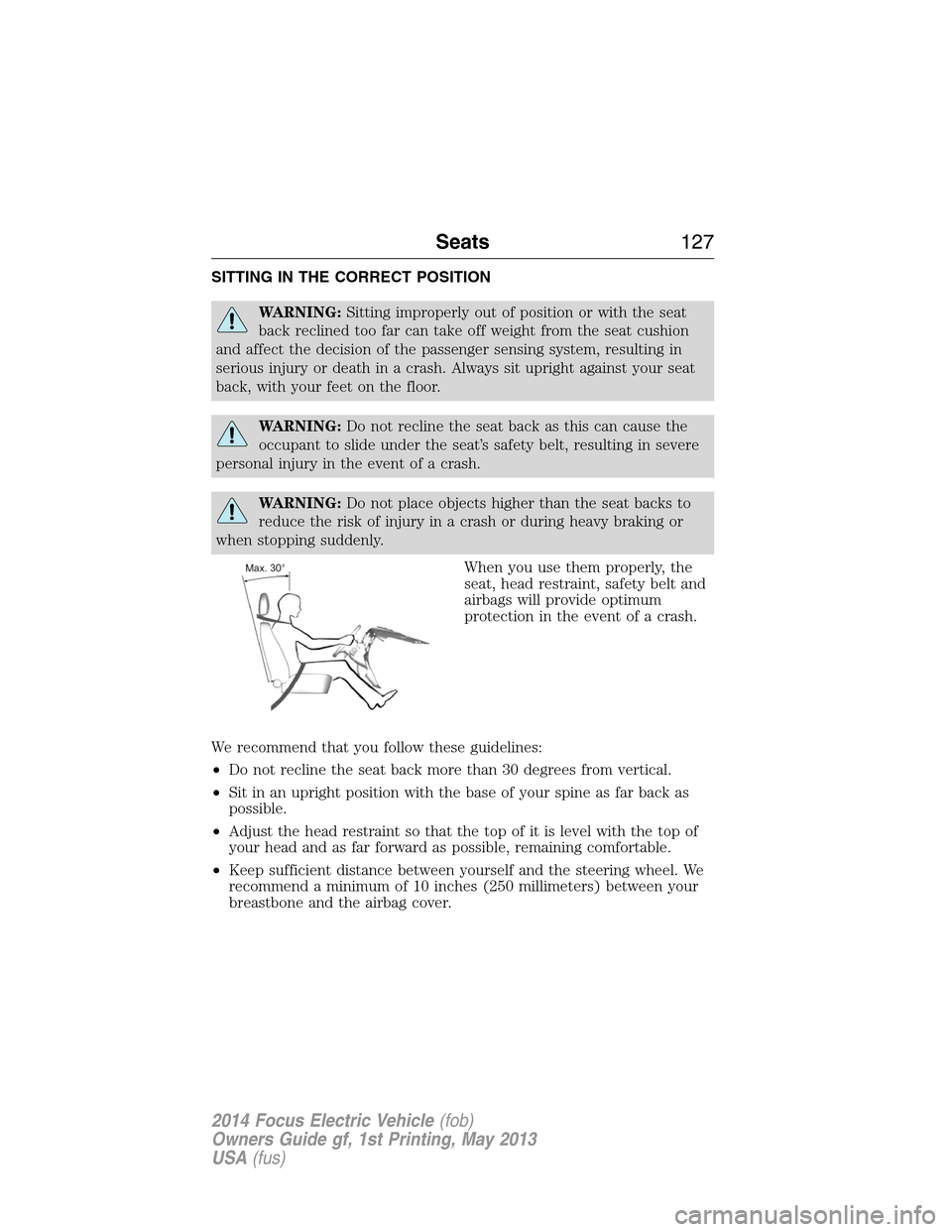
When you use them properly, the
seat, head restraint, safety belt and
airbags will provide optimum
protection in the event of a crash.
We recommend that you follow these guidelines:
•Do not recline the seat back more than 30 degrees from vertical.
•Sit in an upright position with the base of your spine as far back as
possible.
•Adjust the head restraint so that the top of it is level with the top of
your head and as far forward as possible, remaining comfortable.
•Keep sufficient distance between yourself and the steering wheel. We
recommend a minimum of 10 inches (250 millimeters) between your
breastbone and the airbag cover.
Seats127
2014 Focus Electric Vehicle(fob)
Owners Guide gf, 1st Printing, May 2013
USA(fus)
Page 129 of 403
•Hold the steering wheel with your arms slightly bent.
•Bend your legs slightly so that you can press the pedals fully.
•Position the shoulder strap of the safety belt over the center of your
shoulder and position the lap strap tightly across your hips.
Make sure that your driving position is comfortable and that you can
maintain full control of your vehicle.
HEAD RESTRAINTS
WARNING:To minimize the risk of neck injury in the event of a
crash, the driver and passenger occupants should not sit in or
operate the vehicle, until the head restraint is placed in its proper
position. The driver should never adjust the head restraint while the
vehicle is in motion.
WARNING:The adjustable head restraint is a safety device.
Whenever possible, it should be installed and properly adjusted
when the seat is occupied.
WARNING:Install the head restraint properly to minimize the
risk of neck injury in the event of a crash.
Note:Adjust the seat back to an upright driving position before
adjusting any head restraint. Adjust the head restraint so that the top of
it is level with the top of your head and as far forward as possible,
remaining comfortable. For occupants of extremely tall stature, adjust
the head restraint to its highest position.
128Seats
2014 Focus Electric Vehicle(fob)
Owners Guide gf, 1st Printing, May 2013
USA(fus)