Page 9 of 403
SYMBOL GLOSSARY
WARNING:You risk death or serious injury to yourself and
others if you do not follow the instruction highlighted by the
warning symbol.
These are some of the symbols you may see on your vehicle.
Symbol Description Symbol Description Symbol Description
Safety alertSee Owner’s
ManualAnti-lock
braking
system
Avoid
smoking,
flames, or
sparksBatteryBattery acid
Brake
fluid – non
petroleum
baseBrake systemCabin air
filter
Check fuel
capChild Safety
Door Lock
and UnlockChild seat
lower
anchor
Child seat
tether
anchorCruise controlDo not open
when hot
Engine air
filterEngine
coolantEngine
coolant
temperature
Engine oilExplosive gasFan warning
Fasten
safety beltFront airbagFront fog
lamps
8Introduction
2014 Focus Electric Vehicle(fob)
Owners Guide gf, 1st Printing, May 2013
USA(fus)
Page 31 of 403
5. Tighten the child safety seat tether strap according to the
manufacturer’s instructions.
If the safety seat is not anchored properly, the risk of a child being
injured in a crash greatly increases.
If your child restraint system is equipped with a tether strap, and the
child restraint manufacturer recommends its use, Ford also recommends
its use.
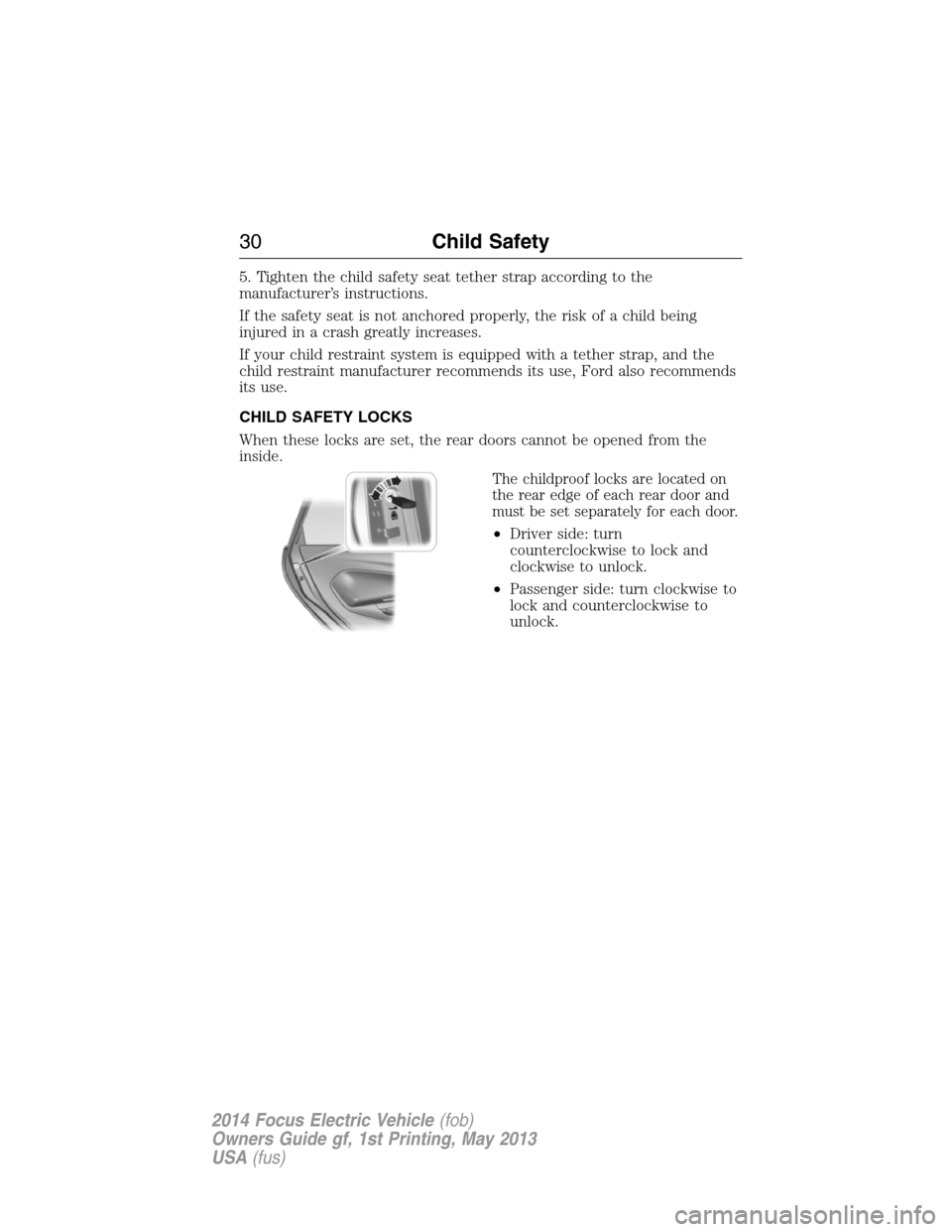
CHILD SAFETY LOCKS
When these locks are set, the rear doors cannot be opened from the
inside.
The childproof locks are located on
the rear edge of each rear door and
must be set separately for each door.
•Driver side: turn
counterclockwise to lock and
clockwise to unlock.
•Passenger side: turn clockwise to
lock and counterclockwise to
unlock.
30Child Safety
2014 Focus Electric Vehicle(fob)
Owners Guide gf, 1st Printing, May 2013
USA(fus)
Page 56 of 403
GENERAL INFORMATION ON RADIO FREQUENCIES
This device complies with part 15 of the FCC Rules and with Industry
Canada license-exempt RSS standard(s). Operation is subject to the
following two conditions: (1) This device may not cause harmful
interference, and (2) This device must accept any interference received,
including interference that may cause undesired operation.
Note:Changes or modifications not expressly approved by the party
responsible for compliance could void the user’s authority to operate the
equipment. The termICbefore the radio certification number only
signifies that Industry Canada technical specifications were met.
The typical operating range for your transmitter is approximately 33 feet
(10 meters). Vehicles with the remote start feature will have a greater
range. A decrease in operating range could be caused by:
•weather conditions
•nearby radio towers
•structures around your vehicle
•other vehicles parked next to your vehicle.
The radio frequency used by your remote control can also be used by
other short-distance radio transmissions, for example amateur radios,
medical equipment, wireless headphones, remote controls and alarm
systems. If the frequencies are jammed, you will not be able to use your
remote control. You can lock and unlock the doors with the key.
Note:Make sure your vehicle is locked before leaving it unattended.
Note:If you are in range, the remote control will operate if you press
any button unintentionally.
Intelligent Access
The system uses a radio frequency signal to communicate with your
vehicle and authorize your vehicle to unlock when one of the following
conditions is met:
•You touch the inside of the front exterior door handle.
•You press the luggage compartment button.
•You press a button on the transmitter.
If excessive radio frequency interference is present in the area or if the
transmitter battery is low, it may be necessary to mechanically unlock
your door. You can use the mechanical key blade in your intelligent
access key to open the driver door in this situation. Refer toRemote
Controlin this chapter for more information on the location and use of
the mechanical key blade.
Keys and Remote Control55
2014 Focus Electric Vehicle(fob)
Owners Guide gf, 1st Printing, May 2013
USA(fus)
Page 57 of 403
REMOTE CONTROL
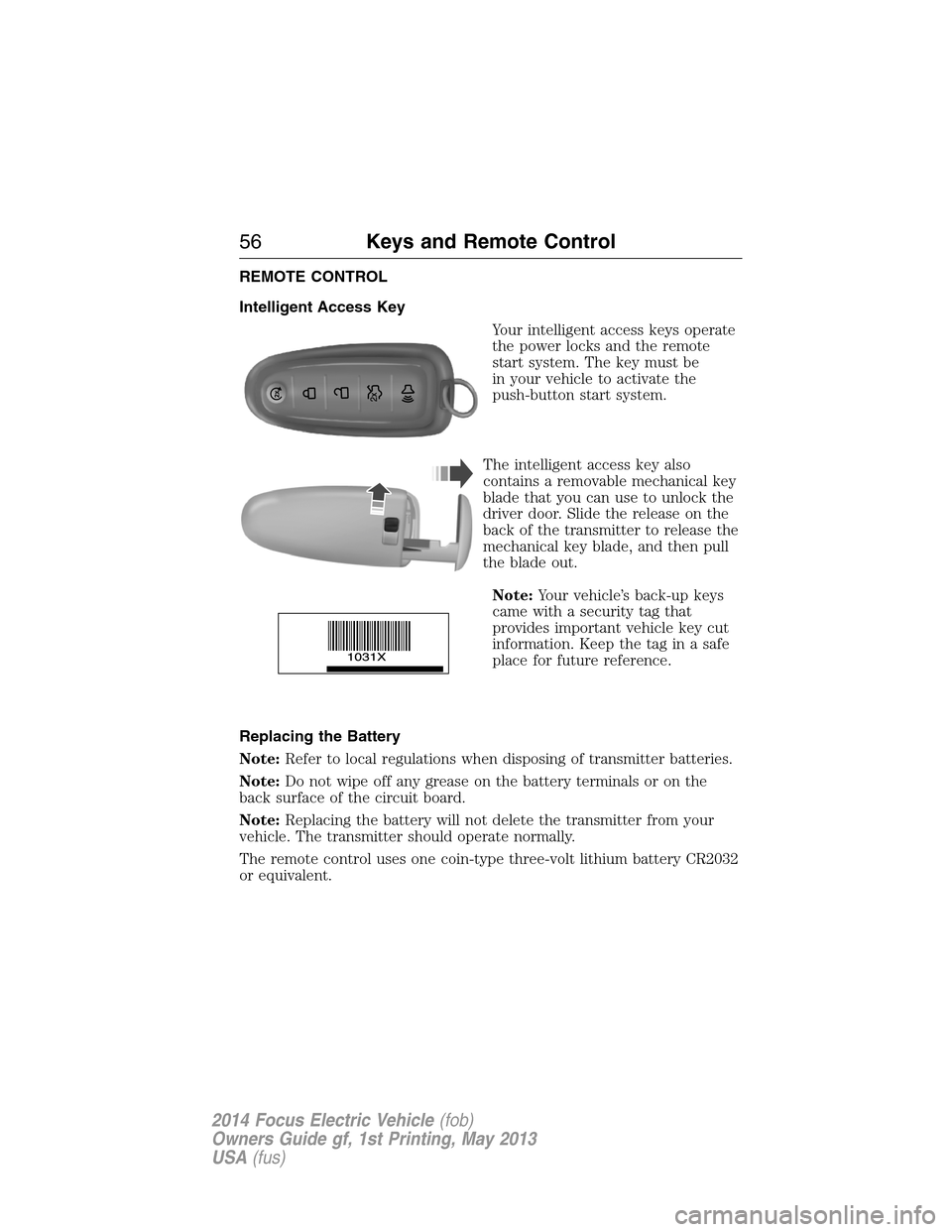
Intelligent Access Key
Your intelligent access keys operate
the power locks and the remote
start system. The key must be
in your vehicle to activate the
push-button start system.
The intelligent access key also
contains a removable mechanical key
blade that you can use to unlock the
driver door. Slide the release on the
back of the transmitter to release the
mechanical key blade, and then pull
the blade out.
Note:Your vehicle’s back-up keys
came with a security tag that
provides important vehicle key cut
information. Keep the tag in a safe
place for future reference.
Replacing the Battery
Note:Refer to local regulations when disposing of transmitter batteries.
Note:Do not wipe off any grease on the battery terminals or on the
back surface of the circuit board.
Note:Replacing the battery will not delete the transmitter from your
vehicle. The transmitter should operate normally.
The remote control uses one coin-type three-volt lithium battery CR2032
or equivalent.
56Keys and Remote Control
2014 Focus Electric Vehicle(fob)
Owners Guide gf, 1st Printing, May 2013
USA(fus)
Page 59 of 403
Remote Start
The remote start button is on the transmitter.
This feature allows you to start your vehicle from outside your vehicle.
The transmitter has an extended operating range.
Vehicles with automatic climate control can be configured to operate
when the vehicle is remote started. Refer to theClimate Control
chapter for more information.
Many states and provinces have restrictions for the use of remote start.
Check your local and state or provincial laws for specific requirements
regarding remote start systems.
The remote start system will not work if:
•the vehicle is on
•the alarm system is triggered
•you disable the feature
•the hood open
•the transmission is not inP
•the vehicle battery voltage is too low
•the powertrain malfunction/reduced power indicator was on the last
time your vehicle was driven.
Remote Starting the Vehicle
Note:You must press each button within three seconds of each other.
Your vehicle will not remote start and the horn will not sound if you do
not follow this sequence.
The label on your transmitter
details the starting procedure.
To remote start your vehicle:
1. Press the lock button to lock all
the doors.
2. Press the remote start button
twice. The exterior lamps flash
twice.
58Keys and Remote Control
2014 Focus Electric Vehicle(fob)
Owners Guide gf, 1st Printing, May 2013
USA(fus)
Page 68 of 403
LOCKING AND UNLOCKING
You can use the power door lock control or the remote control to lock
and unlock your vehicle.
Power Door Locks
The power door lock control is
located on the instrument panel
near the radio.
Press the control to lock or unlock the doors. It will illuminate when you
lock the doors and luggage compartment. When the light is off it indicates
one or more doors are unlocked.
Remote Control
Unlocking the Doors (Two-Stage Unlock)
Press the button to unlock the driver door.
Press the button again within three seconds to unlock all doors.
The turn signals will flash.
Press and hold both the lock and unlock buttons on the remote control
for four seconds to disable or enable two-stage unlocking. Disabling
two-stage unlocking allows all vehicle doors to unlock with one press of
the button. The turn signals will flash twice to indicate a change to the
unlocking mode. The unlocking mode applies to the remote control and
intelligent access.
Intelligent access at the driver door will unlock all doors when you
disable two-stage unlocking.
Locking the Doors
Press the button to lock all the doors. The turn signals will
flash.
Press the button again within three seconds to confirm that all the doors
are closed. The doors will lock again, the horn will sound and the turn
signals will flash if all the doors and the luggage compartment are closed.
Locks67
2014 Focus Electric Vehicle(fob)
Owners Guide gf, 1st Printing, May 2013
USA(fus)
Page 69 of 403
Note:If locking was not successful or any door or the liftgate is open, or
if the hood is open on vehicles with a perimeter alarm or remote start,
the horn will sound twice and the lamps will not flash.
Opening the Luggage Compartment
Press twice to unlatch the luggage compartment lid.
Mechanical Key
Turn the top of the key toward the front of your vehicle once to lock all
doors.
Turn the top of the key toward the rear of your vehicle once to unlock
the driver door only.
Locking the Doors Individually
If the power locks fail to operate, lock the doors individually using the
key in the position shown.
Left-Hand Side
Turn clockwise to lock.
Right-Hand Side
Turn counterclockwise to lock.
Opening a Rear Door from Inside
Pull the interior door release handle twice to unlock and open a rear
door. The first pull unlocks the door and the second pull will unlatch the
door.
Activating Intelligent Access
The intelligent access key must be within 3 feet (1 meter) of your
vehicle.
68Locks
2014 Focus Electric Vehicle(fob)
Owners Guide gf, 1st Printing, May 2013
USA(fus)
Page 70 of 403
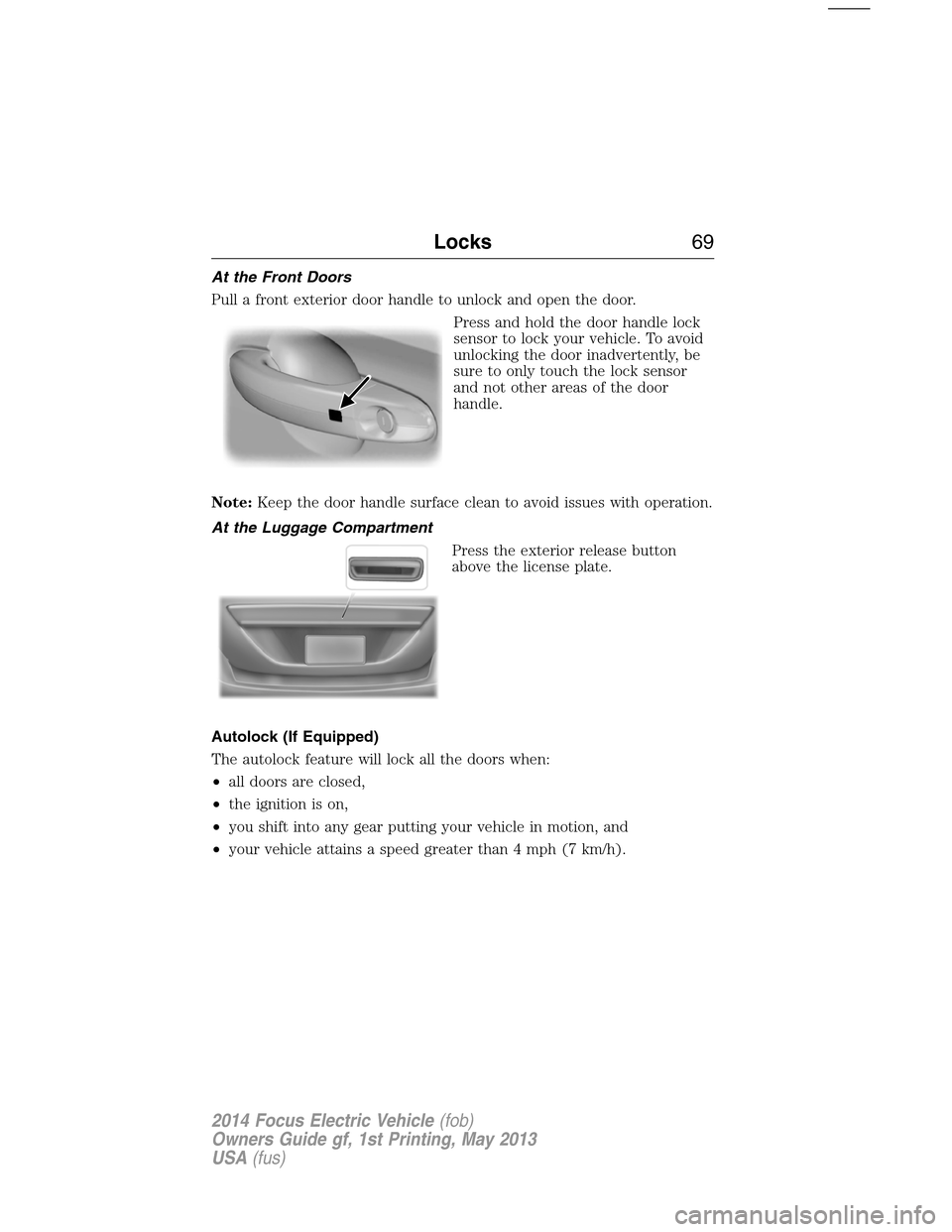
At the Front Doors
Pull a front exterior door handle to unlock and open the door.
Press and hold the door handle lock
sensor to lock your vehicle. To avoid
unlocking the door inadvertently, be
sure to only touch the lock sensor
and not other areas of the door
handle.
Note:Keep the door handle surface clean to avoid issues with operation.
At the Luggage Compartment
Press the exterior release button
above the license plate.
Autolock (If Equipped)
The autolock feature will lock all the doors when:
•all doors are closed,
•the ignition is on,
•you shift into any gear putting your vehicle in motion, and
•your vehicle attains a speed greater than 4 mph (7 km/h).
Locks69
2014 Focus Electric Vehicle(fob)
Owners Guide gf, 1st Printing, May 2013
USA(fus)