Page 245 of 616
2454-5. Using the driving support systems
Auris Touring Sports_EE (OM12G12E)
4
Driving
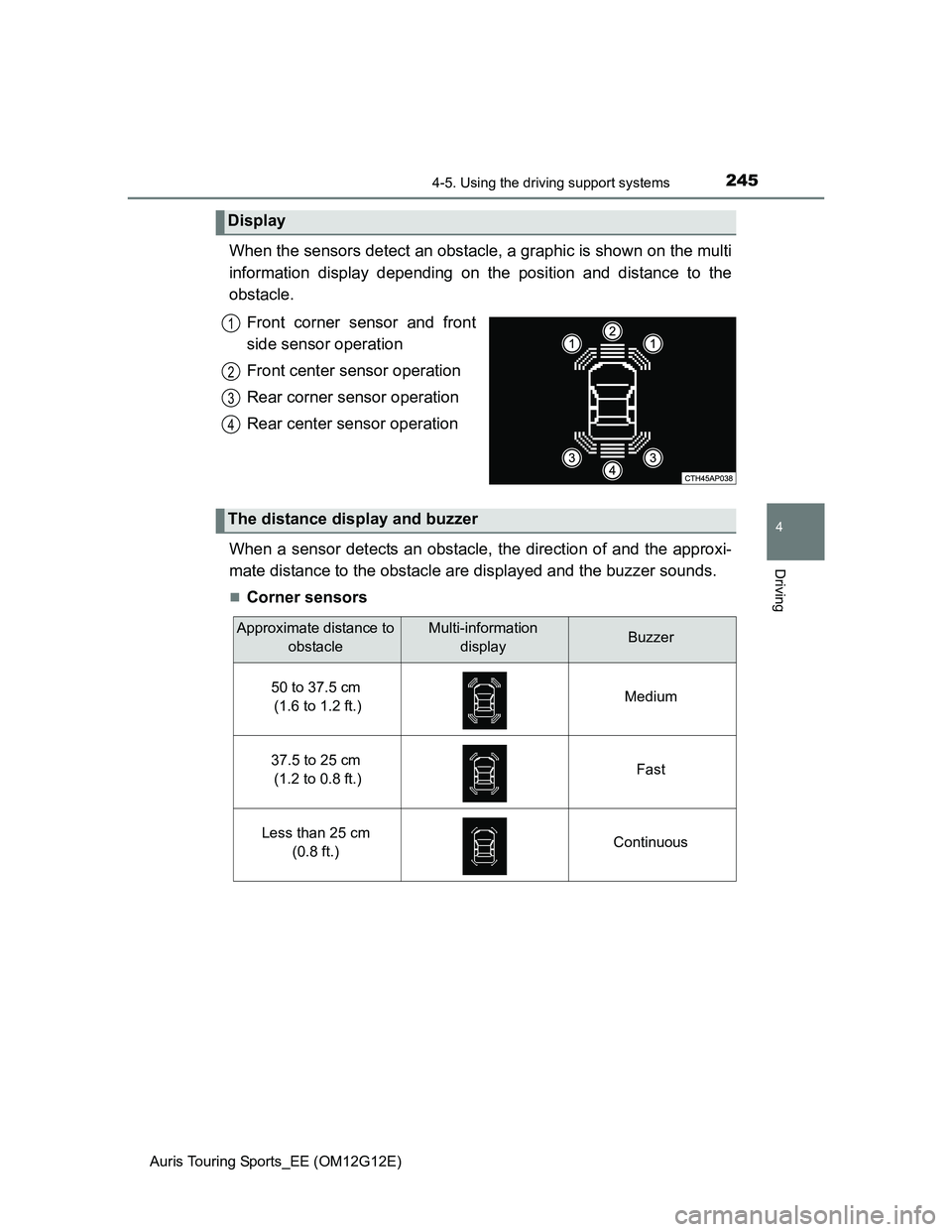
When the sensors detect an obstacle, a graphic is shown on the multi
information display depending on the position and distance to the
obstacle.
Front corner sensor and front
side sensor operation
Front center sensor operation
Rear corner sensor operation
Rear center sensor operation
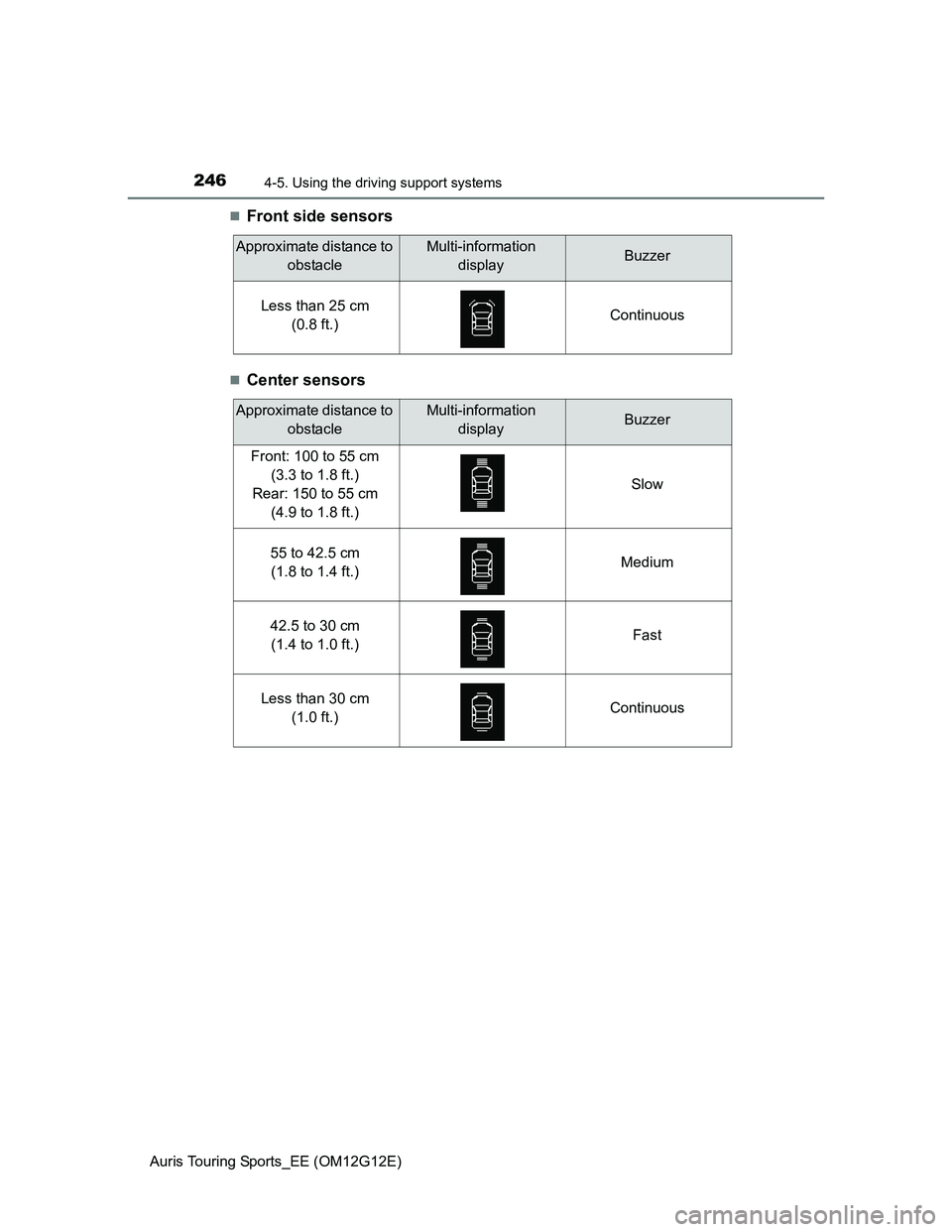
When a sensor detects an obstacle, the direction of and the approxi-
mate distance to the obstacle are displayed and the buzzer sounds.
Corner sensors
Display
1
2
3
4
The distance display and buzzer
Approximate distance to
obstacleMulti-information
displayBuzzer
50 to 37.5 cm
(1.6 to 1.2 ft.)Medium
37.5 to 25 cm
(1.2 to 0.8 ft.)Fast
Less than 25 cm
(0.8 ft.)Continuous
Page 246 of 616
2464-5. Using the driving support systems
Auris Touring Sports_EE (OM12G12E)
Front side sensors
Center sensors
Approximate distance to
obstacleMulti-information
displayBuzzer
Less than 25 cm
(0.8 ft.)Continuous
Approximate distance to
obstacleMulti-information
displayBuzzer
Front: 100 to 55 cm
(3.3 to 1.8 ft.)
Rear: 150 to 55 cm
(4.9 to 1.8 ft.)Slow
55 to 42.5 cm
(1.8 to 1.4 ft.)Medium
42.5 to 30 cm
(1.4 to 1.0 ft.)Fast
Less than 30 cm
(1.0 ft.)Continuous
Page 248 of 616
2484-5. Using the driving support systems
Auris Touring Sports_EE (OM12G12E)
Sensor detection information
Certain vehicle conditions and the surrounding environment may affect the
ability of the sensor to correctly detect obstacles. Particular instances where
this may occur are listed below.
• There is dirt, snow or ice on the sensor.
• A sensor is frozen.
• A sensor is covered in any way.
• The vehicle is leaning considerably to one side.
• On an extremely bumpy road, on an incline, on gravel, or on grass.
• The vicinity of the vehicle is noisy due to vehicle horns, motorcycle
engines, air brakes of large vehicles, or other loud noises producing ultra-
sonic waves.
• There is another vehicle equipped with parking assist sensors in the
vicinity.
• A sensor is coated with a sheet of spray or heavy rain.
• The vehicle is equipped with a fender pole or wireless antenna.
• Towing eyelet is installed.
• A bumper or sensor receives a strong impact.
• The vehicle is approaching a tall or curved curb.
• In harsh sunlight or intense cold weather.
• A non-genuine Toyota suspension (lowered suspension etc.) is installed.
In addition to the examples above, there are instances in which, because of
their shapes, signs and other objects may be judged by the sensor to be
closer than they are.
The shape of the obstacle may prevent the sensor from detecting it. Pay
particular attention to the following obstacles:
• Wires, fences, ropes, etc.
• Cotton, snow and other materials that absorb sound waves
• Sharply-angled objects
• Low obstacles
• Tall obstacles with upper sections projecting outwards in the direction of
your vehicle
If a message is displayed
P. 492
Page 251 of 616
2514-5. Using the driving support systems
Auris Touring Sports_EE (OM12G12E)
4
Driving
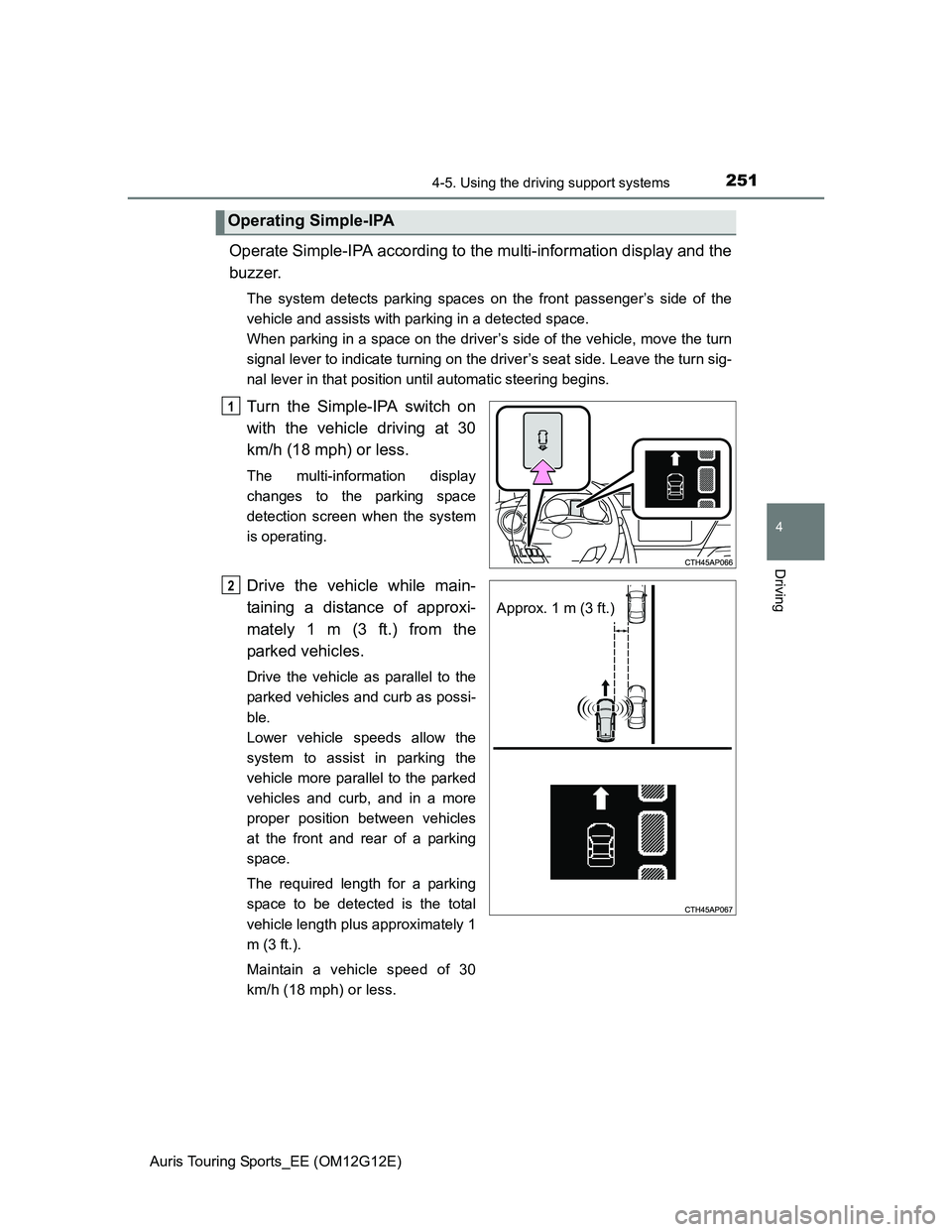
Operate Simple-IPA according to the multi-information display and the
buzzer.
The system detects parking spaces on the front passenger’s side of the
vehicle and assists with parking in a detected space.
When parking in a space on the driver’s side of the vehicle, move the turn
signal lever to indicate turning on the driver’s seat side. Leave the turn sig-
nal lever in that position until automatic steering begins.
Turn the Simple-IPA switch on
with the vehicle driving at 30
km/h (18 mph) or less.
The multi-information display
changes to the parking space
detection screen when the system
is operating.
Drive the vehicle while main-
taining a distance of approxi-
mately 1 m (3 ft.) from the
parked vehicles.
Drive the vehicle as parallel to the
parked vehicles and curb as possi-
ble.
Lower vehicle speeds allow the
system to assist in parking the
vehicle more parallel to the parked
vehicles and curb, and in a more
proper position between vehicles
at the front and rear of a parking
space.
The required length for a parking
space to be detected is the total
vehicle length plus approximately 1
m (3 ft.).
Maintain a vehicle speed of 30
km/h (18 mph) or less.
Operating Simple-IPA
1
Approx. 1 m (3 ft.)
2
Page 252 of 616
2524-5. Using the driving support systems
Auris Touring Sports_EE (OM12G12E)
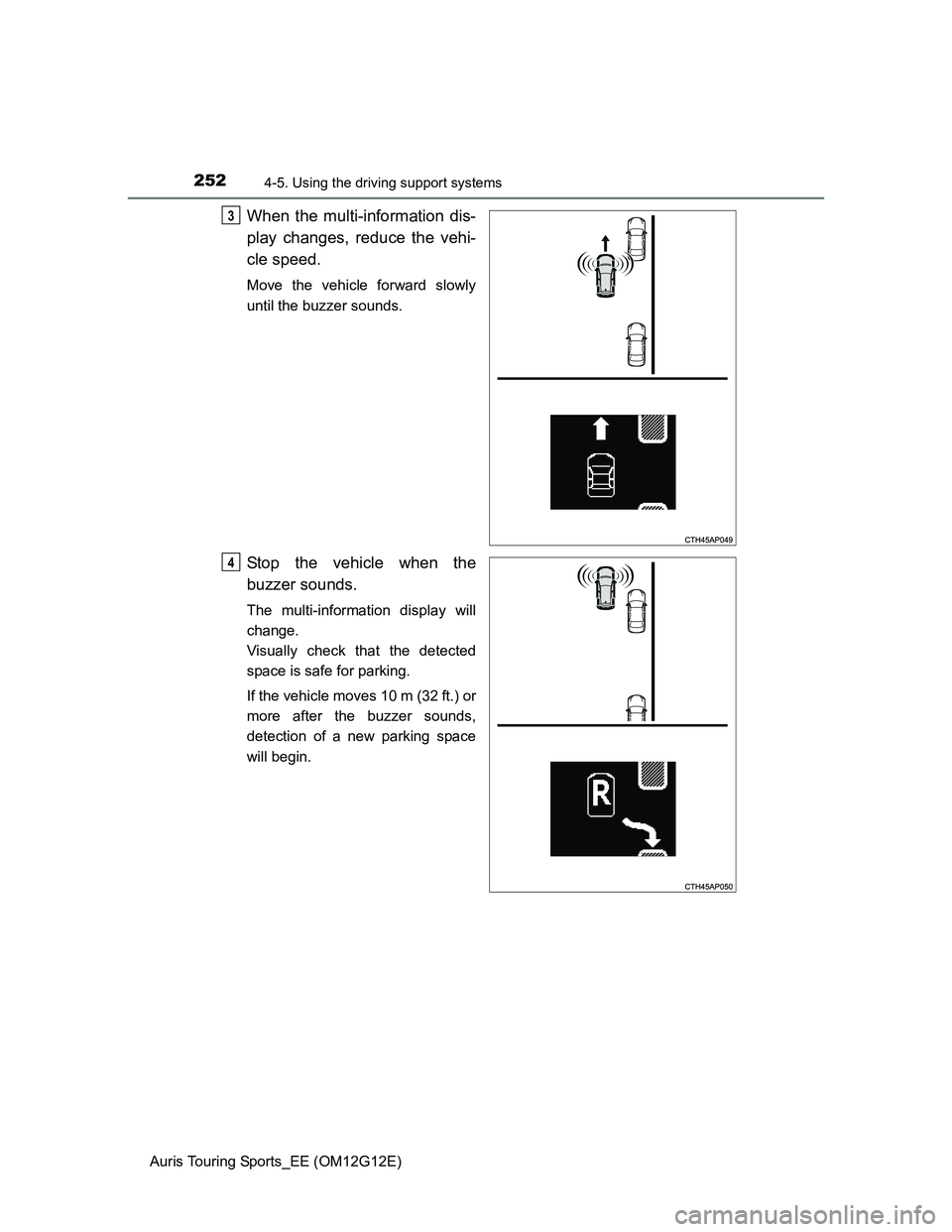
When the multi-information dis-
play changes, reduce the vehi-
cle speed.
Move the vehicle forward slowly
until the buzzer sounds.
Stop the vehicle when the
buzzer sounds.
The multi-information display will
change.
Visually check that the detected
space is safe for parking.
If the vehicle moves 10 m (32 ft.) or
more after the buzzer sounds,
detection of a new parking space
will begin.
3
4
Page 253 of 616
2534-5. Using the driving support systems
Auris Touring Sports_EE (OM12G12E)
4
Driving
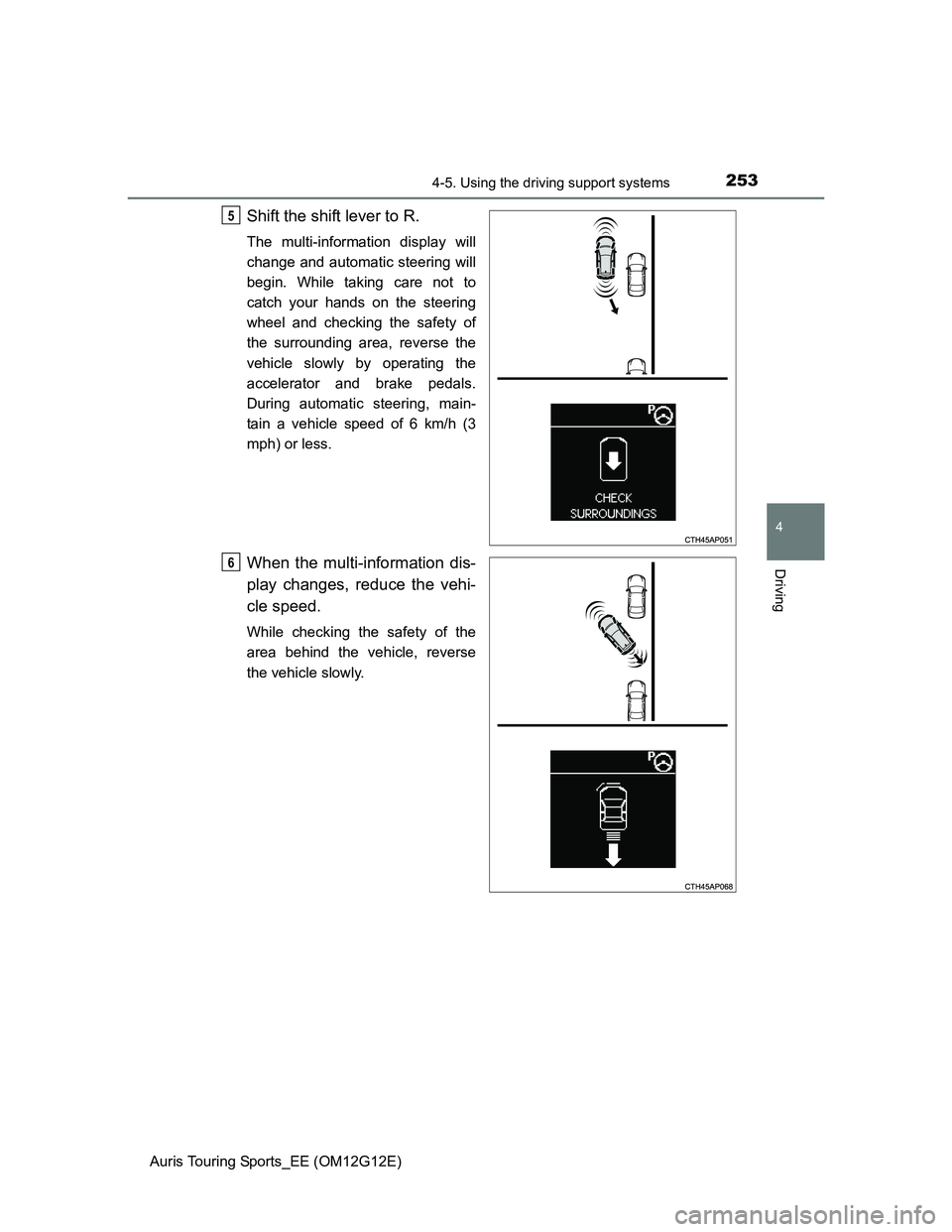
Shift the shift lever to R.
The multi-information display will
change and automatic steering will
begin. While taking care not to
catch your hands on the steering
wheel and checking the safety of
the surrounding area, reverse the
vehicle slowly by operating the
accelerator and brake pedals.
During automatic steering, main-
tain a vehicle speed of 6 km/h (3
mph) or less.
When the multi-information dis-
play changes, reduce the vehi-
cle speed.
While checking the safety of the
area behind the vehicle, reverse
the vehicle slowly.
5
6
Page 254 of 616
2544-5. Using the driving support systems
Auris Touring Sports_EE (OM12G12E)
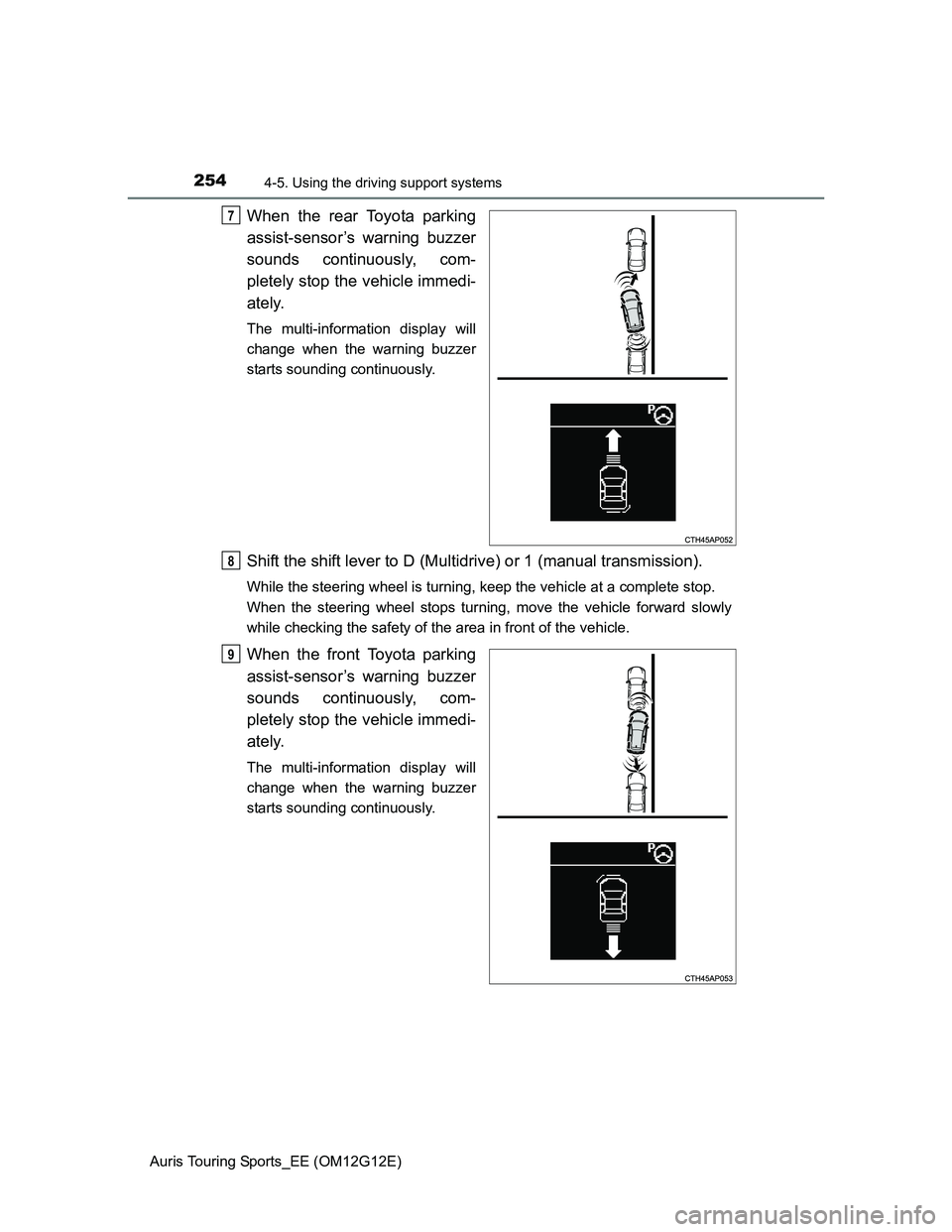
When the rear Toyota parking
assist-sensor’s warning buzzer
sounds continuously, com-
pletely stop the vehicle immedi-
ately.
The multi-information display will
change when the warning buzzer
starts sounding continuously.
Shift the shift lever to D (Multidrive) or 1 (manual transmission).
While the steering wheel is turning, keep the vehicle at a complete stop.
When the steering wheel stops turning, move the vehicle forward slowly
while checking the safety of the area in front of the vehicle.
When the front Toyota parking
assist-sensor’s warning buzzer
sounds continuously, com-
pletely stop the vehicle immedi-
ately.
The multi-information display will
change when the warning buzzer
starts sounding continuously.
7
8
9
Page 255 of 616
2554-5. Using the driving support systems
Auris Touring Sports_EE (OM12G12E)
4
Driving
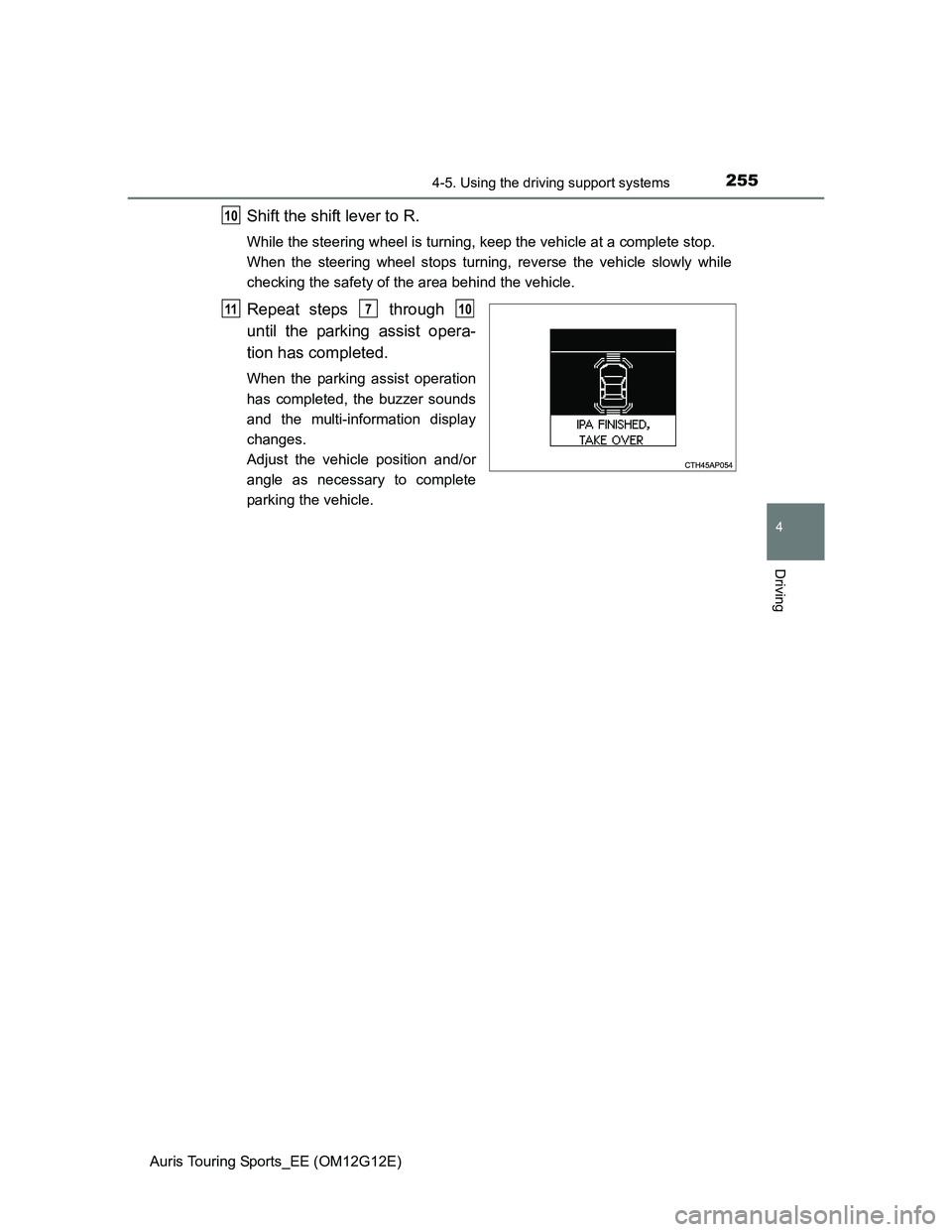
Shift the shift lever to R.
While the steering wheel is turning, keep the vehicle at a complete stop.
When the steering wheel stops turning, reverse the vehicle slowly while
checking the safety of the area behind the vehicle.
Repeat steps through
until the parking assist opera-
tion has completed.
When the parking assist operation
has completed, the buzzer sounds
and the multi-information display
changes.
Adjust the vehicle position and/or
angle as necessary to complete
parking the vehicle.
10
11710