Page 107 of 616
1072. Instrument cluster
Auris Touring Sports_EE (OM12G12E)
2
Instrument cluster
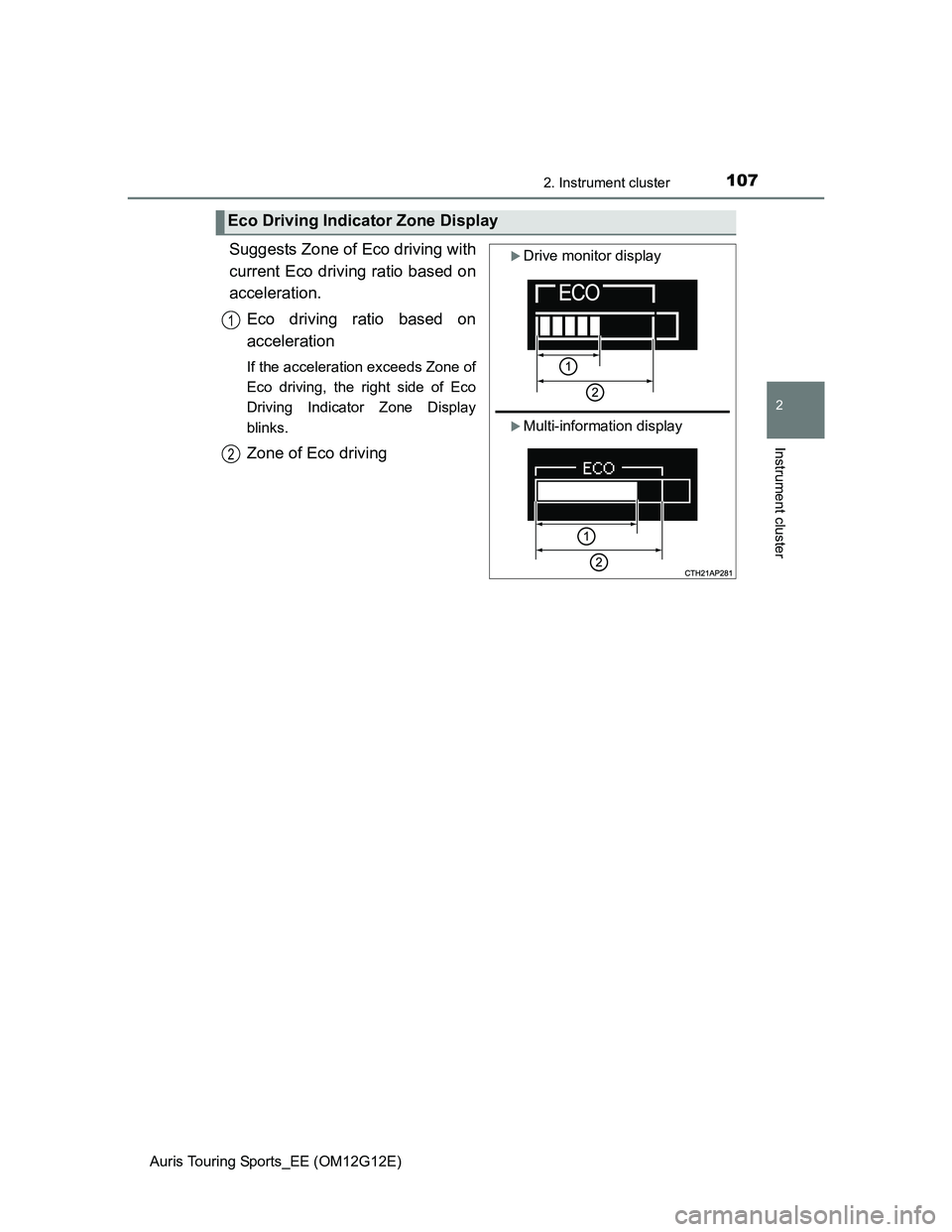
Suggests Zone of Eco driving with
current Eco driving ratio based on
acceleration.
Eco driving ratio based on
acceleration
If the acceleration exceeds Zone of
Eco driving, the right side of Eco
Driving Indicator Zone Display
blinks.
Zone of Eco driving
Eco Driving Indicator Zone Display
Drive monitor display
Multi-information display
1
2
Page 108 of 616
1082. Instrument cluster
Auris Touring Sports_EE (OM12G12E)
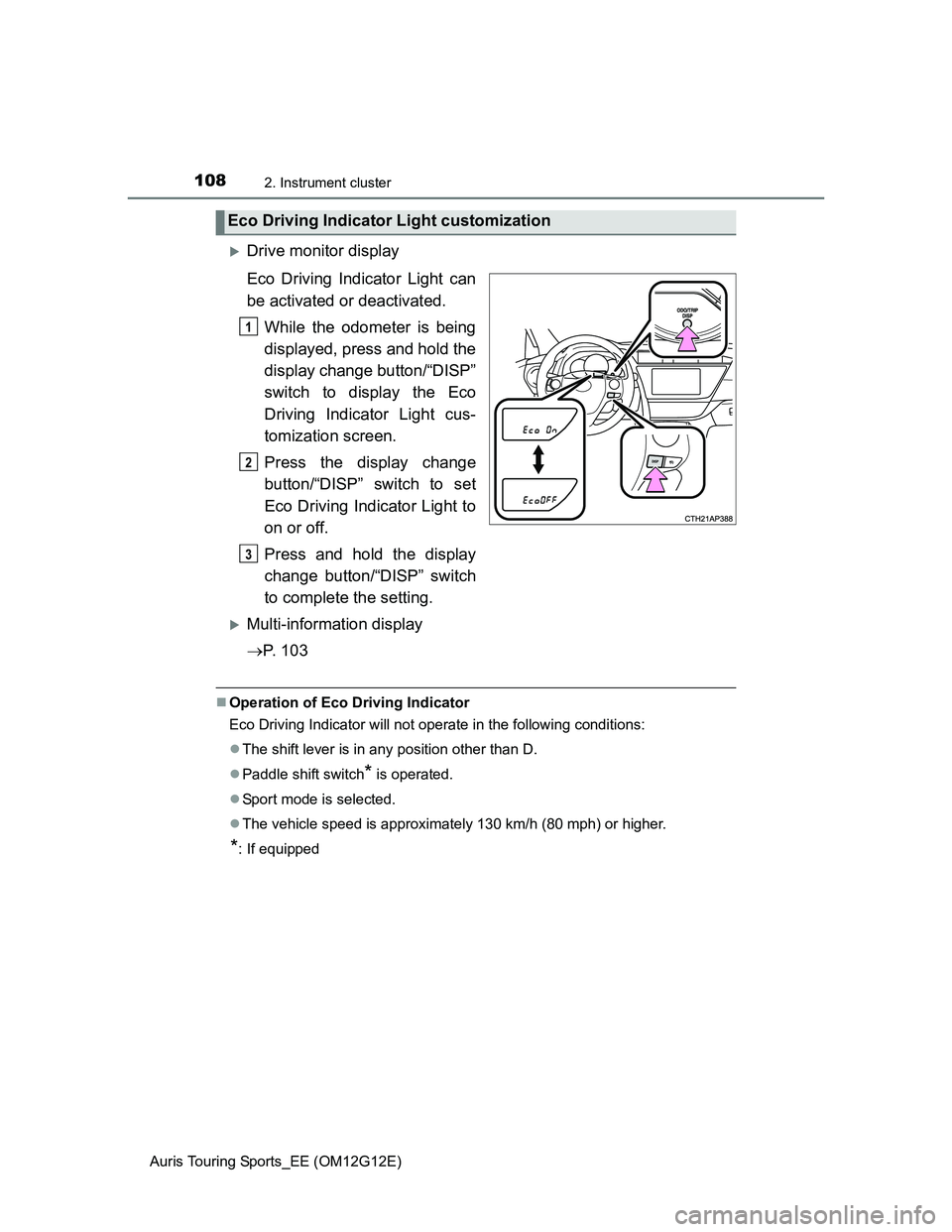
Drive monitor display
Eco Driving Indicator Light can
be activated or deactivated.
While the odometer is being
displayed, press and hold the
display change button/“DISP”
switch to display the Eco
Driving Indicator Light cus-
tomization screen.
Press the display change
button/“DISP” switch to set
Eco Driving Indicator Light to
on or off.
Press and hold the display
change button/“DISP” switch
to complete the setting.
Multi-information display
P. 1 0 3
Operation of Eco Driving Indicator
Eco Driving Indicator will not operate in the following conditions:
The shift lever is in any position other than D.
Paddle shift switch
* is operated.
Sport mode is selected.
The vehicle speed is approximately 130 km/h (80 mph) or higher.
*: If equipped
Eco Driving Indicator Light customization
1
2
3
Page 116 of 616
1163-2. Opening, closing and locking the doors
Auris Touring Sports_EE (OM12G12E)
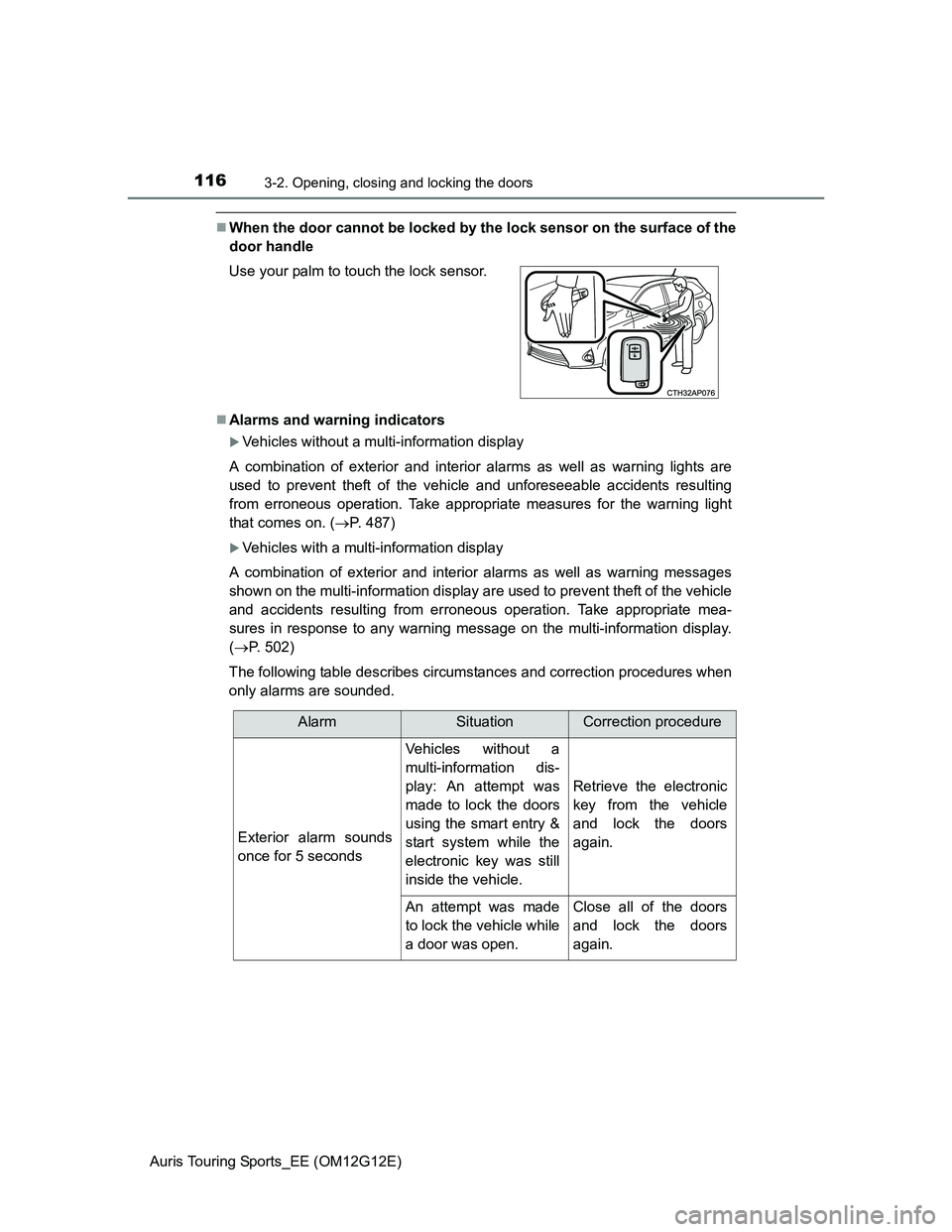
When the door cannot be locked by the lock sensor on the surface of the
door handle
Alarms and warning indicators
Vehicles without a multi-information display
A combination of exterior and interior alarms as well as warning lights are
used to prevent theft of the vehicle and unforeseeable accidents resulting
from erroneous operation. Take appropriate measures for the warning light
that comes on. (P. 487)
Vehicles with a multi-information display
A combination of exterior and interior alarms as well as warning messages
shown on the multi-information display are used to prevent theft of the vehicle
and accidents resulting from erroneous operation. Take appropriate mea-
sures in response to any warning message on the multi-information display.
(P. 502)
The following table describes circumstances and correction procedures when
only alarms are sounded. Use your palm to touch the lock sensor.
AlarmSituationCorrection procedure
Exterior alarm sounds
once for 5 seconds
Vehicles without a
multi-information dis-
play: An attempt was
made to lock the doors
using the smart entry &
start system while the
electronic key was still
inside the vehicle.
Retrieve the electronic
key from the vehicle
and lock the doors
again.
An attempt was made
to lock the vehicle while
a door was open.Close all of the doors
and lock the doors
again.
Page 117 of 616
1173-2. Opening, closing and locking the doors
Auris Touring Sports_EE (OM12G12E)
3
Operation of each component
*1: Vehicles without a multi-information display
*2: Vehicles with a Multidrive
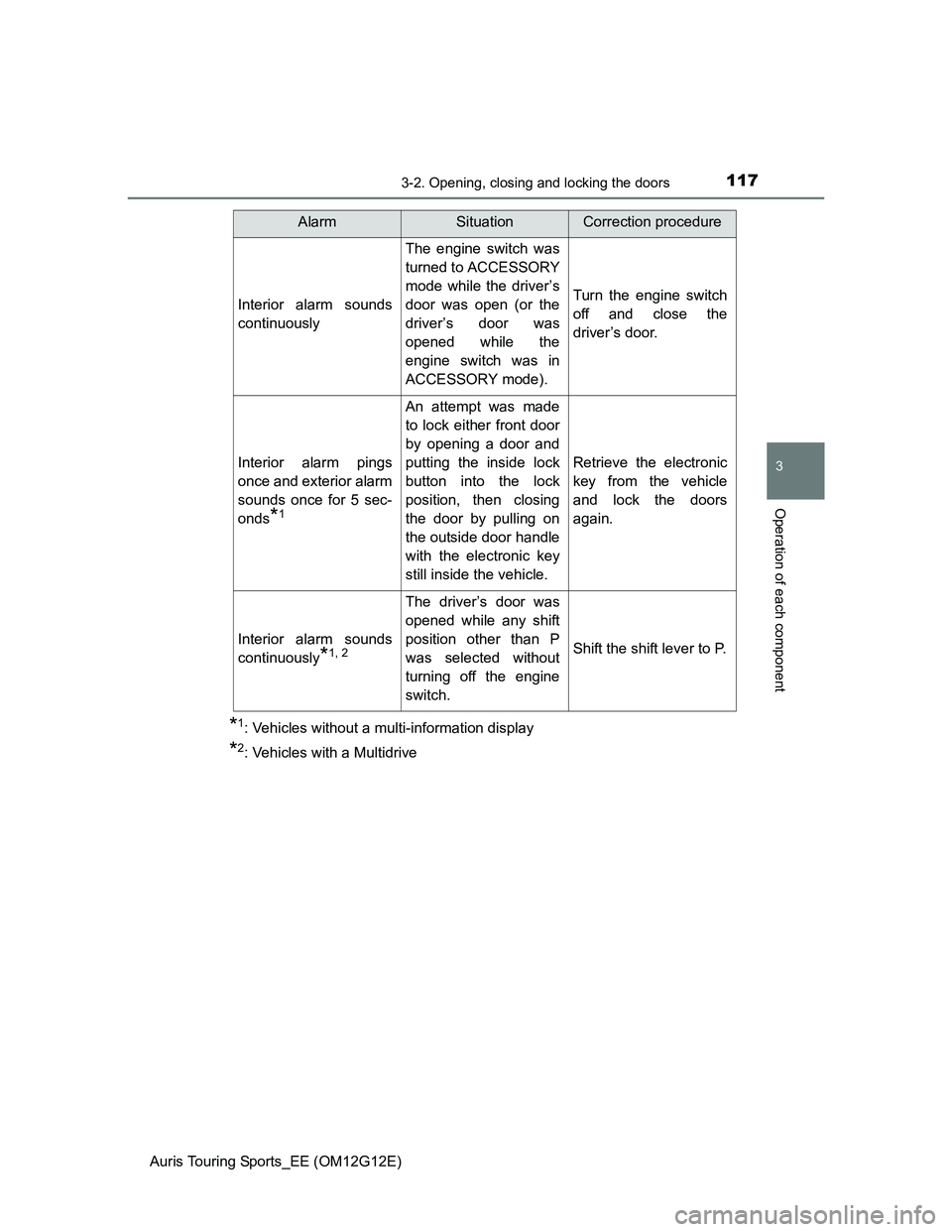
Interior alarm sounds
continuously
The engine switch was
turned to ACCESSORY
mode while the driver’s
door was open (or the
driver’s door was
opened while the
engine switch was in
ACCESSORY mode).
Turn the engine switch
off and close the
driver’s door.
Interior alarm pings
once and exterior alarm
sounds once for 5 sec-
onds
*1
An attempt was made
to lock either front door
by opening a door and
putting the inside lock
button into the lock
position, then closing
the door by pulling on
the outside door handle
with the electronic key
still inside the vehicle.
Retrieve the electronic
key from the vehicle
and lock the doors
again.
Interior alarm sounds
continuously
*1, 2
The driver’s door was
opened while any shift
position other than P
was selected without
turning off the engine
switch.
Shift the shift lever to P.
AlarmSituationCorrection procedure
Page 121 of 616
1213-2. Opening, closing and locking the doors
Auris Touring Sports_EE (OM12G12E)
3
Operation of each component
Note for locking the doors
Touching the door lock sensor while wearing gloves may delay or prevent
lock operation. Remove the gloves and touch the lock sensor again.
When the lock operation is performed using the lock sensor, recognition sig-
nals will be shown up to two consecutive times. After this, no recognition
signals will be given.
If the door handle becomes wet while the electronic key is within the effec-
tive range, the door may lock and unlock repeatedly. In that case, follow the
following correction procedures to wash the vehicle:
• Place the electronic key in a location 2 m (6 ft.) or more away from the
vehicle. (Take care to ensure that the key is not stolen.)
• Set the electronic key to battery-saving mode to disable the smart entry &
start system. (P. 118)
Vehicles without a multi-information display: If the electronic key is inside
the vehicle and a door handle becomes wet during a car wash, a buzzer will
sound outside the vehicle. To turn off the alarm, lock all the doors.
Vehicles with a multi-information display: If the electronic key is inside the
vehicle and a door handle becomes wet during a car wash, a message may
be shown on the multi-information display and a buzzer will sound outside
the vehicle. To turn off the alarm, lock all the doors.
The lock sensor may not work properly if it comes into contact with ice,
snow, mud, etc. Clean the lock sensor and attempt to operate it again.
Fingernails may scrape against the door during operation of the door han-
dle. Be careful not to injure fingernails or damage the surface of the door.
Page 193 of 616
1934-2. Driving procedures
Auris Touring Sports_EE (OM12G12E)
4
Driving
Check that the parking brake is set.
Check that the shift lever is set in P (Multidrive) or N (manual trans-
mission).
Vehicles without a multi-information display
Multidrive: Firmly depress the brake pedal.
Manual transmission: Firmly depress the clutch pedal.
The smart entry & start system indicator light (green) will turn on. If the
indicator light does not turn on, the engine cannot be started.
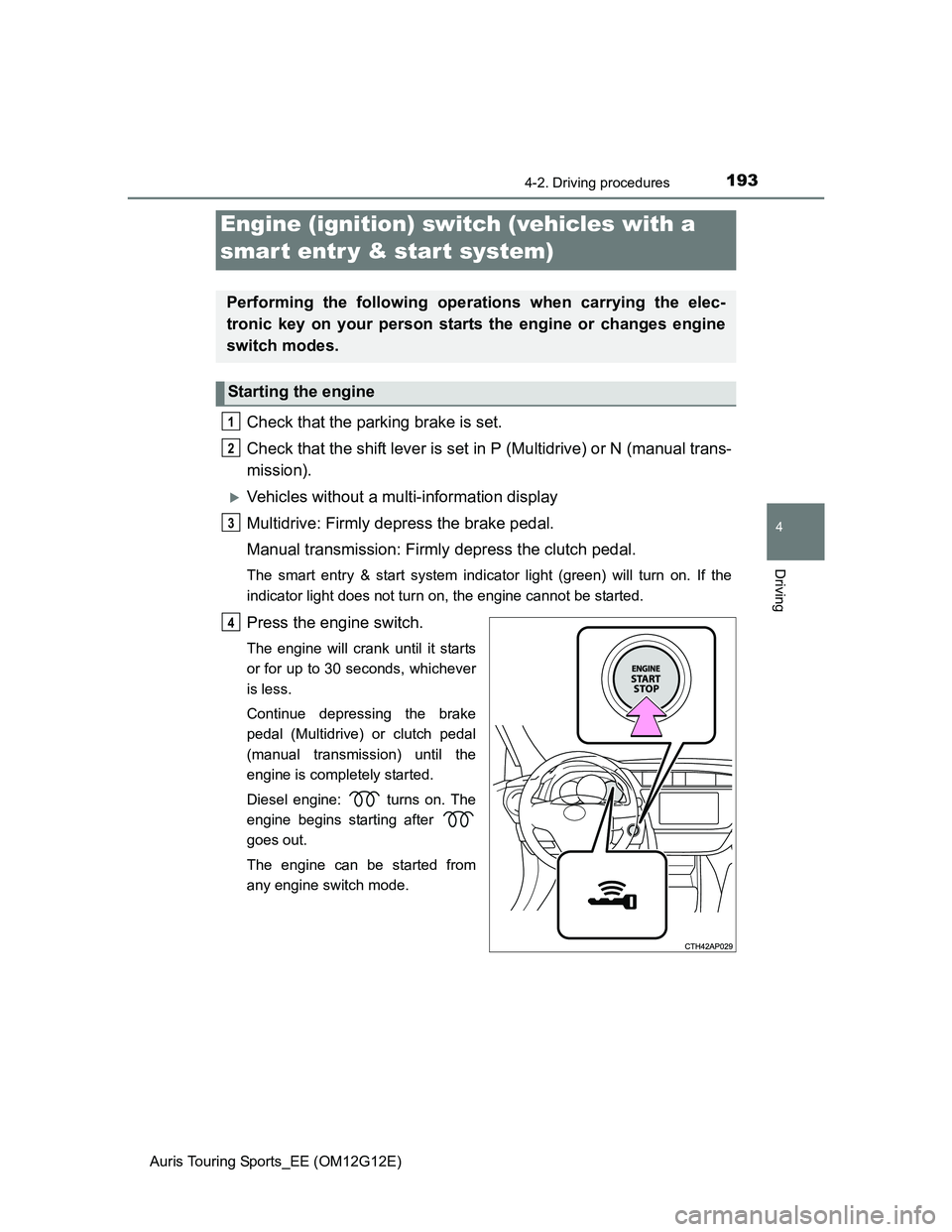
Press the engine switch.
The engine will crank until it starts
or for up to 30 seconds, whichever
is less.
Continue depressing the brake
pedal (Multidrive) or clutch pedal
(manual transmission) until the
engine is completely started.
Diesel engine: turns on. The
engine begins starting after
goes out.
The engine can be started from
any engine switch mode.
Engine (ignition) switch (vehicles with a
smart entr y & start system)
Performing the following operations when carrying the elec-
tronic key on your person starts the engine or changes engine
switch modes.
Starting the engine
1
2
3
4
Page 194 of 616
1944-2. Driving procedures
Auris Touring Sports_EE (OM12G12E)
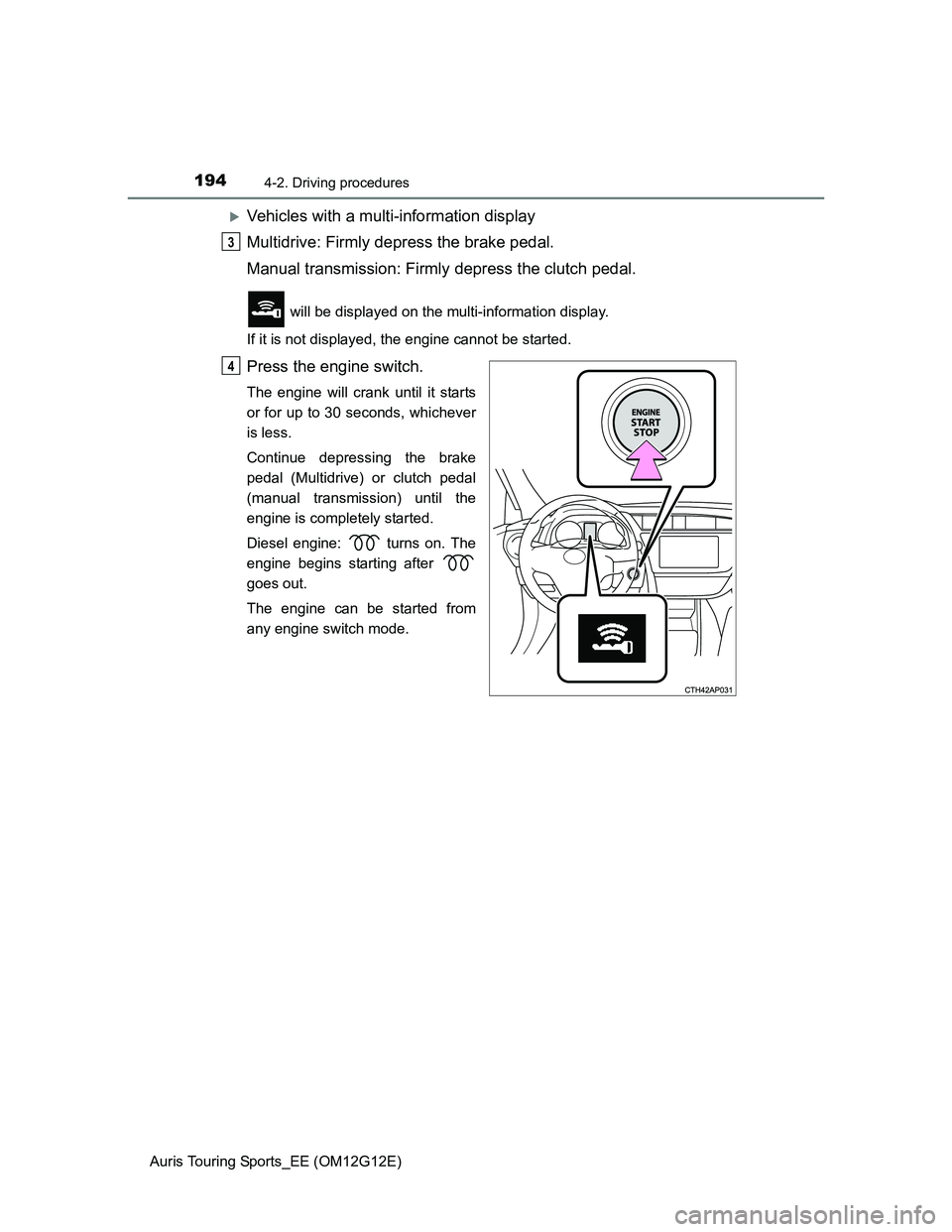
Vehicles with a multi-information display
Multidrive: Firmly depress the brake pedal.
Manual transmission: Firmly depress the clutch pedal.
will be displayed on the multi-information display.
If it is not displayed, the engine cannot be started.
Press the engine switch.
The engine will crank until it starts
or for up to 30 seconds, whichever
is less.
Continue depressing the brake
pedal (Multidrive) or clutch pedal
(manual transmission) until the
engine is completely started.
Diesel engine: turns on. The
engine begins starting after
goes out.
The engine can be started from
any engine switch mode.
3
4
Page 195 of 616
1954-2. Driving procedures
Auris Touring Sports_EE (OM12G12E)
4
Driving
Multidrive: Stop the vehicle.
Manual transmission: While depressing the clutch pedal, stop the
vehicle.
Multidrive: Shift the shift lever to P.
Manual transmission: Shift the shift lever to N.
Set the parking brake. (P. 212)
Press the engine switch.
Vehicles without a multi-information display: Release the brake
pedal (Multidrive) or clutch pedal (manual transmission) and check
that the smart entry & start system indicator light (green) is off.
Vehicles with a multi-information display: Release the brake pedal
(Multidrive) or clutch pedal (manual transmission) and check that
“POWER ON” on the multi-information display is off.
Stopping the engine
1
2
3
4
5