2013 MERCEDES-BENZ SL-CLASS ROADSTER key
[x] Cancel search: keyPage 424 of 572
X
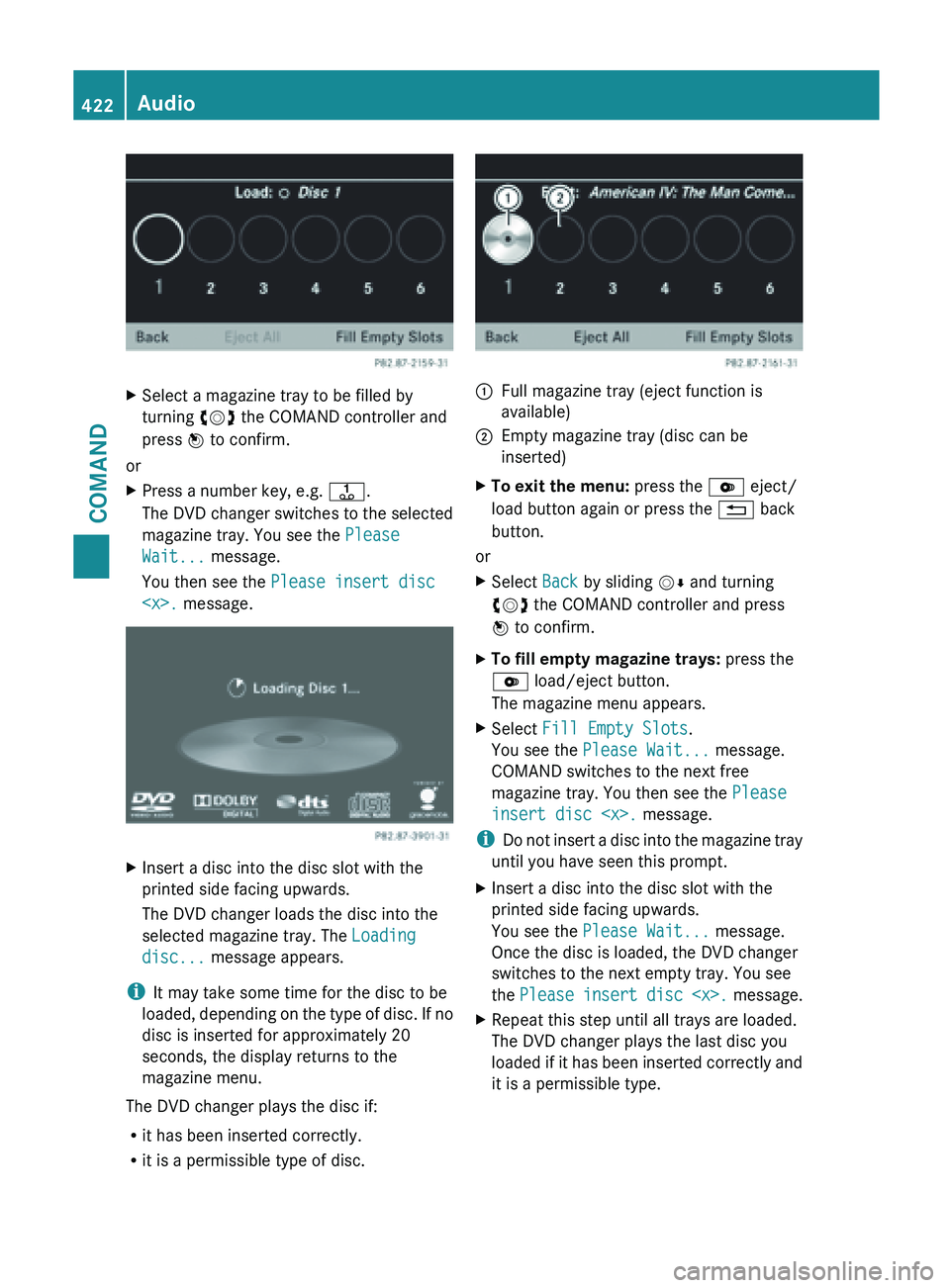
Select a magazine tray to be filled by
turning cVd the COMAND controller and
press W to confirm.
or
X Press a number key, e.g. j.
The DVD
changer switches to the selected
magazine tray. You see the Please
Wait... message.
You then see the Please insert disc
Insert a disc into the disc slot with the
printed side facing upwards.
The DVD changer loads the disc into the
selected magazine tray. The Loading
disc... message appears.
i It may take some time for the disc to be
loaded, depending
on the type of disc. If no
disc is inserted for approximately 20
seconds, the display returns to the
magazine menu.
The DVD changer plays the disc if:
R it has been inserted correctly.
R it is a permissible type of disc. :
Full magazine tray (eject function is
available)
; Empty magazine tray (disc can be
inserted)
X To exit the menu: press the V eject/
load button again or press the % back
button.
or
X Select Back by sliding VÆ and turning
cVd the COMAND controller and press
W to confirm.
X To fill empty magazine trays: press the
V load/eject button.
The magazine menu appears.
X Select Fill Empty Slots.
You see the Please Wait... message.
COMAND switches to the next free
magazine tray. You then see the Please
insert disc
i Do not
insert a disc into the magazine tray
until you have seen this prompt.
X Insert a disc into the disc slot with the
printed side facing upwards.
You see the Please Wait... message.
Once the disc is loaded, the DVD changer
switches to the next empty tray. You see
the Please insert
disc
X Repeat this step until all trays are loaded.
The DVD changer plays the last disc you
loaded if
it has been inserted correctly and
it is a permissible type. 422
Audio
COMAND
Page 425 of 572
X
To cancel loading: press the V eject/
load button again or press the % back
button.
i If you cancel loading with the % back
button, the
system loads and plays the last
CD you inserted.
Ejecting discs from the DVD changer
If you remove one disc while playing another
disc, the DVD changer interrupts playback.
Playback continues once the disc has been
ejected.
X To eject a CD/DVD: press
the V load/
eject button.
The magazine menu appears. The magazine
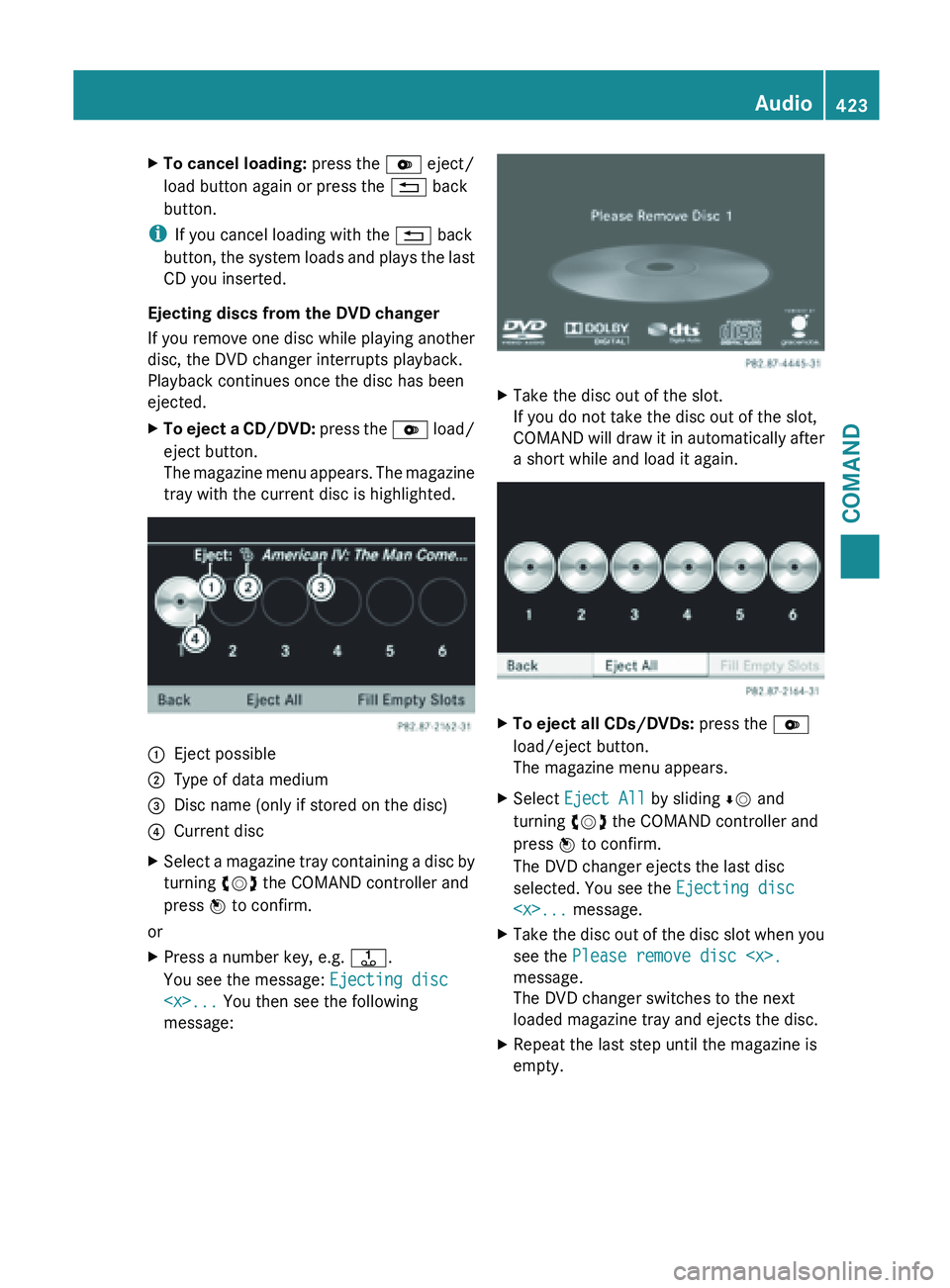
tray with the current disc is highlighted. :
Eject possible
; Type of data medium
= Disc name (only if stored on the disc)
? Current disc
X Select a magazine tray containing a disc by
turning cVd the COMAND controller and
press W to confirm.
or
X Press a number key, e.g. j.
You see the message: Ejecting disc
message: X
Take the disc out of the slot.
If you do not take the disc out of the slot,
COMAND will
draw it in automatically after
a short while and load it again. X
To eject all CDs/DVDs: press the V
load/eject button.
The magazine menu appears.
X Select Eject All by sliding ÆV and
turning cVd the COMAND controller and
press W to confirm.
The DVD changer ejects the last disc
selected. You see the Ejecting disc
X Take the disc out of the disc slot when you
see the Please remove disc
message.
The DVD changer switches to the next
loaded magazine tray and ejects the disc.
X Repeat the last step until the magazine is
empty. Audio
423
COMAND Z
Page 429 of 572
X
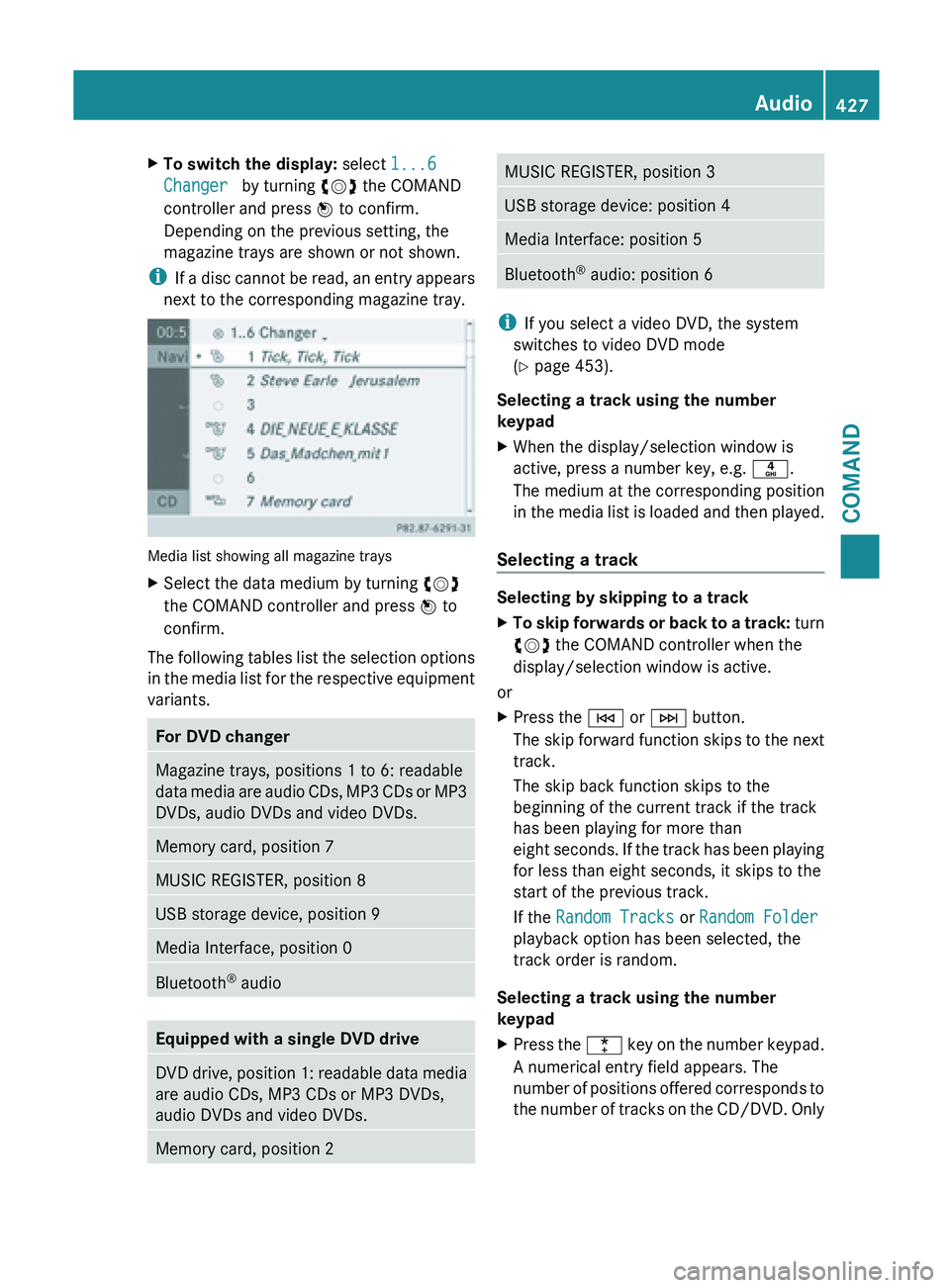
To switch the display: select 1...6
Changer by turning cVd the COMAND
controller and press W to confirm.
Depending on the previous setting, the
magazine trays are shown or not shown.
i If a
disc cannot be read, an entry appears
next to the corresponding magazine tray. Media list showing all magazine trays
X
Select the data medium by turning cVd
the COMAND controller and press W to
confirm.
The following tables list the selection options
in the
media list for the respective equipment
variants. For DVD changer
Magazine trays, positions 1 to 6: readable
data
media
are audio CDs, MP3 CDs or MP3
DVDs, audio DVDs and video DVDs. Memory card, position 7
MUSIC REGISTER, position 8
USB storage device, position 9
Media Interface, position 0
Bluetooth
®
audio Equipped with a single DVD drive
DVD drive, position 1: readable data media
are audio CDs, MP3 CDs or MP3 DVDs,
audio DVDs and video DVDs.
Memory card, position 2 MUSIC REGISTER, position 3
USB storage device: position 4
Media Interface: position 5
Bluetooth
®
audio: position 6 i
If you select a video DVD, the system
switches to video DVD mode
(Y page 453).
Selecting a track using the number
keypad
X When the display/selection window is
active, press a number key, e.g. n.
The medium at the corresponding position
in the
media list is loaded and then played.
Selecting a track Selecting by skipping to a track
X
To skip forwards or back to a track: turn
cVd
the COMAND controller when the
display/selection window is active.
or
X Press the E or F button.
The skip
forward function skips to the next
track.
The skip back function skips to the
beginning of the current track if the track
has been playing for more than
eight seconds. If the track has been playing
for less than eight seconds, it skips to the
start of the previous track.
If the Random Tracks or Random Folder
playback option has been selected, the
track order is random.
Selecting a track using the number
keypad
X Press the ¯ key
on the number keypad.
A numerical entry field appears. The
number of positions offered corresponds to
the number of tracks on the CD/DVD. Only Audio
427
COMAND Z
Page 430 of 572

numbers that correspond to a track
number on the CD/DVD can be entered.
X Enter the desired track number using the
number keys.
The track plays after the last possible
number is entered.
i Pressing and holding a number key for
more than two seconds completes the
entry, and the corresponding track is
played.
Selecting a track using music search X
Select Current Tracklist, Folder or a
category and press W to confirm.
Select music via categories (e.g. album,
artist) with the music search function.
If you select a category, COMAND starts a
search for track information if the following
conditions are fulfilled:
R the data
carriers are inserted or connected
R the track information from these data
carriers is not yet contained in the
COMAND music database
COMAND imports track information from the
following data carriers:
R disc (audio CD/DVD/MP3)
R memory card
R MUSIC REGISTER
R USB storage device
The Track information is complete.
message appears once the search is
completed. COMAND stores the music data
in its own database. You can now select the available music data within the desired
category.
You
will
find further information on searching
for music in the "Music search" section
(Y page 433).
X In audio CD/audio DVD mode/MP3 mode,
select Search by sliding VÆ and turning
cVd the COMAND controller and press
W to confirm.
The category list appears. Example: current track list
X
Select the track by turning cVd the
COMAND controller and press W to
confirm.
The basic display appears and the track is
played.
Fast forwarding/rewinding X
While the display/selection window is
active, slide XVY and hold the COMAND
controller until the desired position has
been reached.
or
X Press and hold the E or F button
until the desired position is reached.
Gracenote Media Database Introduction
This function is only available in audio CD
mode.428
Audio
COMAND
Page 437 of 572
X
Select the desired cover by turning cVd
the COMAND controller and press W to
confirm.
The corresponding album is played.
Selection via keyword search
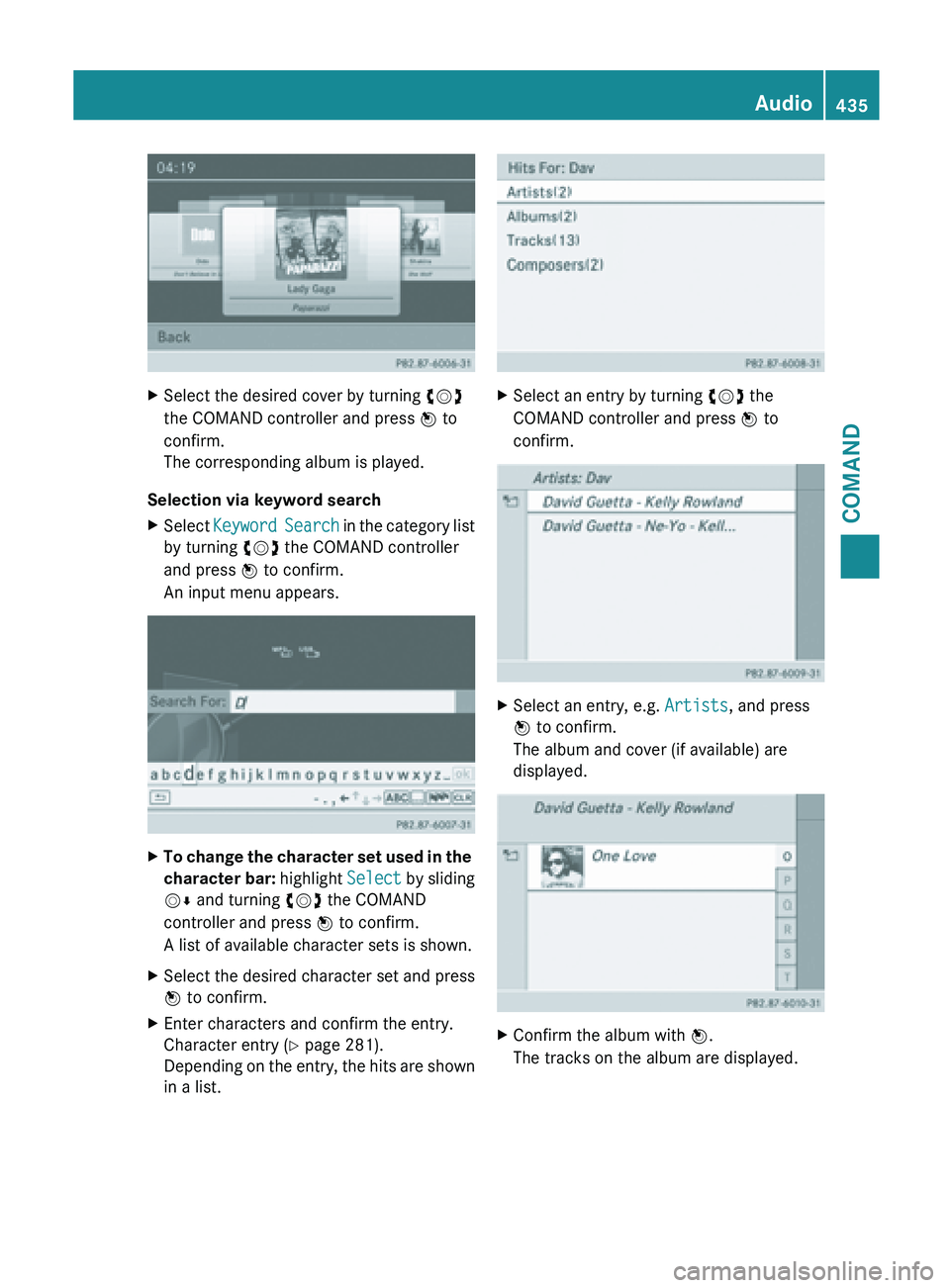
X Select Keyword Search
in the category list
by turning cVd the COMAND controller
and press W to confirm.
An input menu appears. X
To change the character set used in the
character bar: highlight Select
by sliding
VÆ and turning cVd the COMAND
controller and press W to confirm.
A list of available character sets is shown.
X Select the desired character set and press
W to confirm.
X Enter characters and confirm the entry.
Character entry (Y page 281).
Depending on
the entry, the hits are shown
in a list. X
Select an entry by turning cVd the
COMAND controller and press W to
confirm. X
Select an entry, e.g. Artists, and press
W to confirm.
The album and cover (if available) are
displayed. X
Confirm the album with W.
The tracks on the album are displayed. Audio
435
COMAND Z
Page 439 of 572
X
Select Music Register and press W to
confirm.
Option 3
X Press the r number key (for a DVD
changer).
The MUSIC REGISTER is switched on.
Importing music files Introduction
You can copy music files in the following file
formats from the data carrier in the single
DVD drive or in the DVD changer:
R
MP3
R WMA
R AAC (with
file extensions .m4p, .m4a, .m4b
and .aac)
X Switch on audio CD mode ( Y page 424).
X With an audio CD inserted, select REC in
the
basic CD display by sliding VÆ and turning
cVd the COMAND controller and press
W to confirm.
i CD information
such as album name, disk
name, artist and track is provided through
Gracenote Media Database ( Y page 428).
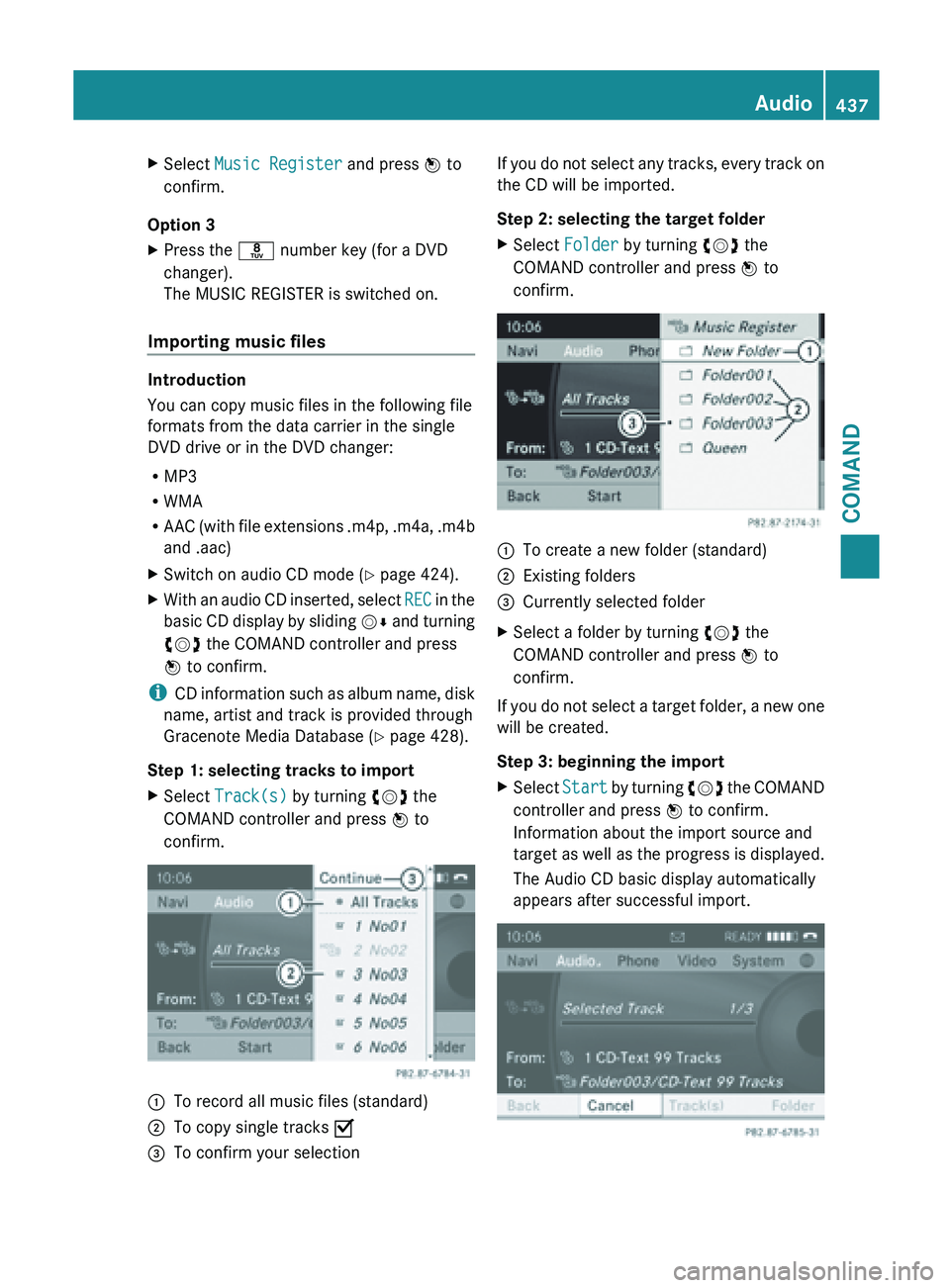
Step 1: selecting tracks to import
X Select Track(s) by turning cVd the
COMAND controller and press W to
confirm. :
To record all music files (standard)
; To copy single tracks O
= To confirm your selection If you do not select any tracks, every track on
the CD will be imported.
Step 2: selecting the target folder
X
Select Folder by turning cVd the
COMAND controller and press W to
confirm. :
To create a new folder (standard)
; Existing folders
= Currently selected folder
X Select a folder by turning cVd the
COMAND controller and press W to
confirm.
If you do not select a target folder, a new one
will be created.
Step 3: beginning the import
X Select Start by
turning cVd the COMAND
controller and press W to confirm.
Information about the import source and
target as well as the progress is displayed.
The Audio CD basic display automatically
appears after successful import. Audio
437
COMAND Z
Page 443 of 572
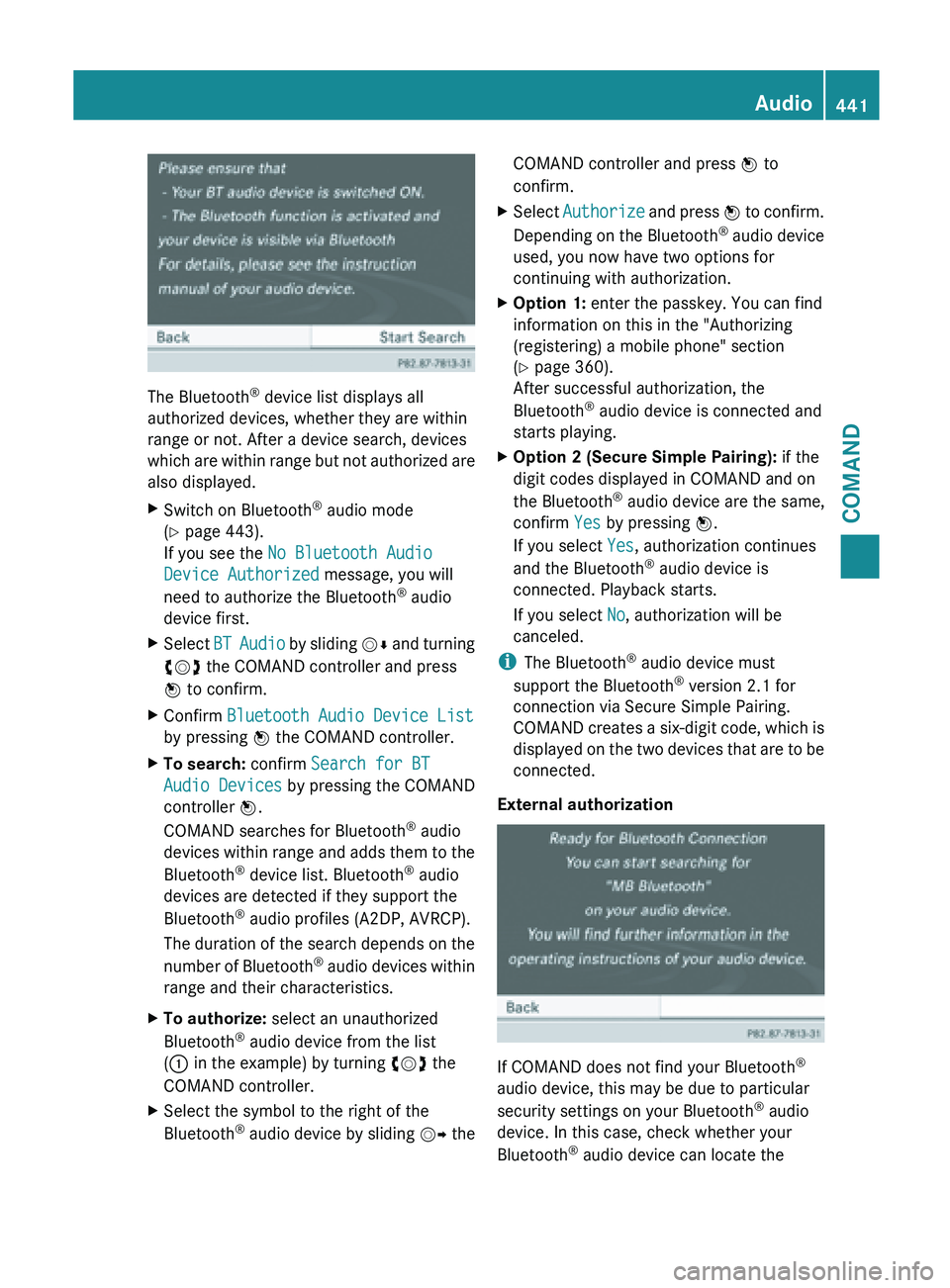
The Bluetooth
®
device list displays all
authorized devices, whether they are within
range or not. After a device search, devices
which are
within range but not authorized are
also displayed.
X Switch on Bluetooth ®
audio mode
(Y page 443).
If you see the No Bluetooth Audio
Device Authorized message, you will
need to authorize the Bluetooth ®
audio
device first.
X Select BT Audio
by sliding VÆ and turning
cVd the COMAND controller and press
W to confirm.
X Confirm Bluetooth Audio Device List
by pressing W the COMAND controller.
X To search: confirm Search for BT
Audio Devices by pressing the COMAND
controller W.
COMAND searches for Bluetooth ®
audio
devices within
range and adds them to the
Bluetooth ®
device list. Bluetooth ®
audio
devices are detected if they support the
Bluetooth ®
audio profiles (A2DP, AVRCP).
The duration of the search depends on the
number of Bluetooth ®
audio devices within
range and their characteristics.
X To authorize: select an unauthorized
Bluetooth ®
audio device from the list
(: in the example) by turning cVd the
COMAND controller.
X Select the symbol to the right of the
Bluetooth ®
audio
device by sliding VY theCOMAND controller and press
W to
confirm.
X Select Authorize and
press W to confirm.
Depending on the Bluetooth ®
audio device
used, you now have two options for
continuing with authorization.
X Option 1: enter the passkey. You can find
information on this in the "Authorizing
(registering) a mobile phone" section
(Y page 360).
After successful authorization, the
Bluetooth ®
audio device is connected and
starts playing.
X Option 2 (Secure Simple Pairing): if the
digit codes displayed in COMAND and on
the Bluetooth ®
audio device are the same,
confirm Yes by pressing W.
If you select Yes, authorization continues
and the Bluetooth ®
audio device is
connected. Playback starts.
If you select No, authorization will be
canceled.
i The Bluetooth ®
audio device must
support the Bluetooth ®
version 2.1 for
connection via Secure Simple Pairing.
COMAND creates
a six-digit code, which is
displayed on the two devices that are to be
connected.
External authorization If COMAND does not find your Bluetooth
®
audio device, this may be due to particular
security settings on your Bluetooth ®
audio
device. In this case, check whether your
Bluetooth ®
audio device can locate the Audio
441
COMAND Z
Page 449 of 572

R
the Media Interface connection is faulty.
R a mass
storage device (e.g. a USB memory
stick or USB hard drive) is connected to the
Media Interface.
In this case the message Please
connect the device to the other
USB port appears.
i The separate USB connection ensures
quick access and expanded media content
options.
i Consult an authorized Mercedes-Benz
Center if you have further questions.
Switching to Media Interface mode General notes
In extreme cases, starting up individual
functions can take up to several minutes –
this depends on the external device and its
content (e.g. video podcasts).
Only
use
the original software to save files on
iPods ®
or MP3 players. Otherwise, some or
all functions may not be available.
Automatic switching Media Interface mode (iPod
®
mode) when
equipped with a DVD changer
: Cover (if available) or representation of
device
; Track number
= Elapsed track time (also in format
00:00:00 for audio books)
? Track name
A Graphic time display B
Track position in playlist
C Album name (if available)
D Artist (if available)
E Music search
F Position in the media list
G Type of data medium
H Playback options
The type of device connected is indicated by
the corresponding symbol for iPod ®
,
iPhone ®
or MP3 player G.
The current playback option is shown with a
symbol behind
album name C (no display for
Normal Track Sequence) ( Y page 450).
X Connect an external device (Y page 446).
COMAND activates the device. The basic
display then appears.
i If the device connected does not contain
any playable
tracks, a message appears to
this effect.
Switching modes using the function
button
The external device is connected to the Media
Interface ( Y page 446).
X Press the h function button repeatedly
until the Media Interface basic menu
appears (Y
page 447).
By pressing the function button repeatedly,
you can change the operating mode in the
following order:
R audio CD/DVD/MP3 (disc)
R memory card mode
R MUSIC REGISTER
R USB storage device
R Media Interface or audio AUX mode
R Bluetooth ®
audio mode
Switching on using a number key
The external
device is connected to the Media
Interface ( Y page 446). Audio
447
COMAND Z