2012 Seat Exeo format
[x] Cancel search: formatPage 82 of 167

Mobile phone system*81
Operating
RADIO, MEDIA (audiovisual
systems)
NAME, TEL
NAV, INFO
CAR, SETUP
Storing a telephone number in the directory– Enter a phone number or
– Select a number from the list of Numbers dialled, Received calls ,
Missed calls or from the Phone book.
– Press the Memory control button.
–Select Store current number. – Select New entry
⇒ page 64 to enter information for a new
contact, or
– Select Find entry ⇒ page 65, or
– Select a name from the list ⇒page 65.
– Complete the entry data ⇒fig. 100.
– Select Store entry . The entry will then be stored in the directory.
A Surname is required to store an entry.
Select the Edit directory function to switch to the "Name" function and edit
the complete directory card for this entry.
Note
Use the button to access and edit your directory data ⇒page 63.
Fig. 99 Telephone: Store
in directoryFig. 100 Telephone:
Store in directory
NAME
media_systemE_EN.book Seite 81 Montag, 21. September 2009 1:48 13
Page 84 of 167
Mobile phone system*83
Operating
RADIO, MEDIA (audiovisual
systems)
NAME, TEL
NAV, INFO
CAR, SETUP
Phone numbers can be stored in different categories in the mobile phone
directory. These categories are displayed as follows:
P Private phone number
W Work phone number
M Mobile phone number
Scroll the left thumbwheel downwards to scroll down the list of stored names
from
A to Z . Scroll the left thumbwheel upwards to scroll up the list of stored
names from Z to A. If you "flick" the left thumbwheel you can jump to the next
letter of the alphabet.
Note
The information shown on the instrument panel display depends on the type
of mobile phone used.
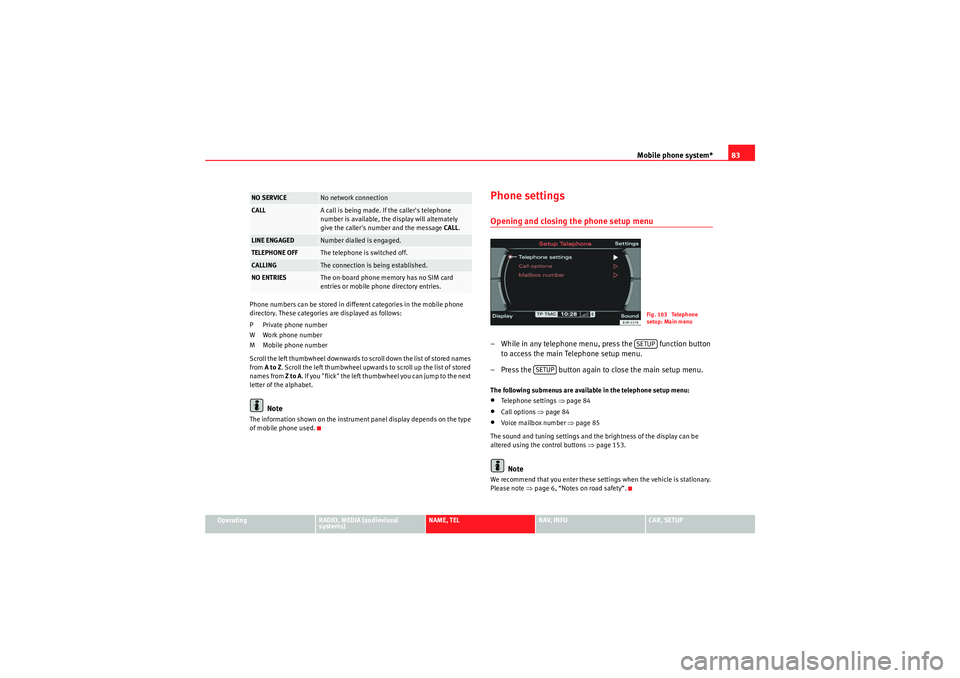
Phone settingsOpening and closing the phone setup menu– While in any telephone menu, press the function button to access the main Telephone setup menu.
– Press the button again to close the main setup menu.The following submenus are available in the telephone setup menu:•Telephone settings ⇒page 84•Call options ⇒page 84•Voice mailbox number ⇒ page 85
The sound and tuning settings and the brightness of the display can be
altered using the control buttons ⇒page 153.Note
We recommend that you enter these settings when the vehicle is stationary.
Please note ⇒ page 6, “Notes on road safety”.
NO SERVICE
No network connection
CALL
A call is being made. If the caller's telephone
number is available, the display will alternately
give the caller's number and the message CALL.
LINE ENGAGED
Number dialled is engaged.
TELEPHONE OFF
The telephone is switched off.
CALLING
The connection is being established.
NO ENTRIES
The on-board phone memory has no SIM card
entries or mobile phone directory entries.
Fig. 103 Telephone
setup: Main menuSETUP
SETUP
media_systemE_EN.book Seite 83 Montag, 21. September 2009 1:48 13
Page 86 of 167
Mobile phone system*85
Operating
RADIO, MEDIA (audiovisual
systems)
NAME, TEL
NAV, INFO
CAR, SETUP
When "Automatic answer" is on, an incoming call is answered automatically.
However, you do have the opportunity to quickly select
Reject if you wish to
reject the call.
Voice mailboxStoring the voice mailbox number
– Press the button in a telephone menu.
–Select Voice mailbox number .
– Press the rotary pushbutton to enter the number using the alpha- numeric keyboard.
–Select OK in the alphanumeric keyboard to store the new mailbox
number.
Editing the voice mailbox number
– Press the button in a telephone menu.
–Select Voice mailbox number .
– Press the control knob to edit the number using the alphanu- meric keypad.
–Select OK in the alphanumeric keyboard to store the new voice
mailbox number.
Deleting the voice mailbox number
– Press the button in a telephone menu.
–Select Voice mailbox number . – Press the control knob. The alph
anumeric keyboard will appear.
– Select DEL in the alphanumeric keyboard.
– Press the control knob until the voice mailbox number has been deleted.
– Select OK in the alphanumeric keyboard to confirm deletion of
the number.
If you have stored your voice mailbox number, you can consult it using the
Memory control button ⇒page 78. You can listen to any voice messages left
in your mailbox.
This function must be selected and se t up beforehand. For more information,
contact your service provider.
Note
•You can also use the alphanumeric keyboard to call your voice mailbox
⇒ page 78.•If you are abroad, do not forget to dial the necessary country codes.
SETUPSETUPSETUP
media_systemE_EN.book Seite 85 Montag, 21. September 2009 1:48 13
Page 98 of 167

Navigation (NAV)*97
Operating
RADIO, MEDIA (audiovisual
systems)
NAME, TEL
NAV, INFO
CAR, SETUP
NAV, INFONavigation (NAV)*General safety precautionsThe driver is completely responsible for traffic safety even
when driving with the navigation system active.Be sure that you always have complete control of your vehicle in all traffic situ-
ations when using navigation system functions.
WARNING
•Today's driving conditions require the full attention of drivers. Please
see ⇒page 6, “Notes on road safety”.•Pay attention to traffic rules when driving. The route calculated by the
navigation system is a recommendation of how best to reach a destination.
If driving instructions run contrary to traffic laws, the traffic laws always
take precedence. Pay attention to traffic lights, no-stopping signs, lane
change restrictions, one-way streets, etc.Caution
The volume of the sound system should be set at a level that enables you to
hear acoustic signals from outside, such as police and fire brigade sirens.
Failure to do so may cause an accident.
IntroductionIntroductionThe SEAT navigation system can help you reach your destination without
spending a lot of time studying maps.
During route guidance you receive information in the navigation system
display ⇒fig. 114 and instrument panel display ⇒page 99, fig. 116
regarding vehicle position, turn-off information (direction and distance to
turn-off), remaining distance to destination and estimated arrival time. Addi-
tionally, you receive spoken navigation information ⇒ page 100.
There are two possibilities for route guidance:•Route without stopover (single destination mode)•Route with stopovers (route plan)
Fig. 114 Navigation:
Example of a map on the
navigation system displa
y
media_systemE_EN.book Seite 97 Montag, 21. September 2009 1:48 13
Page 99 of 167

Navigation (NAV)*
98Route without stopover (single destination mode)
In the single destination mode you can drive directly to a destination
⇒ page 104.
If you enter a direct destination and start route guidance, you are given the
option of up to three different routes ⇒page 113.
Route with stopovers (route plan)
In this mode, you can choose to three stopovers and one final destination
( ⇒ page 120).
For example, when travelling you can save time by finding the nearest filling
station in unfamiliar towns. You can also make a stopover to eat in a restau-
rant or visit a tourist attraction ⇒page 106.
Note
You do not receive any information about the meaning of road signs!How does the navigation system work?
The navigation system works with the help of satellites (GPS).The current vehicle position is determined with the aid of distance sensors,
manoeuvre sensors and satellite signals. GPS satellites send the necessary
signals required by the system (GPS stands for “Global Positioning System”).
The information is transmitted to the navigation system and compared with
the information stored in the navigation DVD map database. This way, the
route guidance can be accurately calculated.
Before the system can function, a navigation DVD must be inserted in the
navigation drive. The navigation drive is located behind the system display
⇒page 22, fig. 24 . When the navigation DVD is inserted, the system starts automatically and
navigation destinations can be entered
⇒page 104.
Six different languages (German, Spanish, French, English, Italian and Portu-
guese) are available on the navigation DVD for the audible navigation
prompts. You can change the language for the voice guidance cues via the
option Menu language ⇒ page 154 in the Setup menu.
Note
•Snow or other obstructions on the GPS aerial or interference caused by
trees or large buildings could affect the reception of the satellite signals and
make positioning difficult. GPS reception and vehicle positioning can also be
adversely affected by deactivation or a malfunction of several satellites.•GPS positioning is uni-directional, i.e. the navigation system receives
data for positioning the vehicle, but does not transmit any data.Navigation DVDs
The data relating to the starting point and the destination can
be saved separately in the two navigation DVDs.If this is the case, proceed as follows:
– First put the DVD covering the country of your destination into the navigation drive ⇒page 23.
– Enter your destination ⇒page 104.
– Then put in the DVD for the country where your starting point is located ⇒page 23.
–Start the route guidance ⇒page 112. The navigation system will
calculate the route.
media_systemE_EN.book Seite 98 Montag, 21. September 2009 1:48 13
Page 100 of 167

Navigation (NAV)*99
Operating
RADIO, MEDIA (audiovisual
systems)
NAME, TEL
NAV, INFO
CAR, SETUP
– Wait until you reach one of the countries that is covered by both
DVDs. These countries serve as an overlap zone where you can
change the DVDs.
– Without stopping the route guidance, put the DVD for the country of your destination into the navigation drive once again
⇒page 23. Route guidance will be continued automatically.When navigating with two different DVDs, please note the following:•The destination flag will be displayed to indicate the direct line between
your starting point and your destination.•The system does not process the detailed navigation information on the
DVD which is not being used.•Some countries are covered by both DVDs. We recommend that you
change over the DVDs in good time before leaving this overlap zone.Note
•The packaging of the navigation DVD will indicate which countries are
covered by the DVD.•The traffic infrastructure is subject to changes. Therefore, the information
stored on the navigation DVD may not always correspond exactly to the roads
and other features that you encounter.•You can obtain navigation DVDs from your dealer. Your dealer will also be
able to provide information on updates which are available for the CDs.
Navigation route guidanceRoute guidance assistance is given with both visual and spoken cues:•with voice messages ⇒page 100•through the screen in the navigation system display ⇒fig. 115
( ⇒ page 101)•through the instrument panel display ⇒fig. 116 (⇒ page 101)
Fig. 115 Navigation:
Example of screen in the
navigation system displa
y
Fig. 116 Navigation:
Example of a display in
the instrument panel
media_systemE_EN.book Seite 99 Montag, 21. September 2009 1:48 13
Page 101 of 167

Navigation (NAV)*
100
Note•If you do not follow the calculated route or if you leave the route, the
system will automatically calculate a new route plan based on your current
location.•You can also start a route guidance in demo mode ⇒page 139 for simu-
lation purposes.Navigation system voice guidanceRoute calculation is announced with a voice message. During this time, “The
route is being calculated” is shown on the navigation system display and
“CALC” is shown on the instrument panel display.
When route calculation is complete, guidance is given by spoken driving
instructions and symbols. Driving recommendations are always made with
eno ugh time to make a turn. An announcement is made in different stages in
preparation for a change of direction.
You can use the following options to repeat the last navigation voice
message:•Press the Nav-Info control button ⇒page 130 if you are not in the Nav-
Info submenu or•Press the right thumbwheel on the multi-function steering wheel*
⇒ page 12.
You can change the language for the voice messages if desired ⇒ page 154.Caution
If driving instructions run contrary to traffic laws, the traffic laws always take
precedence.
Note
•You can adjust the volume of the voice guidance prompts as they are
being announced using the on/off button ⇒page 9 on the navigation control
console or the right thumbwheel on the multi-function steering wheel*
⇒ page 12.•If the vehicle is in a location which cannot be read by the navigation
system (car park, garage), a voice message will inform you.Dynamic navigation
The dynamic navigation function calculates routes based on
the currently available TMC traffic messages.These TMC traffic messages are sent by TMC (Traffic Message Channel) radio
stations in addition to regular programming and are received and processed
by the navigation system. The reception of TMC traffic messages is free of
charge in Germany.
If the dynamic navigation function ⇒page 121 is activated, the system
constantly checks if relevant TMC messages are available for the set route. If
the navigation system then determines that a TMC traffic message is relevant
for the current route, the system will automatically calculate a new route plan
to the destination.
Note
•The quality of the dynamic navigation function depends largely on the
quality of the TMC traffic messages. Please note that the TMC messages sent
by the radio stations may not always be complete and correct.•For more information regarding TMC traffic messages, please refer to
⇒ page 141.
media_systemE_EN.book Seite 100 Montag, 21. September 2009 1:48 13
Page 102 of 167

Navigation (NAV)*101
Operating
RADIO, MEDIA (audiovisual
systems)
NAME, TEL
NAV, INFO
CAR, SETUP
Representation of maps on the navigation system display
A comprehensive route will be shown graphically on a map on
the display.– Press the Map control button ⇒page 123 from the navigation
menu. The route will be displayed on a map ⇒fig. 117 .In addition to the route guidance, you can also display detailed information
about your route on the map. Settings can be entered directly on the map
⇒page 124 and in Navigation Setup ⇒page 131 to display the map.
If you are navigating without stopovers, you can select from up to three routes
⇒ page 113. Detailed route information is also available.
If you are navigating with stopovers, you are shown the entire route with all
stopovers and detailed route information in an overview ⇒page 114.
You can also use the map as presented in the navigation system display to
enter a destination ⇒ page 111.
Route guidance on the instrument panel display*After you have entered a route and begun navigating, guidance to your desti-
nation will also be shown on the instrument panel display
(⇒ fig. 118/ ⇒fig. 119 ).
Fig. 117 Navigation:
Example of a map on the
navigation system display
Fig. 118 Instrument
panel display: Example of
route guidanceFig. 119 Instrument
panel display: Example of
route guidance (turn-off)
media_systemE_EN.book Seite 101 Montag, 21. September 2009 1:48 13