2012 RENAULT LAGUNA COUPE light
[x] Cancel search: lightPage 84 of 221

starting the engine ................................ (up to the end of the DU)
engine standby ..................................... (up to the end of the DU)
Stop & Start function .............................(up to the end of the DU)
Stop & Start .......................................... (up to the end of the DU)
2.6
ENG_UD28949_4
Fonction Stop and Start (X91 - B91 - K91 - D91 - Renault)
ENG_NU_939-3_D91_Renault_2
Jaune NoirNoir texte
stop and start function
StoP aND StaRt function (1/3)
The message “Auto Stop” on the instru-
ment panel indicates that the engine is
on standby.
The vehicle equipment remain opera -
tional while the engine is stopped.
The engine will restart as soon as you
press the clutch pedal and move into
gear.This system enables a reduced fuel
consumption and lower greenhouse
gas emissions.
The system is activated automatically
when the vehicle is started.
While driving, the system stops the
engine (standby) when the vehicle is
at a standstill (traffic jam, traffic lights,
etc).
System operating conditionsEngine standby is activated if:
– the vehicle has been driven since its
last stop;
– the gearbox is in neutral;
– the clutch pedal is released;
and
– the vehicle is travelling at less than 3
km/h. Special feature of the automatic
engine re-start
Under certain conditions, the engine
can restart on its own in order to guar-
antee your safety and comfort.
This can occur especially when:
–
the outdoor temperature is too low or
too high (less than around 0 °C or
higher than around 30 °C);
– the “Clear View” function is activated
(please see “Automatic Climate
Control” in Section 3);
– the battery is not sufficiently charged;
– the vehicle speed is above 7 km/h
(downhill slope, etc.);
– repeated pressing on the brake
pedal or braking system require -
ment;
– ...
Special feature of vehi -
cles equipped with an
electronic parking brake
If the engine is put on
standby (the message “ Auto Stop”
is displayed on the instrument
panel), the electronic parking brake
is not applied automatically.
Engine on standby - braking
assistance is no longer op-
erational.
Before getting out of the
vehicle, you must switch
off the ignition by pressing
the engine stop (please see
“Starting, stopping the engine”).
Do not drive off when the
engine is on standby (the
message “Auto Stop” is dis-
played on the instrument
panel).
Page 85 of 221

JauneNoirNoir texte
2.7
ENG_UD28949_4
Fonction Stop and Start (X91 - B91 - K91 - D91 - Renault)
ENG_NU_939-3_D91_Renault_2
StoP aND StaRt function (2/3)
Special cases
– While the system is operating, and
the engine is stopped (traffic jam,
traffic lights, etc.), if the driver gets
out of their seat or unfastens their
seat belt and opens the driver ’s
door, the ignition will be switched off
and, depending on the vehicle, the
electronic parking brake will be ac -
tivated automatically. To restart and
reactivate the Stop and Start system,
press the start button (please see
“Starting, stopping the engine”).
– In the event of the engine stalling,
if the system is operational, press
down the clutch pedal as far as it will
go to restart.
Deactivate the Stop and
Start function for any opera -
tion performed in the engine
compartment.
Conditions preventing the
standby of the engine
Certain conditions prevent the system
from using the engine standby function,
including when:
– reverse gear is engaged;
– the bonnet is not locked;
– the driver’s door is not closed;
– the driver’s seatbelt is not fastened;
– the outdoor temperature is too low or
too high (less than around 0 °C or
higher than around 30 °C);
– the battery is not sufficiently charged;
– the difference between the vehicle
interior temperature and the auto -
matic climate control instruction is
too high; –
the “Clear View” function is activated
(please see “Automatic Climate
Control” in Section 3);
– the engine coolant temperature is
too low;
– automatic particle filter cleaning is
underway;
or
– ...
To fill up with fuel, the engine must
be stopped (and not on standby):
always stop the engine by pressing
the engine stop button (please see
“Starting, stopping the engine)”.
Page 86 of 221

2.8
ENG_UD28949_4
Fonction Stop and Start (X91 - B91 - K91 - D91 - Renault)
ENG_NU_939-3_D91_Renault_2
operating faults
When the message “ Check Stop &
Start” appears on the instrument panel
and the integrated warning light 2 lights
up on the switch 1, the system is deac-
tivated.
Please consult an authorised dealer.
Deactivating, activating the
function
Press 1 to deactivate the function. The
message “Stop & Start deactivated ” will
appear on the instrument panel and the
integrated warning light 2 on the switch
will light up.
Pressing again will reactivate the
system. The message “Stop & Start ac-
tivated ” will appear on the instrument
panel and the integrated warning light 2
on switch 1 will go out.
StoP aND StaRt function (3/3)
The system is automatically reactivated
each time the vehicle is started using
the start button (please see “Starting,
stopping the engine)”.
Before getting out of the
vehicle, you must switch
off the ignition by pressing
the engine stop (please see
“Starting, stopping the engine”).
2
1
In the event of an emer -
gency, the engine can be
restarted by pressing on the
clutch pedal if the Stop and
Start function is activated.
Page 87 of 221
special features of petrol vehicles ........ (up to the end of the DU)
catalytic converter ................................. (up to the end of the DU)
driving ................................................... (up to the end of the DU)
catalytic converter ................................. (up to the end of the DU)
2.9
ENG_UD10553_1
Particularités des versions essence (X85 - B85 - C85 - S85 - K85 - R\
enault)
ENG_NU_939-3_D91_Renault_2
Special features of petrol versions
SPeCIaL FeatUReS oF PetRoL VeRSIoNS
The following operating conditions:
– driving for long periods when the low
fuel level warning light is lit;
– using leaded petrol;
– using fuel or lubrication additives
which are not approved.
Or operating faults such as:
– faulty ignition system, running out of
fuel or disconnected spark plugs re-
sulting in the engine misfiring or cut-
ting out when driving;
– loss of power,
as they may cause the catalytic con -
verter to overheat and thus reduce its
efficiency, or damage it irreparably
and cause heat damage to the vehi-
cle. If you notice any of the above operating
faults, have the necessary repairs car-
ried out as soon as possible by an ap-
proved Dealer.
These faults may be avoided by regu
-
larly taking your vehicle to an approved
Dealer at the intervals specified in the
Maintenance Service Booklet.
Starting problems
To avoid damaging the catalytic con -
verter, do not keep trying to start the
engine (using the start button, or by
pushing or towing the vehicle) without
having identified and corrected the
starting fault.
If the fault cannot be identified, do not
keep trying to start the engine, but con-
tact an approved Dealer.
Do not park the vehicle or
run the engine in locations
where combustible sub -
stances or materials such
as grass or leaves can come into
contact with the hot exhaust system.
Page 88 of 221

catalytic converter................................. (up to the end of the DU)
special features of diesel versions ........(up to the end of the DU)
driving ................................................... (up to the end of the DU)
2.10
ENG_UD6756_3
Particularités des versions diesel (X91 - B91 - K91 - Renault)
ENG_NU_939-3_D91_Renault_2
Special features of diesel versions
SPeCIaL FeatUReS oF DIeSeL VeRSIoNS
Diesel engine speed
Diesel engines are fitted with injection
equipment which prevents the engine
speed being exceeded irrespective of
the gear selected.
If the message “Check antipollu -
tion” is displayed on the instrument
panel accompanied by the
Ä and
©warning light; consult an ap -
proved dealer straight away.
When driving, depending on the fuel
grade used, it is possible that white
smoke may be emitted.
This is due to the exhaust particle filter
being cleaned automatically, and does
not affect the way the vehicle runs.
Running out of fuel
If the tank has been completely
drained, the system must be reprimed
after the tank is refilled: see information
on the “fuel tank” in section 1 before re-
starting the engine.
Do not park the vehicle or
run the engine in locations
where combustible sub -
stances or materials such
as grass or leaves can come into
contact with the hot exhaust system.
Precautions to be taken in
winter
To avoid any faults in icy weather:
– ensure that the battery is always fully
charged,
– always keep the diesel tank rela -
tively full to avoid water vapour con-
densing in it and accumulating at the
bottom of the tank.
Page 89 of 221
gear lever............................................................... (current page)
changing gear ....................................... (up to the end of the DU)
reverse gear selecting .......................................... (up to the end of the DU)
driving ................................................... (up to the end of the DU)
2.11
ENG_UD27733_1
Levier de vitesses (X91 - D91 - Renault)
ENG_NU_939-3_D91_Renault_2
Gear lever
GeaR LeVeR
Selecting reverse gear
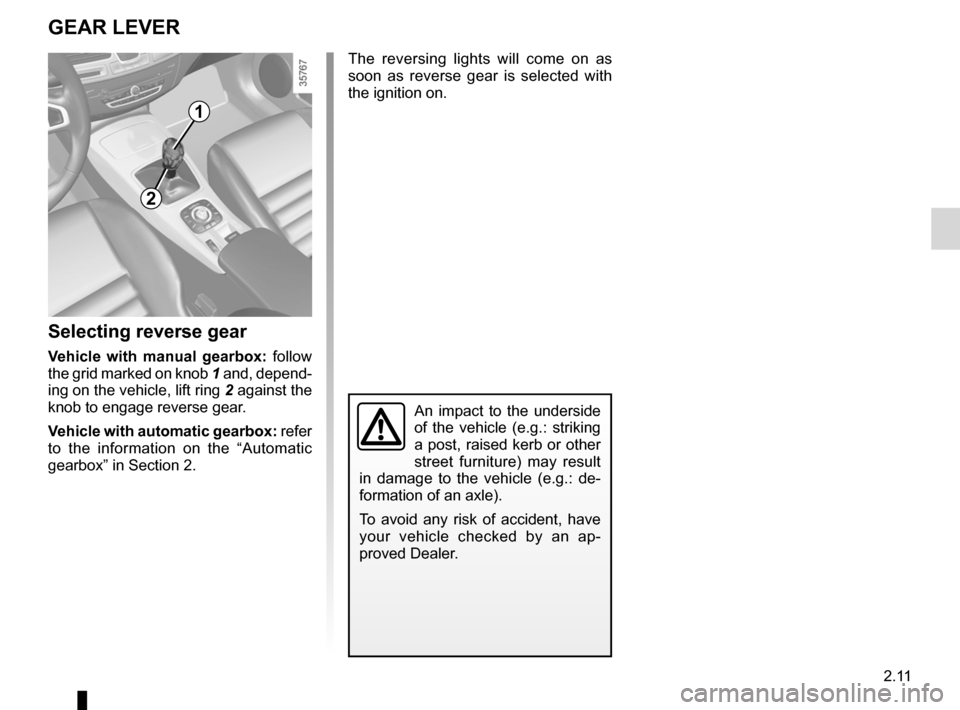
Vehicle with manual gearbox: follow
the grid marked on knob 1 and, depend-
ing on the vehicle, lift ring 2 against the
knob to engage reverse gear.
Vehicle with automatic gearbox: refer
to the information on the “Automatic
gearbox” in Section 2. The reversing lights will come on as
soon as reverse gear is selected with
the ignition on.
An impact to the underside
of the vehicle (e.g.: striking
a post, raised kerb or other
street furniture) may result
in damage to the vehicle (e.g.: de -
formation of an axle).
To avoid any risk of accident, have
your vehicle checked by an ap -
proved Dealer.
1
2
Page 90 of 221

driving ................................................... (up to the end of the DU)
electronic parking brake ....................... (up to the end of the DU)
2.12
ENG_UD11986_3
Frein de parking assisté (X91 - D91 - Renault)
ENG_NU_939-3_D91_Renault_2
Jaune NoirNoir texte
Electronic parking brake
Before leaving the vehicle,
check that the electronic
parking brake is fully ap -
plied. Indicator light 2 on
switch 3 and indicator light
}
on the instrument panel light up to
show that the parking brake is ap -
plied but go out when the doors are
locked.
Note:
The message “apply parking brake” ap-
pears on the instrument panel and a
beep sounds to indicate that the elec -
tronic parking brake is applied or re -
leased: This message may appear:
– with the engine running: when the
driver’s door is opened;
– with the engine switched off (e.g.
when the engine stalls): when a door
is opened.
In this case, pull and release switch 3 to
apply the electronic parking brake.
The brake will be released as soon as
the vehicle starts and accelerates.
automatic operation
The electronic parking brake en -
sures vehicle immobilisation when the
engine is stopped and engine Start/
Stop button 1 is pressed.
In all other instances, e.g. engine stall-
ing, the electronic parking brake is not
applied automatically. Manual mode
must be used.
For certain country-specific model ver-
sions, the automatic brake application
function is not activated. Refer to the in-
formation on “Manual operation”.
aSSISteD P aRKING BRaKe
To confirm that the electronic parking
brake is applied, the message “parking
brake applied” and indicator light
}
on the instrument panel and indicator
light 2 on switch 3 light up.
Indicator light 2 goes out several min -
utes after the electronic parking brake
has been applied and indicator light
} goes out when the vehicle is
locked.
12
3
Page 91 of 221

JauneNoirNoir texte
2.13
ENG_UD11986_3
Frein de parking assisté (X91 - D91 - Renault)
ENG_NU_939-3_D91_Renault_2
Special cases
When parking on a slope or towing a
trailer, pull switch 3 for a few seconds
to obtain the maximum braking effect.
To park the vehicle without applying the
electronic parking brake (if there is a
risk of freezing, for example):
– w i t h t h e e n g i n e r u n n i n g a n d
RENAULT card in reader 4 , switch
off the engine by pressing engine
Start/Stop button 1;
– select a gear (manual gearbox) or
position P (automatic gearbox);
– depress the brake pedal and press
switch 3 at the same time;
– remove the RENAULT card from the
card reader.
Brief stopTo manually activate the electronic
parking brake, (when stopping at a red
light, or stopping when the engine is
running, etc.): pull and release switch 3.
The brake is released as soon as the
vehicle is started up again.
aSSISteD P aRKING BRaKe (continued)
4
13
Manual operationYou can control the electronic parking
brake manually.
applying the electronic parking
brake
Pull switch 3 . Indicator lights 2 and
} light up on the instrument panel.
Releasing the electronic parking
brake
With the ignition on, depress the brake
pedal then press button 3 : indicator
lights 2 and
} go out.
2