2012 MERCEDES-BENZ SL ROADSTER cruise control
[x] Cancel search: cruise controlPage 12 of 637
Problem with the rear window
heating .......................................... 148
Problems with cooling with air
dehumidification ............................1 44
Setting the air distribution ............. 145
Setting the air vents ..................... .150
Setting the airflow ......................... 146
Setting the temperature ................ 145
Switching air-recirculation mode
on/off ............................................ 148
Switching on/off ........................... 142
Switching residual heat on/off ...... 149
Switching the rear window heat-
ing on/off ...................................... 147
Switching the ZONE function on/
off ................................................. .146
THERMOTRONIC (2-zone) auto-
matic climate control ..................... 141
Cockpit
Overview .......................................... 38
see Instrument cluster
Collapsible emergency spare
wheel
see Emergency spare wheel
COMAND control panel ..................... 294
...................................................... 294
COMAND controller ........................... 296
COMAND display ............................... 293
Cleaning ......................................... 572
Cleaning instructions ..................... 293
Driving conditions menu (AMG
vehicles) ........................................ 204
Driving conditions menu (except
AMG vehicles) ................................ 201
Setting .......................................... .310
Switching on/off ........................... 293
COMAND Online ........................ 446, 461
Active multicontour seat ................ 319
Basic functions .............................. 298
Calling up drive status regulator
(ABC) ............................................. 318
Display .......................................... .289
Emergency call system displays .... 432
Examples of operation ................... 296
Importing POIs ............................... 446
Menu overview .............................. 291
Multicontour seat .......................... 319
Seat functions ............................... 318 Settings ......................................... 461
Switching on/off ........................... 298
COMAND Online and Internet
see Online and Internet functions
Combination switch .......................... 129
Compass function .............................381
Connecting a USB device ................. 472
Consumption statistics (on-board
computer) .......................................... 231
Contacts
Deleting ......................................... 418
Importing ....................................... 417
Convenience closing feature ............ 101
Convenience opening feature
see Side windows
Convenience opening/closing (air-
recirculation mode) ........................... 148
Coolant (engine)
Checking the level ......................... 565
Display message ............................ 258
Important safety notes .................. 627
Temperature (on-board com-
puter) ............................................. 244
Temperature gauge ........................ 228
Warning lamp ................................. 281
Cooling
see Climate control
Copy protection (CD/DVD) ...............480
Copyright ............................................. 36
Cornering light function
Display message ............................ 255
Function/notes ............................ .131
Country-specific information (nav-
igation) ............................................... 382
Crash-responsive emergency light-
ing ....................................................... 135
Cruise control
Cruise control lever ....................... 182
Deactivating ................................... 184
Display message ............................ 265
Driving system ............................... 182
Important safety notes .................. 182
LIM indicator lamp ......................... 182
Selecting ........................................ 183
Setting a speed .............................. 184
Storing and maintaining current
speed ............................................. 183 Index
9
Page 14 of 637
Lights .............................................2
55
Safety systems .............................. 248
Tyres .............................................. 267
Vehicle .......................................... .269
Displaying the arrival time ...............358
Displaying the distance to the des-
tination ............................................... 358
Displaying the track and album ....... 478
Distance recorder
see Trip meter
Distance warning signal (warning
lamp) ................................................. .283
DISTRONIC PLUS
Cruise control lever ....................... 186
Deactivating ................................... 192
Display message ............................ 264
Displays in the multifunction dis-
pla y................................................ 191
Driving tips .................................... 192
Function/note s............................. 185
Important safety notes .................. 185
Selecting ........................................ 187
Setting the specified minimum
distance ......................................... 190
Warning lamp ................................. 283
Dolby® Digital ................................... 300
Door
Automatic locking (on-board com-
puter) ............................................. 242
Automatic locking (switch) ............... 92
Central locking/unlocking (key) ...... 85
Control panel ................................... 48
Display message ............................ 270
Emergency locking ........................... 93
Emergency unlocking ....................... 93
Important safety notes .................... 90
Opening (from the inside) ................ 91
Power closing .................................. 93
Doors
Overview .......................................... 90
Draught stop
Electrical draught stop ................... 108
Manual draught stop ...................... 107
Drive program
Automatic ...................................... 169
Display ........................................... 165
Manual ........................................... 169 Manual (vehicles with Sports
package AMG) ............................... 170
Drive program selector ..................... 168
Driver's door
see Door
Driving abroad
Mercedes-Benz Service ................. 568
Symmetrical dipped beam ............. 126
Driving on flooded roads .................. 181
Driving safety system
BAS PLUS (Brake Assist System
PLUS) ............................................... 72
Driving safety systems
ABS (Anti-lock Braking System) ....... 71
ADAPTIVE BRAK E............................. 77
Adaptive brake lights ....................... 73
BAS (Brake Assist System) .............. 71
Electronic Brake-force Distribu-
tion .................................................. 76
ESP® (Electronic Stability Pro-
gram) ............................................... 73
ETS (Electronic Traction System) ..... 73
Important safety guidelines ............. 70
Overview .......................................... 70
PRE-SAFE® Brake ............................ 77
STEER CONTROL ............................. 78
Driving system
Active Body Control (AMG vehi-
cles) ............................................... 202
Active Body Control (except AMG
vehicles) ........................................ 199
Adaptive Damping System ............. 199
Driving systems
Active Blind Spot Assist ................. 220
Active Driving Assistance pack-
age ................................................. 220
Active Lane Keeping Assist ............ 223
Active Parking Assist ..................... 207
ATTENTION ASSIST ........................ 214
Cruise control ................................ 182
Display message ............................ 260
Distronic Plus ................................ 185
HOLD function ............................... 196
Night View Assist Plus ................... 217
PARKTRONIC ................................. 204
RACE START (AMG vehicles) .......... 198
Reversing camera .......................... 211
Speed Limit Assist ......................... 215 Index
11
Page 20 of 637
Switching the surround lighting
on/off (on-board computer) .......... 241
Turn signals ................................... 129
see Interior lighting
see Replacing bulbs
LIM indicator lamp
Cruise control ................................ 182
DISTRONIC PLUS ........................... 186
Variable SPEEDTRONIC ................. 194
Limiting the speed
see SPEEDTRONIC
LINGUATRONIC .................................. 312
Setting s......................................... 312
List of access data ............................ 437
New provider ................................. 437
List of mobile phone network pro-
viders ......................................... 434, 435
Calling up ....................................... 434
Empty ............................................ 434
With the selected provider ............. 435
Load/eject button ............................. 469
Loading aid (boot)
Raising/lowering the roof .............. 546
Locking
see Central locking
Locking (doors)
Automatic ........................................ 92
Emergency locking ........................... 93
From inside (central locking but-
ton) .................................................. 92
Locking centrally
see Central locking
Locking verification signal (on-
board computer) ............................... 242
Luggage cover
see Boot separator
Lumbar support
Adjusting (COMAND Online) .......... 319 M
M+S tyres ........................................... 598
MAGIC SKY CONTROL ....................... 109
Main-beam headlamps
Display message ............................ 256
Switching on/of f........................... 130
Map (navigation)
Adjusting the scale ........................ 372 Arrival time/distance to the des-
tination .......................................... 375
City model ..................................... 376
Geo-coordinate display .................. 375
Heading ......................................... 374
Information in the display .............. 375
Map settings .................................. 373
Moving ........................................... 373
North orientation ........................... 374
Notes ............................................. 372
POI symbols ................................... 374
RDS-TMC display
s......................... 365
Road display .................................. 375
Saving the crosshair position ......... 373
Showing the map data version ....... 382
Topographical map ........................ 376
Updating ........................................ 382
Updating process ........................... 383
Matt finish (cleaning instructions) .. 570
Media Inter-
fac
e ........................... 494, 495, 496, 497, 499
Alphabetical track selection .......... 498
Basic menu .................................... 495
Connecting an external audio
source ............................................ 494
Connecting an external video
source ............................................ 516
Connection options ....................... 494
iPod® ............................................ 494
Mode ............................................. 494
MP3 player .................................... 494
Notes for the MP3 player ............... 499
Playback options ........................... 499
Selecting categories ...................... 497
Selecting folders ............................ 497
Selecting music files ...................... 496
Selecting playlists .......................... 497
Switching on .................................. 495
USB mass storage device .............. 494
see Separate operating instructions
Media list ........................................... 474
Memory card (audio) ......................... 234
Memory function ............................... 123
Mercedes-Benz Contact .................... 427 Index
17
Page 27 of 637
Rear Seat Entertainment Syste
m... 539
Setting the night design ................... 310
Setting the read-aloud speed ........... 312
Setting the reception region (TV)
Rear Seat Entertainment System ... 534
Setting the volume
Telephone calls .............................. 299
Video-AUX ..................................... 517
Settings
Basic TV settings ........................... 507
Factory (on-board computer) ......... 244
Menu overview .............................. 291
On-board computer ....................... 239
Picture (COMAND) ......................... 502
Ringtone telephone module with
Bluetooth® (SAP profile) ............... 423
Sound settings ............................... 299
Telephone module with Blue-
tooth® (SAP profile) ...................... 423
SETUP (on-board computer) ............. 244
Side lamps
Switching on/of f........................... 128
Side windows
Convenience closing ...................... 101
Important safety notes .................... 99
Opening/closing (front) ................. 100
Opening/closing (rear) .................. 100
Opening/closing all ....................... 100
Overview .......................................... 99
Problem (malfunction) ................... 103
Resetting ....................................... 102
Sidebag ................................................ 54
SIM card
Inserting ........................................ 421
Removing ....................................... 421
SIM card mode
Telephone module with Blue-
tooth® (SAP profile) ...................... 421
Snow chains ...................................... 599
Socket
Charge maintenance socket .......... 552
Front-passenger footwell ............... 550
Under the armrest ......................... 551
Sockets
General notes ................................ 550
Sound
Switching on/of f........................... 298 Sound menu
....................................... 299
Sound Modus ..................................... 302
Sound settings
Calling up the sound menu ............ 299
Surround sound ............................. 300
Special destination list ..................... 342
With character bar ......................... 342
Specialist workshop ............................ 34
Spectacles compartment ................. 545
Speed dial list .................................... 407
Storing a phone book entry in the
speed dial list ................................ 407
Speed Limit Assist
Activating/deactivating the warn-ing function .................................... 237
Display message ............................ 262
Display message in the multifunc-
tion display .................................... 216
Function/note s............................. 215
Important safety notes .................. 215
Notes (navigation) ......................... 378
Speed limit assistant ........................ 378
Speed, controlling
see Cruise control
Speedometer
Digital ............................................ 232
In the Instrument cluster ................. 40
Segments ...................................... 229
Selecting the unit of measure-
ment .............................................. 239
SPEEDTRONIC
Deactivating variable ..................... 196
Display message ............................ 265
Function/note s............................. 193
Important safety notes .................. 194
LIM indicator lamp ......................... 194
Permanent ..................................... 196
Selecting ........................................ 195
Storing the current speed .............. 195
Variable ......................................... 194
SPLITVIEW ......................................... 308
SPORT handling mode
Activating/deactivating (AMG
vehicles) .......................................... 75
Warning lamp ................................. 278 24
Index
Page 32 of 637
Locking (in an emergency) ............... 93
Locking (key) ................................... 85
Lowering ........................................ 609
Pulling away ................................... 158
Raising ........................................... 607
Registration ..................................... 34
Securing from rolling away ............ 606
Tow-starting ................................... 588
Towing away .................................. 588
Transporting .................................. 591
Unlocking (in an emergency) ........... 93
Unlocking (key) ................................ 85
Vehicle data ................................... 629
Vehicle battery
see Battery (vehicle)
Vehicle data ....................................... 629
Vehicle dimensions ........................... 629
Vehicle emergency locking ................ 93
Vehicle identification number
see VIN
Vehicle identification plate .............. 622
Vehicle level
Active Body Control (AMG vehi-
cles) ............................................... 202
Active Body Control (except AMG
vehicles) ........................................ 199
Display message ............................ 260
Vehicle tool kit .................................. 577
Video
Operating the DVD ......................... 235
see Video DVD
Video DVD .......................................... 514
Automatic picture shutoff .............. 501
Data carrier .................................... 511
DVD menu ..................................... 514
Fast forward/rewind ...................... 513
Function restrictions ...................... 511
Interactive content ........................ 516
Operation ....................................... 511
Pause function ............................... 513
Playing conditions .......................... 511
Safety notes .................................. 511
Selecting ........................................ 514
Selecting a film/title ...................... 514
Selecting a scene/chapter ............ 513
Setting the audio format ................ 515
Setting the language ...................... 515 Setting the picture ......................... 502
Showing/hiding the menu ............. 512
Showing/hiding the navigation
menu ............................................. 512
Stop function ................................. 513
Subtitles ........................................ 516
Switching on .................................. 512
Video-AUX
Setting the picture ......................... 502
VIN ...................................................... 622 W
Warning and indicator lamps ABS ................................................ 275
Brakes ........................................... 275
Distance warning signal ................. 283
ESP® ............................................. 277
ESP® OFF ...................................... 278
LIM (cruise control) ........................ 182
LIM (DISTRONIC PLUS) .................. 186
LIM (variable SPEEDTRONIC) ......... 194
Overview .......................................... 42
PASSENGER AIRBAG OFF ................ 63
Reserve fuel ................................... 280
Seat belt ........................................ 274
SRS ................................................ 280
Tyre pressure monitor ................... 284
Warning triangle ................................ 576
Washer fluid
Display message ............................ 272
Waypoints .......................... 335, 337, 338
Accepting waypoints for the
route .............................................. 338
Creating ......................................... 335
Editing ........................................... 337
Entering ......................................... 335
Searching for a filling station when the fuel level is lo w........................ 338
Weather display (COMAND
Online) ........................................ 447, 448
Calling up the weather map ........... 448
Information chart ........................... 447
Selecting locations in the informa-
tion chart ....................................... 447
Selecting the location .................... 447
Selecting the location in the
weather map .................................. 448 Index
29
Page 41 of 637
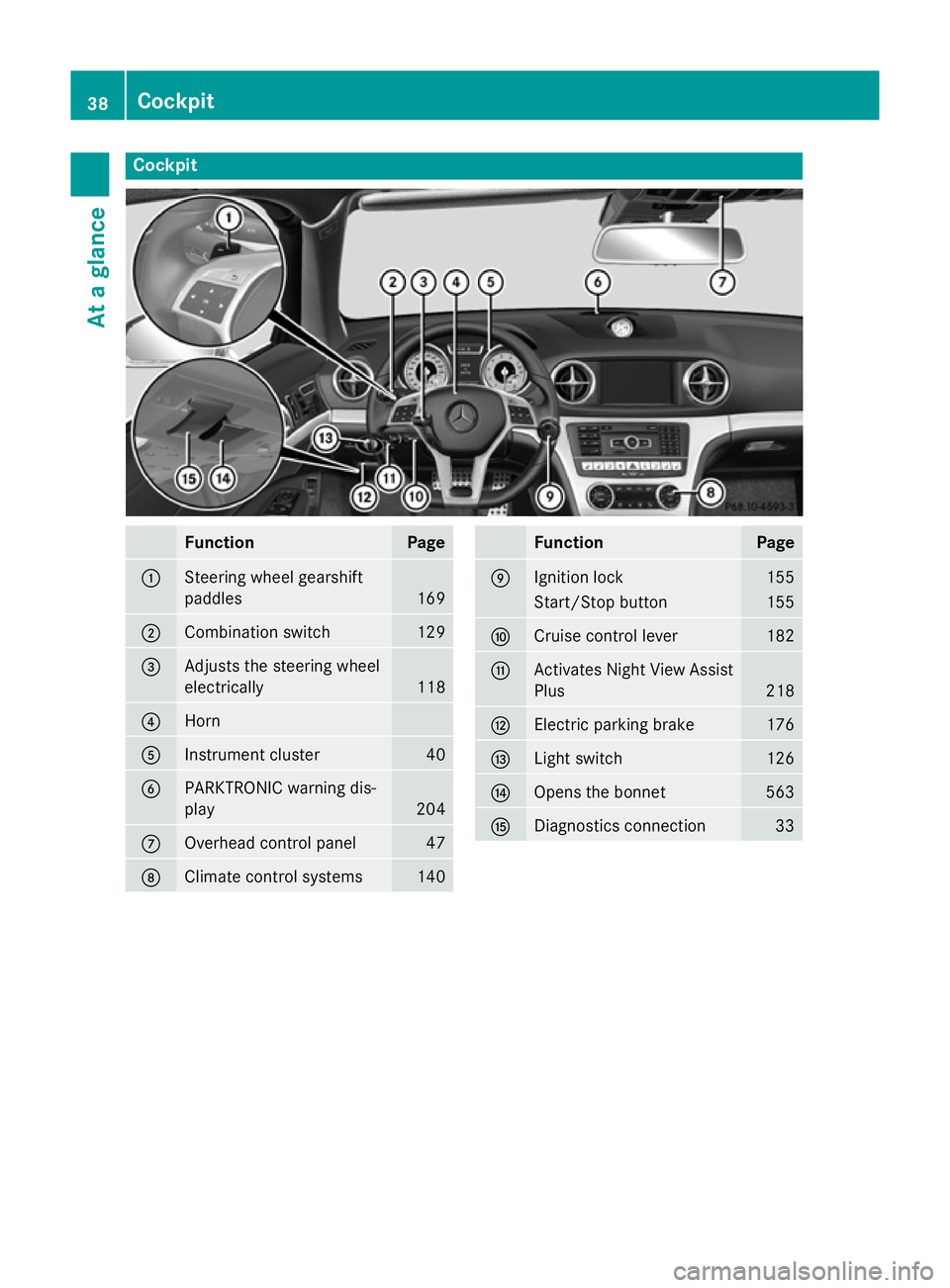
Cockpit
Function Page
:
Steering wheel gearshift
paddles
169
;
Combination switch 129
=
Adjusts the steering wheel
electrically
118
?
Horn
A
Instrument cluster 40
B
PARKTRONIC warning dis-
play
204
C
Overhead control panel 47
D
Climate control systems 140 Function Page
E
Ignition lock 155
Start/Stop button 155
F
Cruise control lever 182
G
Activates Night View Assist
Plus 218
H
Electric parking brake 176
I
Light switch 126
J
Opens the bonnet 563
K
Diagnostics connection 3338
CockpitAt a glance
Page 42 of 637
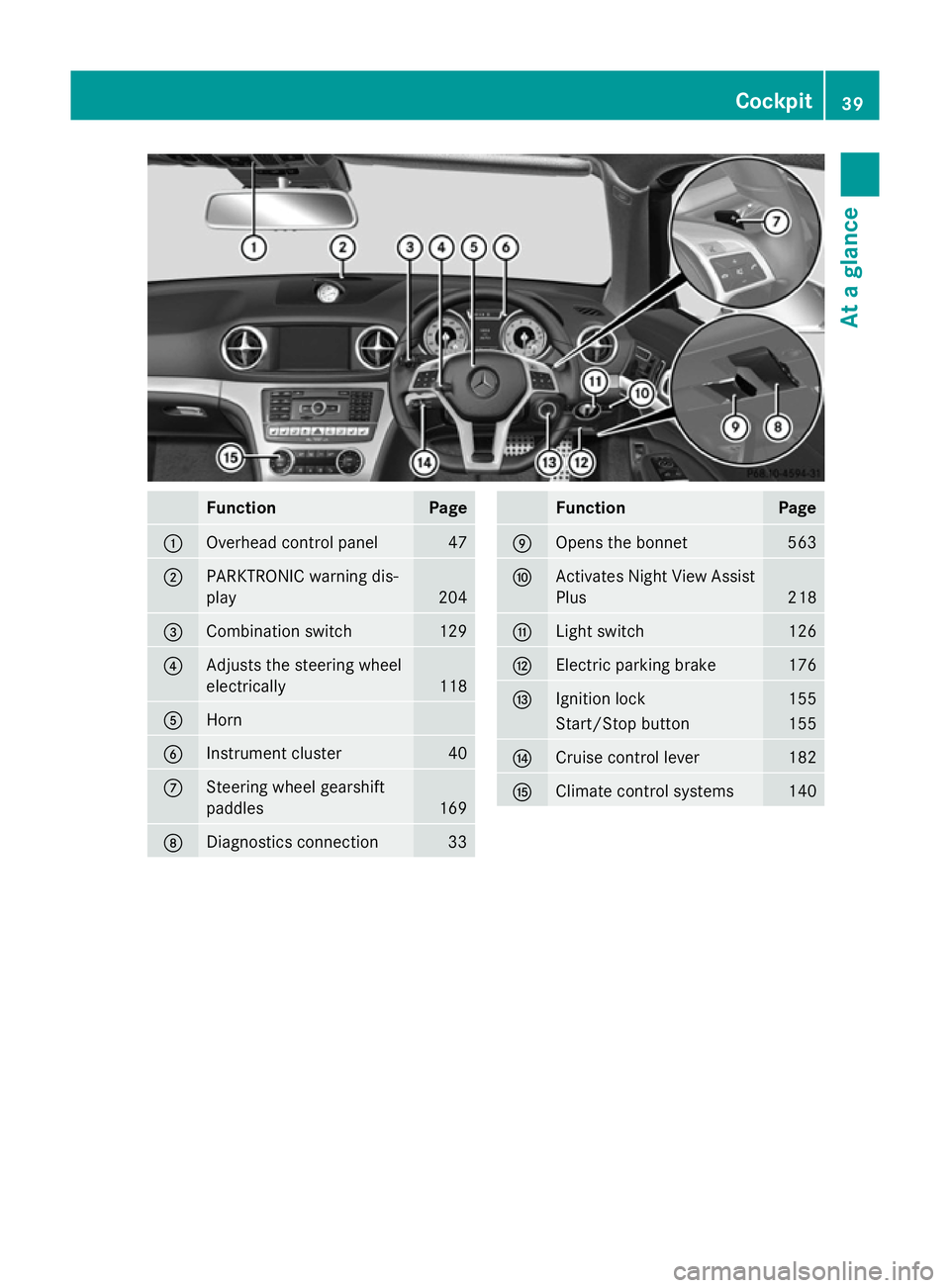
Function Page
:
Overhead control panel 47
;
PARKTRONIC warning dis-
play 204
=
Combination switch 129
?
Adjusts the steering wheel
electrically
118
A
Horn
B
Instrument cluster 40
C
Steering wheel gearshift
paddles
169
D
Diagnostics connection 33 Function Page
E
Opens the bonnet 563
F
Activates Night View Assist
Plus 218
G
Light switch 126
H
Electric parking brake 176
I
Ignition lock 155
Start/Stop button 155
J
Cruise control lever 182
K
Climate control systems 140Cockpit
39At a glance
Page 182 of 637
in the ECO display does not indicate a fixed
consumption.
In addition to driving style, the consumption is
affected by many other factors, such as:
R load
R tyre pressure
R cold start
R choice of route
R the use of electrical consumers
These factors are not included in the ECO dis-
play.
The evaluation of your driving style takes the following three categories into consideration:
R Acceleration
Acceleration (evaluation of all accelera-
tion processes):
- The bar fills up: moderate acceleration,
especially at higher speeds
- The bar empties: sporty acceleration
R Constant Constant (assessment of driving behav-
iour at all times):
- The bar fills up: constant speed and
avoidance of unnecessary acceleration
and deceleration
- The bar empties: fluctuations in speed
R Coasting
Coasting (assessment of all deceleration
processes):
- The bar fills up: anticipatory driving,
keeping your distance and early release
of the accelerator. The vehicle can coast
without use of the brakes
- The bar empties: frequent braking
i An economical driving style involves driv-
ing at a moderate engine speed.
To achieve a higher value in the categories
Acceleration
Acceleration andConstant Constant :
R observe the gearshift recommendation.
R drive the vehicle in drive program E.
i On long journeys at a constant speed, e.g.
on the motorway, only the bar for Constant
Constant
will change.
i The ECO display summarises the driving
characteristics from the start of the journey to its completion. Therefore, there are
dynamic changes in the bars at the start of
a journey. During a prolonged driving time, these changes are smaller. For more
dynamic changes, perform a manual reset.
For further information on the ECO display,
see (Y page 232). Braking
Important safety notes G
WARNING
If you shift down on a slippery road surface in an attempt to increase the engine's braking
effect, the drive wheels could lose their grip.
This increases the risk of skidding and having
an accident.
Do not shift down for additional engine brak-
ing on a slippery road surface.
Downhill gradients Change into a lower gear in good time on long
and steep downhill gradients. Take particular note of this when driving a laden vehicle.
i This also applies if you have activated
cruise control, SPEEDTRONIC or DIS-
TRONIC.
This will use the braking effect of the engine,
so less braking will be required to maintain
vehicle speed. This relieves the load on the
brake system and prevents the brakes from
overheating and wearing too quickly.
Heavy and light loads G
WARNING
The braking system can overheat if you leave your foot on the brake pedal while driving.
This increases the braking distance and could
even cause the braking system to fail. There is
a risk of an accident.
Never use the brake pedal as a footrest. Do
not simultaneously depress both the brake
pedal and the accelerator pedal while driving. Driving tips
179Driving and parking Z