Page 253 of 429
For the best picture, always keep the
rearview camera clean, and do not
cover the camera lens. To avoid
scratching the lens when you clean it,
use a moist, sof t cloth.
Since the rearview camera display
area is limited, you should always
back up slowly and caref ully, and
look behind you f or obstacles.
Whenever you shif t to reverse (R)
with the ignition switch in the ON
(II) position, the rearview is shown
on the navigation system screen.On models with navigation system
Rearview Camera and Monitor
246
Main MenuTable of Contents
Page 278 of 429
Youshoulddothefollowingchecks
and adjustments bef ore you drive
your vehicle.Make sure all windows, mirrors,
and outside lights are clean and
unobstructed. Remove f rost, snow,
or ice.
Check that the hood is f ully closed.
Check that the tailgate is f ully
closed when it is not used as an
extended pickup bed.
Visually check the tires. If a tire
looks low, use a gauge to check its
pressure.
Check that any items you may be
carrying are stored properly or
f astened down securely. Check the adjustment of the
inside and outside mirrors (see
page ).
Check the steering wheel
adjustment (see page ).
Make sure the doors and In-Bed
Trunk are securely closed and
locked.
Fasten your seat belt. Check that
your passengers have f astened
their seat belts (see page ).
Check the seat adjustment (see
pages and ). When you start the engine, check
the gauges and indicators in the
instrument panel, and the
messages on the inf ormation
display or multi-inf ormation
display (depending on the model)(
s e e pag es,,, an d
).
1. 2. 3. 4.5. 6. 8.
7. 9.
10. 11.
121 133
99
16
61 76 77
119 89
Preparing to Drive
Driving
271
Main MenuTable of Contents
Page 292 of 429
CONT INUED
To see the inf lation pressures of all
f our tires, press the SEL/RESET
button. The display changes as
shown above.Each tire pressure is shown in PSI
(U.S. models) or in kPa (Canadian
models).
Each tire has its own pressure
sensor. If the air pressure of a tire
becomes signif icantly low, the
sensor in that tire immediately sends
a signal that causes the low tire
pressure/TPMS indicator in the
instrument panel to come on. If this
happens, you will see which tire is
losing pressure on the multi-
inf ormation display along with a
‘‘CHECK TIRE PRESSURE
Page 294 of 429
If the low tire pressure/TPMS
indicator comes on, or the multi-
inf ormation display shows a
‘‘CHECK TPMS SYSTEM
Page 300 of 429
When VSA is off, the VSA OFF
indicator comes on as a reminder.
When VSA activates, you will see the
VSA system indicator blink.
If this indicator comes on while
driving, pull to the side of the road
when it is saf e, and turn of f the
engine. Reset the system by
restarting the engine. If the VSA
system indicator stays on or comes
back on while driving, have the VSA
system inspected by your dealer.The main f unction of the
VSA system is generally known as
Electronic Stability Control (ESC).
The system also includes a traction
control f unction. If the low tire pressure/TPMS
indicator comes on, see page .
Or, if the multi-inf ormation display
shows a ‘‘CHECK TPMS
SYSTEM
Page 320 of 429

This section explains why it is
important to keep your vehicle well
maintained and how to f ollow basic
maintenance saf ety precautions.
This section also includes
instructions on how to read the
Maintenance Minder messages on
the inf ormation display or multi-
inf ormation display (depending on
the model), and instructions for
simple maintenance tasks you may
want to take care of yourself.U.S. Vehicles:
If you have the skills and tools to
perf orm more complex maintenance
tasks on your vehicle, you may want
to purchase the service manual. See
page f or inf ormation on how to
obtain a copy, or see your dealer. ......................
Maintenance Saf ety . 314
.................
Maintenance Minder . 315
..............................
Fluid Locations . 327
........................
Adding Engine Oil . 328
Changing the Engine Oil and
...........................................
Filter . 329
..............................
Engine Coolant . 331
....................
Windshield Washers . 332
....
Automatic Transmission Fluid . 333
....................................
Brake Fluid . 335
....................
Power Steering Fluid . 336
....................................
Timing Belt . 337
.............................................
Lights . 337
................
Cleaning the Seat Belts . 345
.....................................
Floor Mats . 346
..................
Dust and Pollen Filter . 346
.................................
Wiper Blades . 347
...........................................
Wheels . 349
...............................................
Tires . 349
...................
Checking the Battery . 357
.............................
Vehicle Storage . 358
..................................
Interior Care . 359
409
Maintenance
Maintenance, replacement, or
repair of emissions control
devices and systems may be done
by any automotive repair
establishment or individual using
parts that are ‘‘certif ied
Page 322 of 429

�µ
�µ �µ �µ�µ�µ�µ �µ �µ�µ �µ
�µ
Your vehicle displays engine oil lif e
and maintenance service items on
the inf ormation display or multi-
inf ormation display (depending on
the model) to show you when you
should have your dealer perf orm
engine oil replacement and indicated
maintenance services.
Based on the engine operating
conditions and accumulated engine
revolutions, the onboard computer in
your vehicle calculates the remaining
engine oil lif e and displays it as a
percentage. The remaining engine oil lif e is
shownonthedisplayaccordingto
this table:
To see the current engine oil lif e,
turn the ignition switch to the ON
(II) position, and press the SELECT
button repeatedly until the engine oil
lif e display appears (see page ).78
CONT INUED
Calculated Engine
Oil Lif e (%)
100% 91% 90% 81%
80% 71%
70% 61%
60% 51%
50% 41%
40% 31%
30% 21%
20% 16%
15% 11%10% 6%
5% 1% 0% Displayed
Engine Oil Lif e (%) 100%90% 80% 70%60%50%40% 30% 20%15%10%5% 0%
On models without navigation system
Engine Oil L if e Display
Maintenance Minder
Maint enance
315
SELECT BUTTON
ENGINE OIL LIFE DISPLAY
U.S. model is shown.
TM
Main MenuTable of Contents
Page 323 of 429
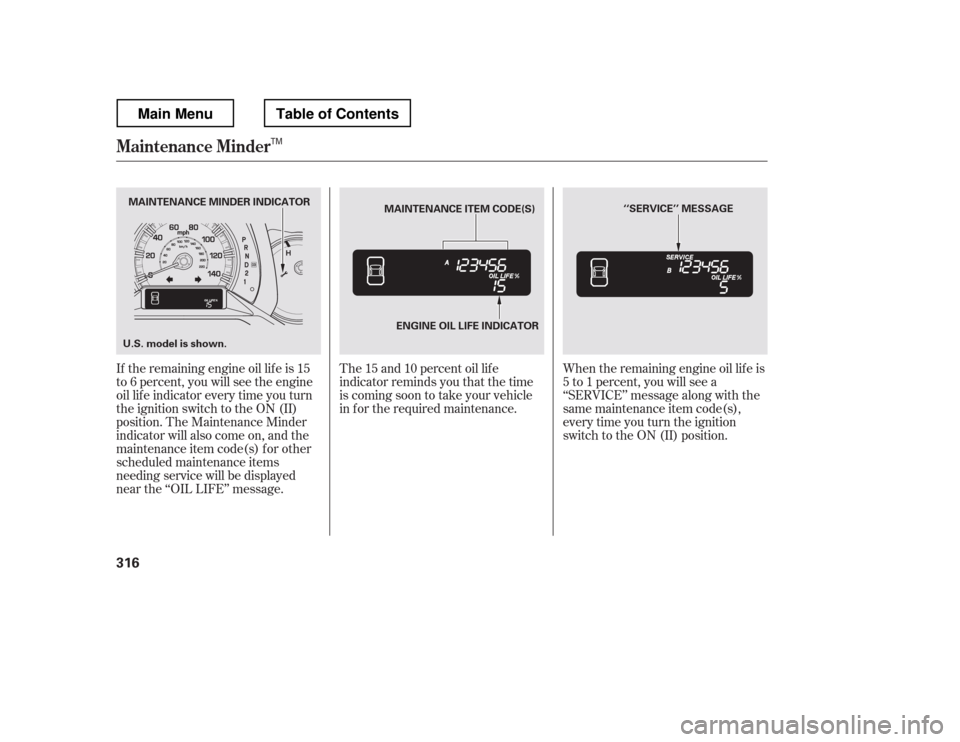
The 15 and 10 percent oil lif e
indicator reminds you that the time
is coming soon to take your vehicle
in f or the required maintenance.
If the remaining engine oil lif e is 15
to 6 percent, you will see the engine
oil lif e indicator every time you turn
the ignition switch to the ON (II)
position. The Maintenance Minder
indicator will also come on, and the
maintenance item code(s) for other
scheduled maintenance items
needing service will be displayed
near the ‘‘OIL LIFE