2011 TOYOTA VERSO S display
[x] Cancel search: displayPage 526 of 664
5267-3. Do-it-yourself maintenance
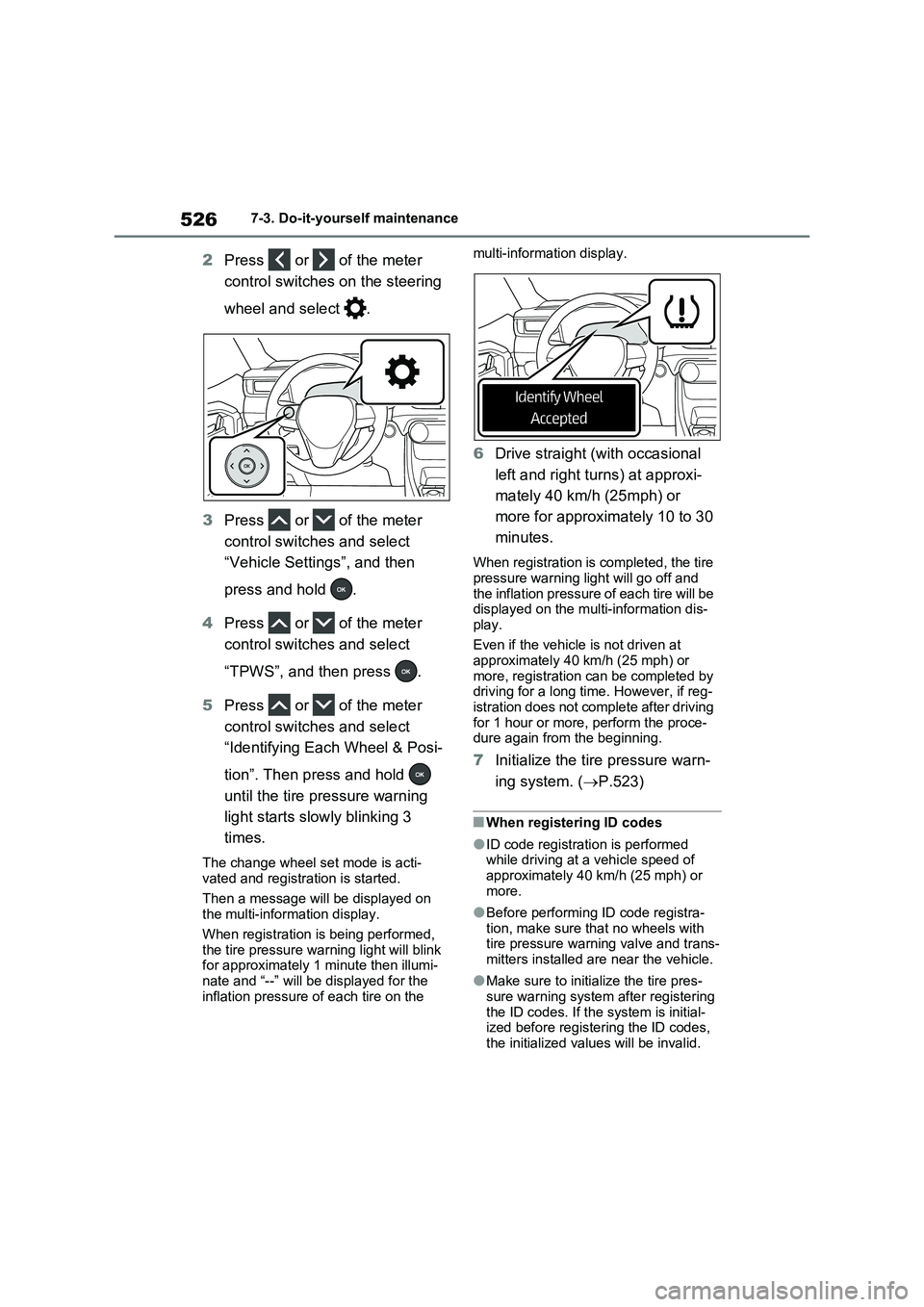
2Press or of the meter
control switches on the steering
wheel and select .
3Press or of the meter
control switches and select
“Vehicle Settings”, and then
press and hold .
4Press or of the meter
control switches and select
“TPWS”, and then press .
5Press or of the meter
control switches and select
“Identifying Each Wheel & Posi-
tion”. Then press and hold
until the tire pressure warning
light starts slowly blinking 3
times.
The change wheel set mode is acti-
vated and registration is started.
Then a message will be displayed on
the multi-information display.
When registration is being performed,
the tire pressure warning light will blink
for approximately 1 minute then illumi-
nate and “--” will be displayed for the
inflation pressure of each tire on the multi-information display.
6Drive straight (with occasional
left and right turns) at approxi-
mately 40 km/h (25mph) or
more for approximately 10 to 30
minutes.
When registration is completed, the tire
pressure warning light will go off and
the inflation pressure of each tire will be
displayed on the multi-information dis-
play.
Even if the vehicle is not driven at
approximately 40 km/h (25 mph) or
more, registration can be completed by
driving for a long time. However, if reg-
istration does not complete after driving
for 1 hour or more, perform the proce-
dure again from the beginning.
7Initialize the tire pressure warn-
ing system. (P.523)
■When registering ID codes
●ID code registration is performed
while driving at a vehicle speed of
approximately 40 km/h (25 mph) or
more.
●Before performing ID code registra-
tion, make sure that no wheels with
tire pressure warning valve and trans-
mitters installed are near the vehicle.
●Make sure to initialize the tire pres-
sure warning system after registering
the ID codes. If the system is initial-
ized before registering the ID codes,
the initialized values will be invalid.
Page 527 of 664
527
7 7-3. Do-it-yourself maintenance
Maintenance and care
●ID codes can be registered by your-
self, but depending on the driving con-
ditions and driving environment,
registration may take some time to
complete.
●As the tires will be warm when regis-
tration is completed, make sure to
allow the tires to cool before perform-
ing initialization.
■Canceling ID code registration
●To cancel ID code registration after it
has been started, select “Identifying
Each Wheel & Position” on the multi-
information display and press and
hold again.
●If ID code registration has been can-
celed, the tire pressure warning light
will blink for approximately 1 minute
when the power switch is turned to
ON and then illuminate. The tire pres-
sure warning system will be opera-
tional when the tire pressure warning
light turns off.
●If the warning light does not turn off
even after several minutes have
elapsed, ID code registration may not
have been canceled correctly. To can-
cel registration, perform the ID code
registration start procedure again and
then turn the power switch off before
driving.
■If ID codes are not registered prop-
erly
●In the following situations, ID code
registration may take longer than
usual to be completed or may not be
possible. Normally, registration com-
pletes within approximately 30 min-
utes.
If ID code registration is not complete
after driving for approximately 30 min-
utes, continue driving for a while.
• Vehicle is not parked for approxi-
mately 20 minutes or more before
driving
• Vehicle is not driven at approximately
40 km/h (25 mph) or more
• Vehicle is driven on unpaved roads
• Vehicle is driven near other vehicles and system cannot recognize tire
pressure warning valve and transmit-
ters of your vehicle over those of other
vehicles
• Wheel with tire pressure warning
valve and transmitter installed is
inside or near the vehicle
If registration does not complete after
driving for 1 hour or more, perform the
ID code registration procedure again
from the beginning.
●If the vehicle is reversed during regis-
tration, the data up to that point is
reset, so perform the registration pro-
cedure again from the beginning.
●In the following situations, ID code
registration will not be started or was
not completed properly and the sys-
tem will not operate properly. Perform
the ID code registration procedure
again.
• If, when attempting to start ID code
registration, the tire pressure warning
light does not blink slowly 3 times.
• If, when the vehicle has been driven
for about 10 minutes after performing
ID code registration, the tire pressure
warning light blinks for approximately
1 minute and then illuminates.
●If ID code registration cannot be com-
pleted after performing the above pro-
cedure, contact any authorized
Toyota retailer or Toyota authorized
repairer, or any reliable repairer.
Your vehicle is equipped with tire
pressure warning system with the
function to have ID codes regis-
tered for a second wheel set, for
example a winter set. You can reg-
ister a second wheel set by your-
self, any authorized Toyota retailer
or Toyota authorized repairer, or
any reliable repairer.
Selecting wheel set
Page 528 of 664
5287-3. Do-it-yourself maintenance
After registration of a second wheel
set, either of these two wheel sets
can be selected for usage with the
tire pressure warning system.
■Operating conditions for the
function
This function will perform the
change of wheel set only if a sec-
ond wheel set has been regis-
tered. If no second wheel set has
been registered, no change will
be made when selecting this
function in the menu.
Only a change between both
registered wheel set is possible,
mixing between these wheel sets
is not supported.
■How to change between wheel
sets
1Have the vehicle fitted with the
preferred wheel set.
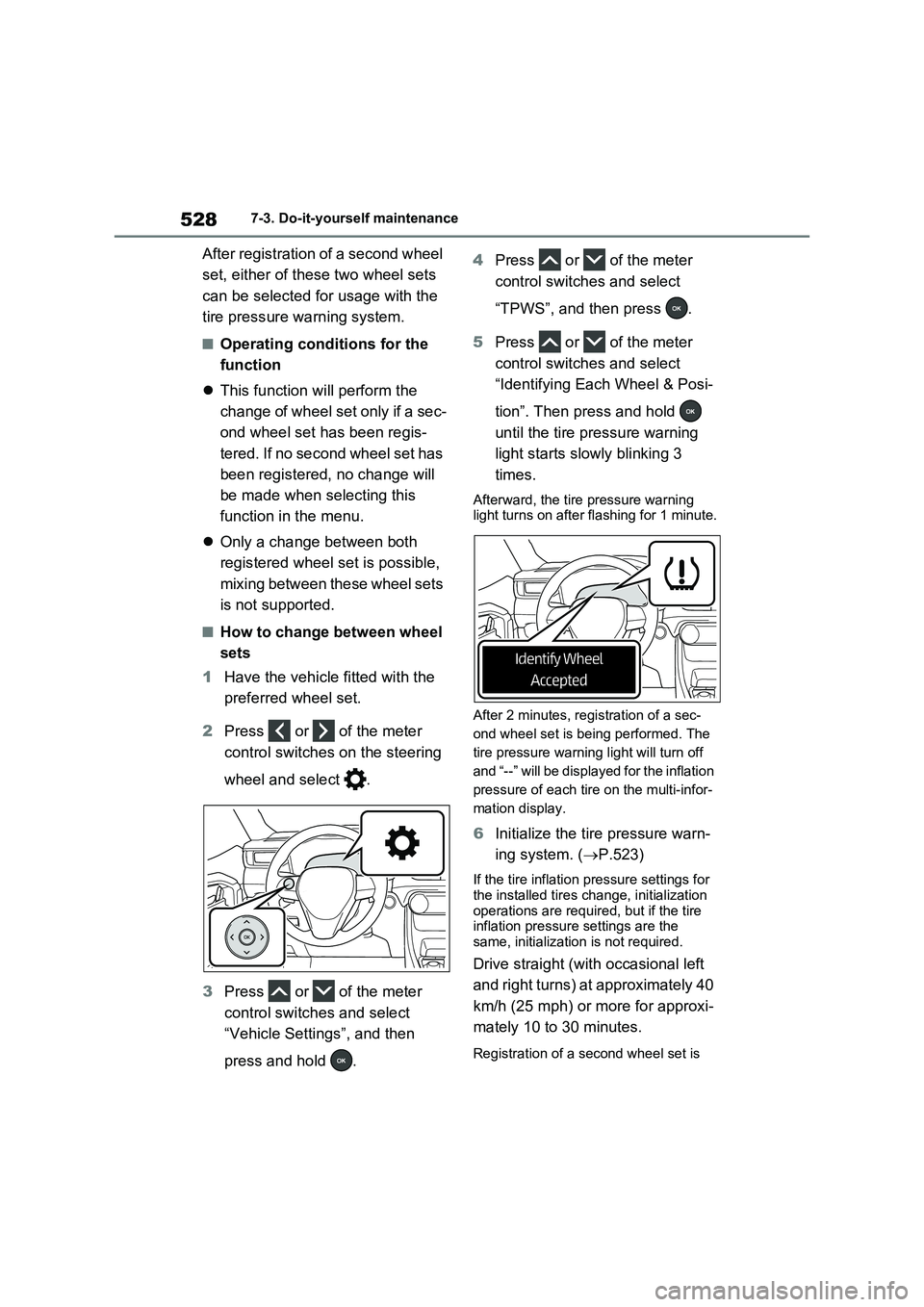
2Press or of the meter
control switches on the steering
wheel and select .
3Press or of the meter
control switches and select
“Vehicle Settings”, and then
press and hold .4Press or of the meter
control switches and select
“TPWS”, and then press .
5Press or of the meter
control switches and select
“Identifying Each Wheel & Posi-
tion”. Then press and hold
until the tire pressure warning
light starts slowly blinking 3
times.
Afterward, the tire pressure warning
light turns on after flashing for 1 minute.
After 2 minutes, registration of a sec-
ond wheel set is being performed. The
tire pressure warning light will turn off
and “--” will be displayed for the inflation
pressure of each tire on the multi-infor-
mation display.
6Initialize the tire pressure warn-
ing system. (P.523)
If the tire inflation pressure settings for
the installed tires change, initialization
operations are required, but if the tire
inflation pressure settings are the
same, initialization is not required.
Drive straight (with occasional left
and right turns) at approximately 40
km/h (25 mph) or more for approxi-
mately 10 to 30 minutes.
Registration of a second wheel set is
Page 529 of 664
529
7 7-3. Do-it-yourself maintenance
Maintenance and care
complete when the tire pressure warn-
ing light turns off and the inflation pres-
sure of each tire is displayed on the
multi-information display.
■Effects of incorrect tire inflation
pressure
Driving with incorrect tire inflation pres-
sure may result in the following:
●Reduced fuel economy
●Reduced driving comfort and poor
handling
●Reduced tire life due to wear
●Reduced safety
●Damage to the drive train
If a tire needs frequent inflating, have it
checked by any authorized Toyota
retailer or Toyota authorized repairer, or
any reliable repairer.
■Instructions for checking tire infla-
tion pressure
When checking tire inflation pressure,
observe the following:
●Check only when the tires are cold.
If your vehicle has been parked for at
least 3 hours or has not been driven
for more than 1.5 km or 1 mile, you
will get an accurate cold tire inflation
pressure reading.
●Always use a tire pressure gauge.
It is difficult to judge if a tire is properly
inflated based only on its appearance.
●It is normal for the tire inflation pres-
sure to be higher after driving as heat
is generated in the tire. Do not reduce
tire inflation pressure after driving.
●Passengers and luggage weight
Tire inflation pressure
Make sure to maintain the
proper tire inflation pressure.
Tire inflation pressure should
be checked at least once per
month. However, Toyota rec-
ommends that tire inflation
pressure be checked once
every two weeks. (P.624)
Page 536 of 664
5367-3. Do-it-yourself maintenance
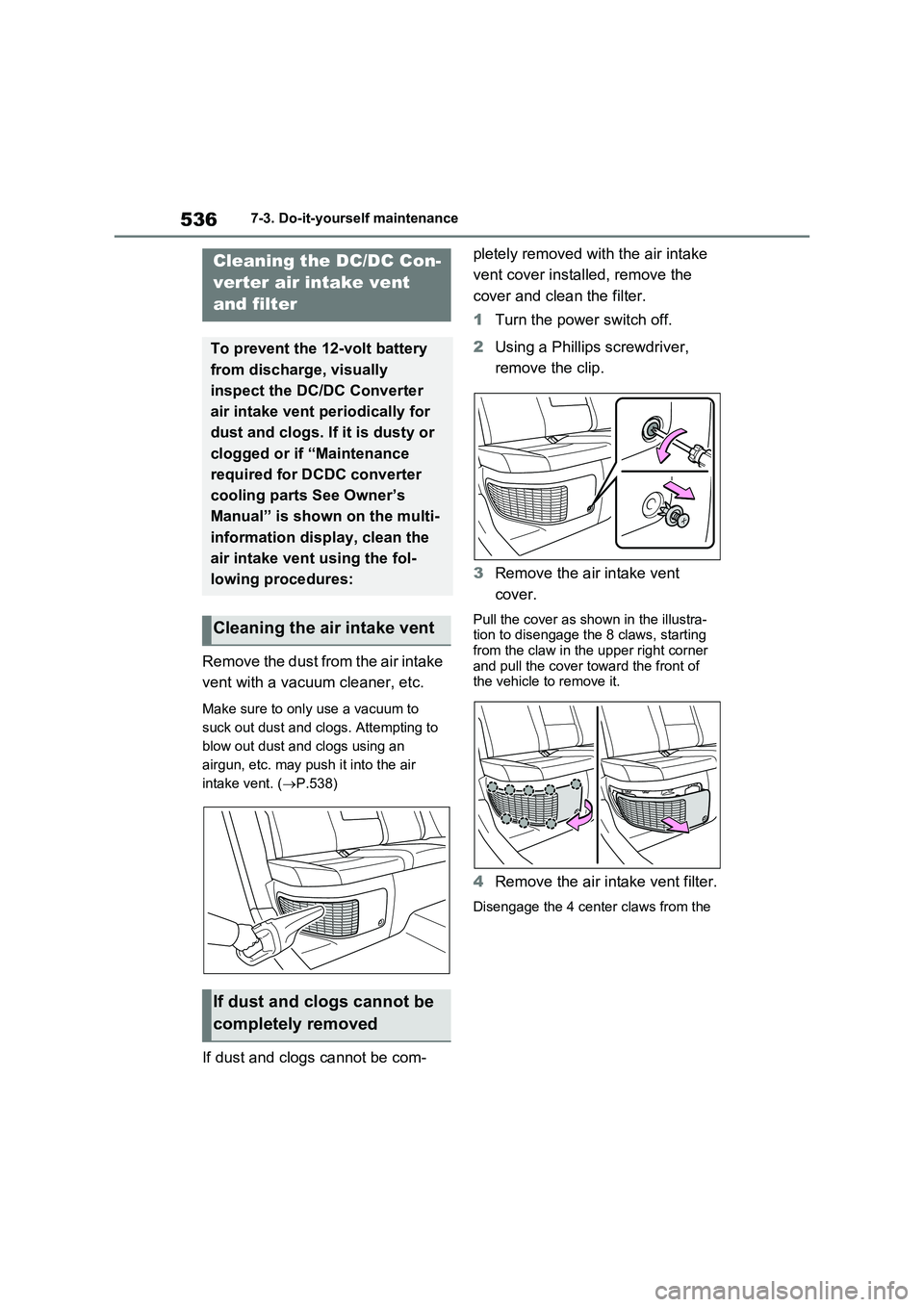
Remove the dust from the air intake
vent with a vacuum cleaner, etc.
Make sure to only use a vacuum to
suck out dust and clogs. Attempting to
blow out dust and clogs using an
airgun, etc. may push it into the air
intake vent. (P.538)
If dust and clogs cannot be com-pletely removed with the air intake
vent cover installed, remove the
cover and clean the filter.
1Turn the power switch off.
2Using a Phillips screwdriver,
remove the clip.
3Remove the air intake vent
cover.
Pull the cover as shown in the illustra-
tion to disengage the 8 claws, starting
from the claw in the upper right corner
and pull the cover toward the front of
the vehicle to remove it.
4Remove the air intake vent filter.
Disengage the 4 center claws from the
Cleaning the DC/DC Con-
verter air intake vent
and filter
To prevent the 12-volt battery
from discharge, visually
inspect the DC/DC Converter
air intake vent periodically for
dust and clogs. If it is dusty or
clogged or if “Maintenance
required for DCDC converter
cooling parts See Owner’s
Manual” is shown on the multi-
information display, clean the
air intake vent using the fol-
lowing procedures:
Cleaning the air intake vent
If dust and clogs cannot be
completely removed
Page 538 of 664
5387-3. Do-it-yourself maintenance
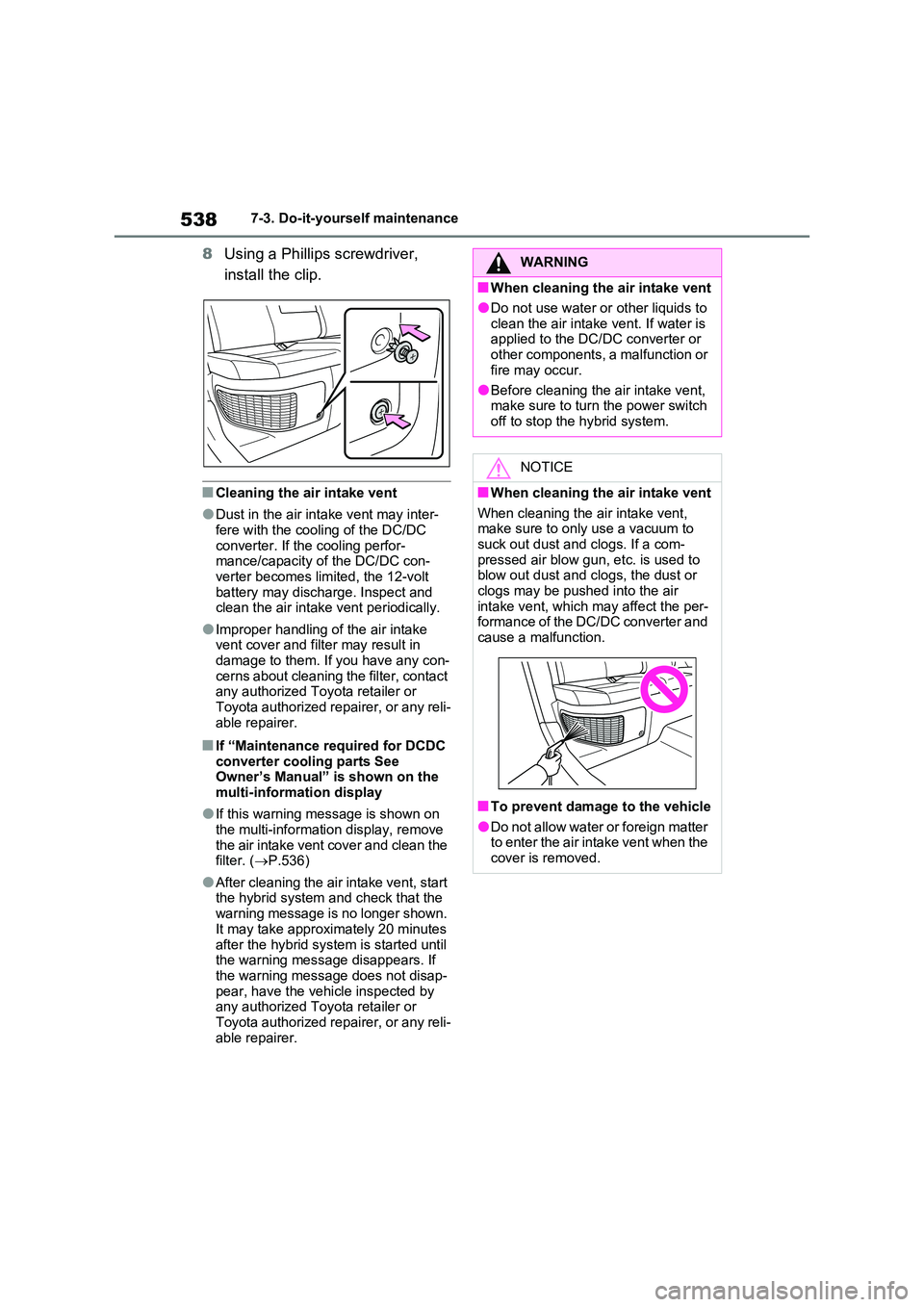
8Using a Phillips screwdriver,
install the clip.
■Cleaning the air intake vent
●Dust in the air intake vent may inter- fere with the cooling of the DC/DC
converter. If the cooling perfor- mance/capacity of the DC/DC con-verter becomes limited, the 12-volt
battery may discharge. Inspect and clean the air intake vent periodically.
●Improper handling of the air intake vent cover and filter may result in damage to them. If you have any con-
cerns about cleaning the filter, contact any authorized Toyota retailer or Toyota authorized repairer, or any reli-
able repairer.
■If “Maintenance required for DCDC converter cooling parts See Owner’s Manual” is shown on the
multi-information display
●If this warning message is shown on
the multi-information display, remove the air intake vent cover and clean the filter. ( P.536)
●After cleaning the air intake vent, start the hybrid system and check that the
warning message is no longer shown. It may take approximately 20 minutes
after the hybrid system is started until the warning message disappears. If the warning message does not disap-
pear, have the vehicle inspected by any authorized Toyota retailer or Toyota authorized repairer, or any reli-
able repairer.
WARNING
■When cleaning the air intake vent
●Do not use water or other liquids to
clean the air intake vent. If water is applied to the DC/DC converter or other components, a malfunction or
fire may occur.
●Before cleaning the air intake vent, make sure to turn the power switch
off to stop the hybrid system.
NOTICE
■When cleaning the air intake vent
When cleaning the air intake vent, make sure to only use a vacuum to suck out dust and clogs. If a com-
pressed air blow gun, etc. is used to blow out dust and clogs, the dust or clogs may be pushed into the air
intake vent, which may affect the per- formance of the DC/DC converter and cause a malfunction.
■To prevent damage to the vehicle
●Do not allow water or foreign matter to enter the air intake vent when the cover is removed.
Page 539 of 664
539
7
7-3. Do-it-yourself maintenance
Maintenance and care
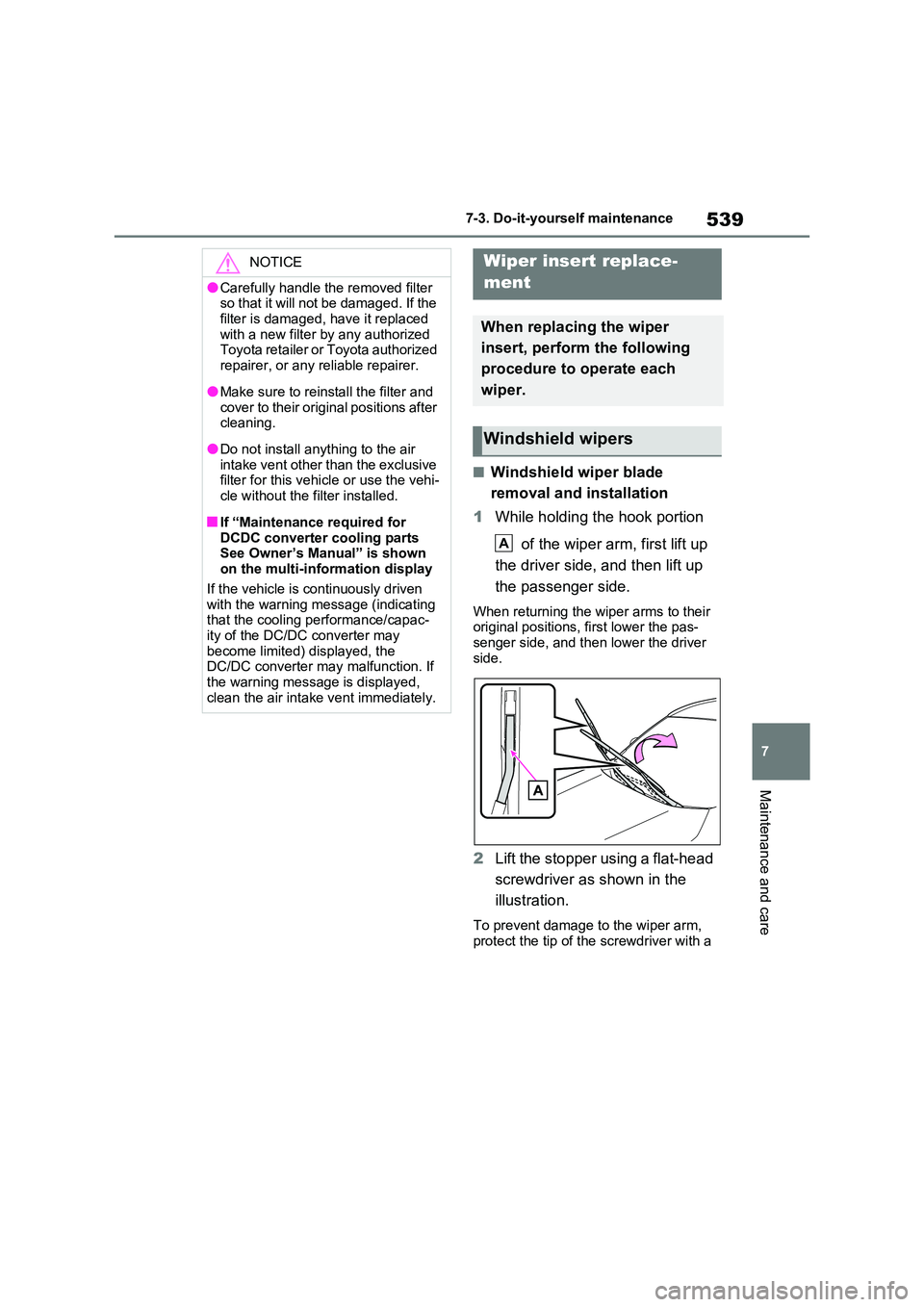
■Windshield wiper blade
removal and installation
1 While holding the hook portion
of the wiper arm, first lift up
the driver side, and then lift up
the passenger side.
When returning the wiper arms to their original positions, first lower the pas-senger side, and then lower the driver
side.
2 Lift the stopper using a flat-head
screwdriver as shown in the
illustration.
To prevent damage to the wiper arm, protect the tip of the screwdriver with a
NOTICE
●Carefully handle the removed filter so that it will not be damaged. If the
filter is damaged, have it replaced with a new filter by any authorized Toyota retailer or Toyota authorized
repairer, or any reliable repairer.
●Make sure to reinstall the filter and
cover to their original positions after cleaning.
●Do not install anything to the air intake vent other than the exclusive filter for this vehicle or use the vehi-
cle without the filter installed.
■If “Maintenance required for
DCDC converter cooling parts See Owner’s Manual” is shown on the multi-information display
If the vehicle is continuously driven with the warning message (indicating that the cooling performance/capac-
ity of the DC/DC converter may become limited) displayed, the DC/DC converter may malfunction. If
the warning message is displayed, clean the air intake vent immediately.
Wiper insert replace-
ment
When replacing the wiper
insert, perform the following
procedure to operate each
wiper.
Windshield wipers
A
Page 564 of 664
5648-2. Steps to take in an emergency
The following may indicate a prob-
lem with your transmission. Contact
any authorized Toyota retailer or
Toyota authorized repairer, or any
reliable repairer or commercial tow-
ing service before towing.
The hybrid system warning mes-
sage is shown on the multi-infor-
mation display and the vehicle
does not move.
The vehicle makes an abnormal
sound.
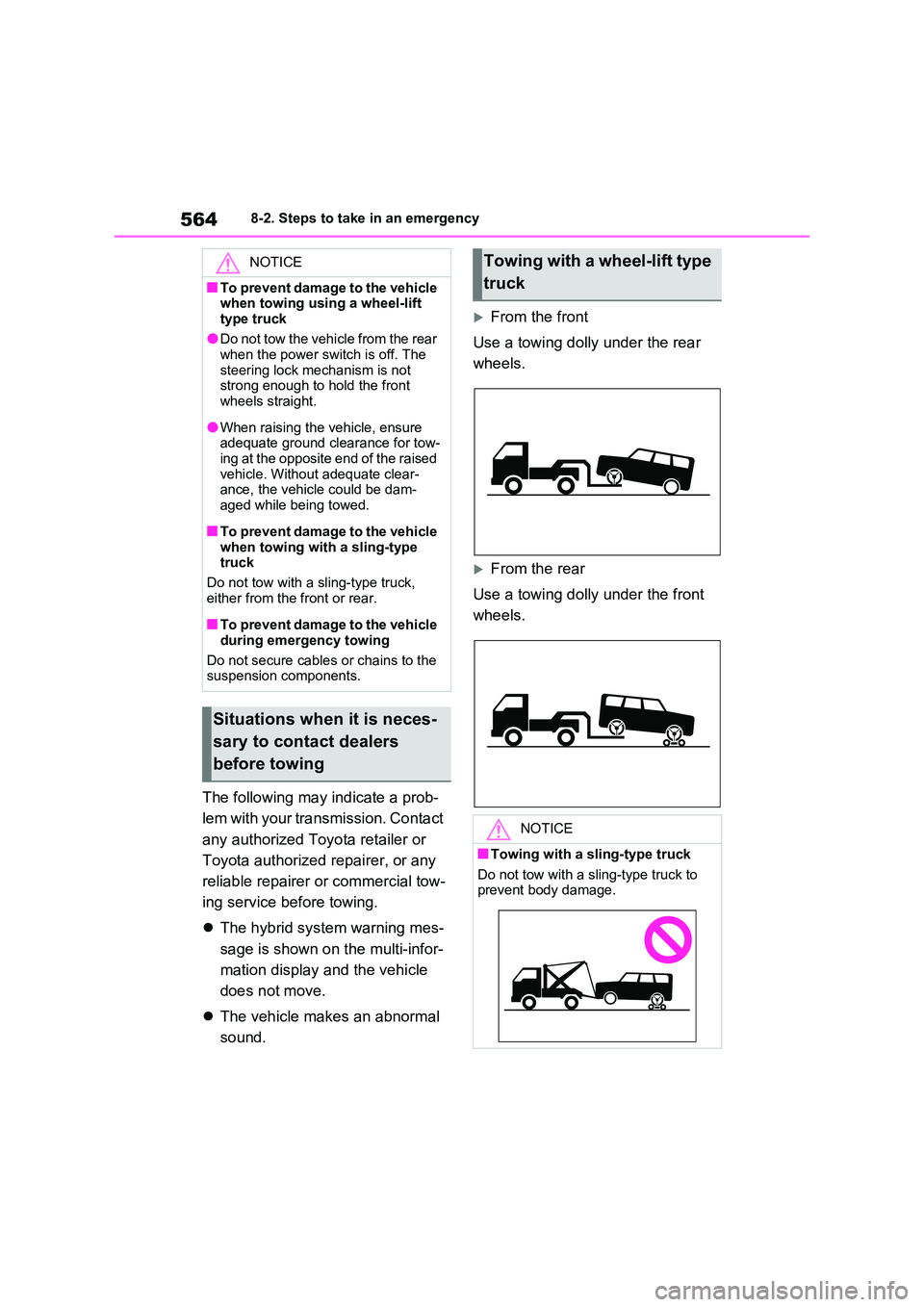
From the front
Use a towing dolly under the rear
wheels.
From the rear
Use a towing dolly under the front
wheels.
NOTICE
■To prevent damage to the vehicle when towing using a wheel-lift
type truck
●Do not tow the vehicle from the rear when the power switch is off. The
steering lock mechanism is not strong enough to hold the front wheels straight.
●When raising the vehicle, ensure adequate ground clearance for tow-
ing at the opposite end of the raised vehicle. Without adequate clear-ance, the vehicle could be dam-
aged while being towed.
■To prevent damage to the vehicle
when towing with a sling-type truck
Do not tow with a sling-type truck,
either from the front or rear.
■To prevent damage to the vehicle
during emergency towing
Do not secure cables or chains to the suspension components.
Situations when it is neces-
sary to contact dealers
before towing
Towing with a wheel-lift type
truck
NOTICE
■Towing with a sling-type truck
Do not tow with a sling-type truck to prevent body damage.