2011 TOYOTA VERSO S ABS
[x] Cancel search: ABSPage 76 of 664
761-4. Theft deterrent system
1-4.Theft de terre nt sys te m
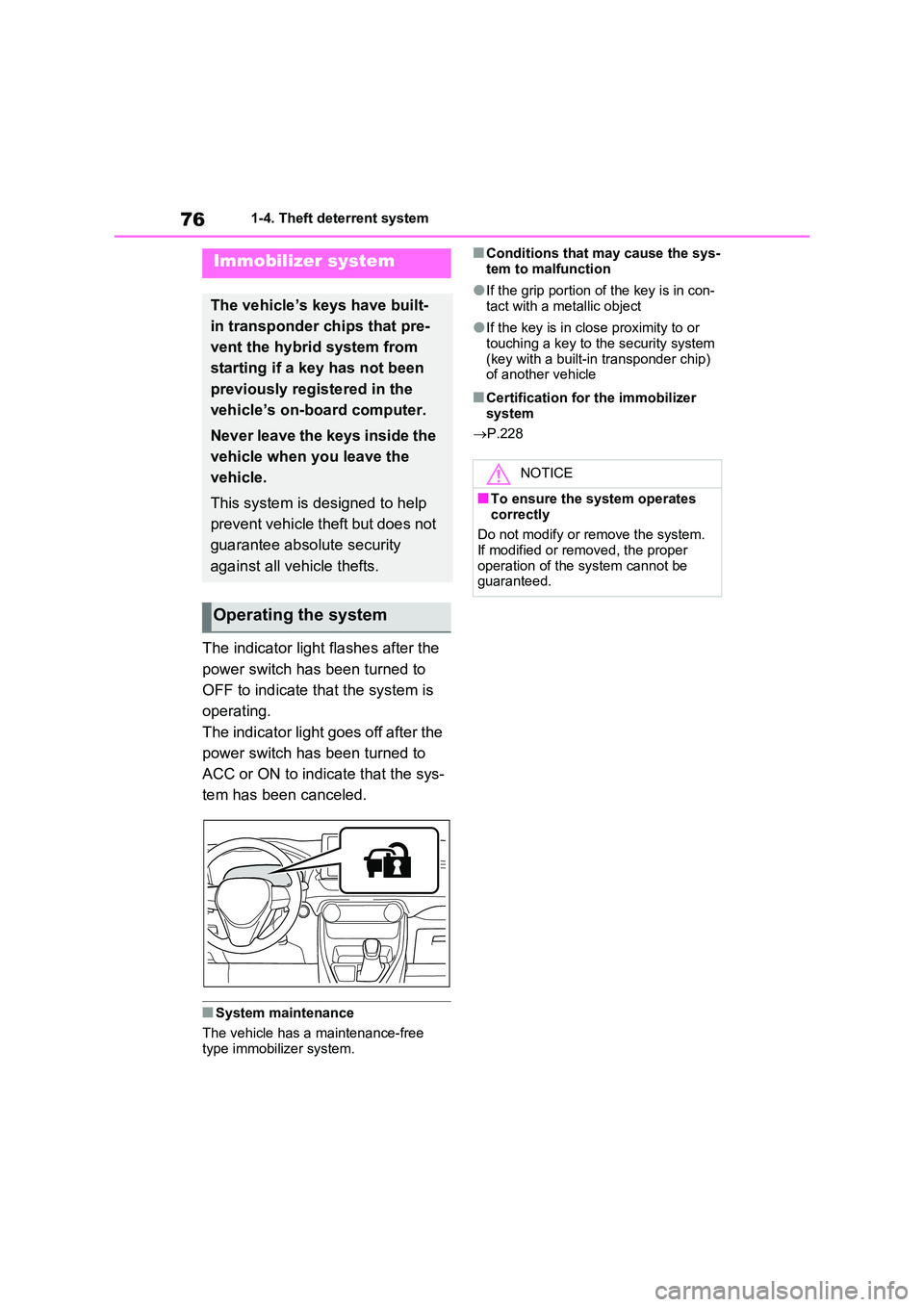
The indicator light flashes after the
power switch has been turned to
OFF to indicate that the system is
operating.
The indicator light goes off after the
power switch has been turned to
ACC or ON to indicate that the sys-
tem has been canceled.
■System maintenance
The vehicle has a maintenance-free type immobilizer system.
■Conditions that may cause the sys-
tem to malfunction
●If the grip portion of the key is in con-
tact with a metallic object
●If the key is in close proximity to or
touching a key to the security system (key with a built-in transponder chip) of another vehicle
■Certification for the immobilizer
system
P.228
Immobilizer system
The vehicle’s keys have built-
in transponder chips that pre-
vent the hybrid system from
starting if a key has not been
previously registered in the
vehicle’s on-board computer.
Never leave the keys inside the
vehicle when you leave the
vehicle.
This system is designed to help
prevent vehicle theft but does not
guarantee absolute security
against all vehicle thefts.
Operating the system
NOTICE
■To ensure the system operates
correctly
Do not modify or remove the system. If modified or removed, the proper
operation of the system cannot be guaranteed.
Page 79 of 664

79
1
1-4. Theft deterrent system
For safety and security
●The doors are unlocked using the
mechanical key.
●A person inside the vehicle opens a
door or hood, or unlocks the vehicle using an inside lock button.
●The 12-volt battery is recharged or replaced when the vehicle is locked. ( P.606)
■Alarm-operated door lock
In the following cases, depending on the
situation, the door may automatically lock to prevent improper entry into the vehicle:
●When a person remaining in the vehi-cle unlocks the door and the alarm is
activated.
●While the alarm is activated, a person
remaining in the vehicle unlocks the door.
●When recharging or replacing the 12-volt battery.
■Customization (if equipped)
The alarm can be set to deactivate when the mechanical key is used to unlock.(Customizable features: P.630)
■The intrusion sensor and tilt
sensor detection
The intrusion sensor detects
intruders or movement in the
vehicle.
The tilt sensor detects changes
in vehicle inclination, such as
when the vehicle is towed away.
This system is designed to deter
and prevent vehicle theft but does
not guarantee absolute security
against all intrusions.
■Setting the intrusion sensor
and tilt sensor
The intrusion sensor and tilt sensor
will be set automatically when the
alarm is set. ( P.78)
■Canceling the intrusion sensor
and tilt sensor
If you are leaving pets or other
moving things inside the vehicle,
make sure to disable the intrusion
sensor and tilt sensor before setting
NOTICE
■To ensure the system operates correctly
Do not modify or remove the system.
If modified or removed, the proper operation of the system cannot be guaranteed.
Intrusion sensor and tilt
sensor
Page 170 of 664

1703-1. Instrument cluster
Warning lights inform the driver of
malfunctions in the indicated vehi-
cle’s systems.
*1: These lights turn on when the power
switch is turned to ON to indicate
that a system check is being per-
formed. They will turn off after the
hybrid system is on, or after a few
seconds. There may be a malfunc-
tion in a system if the light does not
come on, or turn off. Have the vehi-
cle inspected by any authorized
Toyota retailer or Toyota authorized
repairer, or any reliable repairer.
Warning lights
(Red)
Brake system warning
light
*1 (P.568)
(Yellow)
Brake system warning
light
*1 (P.568)
Charging system warn-
ing light
*1 (P.569)
High coolant temperature
warning light
*2 (P.569)
Hybrid system overheat
warning light
*2 (P.569)
Low engine oil pressure
warning light
*2 (P.569)
Malfunction indicator
lamp
*1 (P.570)
SRS warning light
*1
(P.570)
ABS warning light
*1
(P.570)
(Red/yellow)
Electric power steering
system warning light
*1
(P.570)
(Flashes or illu-
minates)
PCS warning light*1 (if
equipped) (P.571)
(Orange)
LTA indicator (if
equipped) (P.571)
Toyota parking assist-
sensor OFF indicator
*3 (if
equipped) (P.572)
PKSB OFF indicator*1 (if
equipped) (P.572)
BSM OFF indicator
*1 (if
equipped) (P.573)
RCTA OFF indicator
*1 (if
equipped)
(P.573)
Slip indicator light
*1
(P.573)
Brake Override Sys-
tem/Drive-Start Con-
trol/PKSB (if equipped)
warning light
*2 (P.574)
(Flashes)
Brake hold operated indi-
cator
*1 (P.574)
(Flashes)
Parking brake indicator
(P.574)
Tire pressure warning
light
*1 (P.575)
Low fuel level warning
light (P.575)
Driver’s and front pas-
senger’s seat belt
reminder light (P.575)
Rear passengers’ seat
belt reminder lights
(P.576)
Page 171 of 664

171
3
3-1. Instrument cluster
Vehicle status information and indicators
*2: This light illuminates on the multi-
information display with a message.
*3: Toyota parking assist-sensor OFF
indicator turns on when the power
switch is turned to ON while the
Toyota parking assist-sensor func-
tion is on. It will turn off after a few
seconds.
The indicators inform the driver of
the operating state of the vehicle’s
various systems.
WARNING
■If a safety system warning light
does not come on
Should a safety system light such as the ABS and SRS warning light not
come on when you start the hybrid system, this could mean that these systems are not available to help pro-
tect you in an accident, which could result in death or serious injury. Have the vehicle inspected by any autho-
rized Toyota retailer or Toyota autho- rized repairer, or any reliable repairer immediately if this occurs.
Indicators
Turn signal indicator
( P.325)
Tail light indicator
( P.332)
Headlight high beam
indicator ( P.333)
Automatic High Beam
indicator (if equipped)
( P.334)
Front fog light indicator
( P.337)
Rear fog light indicator
( P.337)
Smart entry & start sys-
tem indicator*1
( P.317)
Cruise control indicator
( P.376, 388)
Dynamic radar cruise
control indicator (if
equipped) ( P.376)
Cruise control “SET”
indicator ( P.376, 388)
Speed limiter indicator
(if equipped) ( P.391)
LTA indicator*2 (if
equipped) ( 367)
Toyota parking assist-
sensor OFF indicator*3, 4
(if equipped) ( P.415)
PKSB OFF indicator*3, 5
(if equipped) ( P.421)
Page 369 of 664
369
5 5-5. Using the driving support systems
Driving
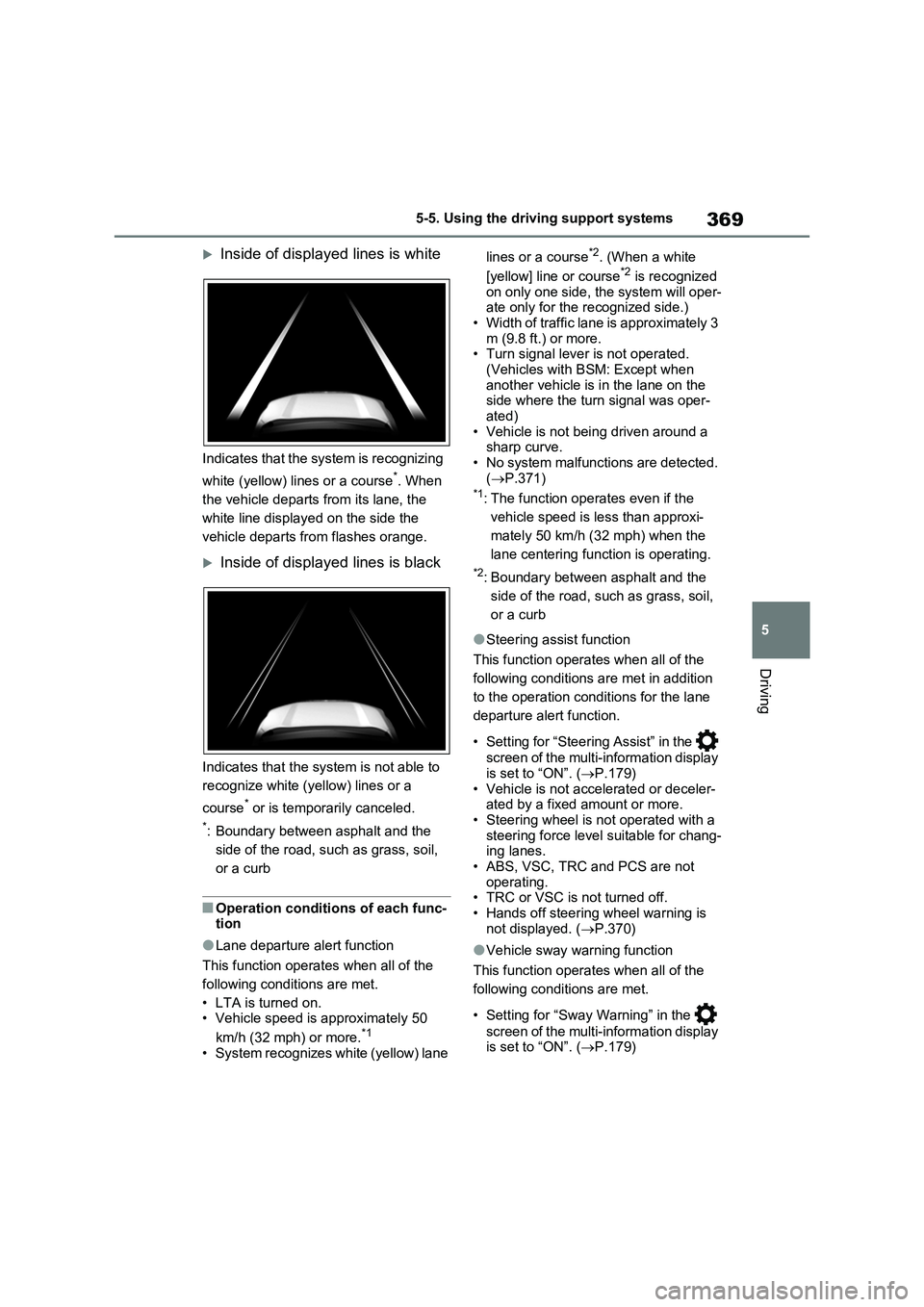
Inside of displayed lines is white
Indicates that the system is recognizing
white (yellow) lines or a course
*. When
the vehicle departs from its lane, the
white line displayed on the side the
vehicle departs from flashes orange.
Inside of displayed lines is black
Indicates that the system is not able to
recognize white (yellow) lines or a
course
* or is temporarily canceled.
*: Boundary between asphalt and the
side of the road, such as grass, soil,
or a curb
■Operation conditions of each func-
tion
●Lane departure alert function
This function operates when all of the
following conditions are met.
• LTA is turned on.
• Vehicle speed is approximately 50
km/h (32 mph) or more.
*1
• System recognizes white (yellow) lane lines or a course
*2. (When a white
[yellow] line or course*2 is recognized
on only one side, the system will oper-
ate only for the recognized side.)
• Width of traffic lane is approximately 3
m (9.8 ft.) or more.
• Turn signal lever is not operated.
(Vehicles with BSM: Except when
another vehicle is in the lane on the
side where the turn signal was oper-
ated)
• Vehicle is not being driven around a
sharp curve.
• No system malfunctions are detected.
(P.371)
*1: The function operates even if the
vehicle speed is less than approxi-
mately 50 km/h (32 mph) when the
lane centering function is operating.
*2: Boundary between asphalt and the
side of the road, such as grass, soil,
or a curb
●Steering assist function
This function operates when all of the
following conditions are met in addition
to the operation conditions for the lane
departure alert function.
• Setting for “Steering Assist” in the
screen of the multi-information display
is set to “ON”. (P.179)
• Vehicle is not accelerated or deceler-
ated by a fixed amount or more.
• Steering wheel is not operated with a
steering force level suitable for chang-
ing lanes.
• ABS, VSC, TRC and PCS are not
operating.
• TRC or VSC is not turned off.
• Hands off steering wheel warning is
not displayed. (P.370)
●Vehicle sway warning function
This function operates when all of the
following conditions are met.
• Setting for “Sway Warning” in the
screen of the multi-information display
is set to “ON”. (P.179)
Page 370 of 664
3705-5. Using the driving support systems
• Vehicle speed is approximately 50
km/h (32 mph) or more.
• Width of traffic lane is approximately 3
m (9.8 ft.) or more.
• No system malfunctions are detected.
(P.371)
●Lane centering function
This function operates when all of the
following conditions are met.
• LTA is turned on.
• Setting for “Steering Assist” and “Lane
Center” in the screen of the multi-
information display are set to “ON”.
(P.179)
• This function recognizes white (yel-
low) lane lines or the position of a pre-
ceding vehicle (except when the
preceding vehicle is small, such as a
motorcycle).
• The dynamic radar cruise control with
full-speed range is operating in vehi-
cle-to-vehicle distance control mode.
• Width of traffic lane is approximately 3
to 4 m (10 to 13 ft.).
• Turn signal lever is not operated.
• Vehicle is not being driven around a
sharp curve.
• No system malfunctions are detected.
(P.371)
• Vehicle does not accelerate or decel-
erate by a fixed amount or more.
• Steering wheel is not operated with a
steering force level suitable for chang-
ing lanes.
• ABS, VSC, TRC and PCS are not
operating.
• TRC or VSC is not turned off.
• Hands off steering wheel warning is
not displayed. (P.370)
• The vehicle is being driven in the cen-
ter of a lane.
• Steering assist function is not operat-
ing.
■Temporary cancelation of functions
●When operation conditions are no lon-
ger met, a function may be temporar-
ily canceled. However, when the
operation conditions are met again,
operation of the function is automati-
cally restored. (P.369)
●If the operation conditions (P.369)
are no longer met while the lane cen-
tering function is operating, the steer-
ing wheel may vibrate and the buzzer
may sound to indicate that the func-
tion has been temporarily canceled.
However, if the “Alert” customization
setting is set to “Steering wheel vibra-
tion”, the system will notify the driver
by vibrating the steering wheel instead
of sounding the buzzer.
■Steering assist function/lane cen-
tering function
●Depending on the vehicle speed, lane
departure situation, road conditions,
etc., the driver may not feel the func-
tion is operating or the function may
not operate at all.
●The steering control of the function is
overridden by the driver’s steering
wheel operation.
●Do not attempt to test the operation of
the steering assist function.
■Lane departure alert function
●The warning buzzer may be difficult to
hear due to external noise, audio play-
back, etc. Also, it may be difficult to
feel steering wheel vibrations due to
the road conditions, etc.
●If the edge of the course* is not clear
or straight, the lane departure alert
function may not operate.
●Vehicles with BSM: It may not be pos-
sible for the system to determine if
there is a danger of a collision with a
vehicle in an adjacent lane.
●Do not attempt to test the operation of
the lane departure alert function.
*: Boundary between asphalt and the
side of the road, such as grass, soil,
or a curb
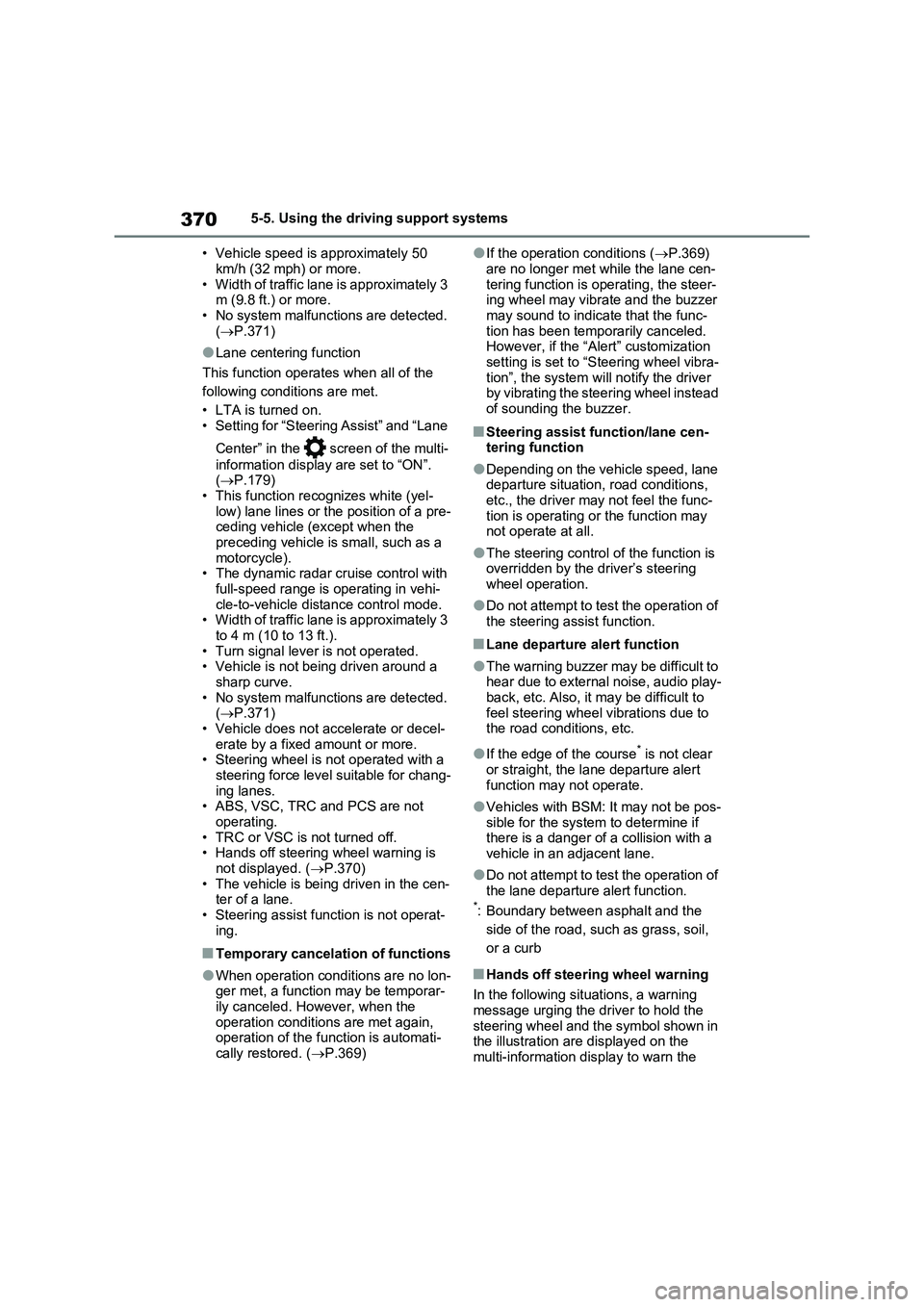
■Hands off steering wheel warning
In the following situations, a warning
message urging the driver to hold the
steering wheel and the symbol shown in
the illustration are displayed on the
multi-information display to warn the
Page 378 of 664

3785-5. Using the driving support systems
WARNING
■Cautions regarding the driving assist systems
Observe the following precautions, as there are limitations to the assistance provided by the system. Failure to do
so may cause an accident resulting in death or serious injury.
●Assisting the driver to measure fol-
lowing distance
The dynamic radar cruise control with
full-speed range is only intended to
help the driver in determining the fol-
lowing distance between the driver’s
own vehicle and a designated vehicle
traveling ahead. It is not a mechanism
that allows careless or inattentive
driving, and it is not a system that can
assist the driver in low-visibility condi-
tions.
It is still necessary for driver to pay
close attention to the vehicle’s sur-
roundings.
●Assisting the driver to judge proper following distance
The dynamic radar cruise control with
full-speed range determines whether
the following distance between the
driver’s own vehicle and a designated
vehicle traveling ahead is within a set
range. It is not capable of making any
other type of judgement. Therefore, it
is absolutely necessary for the driver
to remain vigilant and to determine
whether or not there is a possibility of
danger in any given situation.
●Assisting the driver to operate the vehicle
The dynamic radar cruise control with
full-speed range does not include
functions which will prevent or avoid
collisions with vehicles ahead of your
vehicle. Therefore, if there is ever any
possibility of danger, the driver must
take immediate and direct control of
the vehicle and act appropriately in
order to ensure the safety of all
involved.
■Situations unsuitable for dynamic radar cruise control
with full-speed range
Do not use dynamic radar cruise con- trol with full-speed range in any of the
following situations. Doing so may result in inappropriate speed control and could cause an accident resulting
in death or serious injury.
●Roads where there are pedestrians, cyclists, etc.
●In heavy traffic
●On roads with sharp bends
●On winding roads
●On slippery roads, such as those covered with rain, ice or snow
●On steep downhills, or where there are sudden changes between sharp
up and down gradients
Vehicle speed may exceed the set
speed when driving down a steep hill.
●At entrances to freeways and high- ways
●When weather conditions are bad enough that they may prevent the sensors from detecting correctly
(fog, snow, sandstorm, heavy rain, etc.)
Page 417 of 664

417
5 5-5. Using the driving support systems
Driving
■If “Parking Assist Unavailable” is
displayed on the multi-information
display (vehicles with PKSB)
Water may be continuously flowing over
the sensor surface, such as in a heavy
rain. When the system determines that it
is normal, the system will return to nor-
mal.
■Sensor detection information
●The sensor’s detection areas are lim-
ited to the areas around the vehicle’s
front and rear bumpers.
●The following situations may occur
during use.
• Depending on the shape of the object
and other factors, the detection dis-
tance may shorten, or detection may
be impossible.
• Detection may be impossible if static
objects draw too close to the sensor.
• There will be a short delay between
static object detection and display
(warning buzzer sounds). Even at low
speeds, there is a possibility that the
object will come within 25 cm (9.8 in.)
before the display is shown and the
warning buzzer sounds.
• It might be difficult to hear the buzzer
due to the volume of the audio system
or air flow noise of the air conditioning
system.
• It may be difficult to hear the sound of
this system due to the buzzers of
other systems.
■Conditions under which the func-
tion may not function correctly
Certain vehicle conditions and the sur-
rounding environment may affect the
ability of a sensor to correctly detect
objects. Particular instances where this
may occur are listed below.
●There is dirt, snow or ice on a sensor.
(Cleaning the sensors will resolve this
problem.)
●A sensor is frozen. (Thawing the area
will resolve this problem.)
In especially cold weather, if a sensor
is frozen the sensor display may be
displayed abnormally, or objects, such
as a wall, may not be detected.
●A sensor is covered in any way.
●When a sensor or the area around a
sensor is extremely hot or cold.
●On an extremely bumpy road, on an
incline, on gravel, or on grass.
●The vicinity of the vehicle is noisy due
to vehicle horns, motorcycle engines,
air brakes of large vehicles, or other
loud noises producing ultrasonic
waves.
●There is another vehicle equipped
with parking assist sensors in the
vicinity.
●A sensor is coated with a sheet of
spray or heavy rain.
●If a sensor is hit by a large amount of
water, such as when driving on a
flooded road.
●If the vehicle is significantly tilted.
●The vehicle is approaching a tall or
curved curb.
●If objects draw too close to the sensor.
■Objects which may not be properly
detected
The shape of the object may prevent the
sensor from detecting it. Pay particular
attention to the following objects:
●Wires, fences, ropes, etc.
●Cotton, snow and other materials that
absorb sound waves
●Sharply-angled objects
●Low objects
●Tall objects with upper sections pro-
jecting outwards in the direction of
your vehicle