Page 613 of 664
613
8
8-2. Steps to take in an emergency
When trouble arises
8 Check if “Engine Coolant Temp
High Stop in a Safe Place See
Owner’s Manual” is shown on
the multi-information display.
If the message does not disap-
pear:
Stop the hybrid system and con-
tact any authorized Toyota
retailer or Toyota authorized
repairer, or any reliable repairer.
If the message is not displayed:
Have the vehicle inspected at
the nearest authorized Toyota
retailer or Toyota authorized
repairer, or any reliable repairer.
■If “Hybrid System Overheated
Output Power Reduced” is
shown on the multi-informa-
tion display
1 Stop the vehicle in a safe place.
2 Stop the hybrid system and
carefully lift the hood.
3 After the hybrid system has
cooled down, inspect the hoses
and radiator core (radiator) for
any leaks.
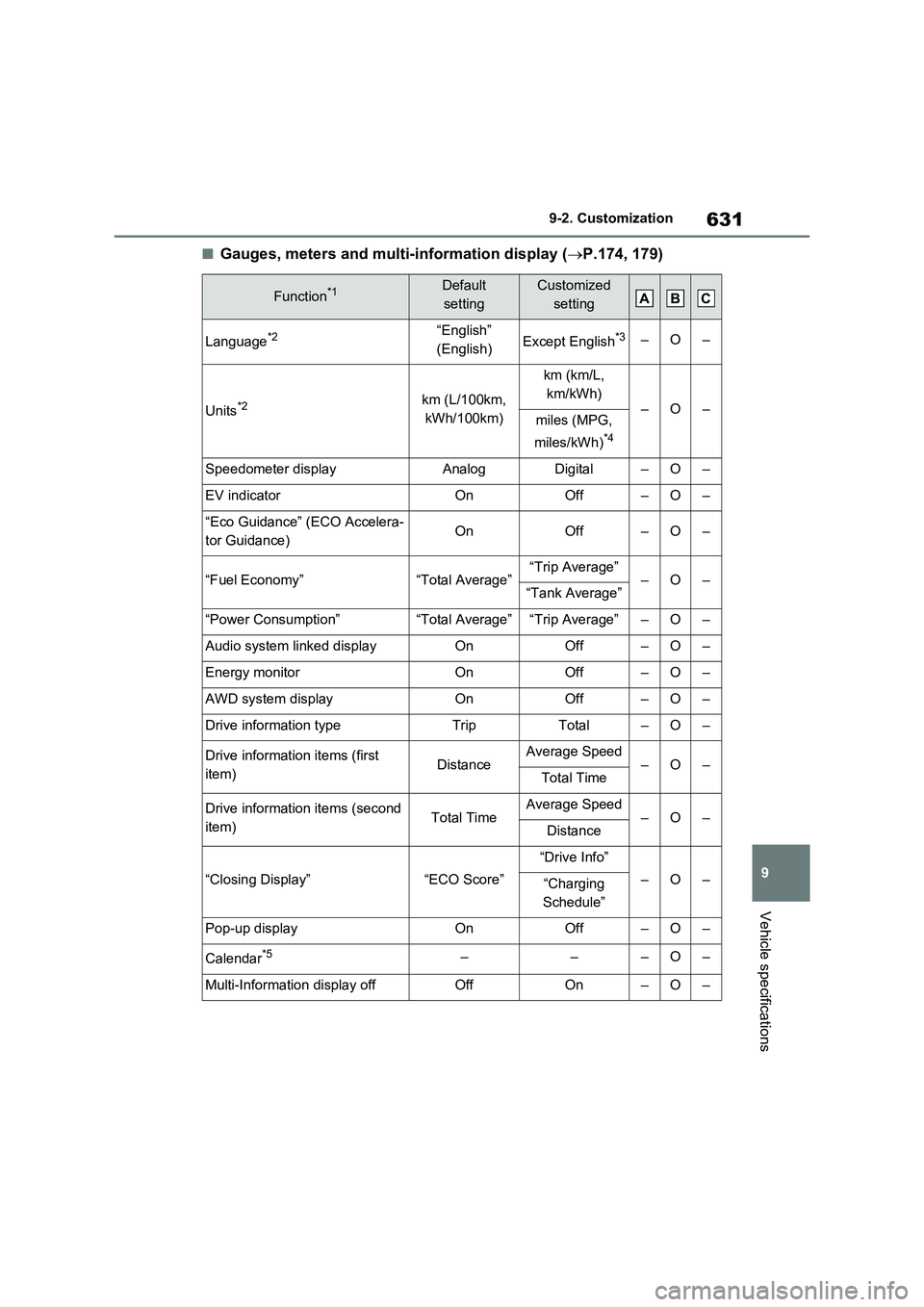
Radiator
Cooling fan
If a large amount of coolant leaks,
immediately contact any authorized Toyota retailer or Toyota authorized repairer, or any reliable repairer.
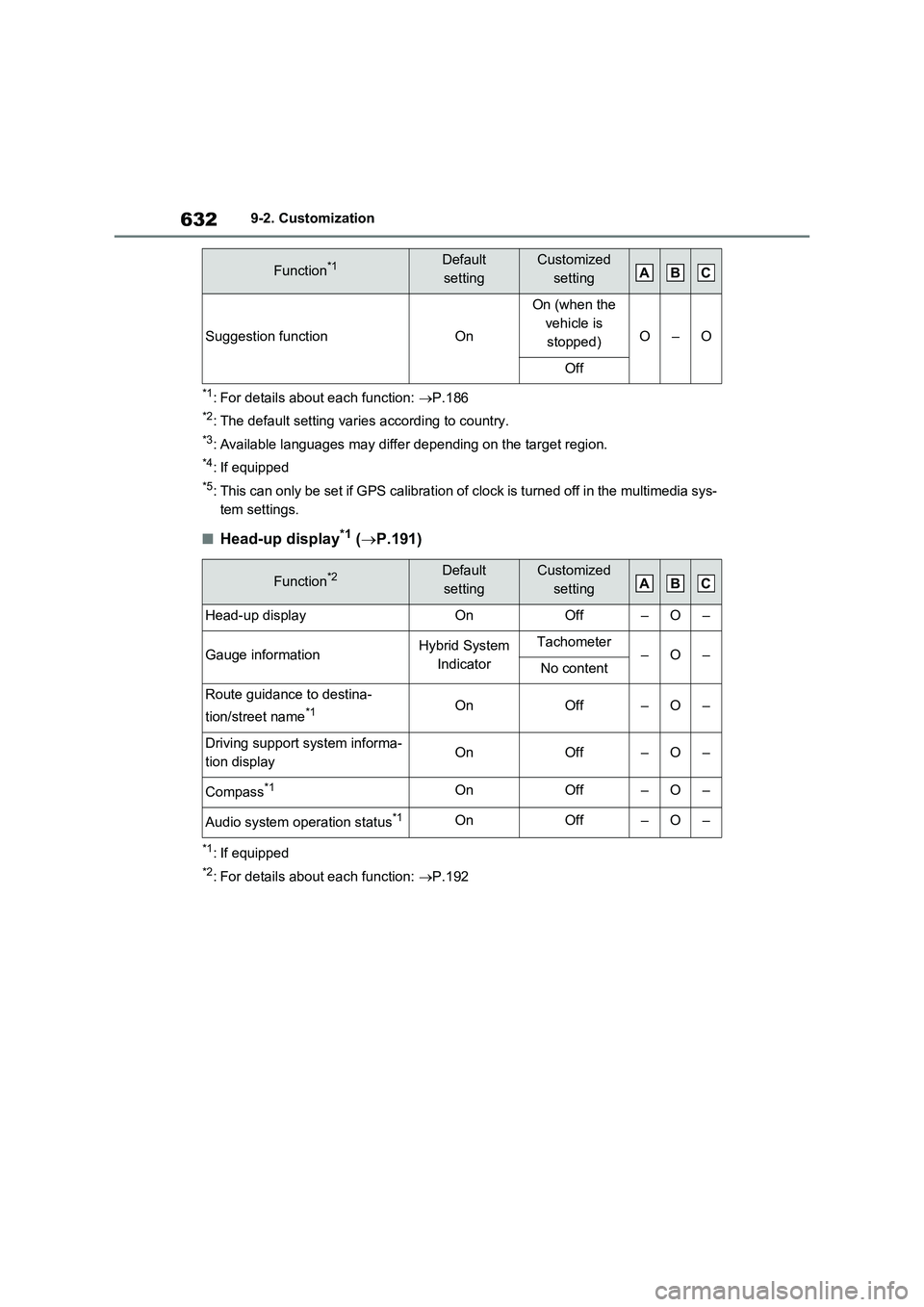
4 The coolant level is satisfactory
if it is between the “FULL” and
“LOW” lines on the reservoir.
Reservoir
“FULL” line
“LOW” line
5 Add coolant if necessary.
Water can be used in an emergency if power control unit coolant is unavail-able.
If water was added in an emergency, have the vehicle inspected at any authorized Toyota retailer or Toyota
authorized repairer, or any reliable repairer as soon as possible.
6 After stopping the hybrid system
and waiting for 5 minutes or
more, start the hybrid system
again and check the multi-infor-
A
B
A
B
C
Page 614 of 664
6148-2. Steps to take in an emergency
mation display.
If the message does not disap-
pear: Stop the hybrid system
and contact any authorized
Toyota retailer or Toyota autho-
rized repairer, or any reliable
repairer.
If the message is not displayed: The hybrid system temperature has dropped and the vehicle may be driven
normally. However, if the message appears again frequently, contact any authorized
Toyota retailer or Toyota authorized repairer, or any reliable repairer.
WARNING
■When inspecting under the hood of your vehicle
Observe the following precautions.
Failure to do so may result in serious injury such as burns.
●If steam is seen coming from under
the hood, do not open the hood until the steam has subsided. The engine compartment may be very
hot.
●After the hybrid system has been
turned off, check that the “READY” indicator is off.When the hybrid system is operat-
ing, the gasoline engine may auto- matically start, or the cooling fan may suddenly operate even if the
gasoline engine stops. Do not touch or approach rotating parts such as the fan, which may lead to fingers
or clothing (especially a tie, a scarf or a muffler) getting caught, result-ing in serious injury.
●Do not loosen the coolant reservoir cap while the hybrid system and
radiator are hot. High temperature steam or coolant could spray out.
NOTICE
■When adding engine/power con-trol unit coolant
Add coolant slowly after the hybrid system has cooled down sufficiently. Adding cool coolant to a hot hybrid
system too quickly can cause dam- age to the hybrid system.
■To prevent damage to the cool-ing system
Observe the following precautions:
●Avoid contaminating the coolant with foreign matter (such as sand or dust, etc.).
●Do not use any coolant additive.
Page 622 of 664
6229-1. Specifications
before next oil change
Oil viscosity (0W-16 is explained
here as an example):
• The 0W in 0W-16 indicates the
characteristic of the oil which
allows cold startability. Oils with
a lower value before the W allow
for easier starting of the engine
in cold weather.
• The 16 in 0W-16 indicates the
viscosity characteristic of the oil
when the oil is at high tempera-
ture. An oil with a higher viscos-
ity (one with a higher value) may
be better suited if the vehicle is
operated at high speeds, or
under extreme load conditions.
How to read oil container labels:
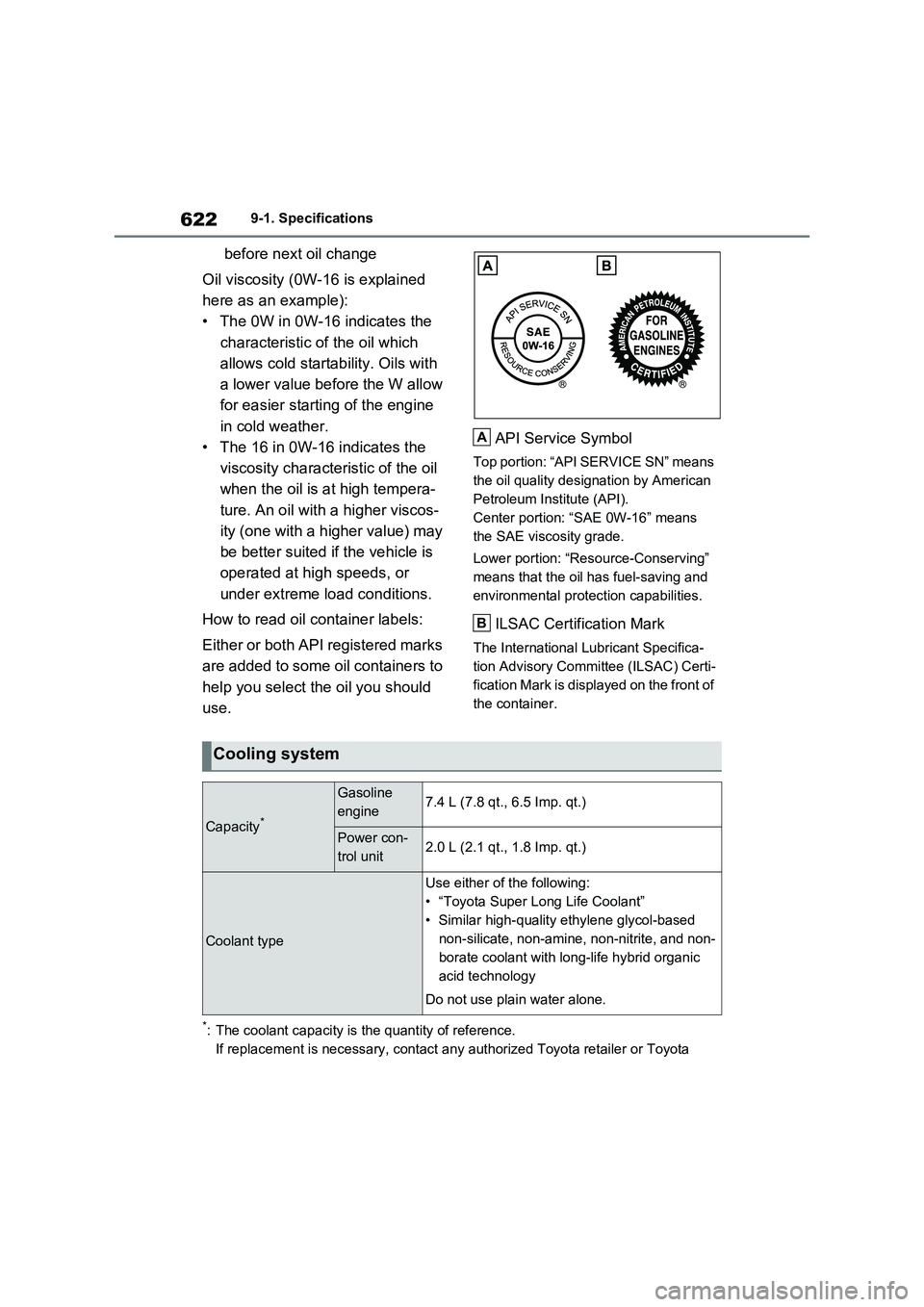
Either or both API registered marks
are added to some oil containers to
help you select the oil you should
use.API Service Symbol
Top portion: “API SERVICE SN” means
the oil quality designation by American
Petroleum Institute (API).
Center portion: “SAE 0W-16” means
the SAE viscosity grade.
Lower portion: “Resource-Conserving”
means that the oil has fuel-saving and
environmental protection capabilities.
ILSAC Certification Mark
The International Lubricant Specifica-
tion Advisory Committee (ILSAC) Certi-
fication Mark is displayed on the front of
the container.
*: The coolant capacity is the quantity of reference.
If replacement is necessary, contact any authorized Toyota retailer or Toyota
A
B
Cooling system
Capacity*
Gasoline
engine7.4 L (7.8 qt., 6.5 Imp. qt.)
Power con-
trol unit2.0 L (2.1 qt., 1.8 Imp. qt.)
Coolant type
Use either of the following:
• “Toyota Super Long Life Coolant”
• Similar high-quality ethylene glycol-based
non-silicate, non-amine, non-nitrite, and non-
borate coolant with long-life hybrid organic
acid technology
Do not use plain water alone.
Page 629 of 664
629
9
9-2. Customization
Vehicle specifications
9-2.Customiz ation
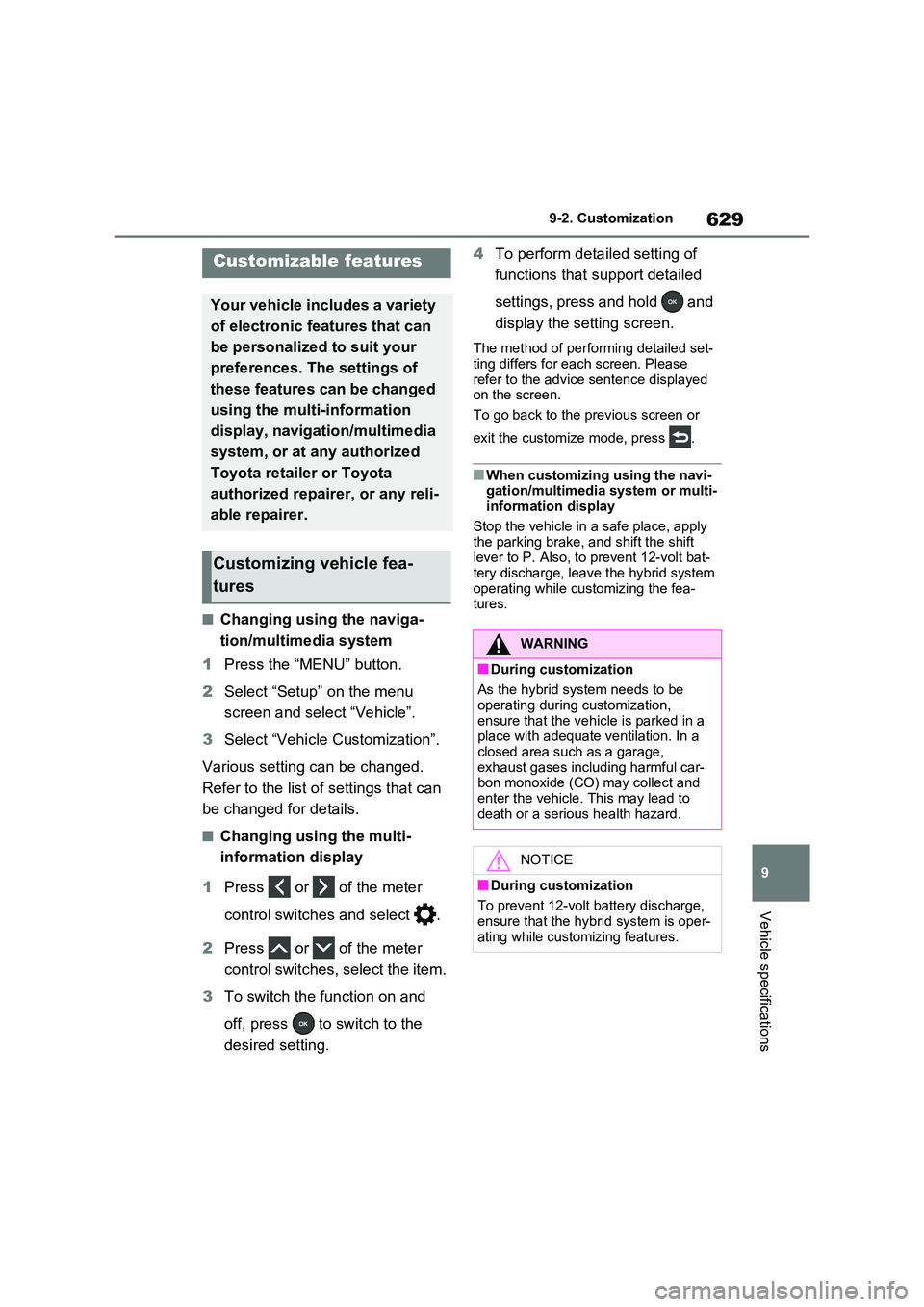
■Changing using the naviga-
tion/multimedia system
1 Press the “MENU” button.
2 Select “Setup” on the menu
screen and select “Vehicle”.
3 Select “Vehicle Customization”.
Various setting can be changed.
Refer to the list of settings that can
be changed for details.
■Changing using the multi-
information display
1 Press or of the meter
control switches and select .
2 Press or of the meter
control switches, select the item.
3 To switch the function on and
off, press to switch to the
desired setting.
4 To perform detailed setting of
functions that support detailed
settings, press and hold and
display the setting screen.
The method of performing detailed set- ting differs for each screen. Please
refer to the advice sentence displayed on the screen.
To go back to the previous screen or
exit the customize mode, press .
■When customizing using the navi- gation/multimedia system or multi-information display
Stop the vehicle in a safe place, apply the parking brake, and shift the shift lever to P. Also, to prevent 12-volt bat-
tery discharge, leave the hybrid system operating while customizing the fea-tures.
Customizable features
Your vehicle includes a variety
of electronic features that can
be personalized to suit your
preferences. The settings of
these features can be changed
using the multi-information
display, navigation/multimedia
system, or at any authorized
Toyota retailer or Toyota
authorized repairer, or any reli-
able repairer.
Customizing vehicle fea-
tures
WARNING
■During customization
As the hybrid system needs to be operating during customization,
ensure that the vehicle is parked in a place with adequate ventilation. In a closed area such as a garage,
exhaust gases including harmful car- bon monoxide (CO) may collect and
enter the vehicle. This may lead to death or a serious health hazard.
NOTICE
■During customization
To prevent 12-volt battery discharge, ensure that the hybrid system is oper-
ating while customizing features.
Page 630 of 664
6309-2. Customization
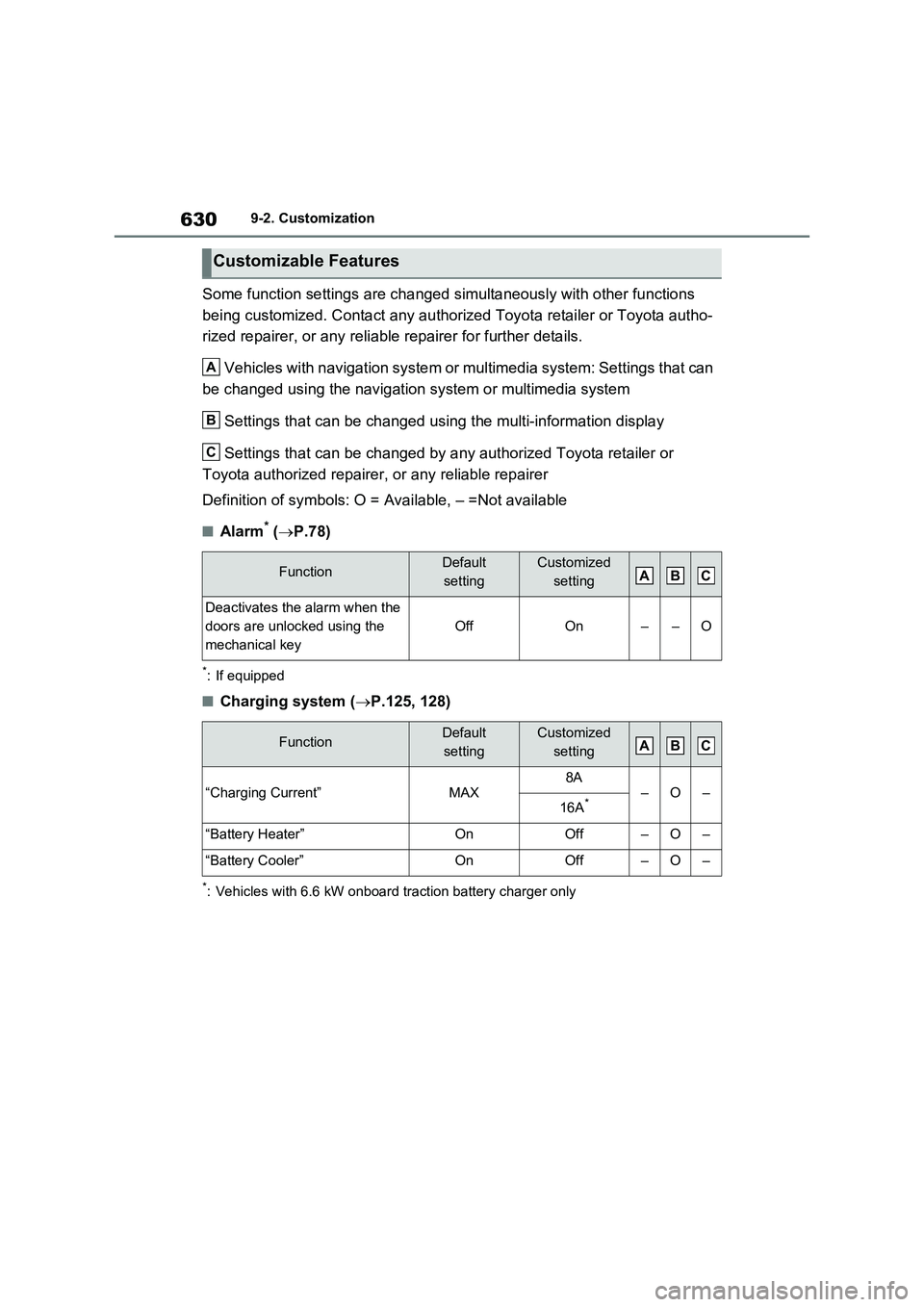
Some function settings are changed simultaneously with other functions
being customized. Contact any authorized Toyota retailer or Toyota autho-
rized repairer, or any reliable repairer for further details.
Vehicles with navigation system or multimedia system: Settings that can
be changed using the navigation system or multimedia system
Settings that can be changed using the multi-information display
Settings that can be changed by any authorized Toyota retailer or
Toyota authorized repairer, or any reliable repairer
Definition of symbols: O = Available, – =Not available
■Alarm* (P.78)
*: If equipped
■Charging system (P.125, 128)
*: Vehicles with 6.6 kW onboard traction battery charger only
Customizable Features
FunctionDefault
settingCustomized
setting
Deactivates the alarm when the
doors are unlocked using the
mechanical key
OffOn––O
FunctionDefault
settingCustomized
setting
“Charging Current”MAX8A–O–16A*
“Battery Heater”OnOff–O–
“Battery Cooler”OnOff–O–
A
B
C
ABC
ABC
Page 631 of 664
631
9 9-2. Customization
Vehicle specifications
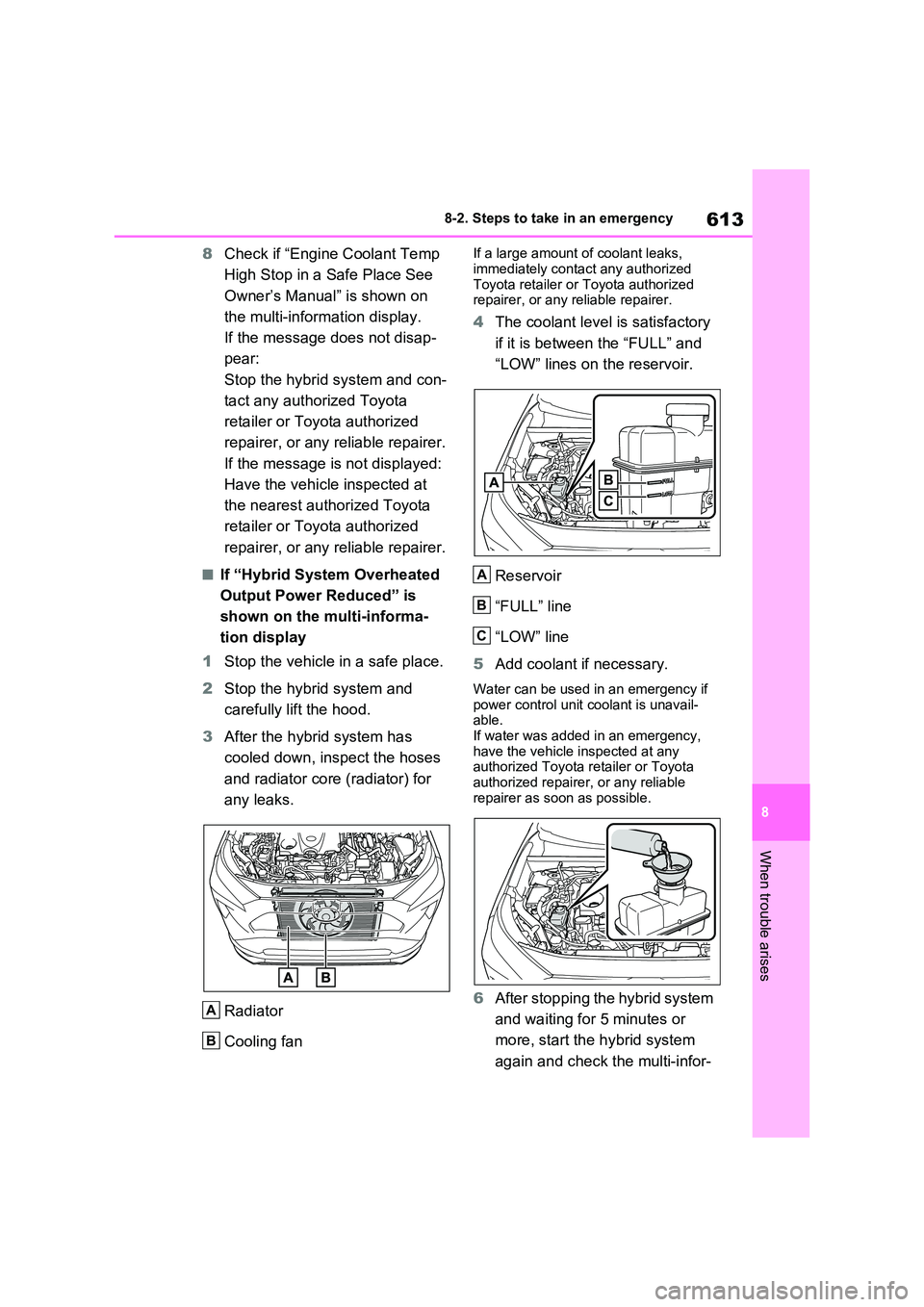
■Gauges, meters and multi-information display (P.174, 179)
Function*1Default
settingCustomized
setting
Language*2“English”
(English)Except English*3–O–
Units*2km (L/100km,
kWh/100km)
km (km/L,
km/kWh)
–O–miles (MPG,
miles/kWh)
*4
Speedometer displayAnalogDigital–O–
EV indicatorOnOff–O–
“Eco Guidance” (ECO Accelera-
tor Guidance)OnOff–O–
“Fuel Economy”“Total Average”“Trip Average”–O–“Tank Average”
“Power Consumption”“Total Average”“Trip Average”–O–
Audio system linked displayOnOff–O–
Energy monitorOnOff–O–
AWD system displayOnOff–O–
Drive information typeTripTotal–O–
Drive information items (first
item)DistanceAverage Speed–O–Total Time
Drive information items (second
item)Total TimeAverage Speed–O–Distance
“Closing Display”“ECO Score”
“Drive Info”
–O–“Charging
Schedule”
Pop-up displayOnOff–O–
Calendar*5–––O–
Multi-Information display offOffOn–O–
ABC
Page 632 of 664
6329-2. Customization
*1: For details about each function: P.186
*2: The default setting varies according to country.
*3: Available languages may differ depending on the target region.
*4: If equipped
*5: This can only be set if GPS calibration of clock is turned off in the multimedia sys-
tem settings.
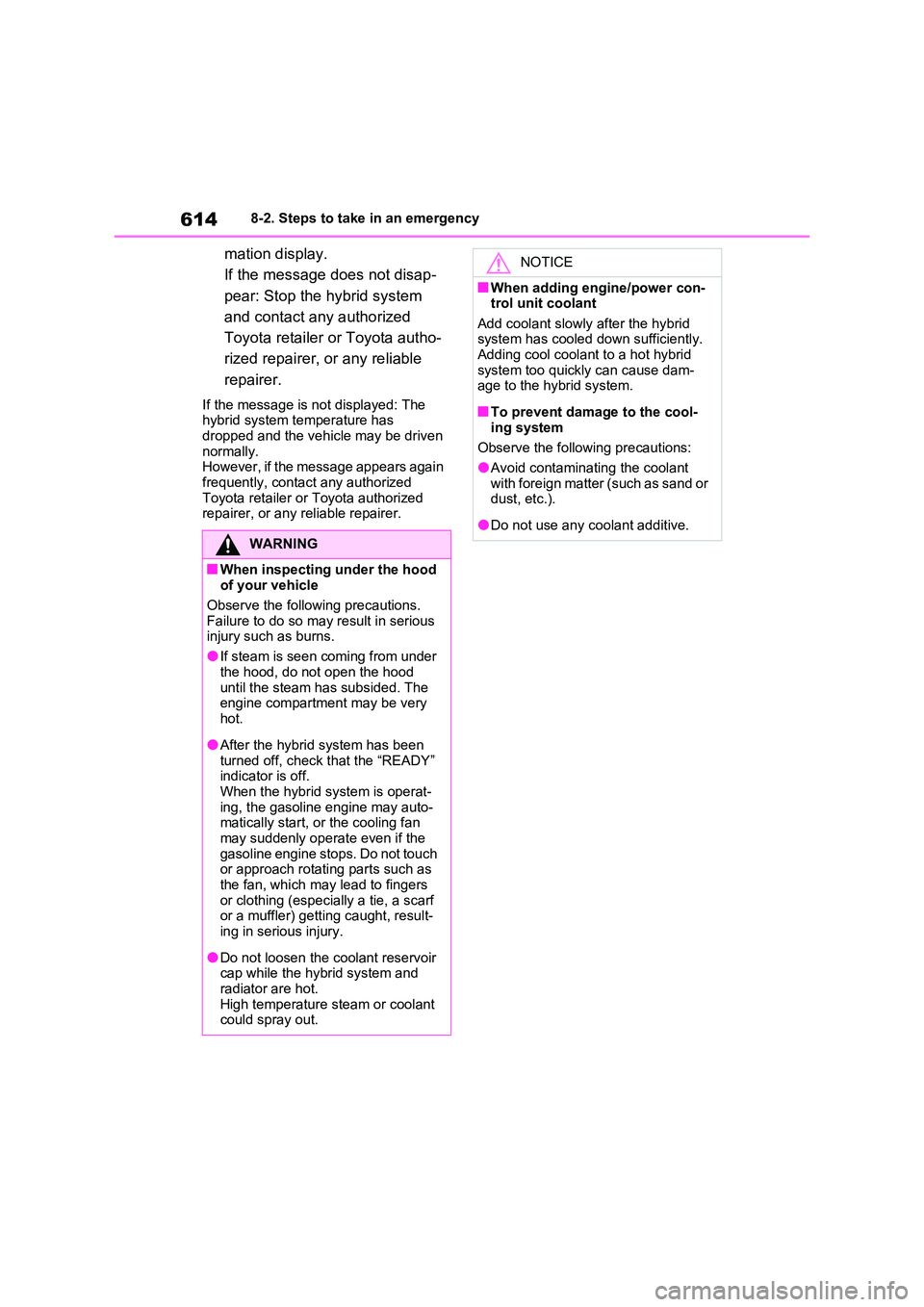
■Head-up display*1 (P.191)
*1: If equipped
*2: For details about each function: P.192
Suggestion functionOn
On (when the
vehicle is
stopped)
O–O
Off
Function*2Default
settingCustomized
setting
Head-up displayOnOff–O–
Gauge informationHybrid System
IndicatorTachometer–O–No content
Route guidance to destina-
tion/street name
*1OnOff–O–
Driving support system informa-
tion displayOnOff–O–
Compass*1OnOff–O–
Audio system operation status*1OnOff–O–
Function*1Default
settingCustomized
settingABC
ABC
Page 638 of 664
6389-2. Customization
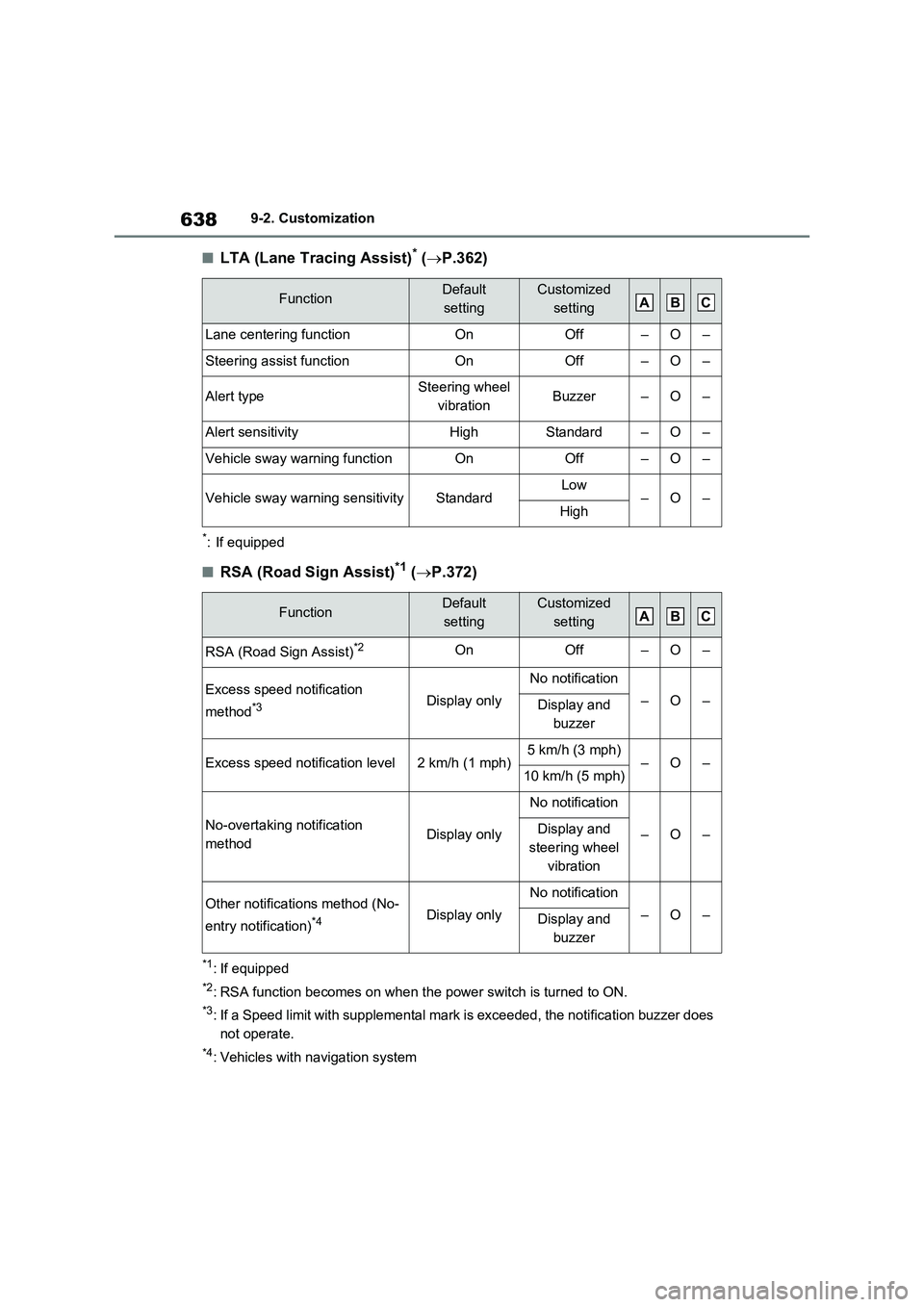
■LTA (Lane Tracing Assist)* (P.362)
*: If equipped
■RSA (Road Sign Assist)*1 (P.372)
*1: If equipped
*2: RSA function becomes on when the power switch is turned to ON.
*3: If a Speed limit with supplemental mark is exceeded, the notification buzzer does
not operate.
*4: Vehicles with navigation system
FunctionDefault
settingCustomized
setting
Lane centering functionOnOff–O–
Steering assist functionOnOff–O–
Alert typeSteering wheel
vibrationBuzzer–O–
Alert sensitivityHighStandard–O–
Vehicle sway warning functionOnOff–O–
Vehicle sway warning sensitivityStandardLow–O–High
FunctionDefault
settingCustomized
setting
RSA (Road Sign Assist)*2OnOff–O–
Excess speed notification
method
*3Display only
No notification
–O–Display and
buzzer
Excess speed notification level2 km/h (1 mph)5 km/h (3 mph)–O–10 km/h (5 mph)
No-overtaking notification
methodDisplay only
No notification
–O–Display and
steering wheel
vibration
Other notifications method (No-
entry notification)
*4Display only
No notification
–O–Display and
buzzer
ABC
ABC