2011 TOYOTA VERSO S spare wheel
[x] Cancel search: spare wheelPage 4 of 664
4TABLE OF CONTENTS
6-1. Using the air conditioning
system and defogger
Automatic air conditioning sys-
tem .................................... 452
Remote Air Conditioning System
.......................................... 460
Heated steering wheel/Front
seat heaters/Front seat heaters
and ventilators/Rear seat heat-
ers..................................... 462
6-2. Using the interior lights
Interior lights list .................. 465
6-3. Using the storage features
List of storage features ....... 468
Luggage compartment features
.......................................... 472
6-4. Using the other interior fea-
tures
Other interior features ......... 476
7-1. Maintenance and care
Cleaning and protecting the
vehicle exterior ................. 488
Cleaning and protecting the
vehicle interior .................. 491
7-2. Maintenance
Maintenance requirements . 494
7-3. Do-it-yourself maintenance
Do-it-yourself service precau-
tions .................................. 496
Hood ................................... 498
Positioning a floor jack ........ 499
Engine compartment........... 501
12-volt battery ..................... 506
Tires .................................... 509
Tire inflation pressure ......... 529
Wheels ................................ 530
Air conditioning filter ........... 532
Cleaning the DC/DC Converter
air intake vent and filter .... 536
Wiper insert replacement .... 539
Electronic key battery ......... 543
Checking and replacing fuses
.......................................... 545
Light bulbs .......................... 548
8-1. Essential information
Emergency flashers ............ 560
If your vehicle has to be stopped
in an emergency ............... 560
If the vehicle is trapped in rising
water ................................. 561
8-2. Steps to take in an emergency
If your vehicle needs to be towed
.......................................... 563
If you think something is wrong
.......................................... 566
If a warning light turns on or a
warning buzzer sounds..... 568
If a warning message is dis-
played ............................... 578
If you have a flat tire (vehicles
without spare tire) ............. 582
If you have a flat tire (vehicles
with spare tire) .................. 593
6Interior features
7Maintenance and care
8When trouble arises
Page 284 of 664
2844-4. Adjusting the steering wheel and mirrors
■Cleaning the mirror surface
If the mirror surface is dirty, the
image on the display may be diffi-
cult to see.
Clean the mirror surface gently
using a soft dry cloth.
■Cleaning the camera
If the camera lens is dirty, the dis-
played image may not be clear. In
this case, clean it with a soft cloth
dampened with water or a swab.
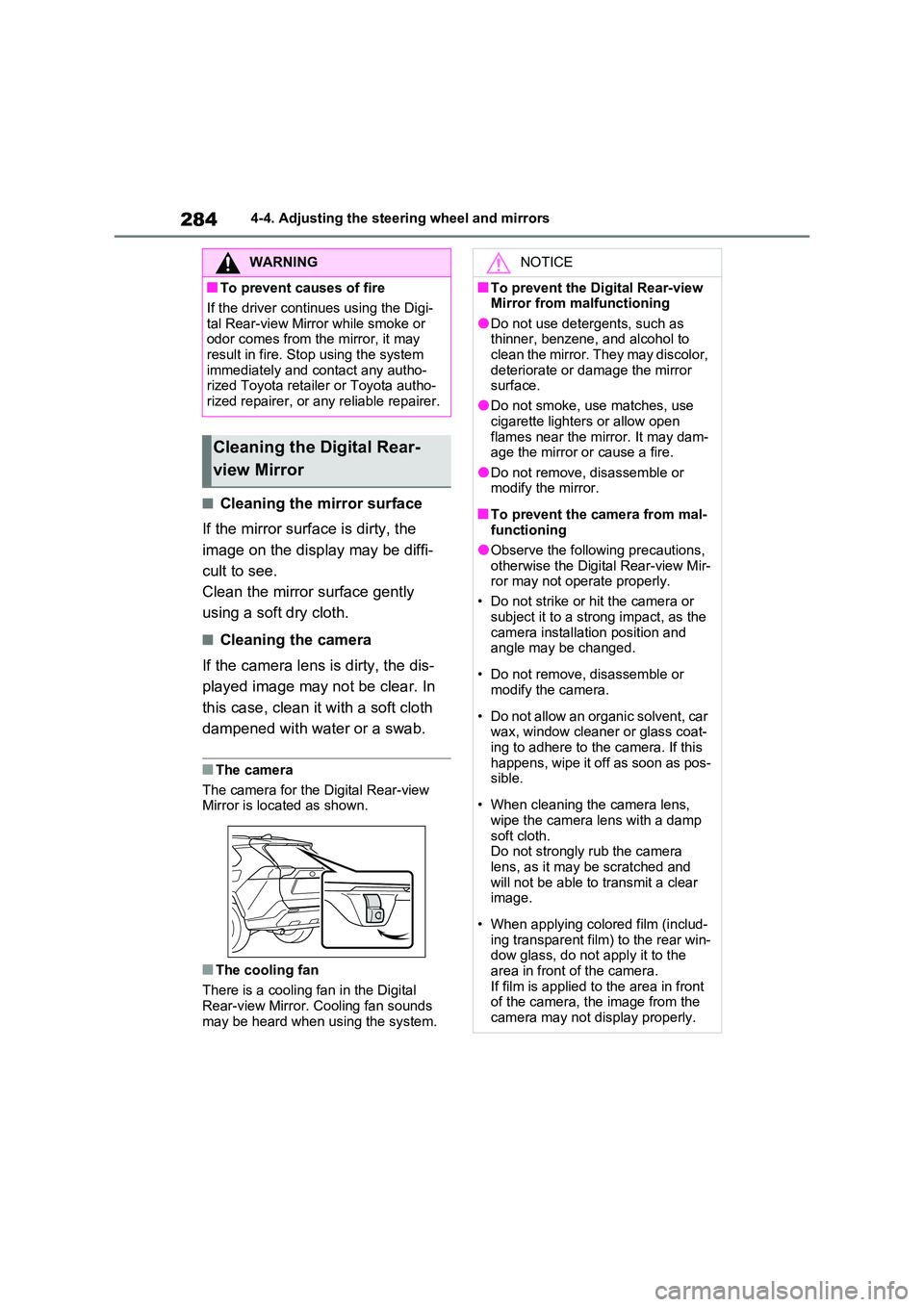
■The camera
The camera for the Digital Rear-view Mirror is located as shown.
■The cooling fan
There is a cooling fan in the Digital
Rear-view Mirror. Cooling fan sounds may be heard when using the system.
WARNING
■To prevent causes of fire
If the driver continues using the Digi-
tal Rear-view Mirror while smoke or odor comes from the mirror, it may result in fire. Stop using the system
immediately and contact any autho- rized Toyota retailer or Toyota autho-rized repairer, or any reliable repairer.
Cleaning the Digital Rear-
view Mirror
NOTICE
■To prevent the Digital Rear-view Mirror from malfunctioning
●Do not use detergents, such as thinner, benzene, and alcohol to clean the mirror. They may discolor,
deteriorate or damage the mirror surface.
●Do not smoke, use matches, use
cigarette lighters or allow open flames near the mirror. It may dam-age the mirror or cause a fire.
●Do not remove, disassemble or modify the mirror.
■To prevent the camera from mal-functioning
●Observe the following precautions,
otherwise the Digital Rear-view Mir- ror may not operate properly.
• Do not strike or hit the camera or
subject it to a strong impact, as the camera installation position and angle may be changed.
• Do not remove, disassemble or modify the camera.
• Do not allow an organic solvent, car wax, window cleaner or glass coat-
ing to adhere to the camera. If this happens, wipe it off as soon as pos-sible.
• When cleaning the camera lens, wipe the camera lens with a damp
soft cloth. Do not strongly rub the camera lens, as it may be scratched and
will not be able to transmit a clear image.
• When applying colored film (includ- ing transparent film) to the rear win-dow glass, do not apply it to the
area in front of the camera. If film is applied to the area in front of the camera, the image from the
camera may not display properly.
Page 357 of 664

357
5
5-5. Using the driving support systems
Driving
■Enabling/disabling the pre-col-
lision system
The pre-collision system can be
enabled/disabled on the screen
( P.186) of the multi-information
display.
The system is automatically enabled
each time the power switch is turned to
ON.
If the system is disabled, the PCS
warning light will turn on and a
message will be displayed on the
multi-information display.
■Changing the pre-collision
warning timing
The pre-collision warning timing
can be changed on the screen
( P.186) of the multi-information
display.
The warning timing setting is retained
when the power switch is turned to
OFF. However, if the pre-collision sys-
tem is disabled and re-enabled, the
operation timing will return to the
default setting (middle).
WARNING
●When inspecting the vehicle using a drum tester such as a chassis
dynamometer or speedometer tes- ter, or when using an on vehicle wheel balancer
●When a strong impact is applied to the front bumper or front grille, due
to an accident or other reasons
●If the vehicle cannot be driven in a
stable manner, such as when the vehicle has been in an accident or is malfunctioning
●When the vehicle is driven in a sporty manner or off-road
●When the tires are not properly inflated
●When the tires are very worn
●When tires of a size other than specified are installed
●When tire chains are installed
●When a compact spare tire or an
emergency tire puncture repair kit is used
●If equipment (snow plow, etc.) that may obstruct the radar sensor or front camera is temporarily installed
to the vehicle
Changing settings of the
pre-collision system
Page 363 of 664
363
5
5-5. Using the driving support systems
Driving
WARNING
■Before using LTA system
●Do not rely solely upon the LTA
system. The LTA system does not automatically drive the vehicle or reduce the amount of attention that
must be paid to the area in front of the vehicle. The driver must always assume full responsibility for driving
safely by paying careful attention to the surrounding conditions and operating the steering wheel to cor-
rect the path of the vehicle. Also, the driver must take adequate breaks when fatigued, such as from
driving for a long period of time.
●Failure to perform appropriate driv-
ing operations and pay careful attention may lead to an accident, resulting in death or serious injury.
●When not using the LTA system, use the LTA switch to turn the sys-
tem off.
■Situations unsuitable for LTA
system
In the following situations, use the LTA switch to turn the system off.
Failure to do so may lead to an acci- dent, resulting in death or serious injury.
●Vehicle is driven on a road surface which is slippery due to rainy
weather, fallen snow, freezing, etc.
●Vehicle is driven on a snow-cov-
ered road.
●White (yellow) lines are difficult to
see due to rain, snow, fog, dust, etc.
●Vehicle is driven in a temporary lane or restricted lane due to con-struction work.
●Vehicle is driven in a construction zone.
●A spare tire, tire chains, etc. are equipped.
●When the tires have been exces-sively worn, or when the tire infla-tion pressure is low.
●When tires of a size other than specified are installed.
●Vehicle is driven in traffic lanes other than that highways and free-
ways.
●When your vehicle is towing a
trailer or during emergency towing
■Preventing LTA system malfunc-
tions and operations performed by mistake
●Do not modify the headlights or
place stickers, etc. on the surface of the lights.
●Do not modify the suspension etc. If the suspension etc. needs to be replaced, contact any authorized
Toyota retailer or Toyota authorized repairer, or any reliable repairer.
●Do not install or place anything on the hood or grille. Also, do not install a grille guard (bull bars, kan-
garoo bar, etc.).
●If your windshield needs repairs,
contact any authorized Toyota retailer or Toyota authorized repairer, or any reliable repairer.
■Conditions in which functions may not operate properly
In the following situations, the func- tions may not operate properly and the vehicle may depart from its lane.
Drive safely by always paying careful attention to your surroundings and operate the steering wheel to correct
the path of the vehicle without relying solely on the functions.
Page 510 of 664
5107-3. Do-it-yourself maintenance
molded into the sidewall of each tire.
Replace the tires if the treadwear indi-
cators are showing on a tire.
■When to replace your vehicle’s tires
Tires should be replaced if:
●The treadwear indicators are showing on a tire.
●You have tire damage such as cuts, splits, cracks deep enough to expose
the fabric, and bulges indicating inter- nal damage.
●A tire goes flat repeatedly or cannot be properly repaired due to the size or location of a cut or other damage.
If you are not sure, consult with any authorized Toyota retailer or Toyota authorized repairer, or any reliable
repairer.
■Tire life
Any tire over 6 years old must be checked by a qualified technician even if
it has seldom or never been used or damage is not obvious.
■If the tread on snow tires wears down below 4 mm (0.16 in.)
The effectiveness of the tires as snow tires is lost.
Rotate the tires in the order shown.
To equalize tire wear and help extend
tire life, Toyota recommends that tire
rotation is carried out approximately
WARNING
■When inspecting or replacing tires
Observe the following precautions to
prevent accidents. Failure to do so may cause damage to parts of the drive train as well as
dangerous handling characteristics, which may lead to an accident result-ing in death or serious injury.
●Do not mix tires of different makes, models or tread patterns.Also, do not mix tires of remarkably
different treadwear.
●Do not use tire sizes other than those recommended by Toyota.
●Do not mix differently constructed tires (radial, bias-belted or bias-ply tires).
●Do not mix summer, all season and snow tires.
●Do not use tires that have been used on another vehicle.
Do not use tires if you do not know how they were used previously.
●Vehicles with compact spare tire: Do not tow if your vehicle has a compact spare tire installed.
●Vehicles with emergency tire punc-ture repair kit: Do not tow anything
if a tire that has been repaired using the emergency tire puncture repair kit is installed. The load on the tire
may cause unexpected damage to the tire.
NOTICE
■Driving on rough roads
Take particular care when driving on roads with loose surfaces or potholes.These conditions may cause losses in
tire inflation pressure, reducing the cushioning ability of the tires. In addi-tion, driving on rough roads may
cause damage to the tires them- selves, as well as the vehicle’s wheels and body.
■If tire inflation pressure of each tire becomes low while driving
Do not continue driving, or your tires and/or wheels may be ruined.
Tire rotation
Page 523 of 664
523
7
7-3. Do-it-yourself maintenance
Maintenance and care
( P.525)
■When replacing the tires and
wheels
If the ID code of the tire pressure warn- ing valve and transmitter is not regis-
tered, the tire pressure warning system will not work properly. After driving for about 10 minutes, the tire pressure
warning light blinks for 1 minute and stays on to indicate a system malfunc-tion.
■The tire pressure warning sys-
tem must be initialized in the
following circumstances:
When rotating the tires.
When changing the tire.
After registering the ID codes.
( P.525)
When changing between two
registered wheel sets.
When the tire pressure warning
system is initialized, the current tire
inflation pressure is set as the
benchmark pressure.
■How to initialize the tire pres-
sure warning system
1 Park the vehicle in a safe place
and stop the hybrid system for
20 minutes or more.
Initialization cannot be performed while the vehicle is moving.
NOTICE
■Repairing or replacing tires, wheels, tire pressure warning valves, transmitters and tire
valve caps
●When removing or fitting the wheels, tires or the tire pressure
warning valves and transmitters, contact any authorized Toyota retailer or Toyota authorized
repairer, or any reliable repairer as the tire pressure warning valves and transmitters may be damaged
if not handled correctly.
●Make sure to install the tire valve
caps. If the tire valve caps are not installed, water could enter the tire pressure warning valves and the
tire pressure warning valves could be bound.
●When replacing tire valve caps, do not use tire valve caps other than those specified.
The cap may become stuck.
■To avoid damage to the tire pres- sure warning valves and trans-mitters (vehicles without spare
tire)
When a tire is repaired with liquid sealants, the tire pressure warning
valve and transmitter may not operate properly. If a liquid sealant is used, contact any authorized Toyota retailer
or Toyota authorized repairer, or any reliable repairer or other qualified ser-vice shop as soon as possible. Make
sure to replace the tire pressure warn- ing valve and transmitter when repair-ing or replacing the tire. ( P.511,
531)
Initializing the tire pressure
warning system
Page 577 of 664
577
8
8-2. Steps to take in an emergency
When trouble arises
elapsed, check that the inflation
pressure of each tire is at the speci- fied level and perform initialization. ( P.523)
■The tire pressure warning light may
come on due to natural causes
The tire pressure warning light may come on due to natural causes such as
natural air leaks and tire inflation pres- sure changes caused by temperature. In this case, adjusting the tire inflation
pressure will turn off the warning light (after a few minutes).
■When a tire is replaced with a com-pact spare tire (vehicles with com-
pact spare tire)
The compact spare tire is not equipped with a tire pressure warning valve and
transmitter. If a tire goes flat, the tire pressure warning light will not turn off even though the flat tire has been
replaced with the spare tire. Replace the spare tire with the standard tire and adjust the tire inflation pressure. The tire
pressure warning light will go off after a few minutes.
■Conditions that the tire pressure warning system may not function
properly
P.512
WARNING
■If a warning light comes on or a
warning buzzer sounds when a warning message is shown on
the multi-information display*
Check and follow the message shown on the multi-information display.
Failure to do so may result in death or serious injury.*: Warning lights illuminate in red or
yellow and the warning buzzer
beeps once or sounds continu-
ously.
■When the electric power steer- ing system warning light comes on
When the light comes on yellow, the assist to the power steering is restricted. When the light comes on
red, the assist to the power steering is lost and handling operations of the steering wheel become extremely
heavy. If the steering wheel becomes heavier than usual when operating, hold firmly
and operate using more force than usual.
■If the tire pressure warning light comes on
Be sure to observe the following pre-
cautions. Failure to do so could cause a loss of vehicle control and result in death or serious injury.
●Stop your vehicle in a safe place as soon as possible. Adjust the tire inflation pressure immediately.
●If the tire pressure warning light comes on even after tire inflation
pressure adjustment, it is probable that you have a flat tire. Check the tires. If a tire is flat, change it with
the spare tire and have the flat tire repaired by the nearest authorized Toyota retailer or Toyota authorized
repairer, or any reliable repairer.
●Avoid abrupt maneuvering and
braking. If the vehicle tires deterio- rate, you could lose control of the steering wheel or the brakes.
■If a blowout or sudden air leak-age should occur
The tire pressure warning system may not activate immediately.
Page 582 of 664

5828-2. Steps to take in an emergency
Stop the vehicle in a safe place
on a hard, flat surface.
Set the parking brake.
Shift the shift lever to P.
Turn off the intrusion sensor and
tilt sensor (if equipped) ( P.79)
Stop the hybrid system.
Turn on the emergency flashers.
( P.560)
For vehicles with power back
door: Turn off the power back
door system. ( P.213)
Check the degree of the tire
damage.
A tire should only be repaired with
the emergency tire puncture repair
kit if the damage is caused by a nail
or screw passing through the tire
tread.
• Do not remove the nail or screw
from the tire. Removing the
object may widen the opening
and prevent emergency repair
with the repair kit.
• To avoid sealant leakage, move
the vehicle until the area of the
puncture, if known, is positioned
at the top of the tire.
If you have a flat tire
(vehicles without spare
tire)
Your vehicle is not equipped
with a spare tire, but instead is
equipped with an emergency
tire puncture repair kit.
A puncture caused by a nail or
screw passing through the tire
tread can be repaired tempo-
rarily using the emergency tire
puncture repair kit. (The kit
contains a bottle of sealant.
The sealant can be used only
once to temporarily repair one
tire without removing the nail
or screw from the tire.)
Depending on the damage con-
dition of the flat tire, it may not
be able to repaired with the
emergency tire puncture repair
kit. ( P.583)
After temporarily repairing the
tire with the kit, have the tire
repaired or replaced by any
authorized Toyota retailer or
Toyota authorized repairer, or
any reliable repairer.
WARNING
■If you have a flat tire
Do not continue driving with a flat tire.
Driving even a short distance with a
flat tire can damage the tire and the wheel beyond repair, which could result in an accident.
Driving with a flat tire may cause a cir- cumferential groove on the side wall.
In such a case, the tire may explode when using a repair kit.
Before repairing the vehicle