2011 TOYOTA VERSO S display
[x] Cancel search: displayPage 421 of 664

421
5
5-5. Using the driving support systems
Driving
The Parking Support Brake can be
enabled/disabled on the screen
of the multi-information display. All
of the Parking Support Brake func-
tions (static objects and rear-cross-
ing vehicles) are enabled/disabled
simultaneously. ( P.186)
When the Parking Support Brake is dis-
abled, the PKSB OFF indicator
( P.171) illuminates on the multi-infor-
mation display.
To re-enable the system, select on
the multi-information display, select
and turn it on.
If the system is disabled, it will remain
off even if the power switch is turned to
ON after the power switch has been
turned off.
WARNING
■Limitations of the Parking Sup- port Brake system
Do not overly rely on the system, as doing so may lead to an accident.
Always drive while checking the
safety of the surroundings of the vehi- cle.
Depending on the vehicle and road
conditions, weather, etc., the system may not operate.
The detection capabilities of sensors
and radars are limited. Always drive while checking the safety of the sur-roundings of the vehicle.
●The driver is solely responsible for safe driving. Always drive carefully,
taking care to observe your sur- roundings. The Parking Support Brake system is designed to pro-
vide support to lessen the severity of collisions. However, it may not operate in some situations.
●The Parking Support Brake system is not designed to stop the vehicle
completely. Additionally, even if the system has stopped the vehicle, it is necessary to depress the brake
pedal immediately as brake control will be canceled after approximately 2 seconds.
●Do not attempt to test the operation of the Parking Support Brake sys-
tem yourself such as intentionally driving to a vehicle or wall.Depending on the situations, the
system may not operate properly, possibly leading to an accident.
NOTICE
■If “PKSB Unavailable” is dis-played on the multi-information
display and the PKSB OFF indi- cator illuminates
If this message is displayed immedi-
ately after the power switch is changed to ON, operate the vehicle carefully, paying attention to your sur-
roundings. It may be necessary to drive the vehicle for a certain amount of time before the system returns to
normal. (If the system does not return to normal after driving for a while, clean the sensors and their surround-
ing area on the bumpers.)
Enabling/Disabling the Park-
ing Support Brake
Page 422 of 664
4225-5. Using the driving support systems
If the hybrid system output restric-
tion control or brake control oper-
ates, a buzzer will sound and a
message will be displayed on the
multi-information display, head-up
display (if equipped) navigation
system (if equipped) or multimedia
system (if equipped) screen, to
alert the driver.
Depending on the situation, hybrid sys-
tem output restriction control will oper-
ate to either limit acceleration or restrict
output as much as possible.
Hybrid system output restriction
control is operating (accelera-
tion restriction)
Acceleration greater than a certain
amount is restricted by the system.
Multi-information display and head-up
display: “Object Detected Acceleration
Reduced” (no warning displayed on the
head-up display)
Navigation system or multimedia sys-
tem screen: No warning displayed
PKSB OFF indicator: Not illuminated
Buzzer: Does not sound
Hybrid system output restriction
control is operating (output
restricted as much as possible)
The system has determined that stron-
ger-than-normal brake operation is nec-
essary.
Multi-information display and head-up
display: “BRAKE!”Navigation system or multimedia sys-
tem screen: “BRAKE!”
PKSB OFF indicator: Not illuminated
Buzzer: Short beep
Brake control is operating
The system determined that emer-
gency braking is necessary.
Multi-information display and head-up
display: “BRAKE!”
Navigation system or multimedia sys-
tem screen: “BRAKE!”
PKSB OFF indicator: Illuminated
Buzzer: Short beep
Vehicle stopped by system oper-
ation
The vehicle has been stopped by brake
control operation.
Multi-information display and head-up
display: “Switch to Brake” (If the accel-
erator pedal is not depressed, “Press
Brake Pedal” will be displayed.)
Navigation system or multimedia sys-
tem screen: “Press Brake Pedal”
PKSB OFF indicator: Illuminated (If the
accelerator pedal is not depressed, the
indicator is not illuminated.)
Buzzer: Short beep
If the Parking Support Brake deter-
mines that a collision with a
detected object is possible, the
hybrid system output will be
restricted to restrain any increase in
the vehicle speed. (Hybrid system
output restriction control: See figure
2.)
Additionally, if the accelerator pedal
Display and buzzer for
hybrid system output
restriction control and brake
control
System overview
Page 424 of 664

4245-5. Using the driving support systems
ing the accelerator pedal.
■Re-enabling the Parking Support
Brake
To re-enable the Parking Support Brake
when it is disabled due to operation of
the Parking Support Brake, either
enable the system again (P.421), or
turn the power switch off and then back
to ON. Additionally, if the object
becomes no longer in the traveling
direction of the vehicle or if the traveling
direction of the vehicle changes (such
as changing from moving forward to
backing up, or from backing up to mov-
ing forward), the system will be re-
enabled automatically.
■If “Parking Support Brake Unavail-
able” is displayed on the multi-
information display and the PKSB
OFF indicator illuminates
●If “Clean Parking Assist Sensor” is
displayed simultaneously, a sensor
may be covered with ice, snow, dirt,
etc. In this case, remove the ice,
snow, dirt, etc., from the sensor to
return the system to normal. If this
message is shown even after remov-
ing dirt from the sensor, or shown
when the sensor was not dirty to begin
with, have the vehicle inspected at
any authorized Toyota retailer or
Toyota authorized repairer, or any reli-
able repairer.
●If “Parking Assist Unavailable” is dis-
played simultaneously, water may be
continuously flowing over the sensor
surface, such as in a heavy rain.
When the system determines that it is
normal, the system will return to nor-
mal.
*: If equipped
This function will operate in situa-
tions such as the following if an
object is detected in the traveling
direction of the vehicle.
Parking Support Brake
function (static objects)
*
If the sensors detect a static
object, such as a wall, in the
traveling direction of the vehi-
cle and the system determines
that a collision may occur due
to the vehicle suddenly moving
forward due to an accidental
accelerator pedal operation,
the vehicle moving the unin-
tended direction due to the
wrong shift position being
selected, or while parking or
traveling at low speeds, the
system will operate to lessen
the impact with the detected
static object and reduce the
resulting damage.
Examples of function opera-
tion
Page 434 of 664
4345-5. Using the driving support systems
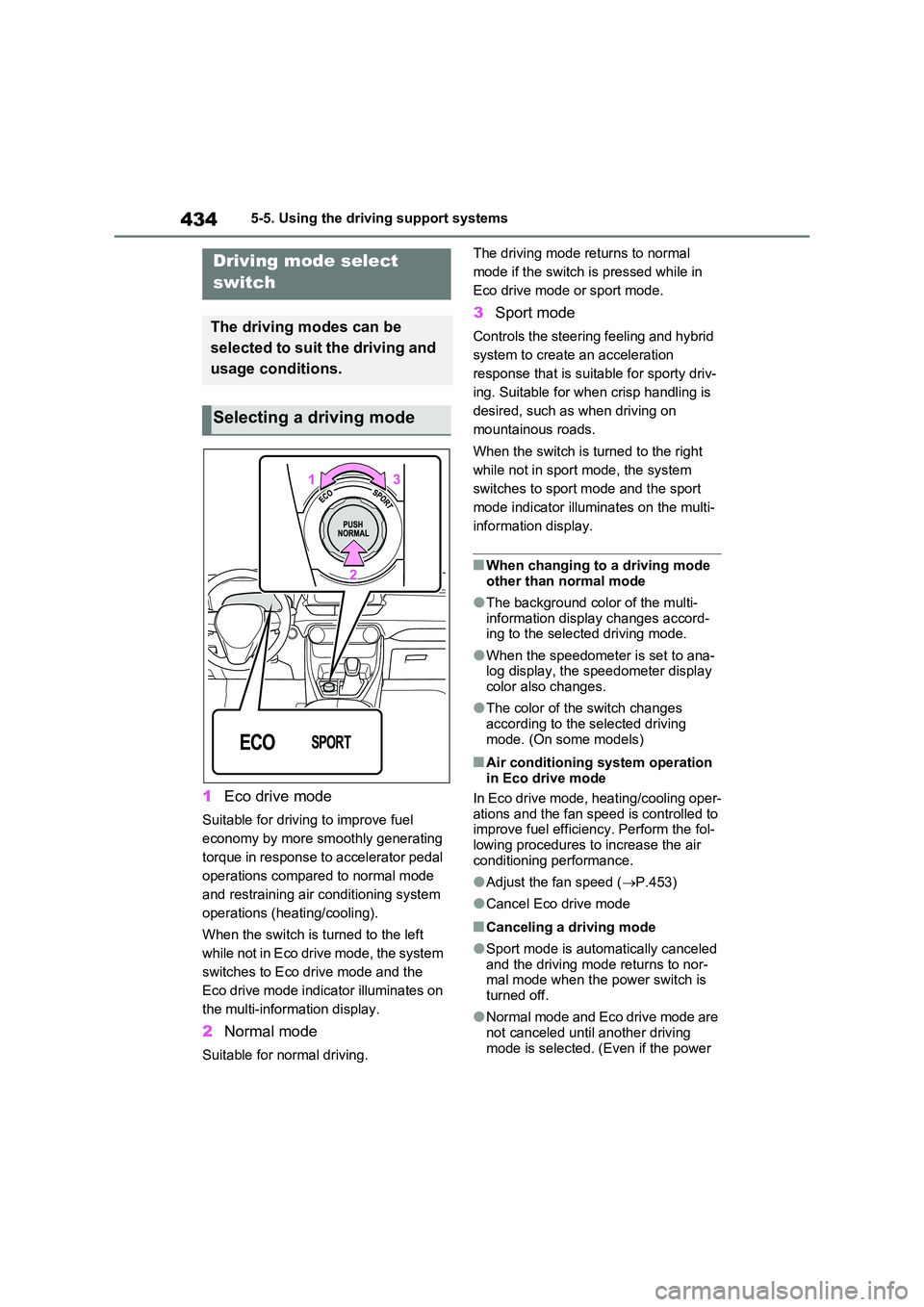
1Eco drive mode
Suitable for driving to improve fuel
economy by more smoothly generating
torque in response to accelerator pedal
operations compared to normal mode
and restraining air conditioning system
operations (heating/cooling).
When the switch is turned to the left
while not in Eco drive mode, the system
switches to Eco drive mode and the
Eco drive mode indicator illuminates on
the multi-information display.
2 Normal mode
Suitable for normal driving.
The driving mode returns to normal
mode if the switch is pressed while in
Eco drive mode or sport mode.
3 Sport mode
Controls the steering feeling and hybrid
system to create an acceleration
response that is suitable for sporty driv-
ing. Suitable for when crisp handling is
desired, such as when driving on
mountainous roads.
When the switch is turned to the right
while not in sport mode, the system
switches to sport mode and the sport
mode indicator illuminates on the multi-
information display.
■When changing to a driving mode
other than normal mode
●The background color of the multi-
information display changes accord- ing to the selected driving mode.
●When the speedometer is set to ana-log display, the speedometer display color also changes.
●The color of the switch changes according to the selected driving
mode. (On some models)
■Air conditioning system operation in Eco drive mode
In Eco drive mode, heating/cooling oper-
ations and the fan speed is controlled to improve fuel efficiency. Perform the fol-lowing procedures to increase the air
conditioning performance.
●Adjust the fan speed ( P.453)
●Cancel Eco drive mode
■Canceling a driving mode
●Sport mode is automatically canceled and the driving mode returns to nor-mal mode when the power switch is
turned off.
●Normal mode and Eco drive mode are
not canceled until another driving mode is selected. (Even if the power
Driving mode select
switch
The driving modes can be
selected to suit the driving and
usage conditions.
Selecting a driving mode
Page 437 of 664
437
5
5-5. Using the driving support systems
Driving
■If “Exhaust Filter Full See Owner’s
Manual” is shown on the multi- information display
●The message may be displayed while high load driving with particulate mat-ter accumulating.
●Hybrid system output (engine speed) is restricted when a certain amount of
particulate matter accumulates, how- ever, it is possible to drive the vehicle unless the malfunction indicator lamp
comes on.
●Particulate matter can accumulate
more quickly if the vehicle is fre- quently driven short trips or at low speeds, or if the hybrid system is reg-
ularly started in an extremely cold environment. Excessive accumula-
tion of particulate matter can be pre- vented by periodically driving long distances continuously with intermit-
tent releasing of the accelerator pedal, such as when driving on highways and freeways.
■If the malfunction indicator lamp
comes on or “Hybrid System Mal- function Output Power Reduced Visit Your Dealer” is shown on the
multi-information display
The amount of accumulated particulate matter has exceeded a certain level.
Have the vehicle inspected by any authorized Toyota retailer or Toyota authorized repairer, or any reliable
repairer immediately.
GPF (Gasoline Particu-
late Filter) system
The GPF system collects par-
ticulate matter in the exhaust
gas by using an exhaust gas
filter. The system will operate
to regenerate the filter auto-
matically, depending on the
vehicle conditions.
NOTICE
■To prevent the GPF system from not operating properly
●Do not use fuel other than the spec-ified type
●Do not modify the exhaust pipes
Page 439 of 664

439
5 5-5. Using the driving support systems
Driving
■E-Four (Electronic On-Demand
AWD system)
Automatically switches from front
wheel drive to all-wheel drive
(AWD) according to the driving con-
ditions, helping to ensure reliable
handling and stability. Examples of
conditions where the system will
switch to AWD are when cornering,
going uphill, starting off or acceler-
ating, and when the road surface is
slippery due to snow, rain, etc.
■Emergency brake signal
When the brakes are applied sud-
denly, the emergency flashers
automatically flash to alert the vehi-
cle behind.
■The Secondary Collision
Brake (if equipped)
When the SRS airbag sensor
detects a collision and the system
operates, the brakes and brake
lights are automatically controlled
to reduce the vehicle speed and
help reduce the possibility of further
damage due to a secondary colli-
sion.
■When the TRC/VSC/ABS/Trailer
Sway Control systems are operat-
ing
The slip indicator light will flash while the
TRC/VSC/ABS/Trailer Sway Control
systems are operating.
■Disabling the TRC system
If the vehicle gets stuck in mud, dirt or
snow, the TRC system may reduce
power from the hybrid system to the
wheels.
Pressing to turn the system off may
make it easier for you to rock the vehicle
in order to free it.
To turn the TRC system off, quickly
press and release .
“Traction Control Turned OFF” will be
shown on the multi-information display.
Press again to turn the system back
on.
■Turning off the TRC/VSC/Trailer
Sway Control systems
To turn the TRC/VSC/Trailer Sway Con-
trol systems off, press and hold for
more than 3 seconds while the vehicle is
stopped.
The VSC OFF indicator light will come
on and the “Traction Control Turned
OFF” will be shown on the multi-infor-
mation display.
*
Press again to turn the systems
back on.
*: On vehicles with PCS (Pre-Collision
Page 440 of 664
4405-5. Using the driving support systems
System), PCS will also be disabled
(only Pre-Collision warning is avail-
able). The PCS warning light will
come on and a message will be dis-
played on the multi-information dis-
play. (P.361)
■When the message is displayed on
the multi-information display show-
ing that TRC has been disabled
even if has not been pressed
TRC is temporary deactivated. If the
information continues to show, contact
any authorized Toyota retailer or Toyota
authorized repairer, or any reliable
repairer.
■Operating conditions of hill-start
assist control
When the following four conditions are
met, the hill-start assist control will oper-
ate:
●The shift lever is in a position other
than P or N (when starting off for-
ward/backward on an upward incline).
●The vehicle is stopped.
●The accelerator pedal is not
depressed.
●The parking brake is not engaged.
■Automatic system cancelation of
hill-start assist control
The hill-start assist control will turn off in
any of the following situations:
●The shift lever is shifted to P or N.
●The accelerator pedal is depressed.
●The parking brake is engaged.
●No more than 2 seconds have
elapsed after the brake pedal is
released.
■Sounds and vibrations caused by
the ABS, brake assist, VSC, Trailer
Sway Control, TRC and hill-start
assist control systems
●A sound may be heard from the
engine compartment when the brake
pedal is depressed repeatedly, when the hybrid system is started or just
after the vehicle begins to move. This
sound does not indicate that a mal-
function has occurred in any of these
systems.
●Any of the following conditions may
occur when the above systems are
operating. None of these indicates
that a malfunction has occurred.
• Vibrations may be felt through the
vehicle body and steering.
• A motor sound may be heard also
after the vehicle comes to a stop.
■ECB operating sound
ECB operating sound may be heard in
the following cases, but it does not indi-
cate that a malfunction has occurred.
●Operating sound heard from the
engine compartment when the brake
pedal is operated.
●Motor sound of the brake system
heard from the front part of the vehicle
when the driver’ door is opened.
●Operating sound heard from the
engine compartment when one or two
minutes passed after the stop of the
hybrid system.
■Active Cornering Assist operation
sounds and vibrations
When the Active Cornering Assist is
operated, operation sounds and vibra-
tions may be generated from the brake
system, but this is not a malfunction.
■EPS operation sound
When the steering wheel is operated, a
motor sound (whirring sound) may be
heard. This does not indicate a malfunc-
tion.
■Automatic reactivation of TRC,
Trailer Sway Control and VSC sys-
tems
After turning the TRC, Trailer Sway
Control and VSC systems off, the sys-
tems will be automatically re-enabled in
the following situations:
●When the power switch is turned off.
●If only the TRC system is turned off,
Page 441 of 664

441
5 5-5. Using the driving support systems
Driving
the TRC will turn on when vehicle
speed increases.
If both the TRC and VSC systems are
turned off, automatic re-enabling will
not occur when vehicle speed
increases.
■Operating conditions of Active Cor-
nering Assist
The system operates when the following
occurs.
●TRC/VSC can operate
●The driver is attempting to accelerate
while turning
●The system detects that the vehicle is
drifting to the outer side
●The brake pedal is released
■Reduced effectiveness of the EPS
system
The effectiveness of the EPS system is
reduced to prevent the system from
overheating when there is frequent
steering input over an extended period
of time. The steering wheel may feel
heavy as a result. Should this occur,
refrain from excessive steering input or
stop the vehicle and turn the hybrid sys-
tem off. The EPS system should return
to normal within 10 minutes.
■Operating conditions of emergency
brake signal
When the following conditions are met,
the emergency brake signal will operate:
●The emergency flashers are off.
●Actual vehicle speed is over 55 km/h (35 mph).
●The system judges from the vehicle
deceleration that it is a sudden brak-
ing operation.
■Automatic system cancelation of
emergency brake signal
The emergency brake signal will be can-
celed in any of the following situations:
●The emergency flashers are turned
on.
●The system judges from the vehicle
deceleration that is not a sudden brak-
ing operation.
■Secondary Collision Brake operat-
ing conditions (if equipped)
The system operates when the SRS air-
bag sensor detects a collision while the
vehicle is in motion. However, the sys-
tem does not operate in any of the fol-
lowing situations.
●The vehicle speed is below 10 km/h (6
mph)
●Components are damaged
■Secondary Collision Brake auto-
matic cancellation (if equipped)
The system is automatically canceled in
any of the following situations.
●The vehicle speed drops below
approximately 10 km/h (6 mph)
●A certain amount of time elapses
during operation
●The accelerator pedal is depressed a
large amount
■If a message about AWD is shown on the multi-information display
Perform the following actions.