Page 297 of 722

If you see an error message on the
audio display while playing an iPod,
f ind the solution in the chart to the
right. If you cannot clear the error
message, take your vehicle to your
dealer.Error Message
Solution
There is a problem with the USB adapter unit.
Appears when the overcurrent protection feature of the system stops
supplying power to USB because an incompatible device is connected.
Disconnect the device. Then, turn the audio system off, and turn it on
again. Do not reconnect the device that caused the error.
Appears when the iPod is empty. Store some files in the iPod.
Appears when an unsupported device is connected. Disconnect the
device.
Appears when an unsupported iPod is connected. See page 287for
specification information for iPods. If it appears when a supported
iPod is connected, update the iPod software to the newer version.
Appears when the system does not acknowledge the iPod. Reconnect
the iPod.
iPodError Messages (Models without navigation system)
294
USB ERROR
BAD USB DEVICE PLEASE CHECK OWNERSMANUAL
NO SONG
UNSUPPORTED
UNSUPPORTED VER. CONNECT RETRY
10/07/22 15:40:19 31TK8600_299
2011 Odyssey
Page 299 of 722
Do not use a device such as a card
reader or hard drive as the device
or your f iles may be damaged.
Do not connect your USB f lash
memory device using a hub.
Do not use an extension cable to
the USB adapter cable equipped
with your vehicle.
Do not keep a USB f lash memory
device in the vehicle. Direct
sunlight and high heat will
This audio system can select and
play the audio f iles f rom a USB f lash
memory device with the same
controls used f or the in-dash disc
player. To play a USB f lash memory
device, connect it to the USB adapter
cable in the glove box, then press the
USB/AUX button. The ignition
switch must be in the ACCESSORY
(I) or ON (II) position. The recommended USB f lash
memory devices are 256 MB or
higher, and f ormatted with the FAT
f ile system. Some digital audio
players may be compatible as well.
Some USB f lash memory devices
(such as devices with security lock-
out f eatures, etc.) will not work in
this audio unit.
EX-L models without navigation system
and Canadian EX modelPlaying a USB Flash Memory Device (Models without navigation system)To Play a USB Flash Memory
Device296
NOTE:
10/07/17 10:13:56 31TK8600_301
damage it.
2011 Odyssey
Page 300 of 722
Some devices cannot be powered
or charged via the USB adapter. If
this is the case, use the accessory
adapter to supply power to your
device.Some versions of MP3, WMA, or
AAC f ormat may not be supported. If
an unsupported f ile is f ound, the
audio unit displays UNSUPPORTED,
then skips to the next file.
In WMA or AAC format, DRM
(digital rights management) f iles
cannot be played. If the system f inds
a DRM f ile, the audio unit displays
UNPLAYABLE FILE, and then skips
to the next file.
The order of f iles in USB playback
maybedifferentfromtheorderof
f iles displayed in PC or other
devices etc. Files are played in the
orderstoredinUSBflashmemory
device.
Depending on the type and
number of f iles, it may take some
time bef ore they begin to play.
Depending on the sof tware the
f iles were made with, it may not be
possibletoplaysomefiles,or
displaysometextdata. We recommend backing up your
data bef ore playing a USB f lash
memory device.
Depending on the type of
encoding and writing sof tware
used, there may be cases where
character inf ormation does not
display properly.
CONT INUED
Playing a USB Flash Memory Device (Models without navigation system)
Features
297
Combining a low sampling f requency
with a low bitrate may result in
extremely degraded sound quality.
10/07/17 10:14:04 31TK8600_302
2011 Odyssey
Page 305 of 722
To take the system out of the USB
mode, press one of the other source
buttons than the USB/AUX button.
When a compatible audio unit is
connected to the auxiliary input jack,
press the USB/AUX button to select it.You can disconnect the USB f lash
memory device at any time even if
the USB mode is selected on the
audio system. Always f ollow the USB
f lash memory device’s instructions
when you remove it. When you disconnect the USB f lash
memory device while it is playing,
the display shows No Data.
To Stop Playing a USB Flash
Memory Device
Disconnect ing a USB Flash Memory
Device
Playing a USB Flash Memory Device (Models without navigation system)302
10/07/17 10:14:35 31TK8600_307
2011 Odyssey
Page 306 of 722
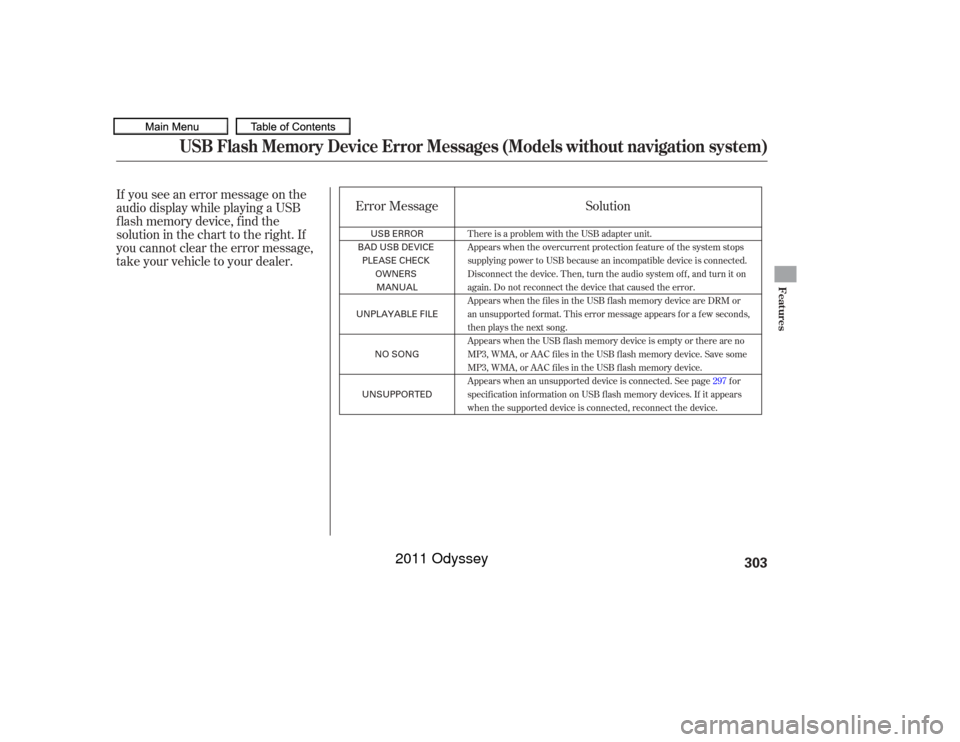
If you see an error message on the
audio display while playing a USB
f lash memory device, f ind the
solution in the chart to the right. If
you cannot clear the error message,
take your vehicle to your dealer.Error Message
Solution
There is a problem with the USB adapter unit.
Appears when the overcurrent protection feature of the system stops
supplying power to USB because an incompatible device is connected.
Disconnect the device. Then, turn the audio system off, and turn it on
again. Do not reconnect the device that caused the error.
Appears when the files in the USB flash memory device are DRM or
an unsupported format. This error message appears for a few seconds,
then plays the next song.
Appears when the USB flash memory device is empty or there are no
MP3, WMA, or AAC files in the USB flash memory device. Save some
MP3, WMA, or AAC files in the USB flash memory device.
Appears when an unsupported device is connected. See page 297for
specification information on USB flash memory devices. If it appears
when the supported device is connected, reconnect the device.
USB Flash Memory Device Error Messages (Models without navigation system)
Features
303
USB ERROR
BAD USB DEVICE
PLEASE CHECK OWNERSMANUAL
UNPLAYABLE FILE
NO SONG
UNSUPPORTED
10/07/17 10:14:39 31TK8600_308
2011 Odyssey
Page 307 of 722
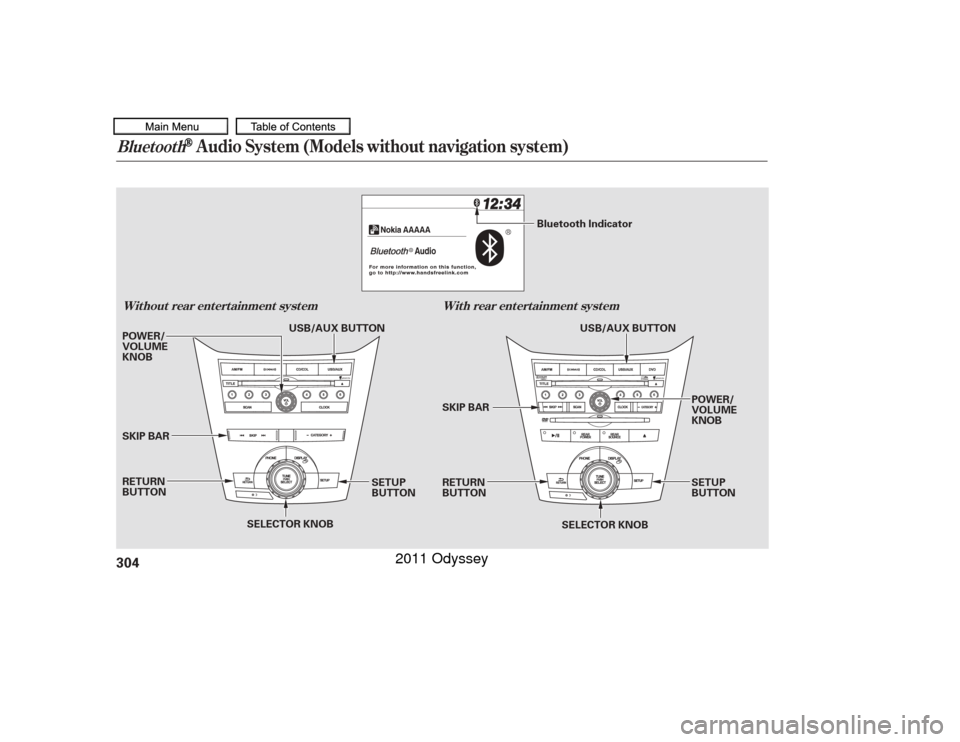
Bluetooth
Audio System (Models without navigation system)
Wit hout rear ent ert ainment syst emWit h rear ent ert ainment syst em304
SELECTOR KNOB
SELECTOR KNOB
SETUP
BUTTON
SETUP
BUTTON POWER/
VOLUME
KNOB
SKIP BAR
RETURN
BUTTON
RETURN
BUTTON SKIP BAR POWER/
VOLUME
KNOB USB/AUX BUTTON
Bluetooth Indicator
USB/AUX BUTTON
10/07/17 10:14:45 31TK8600_309
2011 Odyssey
Page 308 of 722
�Î
�Î
Make sure that your phone is paired
and linked to HFL.
To begin to play the audio f iles, you
may need to operate your phone. If
so, f ollow the phone maker’s
operating instructions. Press the USB/AUX button with
the ignition switch in the
ACCESSORY (I) or ON (II) position.
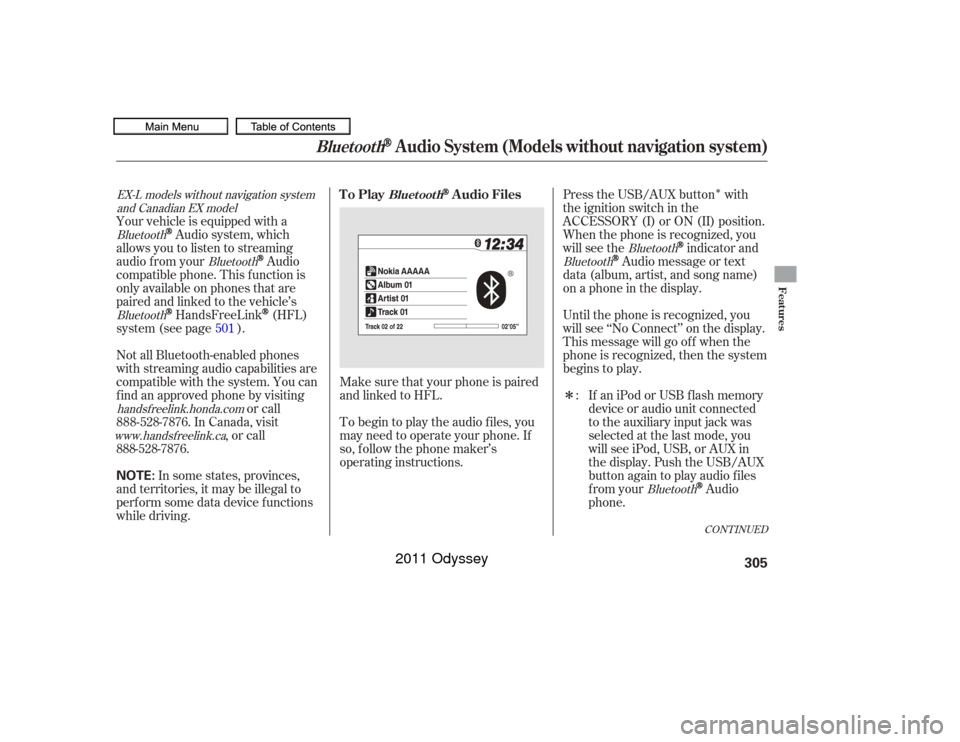
When the phone is recognized, you
will see the
indicator and
Audio message or text
data (album, artist, and song name)
on a phone in the display.
Until the phone is recognized, you
will see ‘‘No Connect’’ on the display.
This message will go of f when the
phone is recognized, then the system
begins to play.
If an iPod or USB f lash memory
device or audio unit connected
to the auxiliary input jack was
selected at the last mode, you
will see iPod, USB, or AUX in
the display. Push the USB/AUX
button again to play audio f iles
from your
Audio
phone.
Your vehicle is equipped with a
Audio system, which
allows you to listen to streaming
audio f rom your
Audio
compatible phone. This f unction is
only available on phones that are
paired and linked to the vehicle’s
HandsFreeLink
(HFL)
system (see page ).
Not all Bluetooth-enabled phones
with streaming audio capabilities are
compatible with the system. You can
f ind an approved phone by visiting or call
, or call
In some states, provinces,
and territories, it may be illegal to
perf orm some data device f unctions
while driving. :
501
Bluetooth
Bluetooth
Bluetooth
Bluetooth
Bluetooth
Bluetooth
handsf reelink.honda.comwww. handsf reelink.ca
EX-L models without navigation system
and Canadian EX model
CONT INUED
To Play
Audio Files
Bluet oot h
Bluetooth
Audio System (Models without navigation system)
Features
305
NOTE:
10/07/17 10:14:54 31TK8600_310
888-528-7876. In Canada, visit
888-528-7876.
2011 Odyssey
Page 309 of 722
The text display f unction
maynotbeavailableonsomephone
devices.
If more than one phone is paired to
the HFL system, there will be a
delay bef ore the system begins to
play. The phone is not linked to HFL.
The phone is not turned on.
The phone is not in the vehicle.
Another HFL compatible phone,
which is not compatible f or
Audio, is already
connected.
In the following conditions, the
display shows ‘‘No Connect’’
message.
Press the side of the SKIP bar
to skip f orward to the next f ile, and
press the side to skip backward
to the beginning of the current f ile.
Push the side again to skip to
the previous f ile.
Turning the selector knob to the
right or the lef t also changes the f ile.
The skip f unction may not be
available on some phone devices.
Bluetooth
Bluetooth
Audio System (Models without navigation system)
T o skip a f ile
306NOTE:
NOTE:
10/07/17 10:15:02 31TK8600_311
2011 Odyssey