Page 223 of 722
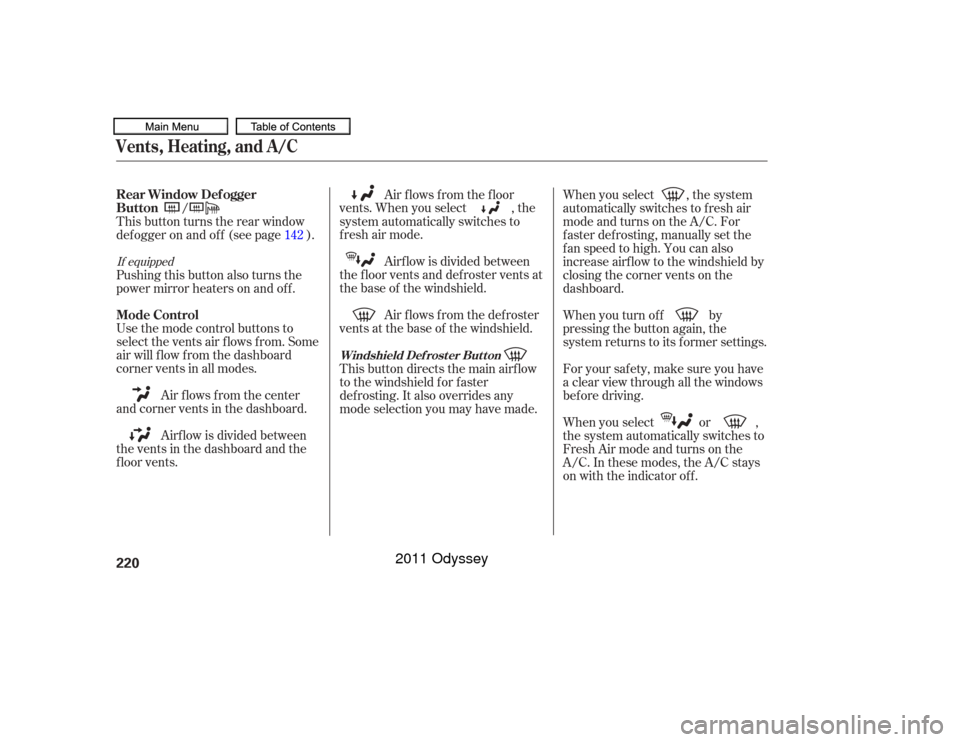
Air f lows f rom the def roster
vents at the base of the windshield. Airf low is divided between
the f loor vents and def roster vents at
the base of the windshield. Air f lows f rom the f loor
vents. When you select , the
system automatically switches to
f resh air mode.
Airf low is divided between
the vents in the dashboard and the
f loor vents. Air flows from the center
and corner vents in the dashboard. Use the mode control buttons to
select the vents air flows from. Some
air will f low f rom the dashboard
corner vents in all modes. Pushing this button also turns the
power mirror heaters on and of f . This button turns the rear window
def ogger on and of f (see page ). When you select , the system
automatically switches to f resh air
mode and turns on the A/C. For
f aster def rosting, manually set the
fanspeedtohigh.Youcanalso
increase airf low to the windshield by
closing the corner vents on the
dashboard.
When you turn of f by
pressing the button again, the
system returns to its former settings.
For your saf ety, make sure you have
a clear view through all the windows
bef ore driving.
When you select or ,
the system automatically switches to
Fresh Air mode and turns on the
A/C. In these modes, the A/C stays
on with the indicator off.
This button directs the main airflow
to the windshield for faster
def rosting. It also overrides any
mode selection you may have made.
/
142
If equippedVents, Heating, and A/CMode Control Rear Window Def ogger
Button
Windshield Def rost er But t on
220
10/07/17 10:03:34 31TK8600_225
2011 Odyssey
Page 228 of 722
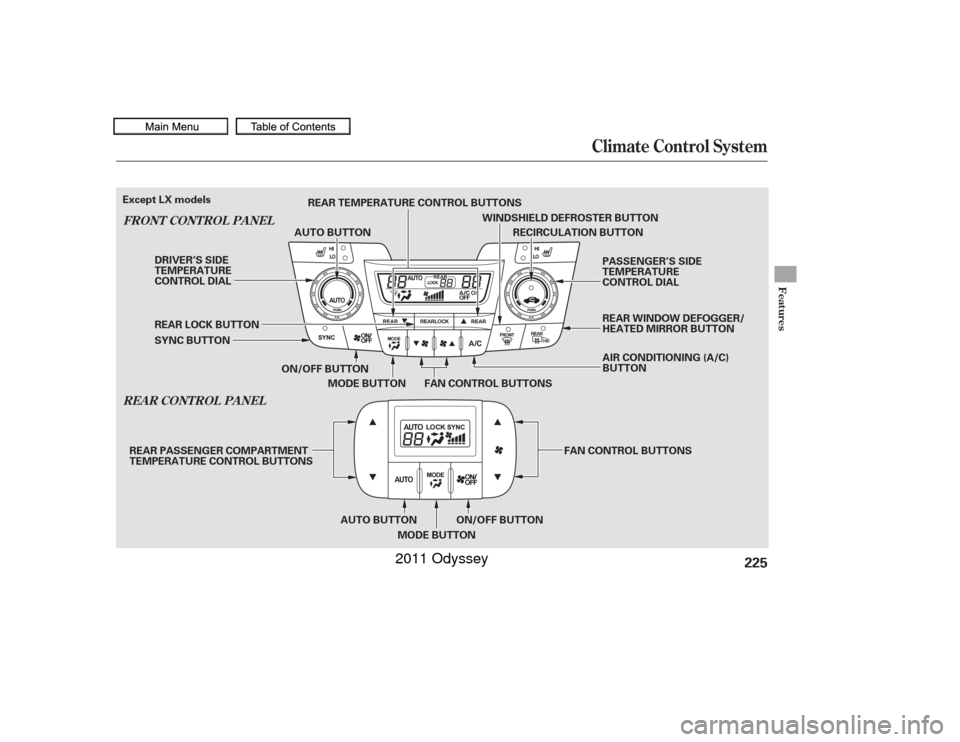
Climate Control System
REA R CONT ROL PA NEL
FRONT CONT ROL PA NEL
Features
225
RECIRCULATION BUTTON
ON/OFF BUTTON FAN CONTROL BUTTONS
MODE BUTTON
SYNC BUTTON REAR LOCK BUTTON AUTO BUTTON
WINDSHIELD DEFROSTER BUTTON
DRIVER’S SIDE
TEMPERATURE
CONTROL DIAL PASSENGER’S SIDE
TEMPERATURE
CONTROL DIAL
AIR CONDITIONING (A/C)
BUTTON
ON/OFF BUTTON
AUTO BUTTON
MODE BUTTON FAN CONTROL BUTTONS
REAR TEMPERATURE CONTROL BUTTONS
REAR PASSENGER COMPARTMENT
TEMPERATURE CONTROL BUTTONS
Except LX models
REAR WINDOW DEFOGGER/
HEATED MIRROR BUTTON
10/07/17 10:04:23 31TK8600_230
2011 Odyssey
Page 233 of 722
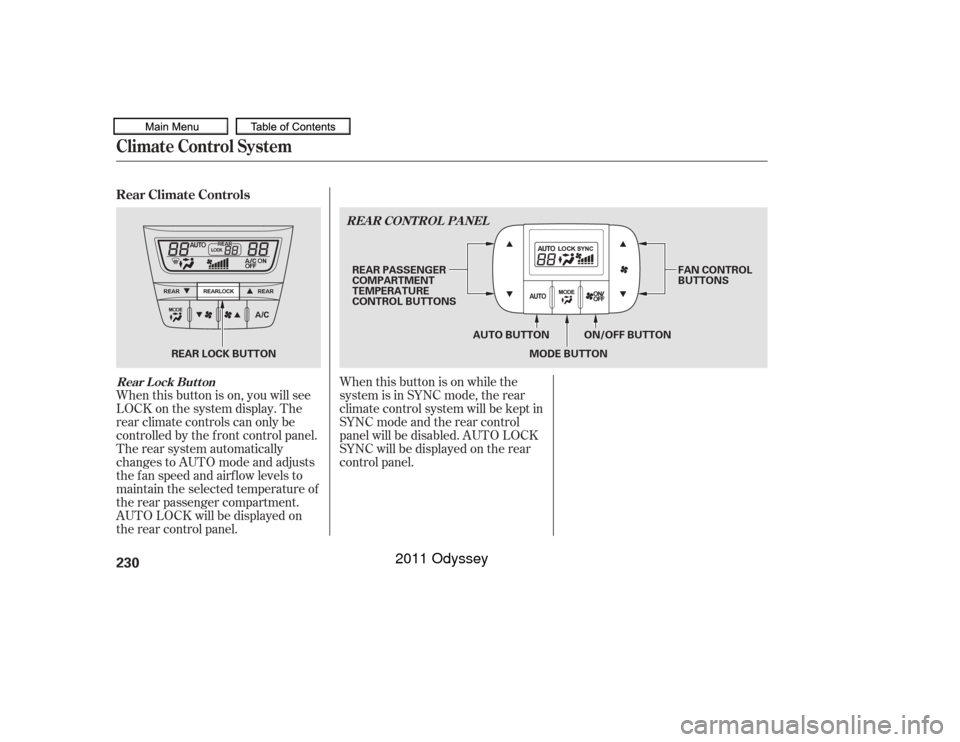
When this button is on, you will see
LOCK on the system display. The
rear climate controls can only be
controlled by the f ront control panel.
The rear system automatically
changes to AUTO mode and adjusts
the fan speed and airflow levels to
maintain the selected temperature of
the rear passenger compartment.
AUTO LOCK will be displayed on
the rear control panel.When this button is on while the
system is in SYNC mode, the rear
climate control system will be kept in
SYNC mode and the rear control
panel will be disabled. AUTO LOCK
SYNC will be displayed on the rear
control panel.
Rear Climate ControlsClimate Control SystemRear Lock Button
REA R CONT ROL PA NEL230
MODE BUTTON
AUTO BUTTON FAN CONTROL
BUTTONS
REAR PASSENGER
COMPARTMENT
TEMPERATURE
CONTROL BUTTONS
REAR LOCK BUTTON ON/OFF BUTTON
10/07/17 10:05:11 31TK8600_235
2011 Odyssey
Page 239 of 722
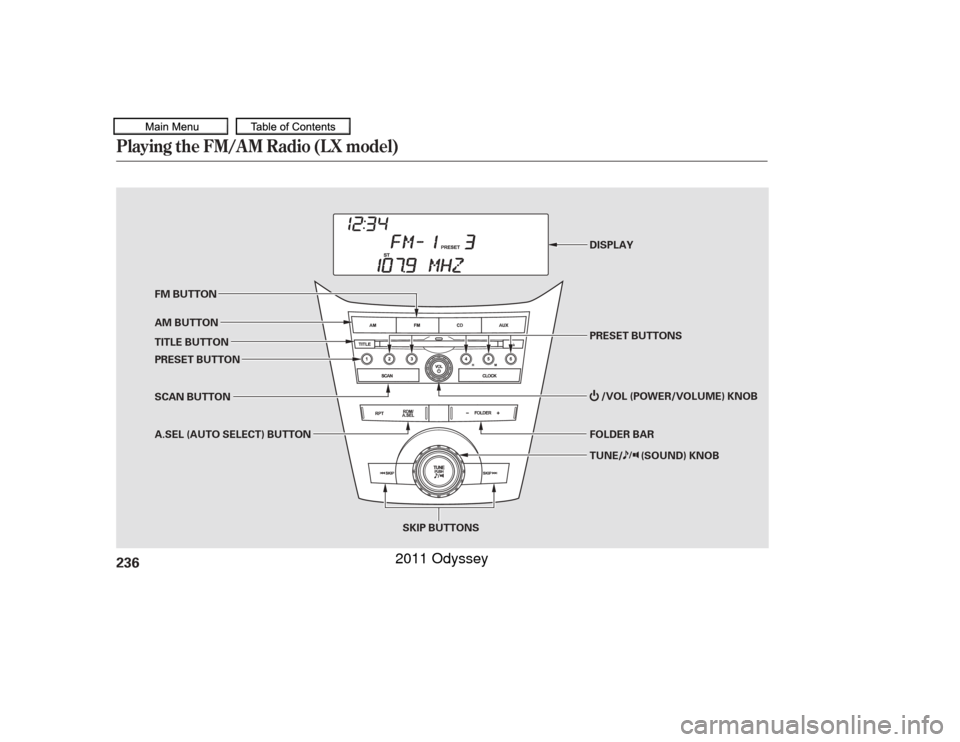
Playing the FM/AM Radio (LX model)236
TUNE/ (SOUND) KNOB
SKIP BUTTONS PRESET BUTTONS DISPLAY
FM BUTTON
PRESET BUTTON AM BUTTON
TITLE BUTTON
A.SEL (AUTO SELECT) BUTTON FOLDER BAR/VOL (POWER/VOLUME) KNOB
SCAN BUTTON
10/07/17 10:05:59 31TK8600_241
2011 Odyssey
Page 240 of 722
�µ
�µ
�µ
The band and f requency that the
radio was last tuned to are displayed.
To change bands, press the AM or
FM button. On the FM band, ST will
be displayed if the station is
broadcasting in stereo. Stereo
reproduction in AM is not available.
On the AM band, AM noise
reduction turns on automatically. The ignition switch must be in the
ACCESSORY (I) or ON (II) position.
Turn the system on by pushing the
power/volume knob or the AM or
FM button. Adjust the volume by
turning the power/volume knob.
You can use any of f ive methods to
f ind radio stations on the selected
band: tune, skip, scan, the preset
buttons, and auto select.
On the FM band, you can also use
the f eatures provided by the radio
data system (RDS). For more
inf ormation on the RDS, see page
. The scan f unction samples
all stations with strong signals on the
selected band. To activate it, press
the SCAN button, then release it.
You will see SCAN in the display.
When the system finds a strong
signal, it will stop and play that
station f or about 10 seconds.
If you do nothing, the system will
scan f or the next strong station and
play it f or 10 seconds. When it plays
a station that you want to listen to,
press the SCAN button again.
Use the TUNE knob to
tune the radio to a desired f requency.
Turn the knob right to tune to a
higher f requency, or lef t to tune to a
lower f requency. Each time you press and release
either of the SKIP buttons ( or
), the radio f requency changes
in small increments.
The skip f unction searches
up and down f rom the current
f requency to f ind a station with a
strong signal. To activate it, press
either of the SKIP buttons ( or ), then release it.
239
CONT INUED
To Select a Station
To Play the Radio
SCAN
TUNE
SK IP
Playing the FM/AM Radio (LX model)
Features
237
10/07/17 10:06:10 31TK8600_242
2011 Odyssey
Page 241 of 722
�µ�µEach preset button can
store one f requency on AM and two
f requencies on FM. If you are
traveling and can no longer receive
your preset stations, you can use the
auto select feature to find stations in
the local area.
You will see a ‘‘0’’ displayed af ter
pressing a preset button if auto
select cannot f ind a strong station f or
that preset button.
If you do not like the stations auto
select has stored, you can store
other f requencies on the preset
buttons as previously described. ,pressthe
A. SEL (auto select) button. This
restores the presets you originally
set.
Press the A. SEL button. ‘‘A-SEL’’
f lashes in the display, and the system
goes into scan mode f or several
seconds. It stores the f requencies of
six AM and twelve FM stations in
the preset buttons. For inf ormation on FM/AM radio
f requencies and reception, see
.
Select the desired band, AM or
FM. FM1 and FM2 let you store
six stations each.
Usethetune,skip,scan,orRDS
function to tune the radio to a
desired station.
Pick a preset button, and hold it
until you hear a beep.
Repeat steps 1 through 3 to store a
total of six stations on AM and
twelve stations on FM.
1.
2.
3.
4.
To turn of f auto select
Preset
A UT O SEL ECTPlaying the FM/AM Radio (LX model)238
10/07/17 10:06:18 31TK8600_243
page409
2011 Odyssey
Page 243 of 722
�´�µ
ALL: All RDS category stations
ROCK: Rock, classic rock and sof t
rock music
COUNTRY: Country music
SOFT: Adult hits and sof t music
TOP 40: Top 40 hits
OLDIES: Nostalgia music and oldies
R & B: Rhythm and blues, and sof t
rhythm and blues
RELIGION: Programs concerned
with religion CLASSIC: Classical music
JAZZ: Jazz
INFO: News, inf ormation, sports,
talk shows, f oreign language,
personality, public, college, and
weather
TRAFFIC: Traffic information
Press either side of the FOLDER bar
to select an RDS category. The
displayshowstheselectedRDS
category name f or about 10 seconds.
You can use the search or scan
function to find radio stations on the
selected RDS category. If you do
nothing while the RDS category
name is displayed, the selected
category is canceled.
On the FM band selected, you can
select the program category
provided by the RDS. Press either
side of the FOLDER bar ( or )
to display and select an RDS
category. The principal RDS
categories are shown as follows;
This f unction searches up and down
a f requency f or the strongest signal
f rom the f requencies that carry the
selected RDS category inf ormation.
This can help you to find a station in
your favorite category. To activate it,
f irst press either side of the
FOLDER bar to select an RDS
category, then press and release
either of the SKIP buttons ( or
). You will see the selected
RDS category name blinking while
searching it. When the system finds
a station, the selected RDS category
name will be displayed again f or
about 10 seconds.
If the system does not find a station,
‘‘NOTHING’’ will be blinking f or
about 5 seconds, then the system
goes back to the last selected station.
Playing the FM/AM Radio (LX model)Radio Data System (RDS) Category RDS Program Search240
10/07/17 10:06:38 31TK8600_245
2011 Odyssey
Page 246 of 722
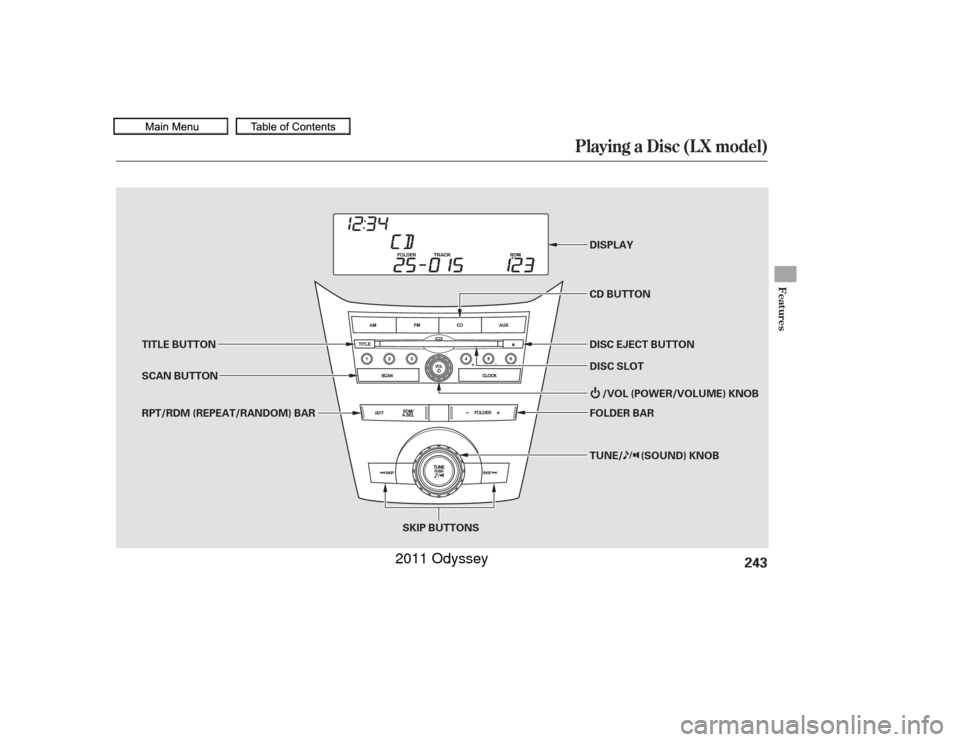
Playing a Disc (L X model)
Features
243
TUNE/ (SOUND) KNOB
SKIP BUTTONS DISPLAY
CD BUTTON
DISC EJECT BUTTON
FOLDER BAR
/VOL (POWER/VOLUME) KNOB
SCAN BUTTON TITLE BUTTON
RPT/RDM (REPEAT/RANDOM) BAR DISC SLOT
10/07/17 10:07:01 31TK8600_248
2011 Odyssey