Page 184 of 400

Thechartontherightexplainsthe
error messages you may see in the
display while playing a disc.
If you see an error message in the
display while playing a disc, press
the eject button. After ejecting the
disc, check it for damage or
deformation. If there is no damage,
insert the disc again.
For additional information on
damaged discs, see page .
If there is still a problem, the error
message will appear again. Press the
eject button, and pull out the disc.
Insert a dif f erent disc. If the new
disc plays, there is a problem with
the f irst disc. If the error message
cycle repeats and you cannot clear it,
take your vehicle to a dealer.Solution
Error Message Cause
217
Press the eject button, and pull out the disc.
Check if it is inserted correctly in the discplayer.
Make sure the disc is not scratched or damaged
(see page 217).
Press the eject button, and pull out the disc.
Check the disc for damage or deformation (see
page 217).
If the disc cannot be pulled out, or the error
message does not disappear after the disc is
ejected, see your dealer.
Press the eject button, and pull out the disc.
Check the disc for damage or deformation (see
page 217).
Will disappear when the temperature returns to
normal.
FOCUS Error
Mechanical Error
TOC Error
High Temperature
Disc Player Error Messages (Models wit h navigat ion system)
180
Main Menu
Page 186 of 400

You operate the PC card player with
the same controls used f or the radio
and the disc player. To load or play a
card, the ignition switch must be in
the ACCESSORY (I) or ON (II)
position.
The PC card player reads and plays
cards in MP3 or WMA f ormats.
Depending on the f ormat, the screen
will indicate ‘‘MP3’’ or ‘‘WMA’’ when
a card is playing. The card limit of
the player is 99 f olders and 999
tracks. If the card has a complex
structure, it takes some time f or the
system to begin playing it.
Based on PCMCIA 2.1/JEIDA 4.2,
the recommended PC cards f or the
PC card reader are:Always use the recommended
memory card with the appropriate
adapter (if an adapter is needed).
Some memory cards will not work in
this unit.
When you insert a PC card into
the slot, make sure you put it in
straight. If you cannot insert it,
remove it, and insert again.
Do not keep PC cards in the
vehicle. Direct sunlight and high
heat will damage them.
To avoid damaging the card
reader, do not insert hard disc
drive cards into the PC card slot.
You cannot close the screen
(move it to the upright position)
until the PC card is inserted all the
way into its slot or removed. Never insert f oreign objects into
the PC card slot.
SD memory card
CompactFlash
Flash ATA Depending on the sof tware the f iles
were made with, it may not be
possible to play some f iles, or display
some text data.
In WMA f ormat, DRM (digital rights
management) f iles cannot be played.
If the system finds a DRM file, it
skips that f ile and plays the next
available f older or f ile.
To Play a PC Card
Playing a PC Card (Models with navigation system)
182
NOTE:
Main Menu
Page 187 of 400
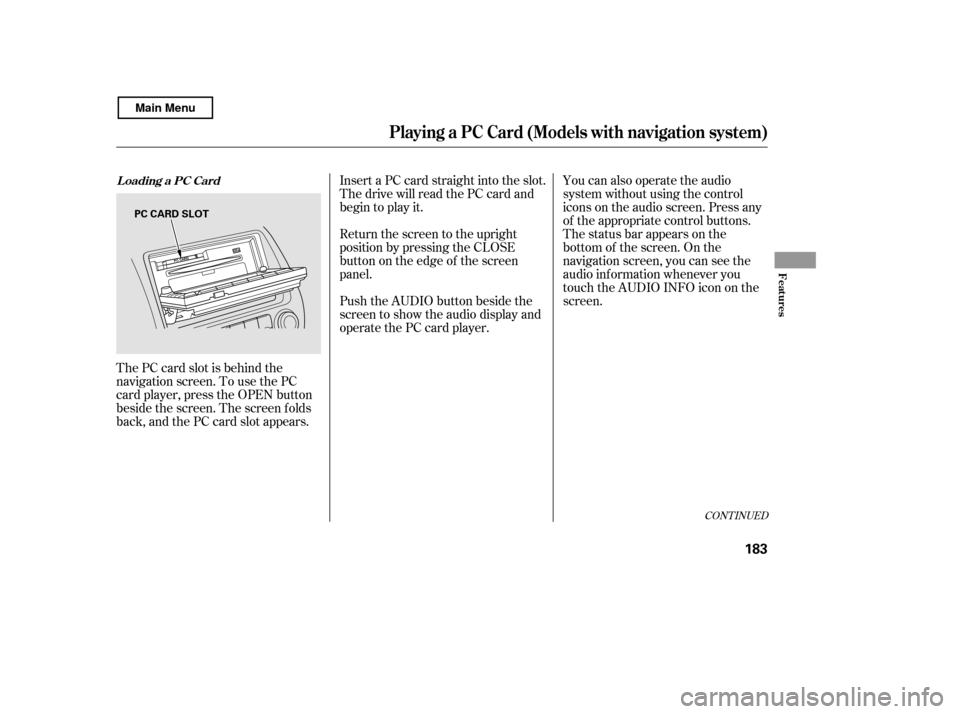
The PC card slot is behind the
navigation screen. To use the PC
card player, press the OPEN button
beside the screen. The screen f olds
back, and the PC card slot appears.Insert a PC card straight into the slot.
The drive will read the PC card and
begin to play it.
Return the screen to the upright
position by pressing the CLOSE
button on the edge of the screen
panel.
Push the AUDIO button beside the
screen to show the audio display and
operate the PC card player.
You can also operate the audio
system without using the control
icons on the audio screen. Press any
of the appropriate control buttons.
The status bar appears on the
bottom of the screen. On the
navigation screen, you can see the
audio inf ormation whenever you
touch the AUDIO INFO icon on the
screen.
CONT INUED
Loading a PC Card
Playing a PC Card (Models with navigation system)
Features
183
PC CARD SLOT
Main Menu
Page 188 of 400
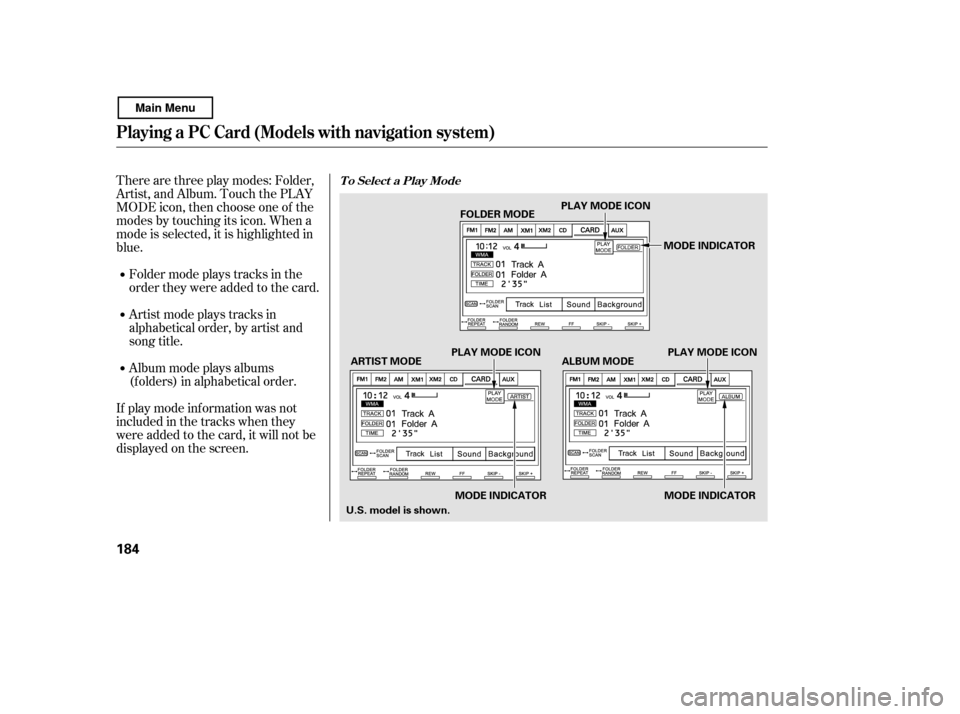
Therearethreeplaymodes:Folder,
Artist, and Album. Touch the PLAY
MODE icon, then choose one of the
modes by touching its icon. When a
mode is selected, it is highlighted in
blue.
If play mode information was not
includedinthetrackswhenthey
were added to the card, it will not be
displayed on the screen.Foldermodeplaystracksinthe
order they were added to the card.
Artistmodeplaystracksin
alphabetical order, by artist and
song title.
Album mode plays albums
(f olders) in alphabetical order.T o Select a Play Mode
Playing a PC Card (Models with navigation system)
184
MODE INDICATOR
PLAY MODE ICON PLAY MODE ICON
ARTIST MODE ALBUM MODE FOLDER MODE
U.S. model is shown. MODE INDICATOR MODE INDICATORPLAY MODE ICON
Main Menu
Page 189 of 400
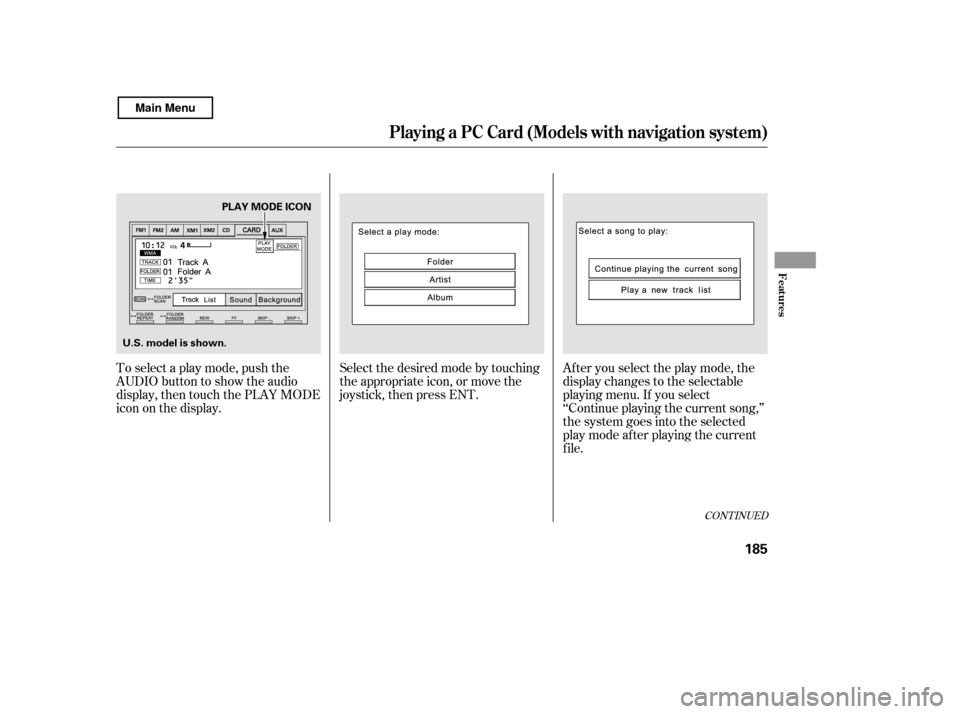
To select a play mode, push the
AUDIO button to show the audio
display, then touch the PLAY MODE
icon on the display.Select the desired mode by touching
the appropriate icon, or move the
joystick, then press ENT.
After you select the play mode, the
display changes to the selectable
playing menu. If you select
‘‘Continue playing the current song,’’
the system goes into the selected
play mode af ter playing the current
f ile.
CONT INUED
Playing a PC Card (Models with navigation system)
Features
185
U.S. model is shown.PLAY MODE ICON
Main Menu
Page 191 of 400

�µ�µ �µ
�µ �µ
�µ
�µ
�Û �Ý
Each time you press and
release (preset 6 button), the
player skips f orward to the
beginning of the next f ile. Press and
release (preset 5 button), to
skip backward to the beginning of
the current f ile. Press it again to skip
to the beginning of the previous file.
To move rapidly within
a f ile, press and hold (preset 4
button) or (preset 3 button). To continuously replay
a f ile, press and release the RPT
button (preset 1). You will see
TRACK REPEAT in the display.
Press the RPT button again to turn it
off.
This f eature, when
activated, replays all the files in the
selected f older/artist/album in the
order they are recorded or listed. To
activate each repeat mode, press and
hold the RPT button (preset 1) f or 2
seconds. You will see FOLDER
REPEAT, ARTIST REPEAT or
ALBUM REPEAT in the display.
The system continuously replays the
current f older/artist/album. Press
andholdtheRPTbuttonfor2
seconds again to turn it of f . Pressing
the RDM button, or selecting a
dif f erent f older/artist/album with
the TUNE bar also turns off the
repeat feature. This feature
plays the f iles within a f older in
random order. To activate track
random, press and release the RDM
button (preset 2). You will see
TRACK RANDOM in the display.
Press and hold the RDM button for 2
seconds to return to normal play.
This f eature, when
activated, plays all files in each
f older/artist/album in random order,
rather than in the order they are
recorded or listed. To activate each
random play, press the RDM button
(preset 2) 2 times. You will see
FOLDER RANDOM, ARTIST
RANDOM or ALBUM RANDOM in
the display.
To
select a dif f erent f older, press either
side of the TUNE bar to move to the
beginning of the next f older. Press
the side of the TUNE bar to skip
to the next folder, and the side to
move to the beginning of the
previous f older.
CONT INUED
SK IP
FF/REW T RA CK REPEA T (FIL E
REPEAT)
FOLDER/ARTIST/ALBUM
REPEATTRACK RANDOM (Random
within a f older)
FOLDER/ARTIST/ALBUM
RANDOM
FOLDER SELECTION
Playing a PC Card (Models with navigation system)
Features
187
Main Menu
Page 192 of 400

�µ�µ
The system then selects and plays
f iles randomly. This continues until
you deactivate each random play by
pressing the RDM button again, or
you select a dif f erent f older/artist/
album with the TUNE bar.
Pressing either of the SKIP buttons
(preset 5 button or 6 button) also
turns off the scan feature. The scan f unction samples
all f iles on the PC card in the order
they are recorded. To activate scan,
press and release the SCAN button.
You will see TRACK SCAN in the
display. You will get a 10 second
sampling of each f ile on the PC card.
Press and hold the SCAN button for
2 seconds to get out of scan mode
and play the last f ile sampled. This f eature, when
activated, samples the first file in
each f older/artist/album on the PC
card in order. To activate each scan
f eature, press and hold the SCAN
button until you hear a beep. You will
see FOLDER SCAN, ARTIST SCAN
or ALBUM SCAN in the display.
The system plays the f irst f ile in the
f older f or about 10 seconds. If you do
nothing, the system plays the first
f ile in each f older, in order, f or 10
seconds each. Af ter playing the f irst
f ile of the last f older/artist/album,
the system returns to normal play.
Pressing either of the SKIP buttons
(preset 5 button or 6 button),
selecting a dif f erent f older/artist/
album with the TUNE bar, or
pressing the SCAN button, also turns
off the scan feature. You can also select a f ile directly
from the folder and track lists on the
audio display. Press the AUDIO
button to show the audio display,
then touch the Track List icon. The
f older list menu appears on the
display.
SCAN
FOLDER/ARTIST/ALBUM
SCAN
Using a T rack L ist
Playing a PC Card (Models with navigation system)
188
TRACK LIST ICON
U.S. model is shown.
Main Menu
Page 193 of 400
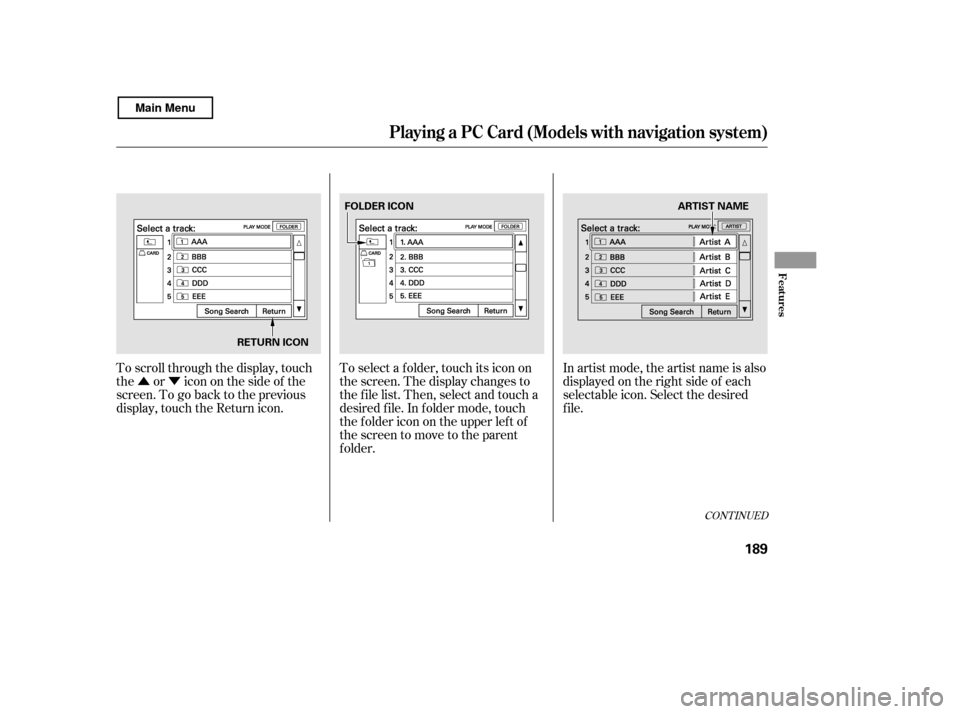
�Û�ÝIn artist mode, the artist name is also
displayed on the right side of each
selectable icon. Select the desired
f ile.
To scroll through the display, touch
the or icononthesideof the
screen.Togobacktotheprevious
display, touch the Return icon. To select a f older, touch its icon on
the screen. The display changes to
the f ile list. Then, select and touch a
desired f ile. In f older mode, touch
the f older icon on the upper lef t of
the screen to move to the parent
f older.
CONT INUED
Playing a PC Card (Models with navigation system)
Features
189
RETURN ICONFOLDER ICON
ARTIST NAME
Main Menu