Page 291 of 658
3-196 Features and controls
3
Operation sound setting
N00557400074
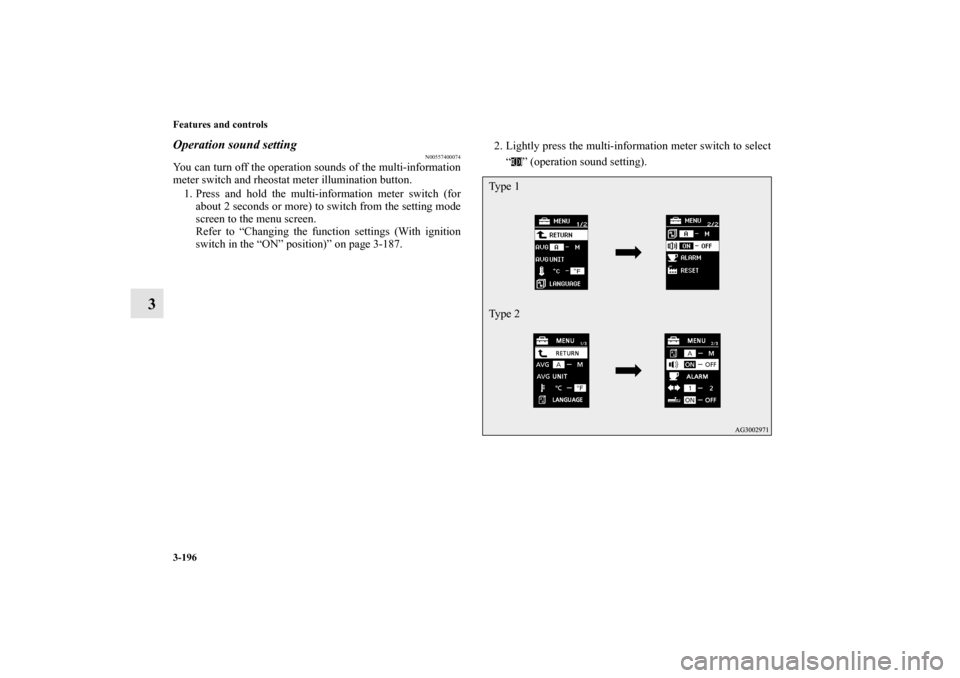
You can turn off the operation sounds of the multi-information
meter switch and rheostat meter illumination button.
1. Press and hold the multi-information meter switch (for
about 2 seconds or more) to switch from the setting mode
screen to the menu screen.
Refer to “Changing the function settings (With ignition
switch in the “ON” position)” on page 3-187.2. Lightly press the multi-information meter switch to select
“ ” (operation sound setting).
Ty p e 1
Ty p e 2
BK0103001US.book 196 ページ 2009年8月20日 木曜日 午前10時45分
Page 292 of 658
Features and controls
3-197
3
3. Press and hold the multi-information meter switch (for
about 2 seconds or more) to switch in sequence from ON
(operation sound on) → OFF (operation sound off) → ON
(operation sound on).
The setting is changed to the selected condition.NOTE�
If the battery is disconnected, the memory of the operation
sound setting is erased and is automatically set to “ON”
(operation sound on).
�
The operation sound setting only deactivates the operation
sound of the multi-information meter switch and rheostat
meter illumination button. The warning display and other
sounds cannot be deactivated.
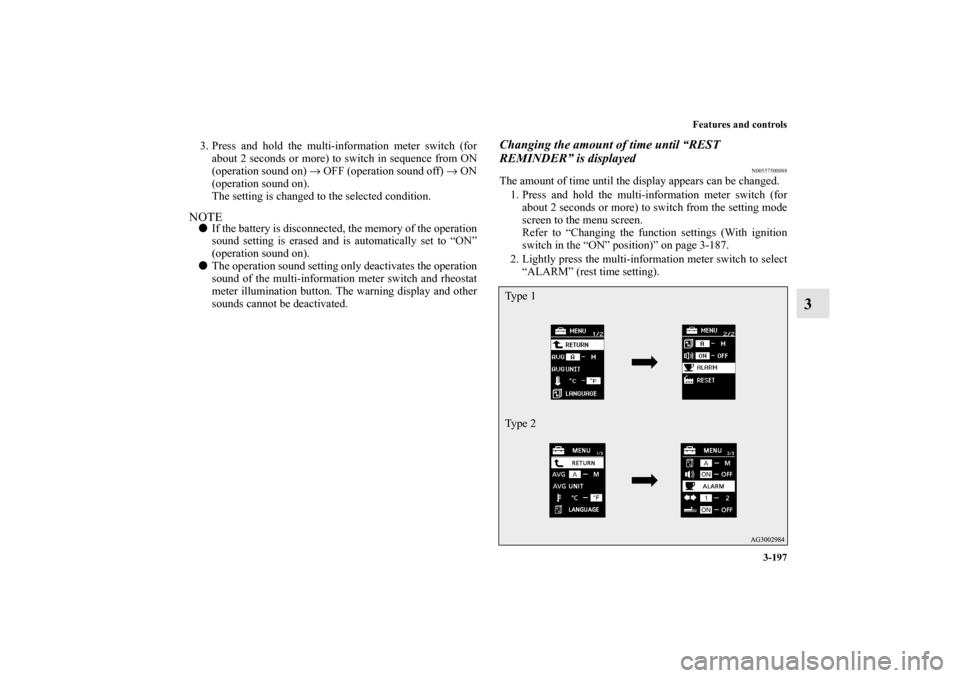
Changing the amount of time until “REST
REMINDER” is displayed
N00557500088
The amount of time until the display appears can be changed.
1. Press and hold the multi-information meter switch (for
about 2 seconds or more) to switch from the setting mode
screen to the menu screen.
Refer to “Changing the function settings (With ignition
switch in the “ON” position)” on page 3-187.
2. Lightly press the multi-information meter switch to select
“ALARM” (rest time setting).Ty p e 1
Ty p e 2
BK0103001US.book 197 ページ 2009年8月20日 木曜日 午前10時45分
Page 293 of 658
3-198 Features and controls
3
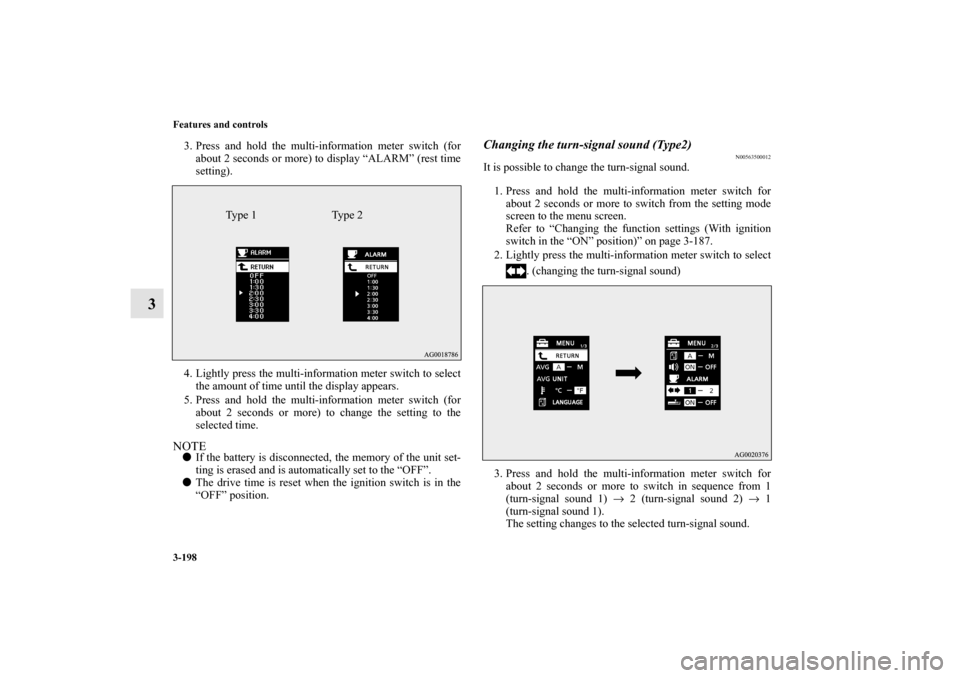
3. Press and hold the multi-information meter switch (for
about 2 seconds or more) to display “ALARM” (rest time
setting).
4. Lightly press the multi-information meter switch to select
the amount of time until the display appears.
5. Press and hold the multi-information meter switch (for
about 2 seconds or more) to change the setting to the
selected time.NOTE�
If the battery is disconnected, the memory of the unit set-
ting is erased and is automatically set to the “OFF”.
�
The drive time is reset when the ignition switch is in the
“OFF” position.
Changing the turn-signal sound (Type2)
N00563500012
It is possible to change the turn-signal sound.
1. Press and hold the multi-information meter switch for
about 2 seconds or more to switch from the setting mode
screen to the menu screen.
Refer to “Changing the function settings (With ignition
switch in the “ON” position)” on page 3-187.
2. Lightly press the multi-information meter switch to select
. (changing the turn-signal sound)
3. Press and hold the multi-information meter switch for
about 2 seconds or more to switch in sequence from 1
(turn-signal sound 1) → 2 (turn-signal sound 2) → 1
(turn-signal sound 1).
The setting changes to the selected turn-signal sound.
Type 1 Type 2
BK0103001US.book 198 ページ 2009年8月20日 木曜日 午前10時45分
Page 294 of 658
Features and controls
3-199
3
Changing the momentary fuel consumption display
(Type 2)
N00563600013
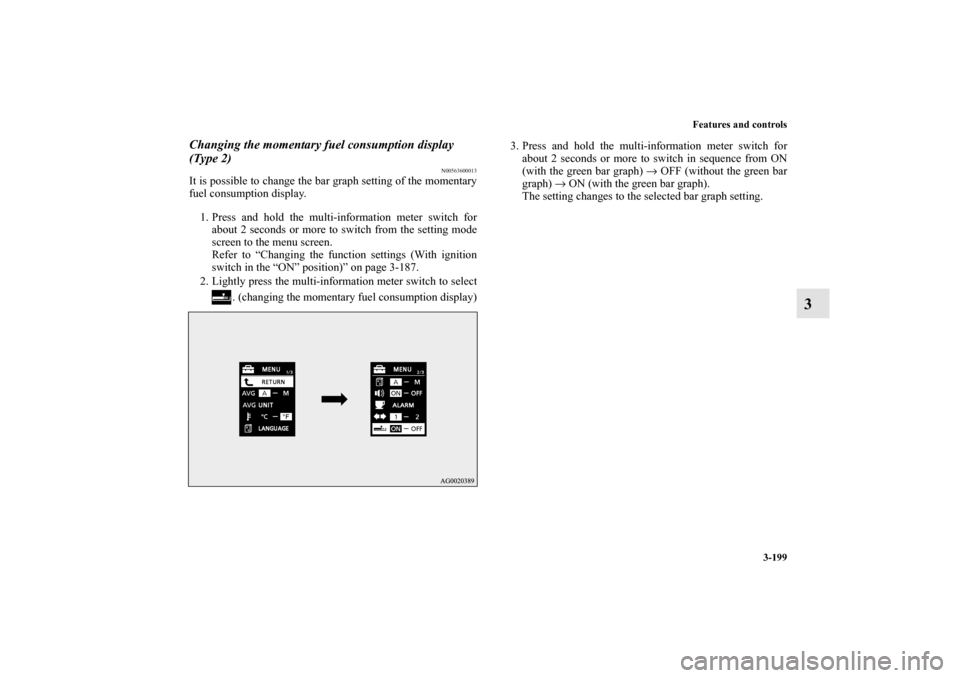
It is possible to change the bar graph setting of the momentary
fuel consumption display.
1. Press and hold the multi-information meter switch for
about 2 seconds or more to switch from the setting mode
screen to the menu screen.
Refer to “Changing the function settings (With ignition
switch in the “ON” position)” on page 3-187.
2. Lightly press the multi-information meter switch to select
. (changing the momentary fuel consumption display)3. Press and hold the multi-information meter switch for
about 2 seconds or more to switch in sequence from ON
(with the green bar graph) → OFF (without the green bar
graph) → ON (with the green bar graph).
The setting changes to the selected bar graph setting.
BK0103001US.book 199 ページ 2009年8月20日 木曜日 午前10時45分
Page 295 of 658
3-200 Features and controls
3
Returning to the factory settings
N00557600106
All of the function settings can be returned to their factory set-
tings.
1. Press and hold the multi-information meter switch (for
about 2 seconds or more) to change from the setting mode
screen to the menu screen.
Refer to “Changing the function settings (With ignition
switch in the “ON” position)” on page 3-187.
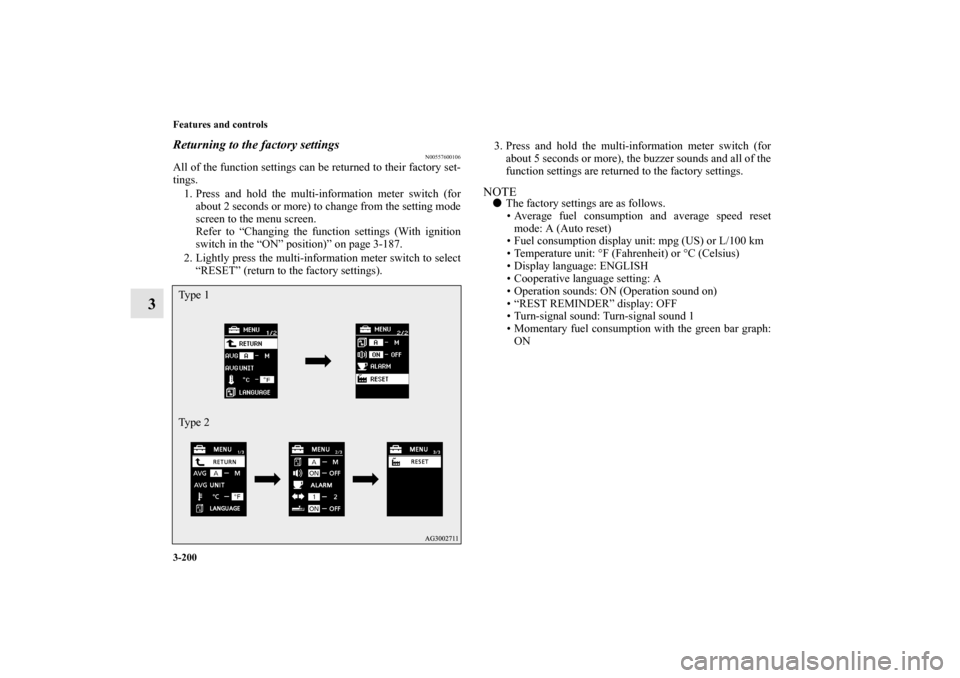
2. Lightly press the multi-information meter switch to select
“RESET” (return to the factory settings).3. Press and hold the multi-information meter switch (for
about 5 seconds or more), the buzzer sounds and all of the
function settings are returned to the factory settings.
NOTE�
The factory settings are as follows.
Average fuel consumption and average speed reset
mode: A (Auto reset)
Fuel consumption display unit: mpg (US) or L/100 km
Temperature unit: °F (Fahrenheit) or °C (Celsius)
Display language: ENGLISH
Cooperative language setting: A
Operation sounds: ON (Operation sound on)
“REST REMINDER” display: OFF
Turn-signal sound: Turn-signal sound 1
Momentary fuel consumption with the green bar graph:
ON
Ty p e 1
Ty p e 2BK0103001US.book 200 ページ 2009年8月20日 木曜日 午前10時45分
Page 296 of 658
Features and controls
3-201
3 Indicator light, warning light, and information screen display list
N00557700035
Indicator and warning light list
N00557800140
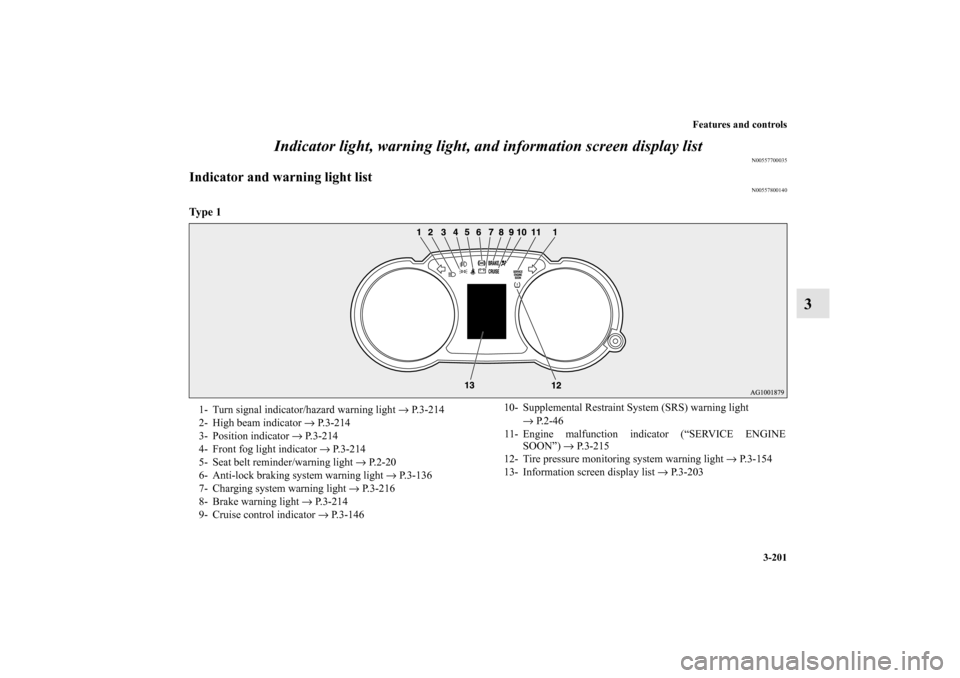
Ty p e 1
1- Turn signal indicator/hazard warning light → P.3-214
2- High beam indicator → P.3-214
3- Position indicator → P.3-214
4- Front fog light indicator → P.3-214
5- Seat belt reminder/warning light → P.2-20
6- Anti-lock braking system warning light → P.3-136
7- Charging system warning light → P.3-216
8- Brake warning light → P.3-214
9- Cruise control indicator → P.3-14610- Supplemental Restraint System (SRS) warning light
→ P. 2 - 4 6
11- Engine malfunction indicator (“SERVICE ENGINE
SOON”) → P. 3 - 2 1 5
12- Tire pressure monitoring system warning light → P.3-154
13- Information screen display list → P.3-203
BK0103001US.book 201 ページ 2009年8月20日 木曜日 午前10時45分
Page 297 of 658
3-202 Features and controls
3
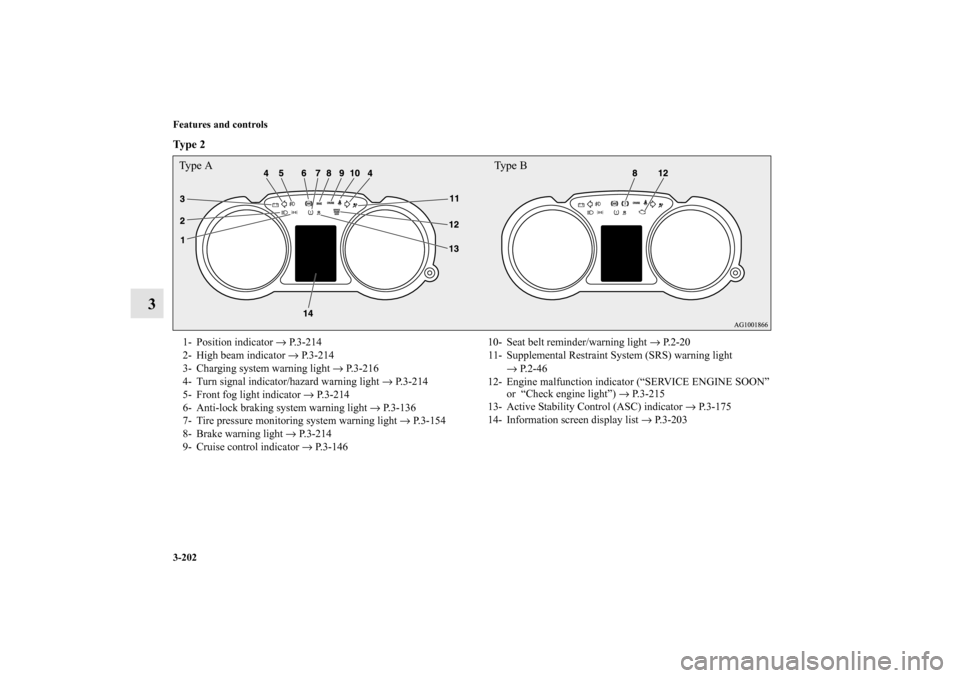
Ty p e 2
Type A Type B1- Position indicator → P.3-214
2- High beam indicator → P.3-214
3- Charging system warning light → P.3-216
4- Turn signal indicator/hazard warning light → P.3-214
5- Front fog light indicator → P.3-214
6- Anti-lock braking system warning light → P.3-136
7- Tire pressure monitoring system warning light → P.3-154
8- Brake warning light → P. 3 - 2 1 4
9- Cruise control indicator → P.3-14610- Seat belt reminder/warning light → P. 2 - 2 0
11- Supplemental Restraint System (SRS) warning light
→ P.2-46
12- Engine malfunction indicator (“SERVICE ENGINE SOON”
or “Check engine light”) → P.3-215
13- Active Stability Control (ASC) indicator → P.3-175
14- Information screen display list → P. 3 - 2 0 3
BK0103001US.book 202 ページ 2009年8月20日 木曜日 午前10時45分
Page 298 of 658
Features and controls
3-203
3
Information screen display list
N00557900040
When there is information to be announced, such as light
reminders, the tone sounds and the screen switches to the dis-
plays shown below. Refer to the appropriate page and take the
necessary measures.
When the cause of the warning display is eliminated, the warn-
ing display goes out automatically.
Refer to “Warning display list (With ignition switch in the
“OFF” position)” on page 3-204.
Refer to “Warning display list (With ignition switch in the
“ON” position)” on page 3-207.
Refer to “Other interrupt displays (With ignition switch in the
“ON” position)” on page 3-212.NOTE�
In the following cases, a warning may be displayed on the
information screen and the buzzer may sound for a few
seconds, at times.
This is caused by the system picking up interference such
as strong electromagnetic waves or noise, and is not a
functional problem.
An extremely strong electromagnetic wave is received
from a source such as an illegal radio set, a spark from a
wire, or a radar station.
Abnormal voltage or a static electricity discharge is gen-
erated by the operation of installed electronics (includ-
ing after-market parts).
If the warning display has occurred a number of times,
take your vehicle to an authorized Mitsubishi Motors
dealer or a repair facility of your choice and have the sys-
tem checked.
BK0103001US.book 203 ページ 2009年8月20日 木曜日 午前10時45分