Page 258 of 658
Features and controls
3-163
3
NOTE�
You can adjust to 8 different levels respectively for when
the tail lights are illuminated and when they are not.
�
If the vehicle is equipped with the automatic light control,
when the light switch is in the “AUTO” position, the
meter illumination switches automatically to the adjusted
brightness, depending on the brightness outside the vehi-
cle.
�
The brightness level of the instruments is stored in mem-
ory when the ignition switch is turned off.
�
If you press and hold the button for longer than about 1
second, the brightness automatically scrolls through its
different levels, and stops scrolling when you release the
button. Select your desired level of brightness. (except for
vehicles equipped with the color multi information dis-
play)
�
If you press and hold the button for longer than about 1
second when the parking lights are illuminated, the bright-
ness level changes to the maximum level. Pressing and
holding the button for longer than about 1 second again
returns the brightness level to the previous level. (for
vehicles equipped with the color multi information dis-
play)
BK0103001US.book 163 ページ 2009年8月20日 木曜日 午前10時45分
Page 263 of 658
3-168 Features and controls
3
Multi-information meter switch
N00555100107
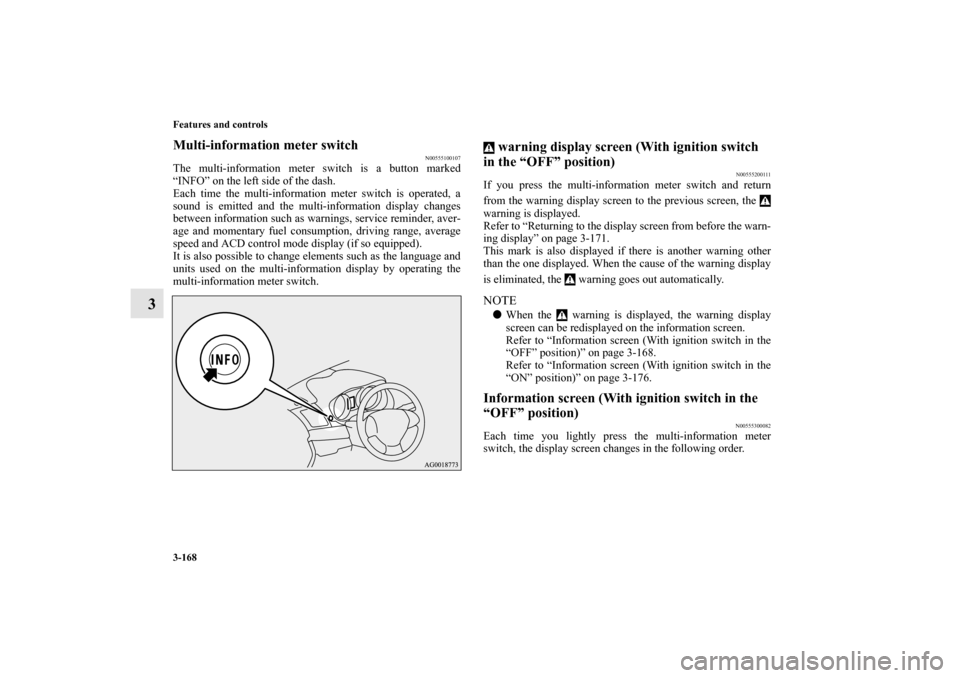
The multi-information meter switch is a button marked
“INFO” on the left side of the dash.
Each time the multi-information meter switch is operated, a
sound is emitted and the multi-information display changes
between information such as warnings, service reminder, aver-
age and momentary fuel consumption, driving range, average
speed and ACD control mode display (if so equipped).
It is also possible to change elements such as the language and
units used on the multi-information display by operating the
multi-information meter switch.
warning display screen (With ignition switch
in the “OFF” position)
N00555200111
If you press the multi-information meter switch and return
from the warning display screen to the previous screen, the
warning is displayed.
Refer to “Returning to the display screen from before the warn-
ing display” on page 3-171.
This mark is also displayed if there is another warning other
than the one displayed. When the cause of the warning display
is eliminated, the warning goes out automatically.NOTE�
When the warning is displayed, the warning display
screen can be redisplayed on the information screen.
Refer to “Information screen (With ignition switch in the
“OFF” position)” on page 3-168.
Refer to “Information screen (With ignition switch in the
“ON” position)” on page 3-176.
Information screen (With ignition switch in the
“OFF” position)
N00555300082
Each time you lightly press the multi-information meter
switch, the display screen changes in the following order.
BK0103001US.book 168 ページ 2009年8月20日 木曜日 午前10時45分
Page 264 of 658
Features and controls
3-169
3
Odometer/Trip odometer
N00555400070
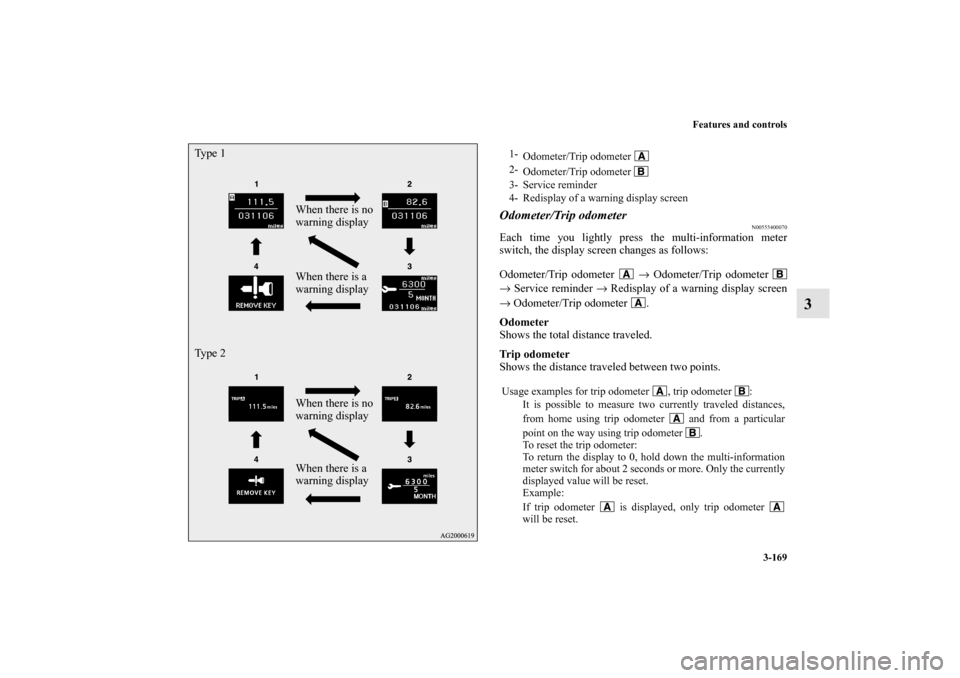
Each time you lightly press the multi-information meter
switch, the display screen changes as follows:
Odometer/Trip odometer → Odometer/Trip odometer
→ Service reminder → Redisplay of a warning display screen
→ Odometer/Trip odometer .
Odometer
Shows the total distance traveled.
Trip odometer
Shows the distance traveled between two points.
When there is no
warning display
When there is a
warning display Ty p e 1
When there is no
warning display
When there is a
warning display Ty p e 2
1-
Odometer/Trip odometer
2-
Odometer/Trip odometer
3- Service reminder
4- Redisplay of a warning display screen
Usage examples for trip odometer , trip odometer :
It is possible to measure two currently traveled distances,
from home using trip odometer and from a particular
point on the way using trip odometer .
To reset the trip odometer:
To return the display to 0, hold down the multi-information
meter switch for about 2 seconds or more. Only the currently
displayed value will be reset.
Example:
If trip odometer is displayed, only trip odometer
will be reset.
BK0103001US.book 169 ページ 2009年8月20日 木曜日 午前10時45分
Page 267 of 658
3-172 Features and controls
3
NOTE�
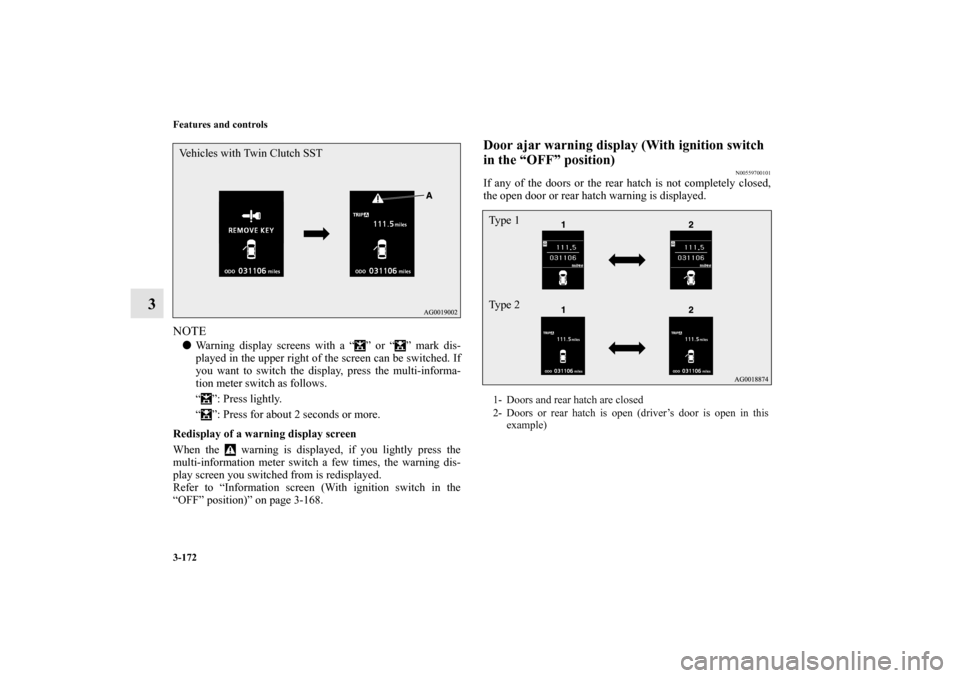
Warning display screens with a “ ” or “ ” mark dis-
played in the upper right of the screen can be switched. If
you want to switch the display, press the multi-informa-
tion meter switch as follows.
“ ”: Press lightly.
“ ”: Press for about 2 seconds or more.
Redisplay of a warning display screen
When the warning is displayed, if you lightly press the
multi-information meter switch a few times, the warning dis-
play screen you switched from is redisplayed.
Refer to “Information screen (With ignition switch in the
“OFF” position)” on page 3-168.
Door ajar warning display (With ignition switch
in the “OFF” position)
N00559700101
If any of the doors or the rear hatch is not completely closed,
the open door or rear hatch warning is displayed.
Vehicles with Twin Clutch SST
1- Doors and rear hatch are closed
2- Doors or rear hatch is open (driver’s door is open in this
example)Ty p e 1
Ty p e 2
BK0103001US.book 172 ページ 2009年8月20日 木曜日 午前10時45分
Page 271 of 658
3-176 Features and controls
3
Information screen (With ignition switch in the
“ON” position)
N00556200134
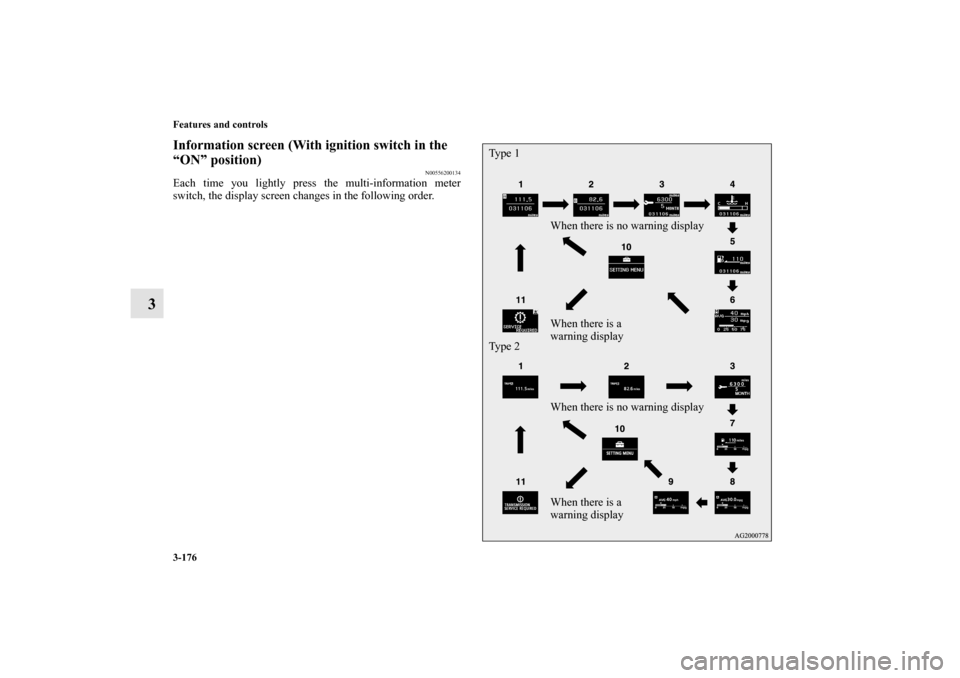
Each time you lightly press the multi-information meter
switch, the display screen changes in the following order.
When there is no warning display
When there is a
warning display
When there is no warning display
When there is a
warning display Ty p e 1
Ty p e 2
BK0103001US.book 176 ページ 2009年8月20日 木曜日 午前10時45分
Page 276 of 658
Features and controls
3-181
3
NOTE�
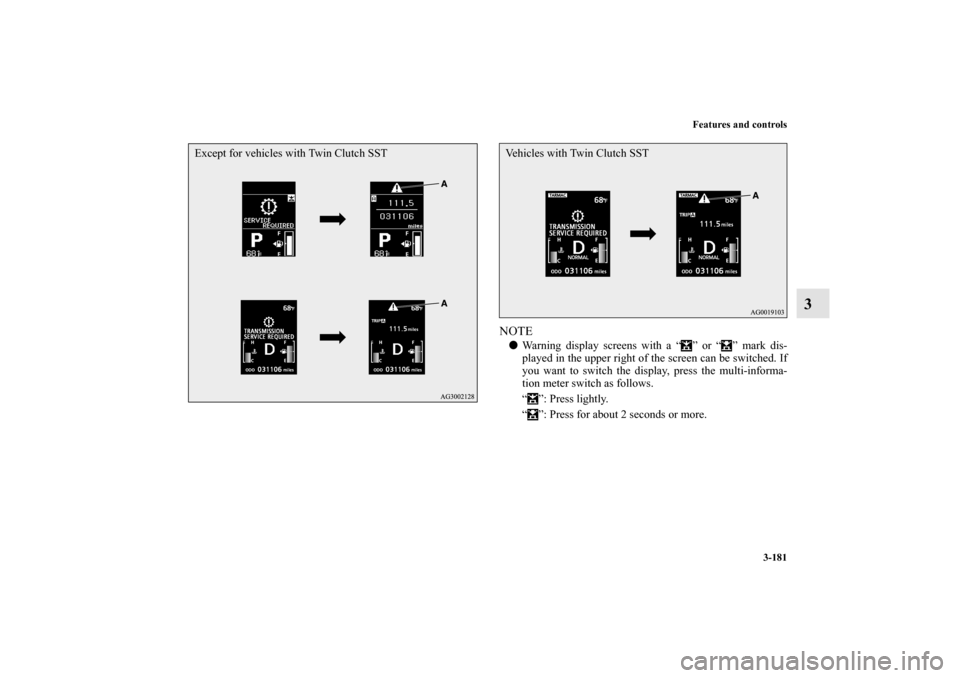
Warning display screens with a “ ” or “ ” mark dis-
played in the upper right of the screen can be switched. If
you want to switch the display, press the multi-informa-
tion meter switch as follows.
“ ”: Press lightly.
“ ”: Press for about 2 seconds or more.
Except for vehicles with Twin Clutch SST
Vehicles with Twin Clutch SST
BK0103001US.book 181 ページ 2009年8月20日 木曜日 午前10時45分
Page 277 of 658
3-182 Features and controls
3
Redisplay of a warning display screenWhen the warning is displayed, if you lightly press the
multi-information meter switch a few times, the warning dis-
play screen you switched from is redisplayed.Other interrupt displaysThe operation status of each system is displayed on the infor-
mation screen.
For further details, refer to the appropriate page in the warning
display list.
Refer to “Other interrupt displays (With ignition switch in the
“ON” position)” on page 3-212.Selector lever position display screen {continu-
ously variable transmission (CVT)}
N00556400051
Shows the position of the selector lever.
Refer to “Selector lever operation” on page 3-94.Gearshift lever position display screen (Twin
Clutch SST)
N00545800039
Shows the position of the gearshift lever.
Refer to “Gearshift lever operation” on page 3-105.
Outside temperature display screen
N00556500052
Shows the temperature outside the vehicle.NOTE�
The display setting can be changed to the preferred units
(°F or °C).
Refer to “Changing the function settings (With ignition
switch in the “ON” position)” on page 3-187.
�
The outside temperature can be displayed from about
-22 °F to 122 °F (-30 °C to 50 °C).
�
Depending on factors such as the driving conditions, the
displayed temperature may vary from the actual outside
temperature.
Twin Clutch SST control mode display screen
(Twin Clutch SST)
N00545100032
The operation status of the Twin Clutch SST control mode is
displayed. Refer to “Twin Clutch SST control mode” on page
3-112.ACD control mode display screen
(if so equipped)
N00545900069
The operation status of the ACD control mode is displayed.
Refer to “ACD control mode” on page 3-128.
BK0103001US.book 182 ページ 2009年8月20日 木曜日 午前10時45分
Page 280 of 658
Features and controls
3-185
3
2. This informs you that a periodic inspection is due. Contact
an authorized Mitsubishi Motors dealer or a repair facility
of your choice to have the system checked.
At that time, when the ignition switch is switched from
the “OFF” position to the “ON” position, the warning dis-
play is displayed for a few seconds on the information
screen.
Ty p e 1
Ty p e 2
3. After your vehicle is inspected at an authorized Mitsubishi
Motors dealer, it displays the time until the next periodic
inspection.
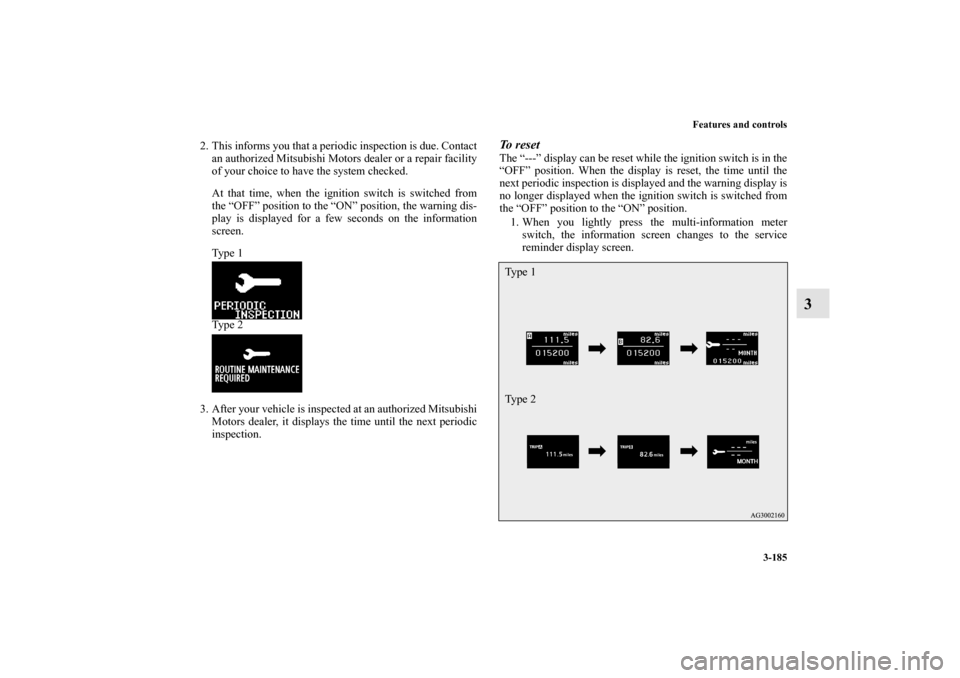
To reset The “---” display can be reset while the ignition switch is in the
“OFF” position. When the display is reset, the time until the
next periodic inspection is displayed and the warning display is
no longer displayed when the ignition switch is switched from
the “OFF” position to the “ON” position.
1. When you lightly press the multi-information meter
switch, the information screen changes to the service
reminder display screen.Ty p e 1
Ty p e 2
BK0103001US.book 185 ページ 2009年8月20日 木曜日 午前10時45分