2010 JAGUAR XFR air condition
[x] Cancel search: air conditionPage 162 of 3039
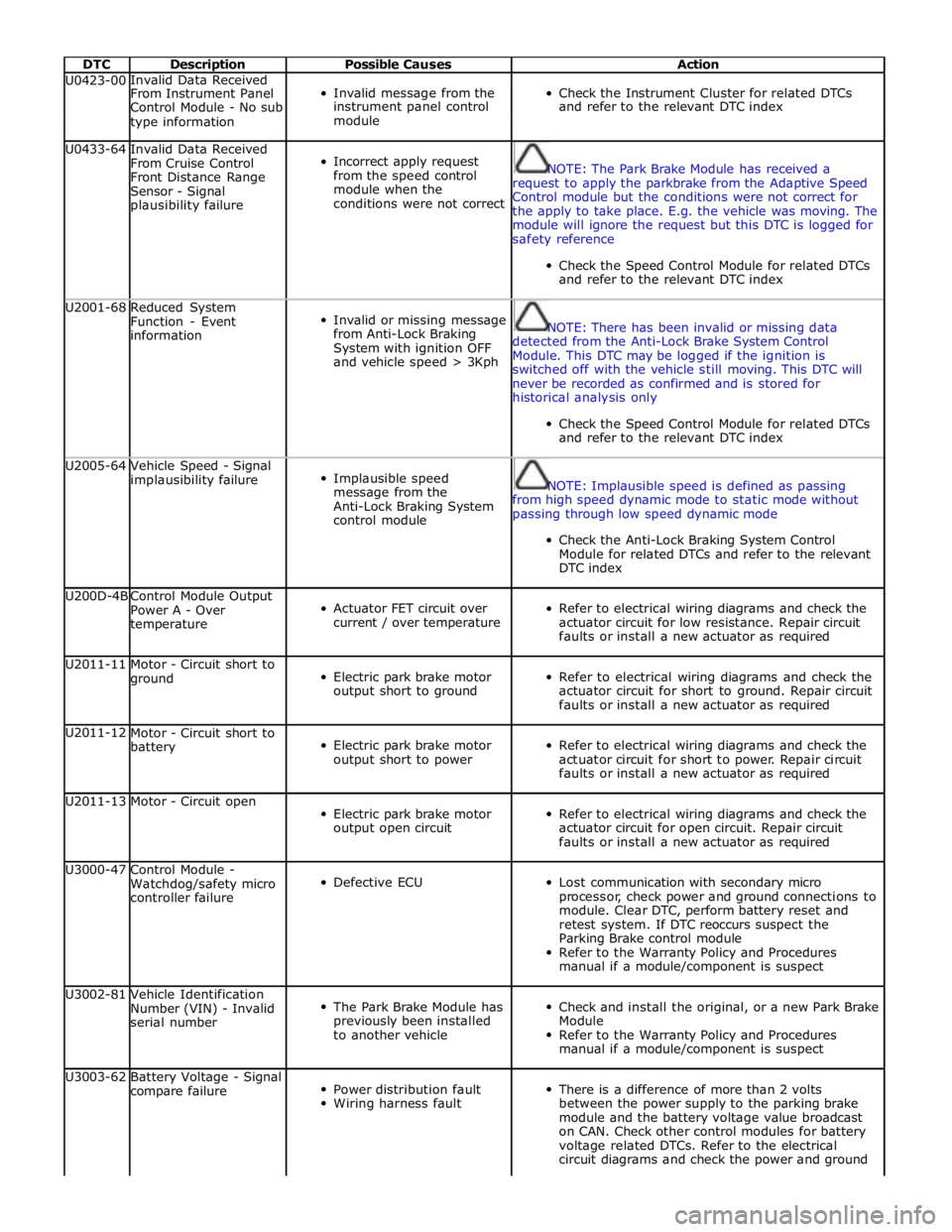
DTC Description Possible Causes Action U0423-00 Invalid Data Received
Invalid message from the
Check the Instrument Cluster for related DTCs From Instrument Panel Control Module - No sub instrument panel control and refer to the relevant DTC index type information module U0433-64
Invalid Data Received
From Cruise Control
Front Distance Range
Sensor - Signal
plausibility failure
Incorrect apply request
from the speed control
module when the
conditions were not correct
NOTE: The Park Brake Module has received a
request to apply the parkbrake from the Adaptive Speed
Control module but the conditions were not correct for
the apply to take place. E.g. the vehicle was moving. The
module will ignore the request but this DTC is logged for
safety reference
Check the Speed Control Module for related DTCs
and refer to the relevant DTC index U2001-68
Reduced System
Function - Event
information
Invalid or missing message
from Anti-Lock Braking
System with ignition OFF
and vehicle speed > 3Kph
NOTE: There has been invalid or missing data
detected from the Anti-Lock Brake System Control
Module. This DTC may be logged if the ignition is
switched off with the vehicle still moving. This DTC will
never be recorded as confirmed and is stored for
historical analysis only
Check the Speed Control Module for related DTCs
and refer to the relevant DTC index U2005-64
Vehicle Speed - Signal
implausibility failure
Implausible speed
message from the
Anti-Lock Braking System
control module
NOTE: Implausible speed is defined as passing
from high speed dynamic mode to static mode without
passing through low speed dynamic mode
Check the Anti-Lock Braking System Control
Module for related DTCs and refer to the relevant
DTC index U200D-4B
Control Module Output
Power A - Over
temperature
Actuator FET circuit over
current / over temperature
Refer to electrical wiring diagrams and check the
actuator circuit for low resistance. Repair circuit
faults or install a new actuator as required U2011-11
Motor - Circuit short to
ground
Electric park brake motor
output short to ground
Refer to electrical wiring diagrams and check the
actuator circuit for short to ground. Repair circuit
faults or install a new actuator as required U2011-12
Motor - Circuit short to
battery
Electric park brake motor
output short to power
Refer to electrical wiring diagrams and check the
actuator circuit for short to power. Repair circuit
faults or install a new actuator as required U2011-13 Motor - Circuit open
Electric park brake motor
output open circuit
Refer to electrical wiring diagrams and check the
actuator circuit for open circuit. Repair circuit
faults or install a new actuator as required U3000-47
Control Module -
Watchdog/safety micro
controller failure
Defective ECU
Lost communication with secondary micro
processor, check power and ground connections to
module. Clear DTC, perform battery reset and
retest system. If DTC reoccurs suspect the
Parking Brake control module
Refer to the Warranty Policy and Procedures
manual if a module/component is suspect U3002-81
Vehicle Identification
Number (VIN) - Invalid
serial number
The Park Brake Module has
previously been installed
to another vehicle
Check and install the original, or a new Park Brake
Module
Refer to the Warranty Policy and Procedures
manual if a module/component is suspect U3003-62
Battery Voltage - Signal
compare failure
Power distribution fault
Wiring harness fault
There is a difference of more than 2 volts
between the power supply to the parking brake
module and the battery voltage value broadcast
on CAN. Check other control modules for battery
voltage related DTCs. Refer to the electrical
circuit diagrams and check the power and ground
Page 165 of 3039
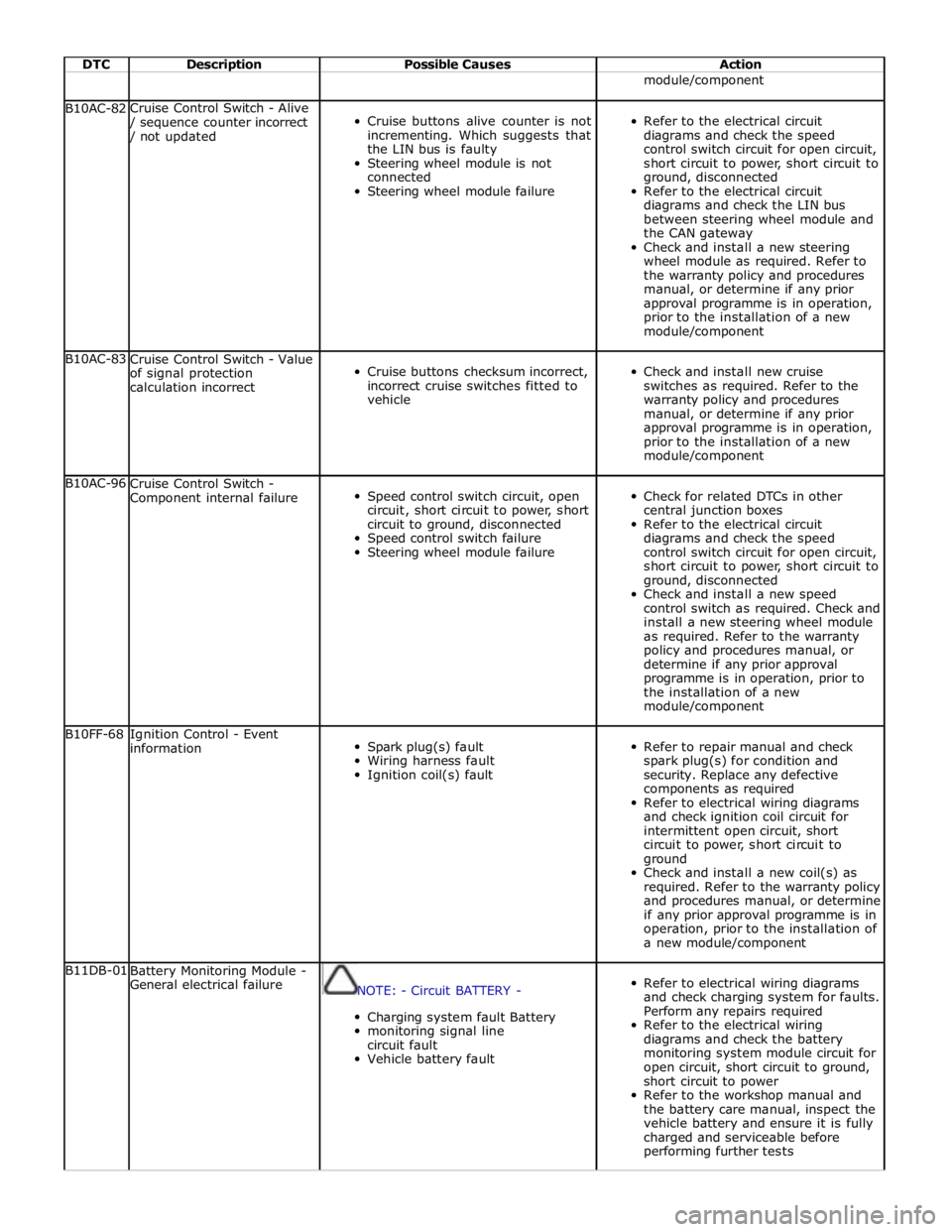
DTC Description Possible Causes Action module/component B10AC-82 Cruise Control Switch - Alive / sequence counter incorrect / not updated
Cruise buttons alive counter is not
incrementing. Which suggests that
the LIN bus is faulty
Steering wheel module is not
connected
Steering wheel module failure
Refer to the electrical circuit
diagrams and check the speed
control switch circuit for open circuit,
short circuit to power, short circuit to
ground, disconnected
Refer to the electrical circuit
diagrams and check the LIN bus
between steering wheel module and
the CAN gateway
Check and install a new steering
wheel module as required. Refer to
the warranty policy and procedures
manual, or determine if any prior
approval programme is in operation,
prior to the installation of a new
module/component B10AC-83
Cruise Control Switch - Value
of signal protection
calculation incorrect
Cruise buttons checksum incorrect,
incorrect cruise switches fitted to
vehicle
Check and install new cruise
switches as required. Refer to the
warranty policy and procedures
manual, or determine if any prior
approval programme is in operation,
prior to the installation of a new
module/component B10AC-96
Cruise Control Switch -
Component internal failure
Speed control switch circuit, open
circuit, short circuit to power, short
circuit to ground, disconnected
Speed control switch failure
Steering wheel module failure
Check for related DTCs in other
central junction boxes
Refer to the electrical circuit
diagrams and check the speed
control switch circuit for open circuit,
short circuit to power, short circuit to
ground, disconnected
Check and install a new speed
control switch as required. Check and
install a new steering wheel module
as required. Refer to the warranty
policy and procedures manual, or
determine if any prior approval
programme is in operation, prior to
the installation of a new
module/component B10FF-68
Ignition Control - Event
information
Spark plug(s) fault
Wiring harness fault
Ignition coil(s) fault
Refer to repair manual and check
spark plug(s) for condition and
security. Replace any defective
components as required
Refer to electrical wiring diagrams
and check ignition coil circuit for
intermittent open circuit, short
circuit to power, short circuit to
ground
Check and install a new coil(s) as
required. Refer to the warranty policy
and procedures manual, or determine
if any prior approval programme is in
operation, prior to the installation of
a new module/component B11DB-01
Battery Monitoring Module -
General electrical failure
NOTE: - Circuit BATTERY -
Charging system fault Battery
monitoring signal line
circuit fault
Vehicle battery fault
Refer to electrical wiring diagrams
and check charging system for faults.
Perform any repairs required
Refer to the electrical wiring
diagrams and check the battery
monitoring system module circuit for
open circuit, short circuit to ground,
short circuit to power
Refer to the workshop manual and
the battery care manual, inspect the
vehicle battery and ensure it is fully
charged and serviceable before
performing further tests
Page 181 of 3039

DTC Description Possible Causes Action B1231-7A
Right Seat - Fluid leak
or seal failure
Seat backrest assembly -
Air path leaking
Seat cushion assembly -
Air path leaking
Seat assembly damaged
Check for blockage or restriction in seat
backrest/seat cushion thermal electric device fan
ducts
Check seat backrest/seat cushion thermal electric
device fan exhaust vent is clear
Carry out on demand self test using manufacturer
approved diagnostic system to confirm
rectification. Alternatively, carry out any pinpoint
tests associated with this DTC using the
manufacturer approved diagnostic system B1232-7A
Left Seat - Fluid leak or
seal failure
Seat backrest assembly -
Air path leaking
Seat cushion assembly -
Air path leaking
Seat assembly damaged
Check for blockage or restriction in seat
backrest/seat cushion thermal electric device fan
ducts
Check seat backrest/seat cushion thermal electric
device fan exhaust vent is clear
Carry out on demand self test using manufacturer
approved diagnostic system to confirm
rectification. Alternatively, carry out any pinpoint
tests associated with this DTC using the
manufacturer approved diagnostic system B1235-13
Left Seat Cushion Temperature Sensor -
Circuit open
Connectors disconnected or
connector pin damage
Seat cushion temperature
sensor left circuit - Open
circuit
Front seat climate control
module failure
Check for any disconnected connectors or damaged
connector pins
Carry out on demand self test using manufacturer
approved diagnostic system to confirm the fault is
present
Refer to the electrical circuit diagrams and check
the front seat climate control module - Circuit
reference LH_CUSHION_SENSOR, Circuit reference
LH_CUSHION_SENSOR_RTN - For open circuit.
Repair circuit as required, clear DTC and retest
Carry out on demand self test using manufacturer
approved diagnostic system to confirm
rectification. Alternatively, carry out any pinpoint
tests associated with this DTC using the
manufacturer approved diagnostic system U0010-88
Medium Speed CAN
Communication Bus -
Bus off
Medium speed CAN
communication - Bus off
Refer to the electrical circuit diagrams and check
the power and ground connections to the module
Using the manufacturer approved diagnostic
system, complete a CAN network integrity test
Carry out on demand self test using manufacturer
approved diagnostic system to confirm rectification U0140-00
Lost Communication
With Body Control
Module - No sub type
information
Lost communication with
central junction box
NOTE: This DTC may be stored even though no fault
condition is present and should be ignored unless the
customer has reported a climate seat concern. Clear the
DTC and retest. Verify the customer concern prior to
diagnosis
Refer to the electrical circuit diagrams and check
the power and ground connections to the module
Using the manufacturer approved diagnostic
system, complete a CAN network integrity test
Refer to the electrical circuit diagrams and check
the CAN network between the front seat climate
control module and central junction box
Carry out on demand self test using manufacturer
approved diagnostic system to confirm rectification U0142-00 Lost Communication
Lost communication with
Refer to the electrical circuit diagrams and check With Body Control Module "B" - No sub rear junction box the power and ground connections to the module type information Using the manufacturer approved diagnostic system, complete a CAN network integrity test Refer to the electrical circuit diagrams and check the CAN network between the front seat climate control module and rear junction box Carry out on demand self test using manufacturer approved diagnostic system to confirm rectification www.JagDocs.com
Page 201 of 3039

DTC Description Possible Causes Action B1016-23
Status Switch - Signal
stuck low
Button stuck
down/jammed
Integrated control
panel failure
Check for stuck down/jammed button. Check and
install a new integrated control panel as required B1017-23
Left Temperature Decrease
Switch - Signal stuck low
Button stuck
down/jammed
Integrated control
panel failure
Check for stuck down/jammed button. Check and
install a new integrated control panel as required B1018-23
Right Temperature
Decrease Switch - Signal
stuck low
Button stuck
down/jammed
Integrated control
panel failure
Check for stuck down/jammed button. Check and
install a new integrated control panel as required B1019-23
Left Temperature Increase
Switch - Signal stuck low
Button stuck
down/jammed
Integrated control
panel failure
Check for stuck down/jammed button. Check and
install a new integrated control panel as required B101A-23
Right Temperature
Increase Switch - Signal
stuck low
Button stuck
down/jammed
Integrated control
panel failure
Check for stuck down/jammed button. Check and
install a new integrated control panel as required B101B-23
Defrost Switch - Signal
stuck low
Button stuck
down/jammed
Integrated control
panel failure
Check for stuck down/jammed button. Check and
install a new integrated control panel as required B101C-23
Seek Up Switch - Signal
stuck low
Button stuck
down/jammed
Integrated control
panel failure
Check for stuck down/jammed button. Check and
install a new integrated control panel as required B101D-23
Seek Down Switch - Signal
stuck low
Button stuck
down/jammed
Integrated control
panel failure
Check for stuck down/jammed button. Check and
install a new integrated control panel as required B101E-23
Air Conditioning Mode
Switch - Signal stuck low
Button stuck
down/jammed
Integrated control
panel failure
Check for stuck down/jammed button. Check and
install a new integrated control panel as required B101F-23
Eject Switch - Signal stuck
low
Button stuck
down/jammed
Integrated control
panel failure
Check for stuck down/jammed button. Check and
install a new integrated control panel as required B1020-23
Load Switch - Signal stuck
low
Button stuck
down/jammed
Integrated control
panel failure
Check for stuck down/jammed button. Check and
install a new integrated control panel as required B1021-23
Source Switch - Signal
stuck low
Button stuck
down/jammed
Integrated control
panel failure
Check for stuck down/jammed button. Check and
install a new integrated control panel as required B1022-23
Audio On/Off Switch -
Signal stuck low
Button stuck
down/jammed
Integrated control
panel failure
Check for stuck down/jammed button. Check and
install a new integrated control panel as required www.JagDocs.com
Page 216 of 3039

Published: 17-Apr-2014
General Information - Diagnostic Trouble Code (DTC) Index DTC: Rear
Differential Control Module (RDCM)
Description and Operation
Rear Differential Control Module (RDCM)
CAUTION: Diagnosis by substitution from a donor vehicle is NOT acceptable. Substitution of control modules does not
guarantee confirmation of a fault, and may also cause additional faults in the vehicle being tested and/or the donor vehicle
NOTES:
If the control module or a component is suspect and the vehicle remains under manufacturer warranty, refer to the
warranty policy and procedures manual, or determine if any prior approval programme is in operation, prior to the installation
of a new module/component
Generic scan tools may not read the codes listed, or may read only 5-digit codes. Match the 5 digits from the scan tool to
the first 5 digits of the 7-digit code listed to identify the fault (the last 2 digits give extra information read by the
manufacturer-approved diagnostic system)
When performing voltage or resistance tests, always use a digital multimeter accurate to three decimal places and with a
current calibration certificate. When testing resistance, always take the resistance of the digital multimeter leads into account
Check and rectify basic faults before beginning diagnostic routines involving pinpoint tests
Inspect connectors for signs of water ingress, and pins for damage and/or corrosion
If DTCs are recorded and, after performing the pinpoint tests, a fault is not present, an intermittent concern may be the
cause. Always check for loose connections and corroded terminals
If the rear differential control module, rear differential actuator or the rear differential are replaced, the on demand self
test (ODST) must be carried out to calibrate the components
Check DDW for open campaigns. Refer to the corresponding bulletins and SSMs which may be valid for the specific
customer complaint and carry out the recommendations as needed
The table below lists all diagnostic trouble codes (DTCs) that could be logged in the rear differential control module, for
additional diagnosis and testing information refer to the relevant diagnosis and testing section.
For additional information, refer to: Rear Drive Axle and Differential (205-02 Rear Drive Axle/Differential, Diagnosis and
Testing).
DTC Description Possible Causes Action P0562-00
System Voltage Low -
No sub type
information
Rear differential control
module voltage supply
below 9 volts
Check the battery charge condition, refer to the
electrical circuit diagrams and check the wiring to
the rear differential control module, repair as
necessary P0563-00
System Voltage High -
No sub type
information
System voltage high
(supply voltage supply
greater than 16 volts)
Check engine control module for stored DTCs,
suspect charging system fault. Refer to the
electrical circuit diagrams and check, power and
ground circuit for fault P0604-00
Internal Control Module
Random Access Memory
(RAM) Error - No sub
type information
Rear differential control
module internal error
Clear the DTC and retest. If the problem persists,
renew the control module. Refer to the warranty
policy and procedures manual, or determine if any
prior approval programme is in operation, prior to
the installation of a new module/component P0605-00
Internal Control Module
Read Only Memory
(ROM) Error - No sub
type information
Rear differential control
module internal error
Clear the DTC and retest. If the problem persists,
renew the control module. Refer to the warranty
policy and procedures manual, or determine if any www.JagDocs.com
Page 217 of 3039

DTC Description Possible Causes Action prior approval programme is in operation, prior to
the installation of a new module/component P0606-00
Control Module
Processor - No sub type
information
Watchdog reset - internal
control module failure
This is a control module internal check DTC. If no
other DTCs are logged and no customer complaint
exists, clear/ignore this DTC. If the problem
persists, renew the control module. Refer to the
warranty policy and procedures manual, or
determine if any prior approval programme is in
operation, prior to the installation of a new
module/component P0607-00
Control Module
Performance - No sub
type information
Rear differential control
module internal error -
charge pump voltage
below threshold
Clear the DTC and retest. If the problem persists,
renew the control module. Refer to the warranty
policy and procedures manual, or determine if any
prior approval programme is in operation, prior to
the installation of a new module/component P0652-00
Sensor Reference
Voltage B Circuit Low -
No sub type
information
Position sensor supply
below 5.7V
Sensor failure (within
actuator)
Refer to the electrical circuit diagrams and check
the differential actuator sensor position circuit,
repair as necessary. Clear the DTC and retest
If no circuit problems exist, renew the differential
actuator. Refer to the warranty policy and
procedures manual, or determine if any prior
approval programme is in operation, prior to the
installation of a new module/component P0653-00
Sensor Reference
Voltage B Circuit High -
No sub type
information
Motor position sensor
supply above 8.3 V
Internal control module
failure
Refer to the electrical circuit diagrams and check
the differential actuator hall sensor reference
voltage at the control module or the actuator
If voltage is too high, then renew control module.
Refer to the warranty policy and procedures
manual, or determine if any prior approval
programme is in operation, prior to the installation
of a new module/component P0666-00 PCM / ECM / TCM
Internal Temperature
Sensor A Circuit - No
sub type information
Internal electronic control
unit temperature sensor
value above 105°C
This is a control module internal check DTC. If no
other DTCs are logged and no customer complaint
exists, clear this DTC and retest. Check the
security of control module fixings. Check the
module ground connection. Consider environmental
conditions before suspecting the control module. If
the problem persists, renew the control module.
Refer to the warranty policy and procedures
manual, or determine if any prior approval
programme is in operation, prior to the installation
of a new module/component P0702-64 Transmission Control
System Electrical -
Signal plausibility
failure
Implausibility of
differential motor
temperature sensor and
oil temperature sensor
readout detected
Motor or oil temperature
sensor circuit - short
circuit to ground or power
Check the rear differential oil quantity and
specification. Refer to the relevant section of the
workshop manual. Check both temperature sensor
circuits and connectors for damage/water ingress,
repair as necessary. Where available, after vehicle
has been switched off for at least an hour, use the
manufacturer approved diagnostic system to read
motor temperature and oil temperature sensor
values. Temperature difference should be less than
25°C. Clear the DTC and retest
Refer to the electrical circuit diagrams and check
motor temperature sensor and oil sump
temperature sensors and circuit for short circuit to
ground, short circuit to power P0712-00 Transmission Fluid Temperature Sensor A
Circuit Low - No sub
type information
Differential actuator
internal temperature
sensor circuit - open
circuit or short circuit to
ground
Refer to the electrical circuit diagrams and check
rear differential actuator motor temperature sensor
circuit for short circuit to ground, open circuit, high
resistance. Clear the DTC and retest. If no circuit
problems exist, renew the differential actuator.
Refer to the warranty policy and procedures
manual, or determine if any prior approval
programme is in operation, prior to the installation
of a new module/component
Page 298 of 3039

Published: 11-May-2011
Noise, Vibration and Harshness - Noise, Vibration and Harshness (NVH)
Description and Operation
Noise, vibration and harshness (NVH) is becoming more important as vehicles become more sophisticated and passenger
comfort levels increase. This section is designed to aid in the diagnosis, testing and repair of NVH concerns.
Noise is defined as sounds not associated with the operation of passenger compartment equipment that interface with
customer satisfaction.
Vibration is defined as impulses felt by the customer that are not caused by road surface changes.
Harshness is a ride quality issue where the customer feels that the vehicle response to the road surface is sharply
transmitted to the customer.
Diagnostic Theory
Diagnosis is more than just following a series of interrelated steps in order to find the solution to the specific condition. It is a
way of looking at systems that are not functioning the way they should and finding out why. Also it is knowing how the system
should work and whether it is working correctly.
There are basic rules for diagnosis. If these rules are followed, the cause of the condition is usually found the first time
through the system.
Know the System
Know how the parts go together.
Know how the system operates as well as its limits and what happens when the system goes wrong.
Sometimes this means checking the system against one that is known to be working correctly.
Know the History of the System
A clue in any one of these areas may save time:
How old or new is the system?
What kind of treatment has it had?
Has it been repaired in the past in such a manner that might relate to the present condition?
What is the repair history?
Know the History of the Condition
Did it start suddenly or appear gradually?
Was it related to some other occurrence such as a collision or previous part renewal?
Know how the condition made itself known; it may be an important clue to the cause.
Know the Probability of Certain Conditions Developing
Look for the simple rather than the complex.
For example:
- Electrical conditions usually occur at connections rather than components.
- An engine no-start is more likely to be caused by a loose wire or small adjustment rather than a sheared-off
camshaft.
Know the difference between impossible and improbable. Certain failures in a system can be improbable but still
happen.
New parts are just that, new. It does not mean they are always good functioning parts.
Do Not Cure the Symptom and Leave the Cause
Lowering the pressure in a front tire may correct the condition of a vehicle leaning to one side, but it does not correct the
original condition.
Be Positive the Cause is Found
Double check the findings.
What caused a worn component?
A loose transmission or engine mount could indicate that other mounts are also loose.
Diagnostic Charts
Charts are a simple way of expressing the relationship between basic logic and a physical system of components. They help
discover the cause of a condition in the least time. Diagnostic charts combine many areas of diagnosis into one visual display:
probability of certain things occurring in a system
speed of checking certain components or functions before others
simplicity of carrying out certain tests before others
elimination of checking huge portions of a system by carrying out simple tests
certainty of narrowing down the search to a small portion before carrying out in-depth testing
The fastest way to find a condition is to work with the tools that are available. This means working with proven diagnostic
charts and the correct special equipment for the system.
Page 299 of 3039

Published: 16-Sep-2013
Noise, Vibration and Harshness - Noise, Vibration and Harshness (NVH)
Diagnosis and Testing
Principle of Operation
For a detailed description of Noise, Vibration and Harshness issues, refer to the Description and Operation section of the
workshop manual.
REFER to: Noise, Vibration and Harshness (NVH) (100-04 Noise, Vibration and Harshness, Description and Operation).
Inspection and Verification
1. Verify the customer's concerns by operating the vehicle to duplicate the condition.
2. Visually inspect the vehicle to determine any obvious cause(s) of the concern(s).
3. If the inspection reveals obvious causes that can be readily identified, repair as necessary.
4. If the concern(s) remains after the inspection, determine the symptom(s) and refer to the Symptom Chart.
How To Use This Diagnostic Procedure Section
Noise, vibration and harshness (NVH) concerns have become more important as vehicles have become more sensitive to
these vibrations. This section is designed as an aid to identifying these situations
The section provides diagnostic procedures based on symptoms. If the condition occurs at high speed, for instance, the
most likely place to start is under High Speed Shake
The road test procedure will tell how to sort the conditions into categories and how to tell a vibration from a shake
A series of Road Test Quick Checks is provided to make sure that a cause is either pinpointed or eliminated
Name the condition, proceed to the appropriate section and locate the correct diagnosis. When the condition is
identified, the job is partly done
Follow the diagnostic procedure as outlined
Quick Checks are described within the step, while more involved tests and adjustments are outlined in General
Procedures
Always follow each step exactly and make notes to recall important findings later
Customer Interview
The road test and customer interview (if available) provide information that will help identify the concerns and will provide
direction to the correct starting point for diagnosis.
Identify the Condition
NVH problems usually occur in a number of areas:
tires
engine accessories
suspension
driveline
air leakage (wind noise)
squeaks and rattles
heating ventilation and air conditioning (HVAC)
electrical (e.g. motor noise)
transmission
engine
It is important, therefore, that an NVH concern be isolated into its specific area(s) as soon as possible. The easiest and
quickest way to do this is to carry out the Road Test as outlined.
Noise Diagnostic Procedure
Non-Axle Noise
The five most important sources of non-axle noise are exhaust, tires, roof racks, trim and mouldings, and transmission.
Therefore, make sure that none of the following conditions are the cause of the noise before proceeding with a driveline tear
down and diagnosis.
Under certain conditions, the pitch of the exhaust may sound very much like gear noise. At other times, it can be
mistaken for a wheel bearing rumble
Tires, especially snow tires, can have a high pitched tread whine or roar, similar to gear noise. Radial tires, to some
degree, have this characteristic. Also, any non-standard tire with an unusual tread construction may emit a roar or
whine type noise
Trim and mouldings can also cause whistling or a whining noise
Clunk may be a metallic noise heard when the automatic transmission is engaged in reverse or drive, or it may occur
when the throttle is applied or released. It is caused by backlash somewhere in the driveline
Bearing rumble sounds like marbles being tumbled. This condition is usually caused by a damaged wheel bearing