2010 JAGUAR XFR Exhaust
[x] Cancel search: ExhaustPage 71 of 3039

General Information - Solvents, Sealants and Adhesives
Description and Operation Published: 11-May-2011
WARNING: Always handle all solvents, sealers and adhesives with extreme care. Some contain chemicals or give off
fumes which can be dangerous to health. Always follow the manufacturers instructions. If in doubt about any substance,
particularly a solvent, DO NOT use it.
CAUTION: If in doubt about the suitability of any proprietary solvent or sealer for a particular application, contact the
manufacturer of the product for information regarding storage, handling and application.
The Solvents, Sealers and Adhesives subsection refers to some commonly used chemicals and materials, hazards associated
with their use, and safety measures to be taken.
Adhesives and Sealers
Highly flammable, flammable, combustible – observe No Smoking policy.
Generally should be stored in No Smoking' areas. Cleanliness and tidiness in use should be observed e.g. disposable paper
covering benches; should be dispensed from applicators where possible; containers, including secondary containers, should be
labelled appropriately.
Solvent - based Adhesives/Sealers - See Solvents
Follow manufacturer's instructions.
Water - based Adhesives/Sealers
Those based on polymer emulsions and rubber latexes may contain small amounts of volatile toxic and harmful chemicals. Skin
and eye contact should be avoided and adequate ventilation provided during use.
Hot Melt Adhesives
In the solid state, they are safe. In the molten state they may cause burns and health hazards may arise from the inhalation
of toxic fumes.
Use appropriate protective clothing and a thermostatically controlled heater with a thermal cut - out and adequate extraction.
Resin - based Adhesives/Sealers e.g. Epoxide and Formaldehyde Resin - based
Mixing should be carried out in well ventilated areas, as harmful or toxic volatile chemicals may be released.
Skin contact with uncured resins and hardeners can result in irritation, dermatitis, and absorption of toxic or harmful chemicals
through the skin. Splashes can damage the eyes.
Provide adequate ventilation and avoid skin and eye contact.
Anaerobic, Cyanoacrylate (Super - glues) and other Acrylic Adhesives Many are irritant, sensitizing or harmful to the skin and/or respiratory tract. Some are eye irritants.
Skin and eye contact should be avoided and the manufacturer's instructions followed.
Cyanoacrylate adhesives (super-glues) MUST NOT contact the skin or eyes. If skin or eye tissue is bonded, cover with a clean
moist pad and seek immediate medical attention. Do not attempt to pull tissue apart. Use in well ventilated areas as vapors
can cause irritation to the nose and eyes.
For two - pack systems see Resin - based and Isocyanate Adhesives/Sealers.
Isocyanate (Polyurethane) Adhesives/Sealers
See also Resin - based Adhesives
Individuals suffering from asthma or respiratory allergies should not work with or near these materials as sensitivity reactions
can occur.
Over exposure is irritating to the eyes and respiratory system. Excessive concentrations may produce effects on the nervous
system including drowsiness. In extreme cases, loss of consciousness may result. Long term exposure to vapor concentrations
may result in adverse health effects.
Prolonged contact with the skin may lead to skin irritation and, in some cases, dermatitis.
Splashes entering the eye will cause discomfort and possible damage.
Any spraying should preferably be carried out in exhaust ventilated booths removing vapors and spray droplets from the
breathing zone.
Wear appropriate gloves, eye and respiratory protection.
Page 72 of 3039
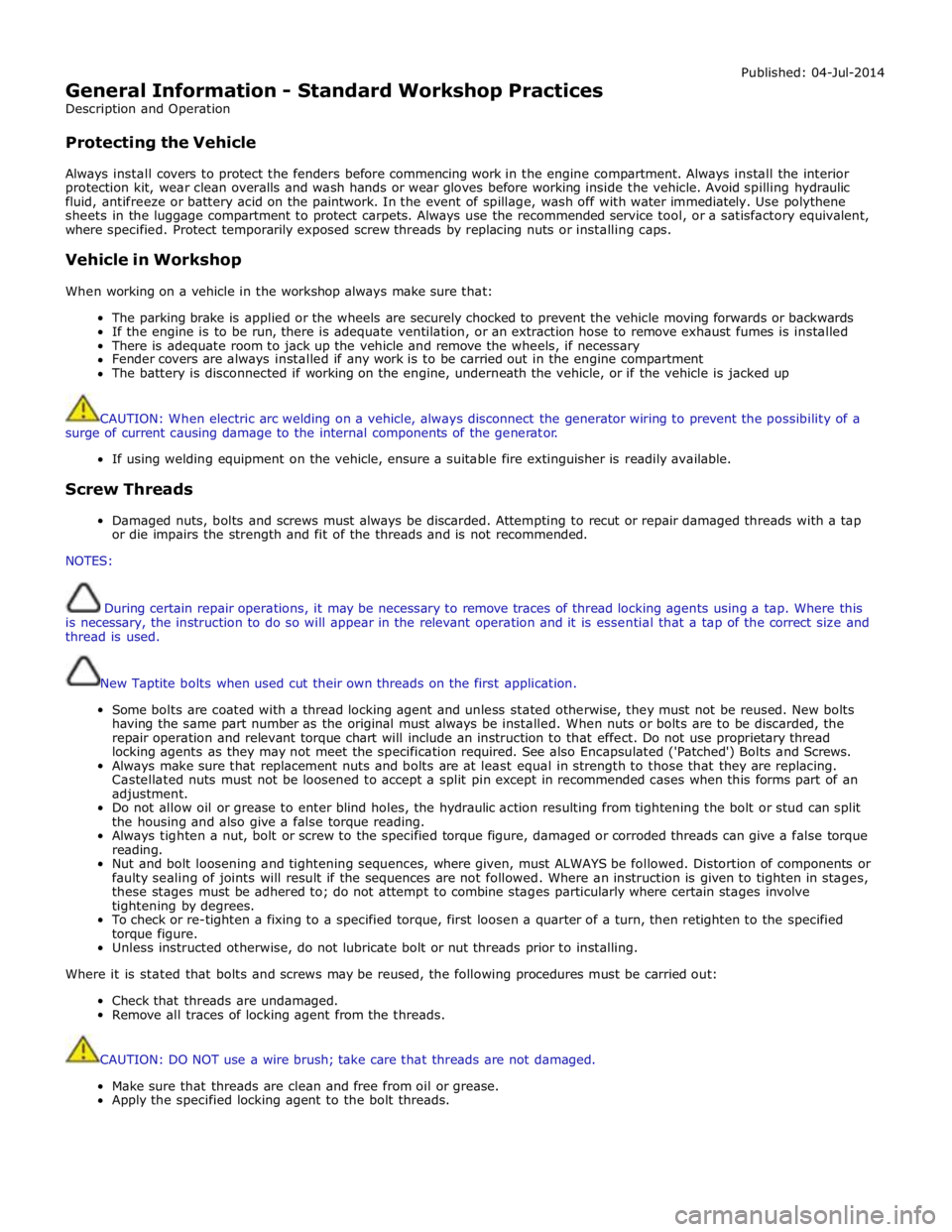
General Information - Standard Workshop Practices
Description and Operation
Protecting the Vehicle Published: 04-Jul-2014
Always install covers to protect the fenders before commencing work in the engine compartment. Always install the interior
protection kit, wear clean overalls and wash hands or wear gloves before working inside the vehicle. Avoid spilling hydraulic
fluid, antifreeze or battery acid on the paintwork. In the event of spillage, wash off with water immediately. Use polythene
sheets in the luggage compartment to protect carpets. Always use the recommended service tool, or a satisfactory equivalent,
where specified. Protect temporarily exposed screw threads by replacing nuts or installing caps.
Vehicle in Workshop
When working on a vehicle in the workshop always make sure that:
The parking brake is applied or the wheels are securely chocked to prevent the vehicle moving forwards or backwards
If the engine is to be run, there is adequate ventilation, or an extraction hose to remove exhaust fumes is installed
There is adequate room to jack up the vehicle and remove the wheels, if necessary
Fender covers are always installed if any work is to be carried out in the engine compartment
The battery is disconnected if working on the engine, underneath the vehicle, or if the vehicle is jacked up
CAUTION: When electric arc welding on a vehicle, always disconnect the generator wiring to prevent the possibility of a
surge of current causing damage to the internal components of the generator.
If using welding equipment on the vehicle, ensure a suitable fire extinguisher is readily available.
Screw Threads
Damaged nuts, bolts and screws must always be discarded. Attempting to recut or repair damaged threads with a tap
or die impairs the strength and fit of the threads and is not recommended.
NOTES:
During certain repair operations, it may be necessary to remove traces of thread locking agents using a tap. Where this
is necessary, the instruction to do so will appear in the relevant operation and it is essential that a tap of the correct size and
thread is used.
New Taptite bolts when used cut their own threads on the first application.
Some bolts are coated with a thread locking agent and unless stated otherwise, they must not be reused. New bolts
having the same part number as the original must always be installed. When nuts or bolts are to be discarded, the
repair operation and relevant torque chart will include an instruction to that effect. Do not use proprietary thread
locking agents as they may not meet the specification required. See also Encapsulated ('Patched') Bolts and Screws.
Always make sure that replacement nuts and bolts are at least equal in strength to those that they are replacing.
Castellated nuts must not be loosened to accept a split pin except in recommended cases when this forms part of an
adjustment.
Do not allow oil or grease to enter blind holes, the hydraulic action resulting from tightening the bolt or stud can split
the housing and also give a false torque reading.
Always tighten a nut, bolt or screw to the specified torque figure, damaged or corroded threads can give a false torque
reading.
Nut and bolt loosening and tightening sequences, where given, must ALWAYS be followed. Distortion of components or
faulty sealing of joints will result if the sequences are not followed. Where an instruction is given to tighten in stages,
these stages must be adhered to; do not attempt to combine stages particularly where certain stages involve
tightening by degrees.
To check or re-tighten a fixing to a specified torque, first loosen a quarter of a turn, then retighten to the specified
torque figure.
Unless instructed otherwise, do not lubricate bolt or nut threads prior to installing.
Where it is stated that bolts and screws may be reused, the following procedures must be carried out:
Check that threads are undamaged.
Remove all traces of locking agent from the threads.
CAUTION: DO NOT use a wire brush; take care that threads are not damaged.
Make sure that threads are clean and free from oil or grease.
Apply the specified locking agent to the bolt threads.
Page 166 of 3039
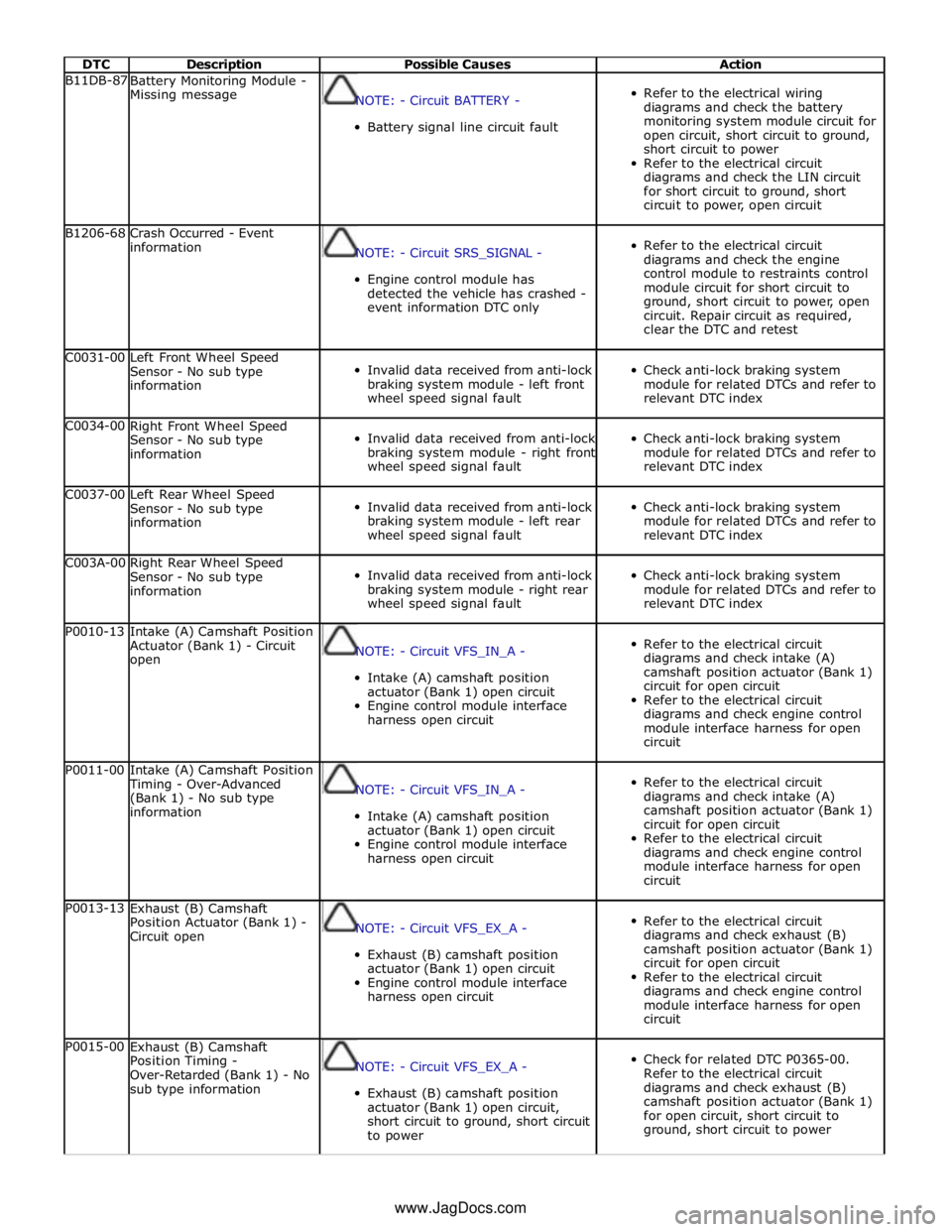
DTC Description Possible Causes Action B11DB-87
Battery Monitoring Module -
Missing message
NOTE: - Circuit BATTERY -
Battery signal line circuit fault
Refer to the electrical wiring
diagrams and check the battery
monitoring system module circuit for
open circuit, short circuit to ground,
short circuit to power
Refer to the electrical circuit
diagrams and check the LIN circuit
for short circuit to ground, short
circuit to power, open circuit B1206-68
Crash Occurred - Event
information
NOTE: - Circuit SRS_SIGNAL -
Engine control module has
detected the vehicle has crashed -
event information DTC only
Refer to the electrical circuit
diagrams and check the engine
control module to restraints control
module circuit for short circuit to
ground, short circuit to power, open
circuit. Repair circuit as required,
clear the DTC and retest C0031-00
Left Front Wheel Speed
Sensor - No sub type
information
Invalid data received from anti-lock
braking system module - left front
wheel speed signal fault
Check anti-lock braking system
module for related DTCs and refer to
relevant DTC index C0034-00
Right Front Wheel Speed
Sensor - No sub type
information
Invalid data received from anti-lock
braking system module - right front
wheel speed signal fault
Check anti-lock braking system
module for related DTCs and refer to
relevant DTC index C0037-00
Left Rear Wheel Speed
Sensor - No sub type
information
Invalid data received from anti-lock
braking system module - left rear
wheel speed signal fault
Check anti-lock braking system
module for related DTCs and refer to
relevant DTC index C003A-00
Right Rear Wheel Speed
Sensor - No sub type
information
Invalid data received from anti-lock
braking system module - right rear
wheel speed signal fault
Check anti-lock braking system
module for related DTCs and refer to
relevant DTC index P0010-13
Intake (A) Camshaft Position
Actuator (Bank 1) - Circuit
open
NOTE: - Circuit VFS_IN_A -
Intake (A) camshaft position
actuator (Bank 1) open circuit
Engine control module interface
harness open circuit
Refer to the electrical circuit
diagrams and check intake (A)
camshaft position actuator (Bank 1)
circuit for open circuit
Refer to the electrical circuit
diagrams and check engine control
module interface harness for open
circuit P0011-00
Intake (A) Camshaft Position
Timing - Over-Advanced
(Bank 1) - No sub type
information
NOTE: - Circuit VFS_IN_A -
Intake (A) camshaft position
actuator (Bank 1) open circuit
Engine control module interface
harness open circuit
Refer to the electrical circuit
diagrams and check intake (A)
camshaft position actuator (Bank 1)
circuit for open circuit
Refer to the electrical circuit
diagrams and check engine control
module interface harness for open
circuit P0013-13
Exhaust (B) Camshaft
Position Actuator (Bank 1) -
Circuit open
NOTE: - Circuit VFS_EX_A -
Exhaust (B) camshaft position
actuator (Bank 1) open circuit
Engine control module interface
harness open circuit
Refer to the electrical circuit
diagrams and check exhaust (B)
camshaft position actuator (Bank 1)
circuit for open circuit
Refer to the electrical circuit
diagrams and check engine control
module interface harness for open
circuit P0015-00
Exhaust (B) Camshaft
Position Timing -
Over-Retarded (Bank 1) - No
sub type information
NOTE: - Circuit VFS_EX_A -
Exhaust (B) camshaft position
actuator (Bank 1) open circuit,
short circuit to ground, short circuit
to power
Check for related DTC P0365-00.
Refer to the electrical circuit
diagrams and check exhaust (B)
camshaft position actuator (Bank 1)
for open circuit, short circuit to
ground, short circuit to power www.JagDocs.com
Page 167 of 3039
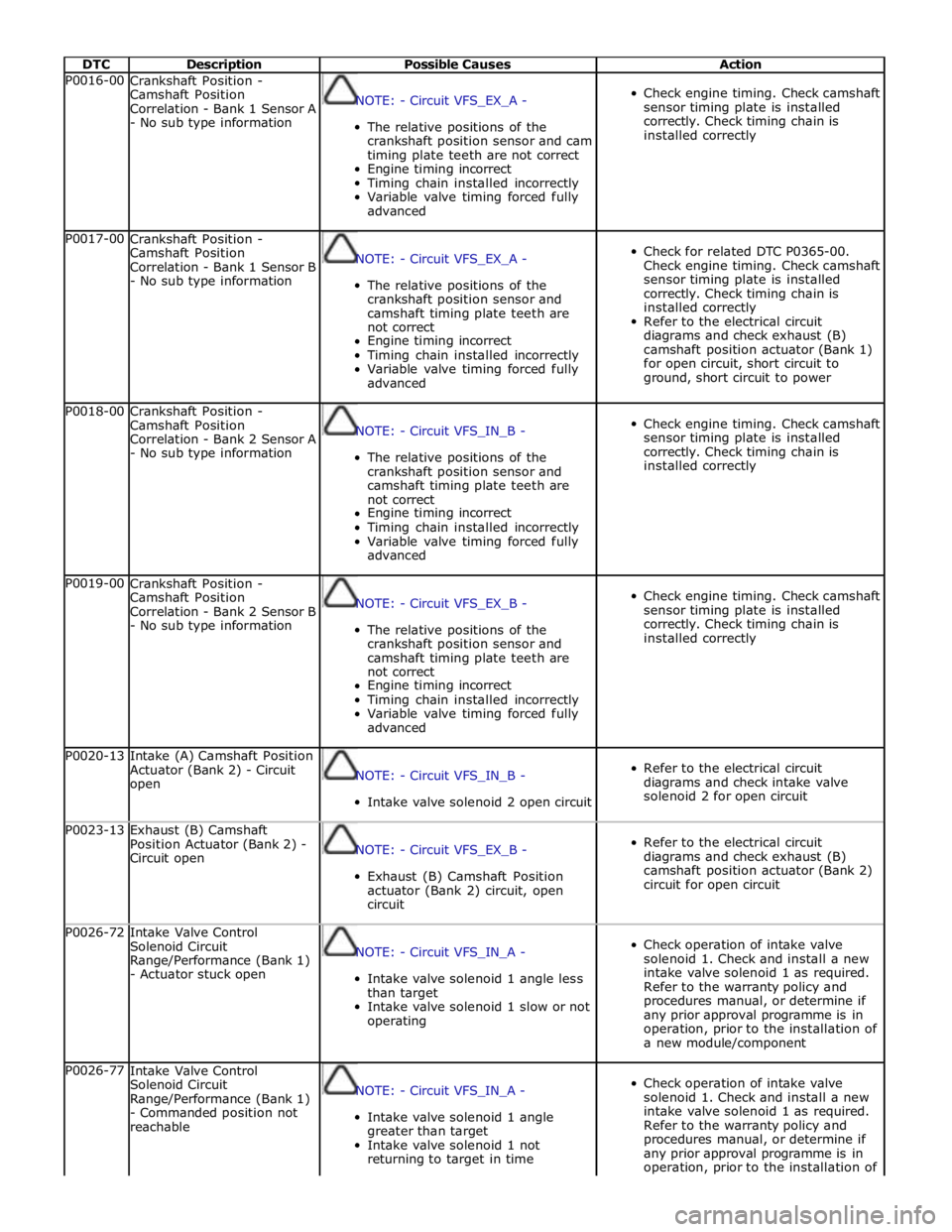
DTC Description Possible Causes Action P0016-00
Crankshaft Position -
Camshaft Position
Correlation - Bank 1 Sensor A
- No sub type information
NOTE: - Circuit VFS_EX_A -
The relative positions of the
crankshaft position sensor and cam
timing plate teeth are not correct
Engine timing incorrect
Timing chain installed incorrectly
Variable valve timing forced fully
advanced
Check engine timing. Check camshaft
sensor timing plate is installed
correctly. Check timing chain is
installed correctly P0017-00
Crankshaft Position -
Camshaft Position
Correlation - Bank 1 Sensor B
- No sub type information
NOTE: - Circuit VFS_EX_A -
The relative positions of the
crankshaft position sensor and
camshaft timing plate teeth are
not correct
Engine timing incorrect
Timing chain installed incorrectly
Variable valve timing forced fully
advanced
Check for related DTC P0365-00.
Check engine timing. Check camshaft
sensor timing plate is installed
correctly. Check timing chain is
installed correctly
Refer to the electrical circuit
diagrams and check exhaust (B)
camshaft position actuator (Bank 1)
for open circuit, short circuit to
ground, short circuit to power P0018-00
Crankshaft Position -
Camshaft Position
Correlation - Bank 2 Sensor A
- No sub type information
NOTE: - Circuit VFS_IN_B -
The relative positions of the
crankshaft position sensor and
camshaft timing plate teeth are
not correct
Engine timing incorrect
Timing chain installed incorrectly
Variable valve timing forced fully
advanced
Check engine timing. Check camshaft
sensor timing plate is installed
correctly. Check timing chain is
installed correctly P0019-00
Crankshaft Position -
Camshaft Position
Correlation - Bank 2 Sensor B
- No sub type information
NOTE: - Circuit VFS_EX_B -
The relative positions of the
crankshaft position sensor and
camshaft timing plate teeth are
not correct
Engine timing incorrect
Timing chain installed incorrectly
Variable valve timing forced fully
advanced
Check engine timing. Check camshaft
sensor timing plate is installed
correctly. Check timing chain is
installed correctly P0020-13
Intake (A) Camshaft Position
Actuator (Bank 2) - Circuit
open
NOTE: - Circuit VFS_IN_B -
Intake valve solenoid 2 open circuit
Refer to the electrical circuit
diagrams and check intake valve
solenoid 2 for open circuit P0023-13
Exhaust (B) Camshaft
Position Actuator (Bank 2) -
Circuit open
NOTE: - Circuit VFS_EX_B -
Exhaust (B) Camshaft Position
actuator (Bank 2) circuit, open
circuit
Refer to the electrical circuit
diagrams and check exhaust (B)
camshaft position actuator (Bank 2)
circuit for open circuit P0026-72
Intake Valve Control
Solenoid Circuit
Range/Performance (Bank 1)
- Actuator stuck open
NOTE: - Circuit VFS_IN_A -
Intake valve solenoid 1 angle less
than target
Intake valve solenoid 1 slow or not
operating
Check operation of intake valve
solenoid 1. Check and install a new
intake valve solenoid 1 as required.
Refer to the warranty policy and
procedures manual, or determine if
any prior approval programme is in
operation, prior to the installation of
a new module/component P0026-77
Intake Valve Control
Solenoid Circuit
Range/Performance (Bank 1)
- Commanded position not
reachable
NOTE: - Circuit VFS_IN_A -
Intake valve solenoid 1 angle
greater than target
Intake valve solenoid 1 not
returning to target in time
Check operation of intake valve
solenoid 1. Check and install a new
intake valve solenoid 1 as required.
Refer to the warranty policy and
procedures manual, or determine if
any prior approval programme is in
operation, prior to the installation of
Page 168 of 3039
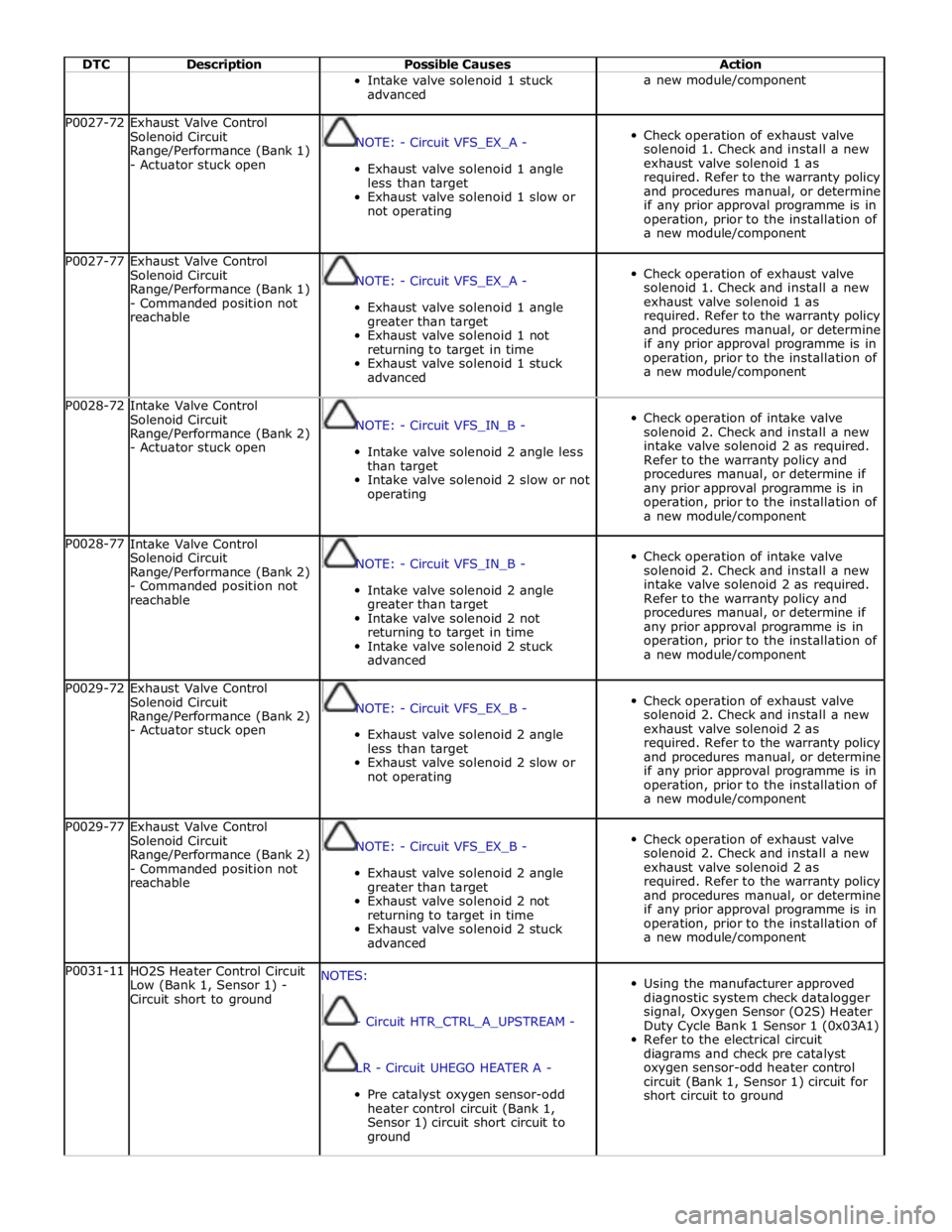
DTC Description Possible Causes Action Intake valve solenoid 1 stuck
advanced a new module/component P0027-72
Exhaust Valve Control
Solenoid Circuit
Range/Performance (Bank 1)
- Actuator stuck open
NOTE: - Circuit VFS_EX_A -
Exhaust valve solenoid 1 angle
less than target
Exhaust valve solenoid 1 slow or
not operating
Check operation of exhaust valve
solenoid 1. Check and install a new
exhaust valve solenoid 1 as
required. Refer to the warranty policy
and procedures manual, or determine
if any prior approval programme is in
operation, prior to the installation of
a new module/component P0027-77
Exhaust Valve Control
Solenoid Circuit
Range/Performance (Bank 1)
- Commanded position not
reachable
NOTE: - Circuit VFS_EX_A -
Exhaust valve solenoid 1 angle
greater than target
Exhaust valve solenoid 1 not
returning to target in time
Exhaust valve solenoid 1 stuck
advanced
Check operation of exhaust valve
solenoid 1. Check and install a new
exhaust valve solenoid 1 as
required. Refer to the warranty policy
and procedures manual, or determine
if any prior approval programme is in
operation, prior to the installation of
a new module/component P0028-72
Intake Valve Control
Solenoid Circuit
Range/Performance (Bank 2)
- Actuator stuck open
NOTE: - Circuit VFS_IN_B -
Intake valve solenoid 2 angle less
than target
Intake valve solenoid 2 slow or not
operating
Check operation of intake valve
solenoid 2. Check and install a new
intake valve solenoid 2 as required.
Refer to the warranty policy and
procedures manual, or determine if
any prior approval programme is in
operation, prior to the installation of
a new module/component P0028-77
Intake Valve Control
Solenoid Circuit
Range/Performance (Bank 2)
- Commanded position not
reachable
NOTE: - Circuit VFS_IN_B -
Intake valve solenoid 2 angle
greater than target
Intake valve solenoid 2 not
returning to target in time
Intake valve solenoid 2 stuck
advanced
Check operation of intake valve
solenoid 2. Check and install a new
intake valve solenoid 2 as required.
Refer to the warranty policy and
procedures manual, or determine if
any prior approval programme is in
operation, prior to the installation of
a new module/component P0029-72
Exhaust Valve Control
Solenoid Circuit
Range/Performance (Bank 2)
- Actuator stuck open
NOTE: - Circuit VFS_EX_B -
Exhaust valve solenoid 2 angle
less than target
Exhaust valve solenoid 2 slow or
not operating
Check operation of exhaust valve
solenoid 2. Check and install a new
exhaust valve solenoid 2 as
required. Refer to the warranty policy
and procedures manual, or determine
if any prior approval programme is in
operation, prior to the installation of
a new module/component P0029-77
Exhaust Valve Control
Solenoid Circuit
Range/Performance (Bank 2)
- Commanded position not
reachable
NOTE: - Circuit VFS_EX_B -
Exhaust valve solenoid 2 angle
greater than target
Exhaust valve solenoid 2 not
returning to target in time
Exhaust valve solenoid 2 stuck
advanced
Check operation of exhaust valve
solenoid 2. Check and install a new
exhaust valve solenoid 2 as
required. Refer to the warranty policy
and procedures manual, or determine
if any prior approval programme is in
operation, prior to the installation of
a new module/component P0031-11
HO2S Heater Control Circuit
Low (Bank 1, Sensor 1) -
Circuit short to ground NOTES:
- Circuit HTR_CTRL_A_UPSTREAM -
LR - Circuit UHEGO HEATER A -
Pre catalyst oxygen sensor-odd
heater control circuit (Bank 1,
Sensor 1) circuit short circuit to
ground
Using the manufacturer approved
diagnostic system check datalogger
signal, Oxygen Sensor (O2S) Heater
Duty Cycle Bank 1 Sensor 1 (0x03A1)
Refer to the electrical circuit
diagrams and check pre catalyst
oxygen sensor-odd heater control
circuit (Bank 1, Sensor 1) circuit for
short circuit to ground
Page 177 of 3039

DTC Description Possible Causes Action tests associated with this DTC using the
manufacturer approved diagnostic system B120E-4B
Right Thermal Electric
Device Control - Over
temperature
Restriction in thermal
electric device air path
Seat backrest thermal
electric device right circuit
- Short circuit to ground
Seat cushion thermal
electric device right circuit
- Short circuit to ground
Front seat climate control
module failure
Check for blockage or restriction in thermal electric
device air path
Carry out on demand self test using manufacturer
approved diagnostic system to confirm the fault is
present
Refer to the electrical circuit diagrams and check
the front seat climate control module - Circuit
reference RH_SEAT_BACK_TED+, Circuit reference
RH_SEAT_BACK_TED- - For short circuit to ground.
Repair circuit as required, clear DTC and retest
Refer to the electrical circuit diagrams and check
the front seat climate control module - Circuit
reference RH_CUSHION_TED+, Circuit reference
RH_CUSHION_TED- - For short circuit to ground.
Repair circuit as required, clear DTC and retest
Carry out on demand self test using manufacturer
approved diagnostic system to confirm
rectification. Alternatively, carry out any pinpoint
tests associated with this DTC using the
manufacturer approved diagnostic system B120F-98
Left Seat Cushion -
Component or system
over temperature
Blocked or restricted
thermal electric device fan
exhaust vent
Restricted thermal electric
device fan movement
Check for blockage or restriction in thermal electric
device fan exhaust vent
Check for restricted thermal electric device fan
movement
Carry out on demand self test using manufacturer
approved diagnostic system to confirm
rectification. Alternatively, carry out any pinpoint
tests associated with this DTC using the
manufacturer approved diagnostic system B1223-13
Right Seat Cushion Temperature Sensor -
Circuit open
Connectors disconnected or
connector pin damage
Seat cushion temperature
sensor right circuit - Open
circuit
Front seat climate control
module failure
Check for any disconnected connectors or damaged
connector pins
Carry out on demand self test using manufacturer
approved diagnostic system to confirm the fault is
present
Refer to the electrical circuit diagrams and check
the front seat climate control module - Circuit
reference RH_CUSHION_SENSOR, Circuit reference
RH_CUSHION_SENSOR_RTN - For open circuit.
Repair circuit as required, clear DTC and retest
Carry out on demand self test using manufacturer
approved diagnostic system to confirm
rectification. Alternatively, carry out any pinpoint
tests associated with this DTC using the
manufacturer approved diagnostic system B1224-13
Left Thermal Electric
Device Control - Circuit
open
Connectors disconnected or
connector pin damage
Seat backrest thermal
electric device left circuit -
Open circuit
Seat cushion thermal
electric device left circuit -
Open circuit
Front seat climate control
module failure
Check for any disconnected connectors or damaged
connector pins
Carry out on demand self test using manufacturer
approved diagnostic system to confirm the fault is
present
Refer to the electrical circuit diagrams and check
the front seat climate control module - Circuit
reference LH_SEAT_BACK_TED+, Circuit reference
LH_SEAT_BACK_TED- - For short circuit to ground.
Repair circuit as required, clear DTC and retest
Refer to the electrical circuit diagrams and check
the front seat climate control module - Circuit
reference LH_CUSHION_TED+, Circuit reference
LH_CUSHION_TED- - For short circuit to ground.
Repair circuit as required, clear DTC and retest
Carry out on demand self test using manufacturer
approved diagnostic system to confirm
rectification. Alternatively, carry out any pinpoint
tests associated with this DTC using the
manufacturer approved diagnostic system
Page 180 of 3039

DTC Description Possible Causes Action B122C-12
Left Seat Cushion
Blower Speed Sensor -
Circuit short to battery
Seat cushion blower speed
left circuit - Short circuit to
power
Blower motor assembly -
Short circuit to power
Front seat climate control
module failure
Carry out on demand self test using manufacturer
approved diagnostic system to confirm the fault is
present
Refer to the electrical circuit diagrams and check
the front seat climate control module - Circuit
reference LH_CUSHION_FAN_SPEED - For short
circuit to power. Repair circuit as required, clear
DTC and retest
Carry out on demand self test using manufacturer
approved diagnostic system to confirm
rectification. Alternatively, carry out any pinpoint
tests associated with this DTC using the
manufacturer approved diagnostic system B122D-11
Left Seat Back Blower
Speed Sensor - Circuit
short to ground
Seat backrest blower speed
left circuit - Short circuit to
ground
Blower motor assembly -
Short circuit to ground
Front seat climate control
module failure
Carry out on demand self test using manufacturer
approved diagnostic system to confirm the fault is
present
Refer to the electrical circuit diagrams and check
the front seat climate control module - Circuit
reference LH_SEAT_BACK_FAN_SPEED - For short
circuit to ground. Repair circuit as required, clear
DTC and retest
Carry out on demand self test using manufacturer
approved diagnostic system to confirm
rectification. Alternatively, carry out any pinpoint
tests associated with this DTC using the
manufacturer approved diagnostic system B122D-12
Left Seat Back Blower
Speed Sensor - Circuit
short to battery
Seat backrest blower speed
left circuit - Short circuit to
power
Blower motor assembly -
Short circuit to power
Front seat climate control
module failure
Carry out on demand self test using manufacturer
approved diagnostic system to confirm the fault is
present
Refer to the electrical circuit diagrams and check
the front seat climate control module - Circuit
reference LH_SEAT_BACK_FAN_SPEED - For short
circuit to power. Repair circuit as required, clear
DTC and retest
Carry out on demand self test using manufacturer
approved diagnostic system to confirm
rectification. Alternatively, carry out any pinpoint
tests associated with this DTC using the
manufacturer approved diagnostic system B122E-98
Right Seat Cushion -
Component or system
over temperature
Blocked or restricted
thermal electric device fan
exhaust vent
Restricted thermal electric
device fan movement
Check for blockage or restriction in thermal electric
device fan exhaust vent
Check for restricted thermal electric device fan
movement
Carry out on demand self test using manufacturer
approved diagnostic system to confirm
rectification. Alternatively, carry out any pinpoint
tests associated with this DTC using the
manufacturer approved diagnostic system B122F-98
Right Seat Back -
Component or system
over temperature
Blocked or restricted
thermal electric device fan
exhaust vent
Restricted thermal electric
device fan movement
Check for blockage or restriction in thermal electric
device fan exhaust vent
Check for restricted thermal electric device fan
movement
Carry out on demand self test using manufacturer
approved diagnostic system to confirm
rectification. Alternatively, carry out any pinpoint
tests associated with this DTC using the
manufacturer approved diagnostic system B1230-98
Left Seat Back -
Component or system
over temperature
Blocked or restricted
thermal electric device fan
exhaust vent
Restricted thermal electric
device fan movement
Check for blockage or restriction in thermal electric
device fan exhaust vent
Check for restricted thermal electric device fan
movement
Carry out on demand self test using manufacturer
approved diagnostic system to confirm
rectification. Alternatively, carry out any pinpoint
tests associated with this DTC using the
manufacturer approved diagnostic system
Page 181 of 3039

DTC Description Possible Causes Action B1231-7A
Right Seat - Fluid leak
or seal failure
Seat backrest assembly -
Air path leaking
Seat cushion assembly -
Air path leaking
Seat assembly damaged
Check for blockage or restriction in seat
backrest/seat cushion thermal electric device fan
ducts
Check seat backrest/seat cushion thermal electric
device fan exhaust vent is clear
Carry out on demand self test using manufacturer
approved diagnostic system to confirm
rectification. Alternatively, carry out any pinpoint
tests associated with this DTC using the
manufacturer approved diagnostic system B1232-7A
Left Seat - Fluid leak or
seal failure
Seat backrest assembly -
Air path leaking
Seat cushion assembly -
Air path leaking
Seat assembly damaged
Check for blockage or restriction in seat
backrest/seat cushion thermal electric device fan
ducts
Check seat backrest/seat cushion thermal electric
device fan exhaust vent is clear
Carry out on demand self test using manufacturer
approved diagnostic system to confirm
rectification. Alternatively, carry out any pinpoint
tests associated with this DTC using the
manufacturer approved diagnostic system B1235-13
Left Seat Cushion Temperature Sensor -
Circuit open
Connectors disconnected or
connector pin damage
Seat cushion temperature
sensor left circuit - Open
circuit
Front seat climate control
module failure
Check for any disconnected connectors or damaged
connector pins
Carry out on demand self test using manufacturer
approved diagnostic system to confirm the fault is
present
Refer to the electrical circuit diagrams and check
the front seat climate control module - Circuit
reference LH_CUSHION_SENSOR, Circuit reference
LH_CUSHION_SENSOR_RTN - For open circuit.
Repair circuit as required, clear DTC and retest
Carry out on demand self test using manufacturer
approved diagnostic system to confirm
rectification. Alternatively, carry out any pinpoint
tests associated with this DTC using the
manufacturer approved diagnostic system U0010-88
Medium Speed CAN
Communication Bus -
Bus off
Medium speed CAN
communication - Bus off
Refer to the electrical circuit diagrams and check
the power and ground connections to the module
Using the manufacturer approved diagnostic
system, complete a CAN network integrity test
Carry out on demand self test using manufacturer
approved diagnostic system to confirm rectification U0140-00
Lost Communication
With Body Control
Module - No sub type
information
Lost communication with
central junction box
NOTE: This DTC may be stored even though no fault
condition is present and should be ignored unless the
customer has reported a climate seat concern. Clear the
DTC and retest. Verify the customer concern prior to
diagnosis
Refer to the electrical circuit diagrams and check
the power and ground connections to the module
Using the manufacturer approved diagnostic
system, complete a CAN network integrity test
Refer to the electrical circuit diagrams and check
the CAN network between the front seat climate
control module and central junction box
Carry out on demand self test using manufacturer
approved diagnostic system to confirm rectification U0142-00 Lost Communication
Lost communication with
Refer to the electrical circuit diagrams and check With Body Control Module "B" - No sub rear junction box the power and ground connections to the module type information Using the manufacturer approved diagnostic system, complete a CAN network integrity test Refer to the electrical circuit diagrams and check the CAN network between the front seat climate control module and rear junction box Carry out on demand self test using manufacturer approved diagnostic system to confirm rectification www.JagDocs.com