2010 CHEVROLET CORVETTE ignition
[x] Cancel search: ignitionPage 234 of 472
The vehicle will remain in ACCESSORY, without the
20 minute time-out period, until the shift lever is moved
to P (Park) or until the driver presses the pushbutton to
restart the vehicle. See Ignition Positions
on page 3‑23for more information.
SHIFT TO PARK OR SET PARK BRAKE
FOR TOP
If the vehicle has an automatic transmission, this
message displays and a sound will be heard if you
try to operate the power convertible top without first
shifting into P (Park) or setting the parking brake.
Either shift the vehicle into P (Park) or set the parking
brake before trying to operate the power convertible
top. See Convertible Top (Manual)
on page 3‑59or
Convertible Top (Power)on page 3‑66for more
information.
SHOCKS INOPERATIVE
This message displays when a malfunction is present in
the Selective Ride Control system which is causing the
shocks to be in their full soft mode. This is a warning to
the driver that the vehicle handling may be affected.
Have the vehicle serviced by your dealer/retailer as
soon as possible.
To acknowledge the message, press the RESET button.
The message reappears every 10 minutes until this
condition changes.
TIRE FLAT
{WARNING:
When the LOW TIRE PRESSURE or TIRE FLAT
message is displayed on the Driver Information
Center, your vehicle's handling capabilities will
be reduced during severe maneuvers. If you drive
too fast, you could lose control of your vehicle.
You or others could be injured. Do not drive
over 55 mph (90 km/h) when the LOW TIRE
PRESSURE or TIRE FLAT message is displayed.
Drive cautiously and check your tire pressures as
soon as you can.
This message displays when one or more of the tires is
flat. This message also displays LEFT FRONT, RIGHT
FRONT, LEFT REAR, or RIGHT REAR to indicate
which tire is affected. Multiple chimes sound and the tire
pressure light on the instrument panel cluster comes on
when this message is displayed. See Tire Pressure
Light
on page 4‑40.
4-66
Page 241 of 472
Press the OPTION button until AUTO MEMORY
RECALL appears on the display, then press the RESET
button to scroll through the following modes:
.YES
.NO (default)
If you choose YES, the driver's seat, the outside
rearview mirrors and the telescopic steering column,
if your vehicle has this feature, positions are recalled
when you turn the ignition on.
If you choose NO, this option will turn off.
When the mode you want is selected, press the
OPTION button to set your choice and advance
to the next personal option.
Auto Exit Recall : If your vehicle has the memory
package, you may have this option. This option allows
the driver's seat and telescopic steering column, if your
vehicle has this feature, to automatically move to the
current driver's exit position when one of the following
occurs:
.The vehicle is turned off or in Retained Accessory
Power (RAP) or accessory mode and the driver's
door is opened.
.The vehicle is turned off or in RAP and the unlock
button on the keyless access transmitter is
pressed. In order for the Auto Exit Recall feature to work on an
automatic transmission vehicle, the vehicle must be in
P (Park). On a manual transmission vehicle, the parking
brake must be set.
Press the OPTION button until AUTO EXIT RECALL
appears on the display, then press the RESET button to
scroll through the following modes:
.YES
.NO (default)
If you choose YES, when you turn the ignition off and
open the driver's door or press the unlock button on the
keyless access transmitter, the seat and the telescopic
steering wheel, if your vehicle has this feature, will
return to their stored exit positions for an easy exit
or an easy entrance when returning to the vehicle.
The seat and steering wheel will only return to the
stored driving position if you press the appropriate
memory button or activate the auto memory recall
feature.
If you choose NO, this option will turn off.
When the mode you want is selected, press the
OPTION button to set your choice and advance
to the next personal option.
4-73
Page 244 of 472
FOB Reminder :This option sounds the horn three
times when the driver's door is closed and there is a
keyless access transmitter inside the interior of the
vehicle. This will only occur when the vehicle is off.
Press the OPTION button until FOB REMINDER
appears on the display, then press the RESET button to
scroll through the following modes:
.YES
.NO (default)
If you choose YES, the horn will sound three times
when a keyless access transmitter is inside of the
vehicle while the ignition is turned off and the driver's
door is closed.
If you choose NO, this option will turn off.
When the mode you want is selected, press the
OPTION button to set your choice and advance to the
next personal option.
Passive Door Locking : This option allows you to
select whether the doors automatically lock during
normal vehicle exit. When the ignition is turned off and
all doors become closed, the vehicle will determine how
many keyless access transmitters remain in the vehicle
interior. If at least one keyless access transmitter has
been removed from the interior of the vehicle, the doors
will lock after a short delay. For example, if there are two keyless access
transmitters in the vehicle and one is removed, the
other will be locked in. The keyless access transmitter
locked in the vehicle can still be used to start the
vehicle or unlock the doors, if needed. A person
approaching the outside of the locked vehicle without
an authorized keyless access transmitter, however, will
not be able to open the door, even with a transmitter in
the vehicle.
You may temporarily disable the passive door locking
feature by pressing the door unlock switch for
three seconds on an open door. Passive door locking
will then remain disabled until a door lock switch is
pressed or until the power mode transitions from the
off power mode.
Press the OPTION button until PASSIVE DOOR
LOCKING appears on the display, then press the
RESET button to scroll through the following modes:
.OFF (default)
.SILENT
.HORN
If you choose OFF, this option will turn off.
If you choose SILENT, the doors will automatically
lock a short time after you remove a keyless access
transmitter from the interior of the vehicle and close
both doors.
4-76
Page 245 of 472
If you choose HORN, the doors will automatically lock
and the horn will sound a short time after you remove a
keyless access transmitter from the interior of the
vehicle and close both doors.
If you are parking in a quiet area and do not want the
horn to sound when the doors lock, press the lock
button on the keyless access transmitter immediately
after removing it from the interior and closing the doors.
This will lock the doors and cancel the passive locking
for this ignition cycle.
When the mode you want is selected, press the
OPTION button to set your choice and advance to the
next personal option.
Passive Door Unlock : This option allows you to
select which doors will automatically unlock when you
approach and open the driver's door with the keyless
access transmitter. See Door Locks
on page 3‑10for
more information.
Press the OPTION button until PASSIVE DOOR
UNLOCK appears on the display, then press the
RESET button to scroll through the following modes:
.DRIVER
.BOTH (default)
If you choose DRIVER, only the driver's door will
automatically unlock when you approach and open
the driver's door with the keyless access transmitter. If you choose BOTH, both doors will automatically
unlock when you approach and open the driver's door
with the keyless access transmitter.
Auto Unlock :
This option allows you to select
whether the driver's door, both doors or neither door
automatically unlocks when the shift lever is moved into
P (Park) for automatic transmission vehicles or when
the ignition is turned off or is in RAP for manual
transmission vehicles.
Press the OPTION button until AUTO UNLOCK appears
on the display, then press the RESET button to scroll
through the following modes:
.OFF
.DRIVER
.BOTH (default)
If you choose OFF, this option will turn off.
If you choose DRIVER, on automatic transmission
vehicles, the driver's door will automatically unlock
when the shift lever is moved into P (Park). On
manual transmission vehicles, the driver's door will
automatically unlock when the ignition is turned
off or is in RAP.
If you choose BOTH, on automatic transmission
vehicles, both doors will automatically unlock when
the shift lever is moved into P (Park). On manual
transmission vehicles, both doors will automatically
unlock when the ignition is turned off or is in RAP.
4-77
Page 248 of 472

Audio System(s)
Determine which radio the vehicle has and read the
following pages to become familiar with its features.
{WARNING:
Taking your eyes off the road for extended periods
could cause a crash resulting in injury or death to
you or others. Do not give extended attention to
entertainment tasks while driving.
This system provides access to many audio and non
audio listings.
To minimize taking your eyes off the road while driving,
do the following while the vehicle is parked:
.Become familiar with the operation and controls of
the audio system.
.Set up the tone, speaker adjustments, and preset
radio stations.
For more information, see Defensive Driving
on
page 5‑2. Notice:
Contact your dealer/retailer before adding
any equipment.
Adding audio or communication equipment could
interfere with the operation of the vehicle's engine,
radio, or other systems, and could damage them.
Follow federal rules covering mobile radio and
telephone equipment.
The vehicle has Retained Accessory Power (RAP). With
RAP, the audio system can be played even after the
ignition is turned off. See Retained Accessory Power
(RAP)
on page 3‑24for more information.
Setting the Clock
To set the clock:
1. Press and hold H until the correct hour displays.
2. Press and hold M until the correct minute displays.
The clock mode automatically times out with the
changed display format set as the current default
setting.
4-80
Page 249 of 472
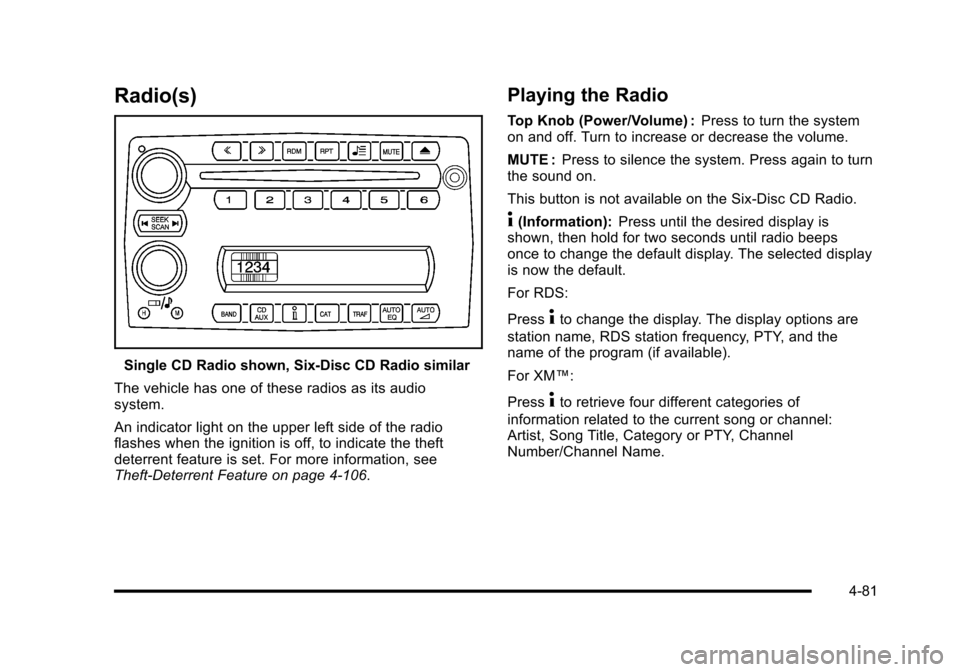
Radio(s)
Single CD Radio shown, Six-Disc CD Radio similar
The vehicle has one of these radios as its audio
system.
An indicator light on the upper left side of the radio
flashes when the ignition is off, to indicate the theft
deterrent feature is set. For more information, see
Theft-Deterrent Feature on page 4‑106.
Playing the Radio
Top Knob (Power/Volume) : Press to turn the system
on and off. Turn to increase or decrease the volume.
MUTE : Press to silence the system. Press again to turn
the sound on.
This button is not available on the Six-Disc CD Radio.
4(Information): Press until the desired display is
shown, then hold for two seconds until radio beeps
once to change the default display. The selected display
is now the default.
For RDS:
Press
4to change the display. The display options are
station name, RDS station frequency, PTY, and the
name of the program (if available).
For XM™:
Press
4to retrieve four different categories of
information related to the current song or channel:
Artist, Song Title, Category or PTY, Channel
Number/Channel Name.
4-81
Page 255 of 472
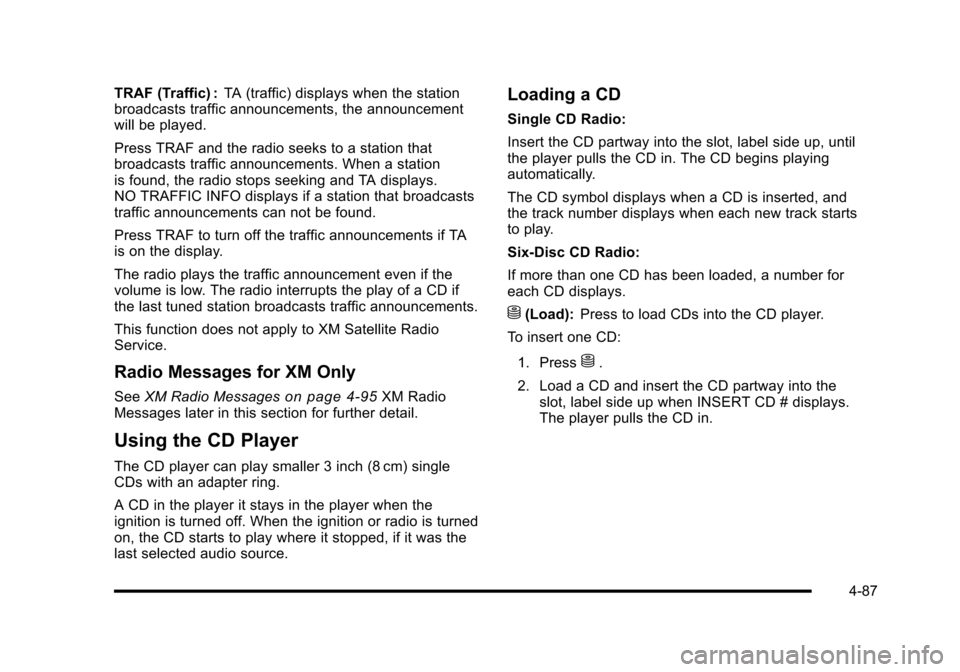
TRAF (Traffic) :TA (traffic) displays when the station
broadcasts traffic announcements, the announcement
will be played.
Press TRAF and the radio seeks to a station that
broadcasts traffic announcements. When a station
is found, the radio stops seeking and TA displays.
NO TRAFFIC INFO displays if a station that broadcasts
traffic announcements can not be found.
Press TRAF to turn off the traffic announcements if TA
is on the display.
The radio plays the traffic announcement even if the
volume is low. The radio interrupts the play of a CD if
the last tuned station broadcasts traffic announcements.
This function does not apply to XM Satellite Radio
Service.
Radio Messages for XM Only
See XM Radio Messageson page 4‑95XM Radio
Messages later in this section for further detail.
Using the CD Player
The CD player can play smaller 3 inch (8 cm) single
CDs with an adapter ring.
A CD in the player it stays in the player when the
ignition is turned off. When the ignition or radio is turned
on, the CD starts to play where it stopped, if it was the
last selected audio source.
Loading a CD
Single CD Radio:
Insert the CD partway into the slot, label side up, until
the player pulls the CD in. The CD begins playing
automatically.
The CD symbol displays when a CD is inserted, and
the track number displays when each new track starts
to play.
Six-Disc CD Radio:
If more than one CD has been loaded, a number for
each CD displays.
M(Load): Press to load CDs into the CD player.
To insert one CD:
1. Press
M.
2. Load a CD and insert the CD partway into the slot, label side up when INSERT CD # displays.
The player pulls the CD in.
4-87
Page 261 of 472
Supported Bit Rates
The following bit rates are supported: 32 kbps,
40 kbps, 56 kbps, 64 kbps, 80 kbps, 96 kbps, 112 kbps,
128 kbps, 160 kbps, 192 kbps, 224 kbps, 256 kbps,
and 320 kbps or a variable bit rate.
File Naming
ID3v1 and ID3v2 tags are supported. The track name
contained in the ID3 tag is shown on the display. The
display only shows up to 32 characters for track and file
names.
If the track name is not contained in the ID3 tag, the
display shows the file name without the file extension.
Playlists
Playlists that do not have a .m3u or .wpl extension may
not work.
Preprogrammed playlists created by WinAmp™,
MusicMatch™, or Real Jukebox™ software are
supported and they cannot be edited using the radio.
Playing an MP3
Insert a CD partway into the slot, label side up.
The player pulls it in, and READING displays. The CD
should begin playing and the CD symbol displays.
If the ignition or radio is turned off with a CD-R in the
player, it stays in the player. When the ignition or radio
is turned on, the CD-R starts to play where it stopped,
if it was the last selected audio source.
As each new track starts to play, the track number
displays.
Order of Play
Tracks are played sequentially in the following order:
1. Playlists.
2. Files contained in the root directory.
3. Files contained in folders.
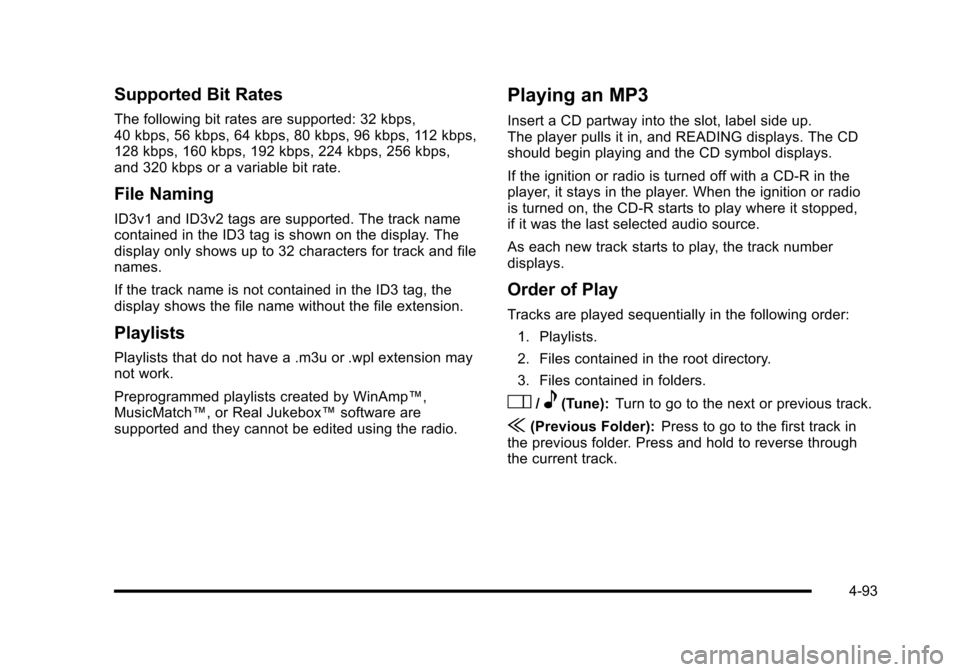
O/e(Tune): Turn to go to the next or previous track.
{(Previous Folder): Press to go to the first track in
the previous folder. Press and hold to reverse through
the current track.
4-93