2010 AUDI S8 tires
[x] Cancel search: tiresPage 330 of 384
___ T_ i_ r _e _s_ a_n_ d_ w_ h_ e_e_ l_ s _______________________________________________ _
• Tire pressure must only be adjusted when the temperature of the
tires is about the same as ambient air temperature .
• When tires are replaced, the sensors and valves should not be
detached or exchanged . Only the valve core needs to be replaced and,
if necessary, the valve and the wheel electronics replaced .
• The tire pressure monitoring system on your Audi was calibrated
usiing tires with the "AO" or "RO" identification. We recommend
using these tires.
• If you should put different wheels and tires on your vehicle (e.g.
winter wheels and tires), you must be certain that the wheels and
tires are compatible with the tire pressure monitoring system. Other
wise the system will register a malfunction and a fault message will be displayed. For more information, contact your authorized Audi
dealer.
• Adjust the tire pressure and store the pressure in the tire pressure
monitoring system to the load you are carrying=:>
page 310.
• For Declaration of Compliance to United States FCC and Industry
Canada regulations =:>
page 364. •
Applies to veh icles: with Tire pressure monitoring system
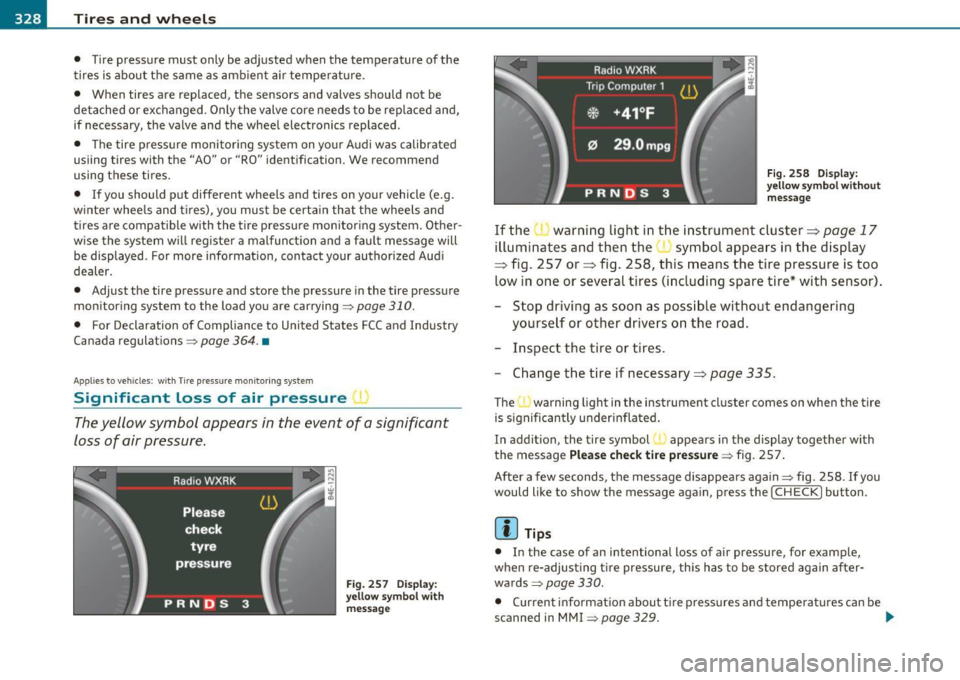
Significant loss of air p ressure I
The yellow symbol appears in the event of a significant
loss of air pressure.
Fig. 257 Display:
yellow symbol with
message Fig.
258 Display:
yellow symbol without
message
If the warning light in the instrument cluster=> page 17
illuminates and then the symbol appears in the display
=:> fig. 257 or=> fig. 258, this means the tire pressure is too
low in one or several tires (including spare tire* with sensor).
- Stop driving as soon as possible without endangering
yourself or other drivers on the road.
- Inspect the tire or tires.
- Change the tire if necessary=>
page 335.
The"' warning light in the instrument cluster comes on when the tire
is significantly underinflated.
In addition, the tire symbol { appears in the display together with
the message
Please check tire pressure=:> fig. 25 7.
After a few seconds, the message disappears again=:> fig. 258 . If you
would like to show the message again, press the
I CHECK] button.
[ i] Tips
• In the case of an intentional loss of air pressure, for example,
when re-adjusting tire pressure, this has to be stored again after
wards:::::,
page 330.
• Current information about tire pressures and temperatures can be
scanned in MMI
=:> page 329. .,,.
Page 331 of 384

________________________________________________ T_ i_ re _ s_ a_ n_d_ w_ h_ e_ e_l _s _ ....... JIII
• Tire pressure must only be adjusted when the temperature of the
tires is about the same as ambient air temperature .
• The yellow symbol disappears, when the tire pressure is corrected
and the new pressure is sto red in the system ~
page 330.
• After changing a wheel you have to adjust the tire pressures on all
wheels. In addition, you must then initialize the new tire pressures in
the tire pressure monitoring system~
page 330.
• If
your vehicle is equipped with a spare tire* with a wheel sensor,
the tire will be monitored and the display symbols~
page 328,
fig. 257 or~ page 328, fig. 258 will appear if the pressure is too
low .a
Applies to vehicles: with Tire pr essure mon itoring system
Displaying tire pressures and temperatures
The current status of the tires can be displayed in MMI.
Fig. 259 MMI display:
Tir e pressur e moni
to ring system
Vehicle OP-eration
-Turn on the ignition.
- Press the [ CAR ] func tion bu tton.
- Select
Systems in the CAR menu.
- Select
Tire pressure monitoring.
Fig. 260 MMI display :
Displaying the tire
pressure
- Select Display tire pressures . The tire pressures and
temperatures are displayed => fig. 260.
Current ti re pressures are shown in green and yellow numbers. The
meaning of the colors is as follows:
• Green:
If current tire pressure and the specified pressure are
approximately the same, the tire pressure is shown in green .
• Yellow: If current tire pressure is too low with respect to specified
pressure, the tire pressure is shown in yellow.
[I] Tips
• During the learning period, tire pressure and tire temperature are
not displayed. Horizontal lines--,-- are displayed for pressure and
temperature .
• Th e tire pressure is shown on the label located eithe r on the
dr iver's side B·pillar (visible when the door is open) or inside the fuel
fi ller flap.
~
Vehicle care Do-it-yourselt service iTechnical data
Page 332 of 384

-~_T_ i_ re _ s_ a_n _ d_ w_ h _e_ e_ ls _________________________________________________ _
• The tire pressure monitoring system helps the driver to keep an
eye on tire pressures. B ut the driver still has the responsibility for
maintaining the correct tire pressure .•
A pplie s to v ehi cle s: w ith Tire pre ssure moni toring syst em
Storing tire pressures
Correct storage of specified pressure is the basic require
ment for reliable tire pressure monitoring.
In order for the tire pressure monitoring system to operate
appropriately, you have to re-save the specified pressures
whenever you adjust tire pressure, for example when the load
condition of your vehicle changes . Proceed as follows:
Corr ecting tir e pr essure
- Check the pressure in the tires (including the spare t ire*) .
- Adjust air pressure as needed in accordance with t he infor -
mation on the label located e ither on the driver's side B
pillar (visible when the door is open), inside the fuel filler
flap and additionally in the manual.
Saving tire p ressures
- Turn on the ignition.
- Press the [
CAR] function button .
- Select
Systems in the CAR menu .
- Select
Tire pressure mon itoring .
-Select Sto re curr. tire pressure s~ page 329, fig . 259 .
All pressure warning indicators in the display will be canceled.
Following each intentional change in specified pressures, tire pres
sures must be resaved . After the
pressures are saved, the tire pressure monitoring system
measures the c urrent tire pressures and saves them as the new spec
ified pressures .
(I] Tips
• The tire pressure is shown on the tire pressure label. On USA vehi
cles, the tire pressure label is located on the driver's side B-pillar. On
Canada veh icles, the tire pressure label is located either on the
driver's side B-pillar or inside the fuel filler flap . The tire pressure
label lists the recommended cold t ire inflation pressures for the
vehicle at its maximum capacity weight and the tires that were on
your vehicle at the time it was manufactured. For recommended tire
pressures for normal load conditions, please see chapter
=> page 310.
• The tire pressure monitoring system helps the driver to keep an
eye on tire p ressures. But the driver still has the responsib ility for
maintaining the correct tire pressure .
• If your veh icle is eq uipped w ith a standard spare ti re*, it must be
inflated to the maximum pressure specified for the vehicle .•
A pp lies to vehicles: with T ire pressu re monitor ing system
Changing a wheel
When you change a wheel, the new tire must be initial
ized.
Turn on the ignit ion .
- Press the
I CAR I function but ton .
- Select
Systems in the CAR menu.
- Select
Tire pre ssure mon itoring .
-Select Initialize wheels~ page 329, fig. 259 .
Programming is necessary:
Page 333 of 384

Tires and wheels Ill _______________ _____.
• Afte r the t ires have been rotated on the vehicle (includi ng use o f
the sp a re t i re*),
• If tires with new wheel sensors are used .
All pressure wa rning and system malfunction indicators in the display
will be canceled .
I f a wheel change has been made , it is necessary to complete the
Initializ e wheel s function .
The tire pressure monitor ing system is not available during the
prog ramming process and no p ressure and temperat ure val ues are
displayed on the MM I display .
After you have selected the function, th e new whe els are
programmed and the act ua l pressures are stored . Th is learn ing phase
can take up to 20 minutes d riving time .•
A pp lies to vehicles : w ith Tir e pressu re mon itor ing system
Malfunctions
A malfunction can have various causes.
Fig. 26 1 D ispl ay :
S ys tem malf uncti on
If the warning ligh t in the inst rument cl uste r flashes fo r approxi -
mately one minu te and then remain continuously illuminated and
additionally the => fig . 261 symbol appears in the d is p lay , the
tire pressure monito ring system is not available . This can have various
causes.
Vehicle OP-eration
• If the message appears at the end of the learning process, the
system c annot recognize the whee ls ins talled o n the veh icle . T his can
be because one or more wheels without a wheel sensor were
installed .
• A wheel sensor or other component may have failed .
• T he sy stem has detected more than S whee ls wi th whee l sensors
i n the ve hicle, for example when carry ing snow tires.
• A tire was changed but the
Init ialize wheel s function was not acti
vated =>
page 330.
• Audi rep lacemen t pa rts were no t used .
• If snow chai ns are be ing used, system function can be compro
mised due to the shielding properties of the chains .
• Th e tire press ure monitor in g sys tem may not be ava ilable because
of a radio malfunction.
• Transmitters wi th the same freq uen cy, s uch as radio headphones
in the vehicle or radio equipment, can cause a temporary disrupt io n
of the sys tem throug h ex cessive elect romag net ic fie lds.
• Eliminate the interference if possible/if you can and then re-start
t he
Initialize wheels f unc tion. If the wa rning light comes on again,
you should contact your authori zed Audi dealer immediately to have
the problem corrected .
• Do not use commercially ava ilab le tire sealants . Otherw ise, the
elect rical components of the tire pressure mon itor ing system w ill no
longer work proper ly and the sensor for the t ire pressure monitoring
system will have to be replaced by a qualified workshop. •
Vehicle care Do-it-yourselt service iTechnical data
Page 342 of 384

.,.___W_ h_ a_t _ d _ o_ I_ d_ o_ n_o _w_ ? ___________________________________________ _
Taking the wheel off/installing the spare
Follow these instructions step-by-step for changing the
wheel
Fig. 274 Changing a
wheel: using the
screwdriver handle
(with the blade
removed ) to turn the
bolts
Fig . 275 Changing a
wheel: alignment pin
inside the top hole
After you have loosened all wheel bolts and raised the vehicle
off the ground, remove and replace the wheel as follows:
Removing the wheel
-Use the hexagonal socket in the screwdriver handle to
completely remove the topmost wheel bolt and set it
aside on a
clean surface => fig. 274 .
- Screw the threaded end of the
alignment pin from the
tool kit hand-tight into the empty bolt hole=> fig. 275 . -
Then remove the other wheel bolts as described above.
- Take off the wheel leaving the alignment pin in the bolt
hole.
Putting on the spare wheel
Lift the spare wheel and carefully slide it over the align
ment pin to guide it in place.
- Use the hexagonal socket in the screwdriver handle to
screw in and tighten all wheel bolts
slightly.
- Remove the alignment pin and insert and tighten the
remaining wheel bolt slightly like the rest.
- Turn the jack handle counter-clockwise to lower the
vehicle until the jack is fully released .
Use the wheel bolt wrench to tighten all wheel bolts firmly
=> page 338. Tighten them crosswise, from one bolt to
the (approximately) opposite one, to keep the wheel
centered .
(I) Tips
Never use the hexagonal socket in the handle of the screwdriver to
loosen or tighten the wheel bolts.
• Pull the reversible blade from the screwdriver before you use the
hexagonal socket in the handle to turn the wheel bolts .
• When mounting tires with
unidirectional tread design make sure
the tread pattern is pointed the right way~
page 341.
• The wheel bolts should be clean and easy to turn. Check for dirt
and corrosion on the mating surfaces of both the wheel and the hub.
Remove all dirt from these surfa ces before remounting the wheel. •
Page 343 of 384

_______________________________________________ W __ h_a _ t_ d_o_ I_ d_o_ n_ o_w _ ? __ _
Tires with unidirectional tread design
Tires with unidirectional tread design must be mounted
w ith their tread pattern pointed in the right direction .
Using a spare tire w ith a tread pattern intended for
u se in a specific direction
When using a spare tire w ith a tread pattern intended for use in a
spec ific direction, please note the fo llow ing:
• The d irect ion of rotation is marked by an arrow on the side of the
tire.
• If the spare tire has to be installed in the incorrect direct ion, use
t he spare t ire only temporar ily since the tire w ill no t be ab le to
achieve its optimum pe rformance character istics with rega rd to
aquap lan ing, no ise and wear.
• We recommend that you pay particular attent ion to t his fact
during wet wea ther and that you adjust you r speed to match road
conditions .
• Rep lace the flat tire w it h a new one and have it ins talled on your
vehicle as soon as poss ible to resto re the handling advantages of a
unidirectio na l tire .•
Notes on wheel changing
Please read the in forma tion => page 318, "New t ires and replacing
tires and wheels" if you are going to use a spare t ire which is different
from the tires on yo ur vehi cle.
After you change a t ire:
• Check the tire pressure on the spare immediately after installa
tion.
• Have the wheel bolt t ightening torque checked with a torque
wren ch as soon a s possible by your authorized Audi dealer or a qua l
i fied serv ice stat ion.
Safety first • With steel and alloy wheel rims
, the wheel bolts are correctly
tightened at a torque of 90
ft lb (120 Nm ).
• If you notice that the wheel bolts are corroded and difficult to
turn while changing a tire, they should be replac ed before you check
the tightening torque.
• R epla ce the flat tire with a new one and have it install ed on your
vehicle as soon as possible. Remount the wheel cover.
Until then, drive with extra care and at reduced speed s.
& WARNING
• If you are going to equip your vehicle with tires or rims which
differ from those which were factory installed, then be sure to
read the information =>
page 318, "New tires and replacing tire s
and whe els ".
• Always make sure the damaged whe el or ev en a flat tire and
the jack and tool kit are prope rly secured in the luggage compart ·
ment and are not loo se in the pa ssenger compartment.
• In an accident or sudden maneu ver they could fly forward ,
injuring anyone in the vehicle .
• Always store dam aged wheel , jack and tools secu rely in the
luggage compartment. Otherwi se, in an accident or sudden
maneuver they could fly fo rward , caus ing inju ry to passengers in
the vehicle .
• Do not u se commercially available tire sealants . Otherwi se, the
electrical component s of the tire pre ssure monitoring system * will
no longer work properly and the sensor for the t ire pressure moni ·
toring sy stem* will have to be replaced b y a qualified work shop .•
Vehicle care Do-it-yourself service Technical data
Page 355 of 384

Emergency situations --------------=---:.-----JftFI
Loading the vehicle onto a flat bed truck
Front hook up
"' .... N
Fig. 288 Vehicle on
flat bed truck
- Align the vehicle with the centerline of the car carrier
ramp.
- Attach the winch hook to the front towline eye previously
installed.
Re ar hoo k up
Align the vehicle with the centerline of the car carrier
ramp .
- Attach the winch hook to the rear towline eye previously installed .
[ i ] Tips
Check carefully to make sure the hook-up is secure before moving the
car up the flatbed truck ramp .•
Vehicle OP-eration
Vehicle transport
Whenever you have your vehicle transported, be sure to
note the following:
0 Note
Mount the tie-down chains/cables over the running surface (circum
ference) of the tires. Never secure the vehicle by the axle , the suspen
sion struts or the front or rear towline eye . For technical reasons, the
pressure in the suspension struts may change during the transport
and this will adve rsely affect veh icle handling. •
Lifting vehicle
Lifting with workshop hoist and with floor
jack
The vehicle may only be lifted at the lifting points illus
trated.
--1------------- ~
'-l.=c==;;;;;;;;;;===-cl i
Fig. 289 Fron t li fting
p oint
~
Vehicle care Do-it-yourself service iTechnical data
Page 369 of 384

___________________________________________ A_ l::.. p _h _a_ b_ e_t _ic _a_ l_ in_ d _ e_x __ nn
We ight-sensing mat .... .. .. .. . ... 232
When must the system be inspected? 217
Aircraft Transporting your vehicle .......... 353
All Wheel Drive ............ .. ...... . 257
Alloy wheels . .... .. .. .. .. .. .. ... ... 275
All-wheel drive
Winter tires ....... .. ............ 323
Alternator See Generator .................... 16
Anti-freeze See Engine coolant ...... .. .. .. ... 296
Anti -lock brake system
How the ABS system works ......... 256
Warning/indicator lights ... .. ..... . 19
Anti-Sl ip Regulation System (ASR)
How the system works . .. .. .. .. .. . 254
Anti-theft systems Anti-theft alarm system ....... ... .. 52
Electronic immobilizer ............. 41
Ashtray Front .............. ...... ........ 96
Rear ........ .. .... .. ... . .. .... .. 96
ASR How the Anti-Slip Regulation System
works ..... .. ... .. ... ... ....... 254
Audi Service Repair Manuals and Literature
361
AUTO mode AC climate control ....... .... .. .. . 106
Auto Safety Hotline ... ... ... . .. ..... 195
Auto-Check Contro l .............. .... . 26 Automatic car wash
See Washing ............... ... .. 271
Automatic Shift Lock (ASL) ... .. .. .. ... 156
Automatic transmission 6-speed automatic transm iss ion .. .. 154
Automatic Sh ift Lock (ASL) ....... .. 156
Dr iv ing ................. ...... .. 154
Dynamic shift program ......... ... 157
Emergency release for selector lever . 159
Fail-safe mode ................ ... 159
lg nition key safety lock .... ..... ... 119
Kick-down . ............ .. ....... 157
Manual shift program .. .. .. .. .. .. . 158
Selector lever ............ ........ 155
Shift buttons ... ...... .. .. .. ..... 159
Steering wheel with tiptronic ...... . 159
Average speed ........... .. .......... 36
Avoid damaging the vehicle .. ....... .. 263
B
Background lighting ... . .. .. .......... 67
Battery . .. .. .. .. .... ............... 300
Battery location inside the luggage
compartment .................. 301
Charging ........................ 303
Important warnings when working on the battery ..... ........... ...... .. 301
low . .. .. .. .. .. ...... .. ......... 258
Rep lacing the battery . ... ......... 304
State of charge ..... .. ........... 258
Winter operation . .... ... ..... .... 300
Working on the battery .... ... .. .. . 301 Before driving
.. .. ... ... ... .... ... .. 187
Blended gasoline ................. .. 283
Body cavity sealing .............. . ... 276
Booster seats ......... ............ . 239
Brake fluid
Changing the brake fluid .......... . 300
Checking the brake fluid level ....... 299
What is the correct brake fluid level?. 299
What should I do if the brake fluid warning
light comes on? . .. .. .. .......... 299
Brake system Anti-lock brake system .. ........... 19
Brake assistant .. .. .. .. .. ...... .. 256
Brake booster ........... ... ..... 256
Brake fluid .. .. .. ................ 299
Brake fluid specificat ions for refill and
repla cemen t .................. . 300
Brake light defective . .... .. .. .. .. .. 24
Brake pads ..................... . 262
Electromechanical parking brake .... 123
Fluid reservoir . .......... ... .. ... 299
How does moisture or road salt affect the
brakes? ... .. ................ .. 254
Malfunction ...................... 28
Warning/indicator lights ... .... .. .. 20
Worn brake pads symbol ........... 32
Break-in period .... . .. .............. 261
Brake pads . ... ................ .. 262
Tires ..... .................... .. 261
Bulbs ............ .... .. .... .... .. . 346
Bumper cover Caution when parking near a parking barri-er or curb . ... ................ .. 124
Automatic belt retractor .......... .. . 201 Battery voltage .. ........... ........ . 34
Controls and equip
ment Safety first Vehicle operation
Vehicle care Do-it-yourself service Technical data