2009 VOLKSWAGEN JETTA safe
[x] Cancel search: safePage 310 of 477
Booklet 3.1 Controls and Equipment
Cruise control
Applies to with co ntro l
Description
The control can be set to keep vehicle speed from about 18 mph to
110
(30 km/h to 180 km/h).
When yo u have re ached the ve hicle speed that
yo u want, yo u can set the crui se co ntrol and take
yo ur fo ot off th e accelerato r pedal.
The crui se co ntrol does
1101 wor k if the selec tor
l ever is in P , N orn.
WARNING
Using the crui se control it is not po ssible
to dri ve safe ly at a co nstan t sp eed is dan
ge rou s.
• Never use the c rui se control when driv in g
in h eavy o r vary ing traffi c, on steep, w inding
or s lippery roads (for examp le snow, ice,
s tr ee ts cove re d with water or gravel).
• To prevent unintended operation of th e
cru ise co ntro l, sw itch the syste m o!Twhcn it is
not being used.
L[:. WARNING (continued)
• It is dangero us to u se the resume feature
w hen the previou sly set speed is too high for
th e existi ng road , traffic or weathe r co ndi
tions.
Not e
• When tra vellin g downhill, the cru ise control
may not maintain cons tant s peed . The vehicle
wi ll accel erate as a resu lt of its ow n weig ht.
Downshift and/or use the foot brake
to slow the
ve hicl e.
• For ve hicles wi th a manual transmission, do
not mo ve the gea rsh ift l ever into n eutral without
d epre ssing the clut ch fully when the cru ise con
t ro l is activated. Othe rw ise the engine cou ld rev
up and be damaged.
Applies to vehicles: with independent lever for Cruise control
Using the cruise control
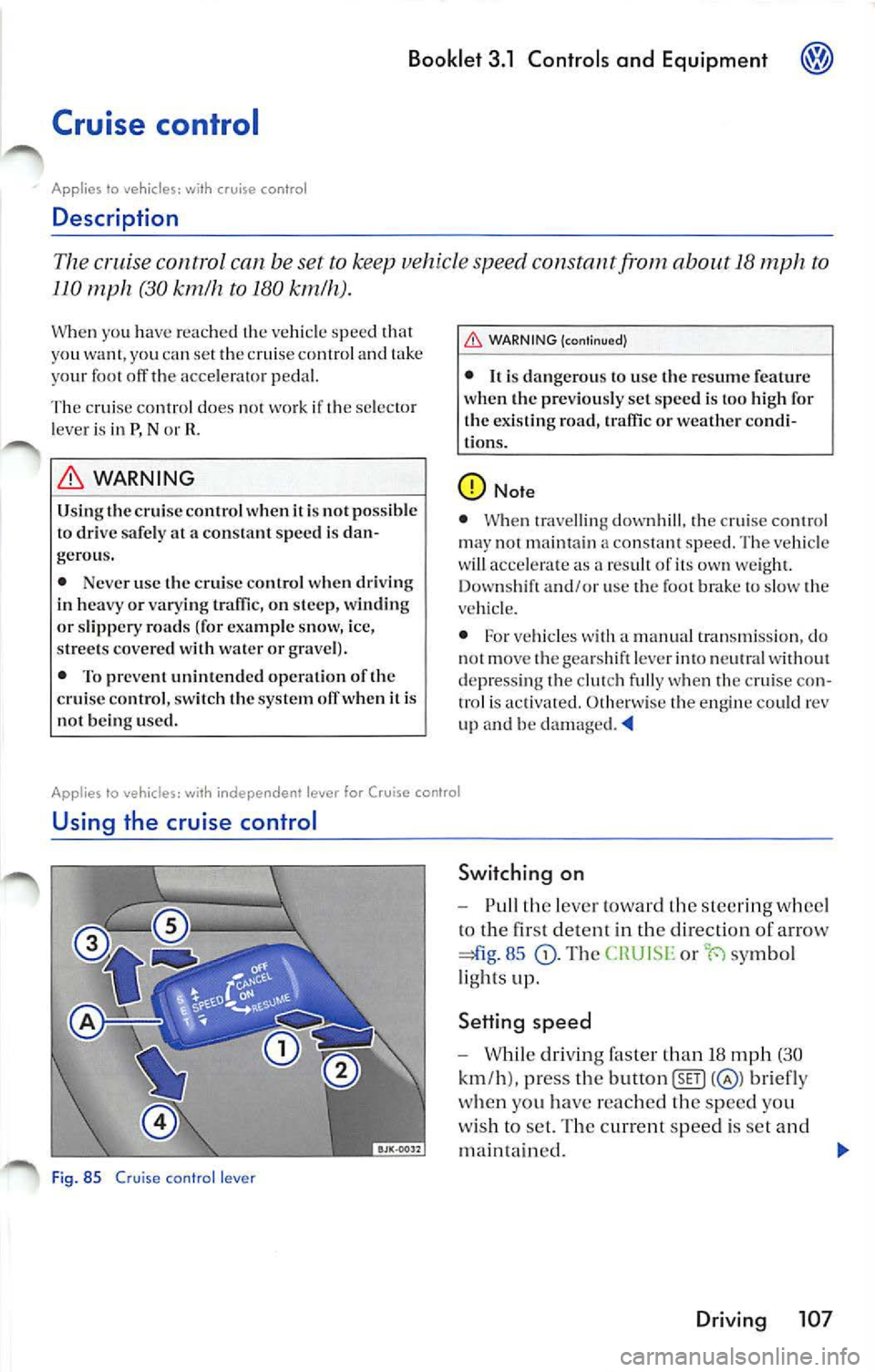
Fig. 85 C ruise con tro l lever
Switch ing on
Pull th e lever toward the steeri ng whee l
lo th e first detenl in the direction of arrow
85 Th e or symbo l
li ghts up.
Setting speed
Whil e dr iv in g faster than 18 mph (30
km /h ). press the button
briefly
w hen you have reac hed the speed yo u
w is h t o se t. Th e cu rrent speed is se t and
ma intained.
Driving 107
Page 311 of 477
Booklet 3.1 Controls and Equ ipment
Accelerating
- Pull th e lever upward in direction
to th e+ position to increase the
s peed by about 0.5 mph
(I km/h ).
Decelerating
- Pull the lever downward in direction of
a rrow © to the - positio n to lowe r the
s peed b y 0.5 mph (about I km/h).
Switching off
-Push the leve r in the direction of arrow
all the way to the OFF position whil e
d rivi ng. The CHU ISE or
symbo l goes off .
- Sw itch th e ignit ion off when the v ehicle
i s standing still.
WARNING
Using the crui se cont ro l whe n it i s not possib le
to dri ve sa fely at a constant speed is dangerous
in "Desc ription".
Tip s
• If th e cruise con trol is switc hed on th e
( or ·t-i sy mbol in the in stru ment cluster
li g ht s up .
• If th e c ruise co ntrol i s
the or symb ol goes o ut. The syste m is
swi tc h ed off compl etely when the selec tor leve r
is in P, Nor
• If yo u increase vehicl e speed with th e accel
erato r pedal, the prev ious ly programmed sp eed
will be re sum ed when the acce le rator p edal is re
leased . T hi s w ill not be the case. however, ifche
vehicle s peed is mo re than 6 mph (10 km/h)
hi gh er than the s tored speed fo r long er
5
minut es. The speed will then have to be store d
again .
• The set speed can be sw itche d off te mpo
rarily if you p ress the brake peda l or the clutch
pedal. Pull th e lever briefly towa rd th e steering
whee l to the point where you can start to fee l re
s is tance
107, fig. 85 to r esum e the
speed again. "'4
App lies to vehic les: with independent lever for Cruise cont·ol
Turning off control temporarily
You can turn off the control temporar ily as
follow s:
- Depress the brake pedal,
- Dep re ss th e clutch pedal, or
- Pu sh the l ever briefly to the point where
yo u can star t to feel r esis tanc e in the dir ec
t ion of a rrow
10 7, 85
Th e set sp ee d re mains in th e mem ory , but it is
not maintain ed. To res um e the spee d previo usly
se lected, re lease the brak e pedal and pull th e
l e ver bri efly coward the stee ring wheel to the
108 Driving
point whe re yo u ca n start to f eel resi stan ce 107, fig. 85
If you drive faster than about 1 10 mph (180 km/h)
the cru ise co ntrol is sw itch ed off automati cally
a nd you cann ot ac tivate the cruise contro l. To
ac tivate the cru ise control again, drive s lower
than about 110 mph (180 km/ h).
WARNING
Us ing the cruise contro l when it is not possib le
to drive safely at a constant spee d is dangerous
in "Descrip tion" on page 107. "'4
Page 312 of 477
Booklet 3.1 Controls and Equipment
Alphabetical index
A
ABS Wa rnin g light 27
See also Ant i-lock brake syste m
A co ustic wa rning 93
Add itional storage co mpartment 73
Adj ustin g the compass variance zone 19
Ai r co ndit io nin g
Co ndensation 89
Impo rtant notes
88
Malfunct io ns 88
Unp leasa nt od or 89
A ir conditioni ng sys tem 81
C lim atro nic
84
Air r ecircul ation mode
2C -Cl imatroni c 83, 88
Alarm syste m 36
Sw itch ing off 36
A lt ern ator
See Genera to r
A nti -lo ck brake system
ligh t 27
An ti-Slip Re gula tion 92
A nti -th eft alar m sys tem 36
Sw itchin g off 36
Arm res t
F ro nt ce nte r arm res t 66
S tora ge compartmen t 70
AS R 92
A ut omat ic mod e
C lim atroni c 85
A ut om atic sw itch-off of elec tri cal
co mp onen ts 93
A utom atic tra nsm iss io n
Dir ect shift gearbox 98
Sa fe ty int erlo ck for ign ition key 94
Se lec tor leve r loc k 99
Tiptroni c 98
A utomati c tra nsm iss ion with Tiptronic LO I
A ve rage fu el con sumpti on 9
Average sp ee d 9
B
Ba ckground lightin g 51 Brake
fluid
Wa rnin g ligh t 11
Brak e pad
W arn ing m essage II
Brak e pad wea r indi ca to r
Warn ing ligh t 26
Bra ke sys te m
Wa rnin g lig ht 28
Bulb defe cti ve
Warn ing lig ht 24
Bumpe r cov er
Ca ution when pa rki ng nea r a parkin g ba r
ri er or cu rb LO S
Bu zze r 50 , 93
C
Ca librat ing th e co mpass 18
Ce ntral loc king
I ndi vid ual unl ocking 34
Ce ntral locki ng butt on 34
Ce ntr al locki ng sys tem 34
C han ging unit s 16
C hild safe ty lo cks 35
C lea nin g
E lec troni c park ing a ssis ta nc e se nsors 106
C lim ati c 81
Ma lfun cti ons 88
C lim atroni c
I mpor tant not es 88
Ma lfu ncti ons 8 8
C loc k 5
C lo sin g
R ea r li d 38
C lot hes hook 7 1
Co rning home fu n ctio n 47
Co mp ass 18
Adjusting 19
Ca librat ing 18
Compa ss fun ctio n 12
Co ndensa tion 89
Contro ls
P owe r w ind ows 39
Conven ience closing 41, 43
Co nve nien ce men u 17
Alphabetical index 109
Page 315 of 477
Booklet 3.1 Controls and Equipment
R Ins ide mir ror 55
M ake- up mirror s 52
Outs ide mirror s, elec trica l 56
Mirrors lowe re d fun cti o n
18
M ulti -Fun cti o n Indi cator 9
M ulti -funct io n stee rin g whee l 4
0
O ne-to uch open in g and clo sin g
p owe r w indows
40
Ori entation lig hti ng 47
Ou ts id e te 111p erature disp lay JO
Ove rv ie w
p
In strument s 5
M ulti-function stee rin g w heel 4
Warn ing light s
20
Pan ic bu tton 32
Park assis t !06
Parking
LOS
Automat ic tran smi ssio n 99
C au tion w hen parkin g nea r a parki ng bar
rier or cur b
105 L ow b umper cover, spoil ers and
s u sp ens ion
10 5 When parking on slo pes !05
Park ing aid
106
Pa rkin g br ake l04
Warn ing lig ht 28, l04
Par king di stanc e wa rning sys te m 106
Pin ch prot ectio n
P owe r roof 43 W indows
Po llen fi lter 88
Po llu tion filt er 88
Power Roof 42
Pow er ou tlet 73
P owe r roof 42
Power steerin g
Wa rnin g light 29
P owe r w ind ows 39
112 Alphab etical inde x
Rain senso r 54
R ea din g light s
Front
5 1
R ear armr est 70
R ea r in te ri or light 52
R ea r lid 37
Clos ing 38
Wa rning light
26
Re ar se at ba ckres t
Folding forward 66
Ra isi ng into place
67
Rea r sea t bench 66
Rea r vent ilati on
86
Rea r view mirro r 55
Rea r w in dow 37
R ea r w in dow hea tin g
80, 81
Rea r w iper 53
R emot e co ntrol
Vehic le
32
Remote control key
13 utt ons 32
Repla cin g th e battery 32
Sy nchronizing 33
R emovi ng th e ignition key
94
R ep laceme nt keys 31
Rep lacing the ba ttery
R e111 ote contro l ke y
32
Rever se
A utoma tic tran s111i ssio n
102
Roof carrie r m ount s 76
Roof load 77
Ro of rack
76, 77
s
Safe ty ins1ru cti ons
Coo la nt te mp eratu re 25
Sea t adju stm ent 57,
60
Sea t h ea tin g
Fron t 65
Sec urin g load 77
Se lector lever loc k 99
Se lec tor leve r positions
102
Se lf-di111m in g in side day-night mir ror 55
Se rv ice int erva l di splay 8
Se rv ice pos ition
53
Page 321 of 477

About this booklet
This booklet contains important information,
tip s, s uggest ions and WARN INGS on usin g yo ur
veh icle. The other booklets in the Owner's Liter
ature contain further information tha t you
sho uld be aware of for yo ur own safety and for
the sa fety of yo ur pa ssenge rs.
Make sure that you always keep the comp lete
Owner's Literature in the vehi cle. Th is is es pe
cia lly import ant whe n you lend or sell th e ve
hicl e.
Thi s manual describes the vehicle equipm ent at
th e time of publicatio n. Some of the equipmen t
d escribed w ill not be availab le until a late r date,
or is only available for certain markets.
Illustrations may slightly vary fro m you r veh icle.
Fo r tl1is reaso n yo u sh ou ld regard illus tratio ns as
a general g uide.
A t th e beginning of this booklet, you
find a
table of contents sho wing all the item s de
scr ibed in this manua l in the order they appear .
An alphabetica l ind ex is a t the end of the
booklet.
Dire ction s and positions (for example right, left,
front, rear ) are a lways re lat ive to the direction o f
travel of the vehicle unless sta ted otherwise.
Some sections of this book let do not app ly to a ll
ve hicl es. If this is the case, a text at the beginning
section indicates w hic h veh icles it appli es
to , for examp le "App lies to veh icles wit h Diese l
engi ne" .
The section i s con tinued on t he nex t page.
In dicates the end of a section.
® Registered trademarks are marked
or®·
However, the absence of this sym bol does
not const itute a wa iver of th e rights con
ce rnin g any te rm.
Cross-reference to a "WA RN ING" within
o r outside of a sect ion.
WARNING
Texts symbo l co ntain imp ortant in
formation on safety and how to reduce risk
of personal injury or d eath.
Note
T exts
sym bol dr aw your attention to potential sources of damage to your vehicle .
For th e sake of environment
Texts w ith this symbo l contain infor mation
a bo ut the environment and how you can he lp
to protect it.
Tips
Texts with thi s symbol contai n spec ia l tips and
othe r information abou t gett ing the most out of
your veh icle and its features.
Page 323 of 477
Booklet 3.2 Tips and Advic e
Smart technology
Brakes
Brake booster
The brak e boo ste r incr ea ses the brake press ure
yo u put on th e peda l. wo rk s onl y wh en
t h e engi ne is runnin g.
If th e brak e boos te r is not workin g or if th e ve
hicl e has to be towe d, yo u wi ll h ave
to push th e
brak e peda l hard er to ma ke up for th e lack of
boo ste r ass is t.
WARNING
B rak ing w ithou t t he brake boos ter needs a
mu ch l onge r bra king distance and r equir es
Brake Assist Sys tem (BAS)
In a n emerg ency, mos t d river s brake in t im e, not w ith m aximum force. This res ult s in stop
ping dis tan ces th at are lo ng er th an they have to
b e!
T he brake a ssis t sys te m h elp s: if yo u pr ess th e
brak e pedal very quickly, t he brak e ass is t sy stem
r eg is te rs an em erge ncy situatio n. It th en very
qui ckly build s up th e full brake press ure so th at
t h e A BS can be activate d more qui ckl y and
cie nt ly, r educin g th e braking di sta nce and le t
tin g you steer at the sa me tim e.
D o not reduce th e pr ess ure o n th e brak e ped al.
T he brak e ass is t sys te m sw itches o ff aut omati
ca lly as soon as you re lease th e brake. The brak e
a ss ist sys te m works onl y wh en th e en gin e is
n ing.
If th e brak e sys te m i s not fun ction in g pro perl y, a
wa rnin g lig ht will com e on =bookl et 3.1 "Co n
t rol s and Equipm ent ."
WARNING
Always ad just you r sp ee d an d driv in g s ty le to
roa d, an d weather cond iti ons. Do not
2 Smart t echnology
WARN ING (con tinued)
yo u to p ush th e bra ke ped a l d ow n ha rder th an
n or mal.
• Never let th e ve hicle coa st w ith th e eng ine
switc hed off.
• If th e brake boos te r is no t ac tive, for
ample if th e ve hicle is bein g towed , yo u w ill
have to p ush th e brake pedal down much
h ar der than n ormal.
WARN ING (continu ed)
let the extra safety afforde d b y th e Brake Ass is t
Syste m temp t yo u int o taking ex tra ri sks.
• Never let t he extra sa fety offered by t he
Brak e Ass is t Sy ste m te mpt you into ta kin g
ex tra risks.
• The B ra ke As sis t Sys te m canno t re d uce t he
r isk o f a n acci den t, fo r examp le if yo u d rive too
fas t for co nditi on s or
if yo u d o not k eep yo ur
di stance fro m th e vehicl e in fr ont of yo u.
• Slippery and
roa ds are dangero us eve n
w ith th e Brake Assis t Sys te m!
WARNING
• Always reme mber th at ve hicle a ltera tio ns
or modificatio ns ca n affec t th e fu nctio n of th e
ABS, BAS , ED L and ES P sys te m s. Exa mpl es of
these alt era tion s or mo dificatio ns includ e a
di fferen t w hee l/tir e co mbin atio n and bra ke or
chassis modifi catio ns
28, and
t echn ic al m odi ficat io ns".
• Chan ging th e ve hicle su spe nsio n or u sing
un approved tir e
I r im combin atio n ca n ch an ge the w ay the A BS, B AS, EDL a nd ESP
Page 324 of 477
WARNING (continued)
systems work and reduce their
effect iveness.
Applies to vehicles: with Driver Steering Recommenda tion
Booklet 3 .2 Tips and Advice
Driver Steering Recommendation helps to the vehicle in certain sit
uations
The Driver Stee ring R ecomm endation i s a com
pl em entar y function of the ESP. This fea ture al
low s th e driv er
stabilize ve hicl e in certain
critical situati ons. Fo r example in certai n road
s ur face conditi ons ii is necessary to brake hard.
The vehicl e will then te nd to brak e awa y to the
r ig ht or t o 1h e lef t. Th e ESP reco gnizes this situ a
tion and supp ort s the drive r to steer to the oppo-
Anti -Lock Brake System {ABS)
sit e dire cti on by in crea sing th e stee rin g
s tr ength.
WARNING
The DSH only supports the driver in cri tical
dri vin g co ndition s. The ve hicl e will not s teer
by itse lf. The dr ive r is res pon sible fo r steering
the vehicle .
The Anti-Lock Brake System prevent s th e wheels from locking when the brakes are
applied.
Th e ABS is an important part of the vehicle 's ac
ti ve safety system. The Anti-Lo ck Brake Syste m
work s onl y when the en gine is run ning.
How the ABS works
If one w he el begi ns tu t urn too s low ly in r elat io n
t o ve hicl e speed an d le n ds to lock up, t he ABS
a utom ati ca ll y
brak e pres sur e lO preve nt
that whee l fr om locking. When ABS is do ing it s
job you will notice a sli ght vibrati on throu gh the
brake pedal and hea r a noise to l et yo u know tha t
yo ur speed must be adjuste d to road, traffic and
wea ther condi tion s. T his is a warn ing 1hat on e or
mor e of the whee ls is about to lock up and that
th e AB S co ntr ol function has inter vened . In thi s
s ituati on
is important to keep the brak e peda l
fully depr essed so the ABS can help to re gul ate
th e brake applica tion. Do not "pump " th e
peda l -ABS can not do its jo b if you do.
A BS helps you 10 kee p th e ve hicl e und er control
be cause i t prev ent s th e w hee ls from locking
w hen th e brak es arc ap plied. Th is m ean s th e ve
hicl e ca n still be s teer ed and is less likely
on
g rav el o r on fresh sno w cover in g a slipp ery sur
If AB S is not functioning properl y, a wa rnin g
li ght will co me on 3.1 "Co n1rol s and
E quipm ent. "
WARNING
Always ad just yo ur dri vin g to the road, traffic
and weather conditio ns. Neve r le t th e ex tra
s afe ty that ABS can provide te mpt you into
taking extra risks.
• Always drive safely .
• ABS canno t ch ange the
of ph ysics.
S lipp ery and wet roads are dangerou s ev en
wi th ABS!
• ABS ca nnot reduce th e risk of accide nts,
f or examp le if yo u drive too
for the co ndi
ti ons or if you do not keep your distance from
th e vehicle in front of you.
Smart technology 3
Page 326 of 477
Booklet 3.2 Tips and Advice
help s th e ve hicl e to sta rt mov ing.
a cc ele rat e a nd climb a grad ient in slipp ery con
di tio ns w her e thi s m ay other wise be diffi cult or
ev en impo ssibl e.
WARNING
Alway s adj ust you r driving to the road, traffic
a nd weather condition s. Do not l et the extra
WARNING (cont inu ed)
safety that ESP and can provid e tempt
yo u into taking extra risks.
• Always drive safely .
• ESP and ASH can not defy the laws of
physics. Slipp ery and wet roads are dange rous
even with ESP!
• ESP and AS H cannot reduce the risk of ac
cident, for examp le if you drive too fast for
condi tions or if yo u do not keep your distance
from the vehicle in front of yo u.
WARNING
• Alway s remember that vehicle alterations
or modifi cations ca n the function of the
ABS, BAS, EDL and ESP sys tems. Examp les of
these altera tio ns or modifications include a
different wheel/tire combination and brake or
c h ass is modifications
28, "Repa irs and
technical modifications".
• Chan ging the vehicle suspension or usi ng
un approve d tire
I rim comb ination can
change the way the ABS, BAS, E DL and ESP
sys te ms work and red uce their effective ness.
• The elJec tivencss of ESP is also determined
b y the tires fitted
51, "Tires and
wheels ".
d iu s o f th e tir es ca n c ause the syste m to re du ce
e n gin e po we r - eve n w hen thi s is not th e bes t
thing
to d o und er th e ci rc um stan ces . '4
Smart technology 5