2009 VOLKSWAGEN JETTA safe
[x] Cancel search: safePage 203 of 477
About this booklet
This booklet conta ins important information ,
t ip s, su ggest ions, and WARN INGS on using your
vehicle. The other booklet s in th e Owner's Liter
ature contain further information that you
should be aware of for your own safety and for
the safety of your passengers.
Make sure that you always keep the comp lete
Owner's Literature in the vehicle. This i s espe
cially important when you len d or sell th e ve
hicle .
Thi s manual describe s the vehicle equipment at
the time of publication. Som e of the equipment
described will not be available until a later date,
or is only available for certain markets.
Illustration s may slight ly vary from your vehicle.
F or thi s rea son you should regard illu stration s as
a general guide.
At the beg inning of this bookl et, you will find a
t a ble of contents showing all the items de
sc ribed in this manual in the order they appear.
An alphabetical index
at the end o f the
booklet.
Dir ections a nd positions (for examp le right, left.
front, rear) are always relative
to the dire ction of
trav el of the ve hicle unl ess s tated otherwise.
Some sect ions of this booklet do not apply to all
ve hicles. If this i s the case, a text at the beginning
of th e sect ion indicates which vehicles it applies
to , for example "Applies to vehicles with Die sel
engine ".
® Regi ster ed trademark s are marked®. How
ever, the absence of this symbo l doe s not
co nstitute a wa iver of the right s concern ing
any term.
The sectio n is con tinued on t he next pa ge.
Indicates the e nd of a section.
Cro ss-refe rence to a "WARN ING" within
or outside of a section.
Cross-reference to a "Note" wit hin or out
s ide of a section.
Texts with this symbo l contain important ' formation on safety and how to reduce the risk
of personal injury or death.
Tips
Texts with this symbo l contain special tips and
other informat ion about gelling th e most out of
yo ur vehicle and its features.
Page 204 of 477
Booklet 3.1 Controls and Equipm ent ®
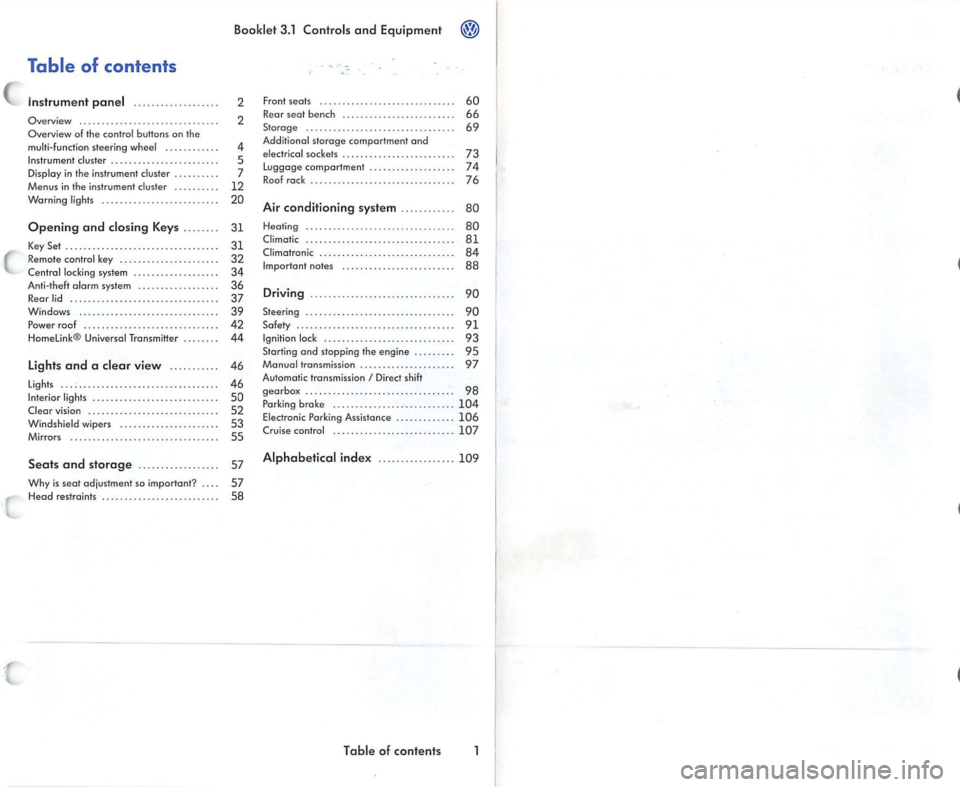
Table of contents
Instrument panel ........... .. .. ... .
Overview .............................. .
Overview of the contro l butto ns on the
mu lti- function steering w heel ..... .... . . .
Instrument cluster ...... ............. ... . .
Display in the in strument cluster ......... .
Menus in the instrument cluster ..... •.. ..
Warning lights .... ....... ........ ..... . .
2
2
4
5
7
12
20
Op ening and closing Keys . . . . . . . .
31
K ey Set . . . . . . . . . . . . . . . . . . . . . . . . . . . . . . . . . . 31
Remo te cont rol key . . . . . . . . . . . . • . . . . . . • . . 32 C ent ral locking system . . . . . . . . . . . . . . . . . . . 34
Anti-the ft o lorm system . . . . . . . . . . . . . . . • . . 36
Rear lid . . . . . . . . . . . . . . . . . . • . . . . . . . . . . . . . . 37
Windows .... .. . . .. .... ... . .... . .. .. .. . .
39 Po wer roof . . . . . . . . . . . . . . . . . . . . . . . . . . . • . . 42
H ome link® Universal Transm itter . . . . . . . . 44
Lights and a clear view . . . . . . . . . . . 46
Lights . . . . . . . . . . . . . . . . . . . . . . . . . . . . . . . . . . . 46
Interior lights . . . . . . . . . . . . . . . . . . . . . . . . . . . . 50
Clear vision . . . . . . . . . . . . . . . . . . . . . . . . . . . . . 52
Windshie ld wi pers . . . . . • . . . . . . . . . . . . . . . . 53
Mirrors . . . . . . . . . . . . . . . . • . . . . . . . . . . . . . . . . 55
Seat s and storag e . . . . . . . . . . . . . . . . . . 57
Why is seat adjust ment so im portant ? . . . . 57
H ead restraints . . . . . . . . . . . . . . . . . . . . . . . . . . 58 Front seats .
..... .... ... •..... .• .... .....
Rear seat bench . ... ...... ....... •.. .... .
Sto rage ......... ................... .... .
Additiona l storage comportmen t ond
elec trica l sockets .... ... .... .... ... ...... .
Luggage comportment ........... ....... .
R oo f rock . .......... ......•.... .. •.......
Air conditioning system ...... ... .. . 60
66
69
73
74
76
80
Heal
ing . . . . . . . . . . . . . . . . . . . . . . . . . . .. . . . . . 80
Cl imatic . . . . . . . . . . . . . . . . . . . . . . . . . . . • . . . . . 8 1 Climotronic . . . . . . . . . . . . . . . . . . . . . . . . . . . . . . 84
Im portan t no tes . . . . . . . . . . . . . . . . . . . . . . . . . 88
Driving ................... ............. 90
Steering . . . . . . . . . . . . . . . . . . . . . . . . . . . . . . . . . 90
Safety . . . . . . . . . . . . . . . . . . . . . . . . . . . . . . . . . . . 91
Igniti on lock . . . . . . . . . . . . . . . . . . . . . . . . . . . . . 93
Starting ond stopping the engine . . . . . . . . . 95
Monuol transmission . . . . . . . . . . . . . . . . . . . . . 97
Automatic transmissio n
I Direct sh ift
gea rbox . . . . . . . . . . . . . . . . . . . . . . . . . . . . . . . . . 98
P arking brok e . ...... .... .... .. .. .. . .. ...
104 Electronic Parking Assistance . ........ •.. . 10 6
Crui se co ntrol ......... ........ .... ...... 107
Alphabetical inde x .... ...... .... ... 10 9
T ab le of contents
Page 225 of 477
Booklet 3.1 Controls and Equipment
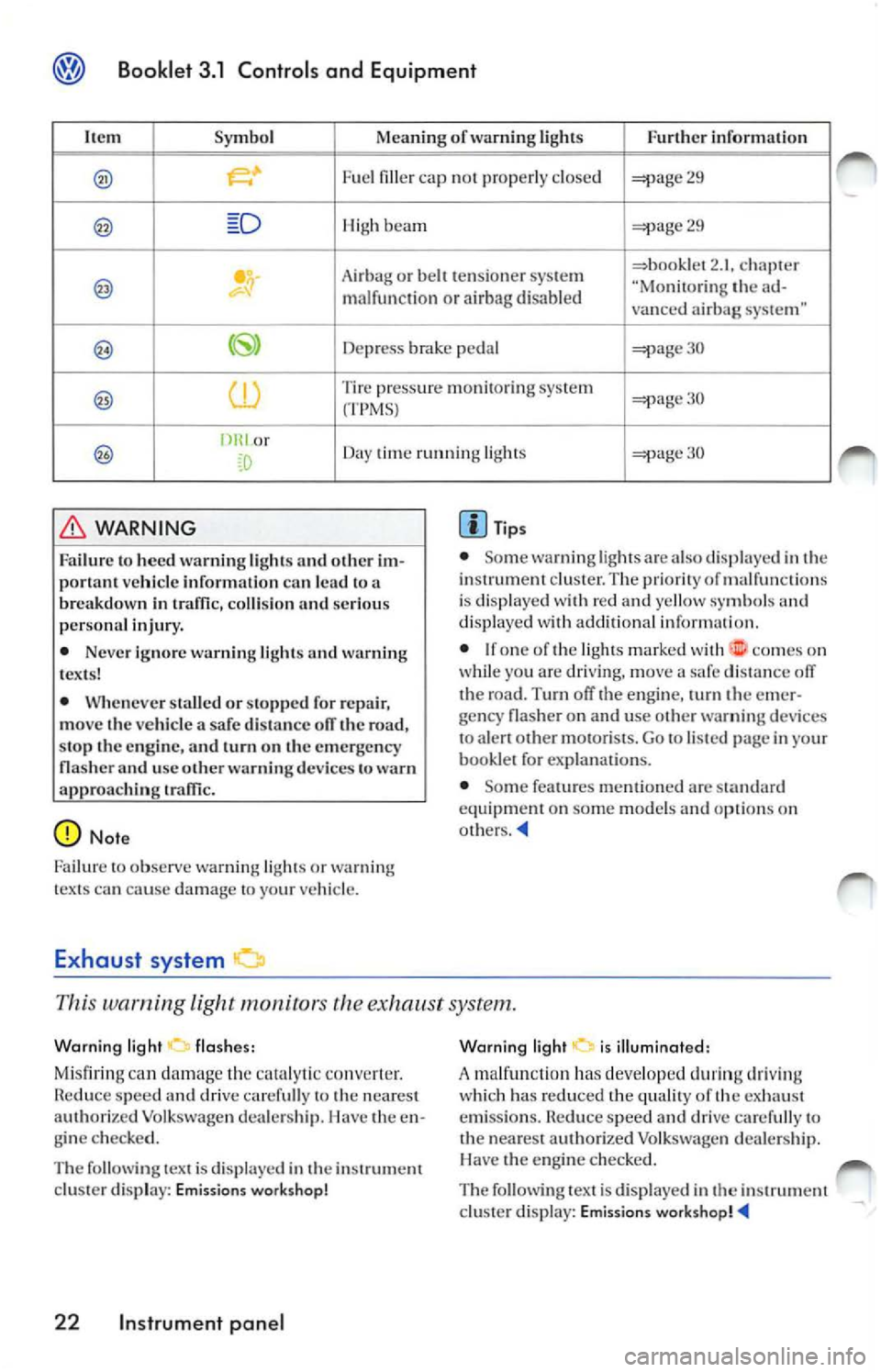
It em Symbol Meaning of warning Lights Fur ther informa tion
. Fue l fi lle r ca p not prop erl y clo sed 29
Hi gh beam 29
Ai rba g or b elt t en sio ner sys te m 2. 1. ch apt er "Mo nitorin g the m alfun cti on o r airb ag disabl ed
vanced airbag system"
Depress pedal 30
Tire press ure m onitorin g syste m 30
(TPMSJ
or
Day time running lights
WARNING
Failur e to heed warn ing l ig ht s and o ther im
por tan t ve hicle informatio n can lead to a
b rea kdow n in
coll is io n an d se rio us
p erso nal injur y.
• Neve r ign ore w arn ing lig ht s and warn ing
t ex ts !
• Whe neve r sta ll ed o r sto pp ed for re pa ir,
move the vehicle a safe dis ta nce ofT the road ,
s top the en gine, and turn on th e emergency
na sher and u se other warn ing device s to
approac hin g
Tip s
• Some warn ing lig hts ar e also displ aye d in th e
instru ment cluster. The pri orit y of malfun ctio ns
i s di spl ayed w ith red and yellow sy mbo ls and
d isp laye d with addition al in for mat ion.
• I f o n e o f th e ligh ts mark ed wit h
comes o n
wh ile yo u are driving , mo ve a safe dista n ce off
th e road. Turn off the en gine , turn the e mer
ge ncy flas her o n and use o ther
devices
t o alert ot her motorists. Go to listed page in yo ur
book let fo r ex planations.
• Some fea tures menti oned are
eq uipment on some models options on
This warning light exh aust system.
W arnin g lig ht
flashe s:
Mi sfiring
damage th e co nverter .
Red uce sp ee d and drive caref ull y to the neares t
au thorized Vo lkswage n dea le rs hip . I lave the e n
g in e c hecke d.
T he follow in g tex t is di spla yed in th e ins trument
clu ster disp lay: Emissions workshop !
22 Instrument pan el
Wa rnin g li g ht i s illumin ated:
A malfun cti on ha s deve loped d urin g driving
w hi ch ha s red uced the qualit y of th e ex haust
e mi ssio n s.
spe ed an d dri ve c arefull y to
th e nearest a uthorized Vo lk swage n deale rs h ip.
H ave the engi ne checke d.
The fo llow ing tex t is displayed i n the instrum ent
cl uste r display: Emissio ns
Page 231 of 477
@ Booklet 3.1 Controls and Equipment
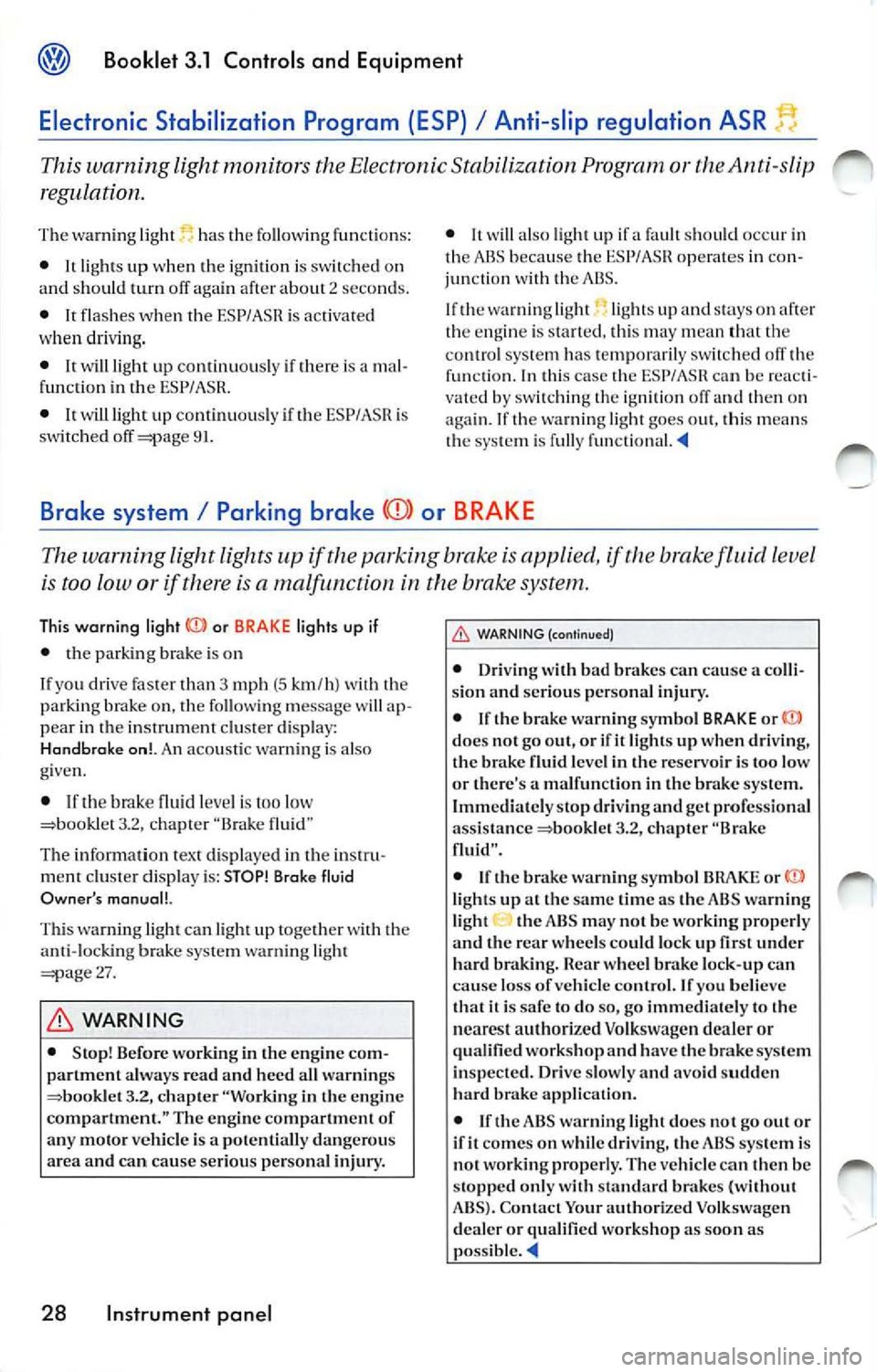
Electronic Stabilization Program {ESP) I Anti-slip regulation ASR
This warning light monitors the Elect ronic Stabil iza tion or th e Anti-slip
regulation.
The warnin g light has the follow ing functi ons:
• It light s up when the ignition i s switched on
and sh ou ld turn off aga in afte r about 2 seconds.
• It flashes whe n the ESP/ASR is activa ted
w hen dri ving.
• It will li gh t up cont inuou sly if th ere is a ma l
f un ction in th e ESP/ASR.
• It
will ligh t up continuou sly if th e ESP/ASR is
sw itch ed off =:pag e 91. •
It w ill also light up if a fa ult sh o uld occur in
the ABS because th e ESP/AS R operates in con
jun cti on w ith the AJ3S.
If th e warning ligh t light s up and stays on a fter
th e e ngin e is
thi s may mean that th e
c ontro l sys tem has tem porarily switch ed o ff the
fu ncti on . In thi s case the ESP/ASH ca n be reac ti
vated by sw itchin g th e ig niti on off and then on
again. If the wa rnin g lig ht goes out, thi s m ea ns
t he sys tem is fully functiona l.
Brake system I Parking brake or BRAKE
The warnin g light lights up if the parking brake is applied, if the brake level
is too low or if there is a malfunction in the brake system .
This warning light or BRAK E lights up if
• the park ing brake is o n
If yo u dri ve faster than 3 mph (5 km /h } w ith the
parking brake on, the follo win g m essage will ap
pear in the in strum ent cluster di spl ay :
Handbrake on!. An ac oustic wa rnin g is a lso
give n.
• If th e brake flu id leve l is too
3.2, chap te r "J3rake fluid"
The infor matio n text disp layed in the instru
m ent cluste r di sp lay is : STOP! Brake fluid
Owner's manual!.
This warn ing light can l ight up t ogether with the
ant i- locki ng bra ke system warni ng lig ht
27 .
WARNING
• Stop! Before workin g in the en gine com
partment always r ead and heed all warnings
3.2, chapter "Working in the engin e
compa rtment." The en gi ne compa rtment of
any motor vehicl e is a pot enti all y dangerou s
area and can cause serious personal injury.
28 Instrument panel
ir1 WARN ING (co ntin ued)
• Drivin g with bad brake s can cause a colli
s ion and seriou s per sona l injury.
• If the brak e warning symb ol BRAKE or
docs not go out, or if it l ights up when drivin g,
the brak e fluid leve l in the r eservoir i s too low
o r th ere's a malfun ction in the brake system.
Imm ediat ely stop driving and get profe ssional
assista nce
3.2, chapter "13 rake
fluid ".
• If the brak e warn ing sy mbol BRAK E or
ligh ts up at the same time as the ABS warning
light the ABS may not be working prope rly
a nd the rear whee ls cou ld lock up
und er
hard braking . R ea r whee l brak e lock-up can
ca use loss o f vehicl e control. If you beli eve
that it i s safe to do so , go imm ediat ely to the
near est auth orized Volkswagen dealer or
qualified works hop a nd h ave the brak e syste m
in spe cted. Dri ve slow ly and avoid sudden
h ard brake application .
• If the ABS warn ing light does not go out o r
if it come s on whil e driving , th e AB S sys te m i s
not working properly. The vehicle can then be
s topped onl y with stand ard brake s (w ithout
A BS ). Co ntact Your authorized Volkswage n
or qualified workshop as soo n as
po ssible ...
Page 236 of 477
Booklet 3.1 Controls and Equipment
WAR NING (c on tinued)
hicl e th at a re mu ch hi gh er th an th e outsid e
t e mp eratur es, parti cul arl y in summ er. T e m
pe rature s can quickl y reac h leve ls th at ca n
ca use un consci ou sn ess a nd dea th, p articu
l a rl y to
children.
• Neve r remove
key from steer ing loc k
w hil e th e ve hicl e is m ovi ng or w hile it i s ro llin g
t o a s to p. Th e stee rin g w hee l co lumn
will lock
u p a nd yo u will not b e a ble to stee r or contro l
th e ve hicle.
Not e
• Never leave any veh icle keys in sid e th e ve
hi cle. En try by unau tho rized perso ns cou ld
har m th e vehicle or yo ur vehicle could b e stole n.
A lways take th e keys with you wheneve r you
l e a ve yo ur vehicle.
• Unsuitable ba tter ies ca n dama ge the remote
contro l key. Rep lace use d batteries
new
o ne s of the sa me vol tage and same s ize.
Resetting the remote control key
32, fig. 15 (blue
area).
• When yo u unlock your vehicl e with the re
mote control, you have 30 seco nds to open
door or the rear lid. If you do not, t he ve hicle w ill
a u tomatically r elock itse lf. T his safery re lock fea
ture prevent s you from leav ing your veh icl e un
lock ed.
• lfthe remote control doe s not work, it may
have to be synchro niz ed again
33.
• I f you try to u se the remote control severa l
t im es outs id e its effect ive range, the remote con
tro l m ay not work and will h ave to be re se t
33.
• Use t he remo te co ntrol o nly if you in te nd to
u se one o f th e fun ctions . Since terra in and con
dition s may vary, pressing the rem ote ma y un
lock th e ve hicle or set off the panic function even
think your are out of range.
• You can
up to 4 remote controls for
your vehicl e.
The remote key has to be reset if it does not lock or unlock the vehicle .
Switch on the ignition a nd leave the key
i n t he ignition lock.
U nlock the dr iver's door ma nua lly by
in se rting t he mas ter key with remo te co n
tro l in t he dr iver's door lock .
Press t he un loc k k ey 32, fig. 14
in t he remo te co ntrol o nce.
Remove the key from th e ign ition lock .
Close the doo r and check if th e remote
co ntro l is res et.
Tip s
The remote control key will h ave to be reset if
yo u press t he bu tton tim es outs ide effect ive a nd t he vehicle can no longer be
loc ked or unlock ed u sing t he re mote.
Opening and closing Keys 33
Page 238 of 477
Booklet 3.1 Cont rols and Equipment
WARNING (cont inued)
• Never leave children, disabled persons or
anyone who cannot help themselves in the ve
hicle. The doors can be lock ed with the ce ntral
locking button. This could leave peo ple
trapped in the vehicle in an emergency. People
trapped in the vehicle can be exposed lo very
high or low temperat ures.
• Heat build-up in the passenger compart
ment and luggage compartment of a parked
ve hicle can result in temperatures in the ve
hicle that are much higher than the outside
t emperatures, particularly in summer. Tem
perature s can quickly reach leve ls that can
cause unconsciousness and death, particu
l arly lo small children.
Child safety locks
WARN ING (con tinued)
• Never allow passenge rs lo remain in a
lock ed vehicle. Locked doors can delay assis
tance to vehicle occupants and rescue from
the outs ide in the event of an emergency. In an
emergency any person still in sid e th e vehicle
might not be able to get out.
Tips
Wh en you lock your ve hicle with the central
l ocking button:
• The doors and the rear lid cannot be ope ned
from the out sid e ( fo r your safety, for examp le,
when stopped at a traffic light).
• If yo u tr y to lock the vehicle using the central
l ock ing button while the driv er's doo r is still
open, the driv er's door will not lock. This feature
pr eve nts you from locking yourself out of the
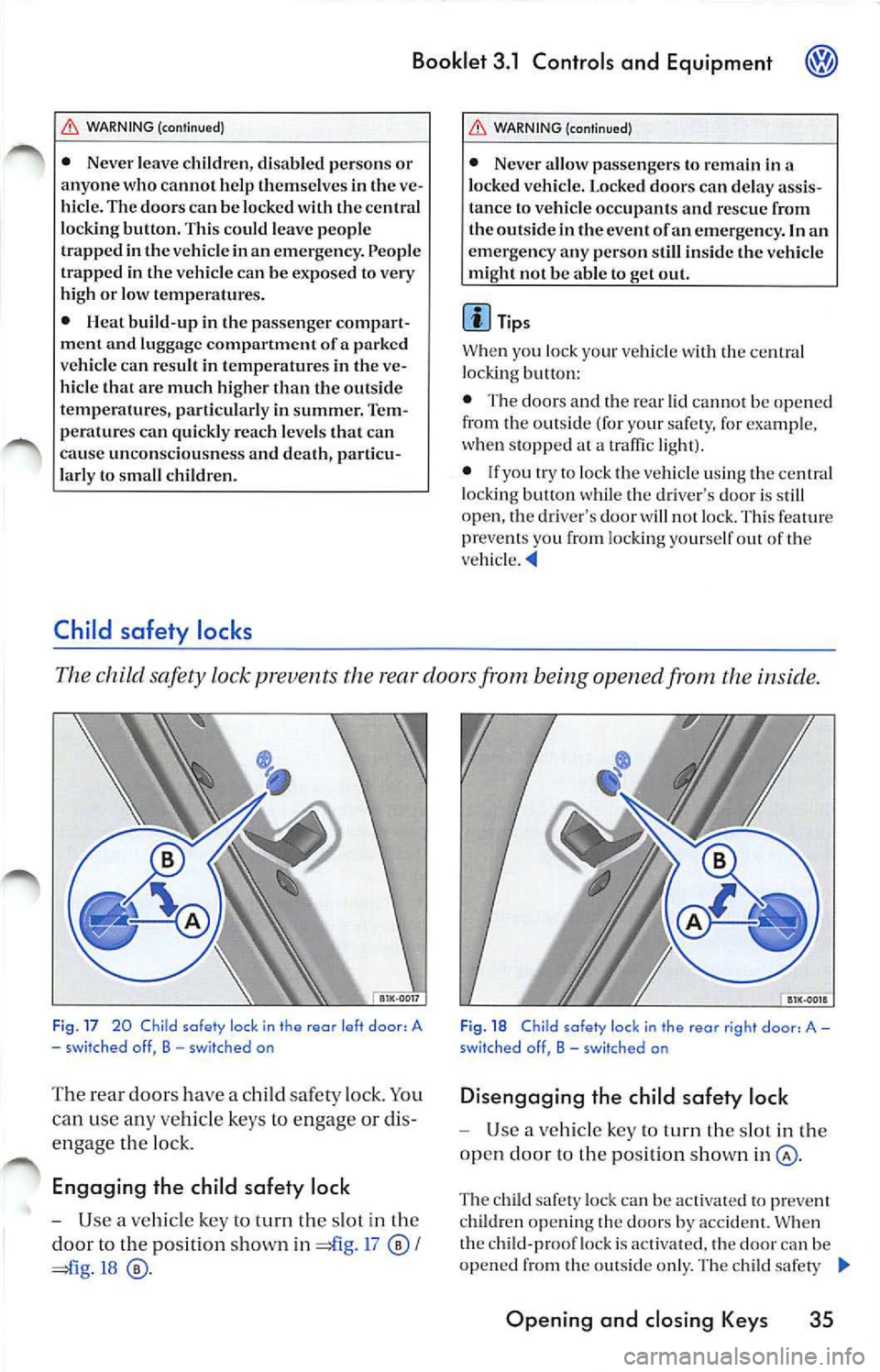
The child safety lock prevents the rear doors from being opened from the inside .
Fig . 17 20 Child safety lock in the rear left door, A
- sw it ched off, B - switched on
The rear doors have a child safety lock . You
can use any vehicle keys to engage or dis
engage the lo ck.
Engaging the child safe ty lock
- Use a vehicle key to turn the slot in the
door to the position sh own in =£l g. 1 7
I
=ii g.18
Fi g. 18 C hild safe ty loc k in the rear r ig ht doo r, A -
swit ched off, B -sw itched on
Di sengaging the child safety lock
Use a vehicle key to turn th e slot in the
open door to the position shown
The child safety loc k can be activat ed to pr eve nt
chi ldren ope ning th e doors by accident. When
the child-pro of lock is act ivated, the doo r can be
opened from the o utside only. The ch ild safe ty
Opening and closing Keys 35
Page 242 of 477
Booklet 3.1 Controls and Equipment
other doors ea ch hav e own switch .
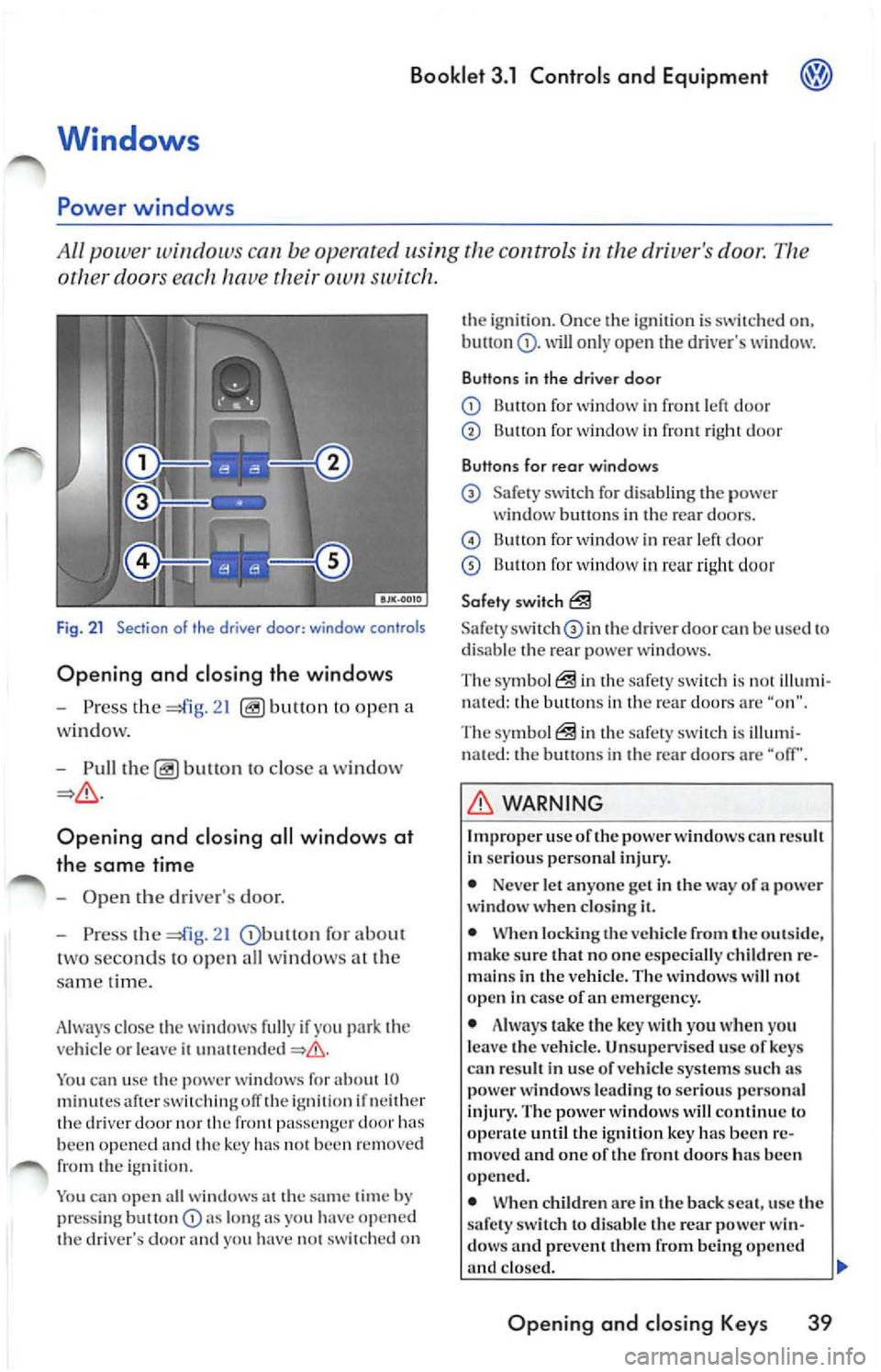
Fig . 21 Section of th e driver door: window controls
Opening and closing the windows
-Press the ope n a
w indow.
- Pull
to close a win dow
Opening and closing all wind ows at
the same time
-Ope n the driver's door.
- Press the
21 for abou t
t wo se conds to op en all wi ndows at the
s am e tim e.
A lwa ys close the w indows fully if yo u
vehicl e or le a ve ii
You ca n u se the power window s for about 10 minut es aft er ofT the ig niti on if n eith er
th e dri ver nor front pa ssenge r doo r been opened and the key has 1101 been re m ove d
from the igniti on.
You can open a ll wi ndow s at the
time by
pr ess ing but ton lo ng as you have o pe n ed
th e dri ver's door yo u ha ve 1101 switched on th
e ignirio n. Once th e ig niti on i s sw itch ed on,
will o nly open dri ver's w indow.
Buttons in the driver door
Button for window in front le ft d oo r
Button for wind ow in front right doo r
Buttons for rear windows
Safe ty sw itch for d isa bling the power
window b uttons in th e re ar door s.
B utt on for wind ow in rear le ft d oor
13u11on for window in rea r ri ght doo r
Safety switch
Safety th e driver doo r can be use d to
di sa ble th e rear p ower w in dows.
The symb ol
in the safe ty sw itch i s illum i
n ate d : the button s in th e rear doo rs a re "o n".
The symbol
in the safety s witch is illumi
n ated: the button s in th e rea r d oo rs are "off'.
WARNING
Imp roper use oft he power windows can result
In se ri ous perso nal inju ry.
• Neve r let anyo ne get in the way of a power
windo w wh en clos ing it.
• When locking the veh icle from the out sid e,
make sure that no on e especia lly c hildren re
m ain s in the vehicl e. T he w indo ws w ill not
open in case of an eme rge ncy .
• Always take the key with you when yo u
l e av e the vehicle . Un supervised u se of ke ys
ca n re sult in u se of ve hicle systems su ch as
pow er windows leading to serious perso nal
injury. The power wind ows will continu e lo
until the i gnition key has been re
mo ved and one of the fron t door s ha s be en
opened.
• When children arc in the back seat, use the
s afet y sw itch
di sa ble the rear power win
dow s and preve nt th em from being opened
clo sed. II>
Opening and closing Key s 39
Page 244 of 477
Booklet 3.1 Controls and Equipment
Pinch protection
The wind ows have a pinch protection feature. This helps re du ce the risk of inju
ries when the windows are closing.
• lfa w indow is obst ructe d w hen closing, the
w ind ow will sto p and open (go down) aga in
If this happe ns, see why the window could
n ot clo se befo re att emp ting to close aga in. If
yo u tr y to close the wind ow again wit hi n 10 sec
o nd s, th e w ind ow's closing force is a utomati
ca lly incr ease d.
• If th e wi ndow is st ill obst ructed, the wi ndow
w ill stop at this po int.
• If th ere is no obvio us reason why the w indow
ca nn ot be closed, try to close it agai n wit hin 5
seconds. T he pin ch protection is now off. The
window clo ses with maximum force.
If you wa it lo n ge r th an the lO or 5 seco nds de
sc ribed above, the w in dow will open f ully whe n
you ope rate o ne of the buttons. One-touch
closi ng is on aga in.
Th e one- tou ch functio n and pinch prot ection do
not wurk if ther e is a m alf un ction in th e power
windows. Contact yo ur authoriz ed Vo lkswage n
deal er co have the m alfunc tion corrected.
Convenience opening and closing
You can ope n or clo se the windo ws from
outside the vehicl e.
Convenience closing
-Hold th e key in th e close pos ition in th e
l oc k of the driver's door, until all windo ws
a re clo sed.
- Turn th e key the other way to interrupt
th e fun ction.
Convenience opening
-Hold th e key in the ope n position in the
l oc k of the driver' s door, until the windows
are ope n.
WARNING
Improper use of the pow er windows can result
in serious personal injury .
• Never let anyone ge t in th e way of a power
window when closing it.
• Always make sure that no one i s in th e w ay
while overriding the pinch protection to close
a w indo w!
• When locking the vehicle from the out side ,
make sur e that no one especially c hildr en re
mains in the vehicle. Th e windows will not
open in case of an emergency.
• Always take the key with you wh en you
leav e the vehicle. Unsupervised use of keys
can result in use of vehicle s ystem s such as
power windows leading to serious personal
inju ry.
• The power windows will continue to op
crntc until the igniti on ke y has bee n re mo ved
and one of the front door s ha s bee n opened.
• When children are in the b ack sea t, use the
safety switch to disable the rear power win
dows and prevent them from b eing opened
and closed.
<4
-Turn the key the oth er way to interrupt
t h e function.
Using set-up in the main menu , you can select if
yo u want the driver 's doo r w in dow. all w indows
o r n o window a t all to open whe n you unlock
your vehicle using the ma ste r key in th e driver's
doo r lock. C hoose the se ttings yo u want in the
CONVENIENCE menu.
WARNING
Improp er use of the power windows can result
in seriou s per sonal injury.
• Neve r let anyon e get in the way of a power
window when clo sing
Opening and closing Keys 41