2009 SUBARU TRIBECA door lock
[x] Cancel search: door lockPage 532 of 2453

LAN(diag)-76
General Diagnostic Table
LAN SYSTEM (DIAGNOSTICS)
13.General Diagnostic Table
A: INSPECTION
Read the DTC or inspect and diagnose the following data in the current data display using Subaru Select
Monitor.
1. LAN SYSTEM
Item OperationSpecificationsNoteYES NO
Diagnostic codeDTC is not displayed when inspect-
ing all DTCs.
DTC is not dis-
played.
Perfor m the diag-
nosis according to
DTC.
Refer to the DTC table
when there are trouble
codes of the CAN commu-
nication system for a mul-
tiple of modules.
TION CHECK, DTC
TA B L E , L i s t o f D i a g n o s t i c
Tr o u b l e C o d e ( D T C ) . >
Coolant Temp.
Check the current data display of
ECM, TCM and body integrated
unit. Three data value are the
same.
Same valuesInspect LAN sys-
tem.
If engine coolant tempera-
ture sensor is not OK,
inspect the sensor circuit.
R defogger SWIt turns to ON when pressing
switch. (Low-speed CAN is OK)Tu r n s t o O N .Inspect rear defog-
ger switch.
Rear defogger switch is
connected with Low-
speed CAN.
R defogger output When switch input, it is output. OutputReplace the body
integrated unit.
If not operating with out-
put, check the rear defog-
ger relay.
Door lock SWWhen locked with door lock switch,
it turns to ON.Tu r n s t o O N .Inspect door lock
switch.
Door lock actuatorWhen locked with door lock switch,
it is output.OutputReplace the body
integrated unit.—
Page 533 of 2453

LAN(diag)-77
General Diagnostic Table
LAN SYSTEM (DIAGNOSTICS)
2. BODY INTEGRATED UNIT
Item OperationSpecificationsNoteYES NO
Illumination VR
power supply
Operate the illumination volume,
illumination light is controlled
according to the change of voltage
on data display.
Illumination light is
controlled with
changing of data.
Inspect the illumi-
nation volume.—
Fuel level resis-
tance
Check the fuel level resistance and
fuel level resistance 2. Both resis-
tances are same.
Same valuesInspect the body
integrated unit.
Compare the input and
output values of body inte-
grated unit.
R wiper SW inputWhen rear wiper SW to ON, data
display turns to ON.Tu r n s t o O N .Inspect the rear
wiper switch.—
R wiper outputWhen rear wiper switch to ON, out-
put signal turns to ON.Tu r n s t o O N .Replace the body
integrated unit.
If not operate with output
turned to ON, check the
rear wiper motor.
Keyless Entr yKeyless entr y LOCK/UNLOCK the
doors.OperateInspect the key-
less antenna.
If the antenna is OK,
replace the body inte-
grated unit.
Brake SWWhen brake pedal is depressed, it
turns to ON.Tu r n s t o O N .Inspect the brake
switch.—
Shift Lock SolenoidThe shift lock releases when
depressing the brake pedal.ReleasedInspect the shift
lock.—
Body integrated
unit registration
function setting
Does Vehicle equipment corre-
spond to setting values?Correspondence
Reconfigure the
values according to
vehicle equipment.
—
CustomizeWhen changing customize setting,
the registration completes correctly.RegisteredInspect the body
integrated unit.
Return to original state
after making changes.
Manual mode
Switch the shift (UP/DOWN) on
Manual mode. Indicator is changed
in 1 — 2.
ChangeInspect the shift
lever.—
Function checkEach checking item operate cor-
rectly. (Except for not equipped)OperateInspect for non-
functional actuator.
Module is normal if output
switches to ON.
Security
After locking with keyless entry sys-
tem and open the door, the security
system operates and the horn
sounds.
Horn sounds.
(Security system
operates.)
Inspect the secu-
rity system.
Horn does not activate if
siren is set to ON by cus-
tomizing.
Page 631 of 2453

SL-2
General Description
SECURITY AND LOCKS
1. General Description
A: COMPONENT
1. DOOR LOCK ASSEMBLY
(A) Front (B) Rear
(1) Inner remote ASSY (6) Rear door latch and door lock
actuator ASSY
Tightening torque: N·m (kgf-m, ft-lb)
(2) Front door latch and door lock
actuator ASSY
T1: 6.5 (0.66, 4.8)
(7) Door outer handle coverT2: 7.5 (0.76, 5.5)
(3) Door outer handle (8) Door outer handle spacerT3: 18 (1.8, 13.3)
(4) Key cylinder (switch) (9) Door outer handle frame ASSY
(5) Striker
SL-00436
(9)
T1
(B)
(A)
T3
(5)
(9)
(2)
(1)
(1)
T3
(5)
(6)
T2
T1
(3)
(7)(4)
(8)
T2
(3)
(7)
T2
T2
(8)T2
T2
Page 635 of 2453

SL-6
General Description
SECURITY AND LOCKS
5. KEYLESS ENTRY SYSTEM
B: CAUTION
•Before disassembling or reassembling parts, al-
ways disconnect the battery ground cable from bat-
tery. When repairing the audio, control module, etc.
which are provided with memory functions, record
the memory contents before disconnecting the
ground cable from battery. Otherwise, these con-
tents are erased upon disconnection.
•Reassemble the parts in the reverse order of dis-
assembly unless otherwise indicated.
•Adjust the parts to the specifications described in
this manual if so designated.
•Connect the connectors securely during reas-
sembly.
•After reassembly, ensure the functional parts op-
erate smoothly.
•The air bag system wiring harness is routed near
electrical parts and switches.
•Airbag system wiring harnesses and connectors
are yellow. Do not use the electrical test equipment
on these circuits.
•Be careful not to damage the airbag system wir-
ing harness when servicing the ignition key cylin-
der.
(1) Keyless entry control module (3) Door switch (5) Horn
(2) Rear gate latch switch (4) Body integrated unit (6) Keyless buzzer
SL-00440
(2)
(3)
(4)
(5)
(5)
(6)
(1)
Page 636 of 2453

SL-7
General Description
SECURITY AND LOCKS
C: PREPARATION TOOL
1. SPECIAL TOOL
2. GENERAL TOOL
ILLUSTRATION TOOL NUMBER DESCRIPTION REMARKS
925580000 PULLER Used for removing trim clip
TOOL NAME REMARKS
Circuit tester Used for measuring resistance and voltage.
Drill Used for replacing ignition key lock.
Clip remover Used for removing trim.
Clip clamp pliers Used for removal of various clips and clamps.
TO RX® T20Used for removing and installing the door outer handle.
ST-925580000
Page 637 of 2453

SL-8
Door Lock Control System
SECURITY AND LOCKS
2. Door Lock Control System
A: WIRING DIAGRAM
1. DOOR LOCK CONTROL
B: INSPECTION
1. SYMPTOM CHART
2. CHECK FUSE
3. CHECK POWER SUPPLY & GROUND CIRCUIT
Symptom Repair order Reference
The door lock control system does
not operate.
1. Check the fuse.
2. Check the power supply and ground cir-
cuit for body integrated unit.
Lock Control System.>
3. Check the door lock switch and the circuit.
trol System.>
4. Check the door lock actuator and the cir-
cuit.
Door Lock Control System.>
The door lock switch does not oper-
ate.
Check the door lock switch.
trol System.>
A specific door lock actuator does
not operate.
Check the door lock actuator and circuit.
Door Lock Control System.>
Step Check Yes No
1CHECK FUSE.
Remove and visually check the fuse No. 3 (in
the fuse and relay box) and No. 7 (in the fuse
and relay box).
Is the fuse blown out? Replace the fuse
with a new one.
Check the power
supply and ground
circuit.
POWER SUPPLY
& GROUND CIR-
CUIT, INSPEC-
TION, Door Lock
Control System.>
Step Check Yes No
1CHECK POWER SUPPLY.
1) Disconnect the harness connector of body
integrated unit.
2) Measure the voltage between harness con-
nector terminal and chassis ground.
Connector & terminal
(i84) No. 34 (+) — Chassis ground (–):
(B281) No. 2 (+) — Chassis ground (– ):
Is the voltage more than 10 V? Go to step 2.Check the harness
for open or shor t
circuit between
body integrated
unit and fuse.
2CHECK GROUND CIRCUIT.
Measure the resistance between harness con-
nector terminal and chassis ground.
Connector & terminal
(B280) No. 22 — Chassis ground:
(B281) No. 8, 9 — Chassis ground:
Is the resistance less than 10
Ω?
The power supply
and ground circuit
are OK.
Repair the har-
ness.
Page 638 of 2453

SL-9
Door Lock Control System
SECURITY AND LOCKS
4. CHECK DOOR LOCK SWITCH.
Step Check Yes No
1CHECK DOOR LOCK SWITCH.
Check the input from door lock switch to body
integrated unit using Subaru Select Monitor.
1) Connect the Subaru Select Monitor to data
link connector.
2) Turn the ignition switch to ON.
3) Select {Integ. unit} from main menu.
4) Select the {Current Data Display & Save}.
5) Check the input to body integrated unit by
operating the door lock switch.
Is the normal input signal dis-
played when the door lock
switch is moved to LOCK/
UNLOCK?
The door lock
switch is OK.
Go to step 2.
2CHECK DOOR LOCK SWITCH CIRCUIT.
1) Disconnect the harness connector of body
integrated unit.
2) Measure the resistance between the har-
ness connector terminal and chassis ground
when moving the door lock switch to LOCK.
Connector & terminal
(i84) No. 15 — Chassis ground:
Is the resistance less than 10
Ω?
Go to step 3.Go to step 4.
3CHECK DOOR LOCK SWITCH CIRCUIT.
Measure the resistance between the harness
connector terminal and chassis ground when
the door lock switch is moved to UNLOCK.
Connector & terminal
(i84) No. 29 — Chassis ground:
Is the resistance less than 10
Ω?
The door lock
switch is OK.
Go to step 4.
4CHECK DOOR LOCK SWITCH.
1) Disconnect the door lock switch harness
connector.
2) Measure the resistance between the door
lock switch terminals when moving the door
lock switch to LOCK.
Connector & terminal
Driver’s side:
(D7) No. 5 — No. 9:
Passenger’s side:
(D125) No. 2 — No. 5:
Is the resistance less than 1
Ω?
Go to step 5.Replace the door
lock switch.
5CHECK DOOR LOCK SWITCH.
Measure the resistance between the door lock
switch terminals when moving the door lock
switch to UNLOCK.
Connector & terminal
Driver’s side:
(D7) No. 5 — No. 8:
Passenger’s side:
(D125) No. 4 — No. 5:
Is the resistance less than 1
Ω?
Go to step 6.Replace the door
lock switch.
6HARNESS INSPECTION.
Measure the resistance between door lock
switch harness connector terminal and chassis
ground.
Connector & terminal
Driver’s side:
(D7) No. 5 — Chassis ground:
Passenger’s side:
(D125) No.5 — Chassis ground:
Is the resistance less than 1
Ω?
Replace the door
lock switch.
Repair the open
circuit or chassis
short circuit of the
harness.
Page 639 of 2453
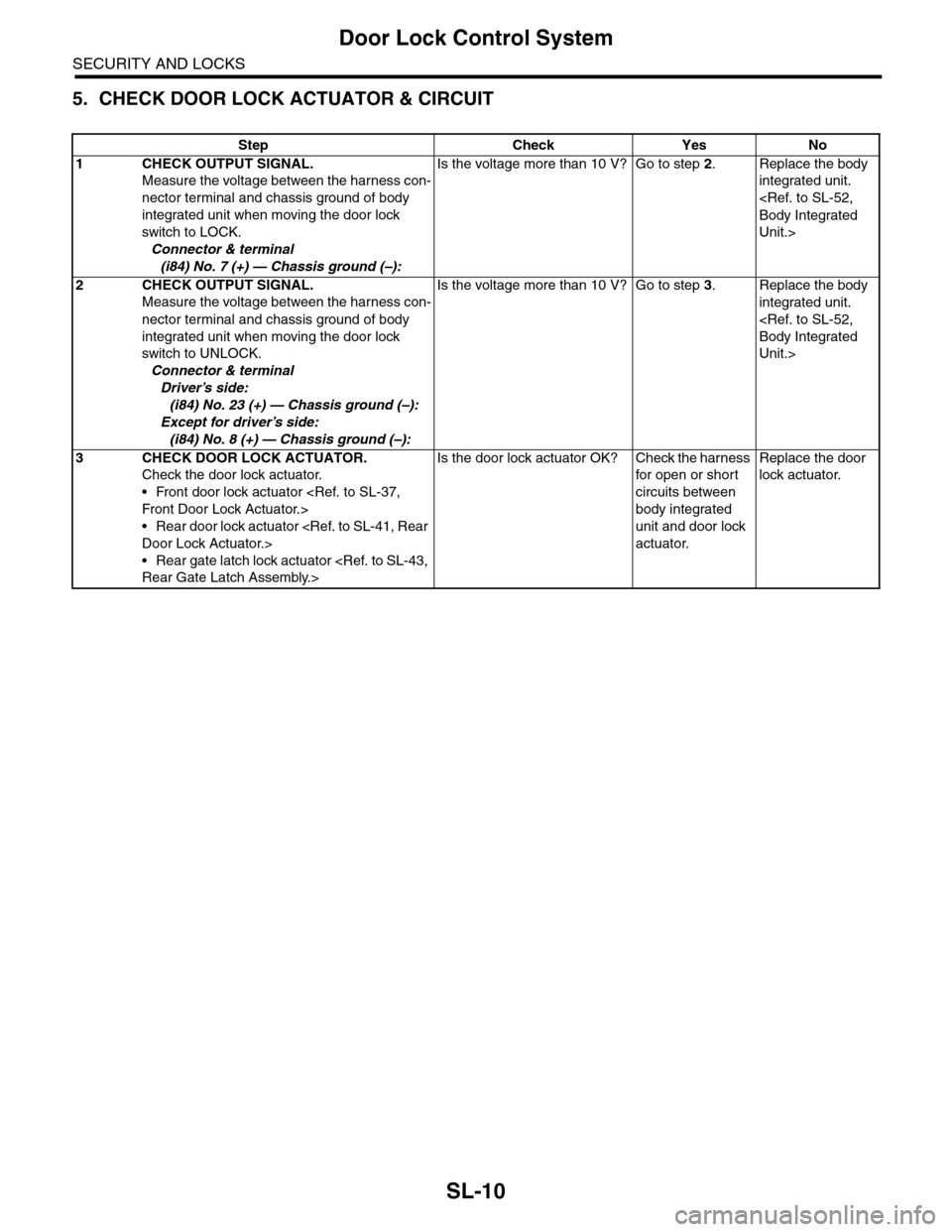
SL-10
Door Lock Control System
SECURITY AND LOCKS
5. CHECK DOOR LOCK ACTUATOR & CIRCUIT
Step Check Yes No
1CHECK OUTPUT SIGNAL.
Measure the voltage between the harness con-
nector terminal and chassis ground of body
integrated unit when moving the door lock
switch to LOCK.
Connector & terminal
(i84) No. 7 (+) — Chassis ground (–):
Is the voltage more than 10 V? Go to step 2.Replace the body
integrated unit.
Unit.>
2CHECK OUTPUT SIGNAL.
Measure the voltage between the harness con-
nector terminal and chassis ground of body
integrated unit when moving the door lock
switch to UNLOCK.
Connector & terminal
Driver’s side:
(i84) No. 23 (+) — Chassis ground (–):
Except for driver’s side:
(i84) No. 8 (+) — Chassis ground (–):
Is the voltage more than 10 V? Go to step 3.Replace the body
integrated unit.
Unit.>
3CHECK DOOR LOCK ACTUATOR.
Check the door lock actuator.
•Front door lock actuator
•Rear door lock actuator
•Rear gate latch lock actuator
Is the door lock actuator OK? Check the harness
for open or shor t
circuits between
body integrated
unit and door lock
actuator.
Replace the door
lock actuator.