2009 SUBARU TRIBECA Negative
[x] Cancel search: NegativePage 1745 of 2453
GD(H6DO)-133
Diagnostic Trouble Code (DTC) Detecting Criteria
GENERAL DESCRIPTION
Time Needed for Diagnosis: 30 to 100 seconds
0.02-inch Diagnosis
DTC
P0456 Evaporative Emission Control System Leak Detected (very small leak)
Diagnostic method
The diagnostic method consists of creating a sealed vacuum in the fuel tank and then determining the pres-
ence of leakage from the speed at which the tank internal pressure returns to atmospheric pressure.
Mode A: (0 Point Compensation)
When pressure in tank is high, wait for 0 point 0 kPa (Near 0 mmHg, 0 inHg) to return.Shift to mode B when
0 point returns.
Cancel the diagnosis when 0 point does not return in the specified time.
Mode B: (Negative pressure introduced)
Introduce negative pressure in the intake manifold to the tank.
Approx. 0 → –2.0 kPa (0 mmHg → –15 mmHg, 0 → –0.59 inHg)
When the pressure above (desired negative pressure) is reached, Mode C is entered.
Cancel the diagnosis when the targeted pressure in the tank is not reached.
Mode C: (Negative pressure maintained)
Stop the introduction of negative pressure and wait until the tank pressure returns to the start level of P2 cal-
culation.
Change to Mode D either when the tank pressure returns to the start level of P2 calculation, or when the pre-
determined amount of time has passed.
Mode D: (Calculate the amount of negative pressure change)
Monitor the tank pressure in mode D, calculate (P2) the pressure change in the tank, and measure the time
(evpdset) for the tank pressure to return when calculation of P2 is completed. Shift to mode E when pressure
returns. Make an advance OK judgment using the value of P2, or cancel, when the pressure in the tank does
not return after calculation of P2 is completed even when the predetermined amount of time has passed.
When the following conditions are established, it is OK.
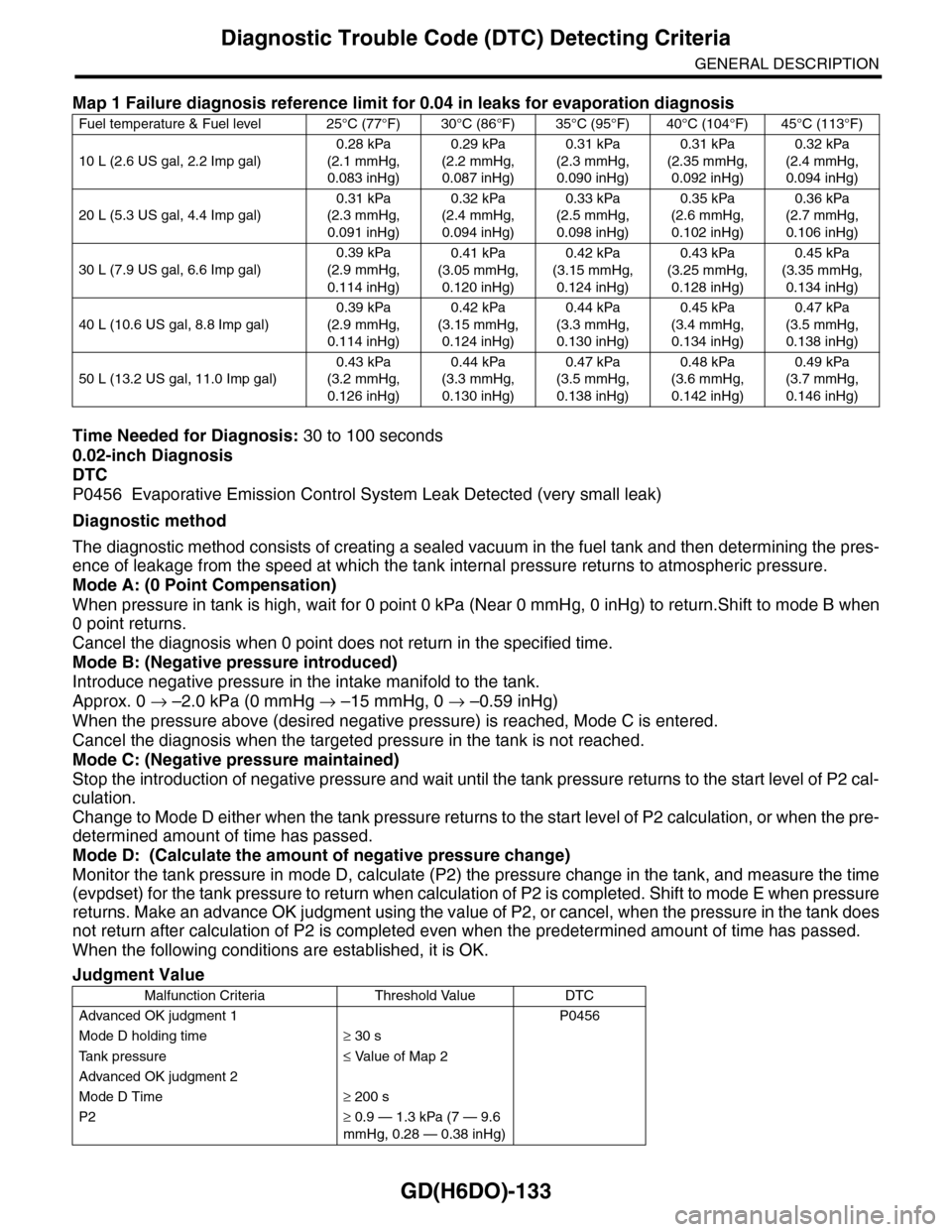
Map 1 Failure diagnosis reference limit for 0.04 in leaks for evaporation diagnosis
Fuel temperature & Fuel level 25°C (77°F) 30°C (86°F) 35°C (95°F) 40°C (104°F) 45°C (113°F)
10 L (2.6 US gal, 2.2 Imp gal)
0.28 kPa
(2.1 mmHg,
0.083 inHg)
0.29 kPa
(2.2 mmHg,
0.087 inHg)
0.31 kPa
(2.3 mmHg,
0.090 inHg)
0.31 kPa
(2.35 mmHg,
0.092 inHg)
0.32 kPa
(2.4 mmHg,
0.094 inHg)
20 L (5.3 US gal, 4.4 Imp gal)
0.31 kPa
(2.3 mmHg,
0.091 inHg)
0.32 kPa
(2.4 mmHg,
0.094 inHg)
0.33 kPa
(2.5 mmHg,
0.098 inHg)
0.35 kPa
(2.6 mmHg,
0.102 inHg)
0.36 kPa
(2.7 mmHg,
0.106 inHg)
30 L (7.9 US gal, 6.6 Imp gal)
0.39 kPa
(2.9 mmHg,
0.114 inHg)
0.41 kPa
(3.05 mmHg,
0.120 inHg)
0.42 kPa
(3.15 mmHg,
0.124 inHg)
0.43 kPa
(3.25 mmHg,
0.128 inHg)
0.45 kPa
(3.35 mmHg,
0.134 inHg)
40 L (10.6 US gal, 8.8 Imp gal)
0.39 kPa
(2.9 mmHg,
0.114 inHg)
0.42 kPa
(3.15 mmHg,
0.124 inHg)
0.44 kPa
(3.3 mmHg,
0.130 inHg)
0.45 kPa
(3.4 mmHg,
0.134 inHg)
0.47 kPa
(3.5 mmHg,
0.138 inHg)
50 L (13.2 US gal, 11.0 Imp gal)
0.43 kPa
(3.2 mmHg,
0.126 inHg)
0.44 kPa
(3.3 mmHg,
0.130 inHg)
0.47 kPa
(3.5 mmHg,
0.138 inHg)
0.48 kPa
(3.6 mmHg,
0.142 inHg)
0.49 kPa
(3.7 mmHg,
0.146 inHg)
Judgment Value
Malfunction Criteria Threshold Value DTC
Advanced OK judgment 1 P0456
Mode D holding time≥ 30 s
Ta n k p r e s s u r e≤ Value of Map 2
Advanced OK judgment 2
Mode D Time≥ 200 s
P2≥ 0.9 — 1.3 kPa (7 — 9.6
mmHg, 0.28 — 0.38 inHg)
Page 1974 of 2453
SC(H6DO)-16
Starter
STARTING/CHARGING SYSTEMS
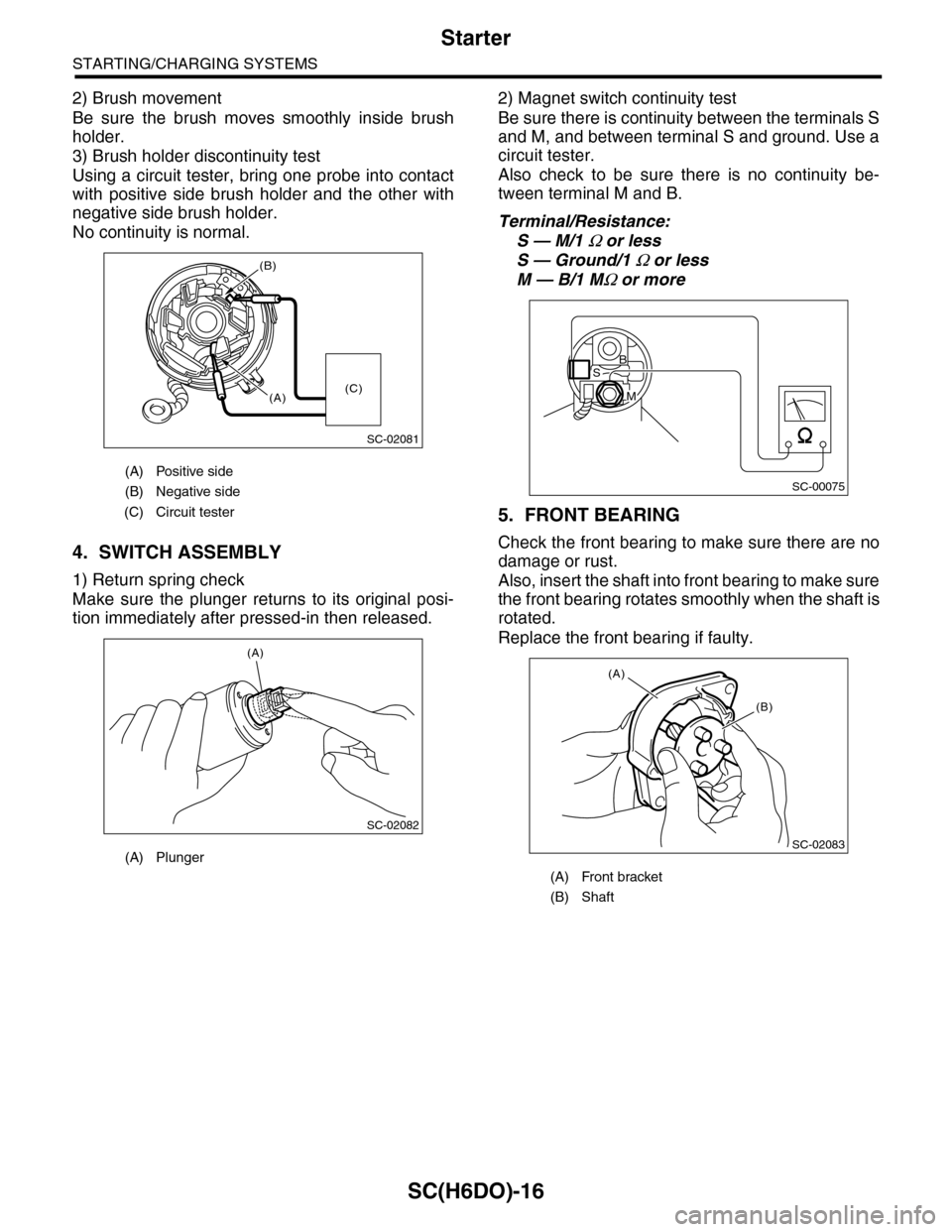
2) Brush movement
Be sure the brush moves smoothly inside brush
holder.
3) Brush holder discontinuity test
Using a circuit tester, bring one probe into contact
with positive side brush holder and the other with
negative side brush holder.
No continuity is normal.
4. SWITCH ASSEMBLY
1) Return spring check
Make sure the plunger returns to its original posi-
tion immediately after pressed-in then released.
2) Magnet switch continuity test
Be sure there is continuity between the terminals S
and M, and between terminal S and ground. Use a
circuit tester.
Also check to be sure there is no continuity be-
tween terminal M and B.
Terminal/Resistance:
S — M/1 Ω or less
S — Ground/1 Ω or less
M — B/1 MΩ or more
5. FRONT BEARING
Check the front bearing to make sure there are no
damage or rust.
Also, insert the shaft into front bearing to make sure
the front bearing rotates smoothly when the shaft is
rotated.
Replace the front bearing if faulty.
(A) Positive side
(B) Negative side
(C) Circuit tester
(A) Plunger
SC-02081
(B)
(A)(C)
SC-02082
(A)
(A) Front bracket
(B) Shaft
SC-00075
B
M
S
SC-02083
(A)
(B)
Page 1976 of 2453
SC(H6DO)-18
Starter
STARTING/CHARGING SYSTEMS
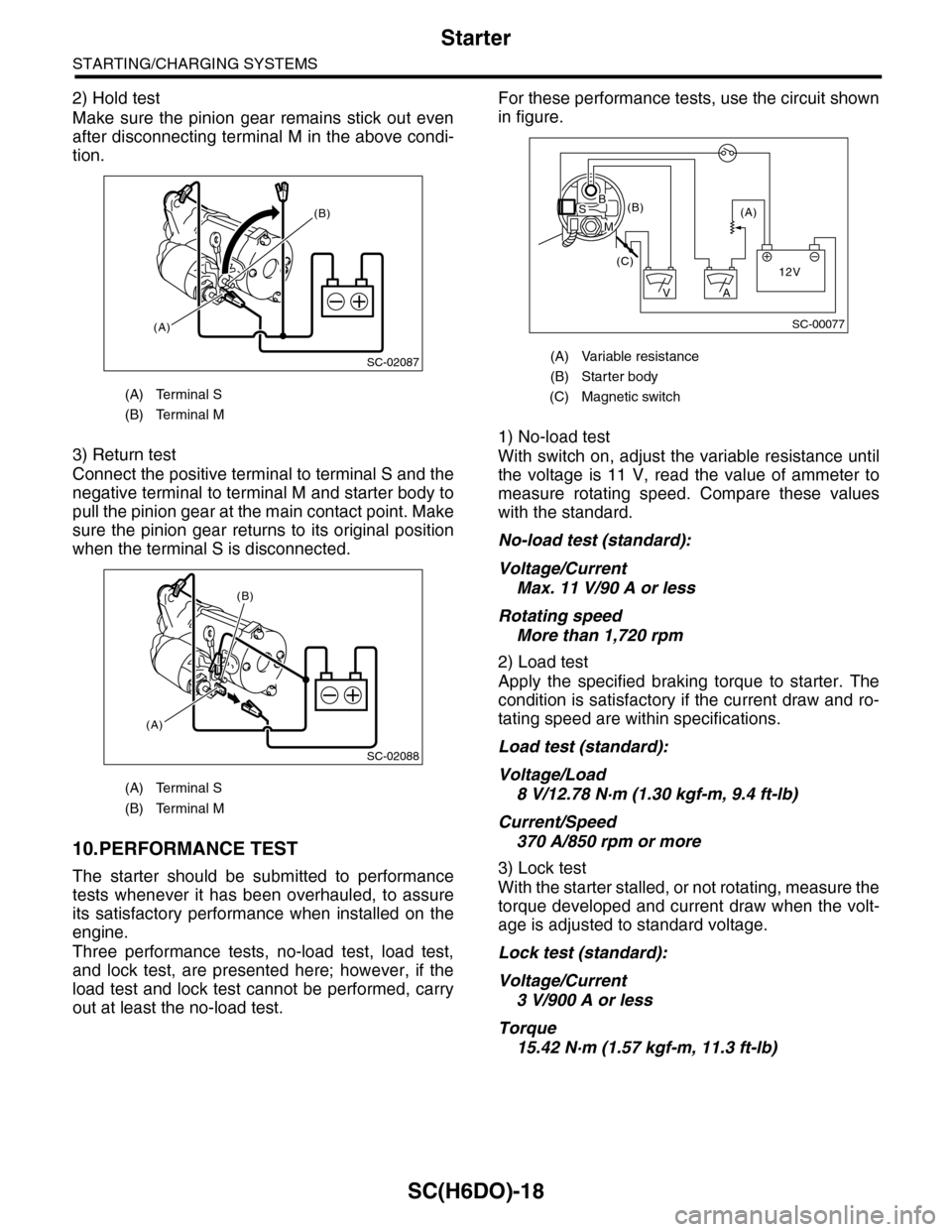
2) Hold test
Make sure the pinion gear remains stick out even
after disconnecting terminal M in the above condi-
tion.
3) Return test
Connect the positive terminal to terminal S and the
negative terminal to terminal M and starter body to
pull the pinion gear at the main contact point. Make
sure the pinion gear returns to its original position
when the terminal S is disconnected.
10.PERFORMANCE TEST
The starter should be submitted to performance
tests whenever it has been overhauled, to assure
its satisfactory performance when installed on the
engine.
Three performance tests, no-load test, load test,
and lock test, are presented here; however, if the
load test and lock test cannot be performed, carry
out at least the no-load test.
For these performance tests, use the circuit shown
in figure.
1) No-load test
With switch on, adjust the variable resistance until
the voltage is 11 V, read the value of ammeter to
measure rotating speed. Compare these values
with the standard.
No-load test (standard):
Voltage/Current
Max. 11 V/90 A or less
Rotating speed
More than 1,720 rpm
2) Load test
Apply the specified braking torque to starter. The
condition is satisfactory if the current draw and ro-
tating speed are within specifications.
Load test (standard):
Voltage/Load
8 V/12.78 N·m (1.30 kgf-m, 9.4 ft-lb)
Current/Speed
370 A/850 rpm or more
3) Lock test
With the starter stalled, or not rotating, measure the
torque developed and current draw when the volt-
age is adjusted to standard voltage.
Lock test (standard):
Voltage/Current
3 V/900 A or less
Torque
15.42 N·m (1.57 kgf-m, 11.3 ft-lb)
(A) Terminal S
(B) Terminal M
(A) Terminal S
(B) Terminal M
SC-02087
(B)
(A)
SC-02088
(A)
(B)
(A) Variable resistance
(B) Starter body
(C) Magnetic switch
SC-00077
(A)(B)
(C)12V
+
AV
BS
M
Page 1980 of 2453
SC(H6DO)-22
Generator
STARTING/CHARGING SYSTEMS
D: ASSEMBLY
Assemble in the reverse order of disassembly.
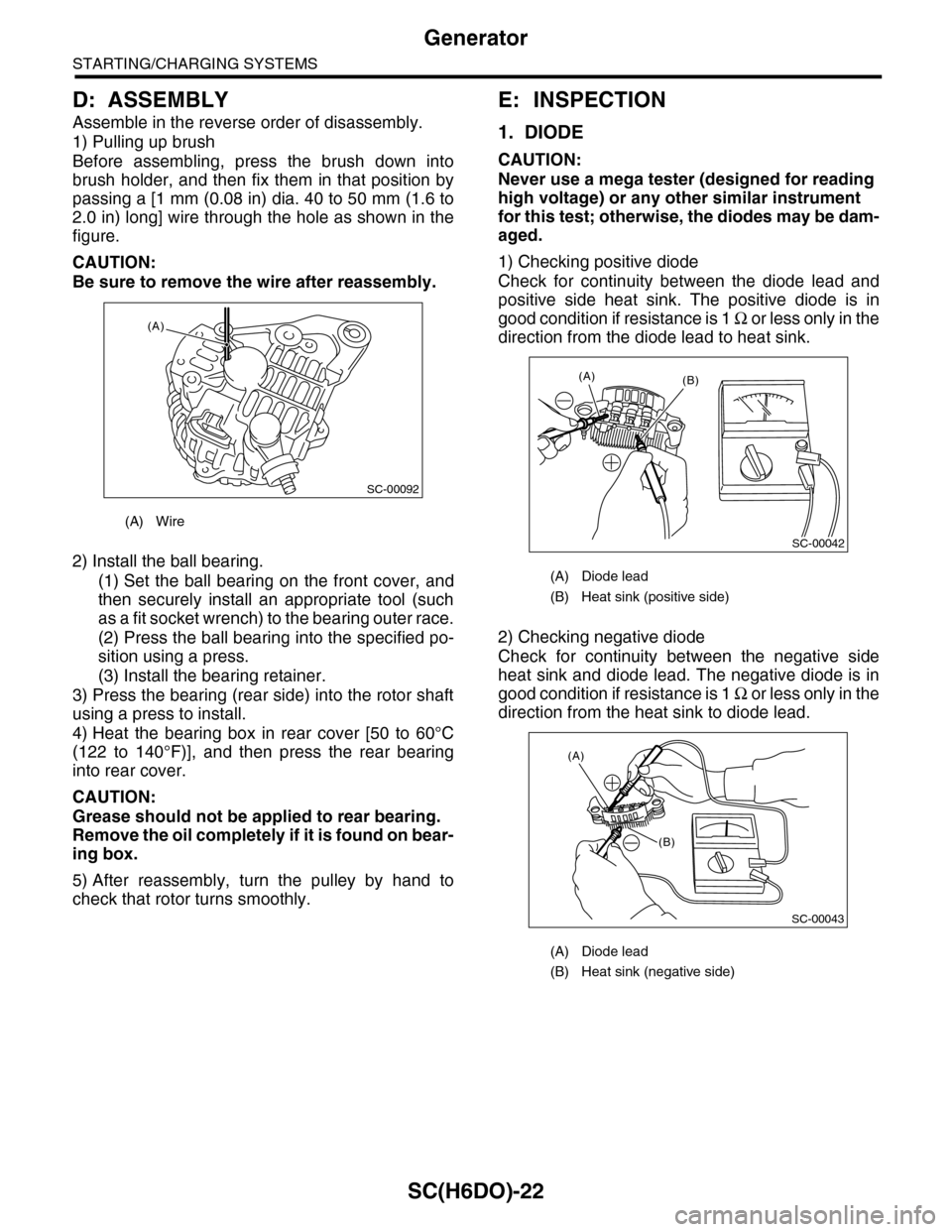
1) Pulling up brush
Before assembling, press the brush down into
brush holder, and then fix them in that position by
passing a [1 mm (0.08 in) dia. 40 to 50 mm (1.6 to
2.0 in) long] wire through the hole as shown in the
figure.
CAUTION:
Be sure to remove the wire after reassembly.
2) Install the ball bearing.
(1) Set the ball bearing on the front cover, and
then securely install an appropriate tool (such
as a fit socket wrench) to the bearing outer race.
(2) Press the ball bearing into the specified po-
sition using a press.
(3) Install the bearing retainer.
3) Press the bearing (rear side) into the rotor shaft
using a press to install.
4) Heat the bearing box in rear cover [50 to 60°C
(122 to 140°F)], and then press the rear bearing
into rear cover.
CAUTION:
Grease should not be applied to rear bearing.
Remove the oil completely if it is found on bear-
ing box.
5) After reassembly, turn the pulley by hand to
check that rotor turns smoothly.
E: INSPECTION
1. DIODE
CAUTION:
Never use a mega tester (designed for reading
high voltage) or any other similar instrument
for this test; otherwise, the diodes may be dam-
aged.
1) Checking positive diode
Check for continuity between the diode lead and
positive side heat sink. The positive diode is in
good condition if resistance is 1 Ω o r l e s s o n l y i n t h e
direction from the diode lead to heat sink.
2) Checking negative diode
Check for continuity between the negative side
heat sink and diode lead. The negative diode is in
good condition if resistance is 1 Ω o r l e s s o n l y i n t h e
direction from the heat sink to diode lead.
(A) Wire
SC-00092
(A)
(A) Diode lead
(B) Heat sink (positive side)
(A) Diode lead
(B) Heat sink (negative side)
SC-00042
(B)(A)
(A)
(B)
SC-00043
Page 1983 of 2453
SC(H6DO)-25
Battery
STARTING/CHARGING SYSTEMS
4. Battery
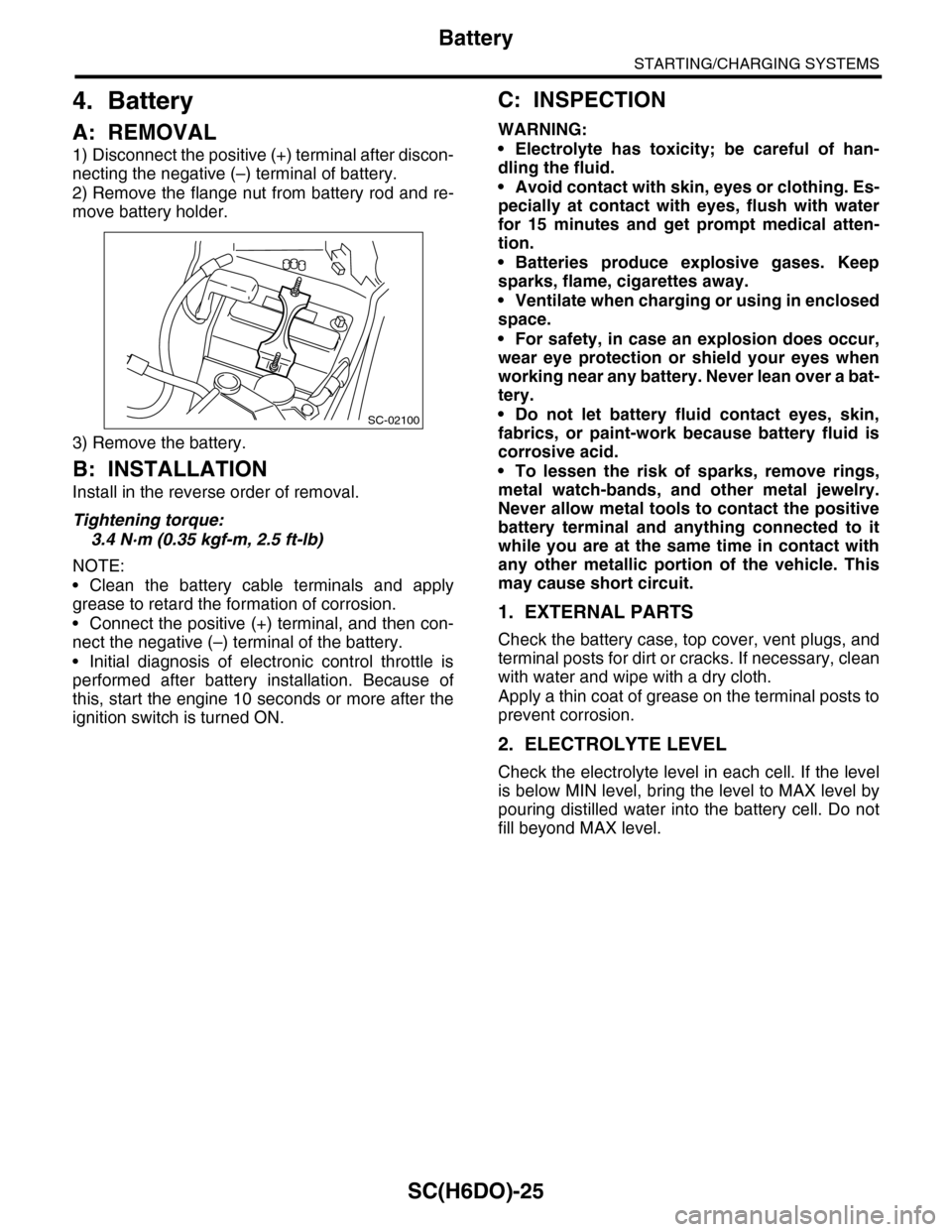
A: REMOVAL
1) Disconnect the positive (+) terminal after discon-
necting the negative (–) terminal of battery.
2) Remove the flange nut from battery rod and re-
move battery holder.
3) Remove the battery.
B: INSTALLATION
Install in the reverse order of removal.
Tightening torque:
3.4 N·m (0.35 kgf-m, 2.5 ft-lb)
NOTE:
•Clean the battery cable terminals and apply
grease to retard the formation of corrosion.
•Connect the positive (+) terminal, and then con-
nect the negative (–) terminal of the battery.
•Initial diagnosis of electronic control throttle is
performed after battery installation. Because of
this, start the engine 10 seconds or more after the
ignition switch is turned ON.
C: INSPECTION
WARNING:
•Electrolyte has toxicity; be careful of han-
dling the fluid.
•Avoid contact with skin, eyes or clothing. Es-
pecially at contact with eyes, flush with water
for 15 minutes and get prompt medical atten-
tion.
•Batteries produce explosive gases. Keep
sparks, flame, cigarettes away.
•Ventilate when charging or using in enclosed
space.
•For safety, in case an explosion does occur,
wear eye protection or shield your eyes when
working near any battery. Never lean over a bat-
tery.
•Do not let battery fluid contact eyes, skin,
fabrics, or paint-work because battery fluid is
corrosive acid.
•To lessen the risk of sparks, remove rings,
metal watch-bands, and other metal jewelry.
Never allow metal tools to contact the positive
battery terminal and anything connected to it
while you are at the same time in contact with
any other metallic portion of the vehicle. This
may cause short circuit.
1. EXTERNAL PARTS
Check the battery case, top cover, vent plugs, and
terminal posts for dirt or cracks. If necessary, clean
with water and wipe with a dry cloth.
Apply a thin coat of grease on the terminal posts to
prevent corrosion.
2. ELECTROLYTE LEVEL
Check the electrolyte level in each cell. If the level
is below MIN level, bring the level to MAX level by
pouring distilled water into the battery cell. Do not
fill beyond MAX level.
SC-02100
Page 2256 of 2453
CS-4
General Description
CONTROL SYSTEMS
C: CAUTION
•Wear work clothing, including a cap, protective
goggles and protective shoes during operation.
•Remove contamination including dirt and corro-
sion before removal, installation or disassembly.
•Keep the disassembled parts in order and pro-
tect them from dust and dirt.
•Before removal, installation or disassembly, be
sure to clarify the failure. Avoid unnecessary re-
moval, installation, disassembly and replacement.
•Use SUBARU genuine fluid, grease etc. or
equivalent. Do not mix fluid, grease, etc. with that of
another grade or from other manufacturers.
•Be sure to tighten fasteners including bolts and
nuts to the specified torque.
•Place shop jacks or rigid racks at the specified
points.
•Apply grease onto sliding or revolution surfaces
before installation.
•Before installing O-rings or snap rings, apply suf-
ficient amount of fluid to avoid damage and defor-
mation.
•Before securing a part in a vise, place cushioning
material such as wood blocks, aluminum plate or
cloth between the part and the vise.
•Before disconnecting electrical connectors, be
sure to disconnect the negative terminal from bat-
tery.
Page 2287 of 2453
WI-3
Basic Diagnostic Procedure
WIRING SYSTEM
1. Basic Diagnostic Procedure
A: BASIC PROCEDURES
1. GENERAL DESCRIPTION
The most important purpose of diagnostics is to
quickly determine which part is malfunctioning, to
save time and labor.
2. IDENTIFICATION OF TROUBLE SYMP-
TOM
Determine what the problem is based on the symp-
tom.
3. PROBABLE CAUSE OF TROUBLE
Look at the wiring diagram and check the system’s
circuit. Then check the switch, relay, fuse, ground,
etc.
4. LOCATION AND REPAIR OF TROUBLE
1) Using the diagnostics, narrow down the causes.
2) If necessary, use a voltmeter, ohmmeter, etc.
3) Before replacing certain component parts
(switch, relay, etc.), check the power supply,
ground, for open wiring harness, poor connectors,
etc. If no problem is encountered, check the com-
ponent parts.
5. SYSTEM OPERATION CHECK
After repairing, ensure that the system operates
properly.
B: BASIC INSPECTION
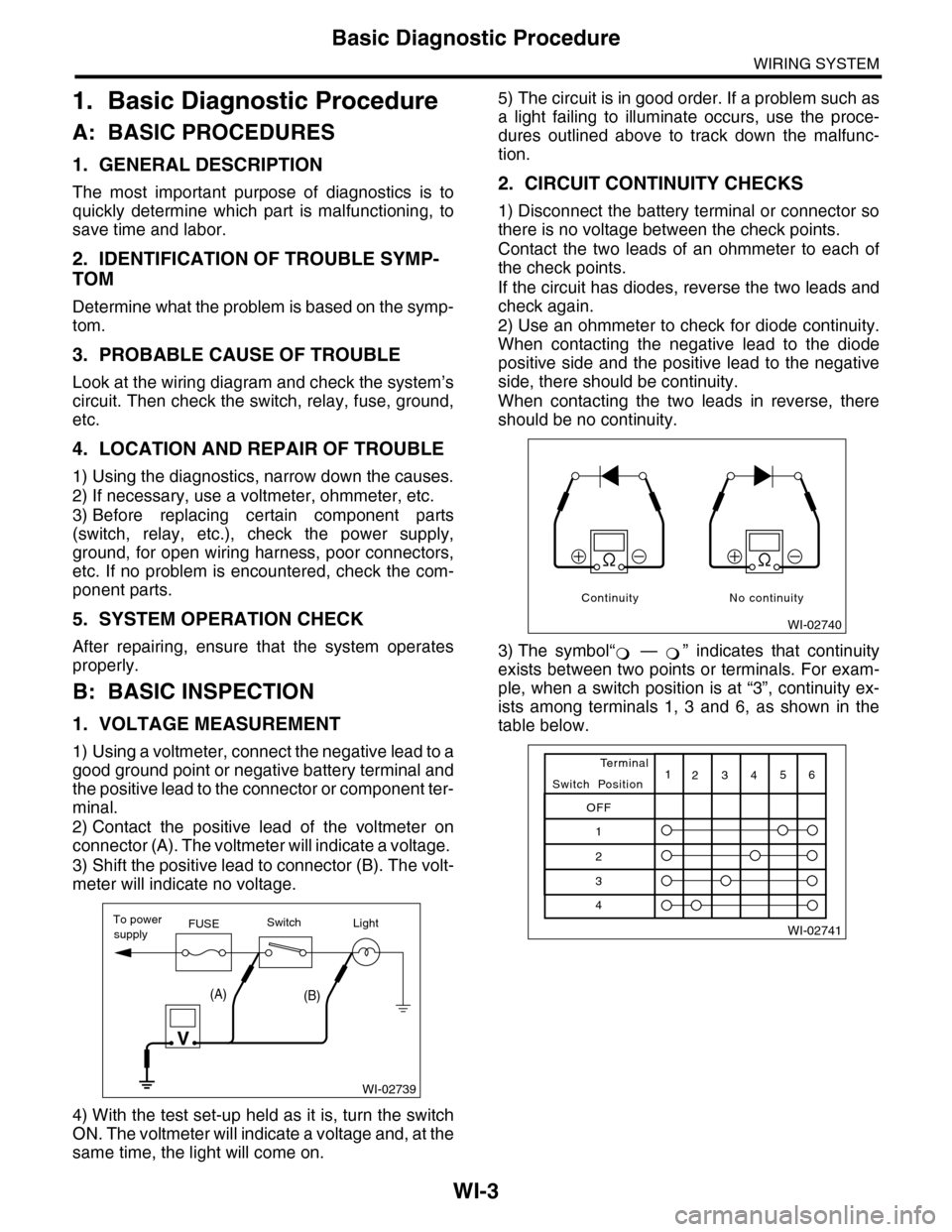
1. VOLTAGE MEASUREMENT
1) Using a voltmeter, connect the negative lead to a
good ground point or negative battery terminal and
the positive lead to the connector or component ter-
minal.
2) Contact the positive lead of the voltmeter on
connector (A). The voltmeter will indicate a voltage.
3) Shift the positive lead to connector (B). The volt-
meter will indicate no voltage.
4) With the test set-up held as it is, turn the switch
ON. The voltmeter will indicate a voltage and, at the
same time, the light will come on.
5) The circuit is in good order. If a problem such as
a light failing to illuminate occurs, use the proce-
dures outlined above to track down the malfunc-
tion.
2. CIRCUIT CONTINUITY CHECKS
1) Disconnect the battery terminal or connector so
there is no voltage between the check points.
Contact the two leads of an ohmmeter to each of
the check points.
If the circuit has diodes, reverse the two leads and
check again.
2) Use an ohmmeter to check for diode continuity.
When contacting the negative lead to the diode
positive side and the positive lead to the negative
side, there should be continuity.
When contacting the two leads in reverse, there
should be no continuity.
3) The symbol“ — ” indicates that continuity
exists between two points or terminals. For exam-
ple, when a switch position is at “3”, continuity ex-
ists among terminals 1, 3 and 6, as shown in the
table below.
WI-02739
To powerFUSEsupplySwitchLight
V
(A)(B)
WI-02740
Continuity No continuity