2009 SUBARU TRIBECA horn
[x] Cancel search: hornPage 478 of 2453
![SUBARU TRIBECA 2009 1.G Service Workshop Manual LAN(diag)-22
Subaru Select Monitor
LAN SYSTEM (DIAGNOSTICS)
9. FUNCTION SETTING (ECM CUSTOMIZING)
1) On the «Main Menu» display screen, select the {Each System Check} and press the [YES] key.
2) On](/manual-img/17/7322/w960_7322-477.png "SUBARU TRIBECA 2009 1.G Service Workshop Manual LAN(diag)-22
Subaru Select Monitor
LAN SYSTEM (DIAGNOSTICS)
9. FUNCTION SETTING (ECM CUSTOMIZING)
1) On the «Main Menu» display screen, select the {Each System Check} and press the [YES] key.
2) On")
LAN(diag)-22
Subaru Select Monitor
LAN SYSTEM (DIAGNOSTICS)
9. FUNCTION SETTING (ECM CUSTOMIZING)
1) On the «Main Menu» display screen, select the {Each System Check} and press the [YES] key.
2) On the «System Selection Menu» display screen, select the {Integ. Unit mode} and press the [YES] key.
3) On the «Integ. Unit mode failure diag» display screen, select the {ECM customizing} and press the [YES] key.
4) Change the setting with UP/DOWN key and press the [YES] key.
•List of function setting item (ECM customizing)
NOTE:
Even if changes are made to items that are not equipped, the contents are not confirmed and do not operate.
DataInitial set-
ting value
Customize
settingRemarksDestination
Specifications
Off delay time Normal
Delay time below can be selected by setting.
After door closed After key unlock
OFF 0 sec. 0 sec.
Short 3 sec. 10 sec.
Normal 5 sec. 20 sec.
Long 8 sec. 30 sec.
Auto lock time 30 sec.0 — 60
sec.
Workable when Auto locking is set to “ON” and Automatic
locking setup is “ON”. Time can be changed by 10 sec-
onds: 0 (OFF) — 60 (maximum).
Not supported by North
American specifications
Rr defogger op.
mode15 min.
15 min.Rear defogger stops in 15 minutes automatically after
switch is turned to ON.
ContinuousRear defogger repeats active condition for 15 minutes and
inactive condition for 2 minutes until switch is turned to OFF.
Wiper deicer op.
mode15 min.
15 min.Wiper deicer stops in 15 minutes automatically after
switch is turned to ON.
ContinuousWiper deicer repeats active condition for 15 minutes and
inactive condition for 2 minutes until switch is turned to OFF.
Security Alarm
SetupONON Security alarm (hazard, horn or siren) in active condition
OFF Security alarm in inactive condition
Impact Sensor
SetupOFF
ONWorkable when Impact Sensor Setup is set to “ON”
Impact sensor in active condition
OFFImpact sensor in inactive condition (Set Impact Sensor
Setup of model without impact sensor to “OFF”.)
Alarm monitor
delay settingON
After doors are locked by keyless entry system operated,
Alarm monitor starts in following time.
ON Delay time is 30 seconds.
OFF Delay time is 0 seconds.
Lockout preven-
tionONONLockout prevention in inactive condition (Lockout preven-
tion does not operate if safety knob is locked by hand.)
OFF Lockout prevention in inactive condition
Impact Sensor OFFON
Ve h i c l e i s c o n t r o l l e d i n i m p a c t s e n s o r e q u i p p e d m o d e .
(Set impact sensor to “OFF” in model without impact sen-
sor. If impact sensor is set to “ON”, hazard, horn or siren
operate after doors are locked by keyless entry system
operated (Alarm monitor starting).
Set to “ON” when an
optional impact sensor
is installed.
OFF Vehicle is controlled in impact sensor no-equipped mode.
Siren setting OFFON
Siren sounds when alarm operates. (Set siren setting to
“OFF” in model without siren. Horn does not sound if siren
setting is set to “ON”.)
Set to “ON” when an
optional siren is
installed.OFF Horn sounds when alarm operates.
Answer-back
buzzer setupON
ON
Workable when answer-back buzzer setup is set to “ON”.
When lock/unlock is selected by keyless entry system
operated, hazard answer-back buzzer operates.
OFFWhen lock/unlock is selected by keyless entry system
operated, answer-back buzzer does not sound.
Page 533 of 2453

LAN(diag)-77
General Diagnostic Table
LAN SYSTEM (DIAGNOSTICS)
2. BODY INTEGRATED UNIT
Item OperationSpecificationsNoteYES NO
Illumination VR
power supply
Operate the illumination volume,
illumination light is controlled
according to the change of voltage
on data display.
Illumination light is
controlled with
changing of data.
Inspect the illumi-
nation volume.—
Fuel level resis-
tance
Check the fuel level resistance and
fuel level resistance 2. Both resis-
tances are same.
Same valuesInspect the body
integrated unit.
Compare the input and
output values of body inte-
grated unit.
R wiper SW inputWhen rear wiper SW to ON, data
display turns to ON.Tu r n s t o O N .Inspect the rear
wiper switch.—
R wiper outputWhen rear wiper switch to ON, out-
put signal turns to ON.Tu r n s t o O N .Replace the body
integrated unit.
If not operate with output
turned to ON, check the
rear wiper motor.
Keyless Entr yKeyless entr y LOCK/UNLOCK the
doors.OperateInspect the key-
less antenna.
If the antenna is OK,
replace the body inte-
grated unit.
Brake SWWhen brake pedal is depressed, it
turns to ON.Tu r n s t o O N .Inspect the brake
switch.—
Shift Lock SolenoidThe shift lock releases when
depressing the brake pedal.ReleasedInspect the shift
lock.—
Body integrated
unit registration
function setting
Does Vehicle equipment corre-
spond to setting values?Correspondence
Reconfigure the
values according to
vehicle equipment.
—
CustomizeWhen changing customize setting,
the registration completes correctly.RegisteredInspect the body
integrated unit.
Return to original state
after making changes.
Manual mode
Switch the shift (UP/DOWN) on
Manual mode. Indicator is changed
in 1 — 2.
ChangeInspect the shift
lever.—
Function checkEach checking item operate cor-
rectly. (Except for not equipped)OperateInspect for non-
functional actuator.
Module is normal if output
switches to ON.
Security
After locking with keyless entry sys-
tem and open the door, the security
system operates and the horn
sounds.
Horn sounds.
(Security system
operates.)
Inspect the secu-
rity system.
Horn does not activate if
siren is set to ON by cus-
tomizing.
Page 635 of 2453

SL-6
General Description
SECURITY AND LOCKS
5. KEYLESS ENTRY SYSTEM
B: CAUTION
•Before disassembling or reassembling parts, al-
ways disconnect the battery ground cable from bat-
tery. When repairing the audio, control module, etc.
which are provided with memory functions, record
the memory contents before disconnecting the
ground cable from battery. Otherwise, these con-
tents are erased upon disconnection.
•Reassemble the parts in the reverse order of dis-
assembly unless otherwise indicated.
•Adjust the parts to the specifications described in
this manual if so designated.
•Connect the connectors securely during reas-
sembly.
•After reassembly, ensure the functional parts op-
erate smoothly.
•The air bag system wiring harness is routed near
electrical parts and switches.
•Airbag system wiring harnesses and connectors
are yellow. Do not use the electrical test equipment
on these circuits.
•Be careful not to damage the airbag system wir-
ing harness when servicing the ignition key cylin-
der.
(1) Keyless entry control module (3) Door switch (5) Horn
(2) Rear gate latch switch (4) Body integrated unit (6) Keyless buzzer
SL-00440
(2)
(3)
(4)
(5)
(5)
(6)
(1)
Page 641 of 2453
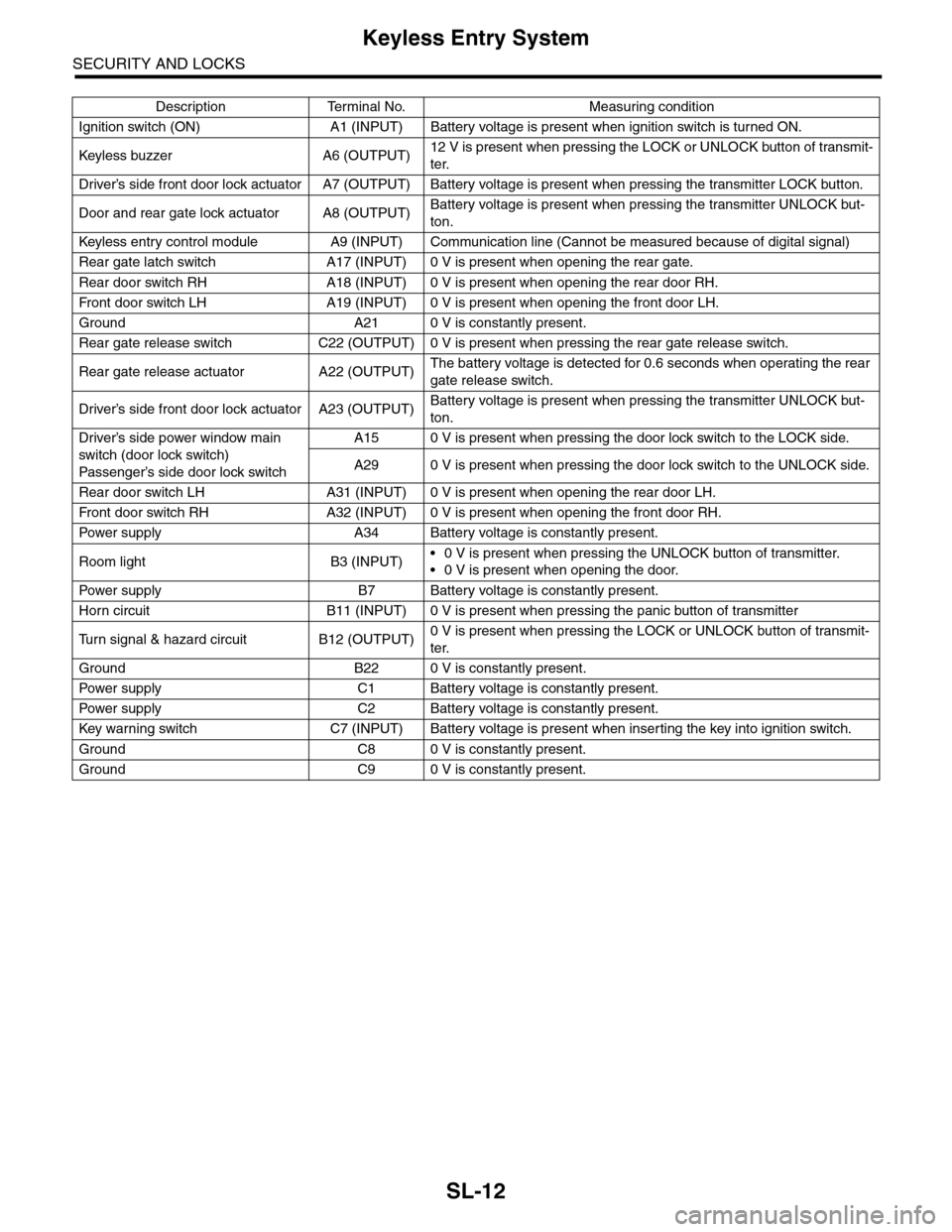
SL-12
Keyless Entry System
SECURITY AND LOCKS
Description Terminal No. Measuring condition
Ignition switch (ON) A1 (INPUT) Battery voltage is present when ignition switch is turned ON.
Keyless buzzer A6 (OUTPU T)12 V is present when pressing the LOCK or UNLOCK button of transmit-
ter.
Driver’s side front door lock actuator A7 (OUTPUT) Battery voltage is present when pressing the transmitter LOCK button.
Door and rear gate lock actuator A8 (OUTPUT)Battery voltage is present when pressing the transmitter UNLOCK but-
ton.
Keyless entr y control module A9 (INPUT) Communication line (Cannot be measured because of digital signal)
Rear gate latch switch A17 (INPUT) 0 V is present when opening the rear gate.
Rear door switch RH A18 (INPUT) 0 V is present when opening the rear door RH.
Fr o nt d oo r swi tc h L H A 19 ( I NP UT ) 0 V i s pr e se n t wh e n o p en in g th e f r o n t d oo r L H.
Ground A21 0 V is constantly present.
Rear gate release switch C22 (OUTPUT) 0 V is present when pressing the rear gate release switch.
Rear gate release actuator A22 (OUTPUT)The battery voltage is detected for 0.6 seconds when operating the rear
gate release switch.
Driver’s side front door lock actuator A23 (OUTPUT)Battery voltage is present when pressing the transmitter UNLOCK but-
ton.
Driver’s side power window main
switch (door lock switch)
Passenger’s side door lock sw itch
A15 0 V is present when pressing the door lock switch to the LOCK side.
A29 0 V is present when pressing the door lock switch to the UNLOCK side.
Rear door switch LH A31 (INPUT) 0 V is present when opening the rear door LH.
Fr o nt d oo r swi tc h RH A 32 ( I NP UT ) 0 V i s pr e se n t wh e n o p en in g th e f r o n t d oo r RH.
Pow er s up p ly A 34 B at t e r y vol t ag e i s c on s ta n tl y p r e se nt .
Room light B3 (INPUT)•0 V is present when pressing the UNLOCK button of transmitter.
•0 V is present when opening the door.
Pow er s up p ly B 7 B at t e r y vol t ag e i s c on s ta n tl y p r e se nt .
Horn circuit B11 (INPUT) 0 V is present when pressing the panic button of transmitter
Tu r n s i g n a l & h a z a r d c i r c u i t B 1 2 ( O U T P U T )0 V is present when pressing the LOCK or UNLOCK button of transmit-
ter.
Ground B22 0 V is constantly present.
Pow er s up p ly C 1 B at t e r y vol t ag e i s c on s ta n tl y p r e se nt .
Pow er s up p ly C 2 B at t e r y vol t ag e i s c on s ta n tl y p r e se nt .
Key war ning switch C7 (INPUT) Batter y voltage is present when inser ting the key into ignition switch.
Ground C8 0 V is constantly present.
Ground C9 0 V is constantly present.
Page 643 of 2453

SL-14
Keyless Entry System
SECURITY AND LOCKS
The panic alarm does not operate. 1. Check the keyless transmitter batter y and func-
tion.
FUNCTION, INSPECTION, Keyless
Entry System.>
Check the horn operation.
Entry System.>
3. Check the body integrated unit.
Buzzer or hazard light does not oper-
ate.
1. Check the buzzer operation.
Entry System.>
2. Check the hazard light operation.
Keyless Entr y System.>
3. Check the body integrated unit.
Room light does not operate. 1. Check the room light operation.
Keyless Entr y System.>
2. Check the body integrated unit.
Ignition switch illumination does not
operate.
1. Check the ignition switch illumination.
TION, Keyless Entry System.>
2. Check the body integrated unit.
Symptom Repair order Reference
Page 652 of 2453

SL-23
Keyless Entry System
SECURITY AND LOCKS
12.CHECK IGNITION SWITCH ILLUMINATION.
13.CHECK HORN OPERATION
Step Check Yes No
1CHECK FUSE.
Remove and visually check the fuse No. 14 (in
the main fuse box).
Is the fuse blown out? Replace the fuse
with a new one.
Go to step 2.
2CHECK POWER SUPPLY.
1) Disconnect the ignition switch illumination
harness connector.
2) Measure the voltage between harness con-
nector terminal and chassis ground.
Connector & terminal
(B414) No. 2 (+) — Chassis ground (– ):
Is the voltage more than 10 V? Go to step 3.Check the harness
for open circuits
and shorts
between the igni-
tion switch illumi-
nation and fuse.
3CHECK IGNITION SWITCH ILLUMINATION
CIRCUIT.
1) Disconnect the harness connector of body
integrated unit and ignition switch illumination
harness connector.
2) Measure the resistance between body inte-
grated unit harness connector terminal and
ignition switch illumination harness connector
terminal.
Connector & terminal
(B280) No. 4 — (B414) No. 1:
Is the resistance less than 10
Ω?
Replace the igni-
tion switch illumi-
nation bulb with a
new one.
Ignition Switch Illu-
mination.>
Check the harness
for open circuits
and shorts
between the body
integrated unit and
ignition switch illu-
mination.
Step Check Yes No
1CHECK HORN OPERATION.
Make sure the horn sounds when the horn
switch is pushed.
Does the horn sound? Go to step 2.Check the horn cir-
cuit.
2CHECK HORN OPERATION.
1) Disconnect the harness connector of body
integrated unit.
2) Connect the harness connector terminal to
ground using a suitable lead wire.
Connector & terminal
(B280) No. 11 (+) — Chassis ground (– ):
Does the horn sound? Check the body
integrated unit.
Diagnostic Proce-
dure.>
Check the harness
for open circuits
and/or shorts
between the body
integrated unit and
horn relay.
Page 655 of 2453

SL-26
Security System
SECURITY AND LOCKS
4. Security System
A: WIRING DIAGRAM
B: ELECTRICAL SPECIFICATION
Description Terminal No. Measuring condition
Ignition switch A1 (INPUT) Battery voltage is present when ignition switch is turned ON.
Keyless entr y control module A9 (INPUT) Communication line (Cannot be measured because of digital signal)
Rear gate latch switch A17 (INPUT) 0 V is present when opening the rear gate.
Rear door switch RH A18 (INPUT) 0 V is present when opening the rear door RH.
Fr o nt d oo r swi tc h L H A 19 ( I NP UT ) 0 V i s pr e se n t wh e n o p en in g th e f r o n t d oo r L H.
Rear door switch LH A31 (INPUT) 0 V is present when opening the rear door LH.
Fr o nt d oo r swi tc h RH A 32 ( I NP UT ) 0 V i s pr e se n t wh e n o p en in g th e f r o n t d oo r RH.
Security indicator light A33 (INPUT) Battery voltage is present when the alarm operation is activated.
Horn relay B11 (OUTPUT) Battery voltage is present when the alarm operation is activated.
Tu r n s i g n a l & h a z a r d c i r c u i t B 1 2 ( O U T P U T ) B a t t e r y v o l t a g e i s p r e s e n t w h e n t h e a l a r m o p e r a t i o n i s a c t i v a t e d .
Ground B22 0 V is constantly present.
Pow er s up p ly C 2 B at t e r y vol t ag e i s c on s ta n tl y p r e se nt .
Impact sensor C5When not applying vibration to the impact sensor, it repeats displaying
the 0 V and battery voltage in every 45 milliseconds.
Ground C8 0 V is constantly present.
Ground C9 0 V is constantly present.
CS-00273
71928
61827
51741626152514241312231122
3102921
1820
B281side
72030
619291828
51741627152614132512241123
3102922
1821
B280side
82335
722342162033
51932183117301615291428
41327
312261121025
1924
i84side
Page 657 of 2453

SL-28
Security System
SECURITY AND LOCKS
CAUTION:
•Security alarm ON/OFF setting
At the time of shipment from the factory, the security alarm is set to “ON”. However, when {Security
setting initialization} is performed with the Subaru Select Monitor, the security alarm automatically is
set to “OFF”. When security initialization has been performed, always return the ON/OFF setting for
the security alarm to “ON”.
•Siren YES/NO setting
The {Siren YES/NO} setting of the item {Unit customization} of the Subaru Select Monitor always
shall be set to “NO”. If it is set to “YES”, the horn of the security alarm will not sound.
7CHECK SECURITY ALARM OPERATION.
1) Unlock all doors using the door lock switch
on driver’s door.
2) Open any door or rear gate.
Does the security alarm oper-
ate when opening any door or
rear gate?
Go to step 8.•Check the door
switch.
DOOR SWITCH,
INSPECTION,
Security System.>
•Check the rear
gate latch switch.
GATE LATCH
SWITCH.,
INSPECTION,
Security System.>
8CHECK SECURITY ALARM OPERATION.
Check the security alarm operation.
Does all of the following secu-
rity alarm operate? •Horn
sounds •Hazard light blinks
•Security indicator light blinks
Go to step 9.•Check horn.
INSPECTION,
Security System.>
•Check the haz-
ard light.
HAZARD LIGHT
OPERATION,
INSPECTION,
Security System.>
9CHECK SECURITY ALARM CANCEL OPER-
ATION.
Press any button of transmitter while operating
security alarm. Or turn the ignition switch
OFF→ON three times.
Does all of the following secu-
rity alarm stop? •Horn •Hazard
light
Go to step 10.Check the ignition
switch circuit.
TION SWITCH
CIRCUIT,
INSPECTION,
Security System.>
10 CHECK SECURITY SYSTEM CONDITION
MEMORY.
Check that the system function properly when
the battery is not connected temporally.
DITION MEMORY, INSPECTION, Security
System.>
Does the system function prop-
erly when the battery is not
connected temporally?
Go to step 11.Replace the body
integrated unit.
Unit.>
11 CHECK IMPACT SENSOR.
Check the sensibility of impact sensor.
MENT, Impact Sensor.>
Is the sensibility set properly? Press the
UNLOCK button of
keyless transmit-
ter, and finish the
diagnosis.
Adjust the sensibil-
ity.
TIVITY ADJUST-
MENT,
ADJUSTMENT,
Impact Sensor.>
Step Check Yes No