2008 NISSAN TEANA check engine light
[x] Cancel search: check engine lightPage 2370 of 5121
![NISSAN TEANA 2008 Service Manual FRONT FOG LAMP AIMING ADJUSTMENT
EXL-341
< ON-VEHICLE MAINTENANCE >[HALOGEN TYPE]
C
D
E
F
G
H
I
J
K
MA
B
EXL
N
O
P
FRONT FOG LAMP AIMING ADJUSTMENT
DescriptionINFOID:0000000003894358
PREPARATION BEFOR](/manual-img/5/57391/w960_57391-2369.png "NISSAN TEANA 2008 Service Manual FRONT FOG LAMP AIMING ADJUSTMENT
EXL-341
< ON-VEHICLE MAINTENANCE >[HALOGEN TYPE]
C
D
E
F
G
H
I
J
K
MA
B
EXL
N
O
P
FRONT FOG LAMP AIMING ADJUSTMENT
DescriptionINFOID:0000000003894358
PREPARATION BEFOR")
FRONT FOG LAMP AIMING ADJUSTMENT
EXL-341
< ON-VEHICLE MAINTENANCE >[HALOGEN TYPE]
C
D
E
F
G
H
I
J
K
MA
B
EXL
N
O
P
FRONT FOG LAMP AIMING ADJUSTMENT
DescriptionINFOID:0000000003894358
PREPARATION BEFORE ADJUSTING
NOTE:
For details, refer to the regulations in your own country.
Before performing aiming adjustment, check the following.
Adjust the tire pressure to the specification.
Fill with fuel, engine coolant and each oil.
Maintain the unloaded vehicle condition. (Remove luggage from the passenger compartment and the lug-
gage room.)
NOTE:
Do not remove the temporary tire, jack and on-vehicle tool.
Wipe out dirt on the headlamp.
CAUTION:
Never use organic solvent (thinner, gasoline etc.)
Ride alone on the driver seat.
AIMING ADJUSTMENT SCREW
Turn the aiming adjusting screw for adjustment.
For the position and direction of the adjusting screw, refer to the
figure.
NOTE:
A screwdriver or hexagonal wrench [6 mm (0.24 in)] can be used
for adjustment.
Aiming Adjustment ProcedureINFOID:0000000003894359
1. Place the screen.
NOTE:
Stop the vehicle facing the wall.
Place the board on a plain road vertically.
2. Face the vehicle with the screen. Maintain 10 m (32.8 ft) between the front fog lamp center and the
screen.
3. Start the engine. Illuminate the front fog lamp.
CAUTION:
Never cover the lens surface with a tape etc. The lens is made of resin.
NOTE:
Shut off the headlamp light with the board to prevent from illuminating the adjustment screen.
4. Adjust the cutoff line height (A) with the aiming adjustment screw so that the distance (X) between the hor-
izontal center line of front fog lamp (H) and (A) becomes 200 mm (7.87 in).
Front fog lamp light distribution on the screen
A: UP
B: DOWN
JPLIA1086ZZ
JPLIA0008ZZ
Page 2511 of 5121

GI-18
< HOW TO USE THIS MANUAL >
TERMINOLOGY
Exhaust gas recirculation control-BPT
valveEGRC-BPT valve BPT valve
Exhaust gas recirculation control-solenoid
valveEGRC-solenoid valve EGR control solenoid valve
Exhaust gas recirculation temperature sen-
sor
EGRT sensor Exhaust gas temperature sensor
EGR temperature sensor
Flash electrically erasable programmable
read only memoryFEEPROM ***
Flash erasable programmable read only
memoryFEPROM ***
Flexible fuel sensor FFS ***
Flexible fuel system FF system ***
Fuel pressure regulator *** Pressure regulator
Fuel pressure regulator control solenoid
valve*** PRVR control solenoid valve
Fuel trim FT ***
Heated Oxygen sensor HO2S Exhaust gas sensor
Idle air control system IAC system Idle speed control
Idle air control valve-air regulator IACV-air regulator Air regulator
Idle air control valve-auxiliary air control
valveIACV-AAC valve Auxiliary air control (AAC) valve
Idle air control valve-FICD solenoid valve IACV-FICD solenoid valve FICD solenoid valve
Idle air control valve-idle up control sole-
noid valveIACV-idle up control solenoid valve Idle up control solenoid valve
Idle speed control-FI pot ISC-FI pot FI pot
Idle speed control system ISC system ***
Ignition control IC ***
Ignition control module ICM ***
Indirect fuel injection system IFI system ***
Intake air IA Air
Intake air temperature sensor IAT sensor Air temperature sensor
Knock *** Detonation
Knock sensor KS Detonation sensor
Malfunction indicator lamp MIL Check engine light
Manifold absolute pressure MAP ***
Manifold absolute pressure sensor MAPS ***
Manifold differential pressure MDP ***
Manifold differential pressure sensor MDPS ***
Manifold surface temperature MST ***
Manifold surface temperature sensor MSTS ***
Manifold vacuum zone MVZ ***
Manifold vacuum zone sensor MVZS ***
Mass air flow sensor MAFS Air flow meter
Mixture control solenoid valve MC solenoid valve Air-fuel ratio control solenoid valve
Multiport fuel injection system MFI system Fuel injection controlNEW TERMNEW ACRONYM /
ABBREVIATIONOLD TERM
Page 2529 of 5121
GI-36
< BASIC INSPECTION >
SERVICE INFORMATION FOR ELECTRICAL INCIDENT
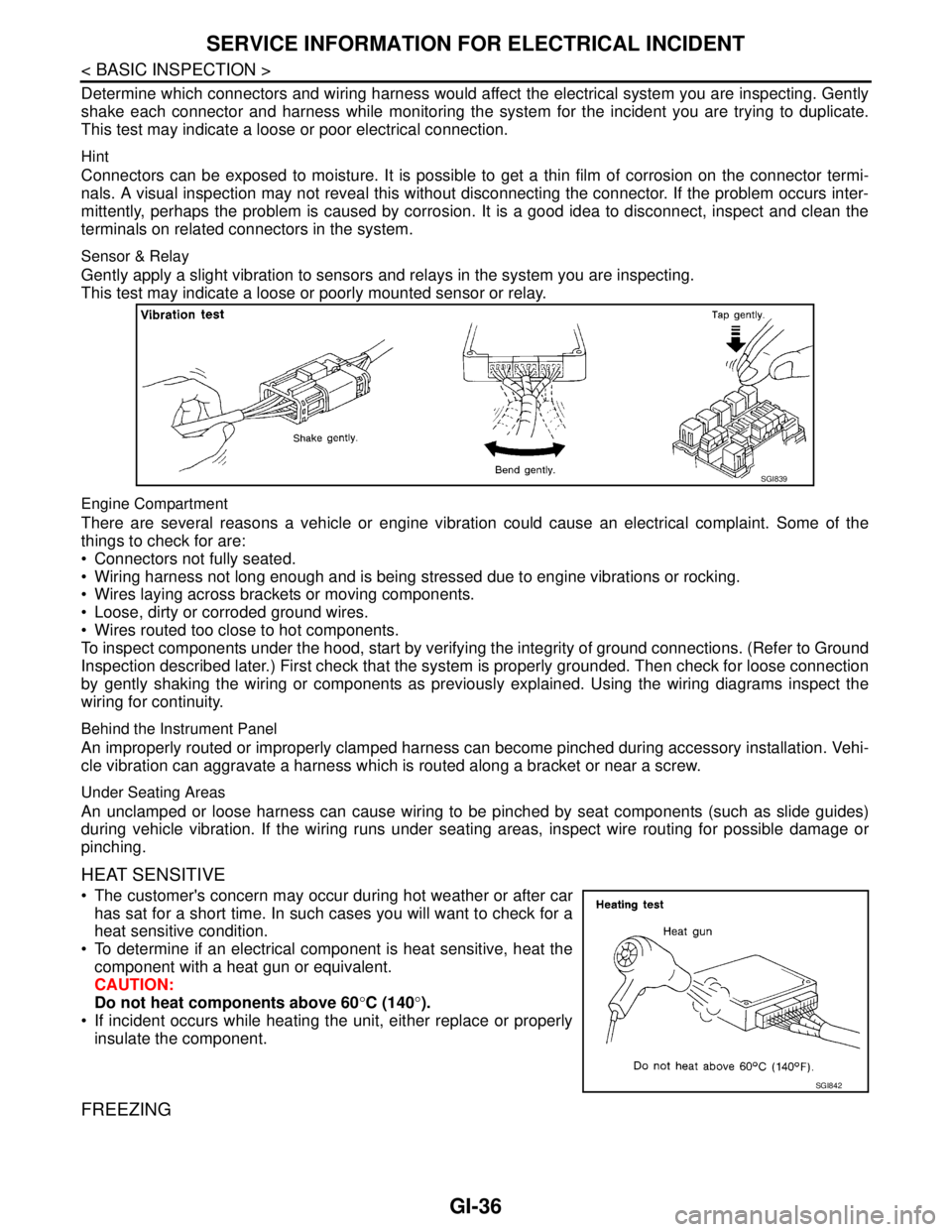
Determine which connectors and wiring harness would affect the electrical system you are inspecting. Gently
shake each connector and harness while monitoring the system for the incident you are trying to duplicate.
This test may indicate a loose or poor electrical connection.
Hint
Connectors can be exposed to moisture. It is possible to get a thin film of corrosion on the connector termi-
nals. A visual inspection may not reveal this without disconnecting the connector. If the problem occurs inter-
mittently, perhaps the problem is caused by corrosion. It is a good idea to disconnect, inspect and clean the
terminals on related connectors in the system.
Sensor & Relay
Gently apply a slight vibration to sensors and relays in the system you are inspecting.
This test may indicate a loose or poorly mounted sensor or relay.
Engine Compartment
There are several reasons a vehicle or engine vibration could cause an electrical complaint. Some of the
things to check for are:
Connectors not fully seated.
Wiring harness not long enough and is being stressed due to engine vibrations or rocking.
Wires laying across brackets or moving components.
Loose, dirty or corroded ground wires.
Wires routed too close to hot components.
To inspect components under the hood, start by verifying the integrity of ground connections. (Refer to Ground
Inspection described later.) First check that the system is properly grounded. Then check for loose connection
by gently shaking the wiring or components as previously explained. Using the wiring diagrams inspect the
wiring for continuity.
Behind the Instrument Panel
An improperly routed or improperly clamped harness can become pinched during accessory installation. Vehi-
cle vibration can aggravate a harness which is routed along a bracket or near a screw.
Under Seating Areas
An unclamped or loose harness can cause wiring to be pinched by seat components (such as slide guides)
during vehicle vibration. If the wiring runs under seating areas, inspect wire routing for possible damage or
pinching.
HEAT SENSITIVE
The customer's concern may occur during hot weather or after car
has sat for a short time. In such cases you will want to check for a
heat sensitive condition.
To determine if an electrical component is heat sensitive, heat the
component with a heat gun or equivalent.
CAUTION:
Do not heat components above 60°C (140°).
If incident occurs while heating the unit, either replace or properly
insulate the component.
FREEZING
SGI839
SGI842
Page 2577 of 5121
HA-8
< SYMPTOM DIAGNOSIS >
REFRIGERATION SYSTEM SYMPTOMS
SYMPTOM DIAGNOSIS
REFRIGERATION SYSTEM SYMPTOMS
Trouble Diagnosis For Unusual PressureINFOID:0000000003795806
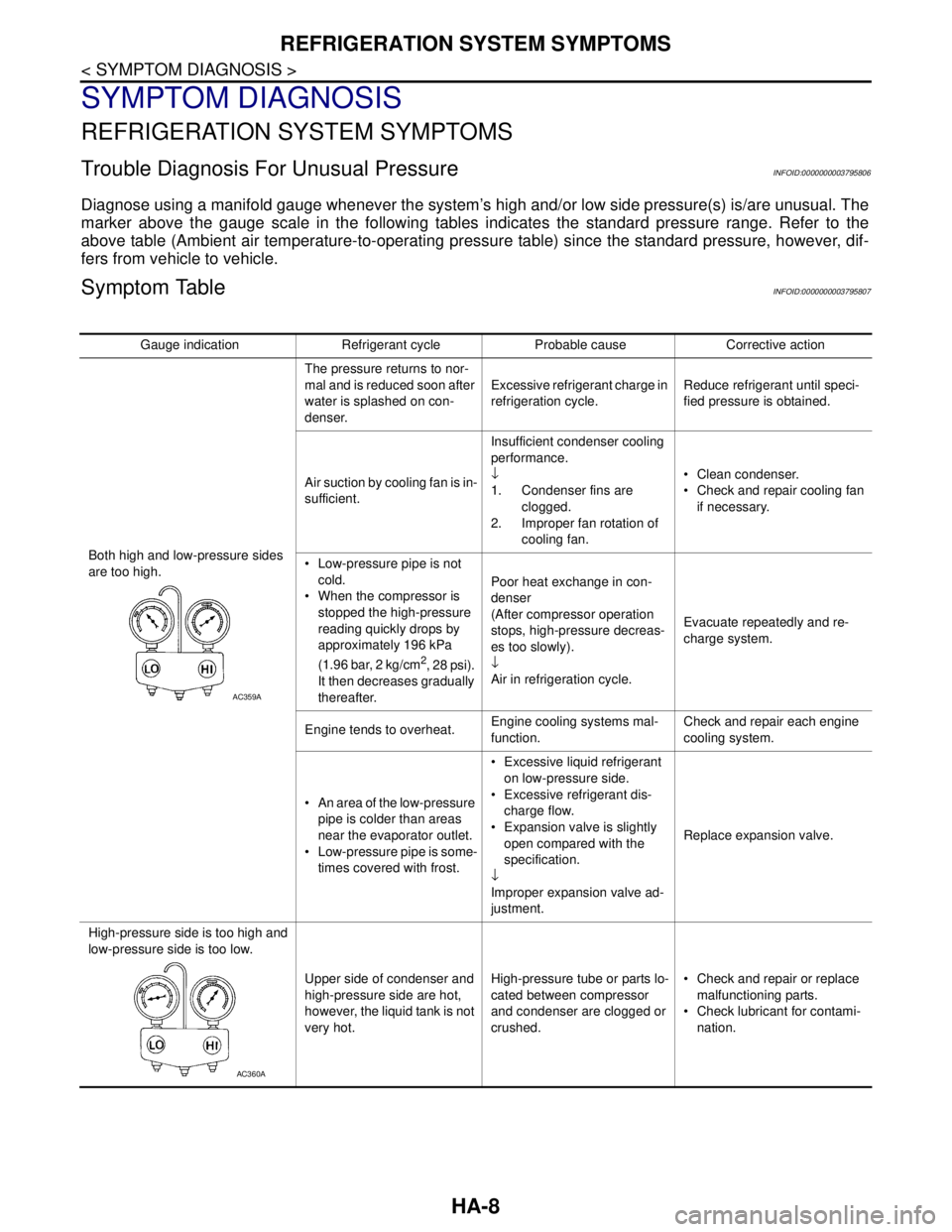
Diagnose using a manifold gauge whenever the system’s high and/or low side pressure(s) is/are unusual. The
marker above the gauge scale in the following tables indicates the standard pressure range. Refer to the
above table (Ambient air temperature-to-operating pressure table) since the standard pressure, however, dif-
fers from vehicle to vehicle.
Symptom TableINFOID:0000000003795807
Gauge indication Refrigerant cycle Probable cause Corrective action
Both high and low-pressure sides
are too high.The pressure returns to nor-
mal and is reduced soon after
water is splashed on con-
denser.Excessive refrigerant charge in
refrigeration cycle.Reduce refrigerant until speci-
fied pressure is obtained.
Air suction by cooling fan is in-
sufficient.Insufficient condenser cooling
performance.
↓
1. Condenser fins are
clogged.
2. Improper fan rotation of
cooling fan. Clean condenser.
Check and repair cooling fan
if necessary.
Low-pressure pipe is not
cold.
When the compressor is
stopped the high-pressure
reading quickly drops by
approximately 196 kPa
(1.96 bar, 2 kg/cm
2, 28 psi).
It then decreases gradually
thereafter.Poor heat exchange in con-
denser
(After compressor operation
stops, high-pressure decreas-
es too slowly).
↓
Air in refrigeration cycle.Evacuate repeatedly and re-
charge system.
Engine tends to overheat.Engine cooling systems mal-
function.Check and repair each engine
cooling system.
An area of the low-pressure
pipe is colder than areas
near the evaporator outlet.
Low-pressure pipe is some-
times covered with frost. Excessive liquid refrigerant
on low-pressure side.
Excessive refrigerant dis-
charge flow.
Expansion valve is slightly
open compared with the
specification.
↓
Improper expansion valve ad-
justment.Replace expansion valve.
High-pressure side is too high and
low-pressure side is too low.
Upper side of condenser and
high-pressure side are hot,
however, the liquid tank is not
very hot.High-pressure tube or parts lo-
cated between compressor
and condenser are clogged or
crushed. Check and repair or replace
malfunctioning parts.
Check lubricant for contami-
nation.
AC359A
AC360A
Page 2601 of 5121

HA-32
< ON-VEHICLE MAINTENANCE >
FLUORESCENT LEAK DETECTOR
FLUORESCENT LEAK DETECTOR
InspectionINFOID:0000000003795981
CHECKING SYSTEM FOR LEAKAGES USING THE FLUORESCENT LEAK DETECTOR
1. Check A/C system for leakages using the UV lamp and safety goggles (SST: J-42220) in a low sunlight
area (area without windows preferable). Illuminate all components, fittings and lines. The dye appears as
a bright green/yellow area at the point of leakage. Fluorescent dye observed at the evaporator drain open-
ing indicates an evaporator core assembly (tubes, core or expansion valve) leakage.
2. Use an adjustable mirror or wipe the area with a clean shop rag or cloth, with the UV lamp for dye residue
if the suspected area is difficult to see.
3. Remove any residual dye using dye cleaner (SST: J-43872) to prevent future misdiagnosis after the leak-
age is repaired.
4. Perform a system performance check and verify the leakage repair with an approved electrical leak detec-
tor.
NOTE:
Other gases in the work area or substances on the A/C components, for example, anti-freeze, windshield
washer fluid, solvents and lubricants, may falsely trigger the leak detector. Make sure the surfaces to be
checked are clean.
Clean with a dry cloth or blow off with shop air.
Do not allow the sensor tip of the detector to contact with any substance. This may also cause false readings
and may damage the detector.
DYE INJECTION
(This procedure is only necessary when recharging the system or when the compressor has seized and was
replaced.)
1. Check A/C system static (at rest) pressure. Pressure must be at least 345 kPa (3.45 bar, 3.52 kg/cm
2, 50
psi).
2. Pour one bottle (1/4 ounce / 7.4 cc) of the A/C refrigerant dye into the injector tool (SST: J-41459).
3. Connect the injector tool to the A/C low-pressure side service valve.
4. Start the engine. Then switch A/C ON.
5. Inject one bottle (1/4 ounce / 7.4 cc) of fluorescent dye through the low-pressure service valve using dye
injector tool (SST: J-41459) (refer to the manufacture’s operating instructions) when the A/C operating
(compressor running).
6. Disconnect the injector tool from the service valve with the engine still running.
CAUTION:
Be careful when replacing the A/C system or a component, pour the dye directly into the open sys-
tem connection and proceed with the service procedures.
7. Operate the A/C system for a minimum of 20 minutes to mix the dye with the system oil. Depending on the
leakage size, operating conditions and location of the leakage, it may take from minutes to days for the
dye to penetrate a leakage and become visible.
8. Attach a blue label if necessary.
Page 2637 of 5121
![NISSAN TEANA 2008 Service Manual INSPECTION AND ADJUSTMENT
HAC-9
< BASIC INSPECTION >[WITHOUT 7 INCH DISPLAY]
C
D
E
F
G
H
J
K
L
MA
B
HAC
N
O
P
4.CHECK INTAKE AIR
1. Press the REC switch. REC indicator is turned ON.
2. Press the FRE s](/manual-img/5/57391/w960_57391-2636.png "NISSAN TEANA 2008 Service Manual INSPECTION AND ADJUSTMENT
HAC-9
< BASIC INSPECTION >[WITHOUT 7 INCH DISPLAY]
C
D
E
F
G
H
J
K
L
MA
B
HAC
N
O
P
4.CHECK INTAKE AIR
1. Press the REC switch. REC indicator is turned ON.
2. Press the FRE s")
INSPECTION AND ADJUSTMENT
HAC-9
< BASIC INSPECTION >[WITHOUT 7 INCH DISPLAY]
C
D
E
F
G
H
J
K
L
MA
B
HAC
N
O
P
4.CHECK INTAKE AIR
1. Press the REC switch. REC indicator is turned ON.
2. Press the FRE switch. FRE indicator is turned ON.
3. Listen for the intake door position change. (Slight change of blower sound can be heard.)
NOTE:
Confirm that the compressor clutch is engaged (sound or visual inspection) and the intake door position is at
the FRE when the DEF is selected.
Is the inspection result normal?
YES >> GO TO 5.
NO >> Intake door system malfunction: HAC-64, "
Diagnosis Procedure".
5.CHECK A/C SWITCH
1. Press the A/C switch.
2. The A/C switch indicator is turned ON.
Confirm that the compressor clutch engages (sound or visual inspection).
Is the inspection result normal?
YES >> GO TO 6.
NO >> Magnet clutch system malfunction: HAC-72, "
Diagnosis Procedure".
6.CHECK WITH TEMPERATURE SETTING LOWERED
1. Operate the compressor.
2. Operate the temperature control switch (driver side) and lower the temperature setting to 18°C (60°F).
3. Check that the cool air blows from the outlets.
Is the inspection result normal?
YES >> GO TO 7.
NO >> Insufficient cooling: HAC-88, "
Inspection procedure".
7.CHECK WITH TEMPERATURE SETTING RAISED
1. Operate the temperature control switch (driver side) and raise the temperature setting to 32°C (90°F) after
warming up the engine.
2. Check that the warm air blows from the outlets.
Is the inspection result normal?
YES >> GO TO 8.
NO >> Insufficient heating: HAC-91, "
Inspection procedure".
8.CHECK LEFT AND RIGHT VENTILATION TEMPERATURE SEPARATELY CONTROL SYSTEM FUNC-
TION
1. Press the DUAL switch, and then check that “DUAL” is shown on the display.
2. Operate the temperature control switch (driver side). Check that the discharge air temperature (driver
side) changes.
3. Operate the temperature control switch (passenger side). Check that the discharge air temperature (pas-
senger side) changes.
4. Press the DUAL switch, and then check that the temperature setting (LH/RH) is unified to the driver side
temperature setting.
Is the inspection result normal?
YES >> GO TO 9.
NO >> Refer to HAC-87, "
Diagnosis Chart By Symptom" and perform the appropriate diagnosis.
9.CHECK AUTO MODE
1. Press the AUTO switch, and then check that “AUTO” is shown on the display.
2. Operate the temperature control switch (driver side). Check that the fan speed or outlet changes (the dis-
charge air temperature or fan speed varies depending on the ambient temperature, in-vehicle tempera-
ture, and temperature setting).
Is the inspection result normal?
YES >> GO TO 10.
NO >> Refer to HAC-87, "
Diagnosis Chart By Symptom" and perform the appropriate diagnosis.
Page 2668 of 5121
![NISSAN TEANA 2008 Service Manual HAC-40
< FUNCTION DIAGNOSIS >[WITHOUT 7 INCH DISPLAY]
DIAGNOSIS SYSTEM (HVAC)
ACTIVE TEST
HVAC TEST
NOTE:
Perform the inspection of each output device after starting the engine because the compresso](/manual-img/5/57391/w960_57391-2667.png "NISSAN TEANA 2008 Service Manual HAC-40
< FUNCTION DIAGNOSIS >[WITHOUT 7 INCH DISPLAY]
DIAGNOSIS SYSTEM (HVAC)
ACTIVE TEST
HVAC TEST
NOTE:
Perform the inspection of each output device after starting the engine because the compresso")
HAC-40
< FUNCTION DIAGNOSIS >[WITHOUT 7 INCH DISPLAY]
DIAGNOSIS SYSTEM (HVAC)
ACTIVE TEST
HVAC TEST
NOTE:
Perform the inspection of each output device after starting the engine because the compressor is operated.
When choosing to “MODE 7”, error message is displayed but it is not malfunction.
WORK SUPPORT
INT TEMP CAL [°C] Intake sensor value calculated by A/C auto amp.
SUNL SEN CAL
[w/m
2]Sunload sensor value calculated by A/C auto amp.
FAN DUTY [%] Duty ratio of blower motor judged by A/C auto amp.
XMTarget discharge air temperature judged by A/C auto amp. according to the tempera-
ture setting and the value from each sensor
ENG COOL TEMP [°C] Water temperature signal value received from ECM via CAN communication
VEHICLE SPEED[Mph
(km/h)]Vehicle speed signal value received from meter via CAN communication Monitor item [Unit] Description
Test item Description
ALL SEG Indicator all segment lighting
HVAC TESTThe operation check of A/C system can be performed by selecting the mode. Refer to the fol-
lowing table for the conditions of each mode.
Te s t i t e m
MODE 1 MODE 2 MODE 3 MODE 4 MODE 5 MODE 6 MODE 7
Mode door position VENT B/L1 B/L2 AUTO FOOT D/F DEF -
Intake door position REC REC 20% FRE FRE FRE FRE -
Air mix door position
(driver & passenger
side)FULL COLD FULL COLD FULL HOT FULL HOT FULL HOT FULL HOT -
Blower motor duty ratio 37% 91% 65% 65% 65% 91% -
Compressor (Magnet
clutch)ON ON OFF OFF ON ON -
Work item Description Reference
TEMP SET CORRECTIf the temperature felt by the customer is different than the air flow
temperature controlled by the temperature setting, the auto ampli-
fier control temperature can be adjusted to compensate for the
temperature setting. HAC-10, "
Temperature
Setting Trimmer"
BLOW SETIn the FOOT mode, the air blowing to the DEF can change ON/
OFF. HAC-10, "Foot Position
Setting Trimmer"
Page 2721 of 5121
![NISSAN TEANA 2008 Service Manual INSUFFICIENT HEATING
HAC-93
< SYMPTOM DIAGNOSIS >[WITHOUT 7 INCH DISPLAY]
C
D
E
F
G
H
J
K
L
MA
B
HAC
N
O
P
1. Check the temperature of inlet hose and outlet hose of heater core.
2. Check that the inle](/manual-img/5/57391/w960_57391-2720.png "NISSAN TEANA 2008 Service Manual INSUFFICIENT HEATING
HAC-93
< SYMPTOM DIAGNOSIS >[WITHOUT 7 INCH DISPLAY]
C
D
E
F
G
H
J
K
L
MA
B
HAC
N
O
P
1. Check the temperature of inlet hose and outlet hose of heater core.
2. Check that the inle")
INSUFFICIENT HEATING
HAC-93
< SYMPTOM DIAGNOSIS >[WITHOUT 7 INCH DISPLAY]
C
D
E
F
G
H
J
K
L
MA
B
HAC
N
O
P
1. Check the temperature of inlet hose and outlet hose of heater core.
2. Check that the inlet side of heater core is hot and the outlet side is slightly lower than/almost equal to the
inlet side.
CAUTION:
Always perform the temperature inspection in a short period of time because the engine coolant
temperature is very hot.
Is the inspection result normal?
YES >> GO TO 9.
NO >> Replace the heater core after performing the procedures after the cooling system inspection. GO
TO 1.
9.REPLACE HEATER CORE
Replace the heater core. Refer to heater core. Refer to VTL-43, "
Exploded View".
Are the malfunction solved?
YES >> END.
NO >> Perform the procedures again after the cooling system inspection. GO TO 1.