2008 MERCEDES-BENZ CLS COUPE AUX
[x] Cancel search: AUXPage 6 of 329
31, 2, 3 ...
7G–TRONIC . . . . . . . . . . . . . . . . . . . . . 106 A
ABS (Anti-lock Braking System)
. . . . . 57
Display message . . . . . . . . . . 221, 231
Warning lamp . . . . . . . . . . . . . . . . . 244
Acceleration
Technical data . . . . . . . . . . . . . . . . 303
Accident
Notes . . . . . . . . . . . . . . . . . . . . . . . 252
Active Service System
see ASSYST PLUS
ADAPTIVE BRAKE . . . . . . . . . . . . . . . . . 60
Adaptive brake lamps . . . . . . . . . . . . . 58
Adaptive damping system see ADS
ADS . . . . . . . . . . . . . . . . . . . . . . . . . . . 147
Airbag Activation . . . . . . . . . . . . . . . . . . . . . 43
Control unit . . . . . . . . . . . . . . . . . . . 43
Driver's . . . . . . . . . . . . . . . . . . . . . . . 46
Front . . . . . . . . . . . . . . . . . . . . . . . . 46
Front passenger . . . . . . . . . . . . . . . . 46
PASSENGER AIRBAG OFF warning
lamp . . . . . . . . . . . . . . . . . . . . . . . 242
Sidebags . . . . . . . . . . . . . . . . . . . . . 47
System . . . . . . . . . . . . . . . . . . . . . . . 45
Windowbags . . . . . . . . . . . . . . . . . . . 48 Air cleaner
Display message
. . . . . . . . . . . . . . 236
Air conditioning
2-zone Thermatic . . . . . . . . . . . . . . 153
4-zone Thermotronic . . . . . . . . . . . 155
Activating/deactivating air-recir-
culation mode . . . . . . . . . . . . . . . . 164
Activating/deactivating auxiliary
heating/ventilation . . . . . . . . . . . . 165
Air-recirculation mode with con-
venience opening/closing feature . 165
Auxiliary heating/ventilation . . . . . 166
Controlling automatically . . . . . . . . 159
Cooling with air dehumidification . . 158
Demisting the windscreen . . . . . . . 163
Malfunction indicator lamp . . . . . . 242
Misted up windows . . . . . . . . . . . . 164
Rear compartment . . . . . . . . . . . . . 158
Rear window heating . . . . . . . . . . . 164
Setting the air distribution . . . . . . . 162
Setting the airflow . . . . . . . . . . . . . 163
Setting the air vents . . . . . . . . . . . . 160
Setting the temperature . . . . . . . . . 159
Setting the temperature (rear
compartment) . . . . . . . . . . . . . . . . 160
see Climate control
Air-conditioning
Activating/deactivating . . . . . . . . . 158
Airmatic DC (Dual Control) . . . . . . . . 146
Air pump, electric . . . . . . . . . . . . . . . 217 Ambient lighting
Setting (on-board computer) . . . . . 126
Antifreeze concentration . . . . . . . . . 317
Anti-lock braking system see ABS
Anti-theft alarm system
see ATA
Anti-theft systems . . . . . . . . . . . . . . . . 61
Ashtray . . . . . . . . . . . . . . . . . . . . . . . . 181
ASSYST PLUS . . . . . . . . . . . . . . . . . . . 209
ATA (anti-theft alarm system) . . . . . . 61
Switching off the alarm . . . . . . . . . . 61
Audible warning signal . . . . . . . . . . . 251
AUTO lights Display message . . . . . . . . . . . . . . 233
Automatic car wash . . . . . . . . . . . . . 211
Automatic transmission
Changing gear yourself . . . . . . . . . 105
Display in the speedometer . . . . . . 105
Display message . . . . . . . . . . . . . . 223
Driving tips . . . . . . . . . . . . . . . . . . . 107
Emergency running mode . . . . . . . 257
Malfunction . . . . . . . . . . . . . . . . . . 257
One-touch gearshifting . . . . . . . . . 105
Program selector button . . . . . . . . 106
Releasing the parking lock man-
ually . . . . . . . . . . . . . . . . . . . . . . . . 268
Selector lever positions . . . . . . . . . 104
Shift ranges . . . . . . . . . . . . . . . . . . 106 Index
219_AKB; 2; 4, en-GB
mkalafa,
2007-11-13T09:28:36+01:00 - Seite 3
Page 7 of 329
4
Auxiliary heating
. . . . . . . . . . . . 166, 264
Adjusting (on-board computer)
. . . . . . . . . . . . . . . . . . . . . . . . . . . . 123
Display message . . . . . . . . . . . . . . 239
Remote control . . . . . . . . . . . . . . . 167
Auxiliary ventilation . . . . . . . . . . . . . 166
Axle load, maximum permissible
. . . . . . . . . . . . . . . . . . . . . . . . . . . . . . . 310 B
BAS (Brake Assist)
. . . . . . . . . . . . . . . . 58
Battery Changing (auxiliary heating
remote control) . . . . . . . . . . . . . . . 270
Changing (key) . . . . . . . . . . . . . . . . 270
Changing (KEYLESS GO key) . . . . . 270
Charging . . . . . . . . . . . . . . . . . . . . . 290
Checking (key) . . . . . . . . . . . . . . . . 270
Checking (KEYLESS GO key) . . . . . 270
Check lamp (key) . . . . . . . . . . . . . . 270
Check lamp (KEYLESS GO key)
. . . . . . . . . . . . . . . . . . . . . . . . . 69, 270
Disconnecting . . . . . . . . . . . . . . . . 290
Display message . . . . . . . . . . . . . . 228
Maintenance (vehicle) . . . . . . . . . . 288
Reconnecting . . . . . . . . . . . . . . . . . 291
Removing/fitting . . . . . . . . . . . . . . 290
Vehicle battery . . . . . . . . . . . . . . . . 288
Voltage (on-board computer) . . . . . 116 Belt force limiters
Activation
. . . . . . . . . . . . . . . . . . . . . 43
Belt height adjustment . . . . . . . . . . . . 90
Belt tensioners Activation . . . . . . . . . . . . . . . . . . . . . 43
Belt warning . . . . . . . . . . . . . . . . . . . . . 89
Bonnet Bonnet catch . . . . . . . . . . . . . . . . . 194
Display message . . . . . . . . . . . . . . 228
Opening/closing . . . . . . . . . . . . . . 193
Bonnet release lever
Release lever . . . . . . . . . . . . . . . . . 194
Boot
Emergency release . . . . . . . . . . . . . 267
Locking separately . . . . . . . . . . . . . . 71
Opening/closing (automatically) . . . 72
Opening/closing (manually) . . . . . . . 70
Boot lid
Display message . . . . . . . . . . . . . . 228
Brake
Warning lamp . . . . . . . . . . . . . . . . . 245
Brake Assist
see BAS
Brake fluid . . . . . . . . . . . . . . . . . . . . . 317
Display message . . . . . . . . . . . . . . 231
Brake lamps
Adaptive . . . . . . . . . . . . . . . . . . . . . . 58
Display message . . . . . . . . . . . . . . 234 Brake system
Display message . . . . . . . . . . . . . . 230
Parking brake . . . . . . . . . . . . . . . . . 104
Bulb
Dipped-beam headlamps . . . . . . . . 273
Licence plate lamp . . . . . . . . . . . . . 274
Main-beam headlamps . . . . . . . . . . 273
Parking lamp . . . . . . . . . . . . . . . . . 273
Replacing . . . . . . . . . . . . . . . . 273, 274
Side lamp . . . . . . . . . . . . . . . . . . . . 273
Turn signal lamp . . . . . . . . . . . . . . . 274
see Lamp
Bulbs
Overview . . . . . . . . . . . . . . . . . . . . 271 C
Calling up a malfunction see Message memory menu
Care . . . . . . . . . . . . . . . . . . . . . . . . . . . 210
Automatic car wash . . . . . . . . . . . . 211
Distronic . . . . . . . . . . . . . . . . . . . . 213
Headlamps . . . . . . . . . . . . . . . . . . . 212
High-pressure cleaners . . . . . . . . . 211
Parktronic . . . . . . . . . . . . . . . . . . . 214
Plastic trim . . . . . . . . . . . . . . . . . . . 212
Rear window . . . . . . . . . . . . . . . . . 212
Side windows . . . . . . . . . . . . . . . . . 212
CD player/CD changer
Operating (on-board computer) . . . 119 Index
219_AKB; 2; 4, en-GB
mkalafa,
2007-11-13T09:28:36+01:00 - Seite 4
Page 14 of 329
11
Rain sensor
Windscreen wipers . . . . . . . . . . . . . . 98
Range (on-board computer) . . . . . . . 130
R button
see Reset button
Rear foglamp
Display message . . . . . . . . . . . . . . 235
Rear-view mirror
Adjusting . . . . . . . . . . . . . . . . . . . . . 83
Anti-dazzle (manual) . . . . . . . . . . . . . 83
Anti-dazzle mode (automatic) . . . . . 85
Rear window
Cleaning . . . . . . . . . . . . . . . . . . . . . 212
Rear window blind . . . . . . . . . . . . . . . 180
Rear window heating Malfunction indicator lamp . . . . . . 242
Refuelling . . . . . . . . . . . . . . . . . . . . . . 190
Remote control Auxiliary heating . . . . . . . . . . . . . . 167
Changing the batteries (auxiliary
heating) . . . . . . . . . . . . . . . . . . . . . 270
Garage door opener . . . . . . . . . . . . 186
Programming (garage door
opener) . . . . . . . . . . . . . . . . . . . . . . 186
Replacing the wiper blades . . . . . . . 275
Reserve Display message . . . . . . . . . . . . . . 240
Reserve fuel . . . . . . . . . . . . . . . . . . . . 311
Display message . . . . . . . . . . . . . . 240 Fuel tank . . . . . . . . . . . . . . . . . . . . 311
Warning lamp . . . . . . . . . . . . . . . . . 250
Reset button . . . . . . . . . . . . . . . . . . . 110
Restraint system
Airbags . . . . . . . . . . . . . . . . . . . . . . . 45
Display message . . . . . . . . . . . . . . 227
Restraint systems
For children . . . . . . . . . . . . . . . . . . . 49
Retaining hooks (boot) . . . . . . . . . . . 176
Rev counter . . . . . . . . . . . . . . . . . . . . 111
Reverse gear Engaging (automatic transmission) 105
Reversing lamp
Display message . . . . . . . . . . . . . . 236
Roller sunblind
Rear window . . . . . . . . . . . . . . . . . 180
Roof load, maximum . . . . . . . . . . . . . 310
Roof rack . . . . . . . . . . . . . . . . . . . . . . 173
Run-on time (mobile phone) . . . . . . . 184 S
Seat Adjusting
. . . . . . . . . . . . . . . . . . 75, 77
Correct driver's seat position . . . . . . 90
Storing settings . . . . . . . . . . . . . . . . 86
Seat belt
Adjusting the height . . . . . . . . . . . . . 90
Fastening . . . . . . . . . . . . . . . . . . . . . 88
Warning lamp . . . . . . . . . . . . . . 89, 249 Seat heating
. . . . . . . . . . . . . . . . . . . . . 80
Seat ventilation . . . . . . . . . . . . . . . . . . 80
Malfunction indicator lamp . . . . . . 241
Selector lever
Display message . . . . . . . . . . . . . . 223
Positions . . . . . . . . . . . . . . . . . . . . 105
Service
Display message . . . . . . . . . . . . . . 209
Service display
see ASSYST PLUS
Service indicator
see ASSYST PLUS
Service products . . . . . . . . . . . . . . . . 311
Brake fluid . . . . . . . . . . . . . . . . . . . 317
Coolant . . . . . . . . . . . . . . . . . . . . . 316
Windscreen washer fluid . . . . . . . . 317
Settings
Calling up a stored setting . . . . . . . . 87
Factory (key) . . . . . . . . . . . . . . . 66, 67
Factory (KEYLESS GO) . . . . . . . . . . . 68
Factory (on-board computer) . . . . . 121
Shift ranges
Automatic transmission . . . . . . . . . 106
Display in the speedometer . . . . . . 105
Sidebags . . . . . . . . . . . . . . . . . . . . . . . . 47
Side window Fault . . . . . . . . . . . . . . . . . . . . . . . . 260
Opening/closing . . . . . . . . . . . . . . . 98
Resetting . . . . . . . . . . . . . . . . . . . . 100 Index
219_AKB; 2; 4, en-GB
mkalafa,
2007-11-13T09:28:36+01:00 - Seite 11
Page 35 of 329
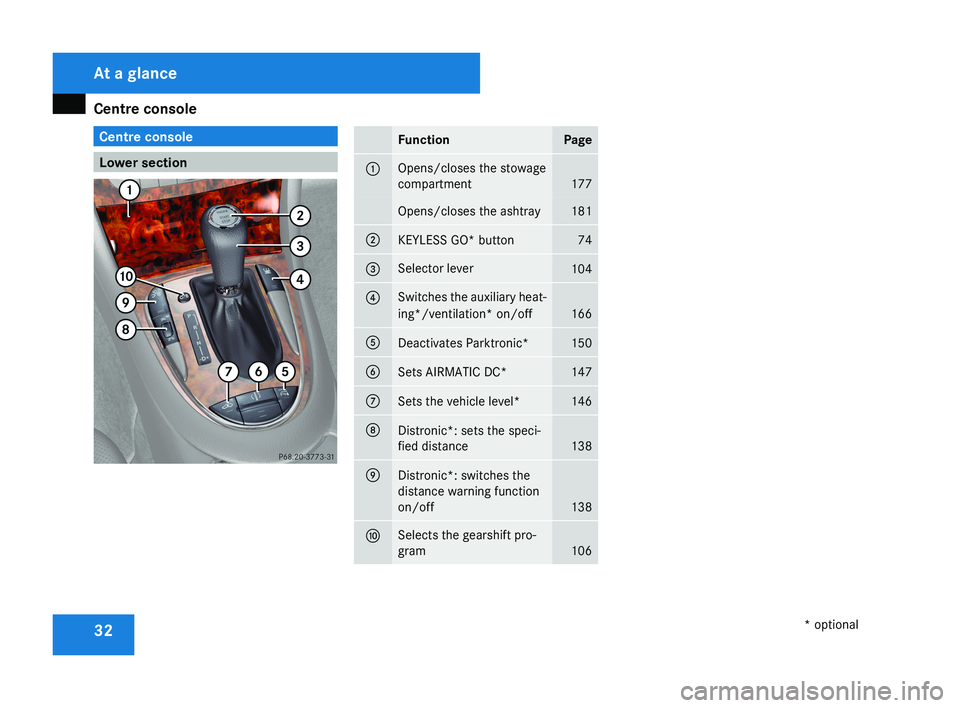
Centre console
32 Centre console
Lower section FunctionPage
1Opens/closes the stowage
compartment
177
Opens/closes the ashtray181
2KEYLESS GO* button74
3Selector lever104
4Switches the auxiliary heat-
ing*/ventilation* on/off
166
5Deactivates Parktronic*150
6Sets AIRMATIC DC*147
7Sets the vehicle level*146
8Distronic*: sets the speci-
fied distance
138
9Distronic*: switches the
distance warning function
on/off
138
aSelects the gearshift pro-
gram
106
At a glance
* optional
219_AKB; 2; 4, en-GB
mkalafa,
2007-11-13T09:28:36+01:00 - Seite 32
Page 122 of 329
On-board computer
119
X
Use the è or · button to select the
Audio/TV/DVD menu.
Selecting a radio station You can only store new stations using the
audio system or COMAND APS*. Please refer
to the separate operating instructions for
notes on how to do this.
X
Switch on the audio equipment or
COMAND APS* and select Radio (see the
separate operating instructions).
X To select a stored station: briefly press
the j or k button.
X To select a channel from the channel
list: press and hold the j or k but-
ton.
X To select a station using the station
search (only if no station list is being
received): press and hold the j or
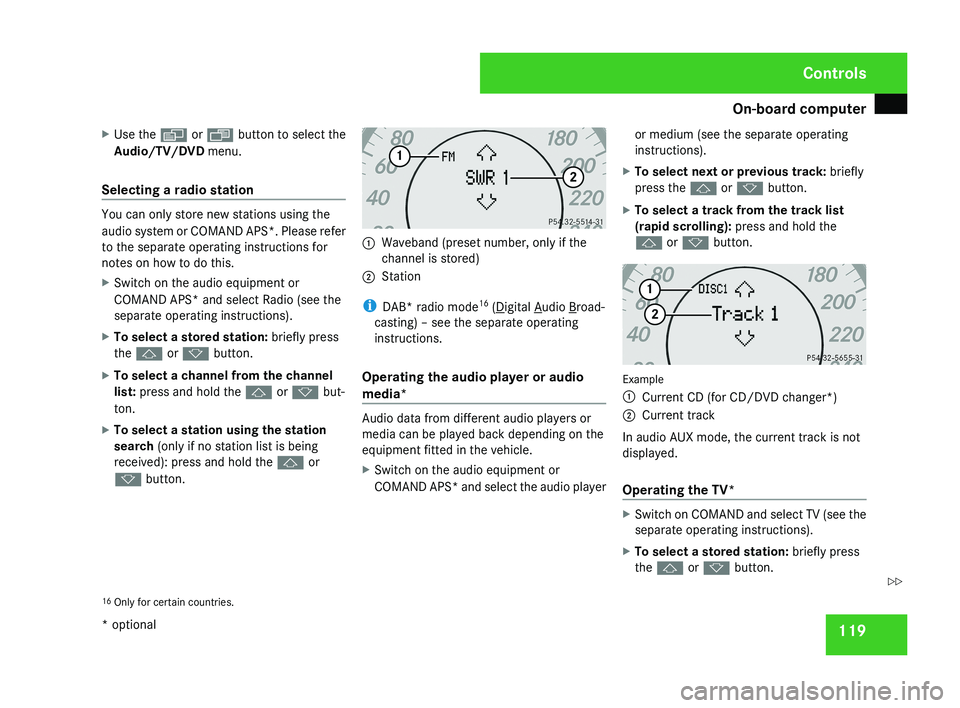
k button. 1
Waveband (preset number, only if the
channel is stored)
2 Station
i DAB* radio mode 16
( Digital Audio Broad-
casting) – see the separate operating
instructions.
Operating the audio player or audio
media* Audio data from different audio players or
media can be played back depending on the
equipment fitted in the vehicle.
X
Switch on the audio equipment or
COMAND APS* and select the audio player or medium (see the separate operating
instructions).
X To select next or previous track: briefly
press the j or k button.
X To select a track from the track list
(rapid scrolling): press and hold the
j or k button. Example
1
Current CD (for CD/DVD changer*)
2 Current track
In audio AUX mode, the current track is not
displayed.
Operating the TV* X
Switch on COMAND and select TV (see the
separate operating instructions).
X To select a stored station: briefly press
the j or k button.
16 Only for certain countries. Controls
* optional
219_AKB; 2; 4, en-GB
mkalafa,
2007-11-13T09:28:36+01:00 - Seite 119 Z
Page 126 of 329
On-board computer
123Vehicle submenu
R
Permanent Speedtronic (Y page 144)
R Automatic locking feature ( Y page 127)Heater* submenu
R
Selecting
the switch-on time for the aux-
iliary heating* ( Y page 127)
R Changing the switch-on time for the aux-
iliary heating* ( Y page 128) Convenience submenu*
R
Easy-entry/exit feature* ( Y page 128)
R Fold in mirrors when locking the vehi-
cle* ( Y page 128) Dynamic driving seat* submenu
R
Settings for the driver's and front-
passenger seat ( Y page 129) Selecting the unit of measurement for
distance
The selected unit of measurement for dis-
tance applies to:
R
the total distance recorder and the trip
meter
R the trip computer
R the digital speedometer 18
R cruise control
R Speedtronic
R Distronic*
X Press the è
or · button to select the
Settings... menu.
X Press the j
button to call up the selec-
tion of submenus.
X Press the æ
or ç button to select the
Inst. cluster submenu.
X Press the j button to select Display
unit Speed-/odometer. X
Press the æ or ç button to select
km (kilometres) or miles as the unit of
measurement for distance.
X Press the j, è or ÿ button to
select a different display.
Selecting the language X
Press the è
or · button to select the
Settings... menu.
X Press the j
button to call up the selec-
tion of submenus.
X Press the æ
or ç button to select the
Inst. cluster submenu.
X Press the j button to select Lan-
guage.
X Press the æ or ç button to select a
language:
R Deutsch
R English
R Français
R Italiano
R Español
R Nederlands
18 Vehicles for the United Kingdom: the digital speedometer always displays
km/h. Controls
* optional
219_AKB; 2; 4, en-GB
mkalafa,
2007-11-13T09:28:36+01:00 - Seite 123 Z
Page 130 of 329
On-board computer
127
X
Press the æ or ç button to select the
Lighting submenu.
X Press the j button to select Interior
lighting delayed switch-off.
X Press the æ or ç button to activate
or deactivate the Interior lighting
delayed switch-off feature.
X Press the j, è or ÿ button to
select a different display.
Activating/deactivating the automatic
door locking feature The Automatic door locking feature
allows you to set whether your vehicle will
lock centrally from a speed of about
15 km/h
upwards.
i For more information on the automatic
locking feature, see ( Y page 69).
X Press the è
or · button to select the
Settings... menu.
X Press the j
button to call up the selec-
tion of submenus.
X Press the æ
or ç button to select the
Vehicle submenu. X
Press the j
button to select Automatic
door locking.
X Press the æ or ç button to switch
the Automatic door locking feature on
or off.
X Press the j, è or ÿ button to
select a different display.
Selecting the switch-on time for the
auxiliary heating* This function is only available if the vehicle
has an auxiliary heating system.
The
Auxiliary
heat. function allows you to
select three switch-on times. You can set the
exact switch-on time using the other func-
tions in the Heater submenu.
The auxiliary heating adopts the Thermatic or
4-zone Thermotronic* temperature setting.
The minimum and maximum temperature set-
tings for the auxiliary heating are 20 † and
24 † respectively.
You can switch off the auxiliary heating by
using the remote control or the auxiliary heat-
ing button on the centre console.
The auxiliary heating is switched off automat-
ically after 50 minutes. This time can be
changed. To do this, visit a qualified specialist workshop, e.g. a Mercedes-Benz Service
Centre. G
Risk of fire and poisoning
The operation of the auxiliary heating pro-
duces hot, toxic exhaust fumes. The fuel
vapours produced during refuelling could
ignite on the hot exhaust system.
Do not switch on the auxiliary heating at
filling stations or in enclosed spaces, for
instance,
a garage, if there is no air extrac-
tion system.
You could otherwise endanger yourself and
others.
The Auxiliary heat. function can be called
up directly.
X Turn the key to position 1
or 2 in the ignition
lock.
X Press the button for the auxiliary heating on
the centre console
(Y page 166).
or
X Press the è
or · button to select the
Settings... menu.
X Press the j
button to call up the selec-
tion of submenus.
X Press the æ
or ç button to select the
Heater submenu. Controls
* optional
219_AKB; 2; 4, en-GB
mkalafa,
2007-11-13T09:28:36+01:00 - Seite 127 Z
Page 131 of 329
On-board computer
128
X
Press the j button to select Auxiliary
heat..
X Press the æ or ç button to select
one of the three switch-on times or Timer
off (auxiliary heating switched off).
When
a switch-on time is selected, the yel-
low indicator lamp lights up in the auxiliary
heating button.
X Press the j, è or ÿ button to
select a different display.
Changing the switch-on time for the
auxiliary heating* This function is only displayed if you have
selected
a switch-on time. Here you can enter
the time at which the auxiliary heating is to
be switched on.
X Press the è
or · button to select the
Settings... menu.
X Press the j
button to call up the selec-
tion of submenus.
X Press the æ
or ç button to select the
Heater submenu.
X Press the j
button to select Switch-on
time X Set hours. X
Press the æ or ç button to set the
hour.
X Press the j
button to select Switch-on
time X Set minutes.
X Press the æ or ç button to set the
minutes.
After changing from one menu to another
the new time setting is stored. The yellow
indicator lamp lights up on the button for
the
auxiliary heating on the centre console.
X Press the j, è or ÿ button to
select a different display.
Activating or deactivating the easy-
entry/exit feature* i
For more information on the easy-entry/
exit feature, see ( Y page 83). G
Risk of injury
When the easy-entry/exit feature is active,
the
steering wheel moves. There is a risk of
occupants becoming trapped. Before acti-
vating the easy-entry/exit feature, make
sure that nobody can become trapped.
Do not leave children unsupervised in the
vehicle, even if they are secured in a child restraint system. The children could open
the driver's door and thereby unintention-
ally activate the easy-entry/exit feature
and become trapped.
X Press the è
or · button to select the
Settings... menu.
X Press the j
button to call up the selec-
tion of submenus.
X Press the æ
or ç button to select the
Convenience submenu.
X Press the j button to select the EASY-
ENTRY system.
X Press the æ or ç button to activate
or deactivate the EASY-ENTRY system.
X Press the j, è or ÿ button to
select a different display.
Activating or deactivating the fold-in
mirrors when locking*
function The
Fold
in mirrors when locking func-
tion allows you to determine whether the
exterior mirrors should fold in when you lock
the vehicle. When you switch on the ignition,
the exterior mirrors fold out again. Controls
* optional
219_AKB; 2; 4, en-GB
mkalafa,
2007-11-13T09:28:36+01:00 - Seite 128