2008 MERCEDES-BENZ CLS COUPE charging
[x] Cancel search: chargingPage 7 of 329
4
Auxiliary heating
. . . . . . . . . . . . 166, 264
Adjusting (on-board computer)
. . . . . . . . . . . . . . . . . . . . . . . . . . . . 123
Display message . . . . . . . . . . . . . . 239
Remote control . . . . . . . . . . . . . . . 167
Auxiliary ventilation . . . . . . . . . . . . . 166
Axle load, maximum permissible
. . . . . . . . . . . . . . . . . . . . . . . . . . . . . . . 310 B
BAS (Brake Assist)
. . . . . . . . . . . . . . . . 58
Battery Changing (auxiliary heating
remote control) . . . . . . . . . . . . . . . 270
Changing (key) . . . . . . . . . . . . . . . . 270
Changing (KEYLESS GO key) . . . . . 270
Charging . . . . . . . . . . . . . . . . . . . . . 290
Checking (key) . . . . . . . . . . . . . . . . 270
Checking (KEYLESS GO key) . . . . . 270
Check lamp (key) . . . . . . . . . . . . . . 270
Check lamp (KEYLESS GO key)
. . . . . . . . . . . . . . . . . . . . . . . . . 69, 270
Disconnecting . . . . . . . . . . . . . . . . 290
Display message . . . . . . . . . . . . . . 228
Maintenance (vehicle) . . . . . . . . . . 288
Reconnecting . . . . . . . . . . . . . . . . . 291
Removing/fitting . . . . . . . . . . . . . . 290
Vehicle battery . . . . . . . . . . . . . . . . 288
Voltage (on-board computer) . . . . . 116 Belt force limiters
Activation
. . . . . . . . . . . . . . . . . . . . . 43
Belt height adjustment . . . . . . . . . . . . 90
Belt tensioners Activation . . . . . . . . . . . . . . . . . . . . . 43
Belt warning . . . . . . . . . . . . . . . . . . . . . 89
Bonnet Bonnet catch . . . . . . . . . . . . . . . . . 194
Display message . . . . . . . . . . . . . . 228
Opening/closing . . . . . . . . . . . . . . 193
Bonnet release lever
Release lever . . . . . . . . . . . . . . . . . 194
Boot
Emergency release . . . . . . . . . . . . . 267
Locking separately . . . . . . . . . . . . . . 71
Opening/closing (automatically) . . . 72
Opening/closing (manually) . . . . . . . 70
Boot lid
Display message . . . . . . . . . . . . . . 228
Brake
Warning lamp . . . . . . . . . . . . . . . . . 245
Brake Assist
see BAS
Brake fluid . . . . . . . . . . . . . . . . . . . . . 317
Display message . . . . . . . . . . . . . . 231
Brake lamps
Adaptive . . . . . . . . . . . . . . . . . . . . . . 58
Display message . . . . . . . . . . . . . . 234 Brake system
Display message . . . . . . . . . . . . . . 230
Parking brake . . . . . . . . . . . . . . . . . 104
Bulb
Dipped-beam headlamps . . . . . . . . 273
Licence plate lamp . . . . . . . . . . . . . 274
Main-beam headlamps . . . . . . . . . . 273
Parking lamp . . . . . . . . . . . . . . . . . 273
Replacing . . . . . . . . . . . . . . . . 273, 274
Side lamp . . . . . . . . . . . . . . . . . . . . 273
Turn signal lamp . . . . . . . . . . . . . . . 274
see Lamp
Bulbs
Overview . . . . . . . . . . . . . . . . . . . . 271 C
Calling up a malfunction see Message memory menu
Care . . . . . . . . . . . . . . . . . . . . . . . . . . . 210
Automatic car wash . . . . . . . . . . . . 211
Distronic . . . . . . . . . . . . . . . . . . . . 213
Headlamps . . . . . . . . . . . . . . . . . . . 212
High-pressure cleaners . . . . . . . . . 211
Parktronic . . . . . . . . . . . . . . . . . . . 214
Plastic trim . . . . . . . . . . . . . . . . . . . 212
Rear window . . . . . . . . . . . . . . . . . 212
Side windows . . . . . . . . . . . . . . . . . 212
CD player/CD changer
Operating (on-board computer) . . . 119 Index
219_AKB; 2; 4, en-GB
mkalafa,
2007-11-13T09:28:36+01:00 - Seite 4
Page 95 of 329
Lights
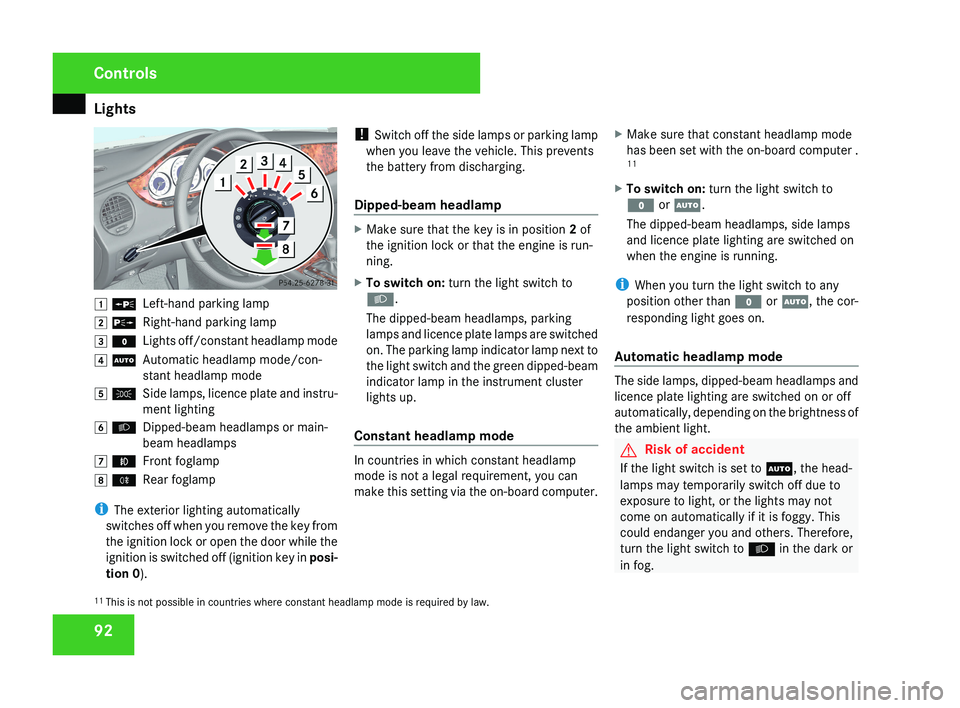
92$ a
Left-hand parking lamp
% g Right-hand parking lamp
& M Lights off/constant headlamp mode
( U Automatic headlamp mode/con-
stant headlamp mode
) C Side lamps, licence plate and instru-
ment lighting
* B Dipped-beam headlamps or main-
beam headlamps
, ¥ Front foglamp
. † Rear foglamp
i The exterior lighting automatically
switches off when you remove the key from
the ignition lock or open the door while the
ignition is switched off (ignition key in posi-
tion 0 ). !
Switch off the side lamps or parking lamp
when you leave the vehicle. This prevents
the battery from discharging.
Dipped-beam headlamp
X Make sure that the key is in position 2 of
the ignition lock or that the engine is run-
ning.
X To switch on: turn the light switch to
B.
The dipped-beam headlamps, parking
lamps and licence plate lamps are switched
on. The parking lamp indicator lamp next to
the light switch and the green dipped-beam
indicator lamp in the instrument cluster
lights up.
Constant headlamp mode
In countries in which constant headlamp
mode is not a legal requirement, you can
make this setting via the on-board computer. X
Make sure that constant headlamp mode
has been set with the on-board computer .
11
X To switch on: turn the light switch to
M or U.
The dipped-beam headlamps, side lamps
and licence plate lighting are switched on
when the engine is running.
i When you turn the light switch to any
position other than M or U, the cor-
responding light goes on.
Automatic headlamp mode
The side lamps, dipped-beam headlamps and
licence plate lighting are switched on or off
automatically, depending on the brightness of
the ambient light.
G Risk of accident
If the light switch is set to U, the head-
lamps may temporarily switch off due to
exposure to light, or the lights may not
come on automatically if it is foggy. This
could endanger you and others. Therefore,
turn the light switch to B in the dark or
in fog.
11 This is not possible in countries where constant headlamp mode is required by law.
Controls
219_AKB; 2; 4, en-GB
mkalafa,
2007-11-13T09:28:36+01:00 - Seite 92
Page 187 of 329
Features
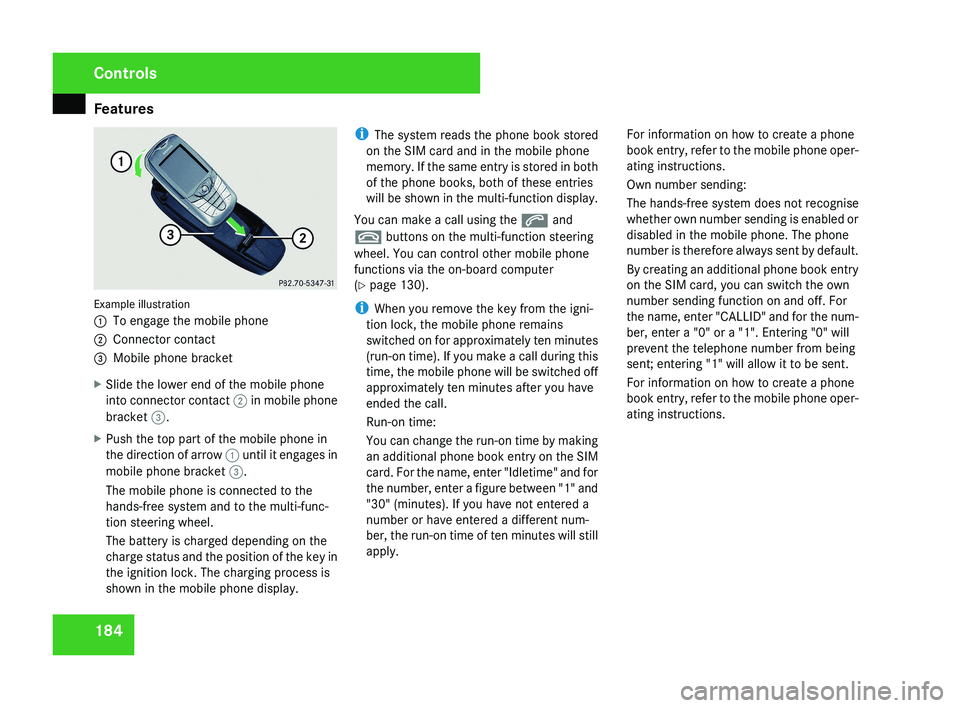
184Example illustration
1
To engage the mobile phone
2 Connector contact
3 Mobile phone bracket
X Slide the lower end of the mobile phone
into connector contact 2 in mobile phone
bracket 3.
X Push the top part of the mobile phone in
the direction of arrow 1 until it engages in
mobile phone bracket 3.
The mobile phone is connected to the
hands-free system and to the multi-func-
tion steering wheel.
The battery is charged depending on the
charge status and the position of the key in
the ignition lock. The charging process is
shown in the mobile phone display. i
The system reads the phone book stored
on the SIM card and in the mobile phone
memory. If the same entry is stored in both
of the phone books, both of these entries
will be shown in the multi-function display.
You can make a call using the s and
t buttons on the multi-function steering
wheel. You can control other mobile phone
functions via the on-board computer
(Y page 130).
i When you remove the key from the igni-
tion lock, the mobile phone remains
switched on for approximately ten minutes
(run-on time). If you make a call during this
time, the mobile phone will be switched off
approximately ten minutes after you have
ended the call.
Run-on time:
You can change the run-on time by making
an additional phone book entry on the SIM
card. For the name, enter "Idletime" and for
the number, enter a figure between "1" and
"30" (minutes). If you have not entered a
number or have entered a different num-
ber, the run-on time of ten minutes will still
apply. For information on how to create a phone
book entry, refer to the mobile phone oper-
ating instructions.
Own number sending:
The hands-free system does not recognise
whether own number sending is enabled or
disabled in the mobile phone. The phone
number is therefore always sent by default.
By creating an additional phone book entry
on the SIM card, you can switch the own
number sending function on and off. For
the name, enter "CALLID" and for the num-
ber, enter a "0" or a "1". Entering "0" will
prevent the telephone number from being
sent; entering "1" will allow it to be sent.
For information on how to create a phone
book entry, refer to the mobile phone oper-
ating instructions.
Controls
219_AKB; 2; 4, en-GB
mkalafa,
2007-11-13T09:28:36+01:00 - Seite 184
Page 292 of 329
Battery
289step out of the vehicle first and touch the
bodywork.
R Do not wipe the battery using a cloth. The
battery may explode as a result of elec-
trostatic charge or through the creation
of sparks.
! Switch the engine off and remove the key
before unscrewing or disconnecting the
terminal clamps from the battery. You may
otherwise destroy electronic components
such as the alternator.
Have the battery checked and, if neces-
sary, replaced at a qualified specialist
workshop, e.g. a Mercedes-Benz Service
Centre, every two years or at least every
20,000 km.
i Mercedes-Benz recommends that you
have all work involving the battery, e.g.
removing, charging and replacing, carried
out at a qualified specialist workshop, e.g.
a Mercedes-Benz Service Centre.
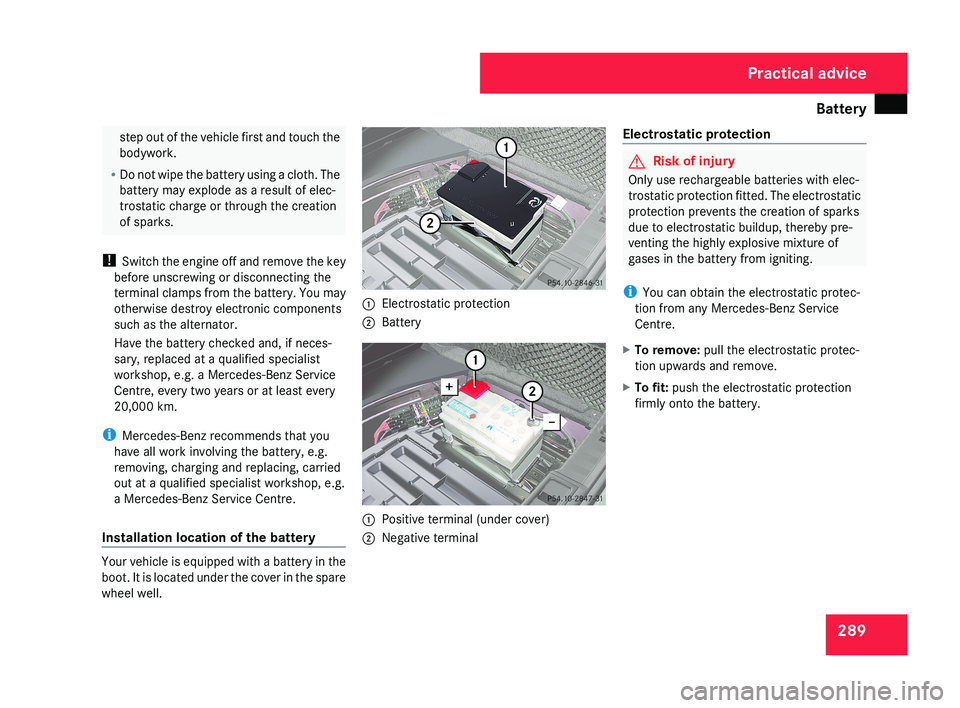
Installation location of the battery Your vehicle is equipped with a battery in the
boot. It is located under the cover in the spare
wheel well. 1
Electrostatic protection
2 Battery 1
Positive terminal (under cover)
2 Negative terminal Electrostatic protection G
Risk of injury
Only use rechargeable batteries with elec-
trostatic protection fitted. The electrostatic
protection prevents the creation of sparks
due to electrostatic buildup, thereby pre-
venting the highly explosive mixture of
gases in the battery from igniting.
i You can obtain the electrostatic protec-
tion from any Mercedes-Benz Service
Centre.
X To remove: pull the electrostatic protec-
tion upwards and remove.
X To fit: push the electrostatic protection
firmly onto the battery. Practical advice
219_AKB; 2; 4, en-GB
mkalafa,
2007-11-13T09:28:36+01:00 - Seite 289
Page 293 of 329
Battery
290 Disconnecting the battery
G
Risk of accident
If the battery is disconnected:
R there
is no brake boosting effect and you
will need to apply more pressure to brake
and the brake pedal travel will be longer;
you may have to depress the brake pedal
with full force
R you can no longer turn the key in the igni-
tion and, on vehicles with KEYLESS
GO*, pressing the KEYLESS GO button*
on the selector lever will have no effect
R the selector lever is locked in position P
! Always disconnect the battery in the
sequence described below. Never swap the
terminal clamps. You may otherwise dam-
age the vehicle electronics.
X Firmly depress the parking brake and move
the selector lever to P.
X Switch off all electrical consumers.
X Turn the key to position 0 in the ignition
lock and remove it.
X Open the boot/luggage compartment.
X Remove the luggage well (Y page 218). X
Remove the battery cover.
X Remove the negative terminal clamp from
the battery.
X Remove the cover from the positive termi-
nal clamp.
X Remove the positive terminal clamp from
the battery.
X Disconnect the breather hose. Removing the battery
X Disconnect the battery ( Y page 290).
X Loosen the bolt which holds the battery in
place.
X Release the strap and remove the battery. Charging and fitting the battery
G
Risk of injury
Only charge the installed battery with a bat-
tery charger which has been tested and
approved
by Mercedes-Benz. These battery
chargers allow the battery to be charged
while it is still installed. Otherwise, the vehi-
cle's electronic system may be damaged.
Only charge the battery in a well-ventilated
area. As the battery is being charged, gases
can escape and generate minor explosions.
This may injure you and other persons or
cause damage to the paintwork or acid cor-
rosion on the vehicle.
You can obtain information about battery
chargers which allow the battery to be
charged when still installed from a qualified
specialist workshop, e.g. a Mercedes-Benz
Service Centre. G
Risk of injury
There is a risk of acid burns during the
charging process due to the gases which
escape from the battery. Do not lean over
the battery during the charging process.
! Only use battery chargers with a maxi-
mum charging voltage of 14.8 V. Practical advice
* optional
219_AKB; 2; 4, en-GB
mkalafa,
2007-11-13T09:28:36+01:00 - Seite 290