2008 MERCEDES-BENZ CLS COUPE change key battery
[x] Cancel search: change key batteryPage 7 of 329
4
Auxiliary heating
. . . . . . . . . . . . 166, 264
Adjusting (on-board computer)
. . . . . . . . . . . . . . . . . . . . . . . . . . . . 123
Display message . . . . . . . . . . . . . . 239
Remote control . . . . . . . . . . . . . . . 167
Auxiliary ventilation . . . . . . . . . . . . . 166
Axle load, maximum permissible
. . . . . . . . . . . . . . . . . . . . . . . . . . . . . . . 310 B
BAS (Brake Assist)
. . . . . . . . . . . . . . . . 58
Battery Changing (auxiliary heating
remote control) . . . . . . . . . . . . . . . 270
Changing (key) . . . . . . . . . . . . . . . . 270
Changing (KEYLESS GO key) . . . . . 270
Charging . . . . . . . . . . . . . . . . . . . . . 290
Checking (key) . . . . . . . . . . . . . . . . 270
Checking (KEYLESS GO key) . . . . . 270
Check lamp (key) . . . . . . . . . . . . . . 270
Check lamp (KEYLESS GO key)
. . . . . . . . . . . . . . . . . . . . . . . . . 69, 270
Disconnecting . . . . . . . . . . . . . . . . 290
Display message . . . . . . . . . . . . . . 228
Maintenance (vehicle) . . . . . . . . . . 288
Reconnecting . . . . . . . . . . . . . . . . . 291
Removing/fitting . . . . . . . . . . . . . . 290
Vehicle battery . . . . . . . . . . . . . . . . 288
Voltage (on-board computer) . . . . . 116 Belt force limiters
Activation
. . . . . . . . . . . . . . . . . . . . . 43
Belt height adjustment . . . . . . . . . . . . 90
Belt tensioners Activation . . . . . . . . . . . . . . . . . . . . . 43
Belt warning . . . . . . . . . . . . . . . . . . . . . 89
Bonnet Bonnet catch . . . . . . . . . . . . . . . . . 194
Display message . . . . . . . . . . . . . . 228
Opening/closing . . . . . . . . . . . . . . 193
Bonnet release lever
Release lever . . . . . . . . . . . . . . . . . 194
Boot
Emergency release . . . . . . . . . . . . . 267
Locking separately . . . . . . . . . . . . . . 71
Opening/closing (automatically) . . . 72
Opening/closing (manually) . . . . . . . 70
Boot lid
Display message . . . . . . . . . . . . . . 228
Brake
Warning lamp . . . . . . . . . . . . . . . . . 245
Brake Assist
see BAS
Brake fluid . . . . . . . . . . . . . . . . . . . . . 317
Display message . . . . . . . . . . . . . . 231
Brake lamps
Adaptive . . . . . . . . . . . . . . . . . . . . . . 58
Display message . . . . . . . . . . . . . . 234 Brake system
Display message . . . . . . . . . . . . . . 230
Parking brake . . . . . . . . . . . . . . . . . 104
Bulb
Dipped-beam headlamps . . . . . . . . 273
Licence plate lamp . . . . . . . . . . . . . 274
Main-beam headlamps . . . . . . . . . . 273
Parking lamp . . . . . . . . . . . . . . . . . 273
Replacing . . . . . . . . . . . . . . . . 273, 274
Side lamp . . . . . . . . . . . . . . . . . . . . 273
Turn signal lamp . . . . . . . . . . . . . . . 274
see Lamp
Bulbs
Overview . . . . . . . . . . . . . . . . . . . . 271 C
Calling up a malfunction see Message memory menu
Care . . . . . . . . . . . . . . . . . . . . . . . . . . . 210
Automatic car wash . . . . . . . . . . . . 211
Distronic . . . . . . . . . . . . . . . . . . . . 213
Headlamps . . . . . . . . . . . . . . . . . . . 212
High-pressure cleaners . . . . . . . . . 211
Parktronic . . . . . . . . . . . . . . . . . . . 214
Plastic trim . . . . . . . . . . . . . . . . . . . 212
Rear window . . . . . . . . . . . . . . . . . 212
Side windows . . . . . . . . . . . . . . . . . 212
CD player/CD changer
Operating (on-board computer) . . . 119 Index
219_AKB; 2; 4, en-GB
mkalafa,
2007-11-13T09:28:36+01:00 - Seite 4
Page 69 of 329
Opening and closing
66 Opening and closing
Key
The vehicle's equipment includes two keys
with remote control. Each key contains an
emergency key element.
The key is configured at the factory to cen-
trally lock and unlock the following:
R the doors
R the boot lid
R the fuel filler flap G
Risk of accident
Never leave children unsupervised in the
vehicle. They could open a door from the
inside, even if it has been locked, or start
the vehicle if the key is left in it. They could
endanger themselves and others. You
should therefore take the key with you
when leaving the vehicle, even if you are
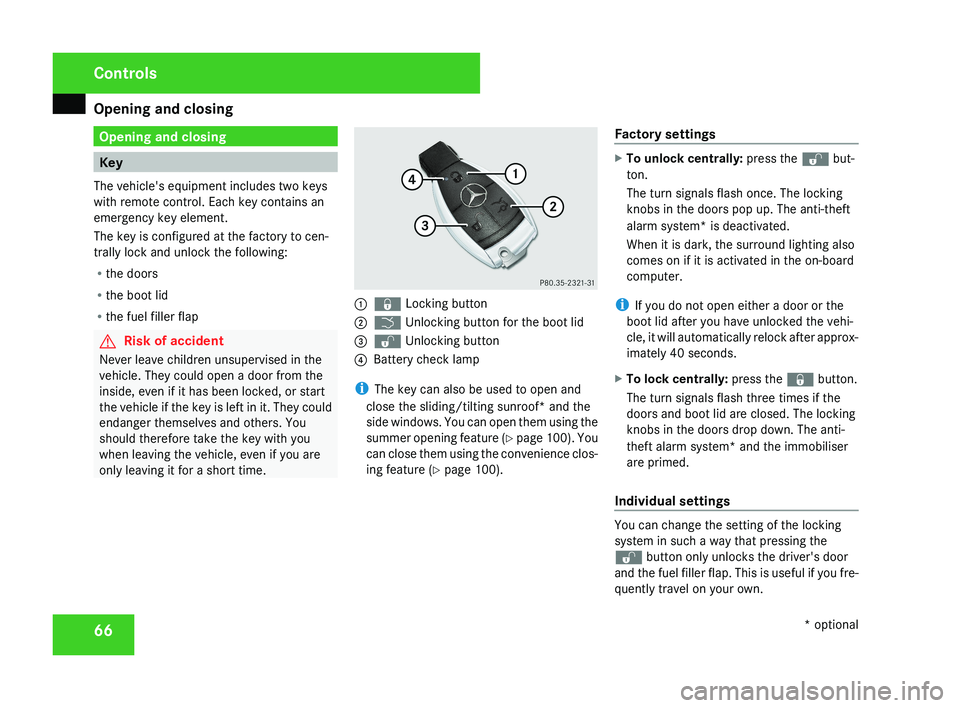
only leaving it for a short time.1 j Locking button
2 i Unlocking button for the boot lid
3 k Unlocking button
4 Battery check lamp
i The key can also be used to open and
close the sliding/tilting sunroof* and the
side windows. You can open them using the
summer opening feature (Y page 100). You
can close them using the convenience clos-
ing feature ( Y page 100). Factory settings
X
To unlock centrally: press the k but-
ton.
The turn signals flash once. The locking
knobs in the doors pop up. The anti-theft
alarm system* is deactivated.
When it is dark, the surround lighting also
comes on if it is activated in the on-board
computer.
i If you do not open either a door or the
boot lid after you have unlocked the vehi-
cle, it will automatically relock after approx-
imately 40 seconds.
X To lock centrally: press the j button.
The turn signals flash three times if the
doors and boot lid are closed. The locking
knobs in the doors drop down. The anti-
theft alarm system* and the immobiliser
are primed.
Individual settings
You can change the setting of the locking
system in such a way that pressing the
k button only unlocks the driver's door
and the fuel filler flap. This is useful if you fre-
quently travel on your own.
Controls
* optional
219_AKB; 2; 4, en-GB
mkalafa,
2007-11-13T09:28:36+01:00 - Seite 66
Page 70 of 329

Opening and closing
67
X
To change the setting: press the k
and j buttons simultaneously for
approximately six seconds until the battery
check lamp flashes twice.
The key now functions as follows:
X To unlock the driver's door: press the
k button once.
X To unlock centrally: press the k but-
ton twice.
X To lock centrally: press the j button.
Restoring the factory settings X
Press the k and j buttons simulta-
neously for approximately six seconds until
the battery check lamp flashes twice. KEYLESS GO*
If you are carrying the KEYLESS GO key on
your person, you can use the KEYLESS GO
functions of your vehicle. The KEYLESS GO
key should not be more than one metre away
from the vehicle. However, you can also use
the KEYLESS GO key like a normal key with
remote control.
When you pull the door handle, the following
unlock centrally if the factory settings have
not been changed:
R the doors
R the boot lid
R the fuel filler flap G
Risk of accident
Never leave children unsupervised in the
vehicle. They could open a door from the
inside at any time, even if it has been
locked. Or they could start the vehicle if a
valid KEYLESS GO key is in the vehicle and
they press the KEYLESS GO button on the
gear selector lever. They could endanger
themselves and others. Switch off the
engine and take the KEYLESS GO key with
you, even if you are only leaving the vehicle
for a short time. 1
j Locking button
2 i Unlocking button for the boot lid
3 k Unlocking button
4 Battery check lamp
i You can also use the KEYLESS GO key to
open and close the side windows and slid-
ing/tilting sunroof* . You can open them
using the summer opening feature
(Y page 100). You can close them using
the convenience closing feature
(Y page 100).
i If the vehicle has been parked for a long
time, you must pull the door handle to acti-
vate the KEYLESS GO functions. Controls
* optional
219_AKB; 2; 4, en-GB
mkalafa,
2007-11-13T09:28:36+01:00 - Seite 67
Page 71 of 329
Opening and closing
68
Important notes R
If the KEYLESS GO key is removed from the
vehicle (in luggage or an article of clothing,
for instance), it will no longer be possible
to lock or start the vehicle.
R If the KEYLESS GO key is removed from the
vehicle while the engine is running, e.g. if
the front passenger leaves the vehicle with
the KEYLESS GO key, the following mes-
sage will appear in the multi-function dis-
play as you pull away: Key not detec-
ted.
R If the KEYLESS GO key is in the vehicle, the
vehicle can be started at any time. If you
have left the KEYLESS GO key in the vehi-
cle, you will see the following message in
the multi-function display when you lock
the vehicle: Key still in vehicle.
Factory settings X
To unlock centrally: pull the door handle.
The turn signals flash once. The locking
knobs in the doors pop up. The anti-theft
alarm system* is deactivated.
When it is dark, the surround lighting also
comes on if it is activated in the on-board
computer. i
If you do not open either a door or the
boot lid after you have unlocked the vehi-
cle, it will automatically relock after approx-
imately 40 seconds.
i When a door is opened, the side window
on that side opens slightly. When the door
is closed, the side window closes again.
! The side windows will not open or close
if the battery is discharged or if the side
windows have iced up. It will not be possi-
ble to close the door. Do not attempt to
force the door closed. You could otherwise
damage the door or the window.
i There is a danger of the vehicle being
unlocked accidentally. This could happen if
the KEYLESS GO key is within one metre of
the vehicle and the door handle is splashed
by water. This could also happen when you
are cleaning the door handle. 1
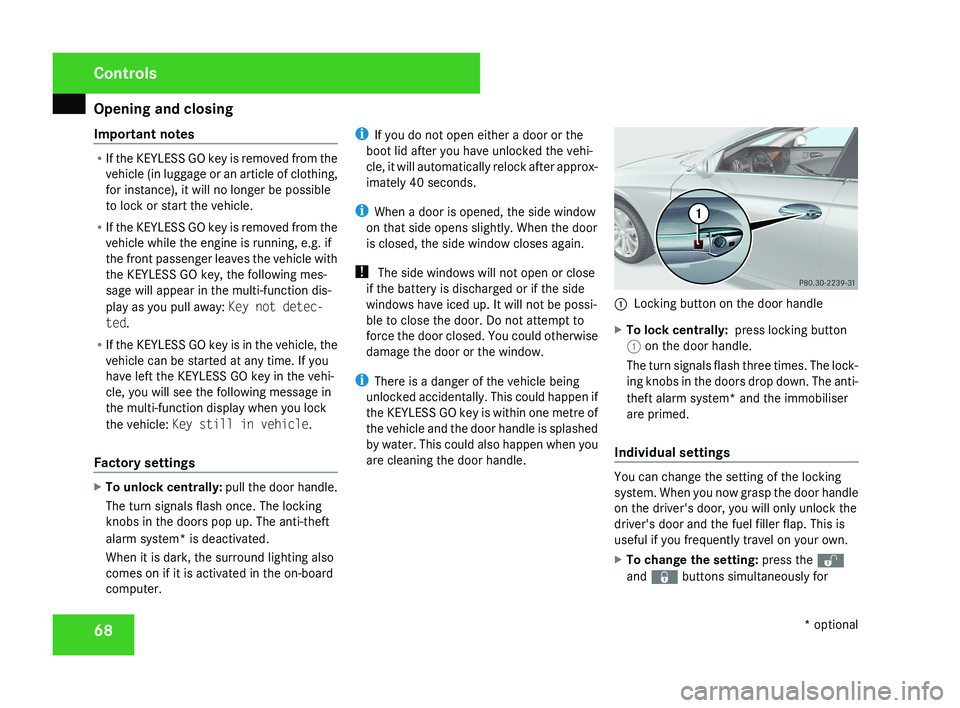
Locking button on the door handle
X To lock centrally: press locking button
1 on the door handle.
The turn signals flash three times. The lock-
ing knobs in the doors drop down. The anti-
theft alarm system* and the immobiliser
are primed.
Individual settings You can change the setting of the locking
system. When you now grasp the door handle
on the driver's door, you will only unlock the
driver's door and the fuel filler flap. This is
useful if you frequently travel on your own.
X
To change the setting: press the k
and j buttons simultaneously for Controls
* optional
219_AKB; 2; 4, en-GB
mkalafa,
2007-11-13T09:28:36+01:00 - Seite 68
Page 187 of 329
Features
184Example illustration
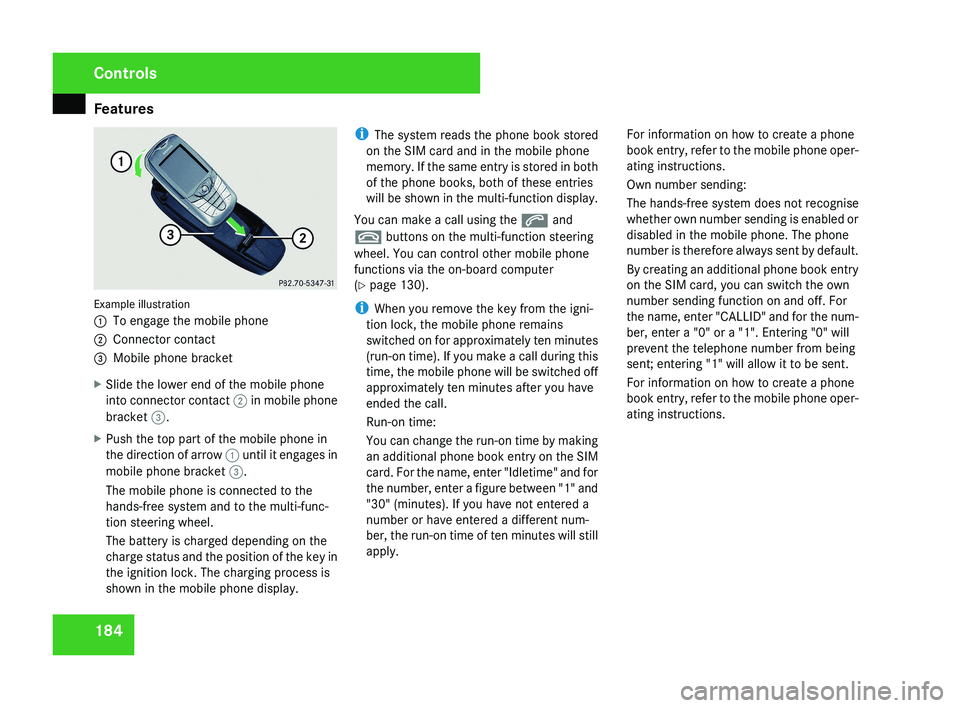
1
To engage the mobile phone
2 Connector contact
3 Mobile phone bracket
X Slide the lower end of the mobile phone
into connector contact 2 in mobile phone
bracket 3.
X Push the top part of the mobile phone in
the direction of arrow 1 until it engages in
mobile phone bracket 3.
The mobile phone is connected to the
hands-free system and to the multi-func-
tion steering wheel.
The battery is charged depending on the
charge status and the position of the key in
the ignition lock. The charging process is
shown in the mobile phone display. i
The system reads the phone book stored
on the SIM card and in the mobile phone
memory. If the same entry is stored in both
of the phone books, both of these entries
will be shown in the multi-function display.
You can make a call using the s and
t buttons on the multi-function steering
wheel. You can control other mobile phone
functions via the on-board computer
(Y page 130).
i When you remove the key from the igni-
tion lock, the mobile phone remains
switched on for approximately ten minutes
(run-on time). If you make a call during this
time, the mobile phone will be switched off
approximately ten minutes after you have
ended the call.
Run-on time:
You can change the run-on time by making
an additional phone book entry on the SIM
card. For the name, enter "Idletime" and for
the number, enter a figure between "1" and
"30" (minutes). If you have not entered a
number or have entered a different num-
ber, the run-on time of ten minutes will still
apply. For information on how to create a phone
book entry, refer to the mobile phone oper-
ating instructions.
Own number sending:
The hands-free system does not recognise
whether own number sending is enabled or
disabled in the mobile phone. The phone
number is therefore always sent by default.
By creating an additional phone book entry
on the SIM card, you can switch the own
number sending function on and off. For
the name, enter "CALLID" and for the num-
ber, enter a "0" or a "1". Entering "0" will
prevent the telephone number from being
sent; entering "1" will allow it to be sent.
For information on how to create a phone
book entry, refer to the mobile phone oper-
ating instructions.
Controls
219_AKB; 2; 4, en-GB
mkalafa,
2007-11-13T09:28:36+01:00 - Seite 184
Page 242 of 329
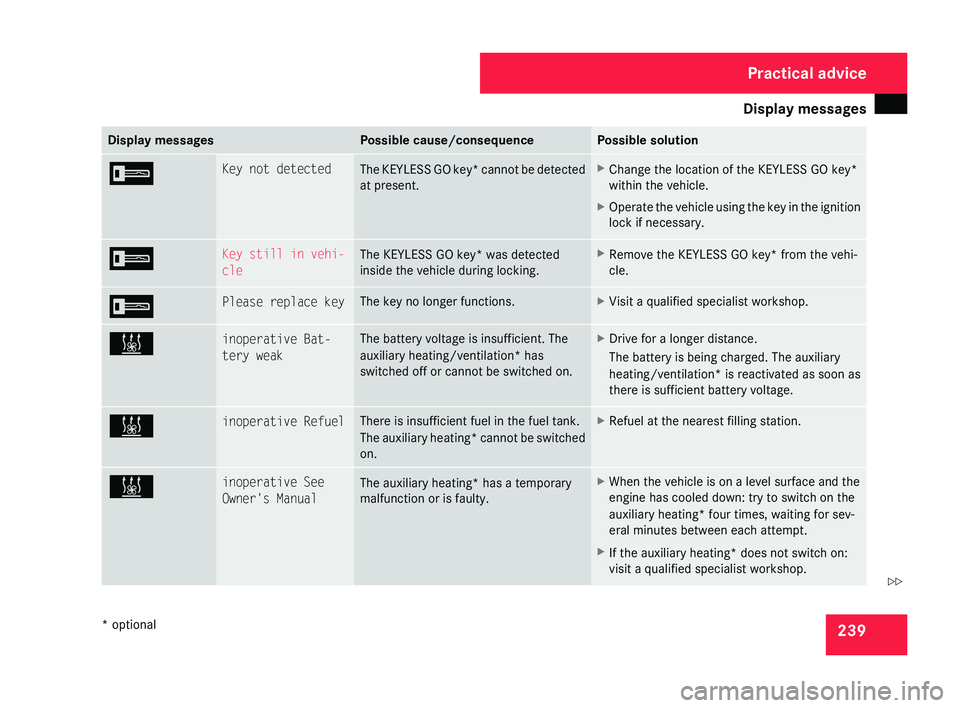
Display messages
239Display messages Possible cause/consequence Possible solution
I Key not detected
The KEYLESS GO key* cannot be detected
at present. X
Change the location of the KEYLESS GO key*
within the vehicle.
X Operate the vehicle using the key in the ignition
lock if necessary. I Key still in vehi-
cle
The KEYLESS GO key* was detected
inside the vehicle during locking. X
Remove the KEYLESS GO key* from the vehi-
cle. I Please replace key The key no longer functions. X
Visit a qualified specialist workshop. X inoperative Bat-
tery weak The battery voltage is insufficient. The
auxiliary heating/ventilation*
has
switched off or cannot be switched on. X
Drive for a longer distance.
The battery is being charged. The auxiliary
heating/ventilation* is reactivated as soon as
there is sufficient battery voltage. X inoperative Refuel There is insufficient fuel in the fuel tank.
The
auxiliary heating* cannot be switched
on. X
Refuel at the nearest filling station. X inoperative See
Owner's Manual
The auxiliary heating* has a temporary
malfunction or is faulty. X
When the vehicle is on a level surface and the
engine has cooled down: try to switch on the
auxiliary heating*
four times, waiting for sev-
eral minutes between each attempt.
X If the auxiliary heating* does not switch on:
visit a qualified specialist workshop. Practical advice
* optional
219_AKB; 2; 4, en-GB
mkalafa,
2007-11-13T09:28:36+01:00 - Seite 239 Z
Page 264 of 329
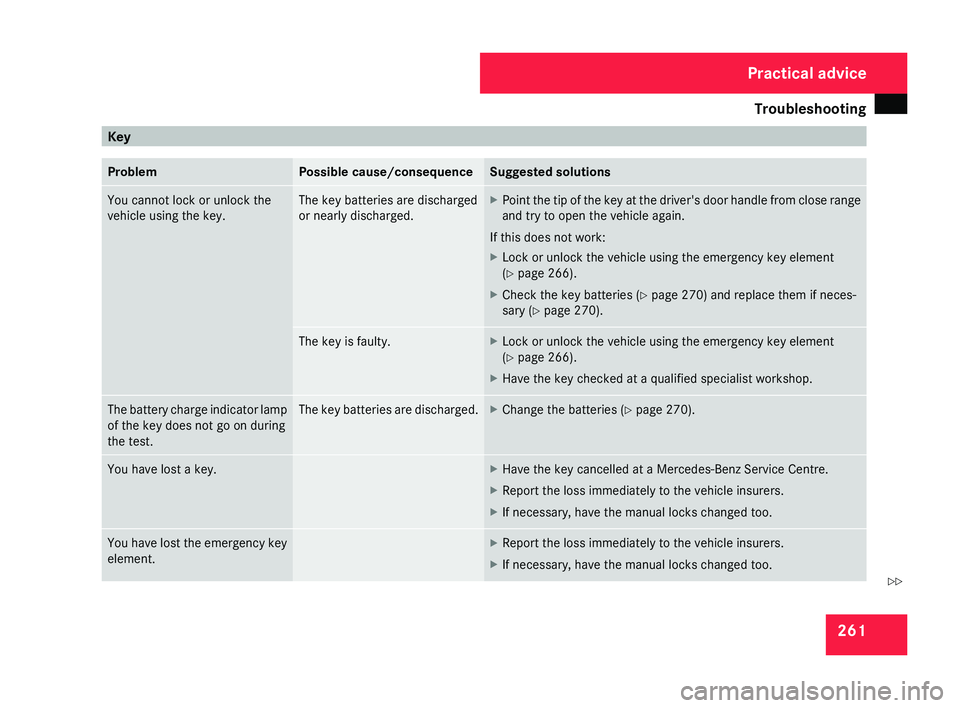
Troubleshooting
261Key
Problem Possible cause/consequence Suggested solutions
You cannot lock or unlock the
vehicle using the key. The key batteries are discharged
or nearly discharged. X
Point the tip of the key at the driver's door handle from close range
and try to open the vehicle again.
If this does not work:
X Lock or unlock the vehicle using the emergency key element
(Y page 266).
X Check the key batteries (Y page 270) and replace them if neces-
sary ( Y page 270). The key is faulty. X
Lock or unlock the vehicle using the emergency key element
(Y page 266).
X Have the key checked at a qualified specialist workshop. The battery charge indicator lamp
of the key does not go on during
the test. The key batteries are discharged. X
Change the batteries ( Y page 270).You have lost a key. X
Have the key cancelled at a Mercedes-Benz Service Centre.
X Report the loss immediately to the vehicle insurers.
X If necessary, have the manual locks changed too. You have lost the emergency key
element. X
Report the loss immediately to the vehicle insurers.
X If necessary, have the manual locks changed too. Practical advice
219_AKB; 2; 4, en-GB
mkalafa,
2007-11-13T09:28:36+01:00 - Seite 261 Z
Page 266 of 329
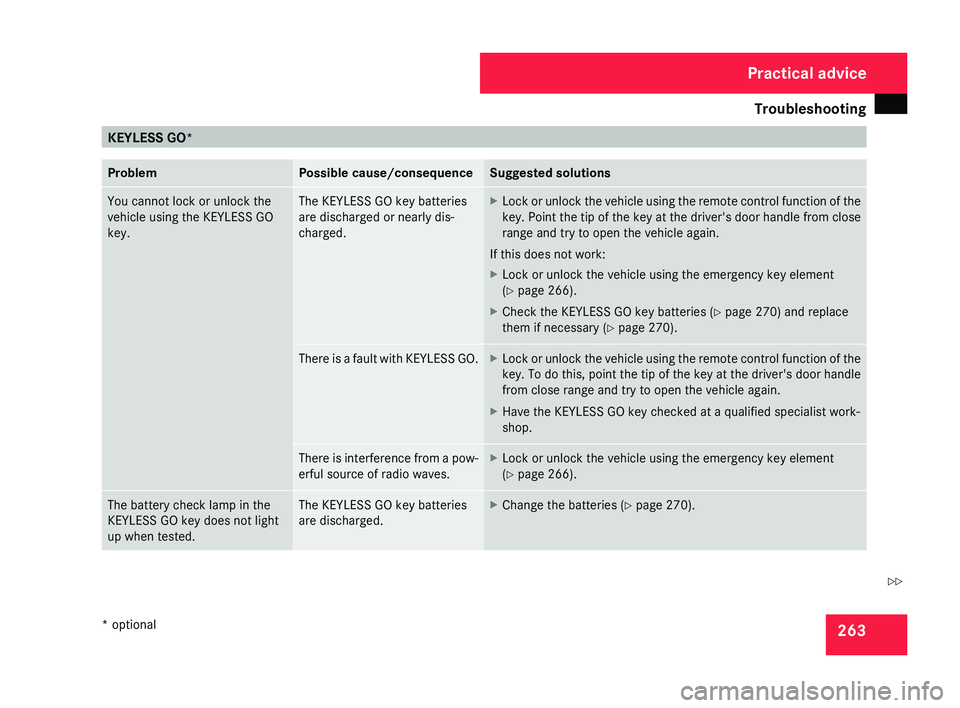
Troubleshooting
263KEYLESS GO*
Problem Possible cause/consequence Suggested solutions
You cannot lock or unlock the
vehicle using the KEYLESS GO
key. The KEYLESS GO key batteries
are discharged or nearly dis-
charged. X
Lock or unlock the vehicle using the remote control function of the
key.
Point the tip of the key at the driver's door handle from close
range and try to open the vehicle again.
If this does not work:
X Lock or unlock the vehicle using the emergency key element
(Y page 266).
X Check the KEYLESS GO key batteries (Y page 270) and replace
them if necessary (Y page 270). There is a fault with KEYLESS GO. X
Lock or unlock the vehicle using the remote control function of the
key.
To do this, point the tip of the key at the driver's door handle
from close range and try to open the vehicle again.
X Have the KEYLESS GO key checked at a qualified specialist work-
shop. There is interference from a pow-
erful source of radio waves. X
Lock or unlock the vehicle using the emergency key element
(Y page 266). The battery check lamp in the
KEYLESS GO key does not light
up when tested. The KEYLESS GO key batteries
are discharged. X
Change the batteries ( Y page 270). Practical advice
* optional
219_AKB; 2; 4, en-GB
mkalafa,
2007-11-13T09:28:36+01:00 - Seite 263 Z